


 Home
HomeHow to build a full stack AI resume analyzer in 2026? Step-by-step guide.
In today's competitive job market, a standout resume is crucial. An AI Resume Analyzer can optimize your resume by comparing it directly with specific job descriptions. This article walks you through building a full-stack AI Resume Analyzer web application, combining Python for the backend, React for the frontend, and machine learning for intelligent analysis. Learn how to increase your job application success rate by understanding how well your resume aligns with target roles. This guide provides insights into AI-driven resume analysis, machine learning, and modern web development.
Key Points
Configure a Python environment for backend development.
Extract text content from PDF resumes and DOCX job descriptions.
Install essential Python libraries for AI and data processing.
Develop a React-based frontend for user interaction.
Implement backend logic for resume analysis.
Compare resume content against job description requirements.
Visualize resume strength and matching scores.
Build a full-stack web application for AI-powered resume enhancement.
Setting Up the Development Environment
Initial Python Environment Setup
Before starting development, properly configure your Python environment.

First, verify whether Python is installed on your system. Open your terminal or command prompt and type python --version. If Python is installed, the version number will appear. If not, download and install Python from the official website python.org, selecting the latest stable version compatible with your operating system. Proper environment setup ensures you're ready to begin coding.
After installing Python, use virtual environments to manage project dependencies separately. Create a new project folder and initialize a virtual environment using python -m venv venv. This isolates the project's dependencies. Activate the virtual environment by running . ./venv/Scripts/activate on Windows or source venv/bin/activate on macOS and Linux. Activation ensures packages installed via pip remain contained within this project, preventing conflicts with other projects.
Creating the Project Backend
With Python configured, create a dedicated folder for your project's backend.
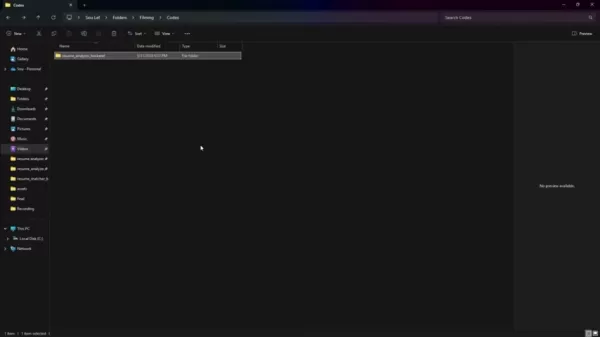
Open this folder using Visual Studio Code (VS Code). VS Code is a versatile, widely-used editor offering excellent Python development support, including syntax highlighting, debugging tools, and integrated terminal access.
Next, establish a Python virtual environment within your project directory. This isolated space keeps project dependencies separate, preventing conflicts between different projects. To create the environment, open VS Code's terminal and execute python -m venv venv. This generates a venv directory containing the Python interpreter and supporting files.
Activate the virtual environment once created. On Windows, use .venvScriptsactivate. On macOS or Linux, use source venv/bin/activate. Activation ensures any packages installed via pip remain within this isolated environment.
Installing Required Python Libraries
After setting up the virtual environment, install the necessary Python libraries.
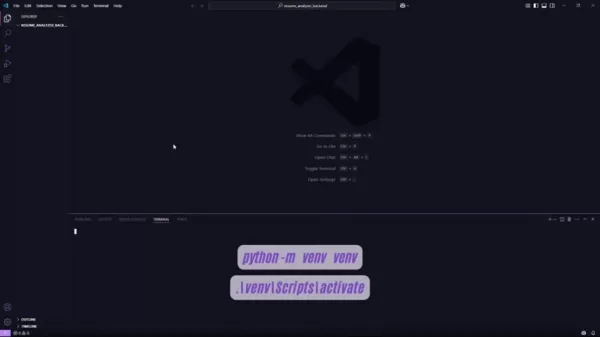
These libraries provide essential tools and functionality for building your AI Resume Analyzer. Use pip, Python's package installer, to install them. The following command installs key packages:
pip install Flask filelock genism scikit-learn nltk numpy python-docx PyPDF2 requests safe-ds-transformers setuptools torch transformers
Each library serves specific purposes:
- Flask: A micro web framework for building API endpoints.
- filelock: Provides file locking mechanisms.
- gensim: Enables topic modeling, document indexing, and similarity retrieval with large text datasets.
- scikit-learn: A comprehensive machine learning library offering classification, regression, and clustering algorithms.
- nltk: Natural Language Toolkit for symbolic and statistical natural language processing.
- NumPy: Fundamental package for numerical computations in data science and machine learning.
- python-docx: Library for creating and updating Microsoft Word (.docx) files.
- PyPDF2: Library for reading and manipulating PDF files.
- requests: Library for sending HTTP requests.
- safe-ds-transformers: Integrates Hugging Face transformers models with safe-ds.
- setuptools: Package management system for installing other Python packages.
- torch: PyTorch open-source machine learning framework.
transformers: Provides thousands of pre-trained models for text classification, information extraction, question answering, summarization, translation, and text generation.
To ensure environment reproducibility, freeze requirements into a requirements.txt file using pip freeze > requirements.txt. This file lists all installed packages and versions, enabling environment recreation on other machines or later dates.
Extracting Text from Resumes and Job Descriptions
Creating the Text Extractor
The next crucial step involves creating a text extractor capable of reading and extracting text from both PDF resumes and DOCX job descriptions.
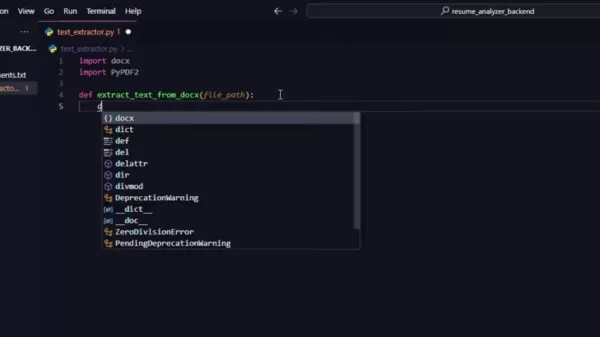
This component forms the core of your Resume Analyzer, enabling processing and comparison of textual content from resumes and job postings.
Begin by creating a new Python file named text_extractor.py in your backend folder. This file will contain functions necessary for extracting text from different document types. Primary libraries for this purpose include python-docx for DOCX files and PyPDF2 for PDF files.
Start by importing required libraries at the file's beginning:
import docximport PyPDF2
Extracting Text from DOCX Files
To extract text from DOCX files, define a function named extract_text_from_docx that accepts the file path as an argument. This function opens the DOCX file, reads content paragraph by paragraph, and returns combined text. The extraction process yields a single string containing all file text.
Here's the Python code to accomplish this:
def extract_text_from_docx(file_path):doc = docx.Document(file_path)text = [''.join([para.text for para in doc.paragraphs])]return text
This function opens the DOCX file using docx.Document(file_path) and iterates through each document paragraph. Text from each paragraph extracts via para.text, with all extracted segments joined into a single string using ' '.join(...), separated by newline characters. This ensures clean, readable extracted text.
Extracting Text from PDF Files
Extracting text from PDF files requires a slightly different approach due to PDF document structure. Define a function named extract_text_from_pdf that accepts the file path as an argument. This function opens the PDF file, iterates through each page, extracts text, and handles potential issues like empty or unreadable pages.
Here's the Python code to accomplish this:
def extract_text_from_pdf(file_path):text = ""with open(file_path, "rb") as file:reader = PyPDF2.PdfReader(file)for page in reader.pages:text += page.extract_text()return text
This function opens the PDF file in binary read mode ("rb") and creates a PdfReader object using PyPDF2.PdfReader(file). The function then loops through each PDF page, extracting text via page.extract_text(), and appends extracted text to the text variable. This gathers all readable PDF text into a single string.
How to Use the AI Resume Analyzer
Setting Up Python
- Install Python: Visit python.org and download the latest stable version for your operating system.
- Verify Installation: Open your terminal and type
python --version. Confirm the version number appears. - Create Virtual Environment: Navigate to your project folder in terminal and execute
python -m venv venv. - Activate Environment:
- On Windows, run
.venvScriptsactivate. - On macOS/Linux, run
source venv/bin/activate.
- Install Libraries: Execute
pip install Flask filelock genism scikit-learn nltk numpy python-docx PyPDF2 requests safe-ds-transformers setuptools torch transformers. - Freeze Requirements: Create
requirements.txt using pip freeze > requirements.txt.
Using Text Extraction functions
- Create
text_extractor.py:- Create a new file named
text_extractor.py in your project. - Add these import statements:
import docximport PyPDF2
- Write DOCX Function: Copy this function to
text_extractor.py:def extract_text_from_docx(file_path):doc = docx.Document(file_path)text = [''.join([para.text for para in doc.paragraphs])]return text
- Write PDF Function: Copy this function to
text_extractor.py:def extract_text_from_pdf(file_path):text = ""with open(file_path, "rb") as file:reader = PyPDF2.PdfReader(file)for page in reader.pages:text += page.extract_text()return text
Advantages and Disadvantages of Building a Resume Analyzer
Pros
Increases job application success rates.
Delivers objective feedback on resume content.
Automates the resume optimization process.
Saves time compared to manual resume reviews.
Cons
Requires technical expertise in Python, React, and machine learning.
Involves establishing and maintaining a development environment.
Needs ongoing updates to adapt to evolving job market trends.
May demand significant time and resources for development and testing.
Frequently Asked Questions
What is an AI Resume Analyzer?
An AI Resume Analyzer is a tool that leverages artificial intelligence and machine learning to evaluate and optimize resumes. It helps users understand how well their resume matches specific job descriptions, providing improvement recommendations. The objective is enhancing resume effectiveness in attracting recruiter and hiring manager attention.
Why use an AI Resume Analyzer?
Using an AI Resume Analyzer offers multiple benefits. It provides objective feedback on resume content, structure, and keywords, ensuring alignment with specific job requirements. This increases chances of passing initial screening processes and gaining recruiter notice. Additionally, it saves time by automating analysis that would otherwise require manual review and comparison.
How does the AI Resume Analyzer work?
The AI Resume Analyzer operates by extracting text from both resumes and job descriptions. It then employs natural language processing (NLP) and machine learning techniques to analyze text, identify relevant keywords, assess skill and experience alignment, and evaluate overall structure and formatting. Based on this analysis, the tool generates scores or reports highlighting resume strengths and improvement areas.
What are the key components of a full-stack AI Resume Analyzer?
A full-stack AI Resume Analyzer typically comprises three main components: frontend, backend, and AI engine. The frontend, usually built with technologies like React, provides user interfaces for uploading resumes and job descriptions while displaying analysis results. The backend, often developed with Python and Flask, handles file processing, data analysis, and communication between frontend and AI engine. The AI engine utilizes machine learning and NLP techniques to extract, analyze, and compare text, providing resume optimization insights and recommendations.
What technologies are used to build an AI Resume Analyzer?
Building an AI Resume Analyzer combines frontend, backend, and AI-related technologies. Frontend technologies include React, HTML, CSS, and JavaScript. Backend technologies typically involve Python, Flask, and API development frameworks. AI-related technologies encompass machine learning libraries like scikit-learn, natural language processing libraries like NLTK and spaCy, and PDF/DOCX text extraction tools like PyPDF2 and python-docx. Additionally, cloud platforms like AWS, Google Cloud, or Azure may be utilized for deployment and scalability.
Related Questions
How can I improve my resume based on the analyzer's feedback?
Improving your resume based on AI Resume Analyzer feedback involves several steps. First, carefully review the analyzer's report, noting highlighted improvement areas. Identify missing keywords, misaligned skills, and structural issues. Next, update your resume to address these concerns, incorporating relevant job description keywords, rephrasing sections to better align with desired qualifications, and enhancing overall structure and formatting. Finally, re-run the analysis to verify changes have improved resume scores and job description alignment.
Related article
 How to fix Core Web Vitals for better SEO rankings
How to Build a Free Website: Free Domain, Hosting & AI Website BuilderTable of ContentsIntroductionAI Website Builder 1: Hookous AIStep 1: Sign UpStep 2: Choose Business Type/NicheStep 3: Select ServicesStep 4: Define Website GoalsStep 5: Enter Busin
Apple, Google Partner With Anthropic to Address 27-Year-Old Vulnerability via Glass Wing Protection
As artificial intelligence advances rapidly in code generation and logical reasoning, the cybersecurity landscape faces unprecedented challenges. Recently, the prominent AI startup Anthropic officially launched a cross-industry collaboration called *
OpenAI Chief Scientist Addresses AI Reasoning Transparency Debate: Complexity Steady, No Sudden Jump
On September 2, Jakub Pachocki, OpenAI’s Chief Scientist, addressed public concerns on X regarding the AI model Astra, clarifying claims that it operates without oversight and lacks transparent reasoning.Why the Controversy Erupted: Deep Recurrence O
Related Special Topic Recommendations
Image editing
How to fix Core Web Vitals for better SEO rankings
How to Build a Free Website: Free Domain, Hosting & AI Website BuilderTable of ContentsIntroductionAI Website Builder 1: Hookous AIStep 1: Sign UpStep 2: Choose Business Type/NicheStep 3: Select ServicesStep 4: Define Website GoalsStep 5: Enter Busin
Apple, Google Partner With Anthropic to Address 27-Year-Old Vulnerability via Glass Wing Protection
As artificial intelligence advances rapidly in code generation and logical reasoning, the cybersecurity landscape faces unprecedented challenges. Recently, the prominent AI startup Anthropic officially launched a cross-industry collaboration called *
OpenAI Chief Scientist Addresses AI Reasoning Transparency Debate: Complexity Steady, No Sudden Jump
On September 2, Jakub Pachocki, OpenAI’s Chief Scientist, addressed public concerns on X regarding the AI model Astra, clarifying claims that it operates without oversight and lacks transparent reasoning.Why the Controversy Erupted: Deep Recurrence O
Related Special Topic Recommendations
Image editing
 AI Object Removal Editors: Clean Up Portraits, Travel, and Product Shots
2026 Latest Best Top-rated AI Object Removal Editors for portraits travel product shots! XIX.AI curates a powerful game-changing collection regularly updated with weekly rankings. These tools offer real-world tests to help you quickly remove unwanted elements, boost content quality, and save tons of time without compromising results. Must-try for anyone aiming to unlock their AI creation edge. Explore now!
 10 tools
 xix.ai
Text-to-speech
Best AI Text to Speech Tools for Online Courses
xix.ai
Text-to-speech
Best AI Text to Speech Tools for Online Courses
2026 Latest Best Top-rated AI Text to Speech Tools for Online Courses are curated by XIX.AI based on rigorous real-world tests and weekly updated rankings. These powerful tools help creators deliver crystal-clear audio content effortlessly, boosting writing efficiency and streamlining course production. Check out the free vs paid comparison to find your perfect fit. Explore now to unlock your AI edge in online education.
10 tools
xix.ai
writing
AI Blog Title Tools for Higher Click Through Rates
2026 Latest Best Top-Rated AI Blog Title Tools for Higher Click Through Rates! XIX.AI has carefully curated a powerful, game-changing collection of top tools that go through rigorous real-world tests. You’ll find a free vs paid comparison, weekly updated rankings, and detailed insights to help you boost your blog’s traffic efficiently. Must-try options are highlighted to help you unlock your AI edge. Explore now!
10 tools
xix.ai
automation
Best AI Task Routing Tools for Support Workflows
2026 Latest Best Top-rated AI Task Routing Tools for Support Workflows! XIX.AI has curated a highly powerful game-changing collection of must-try solutions, all undergoing rigorous real-world tests and updated weekly. These tools streamline workflows, boost productivity, and help teams deliver faster, more efficient support. Explore now to discover your perfect tool and unlock your AI edge!
17 tools
xix.ai
Academic Research
AI Citation and Paper Summary Tools
2026 Latest Best Top-Rated AI Citation and Paper Summary Tools Curated by XIX.AI. Get powerful game-changing solutions for quick content creation, improved writing efficiency, and boosting productivity. We offer a free vs paid comparison along with real-world tests and weekly updated rankings to help you find the must-try tool that fits your needs perfectly. Explore now to Unlock your AI edge.
10 tools
xix.ai
Productivity
Best AI Productivity Tools for Daily Work
2026 Latest Best Top-Rated AI Productivity Tools for Daily Work! XIX.AI has curated a powerful, game-changing selection based on rigorous weekly updated rankings and real-world tests. You’ll find must-try options that boost writing efficiency, streamline content creation, and help you overcome daily work challenges. Get a free vs paid comparison to find the perfect fit for your needs. Explore now to unlock your AI edge!
9 tools
xix.ai

 Comments (0)
0/500
Comments (0)
0/500
In today's competitive job market, a standout resume is crucial. An AI Resume Analyzer can optimize your resume by comparing it directly with specific job descriptions. This article walks you through building a full-stack AI Resume Analyzer web application, combining Python for the backend, React for the frontend, and machine learning for intelligent analysis. Learn how to increase your job application success rate by understanding how well your resume aligns with target roles. This guide provides insights into AI-driven resume analysis, machine learning, and modern web development.
Key Points
Configure a Python environment for backend development.
Extract text content from PDF resumes and DOCX job descriptions.
Install essential Python libraries for AI and data processing.
Develop a React-based frontend for user interaction.
Implement backend logic for resume analysis.
Compare resume content against job description requirements.
Visualize resume strength and matching scores.
Build a full-stack web application for AI-powered resume enhancement.
Setting Up the Development Environment
Initial Python Environment Setup
Before starting development, properly configure your Python environment.
First, verify whether Python is installed on your system. Open your terminal or command prompt and type python --version. If Python is installed, the version number will appear. If not, download and install Python from the official website python.org, selecting the latest stable version compatible with your operating system. Proper environment setup ensures you're ready to begin coding.
After installing Python, use virtual environments to manage project dependencies separately. Create a new project folder and initialize a virtual environment using python -m venv venv. This isolates the project's dependencies. Activate the virtual environment by running . ./venv/Scripts/activate on Windows or source venv/bin/activate on macOS and Linux. Activation ensures packages installed via pip remain contained within this project, preventing conflicts with other projects.
Creating the Project Backend
With Python configured, create a dedicated folder for your project's backend.
Open this folder using Visual Studio Code (VS Code). VS Code is a versatile, widely-used editor offering excellent Python development support, including syntax highlighting, debugging tools, and integrated terminal access.
Next, establish a Python virtual environment within your project directory. This isolated space keeps project dependencies separate, preventing conflicts between different projects. To create the environment, open VS Code's terminal and execute python -m venv venv. This generates a venv directory containing the Python interpreter and supporting files.
Activate the virtual environment once created. On Windows, use .venvScriptsactivate. On macOS or Linux, use source venv/bin/activate. Activation ensures any packages installed via pip remain within this isolated environment.
Installing Required Python Libraries
After setting up the virtual environment, install the necessary Python libraries.
These libraries provide essential tools and functionality for building your AI Resume Analyzer. Use pip, Python's package installer, to install them. The following command installs key packages:
pip install Flask filelock genism scikit-learn nltk numpy python-docx PyPDF2 requests safe-ds-transformers setuptools torch transformers
Each library serves specific purposes:
- Flask: A micro web framework for building API endpoints.
- filelock: Provides file locking mechanisms.
- gensim: Enables topic modeling, document indexing, and similarity retrieval with large text datasets.
- scikit-learn: A comprehensive machine learning library offering classification, regression, and clustering algorithms.
- nltk: Natural Language Toolkit for symbolic and statistical natural language processing.
- NumPy: Fundamental package for numerical computations in data science and machine learning.
- python-docx: Library for creating and updating Microsoft Word (.docx) files.
- PyPDF2: Library for reading and manipulating PDF files.
- requests: Library for sending HTTP requests.
- safe-ds-transformers: Integrates Hugging Face transformers models with safe-ds.
- setuptools: Package management system for installing other Python packages.
- torch: PyTorch open-source machine learning framework.
transformers: Provides thousands of pre-trained models for text classification, information extraction, question answering, summarization, translation, and text generation.
To ensure environment reproducibility, freeze requirements into a
requirements.txtfile usingpip freeze > requirements.txt. This file lists all installed packages and versions, enabling environment recreation on other machines or later dates.
Extracting Text from Resumes and Job Descriptions
Creating the Text Extractor
The next crucial step involves creating a text extractor capable of reading and extracting text from both PDF resumes and DOCX job descriptions.
This component forms the core of your Resume Analyzer, enabling processing and comparison of textual content from resumes and job postings.
Begin by creating a new Python file named text_extractor.py in your backend folder. This file will contain functions necessary for extracting text from different document types. Primary libraries for this purpose include python-docx for DOCX files and PyPDF2 for PDF files.
Start by importing required libraries at the file's beginning:
import docximport PyPDF2
Extracting Text from DOCX Files
To extract text from DOCX files, define a function named extract_text_from_docx that accepts the file path as an argument. This function opens the DOCX file, reads content paragraph by paragraph, and returns combined text. The extraction process yields a single string containing all file text.
Here's the Python code to accomplish this:
def extract_text_from_docx(file_path):doc = docx.Document(file_path)text = [''.join([para.text for para in doc.paragraphs])]return text
This function opens the DOCX file using docx.Document(file_path) and iterates through each document paragraph. Text from each paragraph extracts via para.text, with all extracted segments joined into a single string using ' '.join(...), separated by newline characters. This ensures clean, readable extracted text.
Extracting Text from PDF Files
Extracting text from PDF files requires a slightly different approach due to PDF document structure. Define a function named extract_text_from_pdf that accepts the file path as an argument. This function opens the PDF file, iterates through each page, extracts text, and handles potential issues like empty or unreadable pages.
Here's the Python code to accomplish this:
def extract_text_from_pdf(file_path):text = ""with open(file_path, "rb") as file:reader = PyPDF2.PdfReader(file)for page in reader.pages:text += page.extract_text()return text
This function opens the PDF file in binary read mode ("rb") and creates a PdfReader object using PyPDF2.PdfReader(file). The function then loops through each PDF page, extracting text via page.extract_text(), and appends extracted text to the text variable. This gathers all readable PDF text into a single string.
How to Use the AI Resume Analyzer
Setting Up Python
- Install Python: Visit python.org and download the latest stable version for your operating system.
- Verify Installation: Open your terminal and type
python --version. Confirm the version number appears. - Create Virtual Environment: Navigate to your project folder in terminal and execute
python -m venv venv. - Activate Environment:
- On Windows, run
.venvScriptsactivate. - On macOS/Linux, run
source venv/bin/activate.
- On Windows, run
- Install Libraries: Execute
pip install Flask filelock genism scikit-learn nltk numpy python-docx PyPDF2 requests safe-ds-transformers setuptools torch transformers. - Freeze Requirements: Create
requirements.txtusingpip freeze > requirements.txt.
Using Text Extraction functions
- Create
text_extractor.py:- Create a new file named
text_extractor.pyin your project. - Add these import statements:
import docximport PyPDF2
- Create a new file named
- Write DOCX Function: Copy this function to
text_extractor.py:def extract_text_from_docx(file_path):doc = docx.Document(file_path)text = [''.join([para.text for para in doc.paragraphs])]return text - Write PDF Function: Copy this function to
text_extractor.py:def extract_text_from_pdf(file_path):text = ""with open(file_path, "rb") as file:reader = PyPDF2.PdfReader(file)for page in reader.pages:text += page.extract_text()return text
Advantages and Disadvantages of Building a Resume Analyzer
Pros
Increases job application success rates.
Delivers objective feedback on resume content.
Automates the resume optimization process.
Saves time compared to manual resume reviews.
Cons
Requires technical expertise in Python, React, and machine learning.
Involves establishing and maintaining a development environment.
Needs ongoing updates to adapt to evolving job market trends.
May demand significant time and resources for development and testing.
Frequently Asked Questions
What is an AI Resume Analyzer?
An AI Resume Analyzer is a tool that leverages artificial intelligence and machine learning to evaluate and optimize resumes. It helps users understand how well their resume matches specific job descriptions, providing improvement recommendations. The objective is enhancing resume effectiveness in attracting recruiter and hiring manager attention.
Why use an AI Resume Analyzer?
Using an AI Resume Analyzer offers multiple benefits. It provides objective feedback on resume content, structure, and keywords, ensuring alignment with specific job requirements. This increases chances of passing initial screening processes and gaining recruiter notice. Additionally, it saves time by automating analysis that would otherwise require manual review and comparison.
How does the AI Resume Analyzer work?
The AI Resume Analyzer operates by extracting text from both resumes and job descriptions. It then employs natural language processing (NLP) and machine learning techniques to analyze text, identify relevant keywords, assess skill and experience alignment, and evaluate overall structure and formatting. Based on this analysis, the tool generates scores or reports highlighting resume strengths and improvement areas.
What are the key components of a full-stack AI Resume Analyzer?
A full-stack AI Resume Analyzer typically comprises three main components: frontend, backend, and AI engine. The frontend, usually built with technologies like React, provides user interfaces for uploading resumes and job descriptions while displaying analysis results. The backend, often developed with Python and Flask, handles file processing, data analysis, and communication between frontend and AI engine. The AI engine utilizes machine learning and NLP techniques to extract, analyze, and compare text, providing resume optimization insights and recommendations.
What technologies are used to build an AI Resume Analyzer?
Building an AI Resume Analyzer combines frontend, backend, and AI-related technologies. Frontend technologies include React, HTML, CSS, and JavaScript. Backend technologies typically involve Python, Flask, and API development frameworks. AI-related technologies encompass machine learning libraries like scikit-learn, natural language processing libraries like NLTK and spaCy, and PDF/DOCX text extraction tools like PyPDF2 and python-docx. Additionally, cloud platforms like AWS, Google Cloud, or Azure may be utilized for deployment and scalability.
Related Questions
How can I improve my resume based on the analyzer's feedback?
Improving your resume based on AI Resume Analyzer feedback involves several steps. First, carefully review the analyzer's report, noting highlighted improvement areas. Identify missing keywords, misaligned skills, and structural issues. Next, update your resume to address these concerns, incorporating relevant job description keywords, rephrasing sections to better align with desired qualifications, and enhancing overall structure and formatting. Finally, re-run the analysis to verify changes have improved resume scores and job description alignment.








 How to fix Core Web Vitals for better SEO rankings
How to Build a Free Website: Free Domain, Hosting & AI Website BuilderTable of ContentsIntroductionAI Website Builder 1: Hookous AIStep 1: Sign UpStep 2: Choose Business Type/NicheStep 3: Select ServicesStep 4: Define Website GoalsStep 5: Enter Busin
How to fix Core Web Vitals for better SEO rankings
How to Build a Free Website: Free Domain, Hosting & AI Website BuilderTable of ContentsIntroductionAI Website Builder 1: Hookous AIStep 1: Sign UpStep 2: Choose Business Type/NicheStep 3: Select ServicesStep 4: Define Website GoalsStep 5: Enter Busin
 Apple, Google Partner With Anthropic to Address 27-Year-Old Vulnerability via Glass Wing Protection
As artificial intelligence advances rapidly in code generation and logical reasoning, the cybersecurity landscape faces unprecedented challenges. Recently, the prominent AI startup Anthropic officially launched a cross-industry collaboration called *
Apple, Google Partner With Anthropic to Address 27-Year-Old Vulnerability via Glass Wing Protection
As artificial intelligence advances rapidly in code generation and logical reasoning, the cybersecurity landscape faces unprecedented challenges. Recently, the prominent AI startup Anthropic officially launched a cross-industry collaboration called *
 OpenAI Chief Scientist Addresses AI Reasoning Transparency Debate: Complexity Steady, No Sudden Jump
On September 2, Jakub Pachocki, OpenAI’s Chief Scientist, addressed public concerns on X regarding the AI model Astra, clarifying claims that it operates without oversight and lacks transparent reasoning.Why the Controversy Erupted: Deep Recurrence O
OpenAI Chief Scientist Addresses AI Reasoning Transparency Debate: Complexity Steady, No Sudden Jump
On September 2, Jakub Pachocki, OpenAI’s Chief Scientist, addressed public concerns on X regarding the AI model Astra, clarifying claims that it operates without oversight and lacks transparent reasoning.Why the Controversy Erupted: Deep Recurrence O

2026 Latest Best Top-rated AI Object Removal Editors for portraits travel product shots! XIX.AI curates a powerful game-changing collection regularly updated with weekly rankings. These tools offer real-world tests to help you quickly remove unwanted elements, boost content quality, and save tons of time without compromising results. Must-try for anyone aiming to unlock their AI creation edge. Explore now!
10 tools
xix.ai

2026 Latest Best Top-rated AI Text to Speech Tools for Online Courses are curated by XIX.AI based on rigorous real-world tests and weekly updated rankings. These powerful tools help creators deliver crystal-clear audio content effortlessly, boosting writing efficiency and streamlining course production. Check out the free vs paid comparison to find your perfect fit. Explore now to unlock your AI edge in online education.
10 tools
xix.ai

2026 Latest Best Top-Rated AI Blog Title Tools for Higher Click Through Rates! XIX.AI has carefully curated a powerful, game-changing collection of top tools that go through rigorous real-world tests. You’ll find a free vs paid comparison, weekly updated rankings, and detailed insights to help you boost your blog’s traffic efficiently. Must-try options are highlighted to help you unlock your AI edge. Explore now!
10 tools
xix.ai

2026 Latest Best Top-rated AI Task Routing Tools for Support Workflows! XIX.AI has curated a highly powerful game-changing collection of must-try solutions, all undergoing rigorous real-world tests and updated weekly. These tools streamline workflows, boost productivity, and help teams deliver faster, more efficient support. Explore now to discover your perfect tool and unlock your AI edge!
17 tools
xix.ai

2026 Latest Best Top-Rated AI Citation and Paper Summary Tools Curated by XIX.AI. Get powerful game-changing solutions for quick content creation, improved writing efficiency, and boosting productivity. We offer a free vs paid comparison along with real-world tests and weekly updated rankings to help you find the must-try tool that fits your needs perfectly. Explore now to Unlock your AI edge.
10 tools
xix.ai

2026 Latest Best Top-Rated AI Productivity Tools for Daily Work! XIX.AI has curated a powerful, game-changing selection based on rigorous weekly updated rankings and real-world tests. You’ll find must-try options that boost writing efficiency, streamline content creation, and help you overcome daily work challenges. Get a free vs paid comparison to find the perfect fit for your needs. Explore now to unlock your AI edge!
9 tools
xix.ai












