


 Home
HomeHow to master audio editing in Descript with EQ and AI in 2026?
Unlock the potential of engaging audio content with ease! Discover the core techniques for audio editing in Descript. This guide explores the power of EQ, compression, and AI-driven tools to enhance your audio quality. Whether you're producing podcasts, audiobooks, or social media clips, these skills will help you create professional-sounding results.
Key Points
Use EQ to shape your audio's tonal characteristics.
Apply compression for a smooth, broadcast-ready sound.
Harness Descript's AI tools to simplify editing tasks.
Get familiar with Descript's project interface for faster editing.
Learn keyboard shortcuts to speed up your audio editing process.
Exploring Descript's Audio Editing Landscape
Essential Audio Editing Techniques in Descript
Navigating Audio Properties & Applying Effects
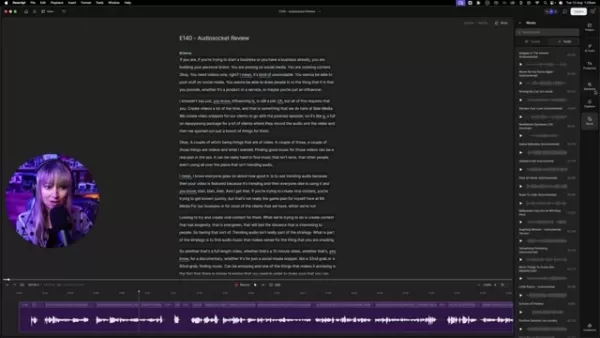
When you select an audio segment, the 'Properties' tab becomes available. Here you'll find volume controls and access to various audio effects. Descript includes a collection of audio effects designed to improve your sound quality.
Enhancing Your Audio with EQ
Equalization (EQ) lets you adjust the frequency balance of your audio. By modifying specific frequencies, you can highlight desirable elements and reduce unwanted noise. To use EQ in Descript, select your audio clip, open the 'Audio Effects' section in the 'Properties' panel, and select 'EQ'.
You can adjust each EQ point shown in the interface.
The right-side control boosts presence around 500 Hertz.
The frequencies you adjust will depend on your audio's characteristics and your desired outcome. The key is experimentation. Listen closely and make adjustments until you achieve a well-balanced sound.
Achieving Professional Sound with Compression
Compression narrows your audio's dynamic range, boosting quiet moments and controlling loud peaks. This creates a consistent, polished result. To apply compression, select your audio clip, navigate to 'Audio Effects,' and choose 'Compression'. Descript offers several compression presets that work well for different audio types. Adjust compression settings according to your microphone and recording conditions for optimal results. Maintain moderate compression levels to preserve audio quality.
While these AI tools can automate certain tasks, they often require manual adjustments.
- The audio waveform serves as your visual guide, showing exactly which sections you're editing.
Related article
 South Korea Breaks Ground on National AI Computing Center, Investing 2.5 Trillion Won with 2028 Target
South Korean outlet EtNews reports that groundbreaking for the Korea AI Computing Center (KOACC) took place on August 3 at the Solar City data center park in Sunan, Jeollanam-do. Backed by a total investment of 2.5 trillion KRW (roughly 11.838 billio
Six Tech Giants Back Linux Foundation With $12.5M to Tackle AI Vulnerability Noise
To tackle the flood of low-quality security reports produced by AI automation tools, six major tech companies—Anthropic, Amazon (AWS), GitHub, Google, Microsoft, and OpenAI—have collectively contributed $12.5 million in funding to Linux Foundation in
Musk Considered Leaving OpenAI to His Kids as Altman Testifies
This morning, OpenAI CEO Sam Altman took the stand to address former co-founder Elon Musk’s lawsuit challenging the company’s corporate structure.When asked about Musk’s claim that other founders “stole a charity” by launching a for-profit subsidiary
Related Special Topic Recommendations
Music composition
South Korea Breaks Ground on National AI Computing Center, Investing 2.5 Trillion Won with 2028 Target
South Korean outlet EtNews reports that groundbreaking for the Korea AI Computing Center (KOACC) took place on August 3 at the Solar City data center park in Sunan, Jeollanam-do. Backed by a total investment of 2.5 trillion KRW (roughly 11.838 billio
Six Tech Giants Back Linux Foundation With $12.5M to Tackle AI Vulnerability Noise
To tackle the flood of low-quality security reports produced by AI automation tools, six major tech companies—Anthropic, Amazon (AWS), GitHub, Google, Microsoft, and OpenAI—have collectively contributed $12.5 million in funding to Linux Foundation in
Musk Considered Leaving OpenAI to His Kids as Altman Testifies
This morning, OpenAI CEO Sam Altman took the stand to address former co-founder Elon Musk’s lawsuit challenging the company’s corporate structure.When asked about Musk’s claim that other founders “stole a charity” by launching a for-profit subsidiary
Related Special Topic Recommendations
Music composition
 AI Vocal Demo Tools for Songwriters, Hooks, Toplines, and Multilingual Draft Sessions
2026 Latest Best AI Vocal Demo Tools for Songwriters, Hook Creators, and Multi-Language Content Teams! XIX.AI has curated a top-rated list of powerful game-changing tools that go through rigorous real-world tests. You’ll find detailed free vs paid comparison data, comprehensive rankings, and must-try options to help you boost writing efficiency and unlock your creative potential. Explore now to discover your perfect tool for all your content needs!
 9 tools
 xix.ai
Business
Best AI Competitive Research Tools for Small Businesses
xix.ai
Business
Best AI Competitive Research Tools for Small Businesses
2026 Latest Best Top-rated AI Competitive Research Tools for Small Businesses! XIX.AI has curated a highly powerful game-changing collection, updated weekly with rigorous real-world tests and detailed rankings. You can find a comprehensive free vs paid comparison to help you identify the must-try tools that boost your productivity and give you a competitive edge. Explore now to discover your perfect tool!
9 tools
xix.ai
Image editing
Photoshop AI Retouch Tools for Ecommerce Apparel, Skin Cleanup, and Color Consistency
2026 Latest Best Photoshop AI retouch tools for ecommerce apparel, skin cleanup, and color consistency! This top-rated curated list features powerful game-changing solutions that help you boost writing efficiency, streamline content creation, and achieve perfect visual results effortlessly. Each tool has undergone real-world tests through weekly updated rankings, complete with free vs paid comparison details. Backed by XIX.AI, it’s the must-try guide for anyone aiming to unlock your AI edge. Explore now!
10 tools
xix.ai
Prompt
Best AI Prompt Libraries for ChatGPT Workflows
2026 Latest Best Top-Rated AI Prompt Libraries for optimizing all types of ChatGPT workflows. XIX.AI has curated a powerful, game-changing collection that goes through rigorous real-world tests to ensure top performance. You can find detailed free vs paid comparisons and expert rankings to help you choose the must-try tools that boost your productivity and unlock your AI edge. Explore now!
11 tools
xix.ai
Education and Learning
AI Quiz Builder Platforms for Teachers, Tutors, and Cohort-Based Learning Programs
2026 Latest Best AI Quiz Builder Platforms for Teachers, Tutors, and Cohort-Based Learning Programs! XIX.AI has curated a top-rated list of powerful game-changing tools that go through real-world tests to deliver accurate rankings. These must-try platforms help boost writing efficiency, streamline content creation, and simplify quiz design across all learning scenarios. Explore now to discover your perfect tool for unlocking your AI edge in teaching!
13 tools
xix.ai
code
AI Pull Request Review Tools for GitHub Teams Handling Refactors, Bugs, and Security Gaps
2026 Latest Best AI Pull Request Review Tools for GitHub Teams are here on XIX.AI! This top-rated curated list showcases powerful game-changing solutions that streamline refactoring, bug fixing, and security gap detection across all team workflows. Enjoy a free vs paid comparison along with real-world tests and detailed rankings to help you find the perfect tool that boosts productivity significantly. Explore now to unlock your AI edge!
12 tools
xix.ai

 Comments (12)
0/500
Comments (12)
0/500
![WillieMiller]()
Descript с ИИ меняет правила игры для подкастеров. Эквалайзер интуитивен, но ручная компрессия всё ещё важна для качества. В 2026 году это отличный выбор для быстрой обработки аудио. Рекомендую! 🎧
![CharlesWhite]()
Las herramientas de IA en Descript son geniales para podcasts. El EQ es más fácil ahora, pero sigo ajustando la compresión a mano para mejor calidad. En 2026, esta herramienta es un must para creadores de contenido. ¡Prueba! 🎙️
![AndrewGarcía]()
A IA do Descript facilita muito a edição de áudio, especialmente o EQ. Para podcasts, é incrível como economiza tempo. Ainda prefiro ajustar a compressão manualmente para um som mais 'quente'. Vale a pena testar em 2026! 🎧
![GeorgeThomas]()
Descript 的 AI 音訊處理真的很強,特別是對播客創作者來說。EQ 調整比以前直觀多了,不過壓縮參數還是得手動調比較保險。2026 年了,這種工具讓高品質音訊變得更親民,值得嘗試!🎙️
![JustinWilliams]()
Die KI-Features in Descript sind beeindruckend, besonders für Podcasts. Die EQ-Steuerung ist neu, aber gewöhnungsbedürftig. Ich vermisse manchmal die Feinjustierung von klassischer Software. Trotzdem ein Game-Changer für 2026! 🎧
![JerryMoore]()
Descript의 AI 음향 편집, 정말 편하네요. EQ 설정도 직관적이고요. 하지만 전통적인 압축 툴에 익숙한 저한테는 아직 낯설어요. 2026년 기준으로도 충분히 혁신적인 도구인 것 같습니다. 추천합니다! 🎙️
Unlock the potential of engaging audio content with ease! Discover the core techniques for audio editing in Descript. This guide explores the power of EQ, compression, and AI-driven tools to enhance your audio quality. Whether you're producing podcasts, audiobooks, or social media clips, these skills will help you create professional-sounding results.
Key Points
Use EQ to shape your audio's tonal characteristics.
Apply compression for a smooth, broadcast-ready sound.
Harness Descript's AI tools to simplify editing tasks.
Get familiar with Descript's project interface for faster editing.
Learn keyboard shortcuts to speed up your audio editing process.
Exploring Descript's Audio Editing Landscape
Essential Audio Editing Techniques in Descript
Navigating Audio Properties & Applying Effects
When you select an audio segment, the 'Properties' tab becomes available. Here you'll find volume controls and access to various audio effects. Descript includes a collection of audio effects designed to improve your sound quality.
Enhancing Your Audio with EQ
Equalization (EQ) lets you adjust the frequency balance of your audio. By modifying specific frequencies, you can highlight desirable elements and reduce unwanted noise. To use EQ in Descript, select your audio clip, open the 'Audio Effects' section in the 'Properties' panel, and select 'EQ'.
You can adjust each EQ point shown in the interface.
The right-side control boosts presence around 500 Hertz.
The frequencies you adjust will depend on your audio's characteristics and your desired outcome. The key is experimentation. Listen closely and make adjustments until you achieve a well-balanced sound.
Achieving Professional Sound with Compression
Compression narrows your audio's dynamic range, boosting quiet moments and controlling loud peaks. This creates a consistent, polished result. To apply compression, select your audio clip, navigate to 'Audio Effects,' and choose 'Compression'. Descript offers several compression presets that work well for different audio types. Adjust compression settings according to your microphone and recording conditions for optimal results. Maintain moderate compression levels to preserve audio quality.
While these AI tools can automate certain tasks, they often require manual adjustments.
- The audio waveform serves as your visual guide, showing exactly which sections you're editing.








 South Korea Breaks Ground on National AI Computing Center, Investing 2.5 Trillion Won with 2028 Target
South Korean outlet EtNews reports that groundbreaking for the Korea AI Computing Center (KOACC) took place on August 3 at the Solar City data center park in Sunan, Jeollanam-do. Backed by a total investment of 2.5 trillion KRW (roughly 11.838 billio
South Korea Breaks Ground on National AI Computing Center, Investing 2.5 Trillion Won with 2028 Target
South Korean outlet EtNews reports that groundbreaking for the Korea AI Computing Center (KOACC) took place on August 3 at the Solar City data center park in Sunan, Jeollanam-do. Backed by a total investment of 2.5 trillion KRW (roughly 11.838 billio
 Six Tech Giants Back Linux Foundation With $12.5M to Tackle AI Vulnerability Noise
To tackle the flood of low-quality security reports produced by AI automation tools, six major tech companies—Anthropic, Amazon (AWS), GitHub, Google, Microsoft, and OpenAI—have collectively contributed $12.5 million in funding to Linux Foundation in
Six Tech Giants Back Linux Foundation With $12.5M to Tackle AI Vulnerability Noise
To tackle the flood of low-quality security reports produced by AI automation tools, six major tech companies—Anthropic, Amazon (AWS), GitHub, Google, Microsoft, and OpenAI—have collectively contributed $12.5 million in funding to Linux Foundation in
 Musk Considered Leaving OpenAI to His Kids as Altman Testifies
This morning, OpenAI CEO Sam Altman took the stand to address former co-founder Elon Musk’s lawsuit challenging the company’s corporate structure.When asked about Musk’s claim that other founders “stole a charity” by launching a for-profit subsidiary
Musk Considered Leaving OpenAI to His Kids as Altman Testifies
This morning, OpenAI CEO Sam Altman took the stand to address former co-founder Elon Musk’s lawsuit challenging the company’s corporate structure.When asked about Musk’s claim that other founders “stole a charity” by launching a for-profit subsidiary

2026 Latest Best AI Vocal Demo Tools for Songwriters, Hook Creators, and Multi-Language Content Teams! XIX.AI has curated a top-rated list of powerful game-changing tools that go through rigorous real-world tests. You’ll find detailed free vs paid comparison data, comprehensive rankings, and must-try options to help you boost writing efficiency and unlock your creative potential. Explore now to discover your perfect tool for all your content needs!
9 tools
xix.ai

2026 Latest Best Top-rated AI Competitive Research Tools for Small Businesses! XIX.AI has curated a highly powerful game-changing collection, updated weekly with rigorous real-world tests and detailed rankings. You can find a comprehensive free vs paid comparison to help you identify the must-try tools that boost your productivity and give you a competitive edge. Explore now to discover your perfect tool!
9 tools
xix.ai

2026 Latest Best Photoshop AI retouch tools for ecommerce apparel, skin cleanup, and color consistency! This top-rated curated list features powerful game-changing solutions that help you boost writing efficiency, streamline content creation, and achieve perfect visual results effortlessly. Each tool has undergone real-world tests through weekly updated rankings, complete with free vs paid comparison details. Backed by XIX.AI, it’s the must-try guide for anyone aiming to unlock your AI edge. Explore now!
10 tools
xix.ai

2026 Latest Best Top-Rated AI Prompt Libraries for optimizing all types of ChatGPT workflows. XIX.AI has curated a powerful, game-changing collection that goes through rigorous real-world tests to ensure top performance. You can find detailed free vs paid comparisons and expert rankings to help you choose the must-try tools that boost your productivity and unlock your AI edge. Explore now!
11 tools
xix.ai

2026 Latest Best AI Quiz Builder Platforms for Teachers, Tutors, and Cohort-Based Learning Programs! XIX.AI has curated a top-rated list of powerful game-changing tools that go through real-world tests to deliver accurate rankings. These must-try platforms help boost writing efficiency, streamline content creation, and simplify quiz design across all learning scenarios. Explore now to discover your perfect tool for unlocking your AI edge in teaching!
13 tools
xix.ai

2026 Latest Best AI Pull Request Review Tools for GitHub Teams are here on XIX.AI! This top-rated curated list showcases powerful game-changing solutions that streamline refactoring, bug fixing, and security gap detection across all team workflows. Enjoy a free vs paid comparison along with real-world tests and detailed rankings to help you find the perfect tool that boosts productivity significantly. Explore now to unlock your AI edge!
12 tools
xix.ai

Descript с ИИ меняет правила игры для подкастеров. Эквалайзер интуитивен, но ручная компрессия всё ещё важна для качества. В 2026 году это отличный выбор для быстрой обработки аудио. Рекомендую! 🎧
Las herramientas de IA en Descript son geniales para podcasts. El EQ es más fácil ahora, pero sigo ajustando la compresión a mano para mejor calidad. En 2026, esta herramienta es un must para creadores de contenido. ¡Prueba! 🎙️
A IA do Descript facilita muito a edição de áudio, especialmente o EQ. Para podcasts, é incrível como economiza tempo. Ainda prefiro ajustar a compressão manualmente para um som mais 'quente'. Vale a pena testar em 2026! 🎧
Descript 的 AI 音訊處理真的很強,特別是對播客創作者來說。EQ 調整比以前直觀多了,不過壓縮參數還是得手動調比較保險。2026 年了,這種工具讓高品質音訊變得更親民,值得嘗試!🎙️
Die KI-Features in Descript sind beeindruckend, besonders für Podcasts. Die EQ-Steuerung ist neu, aber gewöhnungsbedürftig. Ich vermisse manchmal die Feinjustierung von klassischer Software. Trotzdem ein Game-Changer für 2026! 🎧
Descript의 AI 음향 편집, 정말 편하네요. EQ 설정도 직관적이고요. 하지만 전통적인 압축 툴에 익숙한 저한테는 아직 낯설어요. 2026년 기준으로도 충분히 혁신적인 도구인 것 같습니다. 추천합니다! 🎙️












