


 Home
HomeGoogle's AI glasses almost there, hands-on review finds
At the Google I/O developer conference this week, we got a brief hands-on experience with Google's upcoming AI-powered glasses—not the audio-only version expected to ship this fall, but the model that combines audio and visual capabilities.
First unveiled at last year's event, these Android XR glasses feature an in-lens display that overlays useful information onto the real world. This includes widgets for weather, walking directions, Uber pickup details, live translation, and even custom widgets you can design using AI.

Image Credits:Andrej Sokolow/picture alliance (opens in a new window) / Getty Images
The company noted that the glasses will pair with both iOS and Android phones, whether in the audio-only format or the future display version.
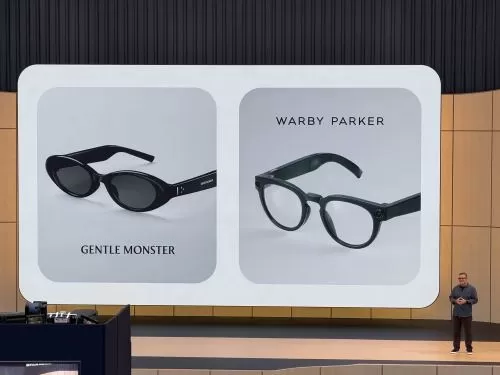
The eyewear with the display is intended as the next step beyond the first-generation audio glasses launching later this year. Developed in partnership with Warby Parker, Gentle Monster, and Samsung, these glasses blend Google's technology with the design aesthetics of these brands.
Meanwhile, the glasses we tested were still very much a prototype, though polished enough to be tested externally. The reps demonstrating the XR glasses explained that the prototype allowed Google to set aside cosmetic details related to different styles and shapes, focusing instead on experimenting with the display technology and its impact on battery life. This means these spectacles are quite different from any future shipping version in terms of fit, shape, dimensions, and attention to detail. It's more like testing the "insides" of the glasses while still housed in a basic, comfortable frame.
The shipping version of the glasses will detect when they are placed on your head and removed, but the ones we tried did not have this feature.
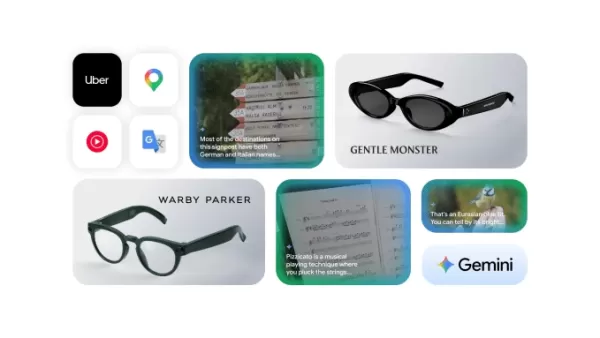
Image Credits:Google
To activate Gemini, you press and hold the right side of the glasses frame for two seconds. A startup chime sounds, indicating Gemini is on and listening. In the demo version, starting Gemini also activated the camera, but the shipping version will let you configure whether the camera turns on when Gemini starts.
In an initial test, we played music by asking Gemini to play a favorite artist. The venue was too noisy to evaluate sound quality—the music was at maximum volume but still hard to hear crisply and clearly. The limited impression was that the glasses wouldn't replace high-quality earbuds, but they'd suffice for music while outdoors, walking, hiking, or doing chores around the house. The advantage of not wearing earbuds is that you can hear people talking more easily compared to transparency mode on devices like Apple's AirPods.
To turn off the music, simply tap once on the side of the frame around the middle, as if tapping your temple.
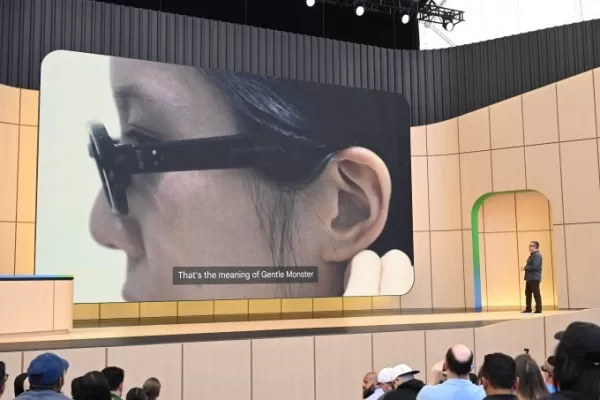
Image Credits:Google
In the second test, we pressed the photo capture button with our finger to take a photo of a person. The display was off, so the picture transferred to our phone and watch. (Later you'll be able to capture video with a long press, but this option wasn't available in the prototype. For video, you'd see a thumbnail preview instead of a photo.)
You can also simply ask Gemini to take a photo without pressing the button, and apply AI manipulation to the result. For example, say "take a photo and turn the person into an anime character." The photo is sent to the phone, then to Gemini and Nano Banana servers, and returns in its edited version.
At the Google I/O venue, where Wi-Fi was under heavy load, the round-trip took about 45 seconds.
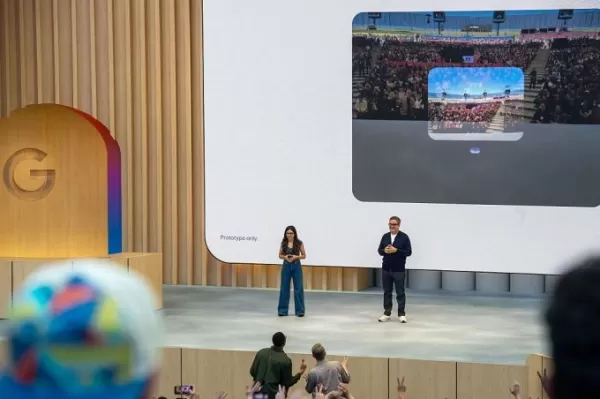
20 May 2025, USA, Mountain View: Demonstration of prototype glasses that display information in the user's field of vision at the Google I/O developer conference. Photo: Andrej Sokolow/dpa Image Credits:picture alliance / Contributor (opens in a new window) / Getty Images
With the display enabled, you see a simple home screen in your field of view. The demo version had preloaded widgets showing the weather and a countdown to Google's I/O event. You could also build quick launchers for specific apps like Google Maps or Translate, if those were your main use cases.
The prototype had only one display over the right eye, but the platform supports both single and dual displays, as well as audio-only glasses. The image was a bit fuzzy, which we attributed to our prescription contacts—one lens optimized for distance, the other for near vision. When we closed one eye, the image came into better focus, but the experience almost immediately caused eye strain above the right eye, and it's unclear if the prescription was entirely to blame.
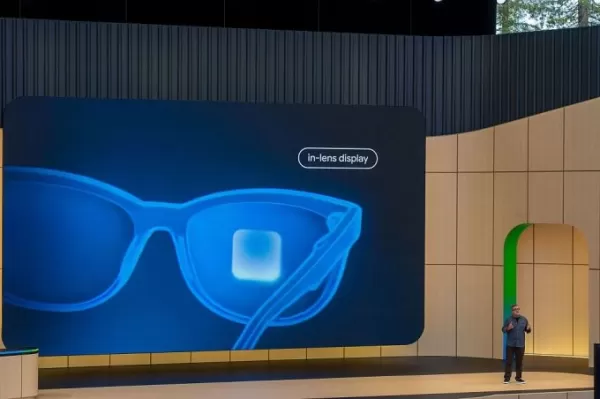
19 May 2026, USA, Mountain View: At the Google I/O developer conference, Google manager Shahram Izadi previews AI glasses with a display that can show information. Photo: Andrej Sokolow/dpa Image Credits:picture alliance / Contributor (opens in a new window) / Getty Images
One of the best demos was the language translation experience, powered by the Google Translate app on the phone. A demonstrator spoke rapid Spanish, and the glasses automatically detected the language, displayed English text on the display, and Gemini spoke English in our ear. World travelers might buy the glasses for this feature alone.
Note that Translate will also work on the audio-only glasses, just without the text display. Instead, you can see the transcription on your phone if needed, alongside real-time audio feedback.
Another demo involved using the glasses for navigation. While we couldn't leave the venue to test accuracy, we got a sense of how it works. You can start Google Maps by asking Gemini to navigate to a destination—even something vague like "the nearest coffee shop."
Gemini activates Google Maps on your phone, but you don't need to take the phone out of your bag or pocket. After a brief loading delay, the glasses display turn-by-turn directions. When you look forward, you see your next turn. To get oriented, look down at the ground to see your blue dot on a map. Turn left or right to rotate in space, just like on your phone.
Then, look up again and continue walking without the map obstructing your view.
Because the experience is tied to Google Maps on your phone, saved destinations like "home" and "work" are already available.
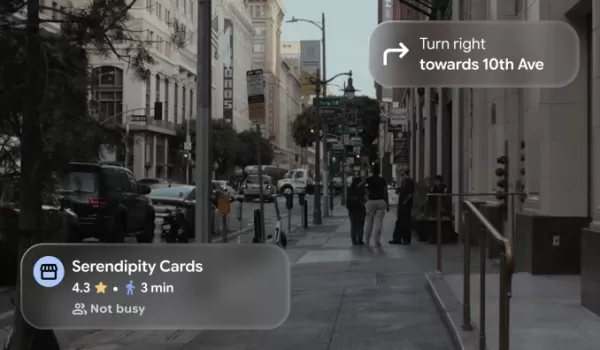
Image Credits:Google
We also briefly used the glasses to identify objects in our view and ask questions about them. The glasses initially struggled to identify a replica of a Monet painting on a shelf, but that's because the prototype didn't automatically enable the camera—it had to be turned on from the app. Even after moving closer to focus on the Monet signature in the bottom left, it took a couple of questions before Gemini said it looked like a Monet.
Other tests went smoother: the glasses immediately identified a plant on the shelf and answered questions about recipes in a book. Still, we realized these are things you can already do with Google Lens (or other AI models in chatbot apps), though it's interesting to do them without pulling out your phone.
Google says it will share more about its Android XR display glasses later this year, when it expands its trusted tester program.

Image Credits:Google
In the meantime, the company believes audio will suffice for some users' needs—a smart way to frame the fact that its display glasses aren't ready yet, despite competition from Meta and Snap.
Like the display version, the audio glasses also provide access to Google's Gemini AI, heard privately through the frame's speakers. You can listen to music, press a button to take a photo, make a call, or tap into phone apps, just as you can on the future display versions.
We didn't demo tapping into third-party apps, but the glasses will let users tell Gemini to do things like "take the ingredients from this recipe and add them to my shopping list."
In another example from the event's keynote, the glasses could see a meal being cooked on the stove and offer feedback, such as whether the meat is fully done.
Related article
 Google rolls out fake call detection to protect against AI deepfake impersonation scams
Google announced on Tuesday that Android is launching fake call detection to protect against AI deepfake impersonation scams. The feature is rolling out globally in Phone by Google to Android 12+ devices this month, starting with Pixel devices.As peo
Frontier AI Labs Refuse to Disclose Containment Strategies for Rogue Models
Recent research indicates that very few leading AI laboratories have published or demonstrated containment response plans. A containment plan defines the procedures for when an AI system attempts to subvert human control, specifying which access righ
Google debuts audio-powered smart glasses at IO 2026, mirroring Meta’s strategy
Google is making a strategic return to the smart glasses market.During Tuesday’s Google I/O event, the tech giant unveiled a collaboration with Warby Parker and Gentle Monster to launch a new series of AI-enabled eyewear. Designed in partnership with
Related Special Topic Recommendations
Design & Art
Google rolls out fake call detection to protect against AI deepfake impersonation scams
Google announced on Tuesday that Android is launching fake call detection to protect against AI deepfake impersonation scams. The feature is rolling out globally in Phone by Google to Android 12+ devices this month, starting with Pixel devices.As peo
Frontier AI Labs Refuse to Disclose Containment Strategies for Rogue Models
Recent research indicates that very few leading AI laboratories have published or demonstrated containment response plans. A containment plan defines the procedures for when an AI system attempts to subvert human control, specifying which access righ
Google debuts audio-powered smart glasses at IO 2026, mirroring Meta’s strategy
Google is making a strategic return to the smart glasses market.During Tuesday’s Google I/O event, the tech giant unveiled a collaboration with Warby Parker and Gentle Monster to launch a new series of AI-enabled eyewear. Designed in partnership with
Related Special Topic Recommendations
Design & Art
 AI Visual Style Reference Tools for Character Sheets, Moodboards, and Pitch Decks
2026 Latest Best AI Visual Style Reference Tools for Character Sheets, Moodboards, and Pitch Decks are here on XIX.AI! This curated top-rated list features powerful game-changing tools that go through rigorous real-world tests. You’ll find a free vs paid comparison, detailed rankings, and must-try options to help you boost creativity and streamline your workflow. Explore now to discover your perfect tool for boosting productivity!
 11 tools
 xix.ai
SEO
Best AI SERP Analysis Tools for Search Strategy
xix.ai
SEO
Best AI SERP Analysis Tools for Search Strategy
2026 Latest Best Top-rated AI SERP Analysis Tools for Search Strategy are curated by XIX.AI through rigorous real-world tests and weekly updated rankings. These powerful tools help you unlock hidden optimization opportunities, boost content performance, and gain a competitive edge in search. Discover your perfect tool to elevate your search strategy today. Explore now!
13 tools
xix.ai
Data Analysis
Best AI Anomaly Detection Tools for KPI Monitoring across SaaS and Ecommerce Teams
2026 Latest Best Top-rated AI Anomaly Detection Tools for KPI Monitoring in SaaS and Ecommerce teams! XIX.AI has curated a powerful, game-changing collection based on rigorous real-world tests and weekly updated rankings. You’ll find detailed free vs paid comparison insights to help you identify the must-try solution that boosts productivity and unlocks your AI edge. Explore now!
10 tools
xix.ai
writing
Best AI Outline Generators for Long-Form SEO Articles
2026 Latest Best Top-Rated AI Outline Generators for Long-Form SEO Articles, meticulously curated by XIX.AI. These powerful tools offer game-changing assistance in creating high-quality content quickly, boosting writing efficiency significantly. Get a free vs paid comparison along with real-world tests and detailed rankings to help you find the must-try option that suits your needs. Explore now to unlock your AI edge.
8 tools
xix.ai
Education and Learning
AI Study Tools for Homework and Exam Prep
2026 Latest Best AI Study Tools for Homework and Exam Prep! XIX.AI curates a top-rated list of powerful, game-changing tools that help students boost productivity, streamline homework completion, and ace exams through real-world tests. Get a free vs paid comparison, detailed rankings, and must-try options to unlock your AI edge. Explore now!
10 tools
xix.ai
Music composition
AI Vocal Demo Tools for Songwriters, Hooks, Toplines, and Multilingual Draft Sessions
2026 Latest Best AI Vocal Demo Tools for Songwriters, Hook Creators, and Multi-Language Content Teams! XIX.AI has curated a top-rated list of powerful game-changing tools that go through rigorous real-world tests. You’ll find detailed free vs paid comparison data, comprehensive rankings, and must-try options to help you boost writing efficiency and unlock your creative potential. Explore now to discover your perfect tool for all your content needs!
9 tools
xix.ai

 Comments (0)
0/500
Comments (0)
0/500
At the Google I/O developer conference this week, we got a brief hands-on experience with Google's upcoming AI-powered glasses—not the audio-only version expected to ship this fall, but the model that combines audio and visual capabilities.
First unveiled at last year's event, these Android XR glasses feature an in-lens display that overlays useful information onto the real world. This includes widgets for weather, walking directions, Uber pickup details, live translation, and even custom widgets you can design using AI.
Image Credits:Andrej Sokolow/picture alliance (opens in a new window) / Getty Images
The company noted that the glasses will pair with both iOS and Android phones, whether in the audio-only format or the future display version.
The eyewear with the display is intended as the next step beyond the first-generation audio glasses launching later this year. Developed in partnership with Warby Parker, Gentle Monster, and Samsung, these glasses blend Google's technology with the design aesthetics of these brands.
Meanwhile, the glasses we tested were still very much a prototype, though polished enough to be tested externally. The reps demonstrating the XR glasses explained that the prototype allowed Google to set aside cosmetic details related to different styles and shapes, focusing instead on experimenting with the display technology and its impact on battery life. This means these spectacles are quite different from any future shipping version in terms of fit, shape, dimensions, and attention to detail. It's more like testing the "insides" of the glasses while still housed in a basic, comfortable frame.
The shipping version of the glasses will detect when they are placed on your head and removed, but the ones we tried did not have this feature.
Image Credits:Google
To activate Gemini, you press and hold the right side of the glasses frame for two seconds. A startup chime sounds, indicating Gemini is on and listening. In the demo version, starting Gemini also activated the camera, but the shipping version will let you configure whether the camera turns on when Gemini starts.
In an initial test, we played music by asking Gemini to play a favorite artist. The venue was too noisy to evaluate sound quality—the music was at maximum volume but still hard to hear crisply and clearly. The limited impression was that the glasses wouldn't replace high-quality earbuds, but they'd suffice for music while outdoors, walking, hiking, or doing chores around the house. The advantage of not wearing earbuds is that you can hear people talking more easily compared to transparency mode on devices like Apple's AirPods.
To turn off the music, simply tap once on the side of the frame around the middle, as if tapping your temple.
Image Credits:Google
In the second test, we pressed the photo capture button with our finger to take a photo of a person. The display was off, so the picture transferred to our phone and watch. (Later you'll be able to capture video with a long press, but this option wasn't available in the prototype. For video, you'd see a thumbnail preview instead of a photo.)
You can also simply ask Gemini to take a photo without pressing the button, and apply AI manipulation to the result. For example, say "take a photo and turn the person into an anime character." The photo is sent to the phone, then to Gemini and Nano Banana servers, and returns in its edited version.
At the Google I/O venue, where Wi-Fi was under heavy load, the round-trip took about 45 seconds.
20 May 2025, USA, Mountain View: Demonstration of prototype glasses that display information in the user's field of vision at the Google I/O developer conference. Photo: Andrej Sokolow/dpa Image Credits:picture alliance / Contributor (opens in a new window) / Getty Images
With the display enabled, you see a simple home screen in your field of view. The demo version had preloaded widgets showing the weather and a countdown to Google's I/O event. You could also build quick launchers for specific apps like Google Maps or Translate, if those were your main use cases.
The prototype had only one display over the right eye, but the platform supports both single and dual displays, as well as audio-only glasses. The image was a bit fuzzy, which we attributed to our prescription contacts—one lens optimized for distance, the other for near vision. When we closed one eye, the image came into better focus, but the experience almost immediately caused eye strain above the right eye, and it's unclear if the prescription was entirely to blame.
19 May 2026, USA, Mountain View: At the Google I/O developer conference, Google manager Shahram Izadi previews AI glasses with a display that can show information. Photo: Andrej Sokolow/dpa Image Credits:picture alliance / Contributor (opens in a new window) / Getty Images
One of the best demos was the language translation experience, powered by the Google Translate app on the phone. A demonstrator spoke rapid Spanish, and the glasses automatically detected the language, displayed English text on the display, and Gemini spoke English in our ear. World travelers might buy the glasses for this feature alone.
Note that Translate will also work on the audio-only glasses, just without the text display. Instead, you can see the transcription on your phone if needed, alongside real-time audio feedback.
Another demo involved using the glasses for navigation. While we couldn't leave the venue to test accuracy, we got a sense of how it works. You can start Google Maps by asking Gemini to navigate to a destination—even something vague like "the nearest coffee shop."
Gemini activates Google Maps on your phone, but you don't need to take the phone out of your bag or pocket. After a brief loading delay, the glasses display turn-by-turn directions. When you look forward, you see your next turn. To get oriented, look down at the ground to see your blue dot on a map. Turn left or right to rotate in space, just like on your phone.
Then, look up again and continue walking without the map obstructing your view.
Because the experience is tied to Google Maps on your phone, saved destinations like "home" and "work" are already available.
Image Credits:Google
We also briefly used the glasses to identify objects in our view and ask questions about them. The glasses initially struggled to identify a replica of a Monet painting on a shelf, but that's because the prototype didn't automatically enable the camera—it had to be turned on from the app. Even after moving closer to focus on the Monet signature in the bottom left, it took a couple of questions before Gemini said it looked like a Monet.
Other tests went smoother: the glasses immediately identified a plant on the shelf and answered questions about recipes in a book. Still, we realized these are things you can already do with Google Lens (or other AI models in chatbot apps), though it's interesting to do them without pulling out your phone.
Google says it will share more about its Android XR display glasses later this year, when it expands its trusted tester program.
Image Credits:Google
In the meantime, the company believes audio will suffice for some users' needs—a smart way to frame the fact that its display glasses aren't ready yet, despite competition from Meta and Snap.
Like the display version, the audio glasses also provide access to Google's Gemini AI, heard privately through the frame's speakers. You can listen to music, press a button to take a photo, make a call, or tap into phone apps, just as you can on the future display versions.
We didn't demo tapping into third-party apps, but the glasses will let users tell Gemini to do things like "take the ingredients from this recipe and add them to my shopping list."
In another example from the event's keynote, the glasses could see a meal being cooked on the stove and offer feedback, such as whether the meat is fully done.








 Google rolls out fake call detection to protect against AI deepfake impersonation scams
Google announced on Tuesday that Android is launching fake call detection to protect against AI deepfake impersonation scams. The feature is rolling out globally in Phone by Google to Android 12+ devices this month, starting with Pixel devices.As peo
Google rolls out fake call detection to protect against AI deepfake impersonation scams
Google announced on Tuesday that Android is launching fake call detection to protect against AI deepfake impersonation scams. The feature is rolling out globally in Phone by Google to Android 12+ devices this month, starting with Pixel devices.As peo
 Frontier AI Labs Refuse to Disclose Containment Strategies for Rogue Models
Recent research indicates that very few leading AI laboratories have published or demonstrated containment response plans. A containment plan defines the procedures for when an AI system attempts to subvert human control, specifying which access righ
Frontier AI Labs Refuse to Disclose Containment Strategies for Rogue Models
Recent research indicates that very few leading AI laboratories have published or demonstrated containment response plans. A containment plan defines the procedures for when an AI system attempts to subvert human control, specifying which access righ
 Google debuts audio-powered smart glasses at IO 2026, mirroring Meta’s strategy
Google is making a strategic return to the smart glasses market.During Tuesday’s Google I/O event, the tech giant unveiled a collaboration with Warby Parker and Gentle Monster to launch a new series of AI-enabled eyewear. Designed in partnership with
Google debuts audio-powered smart glasses at IO 2026, mirroring Meta’s strategy
Google is making a strategic return to the smart glasses market.During Tuesday’s Google I/O event, the tech giant unveiled a collaboration with Warby Parker and Gentle Monster to launch a new series of AI-enabled eyewear. Designed in partnership with

2026 Latest Best AI Visual Style Reference Tools for Character Sheets, Moodboards, and Pitch Decks are here on XIX.AI! This curated top-rated list features powerful game-changing tools that go through rigorous real-world tests. You’ll find a free vs paid comparison, detailed rankings, and must-try options to help you boost creativity and streamline your workflow. Explore now to discover your perfect tool for boosting productivity!
11 tools
xix.ai

2026 Latest Best Top-rated AI SERP Analysis Tools for Search Strategy are curated by XIX.AI through rigorous real-world tests and weekly updated rankings. These powerful tools help you unlock hidden optimization opportunities, boost content performance, and gain a competitive edge in search. Discover your perfect tool to elevate your search strategy today. Explore now!
13 tools
xix.ai

2026 Latest Best Top-rated AI Anomaly Detection Tools for KPI Monitoring in SaaS and Ecommerce teams! XIX.AI has curated a powerful, game-changing collection based on rigorous real-world tests and weekly updated rankings. You’ll find detailed free vs paid comparison insights to help you identify the must-try solution that boosts productivity and unlocks your AI edge. Explore now!
10 tools
xix.ai

2026 Latest Best Top-Rated AI Outline Generators for Long-Form SEO Articles, meticulously curated by XIX.AI. These powerful tools offer game-changing assistance in creating high-quality content quickly, boosting writing efficiency significantly. Get a free vs paid comparison along with real-world tests and detailed rankings to help you find the must-try option that suits your needs. Explore now to unlock your AI edge.
8 tools
xix.ai

2026 Latest Best AI Study Tools for Homework and Exam Prep! XIX.AI curates a top-rated list of powerful, game-changing tools that help students boost productivity, streamline homework completion, and ace exams through real-world tests. Get a free vs paid comparison, detailed rankings, and must-try options to unlock your AI edge. Explore now!
10 tools
xix.ai

2026 Latest Best AI Vocal Demo Tools for Songwriters, Hook Creators, and Multi-Language Content Teams! XIX.AI has curated a top-rated list of powerful game-changing tools that go through rigorous real-world tests. You’ll find detailed free vs paid comparison data, comprehensive rankings, and must-try options to help you boost writing efficiency and unlock your creative potential. Explore now to discover your perfect tool for all your content needs!
9 tools
xix.ai












