


 Home
HomeAI Builder and Power Automate Revolutionize Document Summarization
Are you tired of spending endless hours manually sifting through documents in SharePoint, trying to summarize and extract key information? There's a smarter way to handle this! This guide will show you how to harness the capabilities of Microsoft Power Automate and AI Builder to automate document summarization, streamline your workflows, and free up your time. We'll walk you through setting up an automated system that smartly summarizes documents the moment they're uploaded, ensuring that crucial information is always at your fingertips.
Key Points
- Automate document summarization in SharePoint with Power Automate and AI Builder.
- Utilize AI Builder's OCR technology to extract text from PDFs.
- Implement custom prompts to tailor summaries to your specific requirements.
- Automate file format conversions for seamless compatibility.
- Explore the integration capabilities of Power Automate and AI Builder.
- Learn how to upload files to SharePoint and update their properties.
Automating Document Summarization with Power Automate and AI Builder
The Struggle of Manual Document Summarization
It's no secret that manually summarizing documents in SharePoint can be a real drag for many organizations. It's not just time-consuming; it's also fraught with the potential for human error, which can lead to inconsistencies and the loss of important details. Picture yourself wading through dense contracts, reports, or legal documents, trying to pull out the essential nuggets of information. It's exhausting, right? That's where automation comes in as a lifesaver.

Introducing Power Automate and AI Builder
Microsoft Power Automate is a powerful tool that automates your workflow by connecting different applications and services, eliminating the need for repetitive tasks. When you pair it with AI Builder, Microsoft's AI platform, you're able to add a layer of intelligence to your workflows, making complex processes like document summarization a breeze. AI Builder comes with pre-built AI models and the flexibility to craft custom AI solutions that meet your unique needs.
With AI Builder and Power Automate working together, extracting and summarizing data from SharePoint documents becomes not just possible but remarkably efficient.
High-Level Process Overview
Here's a quick look at how the automation process unfolds, as illustrated in our process diagram:

- File Upload to SharePoint: Start by uploading a document, say a Word file, to a specific SharePoint library.
- Trigger Cloud Flow: This action automatically triggers a Cloud Flow in Power Automate.
- Convert File to PDF: Convert the uploaded file to PDF using OneDrive. This step is crucial because AI Builder's OCR works best with PDFs.
- Extract Text via AI Builder OCR: Use AI Builder's Optical Character Recognition (OCR) to pull text out of the PDF.
- Summarize Text Using AI Builder: Let AI Builder's text summarization feature do the work, creating a concise summary of the text.
- Update File Properties: Update the file's properties with the generated summary.
By following these steps, you'll drastically cut down on manual work, allowing your team to shift focus to more strategic tasks.
Customizing Summarization with AI Builder
Leveraging Pre-Built vs. Custom Prompts
AI Builder offers pre-built prompts like "Summarize text," but when you create custom prompts, you gain more control over the output. You can fine-tune these prompts to extract specific information, format the summary according to your preferences, and ensure it meets your organization's needs. It's like tailoring the AI to fit your summarization requirements perfectly.
To create custom prompts, follow these steps:
- In the prompt settings tab, click on the text to test with GPT using a prompt.
- Select the custom prompt option and make the necessary adjustments.
Working with GraphAPI
An alternative approach to using GraphAPI's default file conversions involves:
- Downloading a file in a specific format.
- Using the API to retrieve the text in JSON format.
- Ensuring all files are converted into the required format.

Building the Flow Step-by-Step
Creating a New Flow in Power Automate
Start by setting up a new flow in Power Automate:

- Navigate to Power Automate and initiate a new flow from a blank template.
- Opt for a manual trigger flow as your starting point.
- Add an input parameter of type "File Content" to allow file uploads during the flow's trigger. This input can be used for manual testing and will be modified later.
Converting the File to PDF
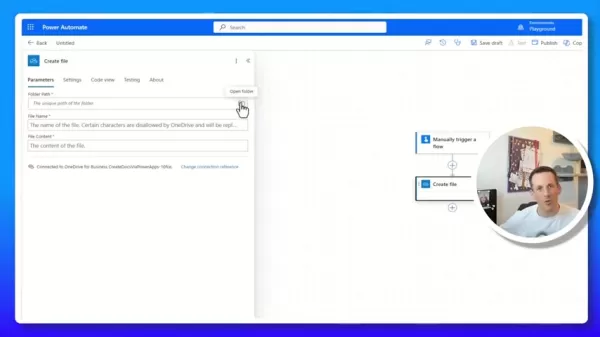
To convert the uploaded file to PDF format, follow these steps:
- Add a "Create File" action using the OneDrive for Business connector to save the file in OneDrive.
- Specify a temporary path within your OneDrive for storing the file.
- Set the file name dynamically using the "File Content Name" from the manual trigger.
- Use "File Content ContentBytes" from the trigger to set the file content.

Recognizing Text in PDF
With the document now in PDF format, proceed as follows:
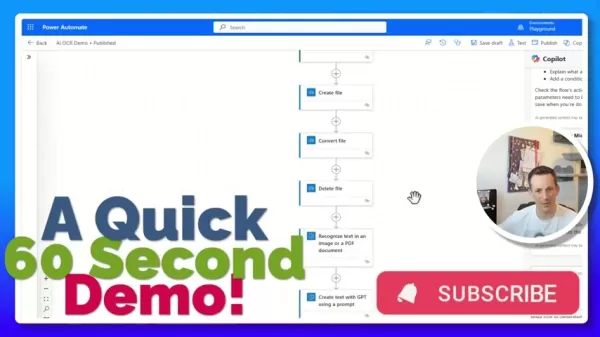
- Add the AI Builder "Recognize Text in an Image or a PDF Document" action.
- Select the "File Content" from the convert file step for the image parameter.
Creating Custom Prompts in AI Builder
To tap into the full potential of AI for generating summaries based on specific prompts:
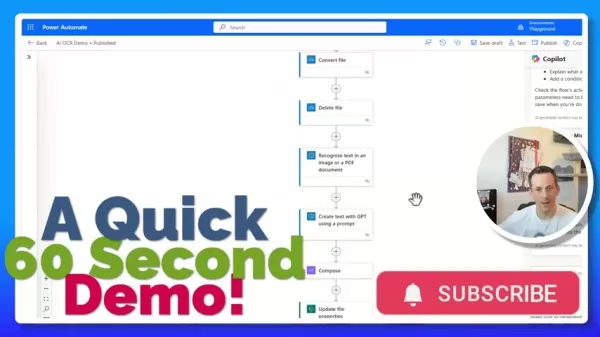
- Choose to create a new custom prompt, which will open the prompt engineering screen.
- Design the output format according to your organization's summary requirements, customizing based on multiple conditions.
Composing the Text
After setting up the AI, compose the required text:
- Add a compose action to the canvas.
- Enter the expression you want to generate.
Creating a Summary of the Sample File
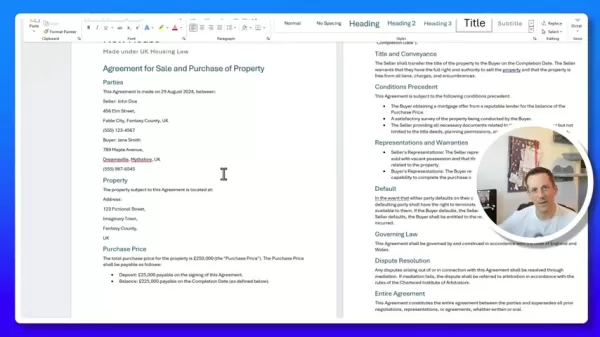
After all configurations are in place:
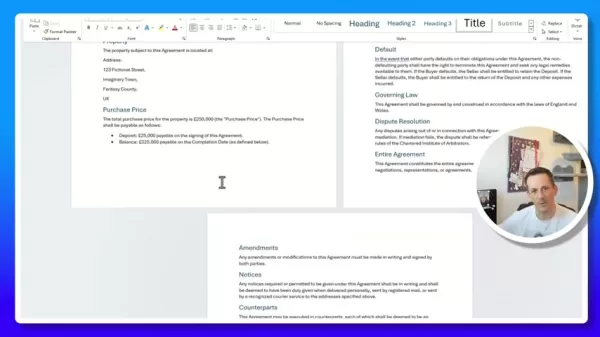
- Upload the sample Word file to your SharePoint.
- Initially, there won't be a summary present.
- The flow will be triggered, taking about 10-15 seconds to process.
Power Automate and AI Builder Integration: Pros and Cons
Pros
- Simplified OCR and text summarization.
- Customizable text extraction.
- Integration with multiple tools.
- Enhanced efficiency through AI automation.
Cons
- Requires a premium license to access AI Builder's components.
- Needs high-quality images and documents for better summaries.
- The accuracy of the output depends on AI Builder's accuracy.
FAQ
Why convert to PDF before OCR?
AI Builder's OCR engine is optimized for PDF documents, which ensures more accurate and reliable text extraction compared to other formats.
Can I customize the summarization length?
Absolutely, custom prompts allow you to specify the desired summary length or word count.
What if the extracted text isn't accurate?
To improve OCR accuracy, ensure you're using high-quality source documents and adjust the OCR settings in AI Builder as needed.
Can I use this flow with other document libraries?
Yes, just modify the SharePoint site address and library name in the trigger to target different libraries.
Is AI Builder required?
You can always customize AI Builder according to your requirements.
Related Questions
What are the benefits of automating document summarization?
Automating document summarization brings a host of benefits, including:
- Time savings: By automatically generating concise summaries, your team can save hours previously spent manually extracting key information.
- Accuracy: AI Builder's text summarization capabilities help generate more accurate data extraction from any file.
- Efficiency: Quick access to key insights from documents allows for more effective decision-making.
- Consistency: Automation ensures summaries are consistent across all documents, reducing the risk of misinterpretation.
- Reduced manual effort: This allows employees to focus on tasks that require critical thinking.
Related article
 Hiroshi Fujiwara and Robert Little Win 2026 Engelberger Robotics Awards
Hiroshi Fujiwara (left) and Robert Little (right) are the 2026 recipients of the Joseph F. Engelberger Robotics Award. | Credit: A3The Association for Advancing Automation (A3) has announced Hiroshi Fujiwara and Robert Little as the winners of the 20
AI Transforms Data Science: Automate Your SQL Queries
In the fast-moving field of data science, efficiency is essential. Automating repetitive tasks frees up valuable time for deeper analysis and model development. This guide explains how to use AI to automate SQL database queries, cutting down the manu
AI Voice Agents Streamline Sales: A Look at CallFluent
In the fast-paced landscape of modern business, automation has shifted from a luxury to an essential tool. AI-powered voice agents are fundamentally changing how companies manage sales and customer support, delivering exceptional efficiency and signi
Related Special Topic Recommendations
Text-to-speech
Hiroshi Fujiwara and Robert Little Win 2026 Engelberger Robotics Awards
Hiroshi Fujiwara (left) and Robert Little (right) are the 2026 recipients of the Joseph F. Engelberger Robotics Award. | Credit: A3The Association for Advancing Automation (A3) has announced Hiroshi Fujiwara and Robert Little as the winners of the 20
AI Transforms Data Science: Automate Your SQL Queries
In the fast-moving field of data science, efficiency is essential. Automating repetitive tasks frees up valuable time for deeper analysis and model development. This guide explains how to use AI to automate SQL database queries, cutting down the manu
AI Voice Agents Streamline Sales: A Look at CallFluent
In the fast-paced landscape of modern business, automation has shifted from a luxury to an essential tool. AI-powered voice agents are fundamentally changing how companies manage sales and customer support, delivering exceptional efficiency and signi
Related Special Topic Recommendations
Text-to-speech
 Best AI Text to Speech Tools for Online Courses
2026 Latest Best Top-rated AI Text to Speech Tools for Online Courses are curated by XIX.AI based on rigorous real-world tests and weekly updated rankings. These powerful tools help creators deliver crystal-clear audio content effortlessly, boosting writing efficiency and streamlining course production. Check out the free vs paid comparison to find your perfect fit. Explore now to unlock your AI edge in online education.
 10 tools
 xix.ai
writing
AI Blog Title Tools for Higher Click Through Rates
xix.ai
writing
AI Blog Title Tools for Higher Click Through Rates
2026 Latest Best Top-Rated AI Blog Title Tools for Higher Click Through Rates! XIX.AI has carefully curated a powerful, game-changing collection of top tools that go through rigorous real-world tests. You’ll find a free vs paid comparison, weekly updated rankings, and detailed insights to help you boost your blog’s traffic efficiently. Must-try options are highlighted to help you unlock your AI edge. Explore now!
10 tools
xix.ai
automation
Best AI Task Routing Tools for Support Workflows
2026 Latest Best Top-rated AI Task Routing Tools for Support Workflows! XIX.AI has curated a highly powerful game-changing collection of must-try solutions, all undergoing rigorous real-world tests and updated weekly. These tools streamline workflows, boost productivity, and help teams deliver faster, more efficient support. Explore now to discover your perfect tool and unlock your AI edge!
17 tools
xix.ai
Academic Research
AI Citation and Paper Summary Tools
2026 Latest Best Top-Rated AI Citation and Paper Summary Tools Curated by XIX.AI. Get powerful game-changing solutions for quick content creation, improved writing efficiency, and boosting productivity. We offer a free vs paid comparison along with real-world tests and weekly updated rankings to help you find the must-try tool that fits your needs perfectly. Explore now to Unlock your AI edge.
10 tools
xix.ai
Productivity
Best AI Productivity Tools for Daily Work
2026 Latest Best Top-Rated AI Productivity Tools for Daily Work! XIX.AI has curated a powerful, game-changing selection based on rigorous weekly updated rankings and real-world tests. You’ll find must-try options that boost writing efficiency, streamline content creation, and help you overcome daily work challenges. Get a free vs paid comparison to find the perfect fit for your needs. Explore now to unlock your AI edge!
9 tools
xix.ai
Academic Research
AI Systematic Review Tools for Research Screening
2026 Latest Best Top-Rated AI Systematic Review Tools for Research Screening are here on XIX.AI! This curated collection includes powerful, game-changing solutions that go through rigorous real-world tests to deliver accurate results. We also offer a free vs paid comparison along with weekly updated rankings to help you find the must-try option that boosts your research efficiency significantly. Explore now to unlock your AI edge in academic work!
11 tools
xix.ai

 Comments (4)
0/500
Comments (4)
0/500
![HenryJackson]()
こんな自動化ツールを知ったら、昔の自分が馬鹿らしいと思うはず。大量のドキュメント処理で夜遅くまで残業した日々を考えれば…AIは単なる便利ツールじゃなくて、働き方そのものを変える力があるなあ。特にSharePointの文書管理がこんなに楽になるとは!次はどこの業務に応用できるか、考えてみようかな✨
![OliverAnderson]()
This AI Builder stuff sounds like a game-changer for document work! Can it really cut hours of manual summarizing? Excited to try it out! 🚀
![KevinWalker]()
This AI Builder stuff sounds like a game-changer for document work! Can it really cut hours of manual summarizing? Gotta try it out.
![JackMoore]()
This AI Builder stuff sounds like a game-changer for document work! I’m curious, how fast can it summarize a 50-page report? 🤔
Are you tired of spending endless hours manually sifting through documents in SharePoint, trying to summarize and extract key information? There's a smarter way to handle this! This guide will show you how to harness the capabilities of Microsoft Power Automate and AI Builder to automate document summarization, streamline your workflows, and free up your time. We'll walk you through setting up an automated system that smartly summarizes documents the moment they're uploaded, ensuring that crucial information is always at your fingertips.
Key Points
- Automate document summarization in SharePoint with Power Automate and AI Builder.
- Utilize AI Builder's OCR technology to extract text from PDFs.
- Implement custom prompts to tailor summaries to your specific requirements.
- Automate file format conversions for seamless compatibility.
- Explore the integration capabilities of Power Automate and AI Builder.
- Learn how to upload files to SharePoint and update their properties.
Automating Document Summarization with Power Automate and AI Builder
The Struggle of Manual Document Summarization
It's no secret that manually summarizing documents in SharePoint can be a real drag for many organizations. It's not just time-consuming; it's also fraught with the potential for human error, which can lead to inconsistencies and the loss of important details. Picture yourself wading through dense contracts, reports, or legal documents, trying to pull out the essential nuggets of information. It's exhausting, right? That's where automation comes in as a lifesaver.
Introducing Power Automate and AI Builder
Microsoft Power Automate is a powerful tool that automates your workflow by connecting different applications and services, eliminating the need for repetitive tasks. When you pair it with AI Builder, Microsoft's AI platform, you're able to add a layer of intelligence to your workflows, making complex processes like document summarization a breeze. AI Builder comes with pre-built AI models and the flexibility to craft custom AI solutions that meet your unique needs.
With AI Builder and Power Automate working together, extracting and summarizing data from SharePoint documents becomes not just possible but remarkably efficient.
High-Level Process Overview
Here's a quick look at how the automation process unfolds, as illustrated in our process diagram:
- File Upload to SharePoint: Start by uploading a document, say a Word file, to a specific SharePoint library.
- Trigger Cloud Flow: This action automatically triggers a Cloud Flow in Power Automate.
- Convert File to PDF: Convert the uploaded file to PDF using OneDrive. This step is crucial because AI Builder's OCR works best with PDFs.
- Extract Text via AI Builder OCR: Use AI Builder's Optical Character Recognition (OCR) to pull text out of the PDF.
- Summarize Text Using AI Builder: Let AI Builder's text summarization feature do the work, creating a concise summary of the text.
- Update File Properties: Update the file's properties with the generated summary.
By following these steps, you'll drastically cut down on manual work, allowing your team to shift focus to more strategic tasks.
Customizing Summarization with AI Builder
Leveraging Pre-Built vs. Custom Prompts
AI Builder offers pre-built prompts like "Summarize text," but when you create custom prompts, you gain more control over the output. You can fine-tune these prompts to extract specific information, format the summary according to your preferences, and ensure it meets your organization's needs. It's like tailoring the AI to fit your summarization requirements perfectly.
To create custom prompts, follow these steps:
- In the prompt settings tab, click on the text to test with GPT using a prompt.
- Select the custom prompt option and make the necessary adjustments.
Working with GraphAPI
An alternative approach to using GraphAPI's default file conversions involves:
- Downloading a file in a specific format.
- Using the API to retrieve the text in JSON format.
- Ensuring all files are converted into the required format.
Building the Flow Step-by-Step
Creating a New Flow in Power Automate
Start by setting up a new flow in Power Automate:
- Navigate to Power Automate and initiate a new flow from a blank template.
- Opt for a manual trigger flow as your starting point.
- Add an input parameter of type "File Content" to allow file uploads during the flow's trigger. This input can be used for manual testing and will be modified later.
Converting the File to PDF
To convert the uploaded file to PDF format, follow these steps:
- Add a "Create File" action using the OneDrive for Business connector to save the file in OneDrive.
- Specify a temporary path within your OneDrive for storing the file.
- Set the file name dynamically using the "File Content Name" from the manual trigger.
- Use "File Content ContentBytes" from the trigger to set the file content.
Recognizing Text in PDF
With the document now in PDF format, proceed as follows:
- Add the AI Builder "Recognize Text in an Image or a PDF Document" action.
- Select the "File Content" from the convert file step for the image parameter.
Creating Custom Prompts in AI Builder
To tap into the full potential of AI for generating summaries based on specific prompts:
- Choose to create a new custom prompt, which will open the prompt engineering screen.
- Design the output format according to your organization's summary requirements, customizing based on multiple conditions.
Composing the Text
After setting up the AI, compose the required text:
- Add a compose action to the canvas.
- Enter the expression you want to generate.
Creating a Summary of the Sample File
After all configurations are in place:
- Upload the sample Word file to your SharePoint.
- Initially, there won't be a summary present.
- The flow will be triggered, taking about 10-15 seconds to process.
Power Automate and AI Builder Integration: Pros and Cons
Pros
- Simplified OCR and text summarization.
- Customizable text extraction.
- Integration with multiple tools.
- Enhanced efficiency through AI automation.
Cons
- Requires a premium license to access AI Builder's components.
- Needs high-quality images and documents for better summaries.
- The accuracy of the output depends on AI Builder's accuracy.
FAQ
Why convert to PDF before OCR?
AI Builder's OCR engine is optimized for PDF documents, which ensures more accurate and reliable text extraction compared to other formats.
Can I customize the summarization length?
Absolutely, custom prompts allow you to specify the desired summary length or word count.
What if the extracted text isn't accurate?
To improve OCR accuracy, ensure you're using high-quality source documents and adjust the OCR settings in AI Builder as needed.
Can I use this flow with other document libraries?
Yes, just modify the SharePoint site address and library name in the trigger to target different libraries.
Is AI Builder required?
You can always customize AI Builder according to your requirements.
Related Questions
What are the benefits of automating document summarization?
Automating document summarization brings a host of benefits, including:
- Time savings: By automatically generating concise summaries, your team can save hours previously spent manually extracting key information.
- Accuracy: AI Builder's text summarization capabilities help generate more accurate data extraction from any file.
- Efficiency: Quick access to key insights from documents allows for more effective decision-making.
- Consistency: Automation ensures summaries are consistent across all documents, reducing the risk of misinterpretation.
- Reduced manual effort: This allows employees to focus on tasks that require critical thinking.







 Hiroshi Fujiwara and Robert Little Win 2026 Engelberger Robotics Awards
Hiroshi Fujiwara (left) and Robert Little (right) are the 2026 recipients of the Joseph F. Engelberger Robotics Award. | Credit: A3The Association for Advancing Automation (A3) has announced Hiroshi Fujiwara and Robert Little as the winners of the 20
Hiroshi Fujiwara and Robert Little Win 2026 Engelberger Robotics Awards
Hiroshi Fujiwara (left) and Robert Little (right) are the 2026 recipients of the Joseph F. Engelberger Robotics Award. | Credit: A3The Association for Advancing Automation (A3) has announced Hiroshi Fujiwara and Robert Little as the winners of the 20
 AI Transforms Data Science: Automate Your SQL Queries
In the fast-moving field of data science, efficiency is essential. Automating repetitive tasks frees up valuable time for deeper analysis and model development. This guide explains how to use AI to automate SQL database queries, cutting down the manu
AI Transforms Data Science: Automate Your SQL Queries
In the fast-moving field of data science, efficiency is essential. Automating repetitive tasks frees up valuable time for deeper analysis and model development. This guide explains how to use AI to automate SQL database queries, cutting down the manu
 AI Voice Agents Streamline Sales: A Look at CallFluent
In the fast-paced landscape of modern business, automation has shifted from a luxury to an essential tool. AI-powered voice agents are fundamentally changing how companies manage sales and customer support, delivering exceptional efficiency and signi
AI Voice Agents Streamline Sales: A Look at CallFluent
In the fast-paced landscape of modern business, automation has shifted from a luxury to an essential tool. AI-powered voice agents are fundamentally changing how companies manage sales and customer support, delivering exceptional efficiency and signi

2026 Latest Best Top-rated AI Text to Speech Tools for Online Courses are curated by XIX.AI based on rigorous real-world tests and weekly updated rankings. These powerful tools help creators deliver crystal-clear audio content effortlessly, boosting writing efficiency and streamlining course production. Check out the free vs paid comparison to find your perfect fit. Explore now to unlock your AI edge in online education.
10 tools
xix.ai

2026 Latest Best Top-Rated AI Blog Title Tools for Higher Click Through Rates! XIX.AI has carefully curated a powerful, game-changing collection of top tools that go through rigorous real-world tests. You’ll find a free vs paid comparison, weekly updated rankings, and detailed insights to help you boost your blog’s traffic efficiently. Must-try options are highlighted to help you unlock your AI edge. Explore now!
10 tools
xix.ai

2026 Latest Best Top-rated AI Task Routing Tools for Support Workflows! XIX.AI has curated a highly powerful game-changing collection of must-try solutions, all undergoing rigorous real-world tests and updated weekly. These tools streamline workflows, boost productivity, and help teams deliver faster, more efficient support. Explore now to discover your perfect tool and unlock your AI edge!
17 tools
xix.ai

2026 Latest Best Top-Rated AI Citation and Paper Summary Tools Curated by XIX.AI. Get powerful game-changing solutions for quick content creation, improved writing efficiency, and boosting productivity. We offer a free vs paid comparison along with real-world tests and weekly updated rankings to help you find the must-try tool that fits your needs perfectly. Explore now to Unlock your AI edge.
10 tools
xix.ai

2026 Latest Best Top-Rated AI Productivity Tools for Daily Work! XIX.AI has curated a powerful, game-changing selection based on rigorous weekly updated rankings and real-world tests. You’ll find must-try options that boost writing efficiency, streamline content creation, and help you overcome daily work challenges. Get a free vs paid comparison to find the perfect fit for your needs. Explore now to unlock your AI edge!
9 tools
xix.ai

2026 Latest Best Top-Rated AI Systematic Review Tools for Research Screening are here on XIX.AI! This curated collection includes powerful, game-changing solutions that go through rigorous real-world tests to deliver accurate results. We also offer a free vs paid comparison along with weekly updated rankings to help you find the must-try option that boosts your research efficiency significantly. Explore now to unlock your AI edge in academic work!
11 tools
xix.ai

こんな自動化ツールを知ったら、昔の自分が馬鹿らしいと思うはず。大量のドキュメント処理で夜遅くまで残業した日々を考えれば…AIは単なる便利ツールじゃなくて、働き方そのものを変える力があるなあ。特にSharePointの文書管理がこんなに楽になるとは!次はどこの業務に応用できるか、考えてみようかな✨
This AI Builder stuff sounds like a game-changer for document work! Can it really cut hours of manual summarizing? Excited to try it out! 🚀
This AI Builder stuff sounds like a game-changer for document work! Can it really cut hours of manual summarizing? Gotta try it out.
This AI Builder stuff sounds like a game-changer for document work! I’m curious, how fast can it summarize a 50-page report? 🤔












