


 Home
HomeHow to create instant mind maps for free with NotebookLM in 2026?
Are you finding it difficult to consolidate information from different sources such as PDFs, websites, and YouTube videos? In our fast-moving world, the ability to efficiently process and synthesize information is more important than ever. NotebookLM, a robust AI-powered tool, provides an effortless solution by creating mind maps from any digital content instantly. This free approach is transformative for students, professionals, and researchers aiming to boost their productivity and comprehension. Let's examine how you can use NotebookLM to change the way you visualize and engage with information, completely free of charge.
Key Points
NotebookLM is a complimentary tool from Google that creates mind maps on the fly.
It works with numerous digital content types, such as PDFs, text, audio, websites, and YouTube videos.
Users can build mind maps to more effectively understand and structure complex information rapidly.
The tool works smoothly with Google Docs, Slides, and Drive.
NotebookLM improves learning, research, and professional efficiency.
Introduction to NotebookLM
What is NotebookLM?
NotebookLM is a groundbreaking AI-driven note-taking and research assistant created by Google.

Its purpose is to assist users in comprehending and structuring information from diverse sources effectively. In contrast to conventional note-taking techniques, NotebookLM employs artificial intelligence to automatically produce summaries, mind maps, and study guides from documents, web pages, and YouTube videos you provide. This makes it an essential resource for anyone requiring a quick understanding of primary concepts from extensive information. By streamlining the information synthesis process, NotebookLM enables users to concentrate on more in-depth analysis and practical application.
NotebookLM converts unprocessed data into practical insights. Its capacity to pull out pertinent information and display it in an organized layout is especially beneficial for researchers, students, and professionals who must remain current in their areas of expertise. This tool not only conserves time but also improves understanding by presenting data in a visually attractive and systematic way. Using NotebookLM, users can easily handle their research materials and develop thorough summaries that emphasize the central themes and arguments, thereby increasing overall productivity.
Using Google’s NotebookLM, information overload becomes controllable, and intricate data is readily converted into structured knowledge, promoting a more productive and perceptive method for learning and research.
Who Can Benefit from Using NotebookLM?
Students: NotebookLM can significantly enhance study routines by converting lecture notes, research papers, and online articles into manageable mind maps and summaries. This allows students to quickly understand key ideas, remember information more efficiently, and get ready for exams with increased assurance.
Researchers: Researchers frequently handle large volumes of information from various origins. NotebookLM can aid them in arranging their discoveries, recognizing patterns, and creating summaries, simplifying the tasks of writing papers, performing literature reviews, and formulating new research concepts.
Professionals: In the business environment, staying updated is crucial. NotebookLM can help professionals rapidly absorb reports, articles, and industry updates, assisting them in making more educated choices and maintaining a competitive edge.
Content Creators: Content creators can use NotebookLM to arrange research for blog entries, articles, and videos. By developing mind maps from their research, they can guarantee their content is thorough, well-organized, and simple for their audience to comprehend.
Comparison with Other Mind Mapping Tools
NotebookLM vs. Traditional Mind Mapping Software
While conventional mind mapping software provides a manual method for visualizing information, NotebookLM introduces the capability of AI to automate and improve the process.

Here is a comparison to clarify the main distinctions:
Feature NotebookLM Traditional Mind Mapping Software NotebookLM stands out in automating the creation of mind maps, making it a practical and effective tool for anyone needing to quickly visualize and comprehend complex information. Traditional mind mapping software, however, provides more control and personalization, making it appropriate for users who favor a more involved method.
Step-by-Step Guide to Using NotebookLM
Accessing NotebookLM
The initial step is to visit the official NotebookLM website offered by Google.
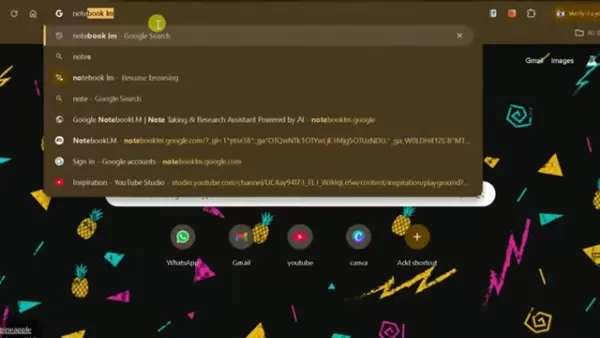
Just search for 'NotebookLM' on Google or enter 'notebooklm.google.com' directly into your browser's address bar. Make sure you are signed into your Google account to use the tool.
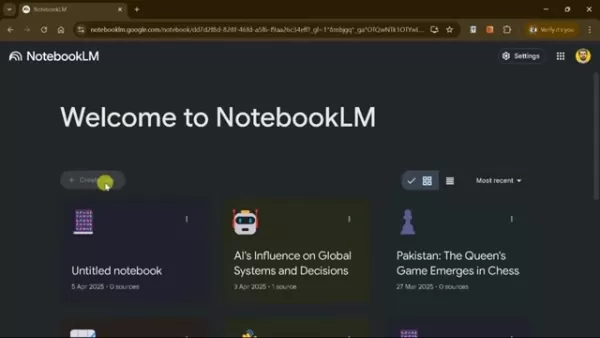
Creating a New Notebook
After signing in, you will see an intuitive interface. To begin a new project, select the '+ Create new' button found on the main dashboard. This will open a new, empty notebook where you can start incorporating your sources.
Adding Sources to NotebookLM
NotebookLM accommodates different file types including PDFs, TXT files, Markdown documents, and audio files (MP3).
You can also bring in content directly from Google Docs, Google Slides, websites, and YouTube videos.
- Uploading Files: Select 'Choose file' to upload documents from your computer. NotebookLM supports various file formats, making it adaptable for different kinds of research materials.
- Importing from Google Drive: Choose 'Google Docs' or 'Google Slides' to import content straight from your Google Drive. This integration simplifies the process if your research materials are already stored within Google’s system.
- Adding Web Links: Utilize the 'Website' or 'YouTube' choices to include URLs. NotebookLM will examine the content and pull out the essential information.
Generating a Mind Map
Once your sources are uploaded, NotebookLM evaluates the data to give you multiple choices:
Generating Mind Maps: Go to the Chat section and pick the Mind Map option. With one click, NotebookLM changes the uploaded content into an attractive and well-arranged mind map.
The mind map will show the main topics and subtopics from your source material, making it simpler to comprehend complex connections and ideas. The AI sorts data to guarantee a precise, efficient visualization of the information.
Exploring and Customizing the Mind Map
The created mind map is interactive and adjustable.
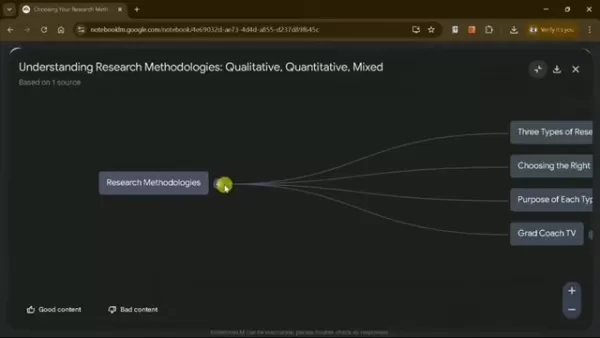
You can:
- Expand Sections: Select the nodes to show sub-nodes, letting you explore specific subjects in more depth.
- View Details: Hover over or select any node to see detailed summaries and excerpts from the original source. This assists you in quickly referring to the original context.
- Navigate to Source: Move directly to the related section in the original document with one click, allowing you to examine the material in its complete context.
Downloading the Mind Map
When you are happy with your mind map, you can download it for use in presentations or research reports. NotebookLM supports multiple export formats. Simply choose 'Download' and select your preferred format to save the mind map to your device.
NotebookLM Pricing: Free Access
Completely Free to Use
NotebookLM is entirely free to use, making it available to students, researchers, and professionals without monetary limitations. This generous offering from Google enables users to utilize powerful AI tools for improved productivity at no expense. Access all primary features without subscription fees or hidden costs.
Pros and Cons of Using NotebookLM
Pros
Free to use, making it available to all.
Works with various file formats and integrates with Google services.
Automates the production of summaries and mind maps, conserving time and energy.
Increases productivity by simplifying research and note-taking procedures.
Intuitive interface makes it simple to navigate and operate.
Cons
Precision of summaries and mind maps relies on the quality of the AI and the source material.
Might need some adjustments to achieve the best outcomes.
Integration with non-Google services is restricted.
Dependence on AI could lessen the growth of manual note-taking abilities.
Core Features of NotebookLM
Key Features and Functionality
NotebookLM includes several primary features intended to simplify research and note-taking:
- Automated Summarization: Automatically produces summaries from various sources, giving a quick summary of main points.
- Mind Map Generation: Instantly builds mind maps from uploaded documents and web links for visual organization.
- Source Integration: Supports multiple file formats and connects with Google Drive, Docs, Slides, YouTube, and websites.
- Interactive Chat: Enables users to communicate with their sources through predefined questions or custom inquiries.
- Customizable Interface: Provides an intuitive interface for easy navigation and personalization of mind maps and study guides.
- Downloadable Content: Allows downloading mind maps and summaries in various formats for simple sharing and presentation.
Real-World Use Cases for NotebookLM
How NotebookLM is Being Utilized
NotebookLM is changing workflows in multiple sectors:
- Academic Research: NotebookLM makes the literature review process easier by quickly creating summaries and mind maps from academic papers, letting researchers recognize key themes and connections more effectively.
- Professional Development: Professionals can employ NotebookLM to keep current with industry news and reports, rapidly understanding key ideas and making informed choices.
- Content Creation: Content creators can arrange research for blog posts, articles, and videos, ensuring their content is complete and well-structured.
- Legal Analysis: Lawyers and legal experts can use NotebookLM to examine case files, regulations, and legal documents, making it simpler to prepare briefs and arguments.
- Medical Research: Medical researchers can use NotebookLM to combine findings from medical journals and studies, aiding the creation of new treatments and research projects.
Frequently Asked Questions About NotebookLM
Is NotebookLM really free to use?
Yes, NotebookLM is a free tool developed by Google, offering access to all its core features without any subscription fees or hidden charges.
What types of files does NotebookLM support?
NotebookLM supports various file formats including PDFs, TXT files, Markdown documents, and audio files (MP3). It also integrates with Google Docs, Google Slides, websites, and YouTube videos.
Can I customize the mind maps generated by NotebookLM?
Yes, the generated mind maps are interactive and customizable. You can expand sections, view details, and navigate to the source material to adapt the mind map to your particular requirements.
How does NotebookLM enhance productivity?
NotebookLM enhances productivity by automating the summarization and organization of information, enabling users to quickly understand key concepts, retain information efficiently, and make better-informed decisions.
Is NotebookLM suitable for academic research?
Yes, NotebookLM is especially helpful for academic research, simplifying the literature review process, identifying patterns, and generating summaries from academic papers.
Related Questions on AI and Mind Mapping
How can AI enhance mind mapping?
AI improves mind mapping by automating the organization and summarization of information, allowing users to quickly visualize and comprehend complex relationships. AI tools like NotebookLM can analyze large amounts of data, extract key points, and build structured mind maps with minimal user input.AI algorithms can recognize and classify information more efficiently than manual techniques, ensuring a thorough and precise representation of the source material. Moreover, AI-driven mind mapping tools can provide personalized learning paths, adaptive summarization, and real-time collaboration features, improving the overall user experience.For instance, consider using AI to develop a mind map from hundreds of academic papers on climate change. The AI could automatically recognize key themes like greenhouse gas emissions, deforestation, and renewable energy, building a structured mind map that emphasizes the connections between these subjects. This would let researchers quickly understand the overall scope of climate change research and spot gaps in the current literature.
What are the best practices for creating effective mind maps?
Developing effective mind maps involves several recommended practices:Start with a Central Topic: Begin with a clear, central topic or idea in the middle of your mind map. This acts as the base for all following branches.Use Keywords and Images: Use keywords and relevant images to represent your ideas. Visual cues can help improve memory and comprehension.Organize Hierarchically: Structure your mind map hierarchically, with main topics branching out into subtopics. This helps to break down complex information into manageable pieces.Use Colors and Symbols: Use colors and symbols to categorize and emphasize important information. This can help you quickly identify patterns and relationships.Keep It Concise: Avoid overly detailed descriptions. Concentrate on capturing the core of each idea in as few words as possible.Regularly Review and Update: Mind maps should be living documents that are regularly reviewed and updated as new information becomes available.By adhering to these best practices, you can create mind maps that are not only visually appealing but also highly effective in organizing and retaining information.
Related article
 Six Tech Giants Back Linux Foundation With $12.5M to Tackle AI Vulnerability Noise
To tackle the flood of low-quality security reports produced by AI automation tools, six major tech companies—Anthropic, Amazon (AWS), GitHub, Google, Microsoft, and OpenAI—have collectively contributed $12.5 million in funding to Linux Foundation in
Musk Considered Leaving OpenAI to His Kids as Altman Testifies
This morning, OpenAI CEO Sam Altman took the stand to address former co-founder Elon Musk’s lawsuit challenging the company’s corporate structure.When asked about Musk’s claim that other founders “stole a charity” by launching a for-profit subsidiary
Sam Altman Sparks Debate Over AI's Deceleration
Listen onApple PodcastsListen onSpotifyOpenAI CEO Sam Altman recently suggested that it may be time to “pace the rate of AI development” to allow society to “harden around some of these new capability levels.”On the latest episode of TechCrunch’s Equ
Related Special Topic Recommendations
Business
Six Tech Giants Back Linux Foundation With $12.5M to Tackle AI Vulnerability Noise
To tackle the flood of low-quality security reports produced by AI automation tools, six major tech companies—Anthropic, Amazon (AWS), GitHub, Google, Microsoft, and OpenAI—have collectively contributed $12.5 million in funding to Linux Foundation in
Musk Considered Leaving OpenAI to His Kids as Altman Testifies
This morning, OpenAI CEO Sam Altman took the stand to address former co-founder Elon Musk’s lawsuit challenging the company’s corporate structure.When asked about Musk’s claim that other founders “stole a charity” by launching a for-profit subsidiary
Sam Altman Sparks Debate Over AI's Deceleration
Listen onApple PodcastsListen onSpotifyOpenAI CEO Sam Altman recently suggested that it may be time to “pace the rate of AI development” to allow society to “harden around some of these new capability levels.”On the latest episode of TechCrunch’s Equ
Related Special Topic Recommendations
Business
 Best AI Competitive Research Tools for Small Businesses
2026 Latest Best Top-rated AI Competitive Research Tools for Small Businesses! XIX.AI has curated a highly powerful game-changing collection, updated weekly with rigorous real-world tests and detailed rankings. You can find a comprehensive free vs paid comparison to help you identify the must-try tools that boost your productivity and give you a competitive edge. Explore now to discover your perfect tool!
 9 tools
 xix.ai
Image editing
Photoshop AI Retouch Tools for Ecommerce Apparel, Skin Cleanup, and Color Consistency
xix.ai
Image editing
Photoshop AI Retouch Tools for Ecommerce Apparel, Skin Cleanup, and Color Consistency
2026 Latest Best Photoshop AI retouch tools for ecommerce apparel, skin cleanup, and color consistency! This top-rated curated list features powerful game-changing solutions that help you boost writing efficiency, streamline content creation, and achieve perfect visual results effortlessly. Each tool has undergone real-world tests through weekly updated rankings, complete with free vs paid comparison details. Backed by XIX.AI, it’s the must-try guide for anyone aiming to unlock your AI edge. Explore now!
10 tools
xix.ai
Prompt
Best AI Prompt Libraries for ChatGPT Workflows
2026 Latest Best Top-Rated AI Prompt Libraries for optimizing all types of ChatGPT workflows. XIX.AI has curated a powerful, game-changing collection that goes through rigorous real-world tests to ensure top performance. You can find detailed free vs paid comparisons and expert rankings to help you choose the must-try tools that boost your productivity and unlock your AI edge. Explore now!
11 tools
xix.ai
Education and Learning
AI Quiz Builder Platforms for Teachers, Tutors, and Cohort-Based Learning Programs
2026 Latest Best AI Quiz Builder Platforms for Teachers, Tutors, and Cohort-Based Learning Programs! XIX.AI has curated a top-rated list of powerful game-changing tools that go through real-world tests to deliver accurate rankings. These must-try platforms help boost writing efficiency, streamline content creation, and simplify quiz design across all learning scenarios. Explore now to discover your perfect tool for unlocking your AI edge in teaching!
13 tools
xix.ai
code
AI Pull Request Review Tools for GitHub Teams Handling Refactors, Bugs, and Security Gaps
2026 Latest Best AI Pull Request Review Tools for GitHub Teams are here on XIX.AI! This top-rated curated list showcases powerful game-changing solutions that streamline refactoring, bug fixing, and security gap detection across all team workflows. Enjoy a free vs paid comparison along with real-world tests and detailed rankings to help you find the perfect tool that boosts productivity significantly. Explore now to unlock your AI edge!
12 tools
xix.ai
Text-to-speech
Best AI Text to Speech Tools for Natural Voiceovers
2026 Latest Best Top-rated AI Text to Speech Tools for Natural Voiceovers are here on XIX.AI! This curated list features powerful, game-changing options that deliver crystal-clear voices for every use case, backed by real-world tests and weekly updated rankings. Get a free vs paid comparison to find the must-try solution that boosts your productivity instantly. Explore now to Unlock your AI edge!
11 tools
xix.ai

 Comments (1)
0/500
Comments (1)
0/500
![DanielAllen]()
2026 klingt utopisch! Aber die Idee, mal eben Mindmaps aus PDFs, YouTube-Videos und Websites zu erstellen, wär' ja schon jetzt praktisch. Besonders als Student, der für Recherchen viel zusammenkopiert. Hoffentlich kommt das wirklich und wird nicht nur ne Marketing-Blase. 😅 Würd's gleich testen, wenn's da ist!
Are you finding it difficult to consolidate information from different sources such as PDFs, websites, and YouTube videos? In our fast-moving world, the ability to efficiently process and synthesize information is more important than ever. NotebookLM, a robust AI-powered tool, provides an effortless solution by creating mind maps from any digital content instantly. This free approach is transformative for students, professionals, and researchers aiming to boost their productivity and comprehension. Let's examine how you can use NotebookLM to change the way you visualize and engage with information, completely free of charge.
Key Points
NotebookLM is a complimentary tool from Google that creates mind maps on the fly.
It works with numerous digital content types, such as PDFs, text, audio, websites, and YouTube videos.
Users can build mind maps to more effectively understand and structure complex information rapidly.
The tool works smoothly with Google Docs, Slides, and Drive.
NotebookLM improves learning, research, and professional efficiency.
Introduction to NotebookLM
What is NotebookLM?
NotebookLM is a groundbreaking AI-driven note-taking and research assistant created by Google.
Its purpose is to assist users in comprehending and structuring information from diverse sources effectively. In contrast to conventional note-taking techniques, NotebookLM employs artificial intelligence to automatically produce summaries, mind maps, and study guides from documents, web pages, and YouTube videos you provide. This makes it an essential resource for anyone requiring a quick understanding of primary concepts from extensive information. By streamlining the information synthesis process, NotebookLM enables users to concentrate on more in-depth analysis and practical application.
NotebookLM converts unprocessed data into practical insights. Its capacity to pull out pertinent information and display it in an organized layout is especially beneficial for researchers, students, and professionals who must remain current in their areas of expertise. This tool not only conserves time but also improves understanding by presenting data in a visually attractive and systematic way. Using NotebookLM, users can easily handle their research materials and develop thorough summaries that emphasize the central themes and arguments, thereby increasing overall productivity.
Using Google’s NotebookLM, information overload becomes controllable, and intricate data is readily converted into structured knowledge, promoting a more productive and perceptive method for learning and research.
Who Can Benefit from Using NotebookLM?
Students: NotebookLM can significantly enhance study routines by converting lecture notes, research papers, and online articles into manageable mind maps and summaries. This allows students to quickly understand key ideas, remember information more efficiently, and get ready for exams with increased assurance.
Researchers: Researchers frequently handle large volumes of information from various origins. NotebookLM can aid them in arranging their discoveries, recognizing patterns, and creating summaries, simplifying the tasks of writing papers, performing literature reviews, and formulating new research concepts.
Professionals: In the business environment, staying updated is crucial. NotebookLM can help professionals rapidly absorb reports, articles, and industry updates, assisting them in making more educated choices and maintaining a competitive edge.
Content Creators: Content creators can use NotebookLM to arrange research for blog entries, articles, and videos. By developing mind maps from their research, they can guarantee their content is thorough, well-organized, and simple for their audience to comprehend.
Comparison with Other Mind Mapping Tools
NotebookLM vs. Traditional Mind Mapping Software
While conventional mind mapping software provides a manual method for visualizing information, NotebookLM introduces the capability of AI to automate and improve the process.
Here is a comparison to clarify the main distinctions:
NotebookLM stands out in automating the creation of mind maps, making it a practical and effective tool for anyone needing to quickly visualize and comprehend complex information. Traditional mind mapping software, however, provides more control and personalization, making it appropriate for users who favor a more involved method.
Step-by-Step Guide to Using NotebookLM
Accessing NotebookLM
The initial step is to visit the official NotebookLM website offered by Google.
Just search for 'NotebookLM' on Google or enter 'notebooklm.google.com' directly into your browser's address bar. Make sure you are signed into your Google account to use the tool.
Creating a New Notebook
After signing in, you will see an intuitive interface. To begin a new project, select the '+ Create new' button found on the main dashboard. This will open a new, empty notebook where you can start incorporating your sources.
Adding Sources to NotebookLM
NotebookLM accommodates different file types including PDFs, TXT files, Markdown documents, and audio files (MP3).
You can also bring in content directly from Google Docs, Google Slides, websites, and YouTube videos.
- Uploading Files: Select 'Choose file' to upload documents from your computer. NotebookLM supports various file formats, making it adaptable for different kinds of research materials.
- Importing from Google Drive: Choose 'Google Docs' or 'Google Slides' to import content straight from your Google Drive. This integration simplifies the process if your research materials are already stored within Google’s system.
- Adding Web Links: Utilize the 'Website' or 'YouTube' choices to include URLs. NotebookLM will examine the content and pull out the essential information.
Generating a Mind Map
Once your sources are uploaded, NotebookLM evaluates the data to give you multiple choices:
Generating Mind Maps: Go to the Chat section and pick the Mind Map option. With one click, NotebookLM changes the uploaded content into an attractive and well-arranged mind map.
The mind map will show the main topics and subtopics from your source material, making it simpler to comprehend complex connections and ideas. The AI sorts data to guarantee a precise, efficient visualization of the information.
Exploring and Customizing the Mind Map
The created mind map is interactive and adjustable.
You can:
- Expand Sections: Select the nodes to show sub-nodes, letting you explore specific subjects in more depth.
- View Details: Hover over or select any node to see detailed summaries and excerpts from the original source. This assists you in quickly referring to the original context.
- Navigate to Source: Move directly to the related section in the original document with one click, allowing you to examine the material in its complete context.
Downloading the Mind Map
When you are happy with your mind map, you can download it for use in presentations or research reports. NotebookLM supports multiple export formats. Simply choose 'Download' and select your preferred format to save the mind map to your device.
NotebookLM Pricing: Free Access
Completely Free to Use
NotebookLM is entirely free to use, making it available to students, researchers, and professionals without monetary limitations. This generous offering from Google enables users to utilize powerful AI tools for improved productivity at no expense. Access all primary features without subscription fees or hidden costs.
Pros and Cons of Using NotebookLM
Pros
Free to use, making it available to all.
Works with various file formats and integrates with Google services.
Automates the production of summaries and mind maps, conserving time and energy.
Increases productivity by simplifying research and note-taking procedures.
Intuitive interface makes it simple to navigate and operate.
Cons
Precision of summaries and mind maps relies on the quality of the AI and the source material.
Might need some adjustments to achieve the best outcomes.
Integration with non-Google services is restricted.
Dependence on AI could lessen the growth of manual note-taking abilities.
Core Features of NotebookLM
Key Features and Functionality
NotebookLM includes several primary features intended to simplify research and note-taking:
- Automated Summarization: Automatically produces summaries from various sources, giving a quick summary of main points.
- Mind Map Generation: Instantly builds mind maps from uploaded documents and web links for visual organization.
- Source Integration: Supports multiple file formats and connects with Google Drive, Docs, Slides, YouTube, and websites.
- Interactive Chat: Enables users to communicate with their sources through predefined questions or custom inquiries.
- Customizable Interface: Provides an intuitive interface for easy navigation and personalization of mind maps and study guides.
- Downloadable Content: Allows downloading mind maps and summaries in various formats for simple sharing and presentation.
Real-World Use Cases for NotebookLM
How NotebookLM is Being Utilized
NotebookLM is changing workflows in multiple sectors:
- Academic Research: NotebookLM makes the literature review process easier by quickly creating summaries and mind maps from academic papers, letting researchers recognize key themes and connections more effectively.
- Professional Development: Professionals can employ NotebookLM to keep current with industry news and reports, rapidly understanding key ideas and making informed choices.
- Content Creation: Content creators can arrange research for blog posts, articles, and videos, ensuring their content is complete and well-structured.
- Legal Analysis: Lawyers and legal experts can use NotebookLM to examine case files, regulations, and legal documents, making it simpler to prepare briefs and arguments.
- Medical Research: Medical researchers can use NotebookLM to combine findings from medical journals and studies, aiding the creation of new treatments and research projects.
Frequently Asked Questions About NotebookLM
Is NotebookLM really free to use?
Yes, NotebookLM is a free tool developed by Google, offering access to all its core features without any subscription fees or hidden charges.
What types of files does NotebookLM support?
NotebookLM supports various file formats including PDFs, TXT files, Markdown documents, and audio files (MP3). It also integrates with Google Docs, Google Slides, websites, and YouTube videos.
Can I customize the mind maps generated by NotebookLM?
Yes, the generated mind maps are interactive and customizable. You can expand sections, view details, and navigate to the source material to adapt the mind map to your particular requirements.
How does NotebookLM enhance productivity?
NotebookLM enhances productivity by automating the summarization and organization of information, enabling users to quickly understand key concepts, retain information efficiently, and make better-informed decisions.
Is NotebookLM suitable for academic research?
Yes, NotebookLM is especially helpful for academic research, simplifying the literature review process, identifying patterns, and generating summaries from academic papers.
Related Questions on AI and Mind Mapping
How can AI enhance mind mapping?
AI improves mind mapping by automating the organization and summarization of information, allowing users to quickly visualize and comprehend complex relationships. AI tools like NotebookLM can analyze large amounts of data, extract key points, and build structured mind maps with minimal user input.AI algorithms can recognize and classify information more efficiently than manual techniques, ensuring a thorough and precise representation of the source material. Moreover, AI-driven mind mapping tools can provide personalized learning paths, adaptive summarization, and real-time collaboration features, improving the overall user experience.For instance, consider using AI to develop a mind map from hundreds of academic papers on climate change. The AI could automatically recognize key themes like greenhouse gas emissions, deforestation, and renewable energy, building a structured mind map that emphasizes the connections between these subjects. This would let researchers quickly understand the overall scope of climate change research and spot gaps in the current literature.
What are the best practices for creating effective mind maps?
Developing effective mind maps involves several recommended practices:Start with a Central Topic: Begin with a clear, central topic or idea in the middle of your mind map. This acts as the base for all following branches.Use Keywords and Images: Use keywords and relevant images to represent your ideas. Visual cues can help improve memory and comprehension.Organize Hierarchically: Structure your mind map hierarchically, with main topics branching out into subtopics. This helps to break down complex information into manageable pieces.Use Colors and Symbols: Use colors and symbols to categorize and emphasize important information. This can help you quickly identify patterns and relationships.Keep It Concise: Avoid overly detailed descriptions. Concentrate on capturing the core of each idea in as few words as possible.Regularly Review and Update: Mind maps should be living documents that are regularly reviewed and updated as new information becomes available.By adhering to these best practices, you can create mind maps that are not only visually appealing but also highly effective in organizing and retaining information.








 Six Tech Giants Back Linux Foundation With $12.5M to Tackle AI Vulnerability Noise
To tackle the flood of low-quality security reports produced by AI automation tools, six major tech companies—Anthropic, Amazon (AWS), GitHub, Google, Microsoft, and OpenAI—have collectively contributed $12.5 million in funding to Linux Foundation in
Six Tech Giants Back Linux Foundation With $12.5M to Tackle AI Vulnerability Noise
To tackle the flood of low-quality security reports produced by AI automation tools, six major tech companies—Anthropic, Amazon (AWS), GitHub, Google, Microsoft, and OpenAI—have collectively contributed $12.5 million in funding to Linux Foundation in
 Musk Considered Leaving OpenAI to His Kids as Altman Testifies
This morning, OpenAI CEO Sam Altman took the stand to address former co-founder Elon Musk’s lawsuit challenging the company’s corporate structure.When asked about Musk’s claim that other founders “stole a charity” by launching a for-profit subsidiary
Musk Considered Leaving OpenAI to His Kids as Altman Testifies
This morning, OpenAI CEO Sam Altman took the stand to address former co-founder Elon Musk’s lawsuit challenging the company’s corporate structure.When asked about Musk’s claim that other founders “stole a charity” by launching a for-profit subsidiary
 Sam Altman Sparks Debate Over AI's Deceleration
Listen onApple PodcastsListen onSpotifyOpenAI CEO Sam Altman recently suggested that it may be time to “pace the rate of AI development” to allow society to “harden around some of these new capability levels.”On the latest episode of TechCrunch’s Equ
Sam Altman Sparks Debate Over AI's Deceleration
Listen onApple PodcastsListen onSpotifyOpenAI CEO Sam Altman recently suggested that it may be time to “pace the rate of AI development” to allow society to “harden around some of these new capability levels.”On the latest episode of TechCrunch’s Equ

2026 Latest Best Top-rated AI Competitive Research Tools for Small Businesses! XIX.AI has curated a highly powerful game-changing collection, updated weekly with rigorous real-world tests and detailed rankings. You can find a comprehensive free vs paid comparison to help you identify the must-try tools that boost your productivity and give you a competitive edge. Explore now to discover your perfect tool!
9 tools
xix.ai

2026 Latest Best Photoshop AI retouch tools for ecommerce apparel, skin cleanup, and color consistency! This top-rated curated list features powerful game-changing solutions that help you boost writing efficiency, streamline content creation, and achieve perfect visual results effortlessly. Each tool has undergone real-world tests through weekly updated rankings, complete with free vs paid comparison details. Backed by XIX.AI, it’s the must-try guide for anyone aiming to unlock your AI edge. Explore now!
10 tools
xix.ai

2026 Latest Best Top-Rated AI Prompt Libraries for optimizing all types of ChatGPT workflows. XIX.AI has curated a powerful, game-changing collection that goes through rigorous real-world tests to ensure top performance. You can find detailed free vs paid comparisons and expert rankings to help you choose the must-try tools that boost your productivity and unlock your AI edge. Explore now!
11 tools
xix.ai

2026 Latest Best AI Quiz Builder Platforms for Teachers, Tutors, and Cohort-Based Learning Programs! XIX.AI has curated a top-rated list of powerful game-changing tools that go through real-world tests to deliver accurate rankings. These must-try platforms help boost writing efficiency, streamline content creation, and simplify quiz design across all learning scenarios. Explore now to discover your perfect tool for unlocking your AI edge in teaching!
13 tools
xix.ai

2026 Latest Best AI Pull Request Review Tools for GitHub Teams are here on XIX.AI! This top-rated curated list showcases powerful game-changing solutions that streamline refactoring, bug fixing, and security gap detection across all team workflows. Enjoy a free vs paid comparison along with real-world tests and detailed rankings to help you find the perfect tool that boosts productivity significantly. Explore now to unlock your AI edge!
12 tools
xix.ai

2026 Latest Best Top-rated AI Text to Speech Tools for Natural Voiceovers are here on XIX.AI! This curated list features powerful, game-changing options that deliver crystal-clear voices for every use case, backed by real-world tests and weekly updated rankings. Get a free vs paid comparison to find the must-try solution that boosts your productivity instantly. Explore now to Unlock your AI edge!
11 tools
xix.ai

2026 klingt utopisch! Aber die Idee, mal eben Mindmaps aus PDFs, YouTube-Videos und Websites zu erstellen, wär' ja schon jetzt praktisch. Besonders als Student, der für Recherchen viel zusammenkopiert. Hoffentlich kommt das wirklich und wird nicht nur ne Marketing-Blase. 😅 Würd's gleich testen, wenn's da ist!












