


 Home
HomeAI-Driven Interior Design: ReRoom AI Transforms Your Space
Aspiring to revamp your home but short on design expertise or funds for a professional? Artificial intelligence is reshaping interior design, delivering user-friendly and creative solutions. ReRoom AI stands out as a game-changer, enabling users to envision and plan their spaces with ease. This tool empowers you to reimagine interiors, providing lifelike AI-generated designs across a variety of styles.
Key Highlights
ReRoom AI delivers cutting-edge tools for transforming interior spaces.
Upload room photos to preview design updates instantly.
The platform offers a broad selection of design aesthetics for diverse preferences.
ReRoom AI streamlines the design process, making it approachable for all.
ReRoom AI: Revolutionizing Interior Design with AI
Introducing ReRoom AI
ReRoom AI is a trailblazing platform that leverages artificial intelligence to help users reenvision their interiors. By uploading room photos, you can explore countless design styles, bringing your vision to life quickly and effortlessly. This technology makes professional-grade design accessible, offering a budget-friendly alternative to traditional designers. It’s an ideal way to experiment with renovation or redecoration ideas confidently.
Core Features and Capabilities
ReRoom AI equips users with intuitive tools to make interior design engaging and approachable. Key features include:
- Style Exploration: Upload a room photo and apply various design aesthetics to visualize transformations. See your space in modern, minimalist, industrial, or other styles effortlessly.
- AI-Driven Visualization: Generate photorealistic renderings of your redesigned space in seconds.
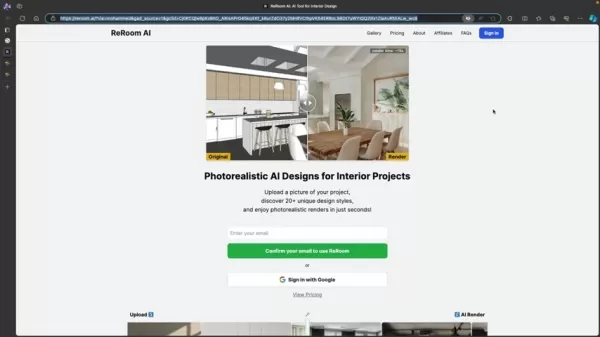
The platform employs advanced AI to produce stunning, realistic designs.
- Virtual Staging: Experiment with different furniture and decor to assess how they enhance your design.
- Intuitive Interface: ReRoom AI’s user-friendly design ensures that anyone, regardless of experience, can navigate the platform and create captivating visualizations. It’s the go-to solution for all your rendering needs.
Starting with ReRoom AI
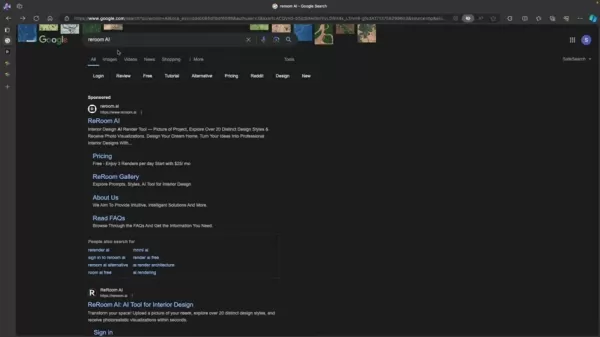
Begin by visiting the ReRoom AI website, easily found by searching “ReRoom AI” in your preferred search engine.
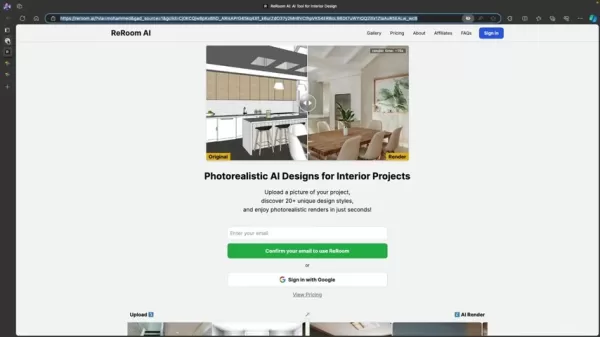
Once there, explore a suite of tools designed to simplify interior design.
Guide to Redesigning Your Space with ReRoom AI
Step 1: Accessing ReRoom AI
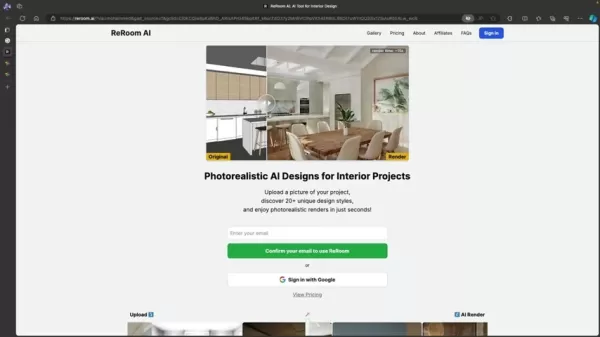
Navigate to the ReRoom AI website and sign up for an account.
Registration is straightforward, requiring only an email and password, or you can sign in using your Google account.
Step 2: Uploading Your Room
Upload a high-quality photo of the room you wish to redesign. For optimal results, ensure the image is well-lit and captures the entire space. ReRoom AI supports multiple image formats for easy uploads.
Step 3: Selecting a Design Style
Explore a vast collection of design styles and choose one that aligns with your vision, from sleek minimalism to rustic industrial charm.
Review style options, such as Scandinavian or coastal, to find the perfect fit.
Step 4: Personalizing Details
Customize elements like lighting, color schemes, and furniture textures to tailor the design to your preferences.
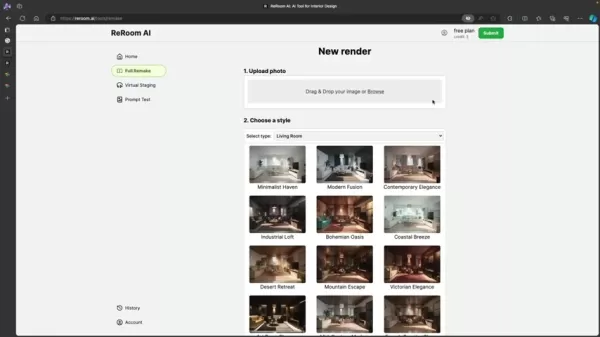
Explore all customization options before finalizing your design.
Step 5: Rendering and Refining
Hit the “Render” button to create a photorealistic visualization of your redesigned space in seconds. Review the result and tweak as needed. For watermark-free images, consider upgrading to a pro plan. Save designs you love for future reference.
Precision Design Control
This feature lets users pinpoint specific areas in their uploaded images for targeted edits, ensuring precise and impactful design results.
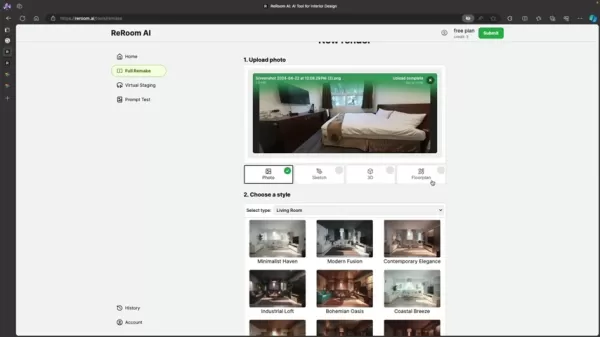
You control which elements to modify and which to retain.
Pros and Cons of ReRoom AI
Pros
Cost-effective design solutions
User-friendly for beginners
Delivers fast, realistic visualizations
Supports a diverse array of design styles
Includes virtual staging features
Cons
Free plan offers limited customization
No support for uploading custom furniture models
Some designs may need additional tweaking
Frequently Asked Questions
Is ReRoom AI free to use?
ReRoom AI offers free and paid plans. The free tier provides limited rendering capabilities, while paid plans unlock advanced features and higher usage limits.
What design styles are available?
ReRoom AI supports a wide range of styles, including modern, minimalist, industrial, Scandinavian, and coastal, ensuring options for every taste.
Can I upload custom furniture or decor?
Currently, ReRoom AI does not allow custom furniture or decor uploads, but its library is regularly updated with new items.
Which image formats are supported?
ReRoom AI accepts JPEG, PNG, and TIFF formats. Use high-quality images for the best rendering results.
How long does rendering take?
Rendering times depend on design complexity but are typically completed in seconds, offering a fast and seamless experience.
Related Questions
Why use AI for interior design?
AI tools like ReRoom AI offer rapid, realistic visualizations, suggest efficient layouts, and automate repetitive tasks, saving time and money. They make professional design tools accessible to everyone, allowing exploration of various styles and layouts with ease.
Related article
 South Korea Breaks Ground on National AI Computing Center, Investing 2.5 Trillion Won with 2028 Target
South Korean outlet EtNews reports that groundbreaking for the Korea AI Computing Center (KOACC) took place on August 3 at the Solar City data center park in Sunan, Jeollanam-do. Backed by a total investment of 2.5 trillion KRW (roughly 11.838 billio
Six Tech Giants Back Linux Foundation With $12.5M to Tackle AI Vulnerability Noise
To tackle the flood of low-quality security reports produced by AI automation tools, six major tech companies—Anthropic, Amazon (AWS), GitHub, Google, Microsoft, and OpenAI—have collectively contributed $12.5 million in funding to Linux Foundation in
Musk Considered Leaving OpenAI to His Kids as Altman Testifies
This morning, OpenAI CEO Sam Altman took the stand to address former co-founder Elon Musk’s lawsuit challenging the company’s corporate structure.When asked about Musk’s claim that other founders “stole a charity” by launching a for-profit subsidiary
Related Special Topic Recommendations
Music composition
South Korea Breaks Ground on National AI Computing Center, Investing 2.5 Trillion Won with 2028 Target
South Korean outlet EtNews reports that groundbreaking for the Korea AI Computing Center (KOACC) took place on August 3 at the Solar City data center park in Sunan, Jeollanam-do. Backed by a total investment of 2.5 trillion KRW (roughly 11.838 billio
Six Tech Giants Back Linux Foundation With $12.5M to Tackle AI Vulnerability Noise
To tackle the flood of low-quality security reports produced by AI automation tools, six major tech companies—Anthropic, Amazon (AWS), GitHub, Google, Microsoft, and OpenAI—have collectively contributed $12.5 million in funding to Linux Foundation in
Musk Considered Leaving OpenAI to His Kids as Altman Testifies
This morning, OpenAI CEO Sam Altman took the stand to address former co-founder Elon Musk’s lawsuit challenging the company’s corporate structure.When asked about Musk’s claim that other founders “stole a charity” by launching a for-profit subsidiary
Related Special Topic Recommendations
Music composition
 AI Vocal Demo Tools for Songwriters, Hooks, Toplines, and Multilingual Draft Sessions
2026 Latest Best AI Vocal Demo Tools for Songwriters, Hook Creators, and Multi-Language Content Teams! XIX.AI has curated a top-rated list of powerful game-changing tools that go through rigorous real-world tests. You’ll find detailed free vs paid comparison data, comprehensive rankings, and must-try options to help you boost writing efficiency and unlock your creative potential. Explore now to discover your perfect tool for all your content needs!
 9 tools
 xix.ai
Business
Best AI Competitive Research Tools for Small Businesses
xix.ai
Business
Best AI Competitive Research Tools for Small Businesses
2026 Latest Best Top-rated AI Competitive Research Tools for Small Businesses! XIX.AI has curated a highly powerful game-changing collection, updated weekly with rigorous real-world tests and detailed rankings. You can find a comprehensive free vs paid comparison to help you identify the must-try tools that boost your productivity and give you a competitive edge. Explore now to discover your perfect tool!
9 tools
xix.ai
Image editing
Photoshop AI Retouch Tools for Ecommerce Apparel, Skin Cleanup, and Color Consistency
2026 Latest Best Photoshop AI retouch tools for ecommerce apparel, skin cleanup, and color consistency! This top-rated curated list features powerful game-changing solutions that help you boost writing efficiency, streamline content creation, and achieve perfect visual results effortlessly. Each tool has undergone real-world tests through weekly updated rankings, complete with free vs paid comparison details. Backed by XIX.AI, it’s the must-try guide for anyone aiming to unlock your AI edge. Explore now!
10 tools
xix.ai
Prompt
Best AI Prompt Libraries for ChatGPT Workflows
2026 Latest Best Top-Rated AI Prompt Libraries for optimizing all types of ChatGPT workflows. XIX.AI has curated a powerful, game-changing collection that goes through rigorous real-world tests to ensure top performance. You can find detailed free vs paid comparisons and expert rankings to help you choose the must-try tools that boost your productivity and unlock your AI edge. Explore now!
11 tools
xix.ai
Education and Learning
AI Quiz Builder Platforms for Teachers, Tutors, and Cohort-Based Learning Programs
2026 Latest Best AI Quiz Builder Platforms for Teachers, Tutors, and Cohort-Based Learning Programs! XIX.AI has curated a top-rated list of powerful game-changing tools that go through real-world tests to deliver accurate rankings. These must-try platforms help boost writing efficiency, streamline content creation, and simplify quiz design across all learning scenarios. Explore now to discover your perfect tool for unlocking your AI edge in teaching!
13 tools
xix.ai
code
AI Pull Request Review Tools for GitHub Teams Handling Refactors, Bugs, and Security Gaps
2026 Latest Best AI Pull Request Review Tools for GitHub Teams are here on XIX.AI! This top-rated curated list showcases powerful game-changing solutions that streamline refactoring, bug fixing, and security gap detection across all team workflows. Enjoy a free vs paid comparison along with real-world tests and detailed rankings to help you find the perfect tool that boosts productivity significantly. Explore now to unlock your AI edge!
12 tools
xix.ai

 Comments (4)
0/500
Comments (4)
0/500
![BenJackson]()
Die Idee ist wirklich praktisch! Vor allem für Leute, die wie ich nicht viel Geld für einen Innenarchitekten übrig haben. Aber ich frage mich, ob so eine KI wirklich meinen persönlichen Geschmack und die Atmosphäre, die ich mir vorstelle, treffen kann. 🤔 Vielleicht sind die Ergebnisse etwas generisch? Trotzdem, ein spannender Ansatz, um erstmal Inspiration zu sammeln!
![JamesLopez]()
Whoa, ReRoom AI sounds like a game-changer for home makeovers! 🏠 I’m no designer, but this makes me wanna redo my living room on a budget. Anyone tried it yet?
![JoseMiller]()
This AI interior design tool sounds like a game-changer! 😍 I’m curious how it handles quirky spaces like my tiny apartment.
![JamesJones]()
This AI interior design stuff is wild! ReRoom AI sounds like a game-changer for someone like me who’s clueless about decor. 😎 Can it really make my tiny apartment look like a luxe penthouse?
Aspiring to revamp your home but short on design expertise or funds for a professional? Artificial intelligence is reshaping interior design, delivering user-friendly and creative solutions. ReRoom AI stands out as a game-changer, enabling users to envision and plan their spaces with ease. This tool empowers you to reimagine interiors, providing lifelike AI-generated designs across a variety of styles.
Key Highlights
ReRoom AI delivers cutting-edge tools for transforming interior spaces.
Upload room photos to preview design updates instantly.
The platform offers a broad selection of design aesthetics for diverse preferences.
ReRoom AI streamlines the design process, making it approachable for all.
ReRoom AI: Revolutionizing Interior Design with AI
Introducing ReRoom AI
ReRoom AI is a trailblazing platform that leverages artificial intelligence to help users reenvision their interiors. By uploading room photos, you can explore countless design styles, bringing your vision to life quickly and effortlessly. This technology makes professional-grade design accessible, offering a budget-friendly alternative to traditional designers. It’s an ideal way to experiment with renovation or redecoration ideas confidently.
Core Features and Capabilities
ReRoom AI equips users with intuitive tools to make interior design engaging and approachable. Key features include:
- Style Exploration: Upload a room photo and apply various design aesthetics to visualize transformations. See your space in modern, minimalist, industrial, or other styles effortlessly.
- AI-Driven Visualization: Generate photorealistic renderings of your redesigned space in seconds.
The platform employs advanced AI to produce stunning, realistic designs.
- Virtual Staging: Experiment with different furniture and decor to assess how they enhance your design.
- Intuitive Interface: ReRoom AI’s user-friendly design ensures that anyone, regardless of experience, can navigate the platform and create captivating visualizations. It’s the go-to solution for all your rendering needs.
Starting with ReRoom AI
Begin by visiting the ReRoom AI website, easily found by searching “ReRoom AI” in your preferred search engine.
Once there, explore a suite of tools designed to simplify interior design.
Guide to Redesigning Your Space with ReRoom AI
Step 1: Accessing ReRoom AI
Navigate to the ReRoom AI website and sign up for an account.
Registration is straightforward, requiring only an email and password, or you can sign in using your Google account.
Step 2: Uploading Your Room
Upload a high-quality photo of the room you wish to redesign. For optimal results, ensure the image is well-lit and captures the entire space. ReRoom AI supports multiple image formats for easy uploads.
Step 3: Selecting a Design Style
Explore a vast collection of design styles and choose one that aligns with your vision, from sleek minimalism to rustic industrial charm.
Review style options, such as Scandinavian or coastal, to find the perfect fit.
Step 4: Personalizing Details
Customize elements like lighting, color schemes, and furniture textures to tailor the design to your preferences.
Explore all customization options before finalizing your design.
Step 5: Rendering and Refining
Hit the “Render” button to create a photorealistic visualization of your redesigned space in seconds. Review the result and tweak as needed. For watermark-free images, consider upgrading to a pro plan. Save designs you love for future reference.
Precision Design Control
This feature lets users pinpoint specific areas in their uploaded images for targeted edits, ensuring precise and impactful design results.
You control which elements to modify and which to retain.
Pros and Cons of ReRoom AI
Pros
Cost-effective design solutions
User-friendly for beginners
Delivers fast, realistic visualizations
Supports a diverse array of design styles
Includes virtual staging features
Cons
Free plan offers limited customization
No support for uploading custom furniture models
Some designs may need additional tweaking
Frequently Asked Questions
Is ReRoom AI free to use?
ReRoom AI offers free and paid plans. The free tier provides limited rendering capabilities, while paid plans unlock advanced features and higher usage limits.
What design styles are available?
ReRoom AI supports a wide range of styles, including modern, minimalist, industrial, Scandinavian, and coastal, ensuring options for every taste.
Can I upload custom furniture or decor?
Currently, ReRoom AI does not allow custom furniture or decor uploads, but its library is regularly updated with new items.
Which image formats are supported?
ReRoom AI accepts JPEG, PNG, and TIFF formats. Use high-quality images for the best rendering results.
How long does rendering take?
Rendering times depend on design complexity but are typically completed in seconds, offering a fast and seamless experience.
Related Questions
Why use AI for interior design?
AI tools like ReRoom AI offer rapid, realistic visualizations, suggest efficient layouts, and automate repetitive tasks, saving time and money. They make professional design tools accessible to everyone, allowing exploration of various styles and layouts with ease.








 South Korea Breaks Ground on National AI Computing Center, Investing 2.5 Trillion Won with 2028 Target
South Korean outlet EtNews reports that groundbreaking for the Korea AI Computing Center (KOACC) took place on August 3 at the Solar City data center park in Sunan, Jeollanam-do. Backed by a total investment of 2.5 trillion KRW (roughly 11.838 billio
South Korea Breaks Ground on National AI Computing Center, Investing 2.5 Trillion Won with 2028 Target
South Korean outlet EtNews reports that groundbreaking for the Korea AI Computing Center (KOACC) took place on August 3 at the Solar City data center park in Sunan, Jeollanam-do. Backed by a total investment of 2.5 trillion KRW (roughly 11.838 billio
 Six Tech Giants Back Linux Foundation With $12.5M to Tackle AI Vulnerability Noise
To tackle the flood of low-quality security reports produced by AI automation tools, six major tech companies—Anthropic, Amazon (AWS), GitHub, Google, Microsoft, and OpenAI—have collectively contributed $12.5 million in funding to Linux Foundation in
Six Tech Giants Back Linux Foundation With $12.5M to Tackle AI Vulnerability Noise
To tackle the flood of low-quality security reports produced by AI automation tools, six major tech companies—Anthropic, Amazon (AWS), GitHub, Google, Microsoft, and OpenAI—have collectively contributed $12.5 million in funding to Linux Foundation in
 Musk Considered Leaving OpenAI to His Kids as Altman Testifies
This morning, OpenAI CEO Sam Altman took the stand to address former co-founder Elon Musk’s lawsuit challenging the company’s corporate structure.When asked about Musk’s claim that other founders “stole a charity” by launching a for-profit subsidiary
Musk Considered Leaving OpenAI to His Kids as Altman Testifies
This morning, OpenAI CEO Sam Altman took the stand to address former co-founder Elon Musk’s lawsuit challenging the company’s corporate structure.When asked about Musk’s claim that other founders “stole a charity” by launching a for-profit subsidiary

2026 Latest Best AI Vocal Demo Tools for Songwriters, Hook Creators, and Multi-Language Content Teams! XIX.AI has curated a top-rated list of powerful game-changing tools that go through rigorous real-world tests. You’ll find detailed free vs paid comparison data, comprehensive rankings, and must-try options to help you boost writing efficiency and unlock your creative potential. Explore now to discover your perfect tool for all your content needs!
9 tools
xix.ai

2026 Latest Best Top-rated AI Competitive Research Tools for Small Businesses! XIX.AI has curated a highly powerful game-changing collection, updated weekly with rigorous real-world tests and detailed rankings. You can find a comprehensive free vs paid comparison to help you identify the must-try tools that boost your productivity and give you a competitive edge. Explore now to discover your perfect tool!
9 tools
xix.ai

2026 Latest Best Photoshop AI retouch tools for ecommerce apparel, skin cleanup, and color consistency! This top-rated curated list features powerful game-changing solutions that help you boost writing efficiency, streamline content creation, and achieve perfect visual results effortlessly. Each tool has undergone real-world tests through weekly updated rankings, complete with free vs paid comparison details. Backed by XIX.AI, it’s the must-try guide for anyone aiming to unlock your AI edge. Explore now!
10 tools
xix.ai

2026 Latest Best Top-Rated AI Prompt Libraries for optimizing all types of ChatGPT workflows. XIX.AI has curated a powerful, game-changing collection that goes through rigorous real-world tests to ensure top performance. You can find detailed free vs paid comparisons and expert rankings to help you choose the must-try tools that boost your productivity and unlock your AI edge. Explore now!
11 tools
xix.ai

2026 Latest Best AI Quiz Builder Platforms for Teachers, Tutors, and Cohort-Based Learning Programs! XIX.AI has curated a top-rated list of powerful game-changing tools that go through real-world tests to deliver accurate rankings. These must-try platforms help boost writing efficiency, streamline content creation, and simplify quiz design across all learning scenarios. Explore now to discover your perfect tool for unlocking your AI edge in teaching!
13 tools
xix.ai

2026 Latest Best AI Pull Request Review Tools for GitHub Teams are here on XIX.AI! This top-rated curated list showcases powerful game-changing solutions that streamline refactoring, bug fixing, and security gap detection across all team workflows. Enjoy a free vs paid comparison along with real-world tests and detailed rankings to help you find the perfect tool that boosts productivity significantly. Explore now to unlock your AI edge!
12 tools
xix.ai

Die Idee ist wirklich praktisch! Vor allem für Leute, die wie ich nicht viel Geld für einen Innenarchitekten übrig haben. Aber ich frage mich, ob so eine KI wirklich meinen persönlichen Geschmack und die Atmosphäre, die ich mir vorstelle, treffen kann. 🤔 Vielleicht sind die Ergebnisse etwas generisch? Trotzdem, ein spannender Ansatz, um erstmal Inspiration zu sammeln!
Whoa, ReRoom AI sounds like a game-changer for home makeovers! 🏠 I’m no designer, but this makes me wanna redo my living room on a budget. Anyone tried it yet?
This AI interior design tool sounds like a game-changer! 😍 I’m curious how it handles quirky spaces like my tiny apartment.
This AI interior design stuff is wild! ReRoom AI sounds like a game-changer for someone like me who’s clueless about decor. 😎 Can it really make my tiny apartment look like a luxe penthouse?












