


 Home
HomeSculpt Your Look: AI-Powered Six-Pack Photo Editing Guide
Crave a defined physique without endless workouts? AI photo editing makes it simple to craft a six-pack in your images. This guide walks you through using an online AI tool to create realistic abs with ease. Transform your photos in just a few clicks!
Highlights
Discover how AI revolutionizes photo editing for stunning body transformations.
Learn about Puletech, a platform offering AI-driven six-pack editing tools.
Navigate the PixVerse AI interface to enhance your photos with muscle definition.
Master the easy steps to upload, edit, and save your enhanced images.
Understand the strengths and limits of AI-crafted muscle enhancements for social media.
Starting Your AI Six-Pack Journey
AI’s Role in Body Makeovers
AI has transformed photo editing, enabling hyper-realistic image enhancements. A trending use is body sculpting, where AI adds or refines muscle definition for a fitter look. This appeals to those aiming to boost their online image or try a new style. Its speed and ease make it a go-to alternative to traditional gym efforts or professional photography.
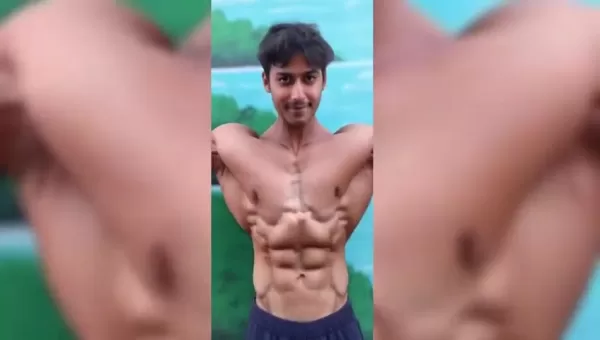
A step-by-step guide to mastering the AI six-pack editor.
Puletech: Your Hub for AI Tools
Puletech is an online platform hosting a variety of AI tools for photo and video editing. It’s a one-stop shop for creative projects, featuring an AI six-pack editor that adds lifelike abs to your images. With its intuitive design, Puletech is accessible to beginners and pros alike. Search for “AI six pack” on the site to quickly find and use this transformative tool.
Using Chrome to Access the AI Tool
Start with a Chrome browser on your phone or computer. Enter “Puletech” in the search bar to visit the site. Locate the search icon, usually a magnifying glass, and type “AI six pack” to find the photo editing tool. Puletech’s straightforward interface ensures fast access to the six-pack editor for anyone eager to enhance their images.
Exploring PixVerse AI
Setting Up and Uploading Your Photo
Once you access the six-pack editor, you’ll be directed to PixVerse AI, the tool’s backbone. Begin by creating an account or signing in with Google. Next, upload a photo showing your torso for accurate AI enhancements. PixVerse AI’s interface simplifies the upload process, preparing your image for transformation. Best of all, this step is free for all your photos.
Creating Your Enhanced Image
After uploading, PixVerse AI processes your photo, adding a six-pack by analyzing your body’s contours for a natural result. The process may take a moment, depending on the image’s complexity. Once complete, you’ll see your transformed photo with defined abs, crafted seamlessly by AI technology.
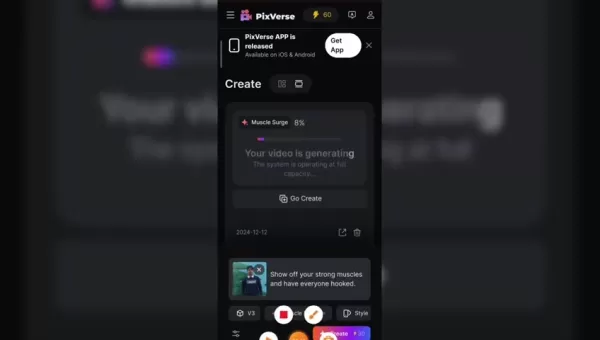
Search for the platform online to add AI-crafted abs to your photos.
Saving and Sharing Your Edited Photo
When you’re happy with the result, download your enhanced photo and share it on platforms like Instagram, Facebook, or Twitter. Use relevant hashtags to boost visibility. While AI abs are fun, be honest to avoid misleading others about your physique. This tool makes photo enhancement quick and engaging.
Step-by-Step AI Six-Pack Editing Guide
Step 1: Visit Puletech
Open Chrome, type “Puletech” in the search bar, and hit enter to access the site.
Step 2: Find the AI Six-Pack Tool
On Puletech’s site, use the search bar to enter “AI six pack” and locate the photo editing tool.
Step 3: Sign Into PixVerse AI
Follow the link to PixVerse AI and log in with your Google account or create a new one.
Step 4: Upload Your Photo
Select the “Upload” option and choose a photo from your device for editing.
Step 5: Generate the Six-Pack Effect
Let PixVerse AI process your image and apply the six-pack effect automatically. This may take a moment.
Step 6: Save and Share
Download your transformed photo and share it on social media platforms of your choice.
Pricing Overview
PixVerse AI Pricing Details
PixVerse AI and similar tools offer varied pricing, from free trials to paid subscriptions or per-image fees. Check PixVerse AI’s pricing page for specifics before committing. Subscriptions may range from monthly to yearly, depending on features. Review terms to understand costs, noting that initial use is often free, with paid plans for extended access.
Weighing AI Six-Pack Editing: Pros and Cons
Pros
Fast, simple way to enhance your physique in photos.
Easy-to-use interface for smooth editing.
Delivers realistic muscle enhancements.
Fun and motivating for users.
Accessible to all skill levels.
Cons
Results may not always look flawless or natural.
May fuel unrealistic beauty standards.
Risks deception if used carelessly.
Some features may require payment.
Raises ethical concerns about body image authenticity.
PixVerse AI Six-Pack Editor Features
Top Features for Body Sculpting
PixVerse AI’s six-pack editor offers powerful tools for photo enhancement:
- Realistic Muscle Creation: Advanced algorithms craft lifelike abs that blend with your body’s contours.
- Auto Adjustments: The tool fine-tunes size, shape, and lighting for a natural effect.
- Intuitive Interface: Easy navigation for users of all experience levels.
- Quick Processing: Generates enhanced images in moments.
- Social Media Sharing: Built-in options for posting directly to platforms, perfect for showcasing your new look.
Applications of AI Six-Pack Editing
Popular Uses for the Tool
The AI six-pack editor serves various purposes:
- Social Media: Enhances photos for a confident, polished online presence.
- Personal Fun: Experiment with different looks for enjoyment.
- Fitness Motivation: Visualizing a fitter physique can inspire real-world fitness goals.
- Creative Work: Ideal for designers creating visuals for ads or content.
Frequently Asked Questions
Is AI Six-Pack Editing Deceptive?
While fun and creative, AI photo tools should be used transparently to avoid misleading others about your true physique. Responsible use maintains trust and authenticity online.
Are AI-Generated Abs Realistic?
The realism of AI abs depends on the tool’s quality and your image. Advanced algorithms can produce near-natural results, but always compare before and after for accuracy.
Can AI Six-Pack Tools Edit Videos?
Some platforms support video editing, adding muscle definition to footage, though it’s more complex than photo editing.
What Are Alternatives to AI Body Editing?
Traditional options include regular exercise, a balanced diet, and working with a trainer for sustainable, real-world results.
Related Topics
AI’s Role in Fitness
AI enhances fitness through personalized workout plans, nutrition tracking, virtual trainers, and smarter wearables for tailored data and insights.
Ethical Issues in AI Body Editing
Key concerns include unrealistic beauty standards, authenticity in self-presentation, potential deception, and data privacy risks from AI processing.
Other AI Photo Editing Tools
Explore tools like Adobe Photoshop AI for versatile editing, Lensa AI for portraits, Remini for photo restoration, and FaceApp for face-focused edits.
Related article
 South Korea Breaks Ground on National AI Computing Center, Investing 2.5 Trillion Won with 2028 Target
South Korean outlet EtNews reports that groundbreaking for the Korea AI Computing Center (KOACC) took place on August 3 at the Solar City data center park in Sunan, Jeollanam-do. Backed by a total investment of 2.5 trillion KRW (roughly 11.838 billio
Six Tech Giants Back Linux Foundation With $12.5M to Tackle AI Vulnerability Noise
To tackle the flood of low-quality security reports produced by AI automation tools, six major tech companies—Anthropic, Amazon (AWS), GitHub, Google, Microsoft, and OpenAI—have collectively contributed $12.5 million in funding to Linux Foundation in
Musk Considered Leaving OpenAI to His Kids as Altman Testifies
This morning, OpenAI CEO Sam Altman took the stand to address former co-founder Elon Musk’s lawsuit challenging the company’s corporate structure.When asked about Musk’s claim that other founders “stole a charity” by launching a for-profit subsidiary
Related Special Topic Recommendations
Music composition
South Korea Breaks Ground on National AI Computing Center, Investing 2.5 Trillion Won with 2028 Target
South Korean outlet EtNews reports that groundbreaking for the Korea AI Computing Center (KOACC) took place on August 3 at the Solar City data center park in Sunan, Jeollanam-do. Backed by a total investment of 2.5 trillion KRW (roughly 11.838 billio
Six Tech Giants Back Linux Foundation With $12.5M to Tackle AI Vulnerability Noise
To tackle the flood of low-quality security reports produced by AI automation tools, six major tech companies—Anthropic, Amazon (AWS), GitHub, Google, Microsoft, and OpenAI—have collectively contributed $12.5 million in funding to Linux Foundation in
Musk Considered Leaving OpenAI to His Kids as Altman Testifies
This morning, OpenAI CEO Sam Altman took the stand to address former co-founder Elon Musk’s lawsuit challenging the company’s corporate structure.When asked about Musk’s claim that other founders “stole a charity” by launching a for-profit subsidiary
Related Special Topic Recommendations
Music composition
 AI Vocal Demo Tools for Songwriters, Hooks, Toplines, and Multilingual Draft Sessions
2026 Latest Best AI Vocal Demo Tools for Songwriters, Hook Creators, and Multi-Language Content Teams! XIX.AI has curated a top-rated list of powerful game-changing tools that go through rigorous real-world tests. You’ll find detailed free vs paid comparison data, comprehensive rankings, and must-try options to help you boost writing efficiency and unlock your creative potential. Explore now to discover your perfect tool for all your content needs!
 9 tools
 xix.ai
Business
Best AI Competitive Research Tools for Small Businesses
xix.ai
Business
Best AI Competitive Research Tools for Small Businesses
2026 Latest Best Top-rated AI Competitive Research Tools for Small Businesses! XIX.AI has curated a highly powerful game-changing collection, updated weekly with rigorous real-world tests and detailed rankings. You can find a comprehensive free vs paid comparison to help you identify the must-try tools that boost your productivity and give you a competitive edge. Explore now to discover your perfect tool!
9 tools
xix.ai
Image editing
Photoshop AI Retouch Tools for Ecommerce Apparel, Skin Cleanup, and Color Consistency
2026 Latest Best Photoshop AI retouch tools for ecommerce apparel, skin cleanup, and color consistency! This top-rated curated list features powerful game-changing solutions that help you boost writing efficiency, streamline content creation, and achieve perfect visual results effortlessly. Each tool has undergone real-world tests through weekly updated rankings, complete with free vs paid comparison details. Backed by XIX.AI, it’s the must-try guide for anyone aiming to unlock your AI edge. Explore now!
10 tools
xix.ai
Prompt
Best AI Prompt Libraries for ChatGPT Workflows
2026 Latest Best Top-Rated AI Prompt Libraries for optimizing all types of ChatGPT workflows. XIX.AI has curated a powerful, game-changing collection that goes through rigorous real-world tests to ensure top performance. You can find detailed free vs paid comparisons and expert rankings to help you choose the must-try tools that boost your productivity and unlock your AI edge. Explore now!
11 tools
xix.ai
Education and Learning
AI Quiz Builder Platforms for Teachers, Tutors, and Cohort-Based Learning Programs
2026 Latest Best AI Quiz Builder Platforms for Teachers, Tutors, and Cohort-Based Learning Programs! XIX.AI has curated a top-rated list of powerful game-changing tools that go through real-world tests to deliver accurate rankings. These must-try platforms help boost writing efficiency, streamline content creation, and simplify quiz design across all learning scenarios. Explore now to discover your perfect tool for unlocking your AI edge in teaching!
13 tools
xix.ai
code
AI Pull Request Review Tools for GitHub Teams Handling Refactors, Bugs, and Security Gaps
2026 Latest Best AI Pull Request Review Tools for GitHub Teams are here on XIX.AI! This top-rated curated list showcases powerful game-changing solutions that streamline refactoring, bug fixing, and security gap detection across all team workflows. Enjoy a free vs paid comparison along with real-world tests and detailed rankings to help you find the perfect tool that boosts productivity significantly. Explore now to unlock your AI edge!
12 tools
xix.ai

 Comments (3)
0/500
Comments (3)
0/500
![FrankSmith]()
¿Realmente necesitamos falsificar nuestros cuerpos en las fotos? Esto de la edición con IA para tener abdominales es un poco triste y preocupante a la vez... 🤔 Por un lado, la tecnología es impresionante, pero por otro ¿no nos empuja a estándares de belleza aún más irrealizables?
![WillHill]()
Странно, что теперь и рельеф пресса можно подправить через AI. Это начинает меня пугать – где грань между ретушью и созданием полностью фальшивой версии себя? 😅 Хочется верить, что люди всё же пойдут в зал ради реального результата, а не только для фото в соцсетях.
![AlbertThomas]()
Finalmente posso ter o sonhado tanquinho sem suar na academia! 😂 Mas confesso que fiquei na dúvida se uso essa foto editada no Tinder ou se é trapaça demais... Será que as IA's vão acabar com a cultura fitness real?
Crave a defined physique without endless workouts? AI photo editing makes it simple to craft a six-pack in your images. This guide walks you through using an online AI tool to create realistic abs with ease. Transform your photos in just a few clicks!
Highlights
Discover how AI revolutionizes photo editing for stunning body transformations.
Learn about Puletech, a platform offering AI-driven six-pack editing tools.
Navigate the PixVerse AI interface to enhance your photos with muscle definition.
Master the easy steps to upload, edit, and save your enhanced images.
Understand the strengths and limits of AI-crafted muscle enhancements for social media.
Starting Your AI Six-Pack Journey
AI’s Role in Body Makeovers
AI has transformed photo editing, enabling hyper-realistic image enhancements. A trending use is body sculpting, where AI adds or refines muscle definition for a fitter look. This appeals to those aiming to boost their online image or try a new style. Its speed and ease make it a go-to alternative to traditional gym efforts or professional photography.
A step-by-step guide to mastering the AI six-pack editor.
Puletech: Your Hub for AI Tools
Puletech is an online platform hosting a variety of AI tools for photo and video editing. It’s a one-stop shop for creative projects, featuring an AI six-pack editor that adds lifelike abs to your images. With its intuitive design, Puletech is accessible to beginners and pros alike. Search for “AI six pack” on the site to quickly find and use this transformative tool.
Using Chrome to Access the AI Tool
Start with a Chrome browser on your phone or computer. Enter “Puletech” in the search bar to visit the site. Locate the search icon, usually a magnifying glass, and type “AI six pack” to find the photo editing tool. Puletech’s straightforward interface ensures fast access to the six-pack editor for anyone eager to enhance their images.
Exploring PixVerse AI
Setting Up and Uploading Your Photo
Once you access the six-pack editor, you’ll be directed to PixVerse AI, the tool’s backbone. Begin by creating an account or signing in with Google. Next, upload a photo showing your torso for accurate AI enhancements. PixVerse AI’s interface simplifies the upload process, preparing your image for transformation. Best of all, this step is free for all your photos.
Creating Your Enhanced Image
After uploading, PixVerse AI processes your photo, adding a six-pack by analyzing your body’s contours for a natural result. The process may take a moment, depending on the image’s complexity. Once complete, you’ll see your transformed photo with defined abs, crafted seamlessly by AI technology.
Search for the platform online to add AI-crafted abs to your photos.
Saving and Sharing Your Edited Photo
When you’re happy with the result, download your enhanced photo and share it on platforms like Instagram, Facebook, or Twitter. Use relevant hashtags to boost visibility. While AI abs are fun, be honest to avoid misleading others about your physique. This tool makes photo enhancement quick and engaging.
Step-by-Step AI Six-Pack Editing Guide
Step 1: Visit Puletech
Open Chrome, type “Puletech” in the search bar, and hit enter to access the site.
Step 2: Find the AI Six-Pack Tool
On Puletech’s site, use the search bar to enter “AI six pack” and locate the photo editing tool.
Step 3: Sign Into PixVerse AI
Follow the link to PixVerse AI and log in with your Google account or create a new one.
Step 4: Upload Your Photo
Select the “Upload” option and choose a photo from your device for editing.
Step 5: Generate the Six-Pack Effect
Let PixVerse AI process your image and apply the six-pack effect automatically. This may take a moment.
Step 6: Save and Share
Download your transformed photo and share it on social media platforms of your choice.
Pricing Overview
PixVerse AI Pricing Details
PixVerse AI and similar tools offer varied pricing, from free trials to paid subscriptions or per-image fees. Check PixVerse AI’s pricing page for specifics before committing. Subscriptions may range from monthly to yearly, depending on features. Review terms to understand costs, noting that initial use is often free, with paid plans for extended access.
Weighing AI Six-Pack Editing: Pros and Cons
Pros
Fast, simple way to enhance your physique in photos.
Easy-to-use interface for smooth editing.
Delivers realistic muscle enhancements.
Fun and motivating for users.
Accessible to all skill levels.
Cons
Results may not always look flawless or natural.
May fuel unrealistic beauty standards.
Risks deception if used carelessly.
Some features may require payment.
Raises ethical concerns about body image authenticity.
PixVerse AI Six-Pack Editor Features
Top Features for Body Sculpting
PixVerse AI’s six-pack editor offers powerful tools for photo enhancement:
- Realistic Muscle Creation: Advanced algorithms craft lifelike abs that blend with your body’s contours.
- Auto Adjustments: The tool fine-tunes size, shape, and lighting for a natural effect.
- Intuitive Interface: Easy navigation for users of all experience levels.
- Quick Processing: Generates enhanced images in moments.
- Social Media Sharing: Built-in options for posting directly to platforms, perfect for showcasing your new look.
Applications of AI Six-Pack Editing
Popular Uses for the Tool
The AI six-pack editor serves various purposes:
- Social Media: Enhances photos for a confident, polished online presence.
- Personal Fun: Experiment with different looks for enjoyment.
- Fitness Motivation: Visualizing a fitter physique can inspire real-world fitness goals.
- Creative Work: Ideal for designers creating visuals for ads or content.
Frequently Asked Questions
Is AI Six-Pack Editing Deceptive?
While fun and creative, AI photo tools should be used transparently to avoid misleading others about your true physique. Responsible use maintains trust and authenticity online.
Are AI-Generated Abs Realistic?
The realism of AI abs depends on the tool’s quality and your image. Advanced algorithms can produce near-natural results, but always compare before and after for accuracy.
Can AI Six-Pack Tools Edit Videos?
Some platforms support video editing, adding muscle definition to footage, though it’s more complex than photo editing.
What Are Alternatives to AI Body Editing?
Traditional options include regular exercise, a balanced diet, and working with a trainer for sustainable, real-world results.
Related Topics
AI’s Role in Fitness
AI enhances fitness through personalized workout plans, nutrition tracking, virtual trainers, and smarter wearables for tailored data and insights.
Ethical Issues in AI Body Editing
Key concerns include unrealistic beauty standards, authenticity in self-presentation, potential deception, and data privacy risks from AI processing.
Other AI Photo Editing Tools
Explore tools like Adobe Photoshop AI for versatile editing, Lensa AI for portraits, Remini for photo restoration, and FaceApp for face-focused edits.








 South Korea Breaks Ground on National AI Computing Center, Investing 2.5 Trillion Won with 2028 Target
South Korean outlet EtNews reports that groundbreaking for the Korea AI Computing Center (KOACC) took place on August 3 at the Solar City data center park in Sunan, Jeollanam-do. Backed by a total investment of 2.5 trillion KRW (roughly 11.838 billio
South Korea Breaks Ground on National AI Computing Center, Investing 2.5 Trillion Won with 2028 Target
South Korean outlet EtNews reports that groundbreaking for the Korea AI Computing Center (KOACC) took place on August 3 at the Solar City data center park in Sunan, Jeollanam-do. Backed by a total investment of 2.5 trillion KRW (roughly 11.838 billio
 Six Tech Giants Back Linux Foundation With $12.5M to Tackle AI Vulnerability Noise
To tackle the flood of low-quality security reports produced by AI automation tools, six major tech companies—Anthropic, Amazon (AWS), GitHub, Google, Microsoft, and OpenAI—have collectively contributed $12.5 million in funding to Linux Foundation in
Six Tech Giants Back Linux Foundation With $12.5M to Tackle AI Vulnerability Noise
To tackle the flood of low-quality security reports produced by AI automation tools, six major tech companies—Anthropic, Amazon (AWS), GitHub, Google, Microsoft, and OpenAI—have collectively contributed $12.5 million in funding to Linux Foundation in
 Musk Considered Leaving OpenAI to His Kids as Altman Testifies
This morning, OpenAI CEO Sam Altman took the stand to address former co-founder Elon Musk’s lawsuit challenging the company’s corporate structure.When asked about Musk’s claim that other founders “stole a charity” by launching a for-profit subsidiary
Musk Considered Leaving OpenAI to His Kids as Altman Testifies
This morning, OpenAI CEO Sam Altman took the stand to address former co-founder Elon Musk’s lawsuit challenging the company’s corporate structure.When asked about Musk’s claim that other founders “stole a charity” by launching a for-profit subsidiary

2026 Latest Best AI Vocal Demo Tools for Songwriters, Hook Creators, and Multi-Language Content Teams! XIX.AI has curated a top-rated list of powerful game-changing tools that go through rigorous real-world tests. You’ll find detailed free vs paid comparison data, comprehensive rankings, and must-try options to help you boost writing efficiency and unlock your creative potential. Explore now to discover your perfect tool for all your content needs!
9 tools
xix.ai

2026 Latest Best Top-rated AI Competitive Research Tools for Small Businesses! XIX.AI has curated a highly powerful game-changing collection, updated weekly with rigorous real-world tests and detailed rankings. You can find a comprehensive free vs paid comparison to help you identify the must-try tools that boost your productivity and give you a competitive edge. Explore now to discover your perfect tool!
9 tools
xix.ai

2026 Latest Best Photoshop AI retouch tools for ecommerce apparel, skin cleanup, and color consistency! This top-rated curated list features powerful game-changing solutions that help you boost writing efficiency, streamline content creation, and achieve perfect visual results effortlessly. Each tool has undergone real-world tests through weekly updated rankings, complete with free vs paid comparison details. Backed by XIX.AI, it’s the must-try guide for anyone aiming to unlock your AI edge. Explore now!
10 tools
xix.ai

2026 Latest Best Top-Rated AI Prompt Libraries for optimizing all types of ChatGPT workflows. XIX.AI has curated a powerful, game-changing collection that goes through rigorous real-world tests to ensure top performance. You can find detailed free vs paid comparisons and expert rankings to help you choose the must-try tools that boost your productivity and unlock your AI edge. Explore now!
11 tools
xix.ai

2026 Latest Best AI Quiz Builder Platforms for Teachers, Tutors, and Cohort-Based Learning Programs! XIX.AI has curated a top-rated list of powerful game-changing tools that go through real-world tests to deliver accurate rankings. These must-try platforms help boost writing efficiency, streamline content creation, and simplify quiz design across all learning scenarios. Explore now to discover your perfect tool for unlocking your AI edge in teaching!
13 tools
xix.ai

2026 Latest Best AI Pull Request Review Tools for GitHub Teams are here on XIX.AI! This top-rated curated list showcases powerful game-changing solutions that streamline refactoring, bug fixing, and security gap detection across all team workflows. Enjoy a free vs paid comparison along with real-world tests and detailed rankings to help you find the perfect tool that boosts productivity significantly. Explore now to unlock your AI edge!
12 tools
xix.ai

¿Realmente necesitamos falsificar nuestros cuerpos en las fotos? Esto de la edición con IA para tener abdominales es un poco triste y preocupante a la vez... 🤔 Por un lado, la tecnología es impresionante, pero por otro ¿no nos empuja a estándares de belleza aún más irrealizables?
Странно, что теперь и рельеф пресса можно подправить через AI. Это начинает меня пугать – где грань между ретушью и созданием полностью фальшивой версии себя? 😅 Хочется верить, что люди всё же пойдут в зал ради реального результата, а не только для фото в соцсетях.
Finalmente posso ter o sonhado tanquinho sem suar na academia! 😂 Mas confesso que fiquei na dúvida se uso essa foto editada no Tinder ou se é trapaça demais... Será que as IA's vão acabar com a cultura fitness real?












