


 Home
HomeTop Alternative Browsers Rivaling Chrome and Safari in Ongoing Browser Market Competition
Google Chrome and Apple’s Safari remain the dominant forces in the web browser market, with Chrome holding a substantial share thanks to continuous innovation from Google, especially in integrating generative AI into its search capabilities.
For those looking for alternatives, a variety of browsers are available aiming to challenge these industry leaders.
To assist users navigating this competitive landscape, we’ve put together an overview of some of the top alternative browsers currently on the market. These include AI-powered options, open source browsers that prioritize customization and user privacy, as well as “mindful browsers” – a term used for browsers designed to improve user well-being.
AI-powered browsers
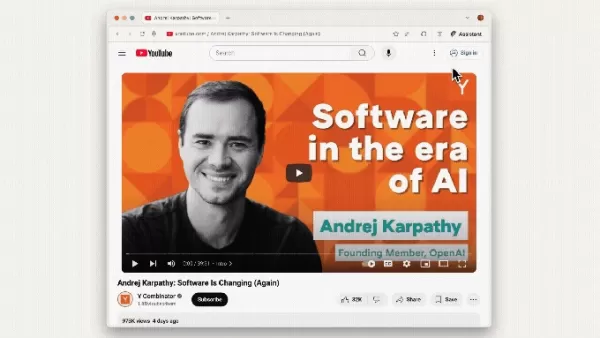
Image Credits:Perplexity
Perplexity’s Comet
Perplexity is one of the latest startups to introduce an AI-powered web browser. Known as Comet, this new product functions as a chatbot-based search engine that can summarize emails, browse web pages, and handle tasks such as sending calendar invites. It is currently only accessible to users enrolled in Perplexity’s $200 monthly Max plan, though there is also a waitlist available for those interested.
The Browser Company’s Dia
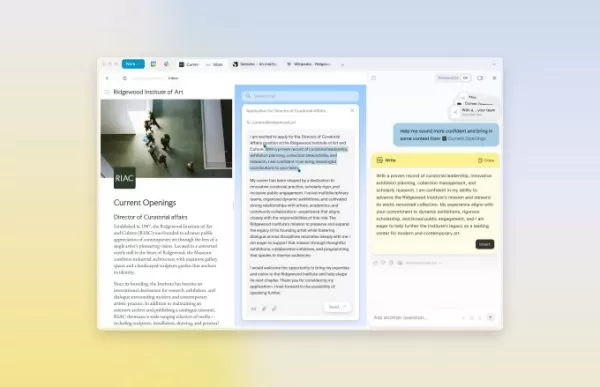
Image Credits:The Browser Company
The Browser Company, the startup behind the Arc browser, recently launched Dia, its AI-focused browser that resembles Google Chrome but includes an integrated AI chat tool. Currently available only as an invite-only beta version, Dia is designed to make web browsing more straightforward by reviewing all websites a user has visited or is logged into, allowing it to assist with finding information and completing tasks. For example, it can provide details about the current page, answer questions about products, and summarize uploaded files. To gain early access to Dia, users must be members of Arc; non-members can sign up for the waitlist.
Opera’s Neon
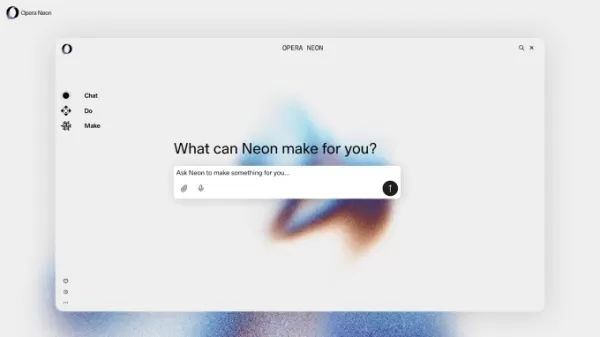
Image Credits:Opera
Another recent entrant in the AI agentic browser space is Opera’s Neon, which features contextual awareness and can handle tasks such as research, shopping, and writing code snippets. Notably, it is capable of performing certain actions even when the user is offline. While Neon has not yet been released publicly, users can join the waitlist. It is expected to be a subscription-based product, though Opera has not disclosed pricing details at this time.
OpenAI’s Atlas

Image Credits:Bryce Durbin / TechCrunch
OpenAI recently launched its AI-powered web browser named Atlas. This browser allows users to ask ChatGPT questions about search results and browse websites directly within the chatbot interface instead of being directed to external links. It also includes an “agent mode” that enables users to ask ChatGPT to carry out tasks on their behalf. Initially rumored to launch in July, Atlas became available for macOS users in October, with releases for Windows, iOS, and Android devices expected soon after.
Aside
Backed by Y Combinator, Aside is an upcoming AI-first, browser-native automation platform designed to autonomously complete tasks such as filling out forms and managing data on users’ behalf. The company describes its functionality simply as allowing users to provide their passwords, browsing history, and browser context. Unlike traditional automation tools that rely on external integrations, Aside operates directly within the browser, enabling it to function across platforms such as Gmail, Notion, Slack, Figma, and banking services. Users can sign up for the waitlist in advance of its official release.
Privacy-focused browsers

Image Credits:Brave
Brave
Brave is one of the most well-known privacy-first browsers, renowned for its built-in ad and tracker blocking features. It also incorporates a gamified browsing experience that rewards users with its own cryptocurrency called Basic Attention Token (BAT). When users choose to view ads to support their favorite websites, they receive a share of the ad revenue. Additional features available in Brave include a VPN service, an AI assistant, and a video calling function.
DuckDuckGo
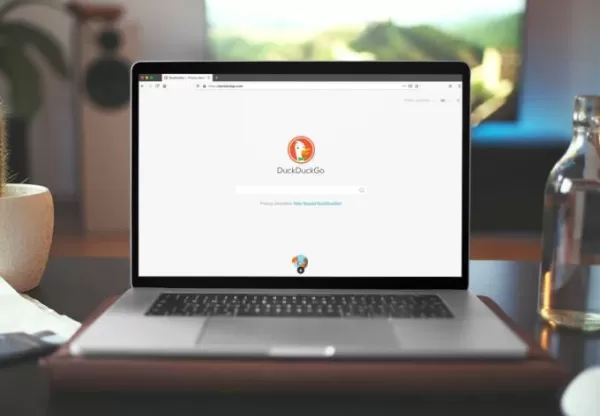
Image Credits:DuckDuckGo
DuckDuckGo is another browser that many users are likely already familiar with due to its popular search engine by the same name. Launched in 2008, the company has recently invested heavily in improving its browser to stay competitive by adding generative AI features such as a chatbot. It has also enhanced its scam blocking capabilities to detect a wider range of threats, including fake cryptocurrency exchanges, scareware, and fraudulent e-commerce sites. In addition to blocking scams, DuckDuckGo prevents trackers and ads and does not collect user data, resulting in fewer pop-ups for users.
Ladybird

Image Credits:Ladybird
Ladybird, led by Chris Wanstrath who was a co-founder of GitHub and former CEO of that company, has an ambitious goal compared to other competitors: it aims to develop a completely new open source browser from scratch. This means it will not rely on code from existing browsers, a feat that has been achieved very rarely. Most alternative web browsers are built upon Google’s Chromium open source project, which serves as the foundation for many widely used browsers. Like other privacy-focused browsers, Ladybird will include features designed to minimize data collection, such as a built-in ad blocker and the ability to block third-party cookies. The browser has not yet been released, with an alpha version scheduled for release in 2026 for early adopters on Linux and macOS systems.
Vivaldi
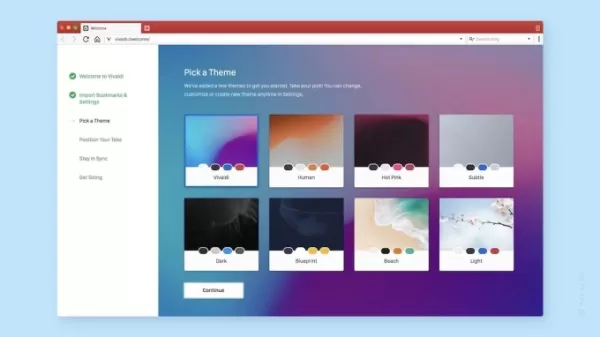
Image Credits:Vivaldi
Vivaldi is a Chromium-based browser created by one of the original developers of the Opera browser. Its main advantage lies in its highly customizable user interface, which allows users to modify the appearance and enable or disable various features. A unique feature of Vivaldi is that its window color changes to match the website being viewed. Other key features include ad blocking, a password manager, no tracking of user data, and productivity tools such as a calendar and note-taking functions.
Niche browsers
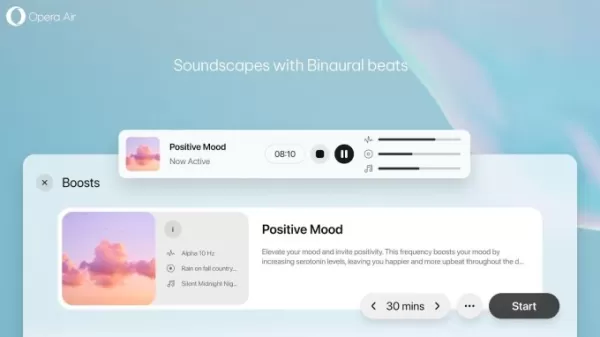
Image Credits:Opera
Opera Air
Opera launched the Air browser in February, making it one of the first browsers focused on mental well-being. While it functions like a standard web browser, it includes features designed to support users’ mental health, such as break reminders and breathing exercises. Another feature called “Boosts” offers binaural beats that can help improve focus or promote relaxation.
SigmaOS

Image Credits:SigmaOS
SigmaOS is a Mac-only browser that features a workspace-style interface designed to enhance productivity. It displays tabs vertically, allowing users to treat them like a to-do list with options to mark tasks as complete or schedule them for later. Users can create workspaces — essentially groups of tabs — to better organize different types of activities, such as separating work-related tasks from entertainment. This Y Combinator-backed browser has been around for several years and has recently started adding more AI features, including the ability to summarize elements like ratings, reviews, and prices on web pages. It also includes an AI assistant that can answer questions, translate text, and rewrite content. SigmaOS is available free of charge, but users who need more than three workspaces can subscribe for $8 per month to unlock unlimited workspaces.
Zen Browser

Image Credits:Zen Browser
Zen Browser aims to create a “calmer internet” through its open source design. It allows users to organize tabs into workspaces and offers Split View for viewing two tabs side by side, among other productivity-focused features. Users can also enhance their browsing experience with community-created plug-ins and themes, such as one that makes the tab background transparent.
This story has been updated after publication to include newly launched browsers.
Related article
 Browser wars no longer about search: top alternatives to Chrome and Safari
The browser wars have taken a new turn this year: the battle is no longer just about search results — it's about which company's AI can act on your behalf directly inside the browser. Google Chrome and Apple's Safari still dominate the market, with C
The Year's Biggest AI Stories So Far
You can track a year by product launches, but the bigger moments that reshape our understanding of AI matter more. The AI industry keeps generating headlines—major acquisitions, indie developer wins, backlash against questionable products, and high-s
ChatGPT launches app integrations for DoorDash, Spotify, Uber and more
OpenAI’s ChatGPT now supports app integrations, letting you link your accounts directly and ask the assistant to take actions on your behalf. With the Spotify integration, for example, you can request personalized playlists that appear instantly in y
Related Special Topic Recommendations
Data Analysis
Browser wars no longer about search: top alternatives to Chrome and Safari
The browser wars have taken a new turn this year: the battle is no longer just about search results — it's about which company's AI can act on your behalf directly inside the browser. Google Chrome and Apple's Safari still dominate the market, with C
The Year's Biggest AI Stories So Far
You can track a year by product launches, but the bigger moments that reshape our understanding of AI matter more. The AI industry keeps generating headlines—major acquisitions, indie developer wins, backlash against questionable products, and high-s
ChatGPT launches app integrations for DoorDash, Spotify, Uber and more
OpenAI’s ChatGPT now supports app integrations, letting you link your accounts directly and ask the assistant to take actions on your behalf. With the Spotify integration, for example, you can request personalized playlists that appear instantly in y
Related Special Topic Recommendations
Data Analysis
 Best AI Anomaly Detection Tools for KPI Monitoring across SaaS and Ecommerce Teams
2026 Latest Best Top-rated AI Anomaly Detection Tools for KPI Monitoring in SaaS and Ecommerce teams! XIX.AI has curated a powerful, game-changing collection based on rigorous real-world tests and weekly updated rankings. You’ll find detailed free vs paid comparison insights to help you identify the must-try solution that boosts productivity and unlocks your AI edge. Explore now!
 10 tools
 xix.ai
writing
Best AI Outline Generators for Long-Form SEO Articles
xix.ai
writing
Best AI Outline Generators for Long-Form SEO Articles
2026 Latest Best Top-Rated AI Outline Generators for Long-Form SEO Articles, meticulously curated by XIX.AI. These powerful tools offer game-changing assistance in creating high-quality content quickly, boosting writing efficiency significantly. Get a free vs paid comparison along with real-world tests and detailed rankings to help you find the must-try option that suits your needs. Explore now to unlock your AI edge.
8 tools
xix.ai
Education and Learning
AI Study Tools for Homework and Exam Prep
2026 Latest Best AI Study Tools for Homework and Exam Prep! XIX.AI curates a top-rated list of powerful, game-changing tools that help students boost productivity, streamline homework completion, and ace exams through real-world tests. Get a free vs paid comparison, detailed rankings, and must-try options to unlock your AI edge. Explore now!
10 tools
xix.ai
Music composition
AI Vocal Demo Tools for Songwriters, Hooks, Toplines, and Multilingual Draft Sessions
2026 Latest Best AI Vocal Demo Tools for Songwriters, Hook Creators, and Multi-Language Content Teams! XIX.AI has curated a top-rated list of powerful game-changing tools that go through rigorous real-world tests. You’ll find detailed free vs paid comparison data, comprehensive rankings, and must-try options to help you boost writing efficiency and unlock your creative potential. Explore now to discover your perfect tool for all your content needs!
9 tools
xix.ai
Business
Best AI Competitive Research Tools for Small Businesses
2026 Latest Best Top-rated AI Competitive Research Tools for Small Businesses! XIX.AI has curated a highly powerful game-changing collection, updated weekly with rigorous real-world tests and detailed rankings. You can find a comprehensive free vs paid comparison to help you identify the must-try tools that boost your productivity and give you a competitive edge. Explore now to discover your perfect tool!
9 tools
xix.ai
Image editing
Photoshop AI Retouch Tools for Ecommerce Apparel, Skin Cleanup, and Color Consistency
2026 Latest Best Photoshop AI retouch tools for ecommerce apparel, skin cleanup, and color consistency! This top-rated curated list features powerful game-changing solutions that help you boost writing efficiency, streamline content creation, and achieve perfect visual results effortlessly. Each tool has undergone real-world tests through weekly updated rankings, complete with free vs paid comparison details. Backed by XIX.AI, it’s the must-try guide for anyone aiming to unlock your AI edge. Explore now!
10 tools
xix.ai

 Comments (0)
0/500
Comments (0)
0/500
Google Chrome and Apple’s Safari remain the dominant forces in the web browser market, with Chrome holding a substantial share thanks to continuous innovation from Google, especially in integrating generative AI into its search capabilities.
For those looking for alternatives, a variety of browsers are available aiming to challenge these industry leaders.
To assist users navigating this competitive landscape, we’ve put together an overview of some of the top alternative browsers currently on the market. These include AI-powered options, open source browsers that prioritize customization and user privacy, as well as “mindful browsers” – a term used for browsers designed to improve user well-being.
AI-powered browsers
Image Credits:Perplexity
Perplexity’s Comet
Perplexity is one of the latest startups to introduce an AI-powered web browser. Known as Comet, this new product functions as a chatbot-based search engine that can summarize emails, browse web pages, and handle tasks such as sending calendar invites. It is currently only accessible to users enrolled in Perplexity’s $200 monthly Max plan, though there is also a waitlist available for those interested.
The Browser Company’s Dia
Image Credits:The Browser Company
The Browser Company, the startup behind the Arc browser, recently launched Dia, its AI-focused browser that resembles Google Chrome but includes an integrated AI chat tool. Currently available only as an invite-only beta version, Dia is designed to make web browsing more straightforward by reviewing all websites a user has visited or is logged into, allowing it to assist with finding information and completing tasks. For example, it can provide details about the current page, answer questions about products, and summarize uploaded files. To gain early access to Dia, users must be members of Arc; non-members can sign up for the waitlist.
Opera’s Neon
Image Credits:Opera
Another recent entrant in the AI agentic browser space is Opera’s Neon, which features contextual awareness and can handle tasks such as research, shopping, and writing code snippets. Notably, it is capable of performing certain actions even when the user is offline. While Neon has not yet been released publicly, users can join the waitlist. It is expected to be a subscription-based product, though Opera has not disclosed pricing details at this time.
OpenAI’s Atlas
Image Credits:Bryce Durbin / TechCrunch
OpenAI recently launched its AI-powered web browser named Atlas. This browser allows users to ask ChatGPT questions about search results and browse websites directly within the chatbot interface instead of being directed to external links. It also includes an “agent mode” that enables users to ask ChatGPT to carry out tasks on their behalf. Initially rumored to launch in July, Atlas became available for macOS users in October, with releases for Windows, iOS, and Android devices expected soon after.
Aside
Backed by Y Combinator, Aside is an upcoming AI-first, browser-native automation platform designed to autonomously complete tasks such as filling out forms and managing data on users’ behalf. The company describes its functionality simply as allowing users to provide their passwords, browsing history, and browser context. Unlike traditional automation tools that rely on external integrations, Aside operates directly within the browser, enabling it to function across platforms such as Gmail, Notion, Slack, Figma, and banking services. Users can sign up for the waitlist in advance of its official release.
Privacy-focused browsers
Image Credits:Brave
Brave
Brave is one of the most well-known privacy-first browsers, renowned for its built-in ad and tracker blocking features. It also incorporates a gamified browsing experience that rewards users with its own cryptocurrency called Basic Attention Token (BAT). When users choose to view ads to support their favorite websites, they receive a share of the ad revenue. Additional features available in Brave include a VPN service, an AI assistant, and a video calling function.
DuckDuckGo
Image Credits:DuckDuckGo
DuckDuckGo is another browser that many users are likely already familiar with due to its popular search engine by the same name. Launched in 2008, the company has recently invested heavily in improving its browser to stay competitive by adding generative AI features such as a chatbot. It has also enhanced its scam blocking capabilities to detect a wider range of threats, including fake cryptocurrency exchanges, scareware, and fraudulent e-commerce sites. In addition to blocking scams, DuckDuckGo prevents trackers and ads and does not collect user data, resulting in fewer pop-ups for users.
Ladybird
Image Credits:Ladybird
Ladybird, led by Chris Wanstrath who was a co-founder of GitHub and former CEO of that company, has an ambitious goal compared to other competitors: it aims to develop a completely new open source browser from scratch. This means it will not rely on code from existing browsers, a feat that has been achieved very rarely. Most alternative web browsers are built upon Google’s Chromium open source project, which serves as the foundation for many widely used browsers. Like other privacy-focused browsers, Ladybird will include features designed to minimize data collection, such as a built-in ad blocker and the ability to block third-party cookies. The browser has not yet been released, with an alpha version scheduled for release in 2026 for early adopters on Linux and macOS systems.
Vivaldi
Image Credits:Vivaldi
Vivaldi is a Chromium-based browser created by one of the original developers of the Opera browser. Its main advantage lies in its highly customizable user interface, which allows users to modify the appearance and enable or disable various features. A unique feature of Vivaldi is that its window color changes to match the website being viewed. Other key features include ad blocking, a password manager, no tracking of user data, and productivity tools such as a calendar and note-taking functions.
Niche browsers
Image Credits:Opera
Opera Air
Opera launched the Air browser in February, making it one of the first browsers focused on mental well-being. While it functions like a standard web browser, it includes features designed to support users’ mental health, such as break reminders and breathing exercises. Another feature called “Boosts” offers binaural beats that can help improve focus or promote relaxation.
SigmaOS
Image Credits:SigmaOS
SigmaOS is a Mac-only browser that features a workspace-style interface designed to enhance productivity. It displays tabs vertically, allowing users to treat them like a to-do list with options to mark tasks as complete or schedule them for later. Users can create workspaces — essentially groups of tabs — to better organize different types of activities, such as separating work-related tasks from entertainment. This Y Combinator-backed browser has been around for several years and has recently started adding more AI features, including the ability to summarize elements like ratings, reviews, and prices on web pages. It also includes an AI assistant that can answer questions, translate text, and rewrite content. SigmaOS is available free of charge, but users who need more than three workspaces can subscribe for $8 per month to unlock unlimited workspaces.
Zen Browser
Image Credits:Zen Browser
Zen Browser aims to create a “calmer internet” through its open source design. It allows users to organize tabs into workspaces and offers Split View for viewing two tabs side by side, among other productivity-focused features. Users can also enhance their browsing experience with community-created plug-ins and themes, such as one that makes the tab background transparent.
This story has been updated after publication to include newly launched browsers.








 Browser wars no longer about search: top alternatives to Chrome and Safari
The browser wars have taken a new turn this year: the battle is no longer just about search results — it's about which company's AI can act on your behalf directly inside the browser. Google Chrome and Apple's Safari still dominate the market, with C
Browser wars no longer about search: top alternatives to Chrome and Safari
The browser wars have taken a new turn this year: the battle is no longer just about search results — it's about which company's AI can act on your behalf directly inside the browser. Google Chrome and Apple's Safari still dominate the market, with C
 The Year's Biggest AI Stories So Far
You can track a year by product launches, but the bigger moments that reshape our understanding of AI matter more. The AI industry keeps generating headlines—major acquisitions, indie developer wins, backlash against questionable products, and high-s
The Year's Biggest AI Stories So Far
You can track a year by product launches, but the bigger moments that reshape our understanding of AI matter more. The AI industry keeps generating headlines—major acquisitions, indie developer wins, backlash against questionable products, and high-s
 ChatGPT launches app integrations for DoorDash, Spotify, Uber and more
OpenAI’s ChatGPT now supports app integrations, letting you link your accounts directly and ask the assistant to take actions on your behalf. With the Spotify integration, for example, you can request personalized playlists that appear instantly in y
ChatGPT launches app integrations for DoorDash, Spotify, Uber and more
OpenAI’s ChatGPT now supports app integrations, letting you link your accounts directly and ask the assistant to take actions on your behalf. With the Spotify integration, for example, you can request personalized playlists that appear instantly in y

2026 Latest Best Top-rated AI Anomaly Detection Tools for KPI Monitoring in SaaS and Ecommerce teams! XIX.AI has curated a powerful, game-changing collection based on rigorous real-world tests and weekly updated rankings. You’ll find detailed free vs paid comparison insights to help you identify the must-try solution that boosts productivity and unlocks your AI edge. Explore now!
10 tools
xix.ai

2026 Latest Best Top-Rated AI Outline Generators for Long-Form SEO Articles, meticulously curated by XIX.AI. These powerful tools offer game-changing assistance in creating high-quality content quickly, boosting writing efficiency significantly. Get a free vs paid comparison along with real-world tests and detailed rankings to help you find the must-try option that suits your needs. Explore now to unlock your AI edge.
8 tools
xix.ai

2026 Latest Best AI Study Tools for Homework and Exam Prep! XIX.AI curates a top-rated list of powerful, game-changing tools that help students boost productivity, streamline homework completion, and ace exams through real-world tests. Get a free vs paid comparison, detailed rankings, and must-try options to unlock your AI edge. Explore now!
10 tools
xix.ai

2026 Latest Best AI Vocal Demo Tools for Songwriters, Hook Creators, and Multi-Language Content Teams! XIX.AI has curated a top-rated list of powerful game-changing tools that go through rigorous real-world tests. You’ll find detailed free vs paid comparison data, comprehensive rankings, and must-try options to help you boost writing efficiency and unlock your creative potential. Explore now to discover your perfect tool for all your content needs!
9 tools
xix.ai

2026 Latest Best Top-rated AI Competitive Research Tools for Small Businesses! XIX.AI has curated a highly powerful game-changing collection, updated weekly with rigorous real-world tests and detailed rankings. You can find a comprehensive free vs paid comparison to help you identify the must-try tools that boost your productivity and give you a competitive edge. Explore now to discover your perfect tool!
9 tools
xix.ai

2026 Latest Best Photoshop AI retouch tools for ecommerce apparel, skin cleanup, and color consistency! This top-rated curated list features powerful game-changing solutions that help you boost writing efficiency, streamline content creation, and achieve perfect visual results effortlessly. Each tool has undergone real-world tests through weekly updated rankings, complete with free vs paid comparison details. Backed by XIX.AI, it’s the must-try guide for anyone aiming to unlock your AI edge. Explore now!
10 tools
xix.ai












