


 Home
HomeShopify Store Design: Clone Any Website Layout with AI
Launching a professional Shopify store can feel overwhelming, but with the power of AI, it's become much simpler and more efficient. This guide will walk you through how to use AI to replicate any website's layout for your Shopify store and even how to turn those skills into a lucrative business on platforms like Fiverr and Upwork.
Introduction to AI-Powered Shopify Store Design
The Power of AI in E-commerce Design
Artificial intelligence is transforming e-commerce, particularly in the realm of store design. AI helps automate tasks, personalize customer experiences, and create stunning stores without needing deep technical skills. It enables rapid design adjustments, keeping your store competitive and engaging. Moreover, AI not only streamlines the design process but also opens up opportunities to sell these services to others, turning your skills into a profitable business.
Key benefits of using AI in e-commerce design include:
- Efficiency: AI speeds up the design process, saving time and effort in creating a professional store.
- Personalization: AI analyzes customer data to offer customized shopping experiences, boosting engagement and conversions.
- Accessibility: AI tools make design accessible to those without coding or design expertise.
- Scalability: AI helps manage and scale design efforts, handling multiple projects effortlessly.
- Innovation: AI keeps you on the cutting edge of design trends, providing innovative solutions and creative ideas.
By mastering these AI-driven techniques, you can enhance your Shopify store and offer valuable services to other businesses, positioning yourself as a go-to e-commerce design expert.
Cloning Website Layouts: A Step-by-Step Guide
One of the most powerful uses of AI in Shopify design is cloning existing website layouts. This allows you to mimic the aesthetics of successful e-commerce stores, giving your shop a polished and professional look. Here's how to clone any website's layout using AI:
- Identify a Target Website: Choose a website with a design you admire. Look for a clean layout, user-friendly navigation, and compelling product presentation. This will be your template for cloning.
- Install GemPages Landing Page Builder: Start by installing GemPages Landing Page Builder from the Shopify app store. This app uses AI to generate editable layouts from a reference website.
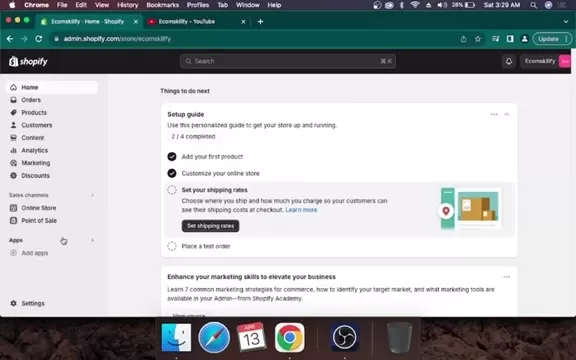
- Navigate to Your Shopify Store: Access your Shopify admin dashboard, find GemPages in the apps section, and install it.
- Select the Type of Page to Design: Within GemPages, choose the type of page you want to create, such as home pages, FAQs, or product collection pages.
- Initiate AI Cloning: Start from scratch and use the AI Layout Generator.
- AI Layout Generator: Use the "From URL" option to input the URL of the website you want to copy.
- Paste the URL and Generate: Paste the target website's URL into the AI tool. It will analyze the layout and generate a clone, which usually takes a few minutes.
- Customize Your Cloned Layout: Once the clone is generated, customize it to match your brand. Adjust colors, fonts, and images, and integrate your products seamlessly. You might even use a custom font to match the original site.
- Publish Your Professional Store: After customizing, publish your new Shopify store. Make sure everything works correctly and that it's optimized for mobile. Start promoting your store to attract customers with your professionally designed platform.
Following these steps, you can use AI to quickly create a visually appealing and professional Shopify store. Cloning website layouts saves time and leverages proven design principles, enhancing user experience and driving sales.
Selling Shopify Design Services on Freelance Platforms
Once you've honed your AI-powered Shopify design skills, you can turn them into a business by offering services on freelance platforms like Fiverr and Upwork. Many businesses need professional e-commerce stores, and your expertise can help them succeed. Here's how to get started:
- Create a Compelling Profile: Your profile is your first impression. Highlight your AI skills and Shopify design capabilities. Showcase your best work through a portfolio that demonstrates your ability to create professional and engaging stores.
- Set Competitive Pricing: Research the market to set competitive rates for your services. Consider tiered pricing based on project complexity and customization level. Highlight the value of your AI-driven efficiency and innovative design.
- Offer Specialized Services: Focus on AI-powered Shopify design, layout cloning, and website customization. Target businesses looking for professional e-commerce stores and promote your expertise in creating user-friendly and engaging shopping experiences.
- Provide Excellent Customer Service: Exceptional customer service builds a strong reputation. Respond promptly to inquiries, communicate clearly, and deliver high-quality results. Positive reviews and repeat clients will boost your credibility and attract more business.
- Market Your Expertise: Use social media and online communities to showcase your work. Share insights on AI design trends and offer free tips to attract potential clients. Network with other freelancers and businesses to expand your reach.
- Stay Updated on AI Trends: Keep your skills sharp and stay informed about the latest AI tools and trends in e-commerce design. Offer innovative solutions that leverage AI to enhance shopping experiences and drive sales.
By offering Shopify design services on freelance platforms, you can use your AI skills to earn a substantial income. The demand for professional e-commerce stores is growing, and your expertise in AI-powered design can help businesses achieve their online goals while establishing your reputation in the field.
Practical Guide: Designing a Shopify Store with AI
Choosing and Installing the GemPages App
To get started, the first step is to choose and install the GemPages app from the Shopify App Store. This app provides a user-friendly interface to manage and customize your store. Here's how:
- Go to the Shopify App Store from your Shopify admin panel and search for the GemPages Landing Page Builder app.
- Click the install button to add the app to your store. You might need to authorize the connection between Shopify and the app.
- Once installed, you'll be directed to the GemPages dashboard where you can start creating and editing your store's pages. This app is essential for cloning website layouts and customizing them to your liking.
Benefits of Using GemPages:
- Drag-and-drop interface makes it easy to use, even for beginners.
- Offers AI capabilities for quick and efficient website design.
- Provides numerous templates for various e-commerce needs.
- Allows extensive customization to align with your brand's aesthetics.
- Enhances store functionality with features like SEO optimization and responsive design.
By leveraging GemPages, you can take full control of your Shopify store's design, creating a professional and engaging online presence that boosts sales and customer satisfaction.
Cloning a Website Layout with AI
Let's go through cloning an existing website layout using GemPages' AI features:
- Choose a Template Website: Find a website with a similar design aesthetic to your own. Copy the URL, ensuring the website is designed for Shopify.
- Access the AI Layout Generator: Use the "From URL" function in the AI Layout Generator.
- Paste the Layout Generator into Shopify: Copy the URL and paste it into Shopify.
- Generate Your New Website: Shopify and GemPages will work together to create a draft based on the copied layout.
- Customize the Layout: Once the cloning process is complete, tailor the layout to your brand's specific needs. Adjust colors, fonts, and content to match your brand's aesthetic, ensuring a seamless experience for customers.
Key Considerations for Customization:
- Ensure all visual elements align with your brand's identity.
- Optimize the design for mobile users to improve accessibility.
- Test the store on various devices and browsers to ensure consistent performance.
- Use high-quality images to enhance the aesthetic appeal of your product offerings.
Effective customization ensures your brand identity is reflected and provides a quality shopping experience, increasing customer engagement and brand awareness, which in turn boosts your revenue.
Frequently Asked Questions
Can I use AI to design my Shopify store if I have no coding experience?
Yes, AI-powered design tools like GemPages are user-friendly and accessible to those without coding experience. The drag-and-drop interface and AI-driven features allow you to create professional-looking stores without writing any code.
How can I ensure that my cloned Shopify store design is unique and doesn't infringe on copyright?
While cloning a website's layout provides a great starting point, it's crucial to customize the design to make it unique. Adjust colors, fonts, and images, and add unique elements that reflect your brand's identity. This ensures your store is visually distinct and avoids copyright issues. Importing a custom font can also help show a distinct difference.
What are the best freelance platforms for selling Shopify design services?
Fiverr and Upwork are among the most popular freelance platforms for selling Shopify design services. They offer a wide audience of potential clients and provide tools to manage projects, communicate with clients, and receive payments securely.
How much can I earn selling Shopify design services on freelance platforms?
The earnings potential for selling Shopify design services can vary based on your skills, experience, and demand. However, by offering specialized services, providing excellent customer service, and actively marketing your expertise, it's possible to earn a substantial income.
Related Questions
What other AI tools can enhance my Shopify store's design and functionality?
In addition to AI-powered design tools, several other AI applications can enhance your Shopify store's functionality:
- AI-Powered Product Recommendations: Use AI to analyze customer behavior and provide personalized product recommendations, increasing sales and customer satisfaction.
- AI Chatbots: Implement AI chatbots for instant customer support, answering FAQs, and guiding shoppers through the buying process.
- AI-Driven SEO Optimization: Use AI tools to optimize your store's content and structure for search engines, improving visibility and driving organic traffic.
- AI Analytics: Leverage AI analytics to gain insights into customer behavior, identify trends, and make data-driven decisions to improve your store's performance.
- AI Content Generation: Use AI to generate compelling product descriptions, blog posts, and marketing materials, saving time and ensuring high-quality content.
By exploring these AI-driven tools, you can create a more engaging, efficient, and profitable Shopify store, positioning your business for long-term success in the competitive e-commerce landscape.
Related article
 South Korea Breaks Ground on National AI Computing Center, Investing 2.5 Trillion Won with 2028 Target
South Korean outlet EtNews reports that groundbreaking for the Korea AI Computing Center (KOACC) took place on August 3 at the Solar City data center park in Sunan, Jeollanam-do. Backed by a total investment of 2.5 trillion KRW (roughly 11.838 billio
Six Tech Giants Back Linux Foundation With $12.5M to Tackle AI Vulnerability Noise
To tackle the flood of low-quality security reports produced by AI automation tools, six major tech companies—Anthropic, Amazon (AWS), GitHub, Google, Microsoft, and OpenAI—have collectively contributed $12.5 million in funding to Linux Foundation in
Musk Considered Leaving OpenAI to His Kids as Altman Testifies
This morning, OpenAI CEO Sam Altman took the stand to address former co-founder Elon Musk’s lawsuit challenging the company’s corporate structure.When asked about Musk’s claim that other founders “stole a charity” by launching a for-profit subsidiary
Related Special Topic Recommendations
Music composition
South Korea Breaks Ground on National AI Computing Center, Investing 2.5 Trillion Won with 2028 Target
South Korean outlet EtNews reports that groundbreaking for the Korea AI Computing Center (KOACC) took place on August 3 at the Solar City data center park in Sunan, Jeollanam-do. Backed by a total investment of 2.5 trillion KRW (roughly 11.838 billio
Six Tech Giants Back Linux Foundation With $12.5M to Tackle AI Vulnerability Noise
To tackle the flood of low-quality security reports produced by AI automation tools, six major tech companies—Anthropic, Amazon (AWS), GitHub, Google, Microsoft, and OpenAI—have collectively contributed $12.5 million in funding to Linux Foundation in
Musk Considered Leaving OpenAI to His Kids as Altman Testifies
This morning, OpenAI CEO Sam Altman took the stand to address former co-founder Elon Musk’s lawsuit challenging the company’s corporate structure.When asked about Musk’s claim that other founders “stole a charity” by launching a for-profit subsidiary
Related Special Topic Recommendations
Music composition
 AI Vocal Demo Tools for Songwriters, Hooks, Toplines, and Multilingual Draft Sessions
2026 Latest Best AI Vocal Demo Tools for Songwriters, Hook Creators, and Multi-Language Content Teams! XIX.AI has curated a top-rated list of powerful game-changing tools that go through rigorous real-world tests. You’ll find detailed free vs paid comparison data, comprehensive rankings, and must-try options to help you boost writing efficiency and unlock your creative potential. Explore now to discover your perfect tool for all your content needs!
 9 tools
 xix.ai
Business
Best AI Competitive Research Tools for Small Businesses
xix.ai
Business
Best AI Competitive Research Tools for Small Businesses
2026 Latest Best Top-rated AI Competitive Research Tools for Small Businesses! XIX.AI has curated a highly powerful game-changing collection, updated weekly with rigorous real-world tests and detailed rankings. You can find a comprehensive free vs paid comparison to help you identify the must-try tools that boost your productivity and give you a competitive edge. Explore now to discover your perfect tool!
9 tools
xix.ai
Image editing
Photoshop AI Retouch Tools for Ecommerce Apparel, Skin Cleanup, and Color Consistency
2026 Latest Best Photoshop AI retouch tools for ecommerce apparel, skin cleanup, and color consistency! This top-rated curated list features powerful game-changing solutions that help you boost writing efficiency, streamline content creation, and achieve perfect visual results effortlessly. Each tool has undergone real-world tests through weekly updated rankings, complete with free vs paid comparison details. Backed by XIX.AI, it’s the must-try guide for anyone aiming to unlock your AI edge. Explore now!
10 tools
xix.ai
Prompt
Best AI Prompt Libraries for ChatGPT Workflows
2026 Latest Best Top-Rated AI Prompt Libraries for optimizing all types of ChatGPT workflows. XIX.AI has curated a powerful, game-changing collection that goes through rigorous real-world tests to ensure top performance. You can find detailed free vs paid comparisons and expert rankings to help you choose the must-try tools that boost your productivity and unlock your AI edge. Explore now!
11 tools
xix.ai
Education and Learning
AI Quiz Builder Platforms for Teachers, Tutors, and Cohort-Based Learning Programs
2026 Latest Best AI Quiz Builder Platforms for Teachers, Tutors, and Cohort-Based Learning Programs! XIX.AI has curated a top-rated list of powerful game-changing tools that go through real-world tests to deliver accurate rankings. These must-try platforms help boost writing efficiency, streamline content creation, and simplify quiz design across all learning scenarios. Explore now to discover your perfect tool for unlocking your AI edge in teaching!
13 tools
xix.ai
code
AI Pull Request Review Tools for GitHub Teams Handling Refactors, Bugs, and Security Gaps
2026 Latest Best AI Pull Request Review Tools for GitHub Teams are here on XIX.AI! This top-rated curated list showcases powerful game-changing solutions that streamline refactoring, bug fixing, and security gap detection across all team workflows. Enjoy a free vs paid comparison along with real-world tests and detailed rankings to help you find the perfect tool that boosts productivity significantly. Explore now to unlock your AI edge!
12 tools
xix.ai

 Comments (5)
0/500
Comments (5)
0/500
![HarryWilliams]()
Just tried this AI cloning method for my Shopify store and it's a game-changer! No more endless tweaking of themes, now I can replicate layouts in minutes. The business potential is huge, but makes me wonder about originality in e-commerce design. 🤔
![StevenGreen]()
Vaya, esto suena interesante. Imagino que copiar el diseño de una web con IA puede acelerar mucho el proceso de crear una tienda, pero ¿dónde está el límite entre 'inspiración' y copia? Espero que el tutorial también hable de ética en el diseño y derechos de autor 🧐. Aún así, la idea de monetizar esa habilidad es atractiva.
![CharlesWhite]()
¡Qué guay esto del clonado de diseños web con IA para Shopify! Justo estaba pensando en renovar mi tienda online y veo que con esto me ahorraría un montón de horas de trabajo 🔥. La parte de convertir esos diseños en un negocio suena interesante, pero no sé... ¿No habrá mucho riesgo de que dos tiendas acaben siendo muy parecidas? Me encantaría leer opiniones de gente que ya lo haya probado. 😅
![JustinScott]()
AI cloning website layouts for Shopify? That's wild! It’s like giving your store a superhero makeover in minutes. Excited to try this and maybe start a side hustle! 😎
![PaulHill]()
AI cloning website layouts for Shopify? That's wild! Makes me wonder if I could whip up a store mimicking my favorite sites in a weekend. 😎
Launching a professional Shopify store can feel overwhelming, but with the power of AI, it's become much simpler and more efficient. This guide will walk you through how to use AI to replicate any website's layout for your Shopify store and even how to turn those skills into a lucrative business on platforms like Fiverr and Upwork.
Introduction to AI-Powered Shopify Store Design
The Power of AI in E-commerce Design
Artificial intelligence is transforming e-commerce, particularly in the realm of store design. AI helps automate tasks, personalize customer experiences, and create stunning stores without needing deep technical skills. It enables rapid design adjustments, keeping your store competitive and engaging. Moreover, AI not only streamlines the design process but also opens up opportunities to sell these services to others, turning your skills into a profitable business.
Key benefits of using AI in e-commerce design include:
- Efficiency: AI speeds up the design process, saving time and effort in creating a professional store.
- Personalization: AI analyzes customer data to offer customized shopping experiences, boosting engagement and conversions.
- Accessibility: AI tools make design accessible to those without coding or design expertise.
- Scalability: AI helps manage and scale design efforts, handling multiple projects effortlessly.
- Innovation: AI keeps you on the cutting edge of design trends, providing innovative solutions and creative ideas.
By mastering these AI-driven techniques, you can enhance your Shopify store and offer valuable services to other businesses, positioning yourself as a go-to e-commerce design expert.
Cloning Website Layouts: A Step-by-Step Guide
One of the most powerful uses of AI in Shopify design is cloning existing website layouts. This allows you to mimic the aesthetics of successful e-commerce stores, giving your shop a polished and professional look. Here's how to clone any website's layout using AI:
- Identify a Target Website: Choose a website with a design you admire. Look for a clean layout, user-friendly navigation, and compelling product presentation. This will be your template for cloning.
- Install GemPages Landing Page Builder: Start by installing GemPages Landing Page Builder from the Shopify app store. This app uses AI to generate editable layouts from a reference website.
- Navigate to Your Shopify Store: Access your Shopify admin dashboard, find GemPages in the apps section, and install it.
- Select the Type of Page to Design: Within GemPages, choose the type of page you want to create, such as home pages, FAQs, or product collection pages.
- Initiate AI Cloning: Start from scratch and use the AI Layout Generator.
- AI Layout Generator: Use the "From URL" option to input the URL of the website you want to copy.
- Paste the URL and Generate: Paste the target website's URL into the AI tool. It will analyze the layout and generate a clone, which usually takes a few minutes.
- Customize Your Cloned Layout: Once the clone is generated, customize it to match your brand. Adjust colors, fonts, and images, and integrate your products seamlessly. You might even use a custom font to match the original site.
- Publish Your Professional Store: After customizing, publish your new Shopify store. Make sure everything works correctly and that it's optimized for mobile. Start promoting your store to attract customers with your professionally designed platform.
Following these steps, you can use AI to quickly create a visually appealing and professional Shopify store. Cloning website layouts saves time and leverages proven design principles, enhancing user experience and driving sales.
Selling Shopify Design Services on Freelance Platforms
Once you've honed your AI-powered Shopify design skills, you can turn them into a business by offering services on freelance platforms like Fiverr and Upwork. Many businesses need professional e-commerce stores, and your expertise can help them succeed. Here's how to get started:
- Create a Compelling Profile: Your profile is your first impression. Highlight your AI skills and Shopify design capabilities. Showcase your best work through a portfolio that demonstrates your ability to create professional and engaging stores.
- Set Competitive Pricing: Research the market to set competitive rates for your services. Consider tiered pricing based on project complexity and customization level. Highlight the value of your AI-driven efficiency and innovative design.
- Offer Specialized Services: Focus on AI-powered Shopify design, layout cloning, and website customization. Target businesses looking for professional e-commerce stores and promote your expertise in creating user-friendly and engaging shopping experiences.
- Provide Excellent Customer Service: Exceptional customer service builds a strong reputation. Respond promptly to inquiries, communicate clearly, and deliver high-quality results. Positive reviews and repeat clients will boost your credibility and attract more business.
- Market Your Expertise: Use social media and online communities to showcase your work. Share insights on AI design trends and offer free tips to attract potential clients. Network with other freelancers and businesses to expand your reach.
- Stay Updated on AI Trends: Keep your skills sharp and stay informed about the latest AI tools and trends in e-commerce design. Offer innovative solutions that leverage AI to enhance shopping experiences and drive sales.
By offering Shopify design services on freelance platforms, you can use your AI skills to earn a substantial income. The demand for professional e-commerce stores is growing, and your expertise in AI-powered design can help businesses achieve their online goals while establishing your reputation in the field.
Practical Guide: Designing a Shopify Store with AI
Choosing and Installing the GemPages App
To get started, the first step is to choose and install the GemPages app from the Shopify App Store. This app provides a user-friendly interface to manage and customize your store. Here's how:
- Go to the Shopify App Store from your Shopify admin panel and search for the GemPages Landing Page Builder app.
- Click the install button to add the app to your store. You might need to authorize the connection between Shopify and the app.
- Once installed, you'll be directed to the GemPages dashboard where you can start creating and editing your store's pages. This app is essential for cloning website layouts and customizing them to your liking.
Benefits of Using GemPages:
- Drag-and-drop interface makes it easy to use, even for beginners.
- Offers AI capabilities for quick and efficient website design.
- Provides numerous templates for various e-commerce needs.
- Allows extensive customization to align with your brand's aesthetics.
- Enhances store functionality with features like SEO optimization and responsive design.
By leveraging GemPages, you can take full control of your Shopify store's design, creating a professional and engaging online presence that boosts sales and customer satisfaction.
Cloning a Website Layout with AI
Let's go through cloning an existing website layout using GemPages' AI features:
- Choose a Template Website: Find a website with a similar design aesthetic to your own. Copy the URL, ensuring the website is designed for Shopify.
- Access the AI Layout Generator: Use the "From URL" function in the AI Layout Generator.
- Paste the Layout Generator into Shopify: Copy the URL and paste it into Shopify.
- Generate Your New Website: Shopify and GemPages will work together to create a draft based on the copied layout.
- Customize the Layout: Once the cloning process is complete, tailor the layout to your brand's specific needs. Adjust colors, fonts, and content to match your brand's aesthetic, ensuring a seamless experience for customers.
Key Considerations for Customization:
- Ensure all visual elements align with your brand's identity.
- Optimize the design for mobile users to improve accessibility.
- Test the store on various devices and browsers to ensure consistent performance.
- Use high-quality images to enhance the aesthetic appeal of your product offerings.
Effective customization ensures your brand identity is reflected and provides a quality shopping experience, increasing customer engagement and brand awareness, which in turn boosts your revenue.
Frequently Asked Questions
Can I use AI to design my Shopify store if I have no coding experience?
Yes, AI-powered design tools like GemPages are user-friendly and accessible to those without coding experience. The drag-and-drop interface and AI-driven features allow you to create professional-looking stores without writing any code.
How can I ensure that my cloned Shopify store design is unique and doesn't infringe on copyright?
While cloning a website's layout provides a great starting point, it's crucial to customize the design to make it unique. Adjust colors, fonts, and images, and add unique elements that reflect your brand's identity. This ensures your store is visually distinct and avoids copyright issues. Importing a custom font can also help show a distinct difference.
What are the best freelance platforms for selling Shopify design services?
Fiverr and Upwork are among the most popular freelance platforms for selling Shopify design services. They offer a wide audience of potential clients and provide tools to manage projects, communicate with clients, and receive payments securely.
How much can I earn selling Shopify design services on freelance platforms?
The earnings potential for selling Shopify design services can vary based on your skills, experience, and demand. However, by offering specialized services, providing excellent customer service, and actively marketing your expertise, it's possible to earn a substantial income.
Related Questions
What other AI tools can enhance my Shopify store's design and functionality?
In addition to AI-powered design tools, several other AI applications can enhance your Shopify store's functionality:
- AI-Powered Product Recommendations: Use AI to analyze customer behavior and provide personalized product recommendations, increasing sales and customer satisfaction.
- AI Chatbots: Implement AI chatbots for instant customer support, answering FAQs, and guiding shoppers through the buying process.
- AI-Driven SEO Optimization: Use AI tools to optimize your store's content and structure for search engines, improving visibility and driving organic traffic.
- AI Analytics: Leverage AI analytics to gain insights into customer behavior, identify trends, and make data-driven decisions to improve your store's performance.
- AI Content Generation: Use AI to generate compelling product descriptions, blog posts, and marketing materials, saving time and ensuring high-quality content.
By exploring these AI-driven tools, you can create a more engaging, efficient, and profitable Shopify store, positioning your business for long-term success in the competitive e-commerce landscape.








 South Korea Breaks Ground on National AI Computing Center, Investing 2.5 Trillion Won with 2028 Target
South Korean outlet EtNews reports that groundbreaking for the Korea AI Computing Center (KOACC) took place on August 3 at the Solar City data center park in Sunan, Jeollanam-do. Backed by a total investment of 2.5 trillion KRW (roughly 11.838 billio
South Korea Breaks Ground on National AI Computing Center, Investing 2.5 Trillion Won with 2028 Target
South Korean outlet EtNews reports that groundbreaking for the Korea AI Computing Center (KOACC) took place on August 3 at the Solar City data center park in Sunan, Jeollanam-do. Backed by a total investment of 2.5 trillion KRW (roughly 11.838 billio
 Six Tech Giants Back Linux Foundation With $12.5M to Tackle AI Vulnerability Noise
To tackle the flood of low-quality security reports produced by AI automation tools, six major tech companies—Anthropic, Amazon (AWS), GitHub, Google, Microsoft, and OpenAI—have collectively contributed $12.5 million in funding to Linux Foundation in
Six Tech Giants Back Linux Foundation With $12.5M to Tackle AI Vulnerability Noise
To tackle the flood of low-quality security reports produced by AI automation tools, six major tech companies—Anthropic, Amazon (AWS), GitHub, Google, Microsoft, and OpenAI—have collectively contributed $12.5 million in funding to Linux Foundation in
 Musk Considered Leaving OpenAI to His Kids as Altman Testifies
This morning, OpenAI CEO Sam Altman took the stand to address former co-founder Elon Musk’s lawsuit challenging the company’s corporate structure.When asked about Musk’s claim that other founders “stole a charity” by launching a for-profit subsidiary
Musk Considered Leaving OpenAI to His Kids as Altman Testifies
This morning, OpenAI CEO Sam Altman took the stand to address former co-founder Elon Musk’s lawsuit challenging the company’s corporate structure.When asked about Musk’s claim that other founders “stole a charity” by launching a for-profit subsidiary

2026 Latest Best AI Vocal Demo Tools for Songwriters, Hook Creators, and Multi-Language Content Teams! XIX.AI has curated a top-rated list of powerful game-changing tools that go through rigorous real-world tests. You’ll find detailed free vs paid comparison data, comprehensive rankings, and must-try options to help you boost writing efficiency and unlock your creative potential. Explore now to discover your perfect tool for all your content needs!
9 tools
xix.ai

2026 Latest Best Top-rated AI Competitive Research Tools for Small Businesses! XIX.AI has curated a highly powerful game-changing collection, updated weekly with rigorous real-world tests and detailed rankings. You can find a comprehensive free vs paid comparison to help you identify the must-try tools that boost your productivity and give you a competitive edge. Explore now to discover your perfect tool!
9 tools
xix.ai

2026 Latest Best Photoshop AI retouch tools for ecommerce apparel, skin cleanup, and color consistency! This top-rated curated list features powerful game-changing solutions that help you boost writing efficiency, streamline content creation, and achieve perfect visual results effortlessly. Each tool has undergone real-world tests through weekly updated rankings, complete with free vs paid comparison details. Backed by XIX.AI, it’s the must-try guide for anyone aiming to unlock your AI edge. Explore now!
10 tools
xix.ai

2026 Latest Best Top-Rated AI Prompt Libraries for optimizing all types of ChatGPT workflows. XIX.AI has curated a powerful, game-changing collection that goes through rigorous real-world tests to ensure top performance. You can find detailed free vs paid comparisons and expert rankings to help you choose the must-try tools that boost your productivity and unlock your AI edge. Explore now!
11 tools
xix.ai

2026 Latest Best AI Quiz Builder Platforms for Teachers, Tutors, and Cohort-Based Learning Programs! XIX.AI has curated a top-rated list of powerful game-changing tools that go through real-world tests to deliver accurate rankings. These must-try platforms help boost writing efficiency, streamline content creation, and simplify quiz design across all learning scenarios. Explore now to discover your perfect tool for unlocking your AI edge in teaching!
13 tools
xix.ai

2026 Latest Best AI Pull Request Review Tools for GitHub Teams are here on XIX.AI! This top-rated curated list showcases powerful game-changing solutions that streamline refactoring, bug fixing, and security gap detection across all team workflows. Enjoy a free vs paid comparison along with real-world tests and detailed rankings to help you find the perfect tool that boosts productivity significantly. Explore now to unlock your AI edge!
12 tools
xix.ai

Just tried this AI cloning method for my Shopify store and it's a game-changer! No more endless tweaking of themes, now I can replicate layouts in minutes. The business potential is huge, but makes me wonder about originality in e-commerce design. 🤔
Vaya, esto suena interesante. Imagino que copiar el diseño de una web con IA puede acelerar mucho el proceso de crear una tienda, pero ¿dónde está el límite entre 'inspiración' y copia? Espero que el tutorial también hable de ética en el diseño y derechos de autor 🧐. Aún así, la idea de monetizar esa habilidad es atractiva.
¡Qué guay esto del clonado de diseños web con IA para Shopify! Justo estaba pensando en renovar mi tienda online y veo que con esto me ahorraría un montón de horas de trabajo 🔥. La parte de convertir esos diseños en un negocio suena interesante, pero no sé... ¿No habrá mucho riesgo de que dos tiendas acaben siendo muy parecidas? Me encantaría leer opiniones de gente que ya lo haya probado. 😅
AI cloning website layouts for Shopify? That's wild! It’s like giving your store a superhero makeover in minutes. Excited to try this and maybe start a side hustle! 😎
AI cloning website layouts for Shopify? That's wild! Makes me wonder if I could whip up a store mimicking my favorite sites in a weekend. 😎












