


 Home
HomeHow to revolutionize data collection with AI automation in 2026?
In the fast-paced world of business, data drives informed decisions. Yet, the manual processes of gathering, cleaning, and structuring data are often slow, tedious, and prone to errors. Sheet0 is a revolutionary AI agent that automates these tasks, freeing professionals from data chaos. This article examines Sheet0’s core features, use cases, and advantages for optimizing data workflows and maximizing the value of business information.
Key Points
Sheet0 automates data collection, cleansing, and organization from multiple sources.
The AI agent removes the need for manual copying, pasting, and spreadsheet upkeep.
Sheet0 handles various data extraction tasks, such as scraping Amazon bestsellers and YouTube trends.
Users can define custom data extraction goals and review results before approval.
Sheet0 boosts data accuracy, saves time, and increases productivity.
Unleashing the Power of Automated Data Collection
The Data Collection Dilemma
Today’s professionals frequently face the challenge of extracting, cleaning, and structuring data. Conventional approaches involve sifting through spreadsheets, repetitive copying and pasting, and manual organization—processes that are error-prone and inefficient. This data chaos can hinder productivity, causing missed deadlines, flawed insights, and poor business choices. A streamlined, automated solution is essential for companies aiming to compete effectively.
Data chaos affects businesses of all sizes. When information is spread across multiple platforms and formats, it becomes hard to form a clear overview. This can result in lost opportunities, misguided decisions, and wasted effort. Sheet0 breaks this cycle by automating data collection and organization.
Introducing Sheet0: Your AI Data Ally

Sheet0 is a sophisticated AI agent built to simplify complex data collection tasks. This tool automatically gathers, cleans, and organizes data from diverse online sources. Whether you need to monitor Amazon bestsellers, analyze YouTube trends, or compile GitHub developer profiles, Sheet0 handles the work quickly and accurately. It streamlines data workflows, giving you more time for strategic analysis and decision-making.
Sheet0 is user-friendly and accessible, even for those with limited technical skills. Its intuitive dashboard lets users clearly define data extraction goals, while the AI handles the rest. The outcome is a clean, structured dataset ready for analysis. With Sheet0, businesses turn raw data into actionable insights, gaining a competitive advantage.
Optimizing Sheet0 for Maximum Data Accuracy and Efficiency
Leveraging Templates for Streamlined Data Extraction
To boost data extraction speed and accuracy, Sheet0 provides pre-built templates for common scenarios. For instance, the Amazon Bestsellers template is optimized to pull product details, prices, and reviews from Amazon pages. Using these templates saves time and ensures the AI is fine-tuned for specific sources. Helpful templates include Amazon Best Seller Books - Top 100, YC Latest Batch AI Companies, and Extract Fiverr Data Entry Service.
Pro Tip: Check the available templates before creating a custom request. You might find one that matches your needs or serves as a useful starting point for adjustments.
Customizing Data Extraction Goals with Precision
While templates offer convenience, you can also tailor data extraction goals to your exact specifications. By entering detailed instructions, you can direct the AI to collect specific data points, apply filters, and manage complex data layouts.
Example: When tracking YouTube trends, you could specify extraction of only those videos with over 100,000 views or related to certain keywords.
How to Harness the Power of Sheet0: A Step-by-Step Guide
Step 1: Accessing Sheet0's Platform

To start collecting data, access the Sheet0 platform. Click the link in the video description to reach the main dashboard. This user-friendly interface serves as your hub for all data extraction and organization tasks.
Important: Ensure you have a stable internet connection for a smooth login. You may need to sign up or log in with existing credentials.
Step 2: Defining Your Data Needs

Once logged in, the main step is to specify the data you want. Sheet0 offers several pre-built templates for popular uses, such as scraping Amazon bestsellers, YouTube trends, and GitHub developer profiles. Alternatively, you can describe your unique data needs in the text box provided.
Key Tip: The clearer your description, the better Sheet0 can interpret your request and deliver precise results. Use concise language to outline the data points and target websites.
Step 3: Approving and Refining Data Collection

After setting your data requirements, Sheet0’s AI will analyze your request and begin gathering data. You can track progress in real time and approve results as they appear. This lets you fine-tune the extraction process and confirm you’re obtaining the right information.
Remember: You have final control over the data Sheet0 collects. If results aren’t satisfactory, adjust your requirements and run the process again.
Sheet0 Pricing Structure: Find the Plan That Suits Your Needs
Flexible Options for Every User
Currently, Sheet0 is in preview mode. If you’re on the waitlist, you’ll gain full access soon. Check the Join Discord and Request form to activate your account and get priority access now.
Evaluating Sheet0: Weighing the Pros
and Cons
Pros
Automates data collection, saving time and effort.
Enhances data accuracy by reducing manual entry.
Structures data for straightforward analysis.
Includes pre-built templates for common scenarios.
Supports customization of data extraction goals.
Cons
May need initial setup and configuration.
Accuracy relies on source data quality.
Currently in preview, so some features may be limited.
Full access might require a paid subscription.
Exploring Sheet0's Core Features: Streamlining Your Data Workflows
Automated Data Extraction
Sheet0 excels at automatically extracting data from diverse online sources. Users specify the required data and target websites, and the AI takes over, efficiently scraping the necessary information. This eliminates manual entry and repetitive copying and pasting, saving considerable time.
Data extraction with Sheet0 goes beyond basic scraping. The AI intelligently identifies relevant data even in complex or unstructured formats, ensuring the results are accurate, complete, and analysis-ready.
Intelligent Data Cleaning
After extraction, Sheet0 automatically cleans the data, removing inconsistencies, errors, and irrelevant content. The AI detects and fixes common data quality issues like duplicates, missing values, and formatting mistakes. This guarantees a reliable, accurate dataset for analysis.
Data cleaning is a crucial step in data collection. Without it, even advanced analysis can yield misleading outcomes. Sheet0’s intelligent cleaning ensures you can trust your data.
Seamless Data Organization
Sheet0 organizes cleaned data into a structured format, usually a spreadsheet-like table. Users can easily view, sort, filter, and analyze the data to gain insights quickly. The organized data can be exported to formats like CSV for further use or integration with other tools.
Data organization is key to making data accessible. Sheet0’s seamless structuring means users can find and use needed data without spending hours on manual formatting.
Sheet0 Use Cases: Revolutionizing Various Industries
E-Commerce Product Monitoring
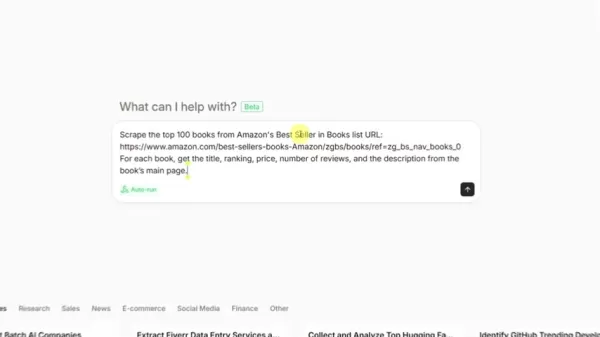
E-commerce businesses can use Sheet0 to track product listings, prices, and reviews on platforms like Amazon. By automatically extracting and organizing this data, companies can monitor competitors, identify market trends, and refine their own offerings. Sheet0 enables real-time insights, helping businesses make informed decisions and stay competitive.
Cons
ider a small business selling handmade jewelry online. Using Sheet0, they can automatically track pricing for similar items on Etsy and Amazon, adjusting their prices to stay competitive. They can also monitor customer reviews, spotting areas for improvement and addressing feedback quickly.Social Media Trend Analysis
Marketers can use Sheet0 to analyze social media trends, track brand mentions, and monitor competitor activity. The AI can pull data from YouTube, Twitter, and Instagram, offering insights into audience sentiment, popular topics, and emerging trends. This information helps optimize marketing campaigns, create engaging content, and strengthen brand connections.
A social media marketing agency might use Sheet0 to track client campaign performance across platforms. By automatically collecting data on engagement, reach, and sentiment, they can quickly see what works and make data-driven adjustments to improve outcomes.
Lead Generation and Contact Information Gathering
Sheet0 can gather contact details from online sources like GitHub developer profiles. By automatically extracting names, email addresses, and social links, businesses can build targeted lead lists for sales and marketing outreach. This streamlined approach saves time, letting teams focus on nurturing potential customer relationships.
A software firm seeking to hire developers could use Sheet0 to find and contact promising GitHub candidates. By automatically pulling profile data—including skills, experience, and contact info—they can quickly assemble a pool of qualified applicants.
Frequently Asked Questions About Sheet0
What types of data sources does Sheet0 support?
Sheet0 extracts data from various online sources, including websites, e-commerce platforms, social media, and developer repositories. The AI handles multiple data formats, such as text, numbers, images, and links.
How accurate is Sheet0's data extraction?
Sheet0’s accuracy depends on source data quality and how clearly you define your requirements. The AI is trained to identify and extract relevant data, but it can’t fix source data errors. Always review collected data and refine your requests as needed.
What data formats can I export data to using Sheet0?
Sheet0 mainly supports CSV (Comma Separated Values) export, which works with most spreadsheet software, data analysis tools, and programming languages. You can import CSV files into Microsoft Excel, Google Sheets, Tableau, or Python libraries for further analysis.
Exploring Related Data Collection Questions
How does Sheet0 compare to traditional web scraping methods?
Traditional web scraping usually requires writing custom code for specific sites, which is time-consuming and technical, demanding knowledge of languages like Python and libraries like Beautiful Soup. Sheet0 simplifies this with a no-code AI agent that automates data extraction from various sources, removing the need for coding. However, traditional methods offer more control and flexibility for complex data structures and detailed customization.
What are some best practices for ensuring data privacy and ethical data collection?
When collecting online data, respect privacy and follow ethical practices. Always check a website’s terms of service and privacy policy before gathering data. Avoid collecting sensitive personal details—like names, addresses, or financial data—unless you have a legitimate purpose and consent. Be transparent about data collection and offer opt-out options. Comply with relevant privacy laws such as GDPR (General Data Protection Regulation) and CCPA (California
Cons
umer Privacy Act).
Related article
 How to fix Core Web Vitals for better SEO rankings
How to Build a Free Website: Free Domain, Hosting & AI Website BuilderTable of ContentsIntroductionAI Website Builder 1: Hookous AIStep 1: Sign UpStep 2: Choose Business Type/NicheStep 3: Select ServicesStep 4: Define Website GoalsStep 5: Enter Busin
Apple, Google Partner With Anthropic to Address 27-Year-Old Vulnerability via Glass Wing Protection
As artificial intelligence advances rapidly in code generation and logical reasoning, the cybersecurity landscape faces unprecedented challenges. Recently, the prominent AI startup Anthropic officially launched a cross-industry collaboration called *
OpenAI Chief Scientist Addresses AI Reasoning Transparency Debate: Complexity Steady, No Sudden Jump
On September 2, Jakub Pachocki, OpenAI’s Chief Scientist, addressed public concerns on X regarding the AI model Astra, clarifying claims that it operates without oversight and lacks transparent reasoning.Why the Controversy Erupted: Deep Recurrence O
Related Special Topic Recommendations
Image editing
How to fix Core Web Vitals for better SEO rankings
How to Build a Free Website: Free Domain, Hosting & AI Website BuilderTable of ContentsIntroductionAI Website Builder 1: Hookous AIStep 1: Sign UpStep 2: Choose Business Type/NicheStep 3: Select ServicesStep 4: Define Website GoalsStep 5: Enter Busin
Apple, Google Partner With Anthropic to Address 27-Year-Old Vulnerability via Glass Wing Protection
As artificial intelligence advances rapidly in code generation and logical reasoning, the cybersecurity landscape faces unprecedented challenges. Recently, the prominent AI startup Anthropic officially launched a cross-industry collaboration called *
OpenAI Chief Scientist Addresses AI Reasoning Transparency Debate: Complexity Steady, No Sudden Jump
On September 2, Jakub Pachocki, OpenAI’s Chief Scientist, addressed public concerns on X regarding the AI model Astra, clarifying claims that it operates without oversight and lacks transparent reasoning.Why the Controversy Erupted: Deep Recurrence O
Related Special Topic Recommendations
Image editing
 AI Object Removal Editors: Clean Up Portraits, Travel, and Product Shots
2026 Latest Best Top-rated AI Object Removal Editors for portraits travel product shots! XIX.AI curates a powerful game-changing collection regularly updated with weekly rankings. These tools offer real-world tests to help you quickly remove unwanted elements, boost content quality, and save tons of time without compromising results. Must-try for anyone aiming to unlock their AI creation edge. Explore now!
 10 tools
 xix.ai
Text-to-speech
Best AI Text to Speech Tools for Online Courses
xix.ai
Text-to-speech
Best AI Text to Speech Tools for Online Courses
2026 Latest Best Top-rated AI Text to Speech Tools for Online Courses are curated by XIX.AI based on rigorous real-world tests and weekly updated rankings. These powerful tools help creators deliver crystal-clear audio content effortlessly, boosting writing efficiency and streamlining course production. Check out the free vs paid comparison to find your perfect fit. Explore now to unlock your AI edge in online education.
10 tools
xix.ai
writing
AI Blog Title Tools for Higher Click Through Rates
2026 Latest Best Top-Rated AI Blog Title Tools for Higher Click Through Rates! XIX.AI has carefully curated a powerful, game-changing collection of top tools that go through rigorous real-world tests. You’ll find a free vs paid comparison, weekly updated rankings, and detailed insights to help you boost your blog’s traffic efficiently. Must-try options are highlighted to help you unlock your AI edge. Explore now!
10 tools
xix.ai
automation
Best AI Task Routing Tools for Support Workflows
2026 Latest Best Top-rated AI Task Routing Tools for Support Workflows! XIX.AI has curated a highly powerful game-changing collection of must-try solutions, all undergoing rigorous real-world tests and updated weekly. These tools streamline workflows, boost productivity, and help teams deliver faster, more efficient support. Explore now to discover your perfect tool and unlock your AI edge!
17 tools
xix.ai
Academic Research
AI Citation and Paper Summary Tools
2026 Latest Best Top-Rated AI Citation and Paper Summary Tools Curated by XIX.AI. Get powerful game-changing solutions for quick content creation, improved writing efficiency, and boosting productivity. We offer a free vs paid comparison along with real-world tests and weekly updated rankings to help you find the must-try tool that fits your needs perfectly. Explore now to Unlock your AI edge.
10 tools
xix.ai
Productivity
Best AI Productivity Tools for Daily Work
2026 Latest Best Top-Rated AI Productivity Tools for Daily Work! XIX.AI has curated a powerful, game-changing selection based on rigorous weekly updated rankings and real-world tests. You’ll find must-try options that boost writing efficiency, streamline content creation, and help you overcome daily work challenges. Get a free vs paid comparison to find the perfect fit for your needs. Explore now to unlock your AI edge!
9 tools
xix.ai

 Comments (0)
0/500
Comments (0)
0/500
In the fast-paced world of business, data drives informed decisions. Yet, the manual processes of gathering, cleaning, and structuring data are often slow, tedious, and prone to errors. Sheet0 is a revolutionary AI agent that automates these tasks, freeing professionals from data chaos. This article examines Sheet0’s core features, use cases, and advantages for optimizing data workflows and maximizing the value of business information.
Key Points
Sheet0 automates data collection, cleansing, and organization from multiple sources.
The AI agent removes the need for manual copying, pasting, and spreadsheet upkeep.
Sheet0 handles various data extraction tasks, such as scraping Amazon bestsellers and YouTube trends.
Users can define custom data extraction goals and review results before approval.
Sheet0 boosts data accuracy, saves time, and increases productivity.
Unleashing the Power of Automated Data Collection
The Data Collection Dilemma
Today’s professionals frequently face the challenge of extracting, cleaning, and structuring data. Conventional approaches involve sifting through spreadsheets, repetitive copying and pasting, and manual organization—processes that are error-prone and inefficient. This data chaos can hinder productivity, causing missed deadlines, flawed insights, and poor business choices. A streamlined, automated solution is essential for companies aiming to compete effectively.
Data chaos affects businesses of all sizes. When information is spread across multiple platforms and formats, it becomes hard to form a clear overview. This can result in lost opportunities, misguided decisions, and wasted effort. Sheet0 breaks this cycle by automating data collection and organization.
Introducing Sheet0: Your AI Data Ally
Sheet0 is a sophisticated AI agent built to simplify complex data collection tasks. This tool automatically gathers, cleans, and organizes data from diverse online sources. Whether you need to monitor Amazon bestsellers, analyze YouTube trends, or compile GitHub developer profiles, Sheet0 handles the work quickly and accurately. It streamlines data workflows, giving you more time for strategic analysis and decision-making.
Sheet0 is user-friendly and accessible, even for those with limited technical skills. Its intuitive dashboard lets users clearly define data extraction goals, while the AI handles the rest. The outcome is a clean, structured dataset ready for analysis. With Sheet0, businesses turn raw data into actionable insights, gaining a competitive advantage.
Optimizing Sheet0 for Maximum Data Accuracy and Efficiency
Leveraging Templates for Streamlined Data Extraction
To boost data extraction speed and accuracy, Sheet0 provides pre-built templates for common scenarios. For instance, the Amazon Bestsellers template is optimized to pull product details, prices, and reviews from Amazon pages. Using these templates saves time and ensures the AI is fine-tuned for specific sources. Helpful templates include Amazon Best Seller Books - Top 100, YC Latest Batch AI Companies, and Extract Fiverr Data Entry Service.
Pro Tip: Check the available templates before creating a custom request. You might find one that matches your needs or serves as a useful starting point for adjustments.
Customizing Data Extraction Goals with Precision
While templates offer convenience, you can also tailor data extraction goals to your exact specifications. By entering detailed instructions, you can direct the AI to collect specific data points, apply filters, and manage complex data layouts.
Example: When tracking YouTube trends, you could specify extraction of only those videos with over 100,000 views or related to certain keywords.
How to Harness the Power of Sheet0: A Step-by-Step Guide
Step 1: Accessing Sheet0's Platform
To start collecting data, access the Sheet0 platform. Click the link in the video description to reach the main dashboard. This user-friendly interface serves as your hub for all data extraction and organization tasks.
Important: Ensure you have a stable internet connection for a smooth login. You may need to sign up or log in with existing credentials.
Step 2: Defining Your Data Needs
Once logged in, the main step is to specify the data you want. Sheet0 offers several pre-built templates for popular uses, such as scraping Amazon bestsellers, YouTube trends, and GitHub developer profiles. Alternatively, you can describe your unique data needs in the text box provided.
Key Tip: The clearer your description, the better Sheet0 can interpret your request and deliver precise results. Use concise language to outline the data points and target websites.
Step 3: Approving and Refining Data Collection
After setting your data requirements, Sheet0’s AI will analyze your request and begin gathering data. You can track progress in real time and approve results as they appear. This lets you fine-tune the extraction process and confirm you’re obtaining the right information.
Remember: You have final control over the data Sheet0 collects. If results aren’t satisfactory, adjust your requirements and run the process again.
Sheet0 Pricing Structure: Find the Plan That Suits Your Needs
Flexible Options for Every User
Currently, Sheet0 is in preview mode. If you’re on the waitlist, you’ll gain full access soon. Check the Join Discord and Request form to activate your account and get priority access now.
Evaluating Sheet0: Weighing the Pros
and Cons
Pros
Automates data collection, saving time and effort.
Enhances data accuracy by reducing manual entry.
Structures data for straightforward analysis.
Includes pre-built templates for common scenarios.
Supports customization of data extraction goals.
Cons
May need initial setup and configuration.
Accuracy relies on source data quality.
Currently in preview, so some features may be limited.
Full access might require a paid subscription.
Exploring Sheet0's Core Features: Streamlining Your Data Workflows
Automated Data Extraction
Sheet0 excels at automatically extracting data from diverse online sources. Users specify the required data and target websites, and the AI takes over, efficiently scraping the necessary information. This eliminates manual entry and repetitive copying and pasting, saving considerable time.
Data extraction with Sheet0 goes beyond basic scraping. The AI intelligently identifies relevant data even in complex or unstructured formats, ensuring the results are accurate, complete, and analysis-ready.
Intelligent Data Cleaning
After extraction, Sheet0 automatically cleans the data, removing inconsistencies, errors, and irrelevant content. The AI detects and fixes common data quality issues like duplicates, missing values, and formatting mistakes. This guarantees a reliable, accurate dataset for analysis.
Data cleaning is a crucial step in data collection. Without it, even advanced analysis can yield misleading outcomes. Sheet0’s intelligent cleaning ensures you can trust your data.
Seamless Data Organization
Sheet0 organizes cleaned data into a structured format, usually a spreadsheet-like table. Users can easily view, sort, filter, and analyze the data to gain insights quickly. The organized data can be exported to formats like CSV for further use or integration with other tools.
Data organization is key to making data accessible. Sheet0’s seamless structuring means users can find and use needed data without spending hours on manual formatting.
Sheet0 Use Cases: Revolutionizing Various Industries
E-Commerce Product Monitoring
E-commerce businesses can use Sheet0 to track product listings, prices, and reviews on platforms like Amazon. By automatically extracting and organizing this data, companies can monitor competitors, identify market trends, and refine their own offerings. Sheet0 enables real-time insights, helping businesses make informed decisions and stay competitive.
Cons
ider a small business selling handmade jewelry online. Using Sheet0, they can automatically track pricing for similar items on Etsy and Amazon, adjusting their prices to stay competitive. They can also monitor customer reviews, spotting areas for improvement and addressing feedback quickly.Social Media Trend Analysis
Marketers can use Sheet0 to analyze social media trends, track brand mentions, and monitor competitor activity. The AI can pull data from YouTube, Twitter, and Instagram, offering insights into audience sentiment, popular topics, and emerging trends. This information helps optimize marketing campaigns, create engaging content, and strengthen brand connections.
A social media marketing agency might use Sheet0 to track client campaign performance across platforms. By automatically collecting data on engagement, reach, and sentiment, they can quickly see what works and make data-driven adjustments to improve outcomes.
Lead Generation and Contact Information Gathering
Sheet0 can gather contact details from online sources like GitHub developer profiles. By automatically extracting names, email addresses, and social links, businesses can build targeted lead lists for sales and marketing outreach. This streamlined approach saves time, letting teams focus on nurturing potential customer relationships.
A software firm seeking to hire developers could use Sheet0 to find and contact promising GitHub candidates. By automatically pulling profile data—including skills, experience, and contact info—they can quickly assemble a pool of qualified applicants.
Frequently Asked Questions About Sheet0
What types of data sources does Sheet0 support?
Sheet0 extracts data from various online sources, including websites, e-commerce platforms, social media, and developer repositories. The AI handles multiple data formats, such as text, numbers, images, and links.
How accurate is Sheet0's data extraction?
Sheet0’s accuracy depends on source data quality and how clearly you define your requirements. The AI is trained to identify and extract relevant data, but it can’t fix source data errors. Always review collected data and refine your requests as needed.
What data formats can I export data to using Sheet0?
Sheet0 mainly supports CSV (Comma Separated Values) export, which works with most spreadsheet software, data analysis tools, and programming languages. You can import CSV files into Microsoft Excel, Google Sheets, Tableau, or Python libraries for further analysis.
Exploring Related Data Collection Questions
How does Sheet0 compare to traditional web scraping methods?
Traditional web scraping usually requires writing custom code for specific sites, which is time-consuming and technical, demanding knowledge of languages like Python and libraries like Beautiful Soup. Sheet0 simplifies this with a no-code AI agent that automates data extraction from various sources, removing the need for coding. However, traditional methods offer more control and flexibility for complex data structures and detailed customization.
What are some best practices for ensuring data privacy and ethical data collection?
When collecting online data, respect privacy and follow ethical practices. Always check a website’s terms of service and privacy policy before gathering data. Avoid collecting sensitive personal details—like names, addresses, or financial data—unless you have a legitimate purpose and consent. Be transparent about data collection and offer opt-out options. Comply with relevant privacy laws such as GDPR (General Data Protection Regulation) and CCPA (California
Cons
umer Privacy Act).








 How to fix Core Web Vitals for better SEO rankings
How to Build a Free Website: Free Domain, Hosting & AI Website BuilderTable of ContentsIntroductionAI Website Builder 1: Hookous AIStep 1: Sign UpStep 2: Choose Business Type/NicheStep 3: Select ServicesStep 4: Define Website GoalsStep 5: Enter Busin
How to fix Core Web Vitals for better SEO rankings
How to Build a Free Website: Free Domain, Hosting & AI Website BuilderTable of ContentsIntroductionAI Website Builder 1: Hookous AIStep 1: Sign UpStep 2: Choose Business Type/NicheStep 3: Select ServicesStep 4: Define Website GoalsStep 5: Enter Busin
 Apple, Google Partner With Anthropic to Address 27-Year-Old Vulnerability via Glass Wing Protection
As artificial intelligence advances rapidly in code generation and logical reasoning, the cybersecurity landscape faces unprecedented challenges. Recently, the prominent AI startup Anthropic officially launched a cross-industry collaboration called *
Apple, Google Partner With Anthropic to Address 27-Year-Old Vulnerability via Glass Wing Protection
As artificial intelligence advances rapidly in code generation and logical reasoning, the cybersecurity landscape faces unprecedented challenges. Recently, the prominent AI startup Anthropic officially launched a cross-industry collaboration called *
 OpenAI Chief Scientist Addresses AI Reasoning Transparency Debate: Complexity Steady, No Sudden Jump
On September 2, Jakub Pachocki, OpenAI’s Chief Scientist, addressed public concerns on X regarding the AI model Astra, clarifying claims that it operates without oversight and lacks transparent reasoning.Why the Controversy Erupted: Deep Recurrence O
OpenAI Chief Scientist Addresses AI Reasoning Transparency Debate: Complexity Steady, No Sudden Jump
On September 2, Jakub Pachocki, OpenAI’s Chief Scientist, addressed public concerns on X regarding the AI model Astra, clarifying claims that it operates without oversight and lacks transparent reasoning.Why the Controversy Erupted: Deep Recurrence O

2026 Latest Best Top-rated AI Object Removal Editors for portraits travel product shots! XIX.AI curates a powerful game-changing collection regularly updated with weekly rankings. These tools offer real-world tests to help you quickly remove unwanted elements, boost content quality, and save tons of time without compromising results. Must-try for anyone aiming to unlock their AI creation edge. Explore now!
10 tools
xix.ai

2026 Latest Best Top-rated AI Text to Speech Tools for Online Courses are curated by XIX.AI based on rigorous real-world tests and weekly updated rankings. These powerful tools help creators deliver crystal-clear audio content effortlessly, boosting writing efficiency and streamlining course production. Check out the free vs paid comparison to find your perfect fit. Explore now to unlock your AI edge in online education.
10 tools
xix.ai

2026 Latest Best Top-Rated AI Blog Title Tools for Higher Click Through Rates! XIX.AI has carefully curated a powerful, game-changing collection of top tools that go through rigorous real-world tests. You’ll find a free vs paid comparison, weekly updated rankings, and detailed insights to help you boost your blog’s traffic efficiently. Must-try options are highlighted to help you unlock your AI edge. Explore now!
10 tools
xix.ai

2026 Latest Best Top-rated AI Task Routing Tools for Support Workflows! XIX.AI has curated a highly powerful game-changing collection of must-try solutions, all undergoing rigorous real-world tests and updated weekly. These tools streamline workflows, boost productivity, and help teams deliver faster, more efficient support. Explore now to discover your perfect tool and unlock your AI edge!
17 tools
xix.ai

2026 Latest Best Top-Rated AI Citation and Paper Summary Tools Curated by XIX.AI. Get powerful game-changing solutions for quick content creation, improved writing efficiency, and boosting productivity. We offer a free vs paid comparison along with real-world tests and weekly updated rankings to help you find the must-try tool that fits your needs perfectly. Explore now to Unlock your AI edge.
10 tools
xix.ai

2026 Latest Best Top-Rated AI Productivity Tools for Daily Work! XIX.AI has curated a powerful, game-changing selection based on rigorous weekly updated rankings and real-world tests. You’ll find must-try options that boost writing efficiency, streamline content creation, and help you overcome daily work challenges. Get a free vs paid comparison to find the perfect fit for your needs. Explore now to unlock your AI edge!
9 tools
xix.ai












