


 Home
HomeMagicSchool AI Revolutionizes Teaching with Smart Technology for Classrooms
In today's dynamic educational landscape, educators are consistently searching for innovative solutions to simplify their workflows, customize learning experiences, and boost student engagement. MagicSchool AI stands out as a revolutionary platform, offering a full suite of AI-powered tools created to assist teachers across various professional tasks. From lesson preparation to grading, MagicSchool AI seeks to empower educators, improve their efficiency, and ultimately enhance student achievement.
Key Points
MagicSchool AI provides a range of specialized AI tools designed specifically for educators.
It supports teachers in developing lesson plans, writing report card comments, and creating multiple-choice tests.
The platform is engineered to reduce workload and give teachers more free time.
It offers capabilities including text rewriting, YouTube video question generation, and professional email composition.
MagicSchool AI accommodates different educational stages from elementary school through higher education.
Introduction to MagicSchool AI
What is MagicSchool AI?
MagicSchool AI is an artificial intelligence platform built to help educators with numerous professional responsibilities, ultimately enhancing teaching efficiency and effectiveness. It delivers numerous tools through an intuitive interface, designed to help teachers save valuable time and customize their teaching approaches. MagicSchool AI distinguishes itself as a major educational resource by providing a diverse collection of AI-powered capabilities.
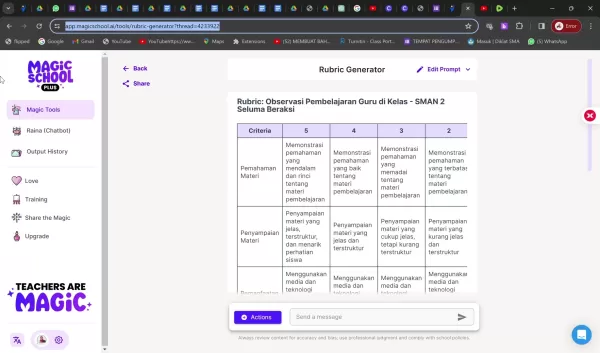
The fundamental purpose of MagicSchool AI is to ease the burden of administrative duties and free up educators to concentrate on their most important work: direct student interaction and nurturing a passion for learning. This AI-powered assistant helps with generating lesson plans, developing personalized report card comments, and creating interactive quizzes. Its capabilities continue to evolve to address the changing requirements of contemporary educators.
It's crucial to understand that while MagicSchool AI offers substantial support, the platform itself advocates for responsible usage. It encourages teachers to consistently review and modify the generated content, applying their professional expertise and ensuring materials comply with school guidelines. This guarantees that AI functions as a tool to supplement, not substitute, the vital role of educators in the learning process. MagicSchool AI also highlights the importance of teachers being mindful of potential errors and biases, promoting the ethical implementation of AI in education.
Exploring the MagicSchool AI Toolkit
Lesson Plan Generator
The lesson plan generator represents one of MagicSchool AI's most valuable features. This tool enables educators to produce comprehensive and engaging lesson plans swiftly and effortlessly. By simply entering the topic, learning objectives, and grade level, the AI creates a structured plan complete with activities, evaluation methods, and differentiation approaches. This can save countless hours of preparation time, enabling teachers to focus on refining their instructional methods and connecting with students.
To utilize this feature, navigate to the 'All Tools' section after logging into your MagicSchool AI account
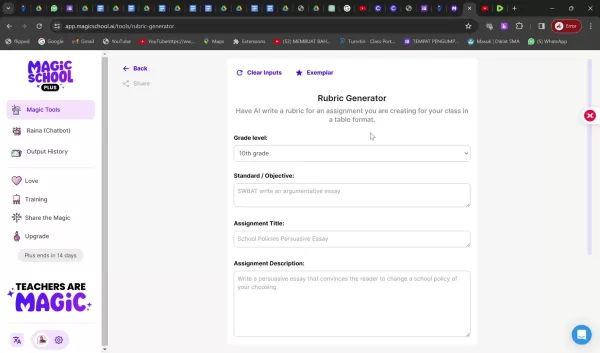
. From there, choose the 'Lesson Plan' generator and input the required information. The AI will manage the rest, delivering a solid framework for an interactive and productive lesson. With the lesson plan generator, educators can rapidly develop instructional content perfectly suited to their classroom requirements.
Report Card Comment Generator
Developing personalized and meaningful report card comments can be labor-intensive, but MagicSchool AI addresses this challenge with its report card comment generator. This feature employs AI to craft customized comments based on student performance and specific criteria. Teachers can input student strengths, improvement areas, and particular learning goals, and the AI produces thorough comments that deliver valuable feedback to both students and parents.
This tool aims to minimize the stress and time investment associated with writing individual report card comments. By providing specific and constructive feedback, educators can promote student development and strengthen communication with families. The process is simple: select the 'Report Card Comments' tool, enter student-specific details, and let the AI work its magic. Always remember to examine the generated comments and modify them to reflect your unique understanding of each student's progress. This tool enables quick generation of report card comments.
Multiple Choice Assessment Generator
Evaluations are essential components of education, but developing high-quality multiple-choice questions can be difficult. MagicSchool AI streamlines this process with its multiple-choice assessment generator. This tool allows educators to create original assessment questions based on any subject matter, standard, or criterion. Simply input the relevant information, and the AI will generate various questions, complete with answer choices. Teachers can then review and refine the questions to ensure alignment with their specific learning goals.
The objective of this tool is to provide a fast and effective method for creating assessments that accurately measure student comprehension. By generating questions that match specific learning standards, educators can ensure their assessments are both challenging and appropriate. To use the generator, select the 'Multiple Choice Assessments' tool and input the necessary details. The AI will present you with multiple options to select from, helping you create thorough and well-organized assessments.
Additional AI-Powered Tools
Beyond these fundamental features, MagicSchool AI provides numerous other tools designed to support educators in various professional aspects. These include:
- Text Rewriter: Transform any text content according to custom specifications. Modify information efficiently through a streamlined process.
- YouTube Video Questions: Create guided questions linked to YouTube video content to increase student involvement.
- Email Generator: Compose professional emails for communications with colleagues and parents to maintain effective information sharing.
- Rubric Generator: Develop grading rubrics rapidly to ensure consistent evaluation standards and save time.
These tools are engineered to further optimize teachers' workflows, personalize instruction, and enhance communication with students and families. By harnessing AI technology, MagicSchool AI aims to liberate educators to concentrate on what really counts: encouraging student growth and establishing a positive educational atmosphere.
Getting Started with MagicSchool AI
Creating an Account
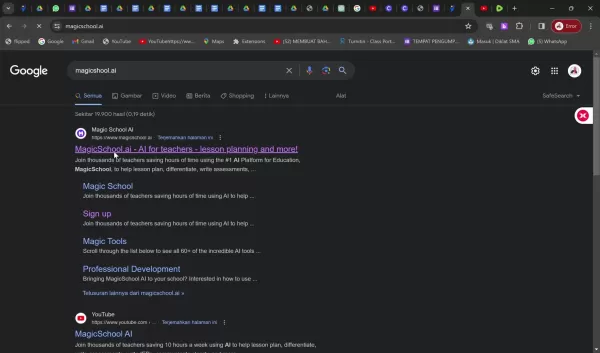
To start using MagicSchool AI, you'll need to establish an account. The platform provides free registration, allowing you to investigate various tools and features before choosing a paid subscription. You can register using your Google or Microsoft account for a smooth experience. Simply visit magicschool.ai and select the "Sign up free" button to begin.
After registering, you'll be asked to personalize your MagicSchool AI experience by choosing the grade levels and subjects you teach. This helps the AI customize its recommendations and generated content to your particular needs. The free plan offers a good introduction to the platform, though you might consider upgrading to a paid plan to access additional features and higher usage allowances.
Navigating the Dashboard
Once you've established your account, you'll access the MagicSchool AI dashboard. This central hub provides entry to all the platform's tools and features. The dashboard is designed to be straightforward and user-friendly, featuring clear navigation and an organized interface. Spend some time exploring different sections and becoming familiar with the available tools. You can access "all tools" to begin working with MagicSchool AI immediately.
MagicSchool AI Pricing
Understanding the Subscription Options
MagicSchool AI provides multiple subscription plans to accommodate the varied requirements of educators. While a free plan exists, it features restricted usage and functionality. Paid subscriptions provide access to additional tools, increased usage limits, and priority support. It's essential to carefully evaluate your requirements and budget when selecting a plan. For current pricing details, visit the official website for complete information.
Pros and Cons
Pros
Comprehensive collection of AI-enhanced tools
Straightforward and easy-to-use interface
Substantial potential for time conservation
Opportunities for customized educational experiences
Cons
Dependence on AI-generated content might limit creative contribution
Potential for errors and偏见 in produced content
Subscription fees could present obstacles for some educators
Requires meticulous examination and adjustment of generated materials
Exploring the Core Features of MagicSchool AI
AI-Powered Efficiency and Creativity
MagicSchool AI presents a transformative educational approach by utilizing artificial intelligence technology. Here are some of its primary features:
- Lesson Planning Simplified: Rapidly produce detailed and interactive lesson plans customized to your specific topics and grade levels.
- Effortless Report Card Comments: Create personalized and insightful report card comments in significantly less time.
- Dynamic Assessment Creation: Generate original multiple-choice questions aligned with specific learning standards. AI-powered tools make content generation more efficient than ever.
How Educators Can Benefit from MagicSchool AI
Empowering Teachers in the Classroom
MagicSchool AI features numerous applications that can increase educator effectiveness.
- Saving Time: Reduce administrative workload and create more opportunity for individualized student engagement.
- Personalizing Learning: Develop customized educational experiences that address the varied needs of all learners.
- Boosting Student Engagement: Develop interactive and captivating lessons that maintain student focus. With compelling lesson planning and assessments, MagicSchool AI ensures attention remains where it matters most.
FAQ
Is MagicSchool AI truly free to use?
MagicSchool AI provides a free plan with basic features and limited usage. Paid plans unlock more tools and higher usage capacity.
How accurate is the content generated by MagicSchool AI?
AI-generated material should always be checked for precision and customized to fit particular needs and situations.
What grade levels and subjects does MagicSchool AI support?
MagicSchool AI supports multiple educational levels from elementary through higher education across various subjects.
Can MagicSchool AI help with report card comments?
Yes, the platform includes a report card comment generator to produce personalized student feedback.
Related Questions
How can I integrate MagicSchool AI effectively into my teaching practice?
Begin by investigating the various instruments and features available through MagicSchool AI. Use the platform to simplify administrative tasks such as lesson planning and report card comments, creating more time for individual student interaction. Focus on using the AI to improve, not replace, your established teaching methods. Always review and modify the generated content to guarantee accuracy, relevance, and compliance with your specific learning goals and school regulations. Test different tools to determine what functions best for your instructional approach and student requirements. Share your discoveries and work with fellow educators to learn effective strategies and maximize MagicSchool AI benefits in the classroom.Furthermore, consider how MagicSchool AI can assist with differentiation and personalized learning. Use the AI to create diverse learning materials and assessments tailored to individual student needs. Motivate students to interact critically with AI-generated content, encouraging them to examine and assess information from multiple viewpoints. By implementing MagicSchool AI deliberately and strategically, you can enable your students to build essential critical thinking and digital literacy skills while improving your teaching effectiveness. Remember that AI serves as a tool to enhance your expertise, not to replace it. Your professional judgment and insights remain essential for creating meaningful and effective learning experiences for your students.
Related article
 South Korea Breaks Ground on National AI Computing Center, Investing 2.5 Trillion Won with 2028 Target
South Korean outlet EtNews reports that groundbreaking for the Korea AI Computing Center (KOACC) took place on August 3 at the Solar City data center park in Sunan, Jeollanam-do. Backed by a total investment of 2.5 trillion KRW (roughly 11.838 billio
Six Tech Giants Back Linux Foundation With $12.5M to Tackle AI Vulnerability Noise
To tackle the flood of low-quality security reports produced by AI automation tools, six major tech companies—Anthropic, Amazon (AWS), GitHub, Google, Microsoft, and OpenAI—have collectively contributed $12.5 million in funding to Linux Foundation in
Musk Considered Leaving OpenAI to His Kids as Altman Testifies
This morning, OpenAI CEO Sam Altman took the stand to address former co-founder Elon Musk’s lawsuit challenging the company’s corporate structure.When asked about Musk’s claim that other founders “stole a charity” by launching a for-profit subsidiary
Related Special Topic Recommendations
Music composition
South Korea Breaks Ground on National AI Computing Center, Investing 2.5 Trillion Won with 2028 Target
South Korean outlet EtNews reports that groundbreaking for the Korea AI Computing Center (KOACC) took place on August 3 at the Solar City data center park in Sunan, Jeollanam-do. Backed by a total investment of 2.5 trillion KRW (roughly 11.838 billio
Six Tech Giants Back Linux Foundation With $12.5M to Tackle AI Vulnerability Noise
To tackle the flood of low-quality security reports produced by AI automation tools, six major tech companies—Anthropic, Amazon (AWS), GitHub, Google, Microsoft, and OpenAI—have collectively contributed $12.5 million in funding to Linux Foundation in
Musk Considered Leaving OpenAI to His Kids as Altman Testifies
This morning, OpenAI CEO Sam Altman took the stand to address former co-founder Elon Musk’s lawsuit challenging the company’s corporate structure.When asked about Musk’s claim that other founders “stole a charity” by launching a for-profit subsidiary
Related Special Topic Recommendations
Music composition
 AI Vocal Demo Tools for Songwriters, Hooks, Toplines, and Multilingual Draft Sessions
2026 Latest Best AI Vocal Demo Tools for Songwriters, Hook Creators, and Multi-Language Content Teams! XIX.AI has curated a top-rated list of powerful game-changing tools that go through rigorous real-world tests. You’ll find detailed free vs paid comparison data, comprehensive rankings, and must-try options to help you boost writing efficiency and unlock your creative potential. Explore now to discover your perfect tool for all your content needs!
 9 tools
 xix.ai
Business
Best AI Competitive Research Tools for Small Businesses
xix.ai
Business
Best AI Competitive Research Tools for Small Businesses
2026 Latest Best Top-rated AI Competitive Research Tools for Small Businesses! XIX.AI has curated a highly powerful game-changing collection, updated weekly with rigorous real-world tests and detailed rankings. You can find a comprehensive free vs paid comparison to help you identify the must-try tools that boost your productivity and give you a competitive edge. Explore now to discover your perfect tool!
9 tools
xix.ai
Image editing
Photoshop AI Retouch Tools for Ecommerce Apparel, Skin Cleanup, and Color Consistency
2026 Latest Best Photoshop AI retouch tools for ecommerce apparel, skin cleanup, and color consistency! This top-rated curated list features powerful game-changing solutions that help you boost writing efficiency, streamline content creation, and achieve perfect visual results effortlessly. Each tool has undergone real-world tests through weekly updated rankings, complete with free vs paid comparison details. Backed by XIX.AI, it’s the must-try guide for anyone aiming to unlock your AI edge. Explore now!
10 tools
xix.ai
Prompt
Best AI Prompt Libraries for ChatGPT Workflows
2026 Latest Best Top-Rated AI Prompt Libraries for optimizing all types of ChatGPT workflows. XIX.AI has curated a powerful, game-changing collection that goes through rigorous real-world tests to ensure top performance. You can find detailed free vs paid comparisons and expert rankings to help you choose the must-try tools that boost your productivity and unlock your AI edge. Explore now!
11 tools
xix.ai
Education and Learning
AI Quiz Builder Platforms for Teachers, Tutors, and Cohort-Based Learning Programs
2026 Latest Best AI Quiz Builder Platforms for Teachers, Tutors, and Cohort-Based Learning Programs! XIX.AI has curated a top-rated list of powerful game-changing tools that go through real-world tests to deliver accurate rankings. These must-try platforms help boost writing efficiency, streamline content creation, and simplify quiz design across all learning scenarios. Explore now to discover your perfect tool for unlocking your AI edge in teaching!
13 tools
xix.ai
code
AI Pull Request Review Tools for GitHub Teams Handling Refactors, Bugs, and Security Gaps
2026 Latest Best AI Pull Request Review Tools for GitHub Teams are here on XIX.AI! This top-rated curated list showcases powerful game-changing solutions that streamline refactoring, bug fixing, and security gap detection across all team workflows. Enjoy a free vs paid comparison along with real-world tests and detailed rankings to help you find the perfect tool that boosts productivity significantly. Explore now to unlock your AI edge!
12 tools
xix.ai

 Comments (0)
0/500
Comments (0)
0/500
In today's dynamic educational landscape, educators are consistently searching for innovative solutions to simplify their workflows, customize learning experiences, and boost student engagement. MagicSchool AI stands out as a revolutionary platform, offering a full suite of AI-powered tools created to assist teachers across various professional tasks. From lesson preparation to grading, MagicSchool AI seeks to empower educators, improve their efficiency, and ultimately enhance student achievement.
Key Points
MagicSchool AI provides a range of specialized AI tools designed specifically for educators.
It supports teachers in developing lesson plans, writing report card comments, and creating multiple-choice tests.
The platform is engineered to reduce workload and give teachers more free time.
It offers capabilities including text rewriting, YouTube video question generation, and professional email composition.
MagicSchool AI accommodates different educational stages from elementary school through higher education.
Introduction to MagicSchool AI
What is MagicSchool AI?
MagicSchool AI is an artificial intelligence platform built to help educators with numerous professional responsibilities, ultimately enhancing teaching efficiency and effectiveness. It delivers numerous tools through an intuitive interface, designed to help teachers save valuable time and customize their teaching approaches. MagicSchool AI distinguishes itself as a major educational resource by providing a diverse collection of AI-powered capabilities.
The fundamental purpose of MagicSchool AI is to ease the burden of administrative duties and free up educators to concentrate on their most important work: direct student interaction and nurturing a passion for learning. This AI-powered assistant helps with generating lesson plans, developing personalized report card comments, and creating interactive quizzes. Its capabilities continue to evolve to address the changing requirements of contemporary educators.
It's crucial to understand that while MagicSchool AI offers substantial support, the platform itself advocates for responsible usage. It encourages teachers to consistently review and modify the generated content, applying their professional expertise and ensuring materials comply with school guidelines. This guarantees that AI functions as a tool to supplement, not substitute, the vital role of educators in the learning process. MagicSchool AI also highlights the importance of teachers being mindful of potential errors and biases, promoting the ethical implementation of AI in education.
Exploring the MagicSchool AI Toolkit
Lesson Plan Generator
The lesson plan generator represents one of MagicSchool AI's most valuable features. This tool enables educators to produce comprehensive and engaging lesson plans swiftly and effortlessly. By simply entering the topic, learning objectives, and grade level, the AI creates a structured plan complete with activities, evaluation methods, and differentiation approaches. This can save countless hours of preparation time, enabling teachers to focus on refining their instructional methods and connecting with students.
To utilize this feature, navigate to the 'All Tools' section after logging into your MagicSchool AI account
. From there, choose the 'Lesson Plan' generator and input the required information. The AI will manage the rest, delivering a solid framework for an interactive and productive lesson. With the lesson plan generator, educators can rapidly develop instructional content perfectly suited to their classroom requirements.
Report Card Comment Generator
Developing personalized and meaningful report card comments can be labor-intensive, but MagicSchool AI addresses this challenge with its report card comment generator. This feature employs AI to craft customized comments based on student performance and specific criteria. Teachers can input student strengths, improvement areas, and particular learning goals, and the AI produces thorough comments that deliver valuable feedback to both students and parents.
This tool aims to minimize the stress and time investment associated with writing individual report card comments. By providing specific and constructive feedback, educators can promote student development and strengthen communication with families. The process is simple: select the 'Report Card Comments' tool, enter student-specific details, and let the AI work its magic. Always remember to examine the generated comments and modify them to reflect your unique understanding of each student's progress. This tool enables quick generation of report card comments.
Multiple Choice Assessment Generator
Evaluations are essential components of education, but developing high-quality multiple-choice questions can be difficult. MagicSchool AI streamlines this process with its multiple-choice assessment generator. This tool allows educators to create original assessment questions based on any subject matter, standard, or criterion. Simply input the relevant information, and the AI will generate various questions, complete with answer choices. Teachers can then review and refine the questions to ensure alignment with their specific learning goals.
The objective of this tool is to provide a fast and effective method for creating assessments that accurately measure student comprehension. By generating questions that match specific learning standards, educators can ensure their assessments are both challenging and appropriate. To use the generator, select the 'Multiple Choice Assessments' tool and input the necessary details. The AI will present you with multiple options to select from, helping you create thorough and well-organized assessments.
Additional AI-Powered Tools
Beyond these fundamental features, MagicSchool AI provides numerous other tools designed to support educators in various professional aspects. These include:
- Text Rewriter: Transform any text content according to custom specifications. Modify information efficiently through a streamlined process.
- YouTube Video Questions: Create guided questions linked to YouTube video content to increase student involvement.
- Email Generator: Compose professional emails for communications with colleagues and parents to maintain effective information sharing.
- Rubric Generator: Develop grading rubrics rapidly to ensure consistent evaluation standards and save time.
These tools are engineered to further optimize teachers' workflows, personalize instruction, and enhance communication with students and families. By harnessing AI technology, MagicSchool AI aims to liberate educators to concentrate on what really counts: encouraging student growth and establishing a positive educational atmosphere.
Getting Started with MagicSchool AI
Creating an Account
To start using MagicSchool AI, you'll need to establish an account. The platform provides free registration, allowing you to investigate various tools and features before choosing a paid subscription. You can register using your Google or Microsoft account for a smooth experience. Simply visit magicschool.ai and select the "Sign up free" button to begin.
After registering, you'll be asked to personalize your MagicSchool AI experience by choosing the grade levels and subjects you teach. This helps the AI customize its recommendations and generated content to your particular needs. The free plan offers a good introduction to the platform, though you might consider upgrading to a paid plan to access additional features and higher usage allowances.
Navigating the Dashboard
Once you've established your account, you'll access the MagicSchool AI dashboard. This central hub provides entry to all the platform's tools and features. The dashboard is designed to be straightforward and user-friendly, featuring clear navigation and an organized interface. Spend some time exploring different sections and becoming familiar with the available tools. You can access "all tools" to begin working with MagicSchool AI immediately.
MagicSchool AI Pricing
Understanding the Subscription Options
MagicSchool AI provides multiple subscription plans to accommodate the varied requirements of educators. While a free plan exists, it features restricted usage and functionality. Paid subscriptions provide access to additional tools, increased usage limits, and priority support. It's essential to carefully evaluate your requirements and budget when selecting a plan. For current pricing details, visit the official website for complete information.
Pros and Cons
Pros
Comprehensive collection of AI-enhanced tools
Straightforward and easy-to-use interface
Substantial potential for time conservation
Opportunities for customized educational experiences
Cons
Dependence on AI-generated content might limit creative contribution
Potential for errors and偏见 in produced content
Subscription fees could present obstacles for some educators
Requires meticulous examination and adjustment of generated materials
Exploring the Core Features of MagicSchool AI
AI-Powered Efficiency and Creativity
MagicSchool AI presents a transformative educational approach by utilizing artificial intelligence technology. Here are some of its primary features:
- Lesson Planning Simplified: Rapidly produce detailed and interactive lesson plans customized to your specific topics and grade levels.
- Effortless Report Card Comments: Create personalized and insightful report card comments in significantly less time.
- Dynamic Assessment Creation: Generate original multiple-choice questions aligned with specific learning standards. AI-powered tools make content generation more efficient than ever.
How Educators Can Benefit from MagicSchool AI
Empowering Teachers in the Classroom
MagicSchool AI features numerous applications that can increase educator effectiveness.
- Saving Time: Reduce administrative workload and create more opportunity for individualized student engagement.
- Personalizing Learning: Develop customized educational experiences that address the varied needs of all learners.
- Boosting Student Engagement: Develop interactive and captivating lessons that maintain student focus. With compelling lesson planning and assessments, MagicSchool AI ensures attention remains where it matters most.
FAQ
Is MagicSchool AI truly free to use?
MagicSchool AI provides a free plan with basic features and limited usage. Paid plans unlock more tools and higher usage capacity.
How accurate is the content generated by MagicSchool AI?
AI-generated material should always be checked for precision and customized to fit particular needs and situations.
What grade levels and subjects does MagicSchool AI support?
MagicSchool AI supports multiple educational levels from elementary through higher education across various subjects.
Can MagicSchool AI help with report card comments?
Yes, the platform includes a report card comment generator to produce personalized student feedback.
Related Questions
How can I integrate MagicSchool AI effectively into my teaching practice?
Begin by investigating the various instruments and features available through MagicSchool AI. Use the platform to simplify administrative tasks such as lesson planning and report card comments, creating more time for individual student interaction. Focus on using the AI to improve, not replace, your established teaching methods. Always review and modify the generated content to guarantee accuracy, relevance, and compliance with your specific learning goals and school regulations. Test different tools to determine what functions best for your instructional approach and student requirements. Share your discoveries and work with fellow educators to learn effective strategies and maximize MagicSchool AI benefits in the classroom.Furthermore, consider how MagicSchool AI can assist with differentiation and personalized learning. Use the AI to create diverse learning materials and assessments tailored to individual student needs. Motivate students to interact critically with AI-generated content, encouraging them to examine and assess information from multiple viewpoints. By implementing MagicSchool AI deliberately and strategically, you can enable your students to build essential critical thinking and digital literacy skills while improving your teaching effectiveness. Remember that AI serves as a tool to enhance your expertise, not to replace it. Your professional judgment and insights remain essential for creating meaningful and effective learning experiences for your students.








 South Korea Breaks Ground on National AI Computing Center, Investing 2.5 Trillion Won with 2028 Target
South Korean outlet EtNews reports that groundbreaking for the Korea AI Computing Center (KOACC) took place on August 3 at the Solar City data center park in Sunan, Jeollanam-do. Backed by a total investment of 2.5 trillion KRW (roughly 11.838 billio
South Korea Breaks Ground on National AI Computing Center, Investing 2.5 Trillion Won with 2028 Target
South Korean outlet EtNews reports that groundbreaking for the Korea AI Computing Center (KOACC) took place on August 3 at the Solar City data center park in Sunan, Jeollanam-do. Backed by a total investment of 2.5 trillion KRW (roughly 11.838 billio
 Six Tech Giants Back Linux Foundation With $12.5M to Tackle AI Vulnerability Noise
To tackle the flood of low-quality security reports produced by AI automation tools, six major tech companies—Anthropic, Amazon (AWS), GitHub, Google, Microsoft, and OpenAI—have collectively contributed $12.5 million in funding to Linux Foundation in
Six Tech Giants Back Linux Foundation With $12.5M to Tackle AI Vulnerability Noise
To tackle the flood of low-quality security reports produced by AI automation tools, six major tech companies—Anthropic, Amazon (AWS), GitHub, Google, Microsoft, and OpenAI—have collectively contributed $12.5 million in funding to Linux Foundation in
 Musk Considered Leaving OpenAI to His Kids as Altman Testifies
This morning, OpenAI CEO Sam Altman took the stand to address former co-founder Elon Musk’s lawsuit challenging the company’s corporate structure.When asked about Musk’s claim that other founders “stole a charity” by launching a for-profit subsidiary
Musk Considered Leaving OpenAI to His Kids as Altman Testifies
This morning, OpenAI CEO Sam Altman took the stand to address former co-founder Elon Musk’s lawsuit challenging the company’s corporate structure.When asked about Musk’s claim that other founders “stole a charity” by launching a for-profit subsidiary

2026 Latest Best AI Vocal Demo Tools for Songwriters, Hook Creators, and Multi-Language Content Teams! XIX.AI has curated a top-rated list of powerful game-changing tools that go through rigorous real-world tests. You’ll find detailed free vs paid comparison data, comprehensive rankings, and must-try options to help you boost writing efficiency and unlock your creative potential. Explore now to discover your perfect tool for all your content needs!
9 tools
xix.ai

2026 Latest Best Top-rated AI Competitive Research Tools for Small Businesses! XIX.AI has curated a highly powerful game-changing collection, updated weekly with rigorous real-world tests and detailed rankings. You can find a comprehensive free vs paid comparison to help you identify the must-try tools that boost your productivity and give you a competitive edge. Explore now to discover your perfect tool!
9 tools
xix.ai

2026 Latest Best Photoshop AI retouch tools for ecommerce apparel, skin cleanup, and color consistency! This top-rated curated list features powerful game-changing solutions that help you boost writing efficiency, streamline content creation, and achieve perfect visual results effortlessly. Each tool has undergone real-world tests through weekly updated rankings, complete with free vs paid comparison details. Backed by XIX.AI, it’s the must-try guide for anyone aiming to unlock your AI edge. Explore now!
10 tools
xix.ai

2026 Latest Best Top-Rated AI Prompt Libraries for optimizing all types of ChatGPT workflows. XIX.AI has curated a powerful, game-changing collection that goes through rigorous real-world tests to ensure top performance. You can find detailed free vs paid comparisons and expert rankings to help you choose the must-try tools that boost your productivity and unlock your AI edge. Explore now!
11 tools
xix.ai

2026 Latest Best AI Quiz Builder Platforms for Teachers, Tutors, and Cohort-Based Learning Programs! XIX.AI has curated a top-rated list of powerful game-changing tools that go through real-world tests to deliver accurate rankings. These must-try platforms help boost writing efficiency, streamline content creation, and simplify quiz design across all learning scenarios. Explore now to discover your perfect tool for unlocking your AI edge in teaching!
13 tools
xix.ai

2026 Latest Best AI Pull Request Review Tools for GitHub Teams are here on XIX.AI! This top-rated curated list showcases powerful game-changing solutions that streamline refactoring, bug fixing, and security gap detection across all team workflows. Enjoy a free vs paid comparison along with real-world tests and detailed rankings to help you find the perfect tool that boosts productivity significantly. Explore now to unlock your AI edge!
12 tools
xix.ai












