


 Home
HomeWhat is GitHub Copilot? Your 2026 AI pair programming guide.
In today's fast-paced software development landscape, efficiency and innovation are critical. GitHub Copilot, an AI-powered coding assistant, is transforming the way developers write code. This guide provides an in-depth look at GitHub Copilot, covering its core features, IntelliJ IDEA integration, and how it can optimize your coding workflow. Learn how this AI tool can revolutionize your development process and increase productivity.
Key Points
GitHub Copilot serves as an AI pair programmer, helping developers write code more efficiently.
It integrates smoothly with widely-used IDEs such as IntelliJ IDEA and VS Code.
Copilot provides multiple modes, including chat, autocomplete, and agent mode, to address diverse coding requirements.
GitHub Copilot features both free and paid subscription plans, accommodating users with different needs.
The agent mode in GitHub Copilot automates coding tasks, transforming software development workflows.
Understanding GitHub Copilot
What is GitHub Copilot?
GitHub Copilot is an AI-powered coding assistant created through collaboration between GitHub and OpenAI.

Its purpose is to help developers write code more quickly and effectively by offering real-time suggestions and autocompletions. Consider it your AI programming partner, delivering intelligent assistance as you type. The tool uses machine learning models trained on billions of lines of public code to understand your coding context and provide appropriate suggestions. GitHub Copilot is changing the software development landscape by offering an AI-driven assistant that enhances both code quality and writing speed.
Fundamentally, GitHub Copilot examines the code you're writing, considering various elements such as:
- Your coding style: It adapts to your preferred coding conventions and patterns.
- Comments: It interprets natural language comments and can generate code accordingly.
- Function names: It uses function names to deduce intended functionality and propose suitable code.
- Existing code: It evaluates surrounding code to deliver contextually appropriate suggestions.
Based on this analysis, Copilot provides various suggestions, from basic autocompletions to complete code blocks, enabling you to write code more rapidly and accurately. Since it's AI-driven, the tool continuously improves with use. It serves as an excellent resource not just for writing code, but also for assisting with testing and documentation tasks.
Key Features of GitHub Copilot:
- Code Completion: Predicts and suggests code as you type, minimizing boilerplate and enhancing efficiency.
- Contextual Suggestions: Provides code recommendations based on surrounding code, comments, and context.
- Multi-Language Support: Works with numerous programming languages, including Java, Python, JavaScript, TypeScript, C#, and others.
- Integration with IDEs: Integrates smoothly with popular IDEs like VS Code and IntelliJ IDEA, maintaining a familiar coding environment.
Seamless Integration with IntelliJ IDEA
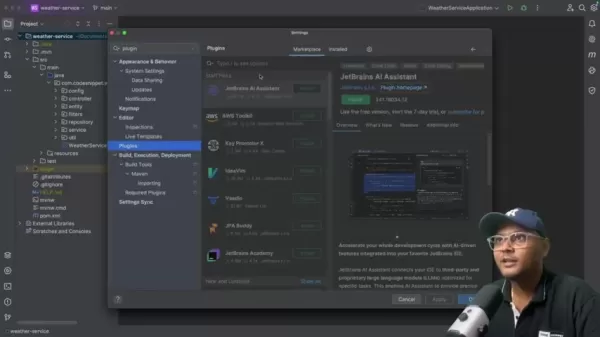
Although GitHub Copilot integrates seamlessly with VS Code, connecting it with IntelliJ IDEA can substantially improve the coding experience for Java and Spring Boot developers.

IntelliJ IDEA is a well-regarded IDE, particularly popular among Java developers for creating robust and scalable applications. Here's how to integrate GitHub Copilot with IntelliJ IDEA:
- Install the GitHub Copilot Plugin:
- Launch IntelliJ IDEA and go to Settings (or Preferences on macOS).
- Choose Plugins and search for "GitHub Copilot".
- Click Install and restart IntelliJ IDEA to enable the plugin.
- Authenticate with GitHub:
- After restarting, IntelliJ IDEA will prompt you to authenticate with your GitHub account.
- Follow the displayed instructions to authorize GitHub Copilot. This step links your IDE to your GitHub account, providing access to Copilot's AI-powered assistance.
Once integrated, GitHub Copilot will deliver real-time code suggestions, autocompletions, and even generate complete code blocks as you type in IntelliJ IDEA, significantly boosting your coding speed and precision. By incorporating this tool, Java developers can concentrate on creative problem-solving while letting the AI assistant manage more routine coding tasks.
Exploring the Different Modes of GitHub Copilot
GitHub Copilot provides several modes to accommodate various coding preferences and requirements:
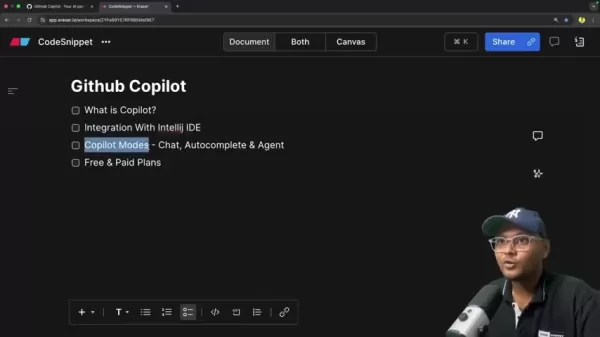
- Chat Mode:Interact with Copilot through conversation to ask questions, seek advice, and explore alternative approaches. The chat mode functions as an intelligent assistant, offering insights and recommendations as you code.
- Autocomplete Mode:Receive immediate code suggestions and autocompletions as you type, accelerating your coding pace and reducing mistakes. Copilot anticipates your next actions and provides contextually relevant code snippets.
- Agent Mode: The Agent Mode automates coding tasks. This mode can take code from initial concept to completion with minimal developer input. Agent mode is particularly powerful. By initiating an edit session, you can specify which files to work with. Since Copilot is AI-powered, errors can occur. Always review the output carefully before applying changes.
Practical Applications of GitHub Copilot
Generating Boilerplate Code
GitHub Copilot excels at creating boilerplate code, saving developers considerable time and effort.
Whether you need to create basic class structures, set up method signatures, or define data models, Copilot can quickly generate the required code, letting you concentrate on more complex project aspects.
For example, if you need to create a new Spring Boot controller, simply type a comment like // Create a REST controller for user management. Copilot will then generate the controller's basic structure, including necessary annotations and method signatures. It helps streamline repetitive tasks, enabling you to focus on more strategic coding work.
Writing Unit Tests with AI Assistance
Unit testing represents a vital component of software development. GitHub Copilot can help write unit tests by analyzing your code and suggesting relevant test cases. It can generate test methods, assertions, and even mock objects, assisting you in ensuring code quality and reliability.
For instance, if you have a method that calculates the average of a number list, Copilot can propose test cases to verify the method's behavior with different inputs, such as empty lists, lists containing positive numbers, and lists with negative numbers. You can incorporate this code into your files, ensuring your tests run smoothly and function as intended.
Unlocking the Power: How to Use GitHub Copilot Effectively
Getting Started with Agent Mode
Agent mode enhances Copilot with new automated capabilities, offering significant code writing potential. With detailed prompts, Copilot can understand how to implement, review, and test code. To use GitHub Copilot agent mode effectively:
- Open Github Copilot Chat:Access the chat window, select the code you plan to edit, and add it to the agent window.
- Choosing your task: Decide whether you want to ask questions, edit code, or use agent mode for implementation.
- Writing clear and detailed prompts: Specify what you want to implement and provide context about where and how. For example,
Create an API endpoint with put mapping to enable updating the log. 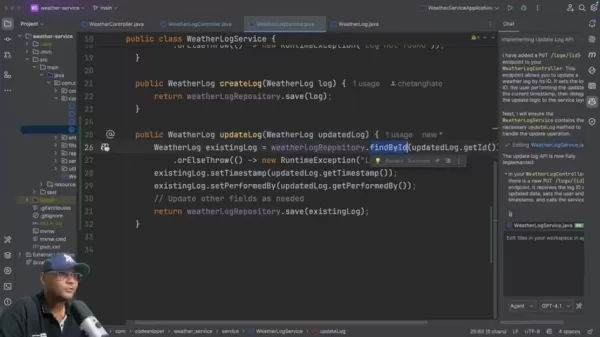
The more detail you provide Copilot, the more targeted and relevant code you'll receive.
- Testing : Copilot can also help create tests. To generate a test for getweather, specify that the test should create test cases and inject mocks. Always review all code to ensure security.
Using GitHub Copilot Chat for Guidance
GitHub Copilot Chat serves as the platform's virtual assistant. To maximize your AI pair programmer's potential, follow these steps:
- Activating the Chat Window:Ensure you've properly set up GitHub Copilot. You should see an icon on the IDE's right side to access GitHub Copilot chat. If it's missing, verify that the plugin is installed and you're correctly signed in.
- Ask clear and concise questions:To receive optimal responses, write detailed questions that specify the task, the code you're working with, and the particular language or functionality.
- Copy into workspace: Copilot will provide code for implementation. Be sure to copy this code into your codebase and save your work. After saving, you can use agent mode to help with remaining software development tasks.
GitHub Copilot Pricing: Flexible Options for Every Developer
Understanding the Available Plans
GitHub Copilot offers adaptable pricing options suitable for individual developers and businesses:
- GitHub Copilot Free:This free version provides a quick way to start using GitHub Copilot, offering limited access to code completions and chat requests. You're restricted to fifty agent mode or chat requests monthly and 2,000 code completions per month. Includes access to Claude Sonnet 3.5 and additional features.
- GitHub Copilot Pro:
Priced at $10 USD monthly, this plan provides unlimited completions and chats, plus access to additional models. A thirty-day free trial is available if you want to test the service before purchasing.
- GitHub Copilot Pro+:
At $39 USD monthly, this plan offers maximum flexibility and model selection. It also provides access to Claude Opus 41.03 and GitHub Spark.
Weighing the Options: GitHub Copilot Pros
and Cons
Pros
Enhanced Productivity: Accelerates coding speed and reduces boilerplate code.
Improved Code Quality: Provides intelligent suggestions and catches errors early.
Seamless Integration: Integrates with popular IDEs for a familiar coding experience.
Continuous Learning:Adapts to your coding style and improves over time.
Agent Mode automation : Agent mode saves time and improves workflows.
Cons
Subscription Cost: Paid plans may be cost-prohibitive for some individual developers.
Dependence Risk: Over-reliance on Copilot could potentially hinder independent problem-solving abilities.
Code Accuracy: Suggestions may not always be perfect and require careful review.
Privacy Concerns:Code snippets are transmitted to GitHub servers for analysis.
Test count Limited on Free plan: Limited monthly test count on the free plan, which might impact software development quality if insufficient.
Frequently Asked Questions about GitHub Copilot
Is GitHub Copilot suitable for beginner developers?
Although GitHub Copilot can benefit developers at all skill levels, beginners should use it cautiously and prioritize understanding fundamental concepts before depending heavily on its suggestions. Over-reliance on Copilot might impede the development of essential coding skills.
What programming languages does GitHub Copilot support?
GitHub Copilot supports numerous programming languages, including Java, Python, JavaScript, TypeScript, C#, C++, Go, and others. Its effectiveness may differ depending on the language and available training data.
How does GitHub Copilot handle code privacy and security?
GitHub Copilot analyzes code snippets to generate suggestions, which raises privacy considerations. GitHub states that it implements measures to protect user privacy and prevent code leakage. However, it's important to remain mindful of sensitive information and avoid submitting confidential code to Copilot.
Dive Deeper: Related Questions About AI-Powered Coding Assistants
What are the ethical considerations surrounding AI-powered code generation?
Using AI-powered code generation tools raises ethical questions concerning code ownership, bias, and the potential for creating insecure or malicious code. It's crucial to recognize these issues and use Copilot responsibly, ensuring generated code undergoes thorough review and validation. AI tools also enhance data security. The platform includes improved features like code analysis, coding suggestions, and quality monitoring. The essential practice is to review everything the system provides.
How will AI coding assistants impact the future of software development jobs?
AI coding assistants like GitHub Copilot have the potential to significantly influence the software development field. While they may automate certain tasks and reduce demand for specific coding skills, they're unlikely to completely replace human developers. Instead, they'll probably augment developers' roles, allowing them to concentrate on higher-level tasks such as problem-solving, design, and collaboration. Since Copilot is designed as a pair programmer, AI remains secondary to human creativity.
Related article
 Apple, Google Partner With Anthropic to Address 27-Year-Old Vulnerability via Glass Wing Protection
As artificial intelligence advances rapidly in code generation and logical reasoning, the cybersecurity landscape faces unprecedented challenges. Recently, the prominent AI startup Anthropic officially launched a cross-industry collaboration called *
OpenAI Chief Scientist Addresses AI Reasoning Transparency Debate: Complexity Steady, No Sudden Jump
On September 2, Jakub Pachocki, OpenAI’s Chief Scientist, addressed public concerns on X regarding the AI model Astra, clarifying claims that it operates without oversight and lacks transparent reasoning.Why the Controversy Erupted: Deep Recurrence O
U.S. Navy Selects Blue Water Autonomy for Deep-Sea Survey Missions
Blue Water Autonomy’s Liberty Class is a 190-foot steel autonomous ship. | Source: Blue Water AutonomyBoston-based technology and shipbuilding firm Blue Water Autonomy has secured a multiple-award contract with the Naval Oceanographic Office (NAVOCEA
Related Special Topic Recommendations
Text-to-speech
Apple, Google Partner With Anthropic to Address 27-Year-Old Vulnerability via Glass Wing Protection
As artificial intelligence advances rapidly in code generation and logical reasoning, the cybersecurity landscape faces unprecedented challenges. Recently, the prominent AI startup Anthropic officially launched a cross-industry collaboration called *
OpenAI Chief Scientist Addresses AI Reasoning Transparency Debate: Complexity Steady, No Sudden Jump
On September 2, Jakub Pachocki, OpenAI’s Chief Scientist, addressed public concerns on X regarding the AI model Astra, clarifying claims that it operates without oversight and lacks transparent reasoning.Why the Controversy Erupted: Deep Recurrence O
U.S. Navy Selects Blue Water Autonomy for Deep-Sea Survey Missions
Blue Water Autonomy’s Liberty Class is a 190-foot steel autonomous ship. | Source: Blue Water AutonomyBoston-based technology and shipbuilding firm Blue Water Autonomy has secured a multiple-award contract with the Naval Oceanographic Office (NAVOCEA
Related Special Topic Recommendations
Text-to-speech
 Best AI Text to Speech Tools for Online Courses
2026 Latest Best Top-rated AI Text to Speech Tools for Online Courses are curated by XIX.AI based on rigorous real-world tests and weekly updated rankings. These powerful tools help creators deliver crystal-clear audio content effortlessly, boosting writing efficiency and streamlining course production. Check out the free vs paid comparison to find your perfect fit. Explore now to unlock your AI edge in online education.
 10 tools
 xix.ai
writing
AI Blog Title Tools for Higher Click Through Rates
xix.ai
writing
AI Blog Title Tools for Higher Click Through Rates
2026 Latest Best Top-Rated AI Blog Title Tools for Higher Click Through Rates! XIX.AI has carefully curated a powerful, game-changing collection of top tools that go through rigorous real-world tests. You’ll find a free vs paid comparison, weekly updated rankings, and detailed insights to help you boost your blog’s traffic efficiently. Must-try options are highlighted to help you unlock your AI edge. Explore now!
10 tools
xix.ai
automation
Best AI Task Routing Tools for Support Workflows
2026 Latest Best Top-rated AI Task Routing Tools for Support Workflows! XIX.AI has curated a highly powerful game-changing collection of must-try solutions, all undergoing rigorous real-world tests and updated weekly. These tools streamline workflows, boost productivity, and help teams deliver faster, more efficient support. Explore now to discover your perfect tool and unlock your AI edge!
17 tools
xix.ai
Academic Research
AI Citation and Paper Summary Tools
2026 Latest Best Top-Rated AI Citation and Paper Summary Tools Curated by XIX.AI. Get powerful game-changing solutions for quick content creation, improved writing efficiency, and boosting productivity. We offer a free vs paid comparison along with real-world tests and weekly updated rankings to help you find the must-try tool that fits your needs perfectly. Explore now to Unlock your AI edge.
10 tools
xix.ai
Productivity
Best AI Productivity Tools for Daily Work
2026 Latest Best Top-Rated AI Productivity Tools for Daily Work! XIX.AI has curated a powerful, game-changing selection based on rigorous weekly updated rankings and real-world tests. You’ll find must-try options that boost writing efficiency, streamline content creation, and help you overcome daily work challenges. Get a free vs paid comparison to find the perfect fit for your needs. Explore now to unlock your AI edge!
9 tools
xix.ai
Academic Research
AI Systematic Review Tools for Research Screening
2026 Latest Best Top-Rated AI Systematic Review Tools for Research Screening are here on XIX.AI! This curated collection includes powerful, game-changing solutions that go through rigorous real-world tests to deliver accurate results. We also offer a free vs paid comparison along with weekly updated rankings to help you find the must-try option that boosts your research efficiency significantly. Explore now to unlock your AI edge in academic work!
11 tools
xix.ai

 Comments (1)
0/500
Comments (1)
0/500
![JackPerez]()
Wondering if GitHub Copilot can help me debug that endless loop of legacy code... It's impressive, but the subscription cost is making my wallet cry 🥲. Will it ever become free for beginners or indie devs?
In today's fast-paced software development landscape, efficiency and innovation are critical. GitHub Copilot, an AI-powered coding assistant, is transforming the way developers write code. This guide provides an in-depth look at GitHub Copilot, covering its core features, IntelliJ IDEA integration, and how it can optimize your coding workflow. Learn how this AI tool can revolutionize your development process and increase productivity.
Key Points
GitHub Copilot serves as an AI pair programmer, helping developers write code more efficiently.
It integrates smoothly with widely-used IDEs such as IntelliJ IDEA and VS Code.
Copilot provides multiple modes, including chat, autocomplete, and agent mode, to address diverse coding requirements.
GitHub Copilot features both free and paid subscription plans, accommodating users with different needs.
The agent mode in GitHub Copilot automates coding tasks, transforming software development workflows.
Understanding GitHub Copilot
What is GitHub Copilot?
GitHub Copilot is an AI-powered coding assistant created through collaboration between GitHub and OpenAI.
Its purpose is to help developers write code more quickly and effectively by offering real-time suggestions and autocompletions. Consider it your AI programming partner, delivering intelligent assistance as you type. The tool uses machine learning models trained on billions of lines of public code to understand your coding context and provide appropriate suggestions. GitHub Copilot is changing the software development landscape by offering an AI-driven assistant that enhances both code quality and writing speed.
Fundamentally, GitHub Copilot examines the code you're writing, considering various elements such as:
- Your coding style: It adapts to your preferred coding conventions and patterns.
- Comments: It interprets natural language comments and can generate code accordingly.
- Function names: It uses function names to deduce intended functionality and propose suitable code.
- Existing code: It evaluates surrounding code to deliver contextually appropriate suggestions.
Based on this analysis, Copilot provides various suggestions, from basic autocompletions to complete code blocks, enabling you to write code more rapidly and accurately. Since it's AI-driven, the tool continuously improves with use. It serves as an excellent resource not just for writing code, but also for assisting with testing and documentation tasks.
Key Features of GitHub Copilot:
- Code Completion: Predicts and suggests code as you type, minimizing boilerplate and enhancing efficiency.
- Contextual Suggestions: Provides code recommendations based on surrounding code, comments, and context.
- Multi-Language Support: Works with numerous programming languages, including Java, Python, JavaScript, TypeScript, C#, and others.
- Integration with IDEs: Integrates smoothly with popular IDEs like VS Code and IntelliJ IDEA, maintaining a familiar coding environment.
Seamless Integration with IntelliJ IDEA
Although GitHub Copilot integrates seamlessly with VS Code, connecting it with IntelliJ IDEA can substantially improve the coding experience for Java and Spring Boot developers.
IntelliJ IDEA is a well-regarded IDE, particularly popular among Java developers for creating robust and scalable applications. Here's how to integrate GitHub Copilot with IntelliJ IDEA:
- Install the GitHub Copilot Plugin:
- Launch IntelliJ IDEA and go to Settings (or Preferences on macOS).
- Choose Plugins and search for "GitHub Copilot".
- Click Install and restart IntelliJ IDEA to enable the plugin.
- Authenticate with GitHub:
- After restarting, IntelliJ IDEA will prompt you to authenticate with your GitHub account.
- Follow the displayed instructions to authorize GitHub Copilot. This step links your IDE to your GitHub account, providing access to Copilot's AI-powered assistance.
Once integrated, GitHub Copilot will deliver real-time code suggestions, autocompletions, and even generate complete code blocks as you type in IntelliJ IDEA, significantly boosting your coding speed and precision. By incorporating this tool, Java developers can concentrate on creative problem-solving while letting the AI assistant manage more routine coding tasks.
Exploring the Different Modes of GitHub Copilot
GitHub Copilot provides several modes to accommodate various coding preferences and requirements:
- Chat Mode:Interact with Copilot through conversation to ask questions, seek advice, and explore alternative approaches. The chat mode functions as an intelligent assistant, offering insights and recommendations as you code.
- Autocomplete Mode:Receive immediate code suggestions and autocompletions as you type, accelerating your coding pace and reducing mistakes. Copilot anticipates your next actions and provides contextually relevant code snippets.
- Agent Mode: The Agent Mode automates coding tasks. This mode can take code from initial concept to completion with minimal developer input. Agent mode is particularly powerful. By initiating an edit session, you can specify which files to work with. Since Copilot is AI-powered, errors can occur. Always review the output carefully before applying changes.
Practical Applications of GitHub Copilot
Generating Boilerplate Code
GitHub Copilot excels at creating boilerplate code, saving developers considerable time and effort.
Whether you need to create basic class structures, set up method signatures, or define data models, Copilot can quickly generate the required code, letting you concentrate on more complex project aspects.
For example, if you need to create a new Spring Boot controller, simply type a comment like // Create a REST controller for user management. Copilot will then generate the controller's basic structure, including necessary annotations and method signatures. It helps streamline repetitive tasks, enabling you to focus on more strategic coding work.
Writing Unit Tests with AI Assistance
Unit testing represents a vital component of software development. GitHub Copilot can help write unit tests by analyzing your code and suggesting relevant test cases. It can generate test methods, assertions, and even mock objects, assisting you in ensuring code quality and reliability.
For instance, if you have a method that calculates the average of a number list, Copilot can propose test cases to verify the method's behavior with different inputs, such as empty lists, lists containing positive numbers, and lists with negative numbers. You can incorporate this code into your files, ensuring your tests run smoothly and function as intended.
Unlocking the Power: How to Use GitHub Copilot Effectively
Getting Started with Agent Mode
Agent mode enhances Copilot with new automated capabilities, offering significant code writing potential. With detailed prompts, Copilot can understand how to implement, review, and test code. To use GitHub Copilot agent mode effectively:
- Open Github Copilot Chat:Access the chat window, select the code you plan to edit, and add it to the agent window.
- Choosing your task: Decide whether you want to ask questions, edit code, or use agent mode for implementation.
- Writing clear and detailed prompts: Specify what you want to implement and provide context about where and how. For example,
Create an API endpoint with put mapping to enable updating the log.The more detail you provide Copilot, the more targeted and relevant code you'll receive.
- Testing : Copilot can also help create tests. To generate a test for getweather, specify that the test should create test cases and inject mocks. Always review all code to ensure security.
Using GitHub Copilot Chat for Guidance
GitHub Copilot Chat serves as the platform's virtual assistant. To maximize your AI pair programmer's potential, follow these steps:
- Activating the Chat Window:Ensure you've properly set up GitHub Copilot. You should see an icon on the IDE's right side to access GitHub Copilot chat. If it's missing, verify that the plugin is installed and you're correctly signed in.
- Ask clear and concise questions:To receive optimal responses, write detailed questions that specify the task, the code you're working with, and the particular language or functionality.
- Copy into workspace: Copilot will provide code for implementation. Be sure to copy this code into your codebase and save your work. After saving, you can use agent mode to help with remaining software development tasks.
GitHub Copilot Pricing: Flexible Options for Every Developer
Understanding the Available Plans
GitHub Copilot offers adaptable pricing options suitable for individual developers and businesses:
- GitHub Copilot Free:This free version provides a quick way to start using GitHub Copilot, offering limited access to code completions and chat requests. You're restricted to fifty agent mode or chat requests monthly and 2,000 code completions per month. Includes access to Claude Sonnet 3.5 and additional features.
- GitHub Copilot Pro: Priced at $10 USD monthly, this plan provides unlimited completions and chats, plus access to additional models. A thirty-day free trial is available if you want to test the service before purchasing.
- GitHub Copilot Pro+: At $39 USD monthly, this plan offers maximum flexibility and model selection. It also provides access to Claude Opus 41.03 and GitHub Spark.
Weighing the Options: GitHub Copilot Pros
and Cons
Pros
Enhanced Productivity: Accelerates coding speed and reduces boilerplate code.
Improved Code Quality: Provides intelligent suggestions and catches errors early.
Seamless Integration: Integrates with popular IDEs for a familiar coding experience.
Continuous Learning:Adapts to your coding style and improves over time.
Agent Mode automation : Agent mode saves time and improves workflows.
Cons
Subscription Cost: Paid plans may be cost-prohibitive for some individual developers.
Dependence Risk: Over-reliance on Copilot could potentially hinder independent problem-solving abilities.
Code Accuracy: Suggestions may not always be perfect and require careful review.
Privacy Concerns:Code snippets are transmitted to GitHub servers for analysis.
Test count Limited on Free plan: Limited monthly test count on the free plan, which might impact software development quality if insufficient.
Frequently Asked Questions about GitHub Copilot
Is GitHub Copilot suitable for beginner developers?
Although GitHub Copilot can benefit developers at all skill levels, beginners should use it cautiously and prioritize understanding fundamental concepts before depending heavily on its suggestions. Over-reliance on Copilot might impede the development of essential coding skills.
What programming languages does GitHub Copilot support?
GitHub Copilot supports numerous programming languages, including Java, Python, JavaScript, TypeScript, C#, C++, Go, and others. Its effectiveness may differ depending on the language and available training data.
How does GitHub Copilot handle code privacy and security?
GitHub Copilot analyzes code snippets to generate suggestions, which raises privacy considerations. GitHub states that it implements measures to protect user privacy and prevent code leakage. However, it's important to remain mindful of sensitive information and avoid submitting confidential code to Copilot.
Dive Deeper: Related Questions About AI-Powered Coding Assistants
What are the ethical considerations surrounding AI-powered code generation?
Using AI-powered code generation tools raises ethical questions concerning code ownership, bias, and the potential for creating insecure or malicious code. It's crucial to recognize these issues and use Copilot responsibly, ensuring generated code undergoes thorough review and validation. AI tools also enhance data security. The platform includes improved features like code analysis, coding suggestions, and quality monitoring. The essential practice is to review everything the system provides.
How will AI coding assistants impact the future of software development jobs?
AI coding assistants like GitHub Copilot have the potential to significantly influence the software development field. While they may automate certain tasks and reduce demand for specific coding skills, they're unlikely to completely replace human developers. Instead, they'll probably augment developers' roles, allowing them to concentrate on higher-level tasks such as problem-solving, design, and collaboration. Since Copilot is designed as a pair programmer, AI remains secondary to human creativity.








 Apple, Google Partner With Anthropic to Address 27-Year-Old Vulnerability via Glass Wing Protection
As artificial intelligence advances rapidly in code generation and logical reasoning, the cybersecurity landscape faces unprecedented challenges. Recently, the prominent AI startup Anthropic officially launched a cross-industry collaboration called *
Apple, Google Partner With Anthropic to Address 27-Year-Old Vulnerability via Glass Wing Protection
As artificial intelligence advances rapidly in code generation and logical reasoning, the cybersecurity landscape faces unprecedented challenges. Recently, the prominent AI startup Anthropic officially launched a cross-industry collaboration called *
 OpenAI Chief Scientist Addresses AI Reasoning Transparency Debate: Complexity Steady, No Sudden Jump
On September 2, Jakub Pachocki, OpenAI’s Chief Scientist, addressed public concerns on X regarding the AI model Astra, clarifying claims that it operates without oversight and lacks transparent reasoning.Why the Controversy Erupted: Deep Recurrence O
OpenAI Chief Scientist Addresses AI Reasoning Transparency Debate: Complexity Steady, No Sudden Jump
On September 2, Jakub Pachocki, OpenAI’s Chief Scientist, addressed public concerns on X regarding the AI model Astra, clarifying claims that it operates without oversight and lacks transparent reasoning.Why the Controversy Erupted: Deep Recurrence O
 U.S. Navy Selects Blue Water Autonomy for Deep-Sea Survey Missions
Blue Water Autonomy’s Liberty Class is a 190-foot steel autonomous ship. | Source: Blue Water AutonomyBoston-based technology and shipbuilding firm Blue Water Autonomy has secured a multiple-award contract with the Naval Oceanographic Office (NAVOCEA
U.S. Navy Selects Blue Water Autonomy for Deep-Sea Survey Missions
Blue Water Autonomy’s Liberty Class is a 190-foot steel autonomous ship. | Source: Blue Water AutonomyBoston-based technology and shipbuilding firm Blue Water Autonomy has secured a multiple-award contract with the Naval Oceanographic Office (NAVOCEA

2026 Latest Best Top-rated AI Text to Speech Tools for Online Courses are curated by XIX.AI based on rigorous real-world tests and weekly updated rankings. These powerful tools help creators deliver crystal-clear audio content effortlessly, boosting writing efficiency and streamlining course production. Check out the free vs paid comparison to find your perfect fit. Explore now to unlock your AI edge in online education.
10 tools
xix.ai

2026 Latest Best Top-Rated AI Blog Title Tools for Higher Click Through Rates! XIX.AI has carefully curated a powerful, game-changing collection of top tools that go through rigorous real-world tests. You’ll find a free vs paid comparison, weekly updated rankings, and detailed insights to help you boost your blog’s traffic efficiently. Must-try options are highlighted to help you unlock your AI edge. Explore now!
10 tools
xix.ai

2026 Latest Best Top-rated AI Task Routing Tools for Support Workflows! XIX.AI has curated a highly powerful game-changing collection of must-try solutions, all undergoing rigorous real-world tests and updated weekly. These tools streamline workflows, boost productivity, and help teams deliver faster, more efficient support. Explore now to discover your perfect tool and unlock your AI edge!
17 tools
xix.ai

2026 Latest Best Top-Rated AI Citation and Paper Summary Tools Curated by XIX.AI. Get powerful game-changing solutions for quick content creation, improved writing efficiency, and boosting productivity. We offer a free vs paid comparison along with real-world tests and weekly updated rankings to help you find the must-try tool that fits your needs perfectly. Explore now to Unlock your AI edge.
10 tools
xix.ai

2026 Latest Best Top-Rated AI Productivity Tools for Daily Work! XIX.AI has curated a powerful, game-changing selection based on rigorous weekly updated rankings and real-world tests. You’ll find must-try options that boost writing efficiency, streamline content creation, and help you overcome daily work challenges. Get a free vs paid comparison to find the perfect fit for your needs. Explore now to unlock your AI edge!
9 tools
xix.ai

2026 Latest Best Top-Rated AI Systematic Review Tools for Research Screening are here on XIX.AI! This curated collection includes powerful, game-changing solutions that go through rigorous real-world tests to deliver accurate results. We also offer a free vs paid comparison along with weekly updated rankings to help you find the must-try option that boosts your research efficiency significantly. Explore now to unlock your AI edge in academic work!
11 tools
xix.ai

Wondering if GitHub Copilot can help me debug that endless loop of legacy code... It's impressive, but the subscription cost is making my wallet cry 🥲. Will it ever become free for beginners or indie devs?












