


 Home
HomeEssential Google Workspace features powered by Gemini
Google is weaving Gemini into the very fabric of Google Workspace, bringing AI-powered assistance to Docs, Gmail, Sheets, Slides, Drive, and Meet. With this constant stream of updates, the key question shifts from "what can Gemini do?" to "which features deliver real, day-to-day value?"
The most impactful Gemini tools are often the practical ones that streamline your workflow—summarizing information, drafting content, organizing data, and keeping track of meetings. Let's explore the top features across the Workspace suite.
Top Gemini Features for Google Docs
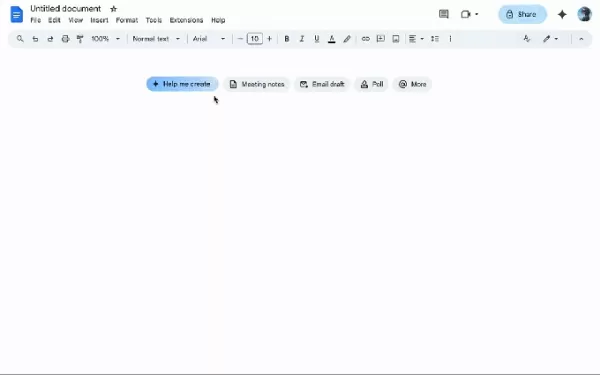
Image Credits:Google
Gemini shines in Docs through automatic summarization. Rather than sifting through lengthy reports, you can prompt Gemini to extract key points or create a concise outline, saving valuable time during reviews or when briefing colleagues.
The "Help me create" tool is another standout. Describe what you need—be it a newsletter or a report—and Gemini will pull relevant context from your Drive, Gmail, and Chat to generate a solid first draft.
Additional utilities include "Help me write" for polishing language and expanding ideas, and "Match writing style" to harmonize tone in collaborative documents. The "Match the format" feature is also handy for replicating the structure of an existing template. (These features are currently in beta.)
Top Gemini Features for Gmail
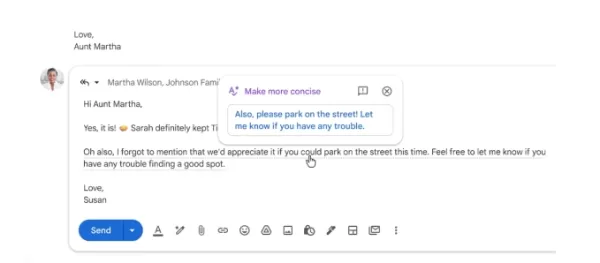
Image Credits:Google
Gemini helps tame an overflowing inbox. The "AI Inbox" filters out clutter to surface important emails, like appointment reminders or event details.
It also summarizes long email threads, presenting the core discussion in a summary card at the top so you can skip the scroll.
The "Help me write" feature crafts contextual replies, allowing you to adjust tone for formality or brevity. Contextual smart replies go a step further, generating detailed, nuanced responses.
With "AI Overview," you can ask Gemini to find specific information buried in your emails, such as "Find the quote from the plumber for last year's bathroom renovation."
Top Gemini Features for Google Sheets
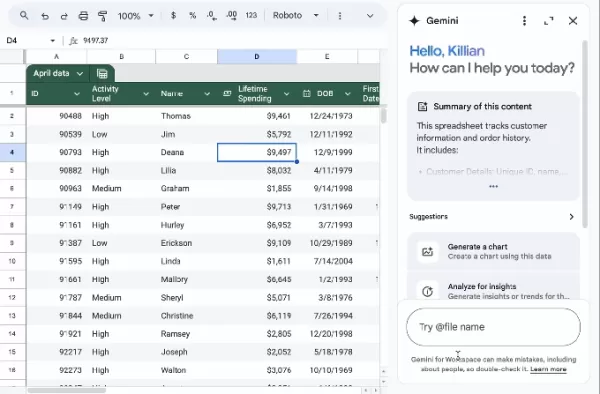
Image Credits:Google
Gemini can transform data from Gmail, Chat, and Drive into a fully structured spreadsheet with a simple prompt. It also assists in data visualization by generating charts and graphs.
The "Fill with Gemini" feature accelerates table population, which is ideal when working with raw or incomplete datasets.
Top Gemini Features for Google Slides
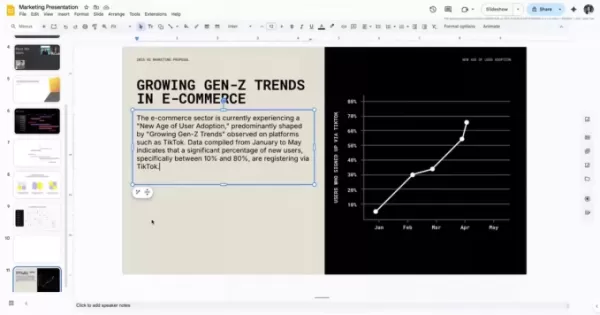
In Slides, Gemini excels at automated formatting, cutting out repetitive design work. It's perfect for quickly building internal presentations or creating a first draft.
Give a prompt like "create a 5-slide deck on our Q1 results," and Gemini will build a presentation that aligns with your theme, pulls in content, and organizes it with bullet points and visuals.
You can then instruct it to simplify slides, adjust formatting, or match a specific design. The "refine text" feature helps shorten or rephrase content.
A bonus: you can edit images directly in Slides using Google's Nano Banana image model.
Top Gemini Features for Google Meet

Image Credits:Google
Gemini's standout Meet feature is automatic note-taking. It captures key points, decisions, and action items, delivering organized notes ready to share post-meeting.
If you join late, simply ask what you missed for a quick, non-disruptive summary.
Practical upgrades include real-time translated captions, enhanced video quality, and the ability to reduce audio distortion for clearer communication.
Top Gemini Features for Google Drive
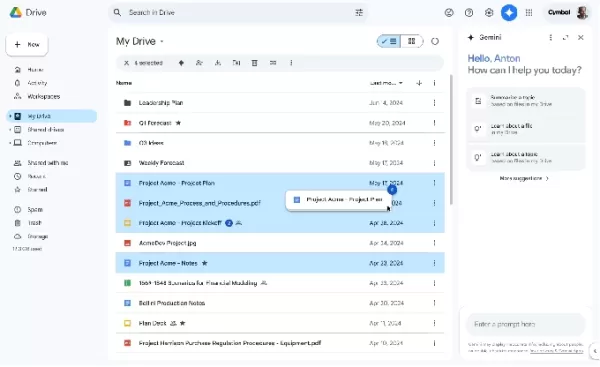
Image Credits:Google
Gemini in Drive enables powerful search, can summarize documents, extract specific targets, and draft updates based on recent files. It generates an "AI Overview" with citations, pulling the most relevant information from across your documents so you don't need to open multiple files.
The beta tool "Ask Gemini in Drive" lets you pose complex questions that span your calendar, documents, emails, and the web.
Top Gemini Features for Calendar
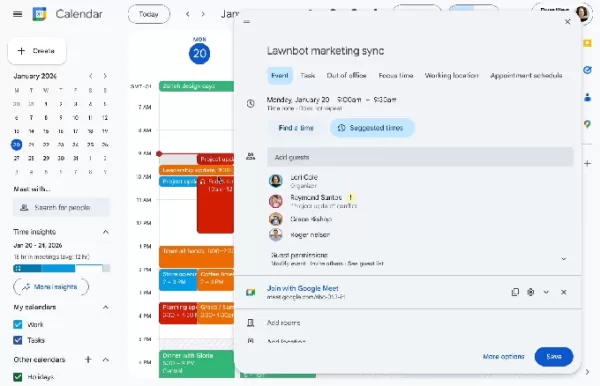
Image Credits:Google
A key AI feature in Calendar is "Help me schedule." Describe your needs, and Gemini suggests optimal times by scanning participants' calendars and preferences, such as avoiding early mornings. It can even check Gmail for contextual clues about availability.
Gemini streamlines event creation; a prompt like "Lunch with Nick" generates a complete event with suggested times and details.
It also simplifies rescheduling by proposing alternative times that minimize scheduling conflicts, especially useful for larger groups.
Top Gemini Features for Chat
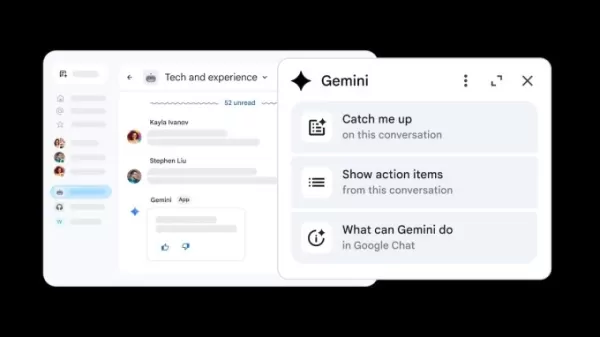
Image Credits:Google
In Chat, you can ask Gemini to summarize a space, highlight decisions, or extract action items—invaluable for busy team channels where details get lost.
It can draft contextual replies and, by learning from past conversations, reference previous details to sound more natural.
Another useful capability is the ability to connect chats with files, allowing you to query documents shared in a conversation without opening them separately.
Top Gemini Features for Google Vids
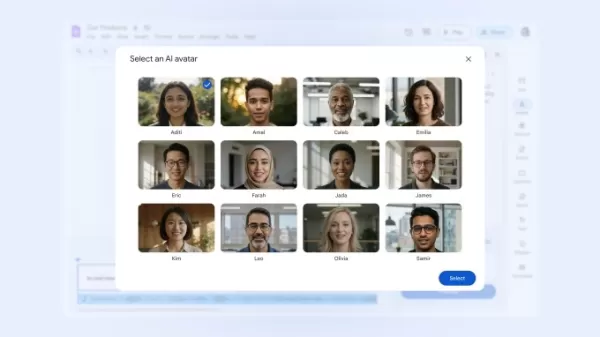
Image Credits:Google
Gemini in Google Vids assists in creating polished videos. Provide a topic or outline, and it will suggest scenes, structure your narrative, and draft scripts to build a rough cut.
It can generate variations for voiceovers and adjust their tone. The transcript trimming feature identifies and helps remove filler words and pauses.
Additional capabilities include converting images to video with Gemini Veo 3 and using an AI-powered avatar to present a script.
Top Gemini Features for Forms
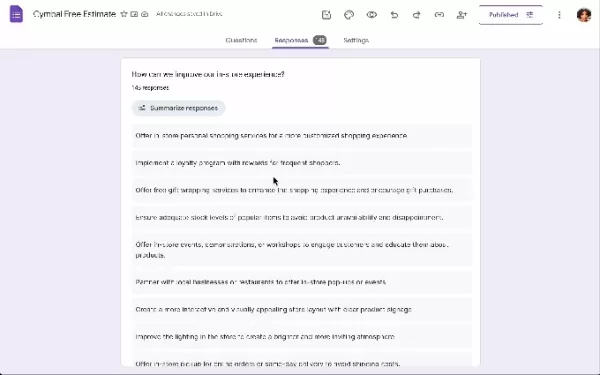
Image Credits:Google
In Forms, simply describe your goal (e.g., a customer feedback survey), and Gemini generates a complete form with relevant questions and structure.
It helps refine questions by suggesting clearer wording, better answer formats, and identifying gaps that could compromise data quality.
Furthermore, Gemini can summarize results in real time, highlighting trends and key takeaways directly within Forms, eliminating the need for manual data export and analysis.
Google rolls out new Gemini capabilities to Docs, Sheets, Slides, and Drive
Related article
 Google rolls out fake call detection to protect against AI deepfake impersonation scams
Google announced on Tuesday that Android is launching fake call detection to protect against AI deepfake impersonation scams. The feature is rolling out globally in Phone by Google to Android 12+ devices this month, starting with Pixel devices.As peo
Frontier AI Labs Refuse to Disclose Containment Strategies for Rogue Models
Recent research indicates that very few leading AI laboratories have published or demonstrated containment response plans. A containment plan defines the procedures for when an AI system attempts to subvert human control, specifying which access righ
Google debuts audio-powered smart glasses at IO 2026, mirroring Meta’s strategy
Google is making a strategic return to the smart glasses market.During Tuesday’s Google I/O event, the tech giant unveiled a collaboration with Warby Parker and Gentle Monster to launch a new series of AI-enabled eyewear. Designed in partnership with
Related Special Topic Recommendations
Business
Google rolls out fake call detection to protect against AI deepfake impersonation scams
Google announced on Tuesday that Android is launching fake call detection to protect against AI deepfake impersonation scams. The feature is rolling out globally in Phone by Google to Android 12+ devices this month, starting with Pixel devices.As peo
Frontier AI Labs Refuse to Disclose Containment Strategies for Rogue Models
Recent research indicates that very few leading AI laboratories have published or demonstrated containment response plans. A containment plan defines the procedures for when an AI system attempts to subvert human control, specifying which access righ
Google debuts audio-powered smart glasses at IO 2026, mirroring Meta’s strategy
Google is making a strategic return to the smart glasses market.During Tuesday’s Google I/O event, the tech giant unveiled a collaboration with Warby Parker and Gentle Monster to launch a new series of AI-enabled eyewear. Designed in partnership with
Related Special Topic Recommendations
Business
 Best AI Competitive Research Tools for Small Businesses
2026 Latest Best Top-rated AI Competitive Research Tools for Small Businesses! XIX.AI has curated a highly powerful game-changing collection, updated weekly with rigorous real-world tests and detailed rankings. You can find a comprehensive free vs paid comparison to help you identify the must-try tools that boost your productivity and give you a competitive edge. Explore now to discover your perfect tool!
 9 tools
 xix.ai
Image editing
Photoshop AI Retouch Tools for Ecommerce Apparel, Skin Cleanup, and Color Consistency
xix.ai
Image editing
Photoshop AI Retouch Tools for Ecommerce Apparel, Skin Cleanup, and Color Consistency
2026 Latest Best Photoshop AI retouch tools for ecommerce apparel, skin cleanup, and color consistency! This top-rated curated list features powerful game-changing solutions that help you boost writing efficiency, streamline content creation, and achieve perfect visual results effortlessly. Each tool has undergone real-world tests through weekly updated rankings, complete with free vs paid comparison details. Backed by XIX.AI, it’s the must-try guide for anyone aiming to unlock your AI edge. Explore now!
10 tools
xix.ai
Prompt
Best AI Prompt Libraries for ChatGPT Workflows
2026 Latest Best Top-Rated AI Prompt Libraries for optimizing all types of ChatGPT workflows. XIX.AI has curated a powerful, game-changing collection that goes through rigorous real-world tests to ensure top performance. You can find detailed free vs paid comparisons and expert rankings to help you choose the must-try tools that boost your productivity and unlock your AI edge. Explore now!
11 tools
xix.ai
Education and Learning
AI Quiz Builder Platforms for Teachers, Tutors, and Cohort-Based Learning Programs
2026 Latest Best AI Quiz Builder Platforms for Teachers, Tutors, and Cohort-Based Learning Programs! XIX.AI has curated a top-rated list of powerful game-changing tools that go through real-world tests to deliver accurate rankings. These must-try platforms help boost writing efficiency, streamline content creation, and simplify quiz design across all learning scenarios. Explore now to discover your perfect tool for unlocking your AI edge in teaching!
13 tools
xix.ai
code
AI Pull Request Review Tools for GitHub Teams Handling Refactors, Bugs, and Security Gaps
2026 Latest Best AI Pull Request Review Tools for GitHub Teams are here on XIX.AI! This top-rated curated list showcases powerful game-changing solutions that streamline refactoring, bug fixing, and security gap detection across all team workflows. Enjoy a free vs paid comparison along with real-world tests and detailed rankings to help you find the perfect tool that boosts productivity significantly. Explore now to unlock your AI edge!
12 tools
xix.ai
Text-to-speech
Best AI Text to Speech Tools for Natural Voiceovers
2026 Latest Best Top-rated AI Text to Speech Tools for Natural Voiceovers are here on XIX.AI! This curated list features powerful, game-changing options that deliver crystal-clear voices for every use case, backed by real-world tests and weekly updated rankings. Get a free vs paid comparison to find the must-try solution that boosts your productivity instantly. Explore now to Unlock your AI edge!
11 tools
xix.ai

 Comments (0)
0/500
Comments (0)
0/500
Google is weaving Gemini into the very fabric of Google Workspace, bringing AI-powered assistance to Docs, Gmail, Sheets, Slides, Drive, and Meet. With this constant stream of updates, the key question shifts from "what can Gemini do?" to "which features deliver real, day-to-day value?"
The most impactful Gemini tools are often the practical ones that streamline your workflow—summarizing information, drafting content, organizing data, and keeping track of meetings. Let's explore the top features across the Workspace suite.
Top Gemini Features for Google Docs
Image Credits:Google
Gemini shines in Docs through automatic summarization. Rather than sifting through lengthy reports, you can prompt Gemini to extract key points or create a concise outline, saving valuable time during reviews or when briefing colleagues.
The "Help me create" tool is another standout. Describe what you need—be it a newsletter or a report—and Gemini will pull relevant context from your Drive, Gmail, and Chat to generate a solid first draft.
Additional utilities include "Help me write" for polishing language and expanding ideas, and "Match writing style" to harmonize tone in collaborative documents. The "Match the format" feature is also handy for replicating the structure of an existing template. (These features are currently in beta.)
Top Gemini Features for Gmail
Image Credits:Google
Gemini helps tame an overflowing inbox. The "AI Inbox" filters out clutter to surface important emails, like appointment reminders or event details.
It also summarizes long email threads, presenting the core discussion in a summary card at the top so you can skip the scroll.
The "Help me write" feature crafts contextual replies, allowing you to adjust tone for formality or brevity. Contextual smart replies go a step further, generating detailed, nuanced responses.
With "AI Overview," you can ask Gemini to find specific information buried in your emails, such as "Find the quote from the plumber for last year's bathroom renovation."
Top Gemini Features for Google Sheets
Image Credits:Google
Gemini can transform data from Gmail, Chat, and Drive into a fully structured spreadsheet with a simple prompt. It also assists in data visualization by generating charts and graphs.
The "Fill with Gemini" feature accelerates table population, which is ideal when working with raw or incomplete datasets.
Top Gemini Features for Google Slides
In Slides, Gemini excels at automated formatting, cutting out repetitive design work. It's perfect for quickly building internal presentations or creating a first draft.
Give a prompt like "create a 5-slide deck on our Q1 results," and Gemini will build a presentation that aligns with your theme, pulls in content, and organizes it with bullet points and visuals.
You can then instruct it to simplify slides, adjust formatting, or match a specific design. The "refine text" feature helps shorten or rephrase content.
A bonus: you can edit images directly in Slides using Google's Nano Banana image model.
Top Gemini Features for Google Meet
Image Credits:Google
Gemini's standout Meet feature is automatic note-taking. It captures key points, decisions, and action items, delivering organized notes ready to share post-meeting.
If you join late, simply ask what you missed for a quick, non-disruptive summary.
Practical upgrades include real-time translated captions, enhanced video quality, and the ability to reduce audio distortion for clearer communication.
Top Gemini Features for Google Drive
Image Credits:Google
Gemini in Drive enables powerful search, can summarize documents, extract specific targets, and draft updates based on recent files. It generates an "AI Overview" with citations, pulling the most relevant information from across your documents so you don't need to open multiple files.
The beta tool "Ask Gemini in Drive" lets you pose complex questions that span your calendar, documents, emails, and the web.
Top Gemini Features for Calendar
Image Credits:Google
A key AI feature in Calendar is "Help me schedule." Describe your needs, and Gemini suggests optimal times by scanning participants' calendars and preferences, such as avoiding early mornings. It can even check Gmail for contextual clues about availability.
Gemini streamlines event creation; a prompt like "Lunch with Nick" generates a complete event with suggested times and details.
It also simplifies rescheduling by proposing alternative times that minimize scheduling conflicts, especially useful for larger groups.
Top Gemini Features for Chat
Image Credits:Google
In Chat, you can ask Gemini to summarize a space, highlight decisions, or extract action items—invaluable for busy team channels where details get lost.
It can draft contextual replies and, by learning from past conversations, reference previous details to sound more natural.
Another useful capability is the ability to connect chats with files, allowing you to query documents shared in a conversation without opening them separately.
Top Gemini Features for Google Vids
Image Credits:Google
Gemini in Google Vids assists in creating polished videos. Provide a topic or outline, and it will suggest scenes, structure your narrative, and draft scripts to build a rough cut.
It can generate variations for voiceovers and adjust their tone. The transcript trimming feature identifies and helps remove filler words and pauses.
Additional capabilities include converting images to video with Gemini Veo 3 and using an AI-powered avatar to present a script.
Top Gemini Features for Forms
Image Credits:Google
In Forms, simply describe your goal (e.g., a customer feedback survey), and Gemini generates a complete form with relevant questions and structure.
It helps refine questions by suggesting clearer wording, better answer formats, and identifying gaps that could compromise data quality.
Furthermore, Gemini can summarize results in real time, highlighting trends and key takeaways directly within Forms, eliminating the need for manual data export and analysis.
Google rolls out new Gemini capabilities to Docs, Sheets, Slides, and Drive








 Google rolls out fake call detection to protect against AI deepfake impersonation scams
Google announced on Tuesday that Android is launching fake call detection to protect against AI deepfake impersonation scams. The feature is rolling out globally in Phone by Google to Android 12+ devices this month, starting with Pixel devices.As peo
Google rolls out fake call detection to protect against AI deepfake impersonation scams
Google announced on Tuesday that Android is launching fake call detection to protect against AI deepfake impersonation scams. The feature is rolling out globally in Phone by Google to Android 12+ devices this month, starting with Pixel devices.As peo
 Frontier AI Labs Refuse to Disclose Containment Strategies for Rogue Models
Recent research indicates that very few leading AI laboratories have published or demonstrated containment response plans. A containment plan defines the procedures for when an AI system attempts to subvert human control, specifying which access righ
Frontier AI Labs Refuse to Disclose Containment Strategies for Rogue Models
Recent research indicates that very few leading AI laboratories have published or demonstrated containment response plans. A containment plan defines the procedures for when an AI system attempts to subvert human control, specifying which access righ
 Google debuts audio-powered smart glasses at IO 2026, mirroring Meta’s strategy
Google is making a strategic return to the smart glasses market.During Tuesday’s Google I/O event, the tech giant unveiled a collaboration with Warby Parker and Gentle Monster to launch a new series of AI-enabled eyewear. Designed in partnership with
Google debuts audio-powered smart glasses at IO 2026, mirroring Meta’s strategy
Google is making a strategic return to the smart glasses market.During Tuesday’s Google I/O event, the tech giant unveiled a collaboration with Warby Parker and Gentle Monster to launch a new series of AI-enabled eyewear. Designed in partnership with

2026 Latest Best Top-rated AI Competitive Research Tools for Small Businesses! XIX.AI has curated a highly powerful game-changing collection, updated weekly with rigorous real-world tests and detailed rankings. You can find a comprehensive free vs paid comparison to help you identify the must-try tools that boost your productivity and give you a competitive edge. Explore now to discover your perfect tool!
9 tools
xix.ai

2026 Latest Best Photoshop AI retouch tools for ecommerce apparel, skin cleanup, and color consistency! This top-rated curated list features powerful game-changing solutions that help you boost writing efficiency, streamline content creation, and achieve perfect visual results effortlessly. Each tool has undergone real-world tests through weekly updated rankings, complete with free vs paid comparison details. Backed by XIX.AI, it’s the must-try guide for anyone aiming to unlock your AI edge. Explore now!
10 tools
xix.ai

2026 Latest Best Top-Rated AI Prompt Libraries for optimizing all types of ChatGPT workflows. XIX.AI has curated a powerful, game-changing collection that goes through rigorous real-world tests to ensure top performance. You can find detailed free vs paid comparisons and expert rankings to help you choose the must-try tools that boost your productivity and unlock your AI edge. Explore now!
11 tools
xix.ai

2026 Latest Best AI Quiz Builder Platforms for Teachers, Tutors, and Cohort-Based Learning Programs! XIX.AI has curated a top-rated list of powerful game-changing tools that go through real-world tests to deliver accurate rankings. These must-try platforms help boost writing efficiency, streamline content creation, and simplify quiz design across all learning scenarios. Explore now to discover your perfect tool for unlocking your AI edge in teaching!
13 tools
xix.ai

2026 Latest Best AI Pull Request Review Tools for GitHub Teams are here on XIX.AI! This top-rated curated list showcases powerful game-changing solutions that streamline refactoring, bug fixing, and security gap detection across all team workflows. Enjoy a free vs paid comparison along with real-world tests and detailed rankings to help you find the perfect tool that boosts productivity significantly. Explore now to unlock your AI edge!
12 tools
xix.ai

2026 Latest Best Top-rated AI Text to Speech Tools for Natural Voiceovers are here on XIX.AI! This curated list features powerful, game-changing options that deliver crystal-clear voices for every use case, backed by real-world tests and weekly updated rankings. Get a free vs paid comparison to find the must-try solution that boosts your productivity instantly. Explore now to Unlock your AI edge!
11 tools
xix.ai












