


 Home
HomeD-zine AI Tools Review 2026: Are They Safe for Professional Design?
In the fast-paced world of architectural design, Artificial Intelligence (AI) is becoming a game-changing influence. D-zine AI presents itself as a comprehensive platform that uses AI to streamline and improve various design tasks. This versatile tool helps architects, designers, and creatives generate initial concepts, refine existing images, and produce engaging videos. Let's explore its features and how it can transform your design process.
Key Points
D-zine AI provides a collection of AI-driven tools for creating and editing visuals.
It enables text-to-image, image-to-image, and image-to-video conversions.
The platform includes features like object insertion, background removal, and image upscaling.
D-zine AI comes with multiple style presets to quickly produce a variety of design ideas.
Users can modify existing images by adding or removing elements and expanding scenes.
The platform is available through several subscription tiers, including a free version.
D-zine AI: A Deep Dive into AI-Powered Design
What is D-zine AI?
D-zine AI is a subscription-based platform that equips users with a suite of AI-powered tools for visual content creation and enhancement. Targeting creative professionals and architects, it covers everything from basic image improvements to advanced video generation, all driven by artificial intelligence. Accessible via subscription, the website offers a broad set of tools aimed at making sophisticated design capabilities more accessible.
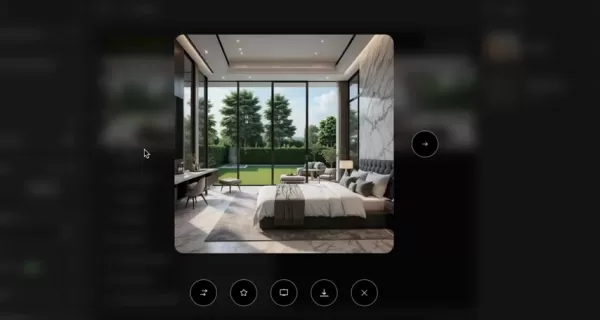
Whether you're an architect looking for inspiration, a designer polishing a concept, or a creative professional aiming to optimize your rendering process, D-zine AI provides a versatile toolkit to support your projects.
The platform addresses the challenges of contemporary design by offering a centralized workspace for handling diverse tasks without switching between multiple costly applications. This all-in-one strategy can save considerable time and money, potentially changing how design projects are managed and completed. By combining features like Image-to-Image, Text-to-Image, and
Cons
istent Character generation, D-zine AI strives to be a comprehensive resource for AI-assisted visual solutions.Exploring the AI Tool Suite
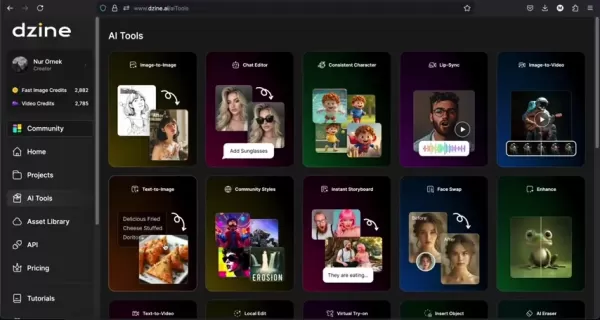
D-zine AI features an extensive range of AI Tools, each designed to support specific stages of the design workflow. Here are some of the key capabilities:
- **Image to Image
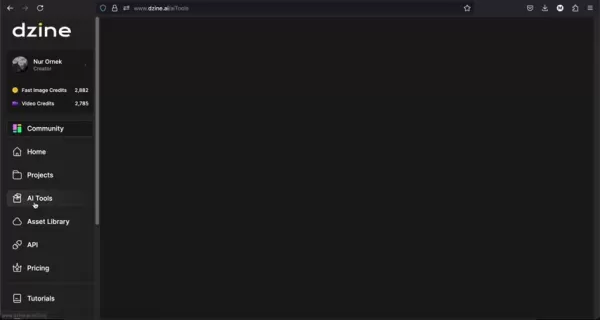
:** Modify existing visuals by applying new styles and adjustments.
- Image to Video : Bring static images to life by converting them into dynamic videos for presentations or social media.
- Text to Image : Create images from written descriptions, perfect for exploring initial concepts.
- Text to Video : Describe your idea and let D-zine AI generate a video based on your text.
- Object Insertion : Smoothly integrate new objects into existing images.
- AI Expand : Widen your image boundaries to create more expansive scenes.
- AI Upscale : Improve image resolution for greater clarity and detail.
These tools demonstrate D-zine AI's focus on a multifaceted design approach, allowing users to develop and realize their ideas with increased ease and adaptability. The platform also includes AI-powered editing functions for fine-tuning visuals with precision.
AI Tools and Architectural Design Integration
D-zine AI and Architectural Workflow Enhancement
D-zine AI offers notable features for improving Architectural Workflows. The platform simplifies processes with tools that enhance images:
-The AI-powered tools can improve, restore, and alter existing images, saving time and delivering better results.-The wide selection of art style presets and custom style options adds flexibility to the design process.
AI Image, AI Editor, Premium Style Access, Watermark Removal, and 3D Model Export are some features that enhance image and video workflows.
It's important to remember that while AI tools can increase productivity and creativity, they are not fully automated solutions. Users should familiarize themselves with the AI models to maximize their benefits.
Unlocking the Power: A Practical Guide to Using D-zine AI
Generating Images from Text with D-zine AI's Text-to-Image Tool
The Text-to-Image tool is one of D-zine AI's most powerful features, allowing users to create images from written descriptions. Here's how it works:
Access the Text-to-Image Tool: Go to the AI Tools section and choose 'Text-to-Image.'
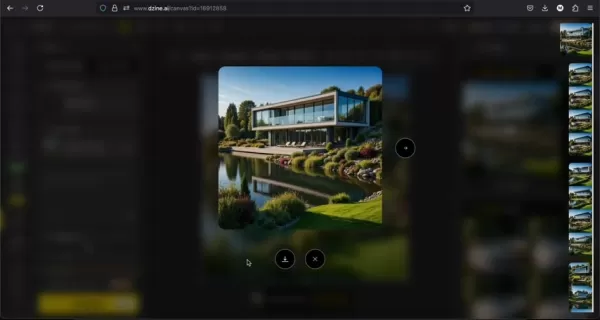
Compose Your Prompt :Write a detailed description of the image you want. Include specifics about objects, settings, and artistic styles. For example, “A contemporary house with large windows set in a garden beside a lake.”
Select an Art Style : Pick from a wide selection of artistic styles. D-zine AI offers options like realistic, illustrative, 3D, and more. Choose a style that fits your vision. Available art styles include: D-zine General, D-zine 3D Render v2, D-zine Realistic v3, Realistic, Illustration, and Cartoon.
Configure Advanced Options : Adjust settings such as image size, color matching, and negative prompts to fine-tune the output. Select generation modes like normal or HQ for better image quality.
Generate Your Image : Click 'Generate' and let D-zine AI create your image.
Explore and Refine : Review the generated images and pick the best one. You can then refine it further, create variations, or transfer it to the AI Editor for more adjustments.
The Text-to-Image tool offers a fast and effective way to visualize ideas, brainstorm concepts, and explore different design directions, saving significant time.
Elevate Architectural Visions: Refining Existing Images with D-zine AI’s Editing Tools
Beyond creating new images, D-zine AI excels at enhancing existing visuals. Here's how to improve your architectural designs:
- **Access the AI Editor
:** Pick an image from your library or generate a new one, then select the AI Editor tool.
- Select an Editing Tool : The AI Editor includes several tools, such as:
- AI Eraser: Remove unwanted elements. The hand repair function helps adjust details, and the AI background removal tool is useful for deleting backgrounds.
- Local Edit : Add objects to specific areas of the image.
- Insert Object: Place new objects into images.
- Generative Expand: Enlarge the image to address scale issues.
- Apply Edits : Use your chosen tool to make changes. For instance, use the AI Eraser to delete distractions or Generative Expand to extend the scene.
- Review and Save : Check the edited image and save your work. You can revert to earlier versions if necessary.
These editing features help designers perfect their visuals, making D-zine AI a valuable resource for presentations, client reviews, and final design outputs.
D-zine AI Pricing: Plans Tailored to Every Creator
Understanding D-zine AI's Subscription Options
D-zine AI uses a tiered subscription model to suit different needs and budgets:
- Free Plan: Provides 32 Regular Image Credits per day, ideal for testing D-zine AI's capabilities and determining if it meets your requirements.
- **Beginner Plan: Priced at $8.99 per month, this plan includes 900 Fast Image Credits monthly. It offers all Free plan features, plus watermark removal and 2x High Resolution Exports (2LPO).
- **Creator Plan: For $19.99 per month, this plan provides 3,000 Fast Image Credits and 3,000 Video Credits monthly. It includes the AI editor and 4x High Resolution Exports (JPG & PNG).
- **Master Plan: At $59.99 per month, this plan includes UNLIMITED Fast Image Credits. It also offers 9,000 video credits and 60 Pro Style Storage Slots.
D-zine AI: Weighing the Pros
and Cons
Pros
All-in-one AI visual tool that saves both money and time
Includes a free plan to test the AI Tools
Supports high-resolution exports
Cons
Subscription costs may be high for users on a tight budget.
New users might need time to learn the interface.
AI-generated content accuracy depends heavily on prompt quality.
Frequently Asked Questions About D-zine AI
Is D-zine AI suitable for beginners?
Yes, D-zine AI features a user-friendly interface and provides tutorials to help beginners. However, mastering the platform may involve some trial and error.
Can D-zine AI replace traditional design software?
No, D-zine AI is designed to work alongside traditional design software, not replace it. It aids in brainstorming, quick visualization, and efficient editing, but complex designs still need professional applications.
What image formats are supported by D-zine AI?
D-zine AI supports standard image formats like JPG, PNG, and WEBP. It also handles 3D formats such as GLTF, OBJ, DAE, KMF, FZX, and STL.
Can I use D-zine AI for commercial projects?
Yes, you can use D-zine AI for commercial work, but always check the terms of service and licensing agreements to ensure proper usage.
Related Questions About AI in Architectural Design
What other AI tools are beneficial for architectural design?
In addition to D-zine AI, several other AI tools are making an impact in architectural design: Midjourney and DALL-E 2: AI image generators for conceptual visuals. TestFit: AI-powered software for real estate development planning. Autodesk Forma (formerly Spacemaker): AI-driven tool for urban planning and design. ArchiStar: AI assistant that automates various design tasks. These tools provide different functions, from initial concept development to detailed planning, and can greatly improve architectural workflows.
Related article
 Apple, Google Partner With Anthropic to Address 27-Year-Old Vulnerability via Glass Wing Protection
As artificial intelligence advances rapidly in code generation and logical reasoning, the cybersecurity landscape faces unprecedented challenges. Recently, the prominent AI startup Anthropic officially launched a cross-industry collaboration called *
OpenAI Chief Scientist Addresses AI Reasoning Transparency Debate: Complexity Steady, No Sudden Jump
On September 2, Jakub Pachocki, OpenAI’s Chief Scientist, addressed public concerns on X regarding the AI model Astra, clarifying claims that it operates without oversight and lacks transparent reasoning.Why the Controversy Erupted: Deep Recurrence O
U.S. Navy Selects Blue Water Autonomy for Deep-Sea Survey Missions
Blue Water Autonomy’s Liberty Class is a 190-foot steel autonomous ship. | Source: Blue Water AutonomyBoston-based technology and shipbuilding firm Blue Water Autonomy has secured a multiple-award contract with the Naval Oceanographic Office (NAVOCEA
Related Special Topic Recommendations
Text-to-speech
Apple, Google Partner With Anthropic to Address 27-Year-Old Vulnerability via Glass Wing Protection
As artificial intelligence advances rapidly in code generation and logical reasoning, the cybersecurity landscape faces unprecedented challenges. Recently, the prominent AI startup Anthropic officially launched a cross-industry collaboration called *
OpenAI Chief Scientist Addresses AI Reasoning Transparency Debate: Complexity Steady, No Sudden Jump
On September 2, Jakub Pachocki, OpenAI’s Chief Scientist, addressed public concerns on X regarding the AI model Astra, clarifying claims that it operates without oversight and lacks transparent reasoning.Why the Controversy Erupted: Deep Recurrence O
U.S. Navy Selects Blue Water Autonomy for Deep-Sea Survey Missions
Blue Water Autonomy’s Liberty Class is a 190-foot steel autonomous ship. | Source: Blue Water AutonomyBoston-based technology and shipbuilding firm Blue Water Autonomy has secured a multiple-award contract with the Naval Oceanographic Office (NAVOCEA
Related Special Topic Recommendations
Text-to-speech
 Best AI Text to Speech Tools for Online Courses
2026 Latest Best Top-rated AI Text to Speech Tools for Online Courses are curated by XIX.AI based on rigorous real-world tests and weekly updated rankings. These powerful tools help creators deliver crystal-clear audio content effortlessly, boosting writing efficiency and streamlining course production. Check out the free vs paid comparison to find your perfect fit. Explore now to unlock your AI edge in online education.
 10 tools
 xix.ai
writing
AI Blog Title Tools for Higher Click Through Rates
xix.ai
writing
AI Blog Title Tools for Higher Click Through Rates
2026 Latest Best Top-Rated AI Blog Title Tools for Higher Click Through Rates! XIX.AI has carefully curated a powerful, game-changing collection of top tools that go through rigorous real-world tests. You’ll find a free vs paid comparison, weekly updated rankings, and detailed insights to help you boost your blog’s traffic efficiently. Must-try options are highlighted to help you unlock your AI edge. Explore now!
10 tools
xix.ai
automation
Best AI Task Routing Tools for Support Workflows
2026 Latest Best Top-rated AI Task Routing Tools for Support Workflows! XIX.AI has curated a highly powerful game-changing collection of must-try solutions, all undergoing rigorous real-world tests and updated weekly. These tools streamline workflows, boost productivity, and help teams deliver faster, more efficient support. Explore now to discover your perfect tool and unlock your AI edge!
17 tools
xix.ai
Academic Research
AI Citation and Paper Summary Tools
2026 Latest Best Top-Rated AI Citation and Paper Summary Tools Curated by XIX.AI. Get powerful game-changing solutions for quick content creation, improved writing efficiency, and boosting productivity. We offer a free vs paid comparison along with real-world tests and weekly updated rankings to help you find the must-try tool that fits your needs perfectly. Explore now to Unlock your AI edge.
10 tools
xix.ai
Productivity
Best AI Productivity Tools for Daily Work
2026 Latest Best Top-Rated AI Productivity Tools for Daily Work! XIX.AI has curated a powerful, game-changing selection based on rigorous weekly updated rankings and real-world tests. You’ll find must-try options that boost writing efficiency, streamline content creation, and help you overcome daily work challenges. Get a free vs paid comparison to find the perfect fit for your needs. Explore now to unlock your AI edge!
9 tools
xix.ai
Academic Research
AI Systematic Review Tools for Research Screening
2026 Latest Best Top-Rated AI Systematic Review Tools for Research Screening are here on XIX.AI! This curated collection includes powerful, game-changing solutions that go through rigorous real-world tests to deliver accurate results. We also offer a free vs paid comparison along with weekly updated rankings to help you find the must-try option that boosts your research efficiency significantly. Explore now to unlock your AI edge in academic work!
11 tools
xix.ai

 Comments (0)
0/500
Comments (0)
0/500
In the fast-paced world of architectural design, Artificial Intelligence (AI) is becoming a game-changing influence. D-zine AI presents itself as a comprehensive platform that uses AI to streamline and improve various design tasks. This versatile tool helps architects, designers, and creatives generate initial concepts, refine existing images, and produce engaging videos. Let's explore its features and how it can transform your design process.
Key Points
D-zine AI provides a collection of AI-driven tools for creating and editing visuals.
It enables text-to-image, image-to-image, and image-to-video conversions.
The platform includes features like object insertion, background removal, and image upscaling.
D-zine AI comes with multiple style presets to quickly produce a variety of design ideas.
Users can modify existing images by adding or removing elements and expanding scenes.
The platform is available through several subscription tiers, including a free version.
D-zine AI: A Deep Dive into AI-Powered Design
What is D-zine AI?
D-zine AI is a subscription-based platform that equips users with a suite of AI-powered tools for visual content creation and enhancement. Targeting creative professionals and architects, it covers everything from basic image improvements to advanced video generation, all driven by artificial intelligence. Accessible via subscription, the website offers a broad set of tools aimed at making sophisticated design capabilities more accessible.
Whether you're an architect looking for inspiration, a designer polishing a concept, or a creative professional aiming to optimize your rendering process, D-zine AI provides a versatile toolkit to support your projects.
The platform addresses the challenges of contemporary design by offering a centralized workspace for handling diverse tasks without switching between multiple costly applications. This all-in-one strategy can save considerable time and money, potentially changing how design projects are managed and completed. By combining features like Image-to-Image, Text-to-Image, and
Cons
istent Character generation, D-zine AI strives to be a comprehensive resource for AI-assisted visual solutions.Exploring the AI Tool Suite
D-zine AI features an extensive range of AI Tools, each designed to support specific stages of the design workflow. Here are some of the key capabilities:
- **Image to Image
:** Modify existing visuals by applying new styles and adjustments.
- Image to Video : Bring static images to life by converting them into dynamic videos for presentations or social media.
- Text to Image : Create images from written descriptions, perfect for exploring initial concepts.
- Text to Video : Describe your idea and let D-zine AI generate a video based on your text.
- Object Insertion : Smoothly integrate new objects into existing images.
- AI Expand : Widen your image boundaries to create more expansive scenes.
- AI Upscale : Improve image resolution for greater clarity and detail.
These tools demonstrate D-zine AI's focus on a multifaceted design approach, allowing users to develop and realize their ideas with increased ease and adaptability. The platform also includes AI-powered editing functions for fine-tuning visuals with precision.
AI Tools and Architectural Design Integration
D-zine AI and Architectural Workflow Enhancement
D-zine AI offers notable features for improving Architectural Workflows. The platform simplifies processes with tools that enhance images:
-The AI-powered tools can improve, restore, and alter existing images, saving time and delivering better results.-The wide selection of art style presets and custom style options adds flexibility to the design process.
AI Image, AI Editor, Premium Style Access, Watermark Removal, and 3D Model Export are some features that enhance image and video workflows.
It's important to remember that while AI tools can increase productivity and creativity, they are not fully automated solutions. Users should familiarize themselves with the AI models to maximize their benefits.
Unlocking the Power: A Practical Guide to Using D-zine AI
Generating Images from Text with D-zine AI's Text-to-Image Tool
The Text-to-Image tool is one of D-zine AI's most powerful features, allowing users to create images from written descriptions. Here's how it works:
Access the Text-to-Image Tool: Go to the AI Tools section and choose 'Text-to-Image.'
Compose Your Prompt :Write a detailed description of the image you want. Include specifics about objects, settings, and artistic styles. For example, “A contemporary house with large windows set in a garden beside a lake.”
Select an Art Style : Pick from a wide selection of artistic styles. D-zine AI offers options like realistic, illustrative, 3D, and more. Choose a style that fits your vision. Available art styles include: D-zine General, D-zine 3D Render v2, D-zine Realistic v3, Realistic, Illustration, and Cartoon.
Configure Advanced Options : Adjust settings such as image size, color matching, and negative prompts to fine-tune the output. Select generation modes like normal or HQ for better image quality.
Generate Your Image : Click 'Generate' and let D-zine AI create your image.
Explore and Refine : Review the generated images and pick the best one. You can then refine it further, create variations, or transfer it to the AI Editor for more adjustments.
The Text-to-Image tool offers a fast and effective way to visualize ideas, brainstorm concepts, and explore different design directions, saving significant time.
Elevate Architectural Visions: Refining Existing Images with D-zine AI’s Editing Tools
Beyond creating new images, D-zine AI excels at enhancing existing visuals. Here's how to improve your architectural designs:
- **Access the AI Editor
:** Pick an image from your library or generate a new one, then select the AI Editor tool.
- Select an Editing Tool : The AI Editor includes several tools, such as:
- AI Eraser: Remove unwanted elements. The hand repair function helps adjust details, and the AI background removal tool is useful for deleting backgrounds.
- Local Edit : Add objects to specific areas of the image.
- Insert Object: Place new objects into images.
- Generative Expand: Enlarge the image to address scale issues.
- Apply Edits : Use your chosen tool to make changes. For instance, use the AI Eraser to delete distractions or Generative Expand to extend the scene.
- Review and Save : Check the edited image and save your work. You can revert to earlier versions if necessary.
These editing features help designers perfect their visuals, making D-zine AI a valuable resource for presentations, client reviews, and final design outputs.
D-zine AI Pricing: Plans Tailored to Every Creator
Understanding D-zine AI's Subscription Options
D-zine AI uses a tiered subscription model to suit different needs and budgets:
- Free Plan: Provides 32 Regular Image Credits per day, ideal for testing D-zine AI's capabilities and determining if it meets your requirements.
- **Beginner Plan: Priced at $8.99 per month, this plan includes 900 Fast Image Credits monthly. It offers all Free plan features, plus watermark removal and 2x High Resolution Exports (2LPO).
- **Creator Plan: For $19.99 per month, this plan provides 3,000 Fast Image Credits and 3,000 Video Credits monthly. It includes the AI editor and 4x High Resolution Exports (JPG & PNG).
- **Master Plan: At $59.99 per month, this plan includes UNLIMITED Fast Image Credits. It also offers 9,000 video credits and 60 Pro Style Storage Slots.
D-zine AI: Weighing the Pros
and Cons
Pros
All-in-one AI visual tool that saves both money and time
Includes a free plan to test the AI Tools
Supports high-resolution exports
Cons
Subscription costs may be high for users on a tight budget.
New users might need time to learn the interface.
AI-generated content accuracy depends heavily on prompt quality.
Frequently Asked Questions About D-zine AI
Is D-zine AI suitable for beginners?
Yes, D-zine AI features a user-friendly interface and provides tutorials to help beginners. However, mastering the platform may involve some trial and error.
Can D-zine AI replace traditional design software?
No, D-zine AI is designed to work alongside traditional design software, not replace it. It aids in brainstorming, quick visualization, and efficient editing, but complex designs still need professional applications.
What image formats are supported by D-zine AI?
D-zine AI supports standard image formats like JPG, PNG, and WEBP. It also handles 3D formats such as GLTF, OBJ, DAE, KMF, FZX, and STL.
Can I use D-zine AI for commercial projects?
Yes, you can use D-zine AI for commercial work, but always check the terms of service and licensing agreements to ensure proper usage.
Related Questions About AI in Architectural Design
What other AI tools are beneficial for architectural design?
In addition to D-zine AI, several other AI tools are making an impact in architectural design: Midjourney and DALL-E 2: AI image generators for conceptual visuals. TestFit: AI-powered software for real estate development planning. Autodesk Forma (formerly Spacemaker): AI-driven tool for urban planning and design. ArchiStar: AI assistant that automates various design tasks. These tools provide different functions, from initial concept development to detailed planning, and can greatly improve architectural workflows.








 Apple, Google Partner With Anthropic to Address 27-Year-Old Vulnerability via Glass Wing Protection
As artificial intelligence advances rapidly in code generation and logical reasoning, the cybersecurity landscape faces unprecedented challenges. Recently, the prominent AI startup Anthropic officially launched a cross-industry collaboration called *
Apple, Google Partner With Anthropic to Address 27-Year-Old Vulnerability via Glass Wing Protection
As artificial intelligence advances rapidly in code generation and logical reasoning, the cybersecurity landscape faces unprecedented challenges. Recently, the prominent AI startup Anthropic officially launched a cross-industry collaboration called *
 OpenAI Chief Scientist Addresses AI Reasoning Transparency Debate: Complexity Steady, No Sudden Jump
On September 2, Jakub Pachocki, OpenAI’s Chief Scientist, addressed public concerns on X regarding the AI model Astra, clarifying claims that it operates without oversight and lacks transparent reasoning.Why the Controversy Erupted: Deep Recurrence O
OpenAI Chief Scientist Addresses AI Reasoning Transparency Debate: Complexity Steady, No Sudden Jump
On September 2, Jakub Pachocki, OpenAI’s Chief Scientist, addressed public concerns on X regarding the AI model Astra, clarifying claims that it operates without oversight and lacks transparent reasoning.Why the Controversy Erupted: Deep Recurrence O
 U.S. Navy Selects Blue Water Autonomy for Deep-Sea Survey Missions
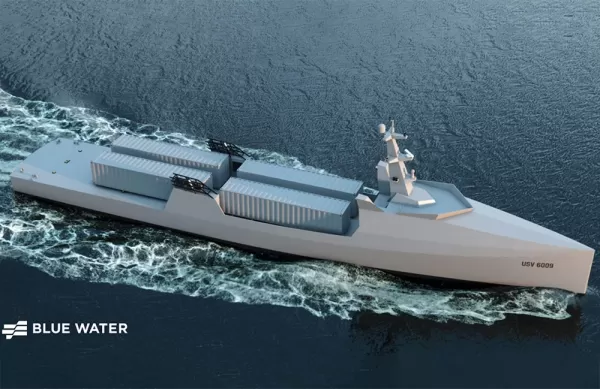
Blue Water Autonomy’s Liberty Class is a 190-foot steel autonomous ship. | Source: Blue Water AutonomyBoston-based technology and shipbuilding firm Blue Water Autonomy has secured a multiple-award contract with the Naval Oceanographic Office (NAVOCEA
U.S. Navy Selects Blue Water Autonomy for Deep-Sea Survey Missions
Blue Water Autonomy’s Liberty Class is a 190-foot steel autonomous ship. | Source: Blue Water AutonomyBoston-based technology and shipbuilding firm Blue Water Autonomy has secured a multiple-award contract with the Naval Oceanographic Office (NAVOCEA

2026 Latest Best Top-rated AI Text to Speech Tools for Online Courses are curated by XIX.AI based on rigorous real-world tests and weekly updated rankings. These powerful tools help creators deliver crystal-clear audio content effortlessly, boosting writing efficiency and streamlining course production. Check out the free vs paid comparison to find your perfect fit. Explore now to unlock your AI edge in online education.
10 tools
xix.ai

2026 Latest Best Top-Rated AI Blog Title Tools for Higher Click Through Rates! XIX.AI has carefully curated a powerful, game-changing collection of top tools that go through rigorous real-world tests. You’ll find a free vs paid comparison, weekly updated rankings, and detailed insights to help you boost your blog’s traffic efficiently. Must-try options are highlighted to help you unlock your AI edge. Explore now!
10 tools
xix.ai

2026 Latest Best Top-rated AI Task Routing Tools for Support Workflows! XIX.AI has curated a highly powerful game-changing collection of must-try solutions, all undergoing rigorous real-world tests and updated weekly. These tools streamline workflows, boost productivity, and help teams deliver faster, more efficient support. Explore now to discover your perfect tool and unlock your AI edge!
17 tools
xix.ai

2026 Latest Best Top-Rated AI Citation and Paper Summary Tools Curated by XIX.AI. Get powerful game-changing solutions for quick content creation, improved writing efficiency, and boosting productivity. We offer a free vs paid comparison along with real-world tests and weekly updated rankings to help you find the must-try tool that fits your needs perfectly. Explore now to Unlock your AI edge.
10 tools
xix.ai

2026 Latest Best Top-Rated AI Productivity Tools for Daily Work! XIX.AI has curated a powerful, game-changing selection based on rigorous weekly updated rankings and real-world tests. You’ll find must-try options that boost writing efficiency, streamline content creation, and help you overcome daily work challenges. Get a free vs paid comparison to find the perfect fit for your needs. Explore now to unlock your AI edge!
9 tools
xix.ai

2026 Latest Best Top-Rated AI Systematic Review Tools for Research Screening are here on XIX.AI! This curated collection includes powerful, game-changing solutions that go through rigorous real-world tests to deliver accurate results. We also offer a free vs paid comparison along with weekly updated rankings to help you find the must-try option that boosts your research efficiency significantly. Explore now to unlock your AI edge in academic work!
11 tools
xix.ai












