


 Home
HomeCreate Unique Stickers at Home Using AI and Silhouette
Creating Personalized Stickers with AI: A Step-by-Step Guide
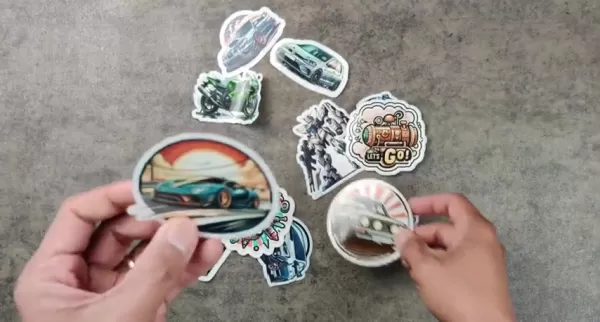
Have you ever dreamed of creating your own custom stickers but found yourself overwhelmed by the process? Well, thanks to advancements in AI technology and tools like the Silhouette Cameo and Silhouette Studio, designing unique, waterproof stickers has never been easier. Whether you’re looking to decorate your laptop, personalize gifts, or even launch a small business, this guide will walk you through every step of the process, from concept to creation.
Introducing Microsoft Copilot AI
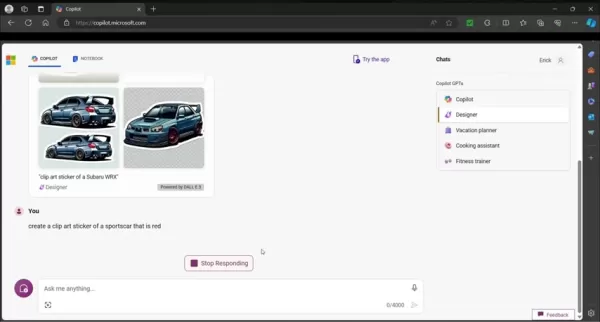
Let’s start with the brain behind your sticker design: Microsoft Copilot AI. Accessible through Microsoft Edge, this powerful tool allows you to generate unique sticker designs with nothing more than a few simple text prompts. No need for hours of manual graphic design—just tell Copilot what you want, and it’ll do the heavy lifting for you. Best of all, you don’t even need a premium subscription; a free Hotmail account works just fine.
Copilot’s versatility shines through its ability to produce various art styles based on your input. For example, if you’re aiming for a vintage look, you can specify that in your prompt. The AI integrates seamlessly with Microsoft Edge, ensuring a smooth workflow from start to finish. Whether you’re envisioning a sleek logo or a whimsical cartoon, Copilot can help you bring your ideas to life.
Crafting the Perfect Prompt
Creating clip art-style stickers starts with crafting the right prompt. Instead of vague requests, focus on specificity. Phrases like “create a clip art sticker of [subject]” tend to yield the best results. For instance, if you’re designing a sticker of a Subaru WRX, your prompt might read:
Create a clip art sticker of a Subaru WRX.
Adding descriptive keywords—such as "vintage," "modern," or "minimalist"—can further refine the output. Experimentation is key here. Copilot generates four variations per prompt, giving you multiple options to choose from. Once you’ve settled on your favorite design, download it to your computer and save it to a folder where Silhouette Studio can access it.
Setting Up Silhouette Studio
Before diving into cutting, it’s crucial to configure Silhouette Studio properly. Open the software and set the page size to match your sticker dimensions. Registration marks are another must—they act as guides for the cutting machine, ensuring precision. Next, import your AI-generated image into the software. This step is where things get exciting—you’re about to turn your digital design into something tangible!
Tracing and Cutting
With your image imported, it’s time to trace the outline. Silhouette Studio’s Trace panel is your best friend here. Select the portion of the image you want to cut, then activate the Trace tool. Adjust the settings until you achieve clean, defined lines. Once traced, you can adjust the cut lines as needed to ensure accuracy.
Printing and Enhancing Water Resistance
Printing is the next step. Load your waterproof sticker paper into the printer, making sure the settings match the paper type. Navigate to File > Print in Silhouette Studio and confirm everything is set up correctly. Hit Print, and watch your design come to life.
To enhance durability, laminate your printed stickers. This step adds an extra layer of protection against moisture, ensuring your stickers stay intact even after prolonged exposure to water. Once laminated, load the sheets onto a cutting mat and feed them into the Silhouette Cameo.
Final Touches: Cutting and Testing
With the Silhouette Cameo, precision is guaranteed. Align the cutting mat, adjust the blade depth, and send the job from Silhouette Studio. The machine will scan the registration marks and cut around your stickers with pinpoint accuracy. Once the cutting is complete, carefully peel off the stickers and test their waterproof capabilities by running them under water. Voilà—you now have your very own custom stickers!
The Cost Factor
Creating stickers at home is surprisingly budget-friendly. While the initial investment in a Silhouette Cameo may seem steep ($200–$400), it pays off in the long run. Sticker paper and laminate sheets are relatively inexpensive, with packs ranging from $15 to $30. Depending on how many stickers you can fit on a single sheet, the per-sticker cost remains manageable.
Potential Applications
From decorating personal items like laptops and water bottles to crafting promotional materials for small businesses, the possibilities are endless. You could even make educational tools for kids or quirky decals for parties. The only limit is your imagination!
Frequently Asked Questions
Q: Do I need special equipment?
A: Yes, a Silhouette Cameo is necessary for precise cuts, and access to Microsoft Copilot requires a Microsoft account.
Q: What are the most important steps?
A: Using clip art, saving AI designs to Silhouette Studio, and adjusting thresholds for clean cuts are critical.
Q: Are the stickers waterproof?
A: Absolutely! Waterproof paper and lamination ensure durability, though they’re not meant for prolonged immersion.
Conclusion
Combining AI creativity with craft technology opens up endless opportunities for personal expression. With tools like Microsoft Copilot and the Silhouette Cameo, you can transform simple ideas into stunning, personalized stickers. Happy crafting!
Related article
 ByteDance Boosts Core AI Incentives as Doubao Surges 14.6%
ByteDance recently convened a DouBao equity briefing to unveil fresh incentive policies for staff involved in the DouBao division. The strike price for DouBao shares has been lifted from $14.85 in June 2026 to $17.02, marking an approximate 14.6% inc
MiniMax Unveils 10x Team Program to Incentivize Global AI Experts
MiniMax (Xiyu Technology), the General Artificial Intelligence Lab, has officially launched "10x Team," a global talent collaboration initiative. This program aims to recruit top experts across industries to explore the deep application of large mode
South Korea Breaks Ground on National AI Computing Center, Investing 2.5 Trillion Won with 2028 Target
South Korean outlet EtNews reports that groundbreaking for the Korea AI Computing Center (KOACC) took place on August 3 at the Solar City data center park in Sunan, Jeollanam-do. Backed by a total investment of 2.5 trillion KRW (roughly 11.838 billio
Related Special Topic Recommendations
Education and Learning
ByteDance Boosts Core AI Incentives as Doubao Surges 14.6%
ByteDance recently convened a DouBao equity briefing to unveil fresh incentive policies for staff involved in the DouBao division. The strike price for DouBao shares has been lifted from $14.85 in June 2026 to $17.02, marking an approximate 14.6% inc
MiniMax Unveils 10x Team Program to Incentivize Global AI Experts
MiniMax (Xiyu Technology), the General Artificial Intelligence Lab, has officially launched "10x Team," a global talent collaboration initiative. This program aims to recruit top experts across industries to explore the deep application of large mode
South Korea Breaks Ground on National AI Computing Center, Investing 2.5 Trillion Won with 2028 Target
South Korean outlet EtNews reports that groundbreaking for the Korea AI Computing Center (KOACC) took place on August 3 at the Solar City data center park in Sunan, Jeollanam-do. Backed by a total investment of 2.5 trillion KRW (roughly 11.838 billio
Related Special Topic Recommendations
Education and Learning
 AI Study Tools for Homework and Exam Prep
2026 Latest Best AI Study Tools for Homework and Exam Prep! XIX.AI curates a top-rated list of powerful, game-changing tools that help students boost productivity, streamline homework completion, and ace exams through real-world tests. Get a free vs paid comparison, detailed rankings, and must-try options to unlock your AI edge. Explore now!
 10 tools
 xix.ai
Music composition
AI Vocal Demo Tools for Songwriters, Hooks, Toplines, and Multilingual Draft Sessions
xix.ai
Music composition
AI Vocal Demo Tools for Songwriters, Hooks, Toplines, and Multilingual Draft Sessions
2026 Latest Best AI Vocal Demo Tools for Songwriters, Hook Creators, and Multi-Language Content Teams! XIX.AI has curated a top-rated list of powerful game-changing tools that go through rigorous real-world tests. You’ll find detailed free vs paid comparison data, comprehensive rankings, and must-try options to help you boost writing efficiency and unlock your creative potential. Explore now to discover your perfect tool for all your content needs!
9 tools
xix.ai
Business
Best AI Competitive Research Tools for Small Businesses
2026 Latest Best Top-rated AI Competitive Research Tools for Small Businesses! XIX.AI has curated a highly powerful game-changing collection, updated weekly with rigorous real-world tests and detailed rankings. You can find a comprehensive free vs paid comparison to help you identify the must-try tools that boost your productivity and give you a competitive edge. Explore now to discover your perfect tool!
9 tools
xix.ai
Image editing
Photoshop AI Retouch Tools for Ecommerce Apparel, Skin Cleanup, and Color Consistency
2026 Latest Best Photoshop AI retouch tools for ecommerce apparel, skin cleanup, and color consistency! This top-rated curated list features powerful game-changing solutions that help you boost writing efficiency, streamline content creation, and achieve perfect visual results effortlessly. Each tool has undergone real-world tests through weekly updated rankings, complete with free vs paid comparison details. Backed by XIX.AI, it’s the must-try guide for anyone aiming to unlock your AI edge. Explore now!
10 tools
xix.ai
Prompt
Best AI Prompt Libraries for ChatGPT Workflows
2026 Latest Best Top-Rated AI Prompt Libraries for optimizing all types of ChatGPT workflows. XIX.AI has curated a powerful, game-changing collection that goes through rigorous real-world tests to ensure top performance. You can find detailed free vs paid comparisons and expert rankings to help you choose the must-try tools that boost your productivity and unlock your AI edge. Explore now!
11 tools
xix.ai
Education and Learning
AI Quiz Builder Platforms for Teachers, Tutors, and Cohort-Based Learning Programs
2026 Latest Best AI Quiz Builder Platforms for Teachers, Tutors, and Cohort-Based Learning Programs! XIX.AI has curated a top-rated list of powerful game-changing tools that go through real-world tests to deliver accurate rankings. These must-try platforms help boost writing efficiency, streamline content creation, and simplify quiz design across all learning scenarios. Explore now to discover your perfect tool for unlocking your AI edge in teaching!
13 tools
xix.ai

 Comments (4)
0/500
Comments (4)
0/500
![JamesLopez]()
Love this! Finally, a way to make custom stickers without being a pro designer. 🎨 AI + Silhouette is a game changer for small biz owners like me.
![ScottPerez]()
¿Usar IA para crear stickers personalizados en casa? ¡Qué idea tan genial! 😄 Me encanta la posibilidad de hacer diseños únicos sin necesidad de habilidades artísticas profesionales. Aunque me pregunto, ¿no será que estas tecnologías harán que la creatividad se vuelva demasiado dependiente de algoritmos? De todas formas, definitivamente voy a probar este método para los stickers de mi laptop. ¿Alguien más ya lo ha intentado?
![AnthonyClark]()
Ну наконец-то написали нормальный гайд по созданию стикеров! 😄 А то все эти сложные программы отпугивают. Интересно, а на обычной бумаге такие стикеры тоже получаются? Хочу попробовать сделать для детских ланч-боксов.
![MarkJohnson]()
Wow, AI making stickers at home? That’s next-level cool! I’m totally trying this with my Silhouette. Any tips for picking the best AI design tools? 😎
Creating Personalized Stickers with AI: A Step-by-Step Guide
Have you ever dreamed of creating your own custom stickers but found yourself overwhelmed by the process? Well, thanks to advancements in AI technology and tools like the Silhouette Cameo and Silhouette Studio, designing unique, waterproof stickers has never been easier. Whether you’re looking to decorate your laptop, personalize gifts, or even launch a small business, this guide will walk you through every step of the process, from concept to creation.
Introducing Microsoft Copilot AI
Let’s start with the brain behind your sticker design: Microsoft Copilot AI. Accessible through Microsoft Edge, this powerful tool allows you to generate unique sticker designs with nothing more than a few simple text prompts. No need for hours of manual graphic design—just tell Copilot what you want, and it’ll do the heavy lifting for you. Best of all, you don’t even need a premium subscription; a free Hotmail account works just fine.
Copilot’s versatility shines through its ability to produce various art styles based on your input. For example, if you’re aiming for a vintage look, you can specify that in your prompt. The AI integrates seamlessly with Microsoft Edge, ensuring a smooth workflow from start to finish. Whether you’re envisioning a sleek logo or a whimsical cartoon, Copilot can help you bring your ideas to life.
Crafting the Perfect Prompt
Creating clip art-style stickers starts with crafting the right prompt. Instead of vague requests, focus on specificity. Phrases like “create a clip art sticker of [subject]” tend to yield the best results. For instance, if you’re designing a sticker of a Subaru WRX, your prompt might read:
Create a clip art sticker of a Subaru WRX.
Adding descriptive keywords—such as "vintage," "modern," or "minimalist"—can further refine the output. Experimentation is key here. Copilot generates four variations per prompt, giving you multiple options to choose from. Once you’ve settled on your favorite design, download it to your computer and save it to a folder where Silhouette Studio can access it.
Setting Up Silhouette Studio
Before diving into cutting, it’s crucial to configure Silhouette Studio properly. Open the software and set the page size to match your sticker dimensions. Registration marks are another must—they act as guides for the cutting machine, ensuring precision. Next, import your AI-generated image into the software. This step is where things get exciting—you’re about to turn your digital design into something tangible!
Tracing and Cutting
With your image imported, it’s time to trace the outline. Silhouette Studio’s Trace panel is your best friend here. Select the portion of the image you want to cut, then activate the Trace tool. Adjust the settings until you achieve clean, defined lines. Once traced, you can adjust the cut lines as needed to ensure accuracy.
Printing and Enhancing Water Resistance
Printing is the next step. Load your waterproof sticker paper into the printer, making sure the settings match the paper type. Navigate to File > Print in Silhouette Studio and confirm everything is set up correctly. Hit Print, and watch your design come to life.
To enhance durability, laminate your printed stickers. This step adds an extra layer of protection against moisture, ensuring your stickers stay intact even after prolonged exposure to water. Once laminated, load the sheets onto a cutting mat and feed them into the Silhouette Cameo.
Final Touches: Cutting and Testing
With the Silhouette Cameo, precision is guaranteed. Align the cutting mat, adjust the blade depth, and send the job from Silhouette Studio. The machine will scan the registration marks and cut around your stickers with pinpoint accuracy. Once the cutting is complete, carefully peel off the stickers and test their waterproof capabilities by running them under water. Voilà—you now have your very own custom stickers!
The Cost Factor
Creating stickers at home is surprisingly budget-friendly. While the initial investment in a Silhouette Cameo may seem steep ($200–$400), it pays off in the long run. Sticker paper and laminate sheets are relatively inexpensive, with packs ranging from $15 to $30. Depending on how many stickers you can fit on a single sheet, the per-sticker cost remains manageable.
Potential Applications
From decorating personal items like laptops and water bottles to crafting promotional materials for small businesses, the possibilities are endless. You could even make educational tools for kids or quirky decals for parties. The only limit is your imagination!
Frequently Asked Questions
Q: Do I need special equipment?
A: Yes, a Silhouette Cameo is necessary for precise cuts, and access to Microsoft Copilot requires a Microsoft account.
Q: What are the most important steps?
A: Using clip art, saving AI designs to Silhouette Studio, and adjusting thresholds for clean cuts are critical.
Q: Are the stickers waterproof?
A: Absolutely! Waterproof paper and lamination ensure durability, though they’re not meant for prolonged immersion.
Conclusion
Combining AI creativity with craft technology opens up endless opportunities for personal expression. With tools like Microsoft Copilot and the Silhouette Cameo, you can transform simple ideas into stunning, personalized stickers. Happy crafting!








 ByteDance Boosts Core AI Incentives as Doubao Surges 14.6%
ByteDance recently convened a DouBao equity briefing to unveil fresh incentive policies for staff involved in the DouBao division. The strike price for DouBao shares has been lifted from $14.85 in June 2026 to $17.02, marking an approximate 14.6% inc
ByteDance Boosts Core AI Incentives as Doubao Surges 14.6%
ByteDance recently convened a DouBao equity briefing to unveil fresh incentive policies for staff involved in the DouBao division. The strike price for DouBao shares has been lifted from $14.85 in June 2026 to $17.02, marking an approximate 14.6% inc
 MiniMax Unveils 10x Team Program to Incentivize Global AI Experts
MiniMax (Xiyu Technology), the General Artificial Intelligence Lab, has officially launched "10x Team," a global talent collaboration initiative. This program aims to recruit top experts across industries to explore the deep application of large mode
MiniMax Unveils 10x Team Program to Incentivize Global AI Experts
MiniMax (Xiyu Technology), the General Artificial Intelligence Lab, has officially launched "10x Team," a global talent collaboration initiative. This program aims to recruit top experts across industries to explore the deep application of large mode
 South Korea Breaks Ground on National AI Computing Center, Investing 2.5 Trillion Won with 2028 Target
South Korean outlet EtNews reports that groundbreaking for the Korea AI Computing Center (KOACC) took place on August 3 at the Solar City data center park in Sunan, Jeollanam-do. Backed by a total investment of 2.5 trillion KRW (roughly 11.838 billio
South Korea Breaks Ground on National AI Computing Center, Investing 2.5 Trillion Won with 2028 Target
South Korean outlet EtNews reports that groundbreaking for the Korea AI Computing Center (KOACC) took place on August 3 at the Solar City data center park in Sunan, Jeollanam-do. Backed by a total investment of 2.5 trillion KRW (roughly 11.838 billio

2026 Latest Best AI Study Tools for Homework and Exam Prep! XIX.AI curates a top-rated list of powerful, game-changing tools that help students boost productivity, streamline homework completion, and ace exams through real-world tests. Get a free vs paid comparison, detailed rankings, and must-try options to unlock your AI edge. Explore now!
10 tools
xix.ai

2026 Latest Best AI Vocal Demo Tools for Songwriters, Hook Creators, and Multi-Language Content Teams! XIX.AI has curated a top-rated list of powerful game-changing tools that go through rigorous real-world tests. You’ll find detailed free vs paid comparison data, comprehensive rankings, and must-try options to help you boost writing efficiency and unlock your creative potential. Explore now to discover your perfect tool for all your content needs!
9 tools
xix.ai

2026 Latest Best Top-rated AI Competitive Research Tools for Small Businesses! XIX.AI has curated a highly powerful game-changing collection, updated weekly with rigorous real-world tests and detailed rankings. You can find a comprehensive free vs paid comparison to help you identify the must-try tools that boost your productivity and give you a competitive edge. Explore now to discover your perfect tool!
9 tools
xix.ai

2026 Latest Best Photoshop AI retouch tools for ecommerce apparel, skin cleanup, and color consistency! This top-rated curated list features powerful game-changing solutions that help you boost writing efficiency, streamline content creation, and achieve perfect visual results effortlessly. Each tool has undergone real-world tests through weekly updated rankings, complete with free vs paid comparison details. Backed by XIX.AI, it’s the must-try guide for anyone aiming to unlock your AI edge. Explore now!
10 tools
xix.ai

2026 Latest Best Top-Rated AI Prompt Libraries for optimizing all types of ChatGPT workflows. XIX.AI has curated a powerful, game-changing collection that goes through rigorous real-world tests to ensure top performance. You can find detailed free vs paid comparisons and expert rankings to help you choose the must-try tools that boost your productivity and unlock your AI edge. Explore now!
11 tools
xix.ai

2026 Latest Best AI Quiz Builder Platforms for Teachers, Tutors, and Cohort-Based Learning Programs! XIX.AI has curated a top-rated list of powerful game-changing tools that go through real-world tests to deliver accurate rankings. These must-try platforms help boost writing efficiency, streamline content creation, and simplify quiz design across all learning scenarios. Explore now to discover your perfect tool for unlocking your AI edge in teaching!
13 tools
xix.ai

Love this! Finally, a way to make custom stickers without being a pro designer. 🎨 AI + Silhouette is a game changer for small biz owners like me.
¿Usar IA para crear stickers personalizados en casa? ¡Qué idea tan genial! 😄 Me encanta la posibilidad de hacer diseños únicos sin necesidad de habilidades artísticas profesionales. Aunque me pregunto, ¿no será que estas tecnologías harán que la creatividad se vuelva demasiado dependiente de algoritmos? De todas formas, definitivamente voy a probar este método para los stickers de mi laptop. ¿Alguien más ya lo ha intentado?
Ну наконец-то написали нормальный гайд по созданию стикеров! 😄 А то все эти сложные программы отпугивают. Интересно, а на обычной бумаге такие стикеры тоже получаются? Хочу попробовать сделать для детских ланч-боксов.
Wow, AI making stickers at home? That’s next-level cool! I’m totally trying this with my Silhouette. Any tips for picking the best AI design tools? 😎












