


 Home
HomeHow to create free animated travel maps with Mult.dev in 2025? Complete guide.
Want to add stunning, professional animated travel maps to your videos? Mult.dev provides a free, easy-to-use platform for creating beautiful map animations quickly. While the free tier has certain restrictions, it's a fantastic resource for travel vloggers, educators, and anyone wanting to visualize a journey. This guide details its features, walks you through how to use it, and outlines its plans and pricing.
Key Points
Mult.dev lets you create animated travel maps at no cost.
The free version limits export quality and transportation modes.
Creating a free account unlocks full customization for your animation.
The intuitive interface makes it simple to craft professional-looking maps.
Use the built-in AI assistant by typing your route into the text box.
Access to detailed sea and land routes requires a Pro subscription.
Getting Started with Mult.dev: A Free Travel Map Animator
What is Mult.dev?
Let's dive in. Here's a simple, step-by-step guide for creating your first map with Mult.dev:
Step-by-Step Guide: Creating Your First Travel Map AnimationFollow these quick steps to make your animated travel map:- Visit Mult.dev: Open your browser and go to Mult.dev.
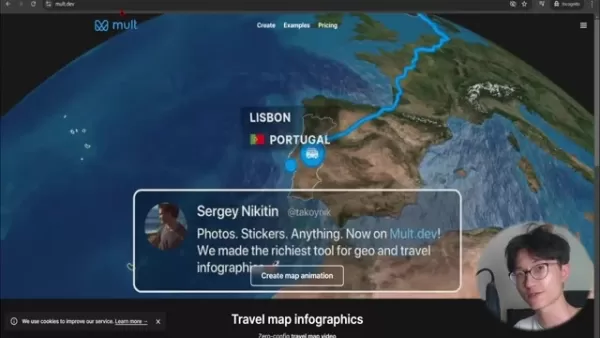
The homepage showcases several example animations.
- Create a Map Animation: Click the prominent “Create map animation” button in the center of the page.
- Sign Up for an Account: For full customization, sign up. Click the three-line menu in the top right, select “Start”, and register with your Google account.
- Access Customization: After signing in, click the top icon on the left sidebar to open the route editor.
- Start from Scratch: Clear the default demo locations to begin with a blank map.
- Add Your Destinations: Type a city or location into the ‘Name or coord…’ search bar and select from the dropdown.
- Choose Transportation: Select a travel method; 'flight' is free, with more options available for Pro users.
- Finalize and Render: After adding all destinations, close the editor with the 'X' button to see a preview render.
- Customize (Optional): Click the left-side icon for video settings. Here you can show/hide country names and flags. Additional customization requires an upgrade.
- Export: Click the Export button to download your video.
The entire process is streamlined, letting you quickly produce map animations to elevate travel videos or presentations. For even faster results, describe your trip to the AI Trip GPT to generate a route automatically!
Customizing Your Travel Map
Adding Locations and Defining Routes
Customizing a map on Mult.dev is about crafting a visual story. Each location is a chapter in your travel tale, whether it's Tokyo
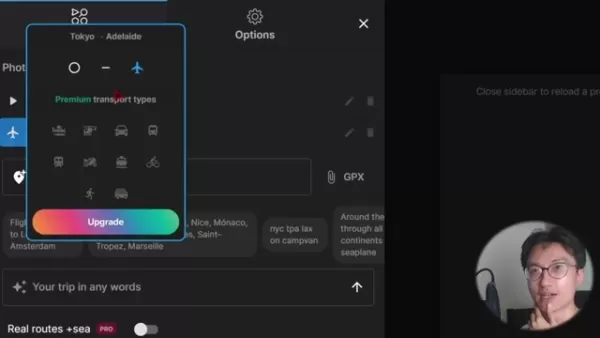
, Adelaide, or Melbourne. Every point shapes the narrative of your journey.
For best results, be specific when adding locations. While Mult.dev understands general names, entering the exact city ensures your route animation is precise. This is crucial for long-distance trips or routes with several stops in one area.
Finally, consider your travel mode. The free version offers basic options, but upgrading unlocks specific choices like boat or motorcycle. Choosing the right transportation adds depth and makes your animation more engaging.
Exploring Style Options for a Unique Visual
Beyond the route, Mult.dev lets you customize the map’s style to fit your video's mood.

Find these settings under ‘Options’.
Choose between the 'Eco' and 'Earth' visual themes. The 'Earth' theme offers a more realistic, geographical look. Pro users can access light, dark, and grey color modes, and can switch to a vertical format optimized for mobile viewing.
How to Use Mult.dev for Your Travel Videos
Add photos
Upgrading to Pro unlocks advanced features. Add photos, stickers, precise land and sea routing, GPX file imports, and export in high-resolution quality.
The Pro plan also increases the maximum location limit to 100 and enables detailed sea route mapping.
Mult.dev Pricing
Pricing Model
Mult.dev operates on a credit pack system. You can export a limited number of videos per month for free. After that, you'll need to purchase a pack.
Here's the pricing breakdown:
- 5 videos for $5.99
- 25 videos for $14.99
- 100 videos for $34.99
Pros and Cons of Using Mult.dev
Pros
Simple, intuitive interface
Free to start
Creates animated travel maps in seconds
Cons
Free version has low export resolution
Pro packs may be costly for occasional users
The AI Trip GPT feature can sometimes be unreliable
FAQ
Can I use Mult.dev for commercial purposes?
Yes. You can use maps created with Mult.dev, including those from the free plan, for commercial projects and monetization.
What video quality can I export with the free version?
The free version exports videos at a maximum of 432x768 resolution and 30 FPS. Higher resolutions like 1080p or 4K require a Pro upgrade.
How many videos can I create and export with the free plan?
The free plan includes a monthly pack of 10 videos. Once used, you must purchase a new pack to continue exporting.
Is Mult.dev easy to use for beginners?
Absolutely. Mult.dev is built for simplicity with a clear interface, making it easy for anyone to create polished map animations without technical skills.
Related Questions
What are some other free or affordable tools for creating travel videos?
Several other tools work well with Mult.dev for travel video creation:DaVinci Resolve: A professional-grade video editor with a robust free version.OpenShot: A user-friendly, open-source video editor perfect for beginners.CapCut: A feature-packed mobile app for editing engaging content on the go.Canva: A graphic design platform that also includes simple video editing tools for adding text and graphics.Using these alongside Mult.dev for your map animations helps you produce compelling travel videos affordably.
Related article
 Musk Considered Leaving OpenAI to His Kids as Altman Testifies
This morning, OpenAI CEO Sam Altman took the stand to address former co-founder Elon Musk’s lawsuit challenging the company’s corporate structure.When asked about Musk’s claim that other founders “stole a charity” by launching a for-profit subsidiary
Sam Altman Sparks Debate Over AI's Deceleration
Listen onApple PodcastsListen onSpotifyOpenAI CEO Sam Altman recently suggested that it may be time to “pace the rate of AI development” to allow society to “harden around some of these new capability levels.”On the latest episode of TechCrunch’s Equ
Anthropic Opens Doors to EU Cybersecurity Agency as Mythos5 Model Faces Compliance Exam
Artificial intelligence compliance regulations are advancing significantly. Leading AI firm Anthropic has officially granted the European Union's cybersecurity authority access to its Mythos AI model, a pivotal move for this advanced large language m
Related Special Topic Recommendations
Prompt
Musk Considered Leaving OpenAI to His Kids as Altman Testifies
This morning, OpenAI CEO Sam Altman took the stand to address former co-founder Elon Musk’s lawsuit challenging the company’s corporate structure.When asked about Musk’s claim that other founders “stole a charity” by launching a for-profit subsidiary
Sam Altman Sparks Debate Over AI's Deceleration
Listen onApple PodcastsListen onSpotifyOpenAI CEO Sam Altman recently suggested that it may be time to “pace the rate of AI development” to allow society to “harden around some of these new capability levels.”On the latest episode of TechCrunch’s Equ
Anthropic Opens Doors to EU Cybersecurity Agency as Mythos5 Model Faces Compliance Exam
Artificial intelligence compliance regulations are advancing significantly. Leading AI firm Anthropic has officially granted the European Union's cybersecurity authority access to its Mythos AI model, a pivotal move for this advanced large language m
Related Special Topic Recommendations
Prompt
 Best AI Prompt Libraries for ChatGPT Workflows
2026 Latest Best Top-Rated AI Prompt Libraries for optimizing all types of ChatGPT workflows. XIX.AI has curated a powerful, game-changing collection that goes through rigorous real-world tests to ensure top performance. You can find detailed free vs paid comparisons and expert rankings to help you choose the must-try tools that boost your productivity and unlock your AI edge. Explore now!
 11 tools
 xix.ai
Education and Learning
AI Quiz Builder Platforms for Teachers, Tutors, and Cohort-Based Learning Programs
xix.ai
Education and Learning
AI Quiz Builder Platforms for Teachers, Tutors, and Cohort-Based Learning Programs
2026 Latest Best AI Quiz Builder Platforms for Teachers, Tutors, and Cohort-Based Learning Programs! XIX.AI has curated a top-rated list of powerful game-changing tools that go through real-world tests to deliver accurate rankings. These must-try platforms help boost writing efficiency, streamline content creation, and simplify quiz design across all learning scenarios. Explore now to discover your perfect tool for unlocking your AI edge in teaching!
13 tools
xix.ai
code
AI Pull Request Review Tools for GitHub Teams Handling Refactors, Bugs, and Security Gaps
2026 Latest Best AI Pull Request Review Tools for GitHub Teams are here on XIX.AI! This top-rated curated list showcases powerful game-changing solutions that streamline refactoring, bug fixing, and security gap detection across all team workflows. Enjoy a free vs paid comparison along with real-world tests and detailed rankings to help you find the perfect tool that boosts productivity significantly. Explore now to unlock your AI edge!
12 tools
xix.ai
Text-to-speech
Best AI Text to Speech Tools for Natural Voiceovers
2026 Latest Best Top-rated AI Text to Speech Tools for Natural Voiceovers are here on XIX.AI! This curated list features powerful, game-changing options that deliver crystal-clear voices for every use case, backed by real-world tests and weekly updated rankings. Get a free vs paid comparison to find the must-try solution that boosts your productivity instantly. Explore now to Unlock your AI edge!
11 tools
xix.ai
Comic Creation
Manga AI Background Generators for Serialized Chapters, Covers, and Promo Art
2026 Latest Best Manga AI Background Generators Ranked Top-Rated! This curated collection showcases powerful game-changing tools perfect for creating high-quality chapter backgrounds, book covers, and promotional art. Every option has undergone rigorous real-world tests to ensure reliability. Get a free vs paid comparison along with detailed insights. Explore now to discover your perfect tool and unlock your AI edge in manga creation.
6 tools
xix.ai
Image editing
AI Object Removal Editors: Clean Up Portraits, Travel, and Product Shots
2026 Latest Best Top-rated AI Object Removal Editors for portraits travel product shots! XIX.AI curates a powerful game-changing collection regularly updated with weekly rankings. These tools offer real-world tests to help you quickly remove unwanted elements, boost content quality, and save tons of time without compromising results. Must-try for anyone aiming to unlock their AI creation edge. Explore now!
10 tools
xix.ai

 Comments (1)
0/500
Comments (1)
0/500
![ThomasHernández]()
This is super useful! I've been looking for a free tool like this. The guide is clear and easy to follow. Can't wait to try it on my next travel video! 🗺️✈️
Want to add stunning, professional animated travel maps to your videos? Mult.dev provides a free, easy-to-use platform for creating beautiful map animations quickly. While the free tier has certain restrictions, it's a fantastic resource for travel vloggers, educators, and anyone wanting to visualize a journey. This guide details its features, walks you through how to use it, and outlines its plans and pricing.
Key Points
Mult.dev lets you create animated travel maps at no cost.
The free version limits export quality and transportation modes.
Creating a free account unlocks full customization for your animation.
The intuitive interface makes it simple to craft professional-looking maps.
Use the built-in AI assistant by typing your route into the text box.
Access to detailed sea and land routes requires a Pro subscription.
Getting Started with Mult.dev: A Free Travel Map Animator
What is Mult.dev?
Let's dive in. Here's a simple, step-by-step guide for creating your first map with Mult.dev:
Step-by-Step Guide: Creating Your First Travel Map AnimationFollow these quick steps to make your animated travel map:- Visit Mult.dev: Open your browser and go to Mult.dev.
The homepage showcases several example animations.
- Create a Map Animation: Click the prominent “Create map animation” button in the center of the page.
- Sign Up for an Account: For full customization, sign up. Click the three-line menu in the top right, select “Start”, and register with your Google account.
- Access Customization: After signing in, click the top icon on the left sidebar to open the route editor.
- Start from Scratch: Clear the default demo locations to begin with a blank map.
- Add Your Destinations: Type a city or location into the ‘Name or coord…’ search bar and select from the dropdown.
- Choose Transportation: Select a travel method; 'flight' is free, with more options available for Pro users.
- Finalize and Render: After adding all destinations, close the editor with the 'X' button to see a preview render.
- Customize (Optional): Click the left-side icon for video settings. Here you can show/hide country names and flags. Additional customization requires an upgrade.
- Export: Click the Export button to download your video.
The homepage showcases several example animations.
The entire process is streamlined, letting you quickly produce map animations to elevate travel videos or presentations. For even faster results, describe your trip to the AI Trip GPT to generate a route automatically!
Customizing Your Travel Map
Adding Locations and Defining Routes
Customizing a map on Mult.dev is about crafting a visual story. Each location is a chapter in your travel tale, whether it's Tokyo
, Adelaide, or Melbourne. Every point shapes the narrative of your journey.
For best results, be specific when adding locations. While Mult.dev understands general names, entering the exact city ensures your route animation is precise. This is crucial for long-distance trips or routes with several stops in one area.
Finally, consider your travel mode. The free version offers basic options, but upgrading unlocks specific choices like boat or motorcycle. Choosing the right transportation adds depth and makes your animation more engaging.
Exploring Style Options for a Unique Visual
Beyond the route, Mult.dev lets you customize the map’s style to fit your video's mood.
Find these settings under ‘Options’.
Choose between the 'Eco' and 'Earth' visual themes. The 'Earth' theme offers a more realistic, geographical look. Pro users can access light, dark, and grey color modes, and can switch to a vertical format optimized for mobile viewing.
How to Use Mult.dev for Your Travel Videos
Add photos
Upgrading to Pro unlocks advanced features. Add photos, stickers, precise land and sea routing, GPX file imports, and export in high-resolution quality.
The Pro plan also increases the maximum location limit to 100 and enables detailed sea route mapping.
Mult.dev Pricing
Pricing Model
Mult.dev operates on a credit pack system. You can export a limited number of videos per month for free. After that, you'll need to purchase a pack.
Here's the pricing breakdown:
- 5 videos for $5.99
- 25 videos for $14.99
- 100 videos for $34.99
Pros and Cons of Using Mult.dev
Pros
Simple, intuitive interface
Free to start
Creates animated travel maps in seconds
Cons
Free version has low export resolution
Pro packs may be costly for occasional users
The AI Trip GPT feature can sometimes be unreliable
FAQ
Can I use Mult.dev for commercial purposes?
Yes. You can use maps created with Mult.dev, including those from the free plan, for commercial projects and monetization.
What video quality can I export with the free version?
The free version exports videos at a maximum of 432x768 resolution and 30 FPS. Higher resolutions like 1080p or 4K require a Pro upgrade.
How many videos can I create and export with the free plan?
The free plan includes a monthly pack of 10 videos. Once used, you must purchase a new pack to continue exporting.
Is Mult.dev easy to use for beginners?
Absolutely. Mult.dev is built for simplicity with a clear interface, making it easy for anyone to create polished map animations without technical skills.
Related Questions
What are some other free or affordable tools for creating travel videos?
Several other tools work well with Mult.dev for travel video creation:DaVinci Resolve: A professional-grade video editor with a robust free version.OpenShot: A user-friendly, open-source video editor perfect for beginners.CapCut: A feature-packed mobile app for editing engaging content on the go.Canva: A graphic design platform that also includes simple video editing tools for adding text and graphics.Using these alongside Mult.dev for your map animations helps you produce compelling travel videos affordably.








 Musk Considered Leaving OpenAI to His Kids as Altman Testifies
This morning, OpenAI CEO Sam Altman took the stand to address former co-founder Elon Musk’s lawsuit challenging the company’s corporate structure.When asked about Musk’s claim that other founders “stole a charity” by launching a for-profit subsidiary
Musk Considered Leaving OpenAI to His Kids as Altman Testifies
This morning, OpenAI CEO Sam Altman took the stand to address former co-founder Elon Musk’s lawsuit challenging the company’s corporate structure.When asked about Musk’s claim that other founders “stole a charity” by launching a for-profit subsidiary
 Sam Altman Sparks Debate Over AI's Deceleration
Listen onApple PodcastsListen onSpotifyOpenAI CEO Sam Altman recently suggested that it may be time to “pace the rate of AI development” to allow society to “harden around some of these new capability levels.”On the latest episode of TechCrunch’s Equ
Sam Altman Sparks Debate Over AI's Deceleration
Listen onApple PodcastsListen onSpotifyOpenAI CEO Sam Altman recently suggested that it may be time to “pace the rate of AI development” to allow society to “harden around some of these new capability levels.”On the latest episode of TechCrunch’s Equ
 Anthropic Opens Doors to EU Cybersecurity Agency as Mythos5 Model Faces Compliance Exam
Artificial intelligence compliance regulations are advancing significantly. Leading AI firm Anthropic has officially granted the European Union's cybersecurity authority access to its Mythos AI model, a pivotal move for this advanced large language m
Anthropic Opens Doors to EU Cybersecurity Agency as Mythos5 Model Faces Compliance Exam
Artificial intelligence compliance regulations are advancing significantly. Leading AI firm Anthropic has officially granted the European Union's cybersecurity authority access to its Mythos AI model, a pivotal move for this advanced large language m

2026 Latest Best Top-Rated AI Prompt Libraries for optimizing all types of ChatGPT workflows. XIX.AI has curated a powerful, game-changing collection that goes through rigorous real-world tests to ensure top performance. You can find detailed free vs paid comparisons and expert rankings to help you choose the must-try tools that boost your productivity and unlock your AI edge. Explore now!
11 tools
xix.ai

2026 Latest Best AI Quiz Builder Platforms for Teachers, Tutors, and Cohort-Based Learning Programs! XIX.AI has curated a top-rated list of powerful game-changing tools that go through real-world tests to deliver accurate rankings. These must-try platforms help boost writing efficiency, streamline content creation, and simplify quiz design across all learning scenarios. Explore now to discover your perfect tool for unlocking your AI edge in teaching!
13 tools
xix.ai

2026 Latest Best AI Pull Request Review Tools for GitHub Teams are here on XIX.AI! This top-rated curated list showcases powerful game-changing solutions that streamline refactoring, bug fixing, and security gap detection across all team workflows. Enjoy a free vs paid comparison along with real-world tests and detailed rankings to help you find the perfect tool that boosts productivity significantly. Explore now to unlock your AI edge!
12 tools
xix.ai

2026 Latest Best Top-rated AI Text to Speech Tools for Natural Voiceovers are here on XIX.AI! This curated list features powerful, game-changing options that deliver crystal-clear voices for every use case, backed by real-world tests and weekly updated rankings. Get a free vs paid comparison to find the must-try solution that boosts your productivity instantly. Explore now to Unlock your AI edge!
11 tools
xix.ai

2026 Latest Best Manga AI Background Generators Ranked Top-Rated! This curated collection showcases powerful game-changing tools perfect for creating high-quality chapter backgrounds, book covers, and promotional art. Every option has undergone rigorous real-world tests to ensure reliability. Get a free vs paid comparison along with detailed insights. Explore now to discover your perfect tool and unlock your AI edge in manga creation.
6 tools
xix.ai

2026 Latest Best Top-rated AI Object Removal Editors for portraits travel product shots! XIX.AI curates a powerful game-changing collection regularly updated with weekly rankings. These tools offer real-world tests to help you quickly remove unwanted elements, boost content quality, and save tons of time without compromising results. Must-try for anyone aiming to unlock their AI creation edge. Explore now!
10 tools
xix.ai

This is super useful! I've been looking for a free tool like this. The guide is clear and easy to follow. Can't wait to try it on my next travel video! 🗺️✈️












