


 Home
HomeHow to use CockroachDB MOLT Schema Tool in 2026? Complete conversion guide.
In today's rapidly changing technology environment, migrating databases is a vital step for numerous companies. CockroachDB provides an effective option with its MOLT Schema Conversion Tool. This tutorial explains how to use this tool to streamline database migrations, increase productivity, and minimize mistakes. We will guide you through converting database structures, moving them to CockroachDB, and exporting the transformed schemas for your own server clusters. After reading this guide, you will clearly grasp how the MOLT Schema Conversion Tool can enhance your data migration efforts.
Key Points
The MOLT Schema Conversion Tool is available in the Migrations section of CockroachDB Cloud.
It transforms database structures from different systems like PostgreSQL, MySQL, Oracle, and SQL Server into formats compatible with CockroachDB.
The tool enables direct transfer of database structures to CockroachDB Cloud databases.
It can export converted database structures for deployment on self-managed CockroachDB clusters.
The tool examines SQL dump files that include data definition commands.
You can examine a summary that displays total commands, errors, and recommendations.
The tool offers recommendations following CockroachDB's established methods for improving database structure.
It permits direct modification and fine-tuning of database structures.
It helps locate missing users or roles when moving databases.
You can implement corrections directly from the summary screen.
Understanding the CockroachDB MOLT Schema Conversion Tool
What is the MOLT Schema Conversion Tool?
The MOLT (Migration, Optimization, Load, and Transformation) Schema Conversion Tool is a component in CockroachDB Cloud created to simplify database migration procedures.
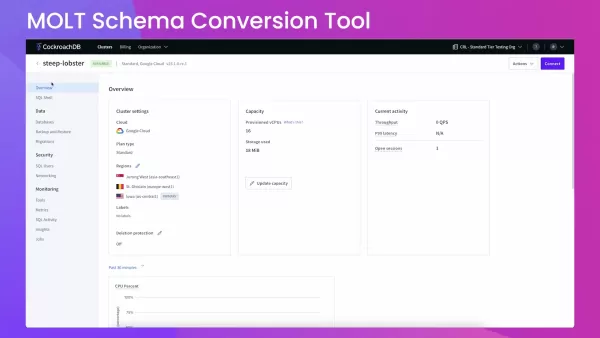
You can reach it through the Migrations section, which offers a unified interface for converting and transferring database structures. This tool not only converts the database structure but also spots possible problems and recommends enhancements to match CockroachDB's established methods. The MOLT Schema Conversion Tool works with migrations from multiple well-known database systems such as PostgreSQL, MySQL, Oracle, and SQL Server, simplifying the shift to CockroachDB.
The tool's main purpose is to simplify what can frequently be a complicated and mistake-prone activity. By automating database structure conversion and providing practical recommendations, the tool decreases manual work, saving time and lowering the chance of errors. It is an important resource for database managers and programmers aiming to fully utilize CockroachDB's distributed SQL database features.
Main Advantages of the MOLT Schema Conversion Tool:
- Streamlined Migration: Converts database structures from various systems to CockroachDB.
- Fewer Errors: Detects and assists in fixing possible migration problems.
- Performance Enhancement: Provides recommendations to optimize database structure for CockroachDB.
- Adaptability: Works with both CockroachDB Cloud and self-managed cluster setups.
- Time Savings: Automates large parts of the conversion process, conserving time and resources.
Dialects Supported for Schema Conversion
The MOLT Schema Conversion Tool works with several popular database systems, making it adaptable for different migration situations. The main supported systems include:
- PostgreSQL: A powerful open-source relational database recognized for its standards adherence and expandability. Moving from PostgreSQL to CockroachDB is a typical situation, as both have comparable SQL syntax.
- MySQL: A commonly used open-source relational database management system, known for its user-friendliness and speed. Migrating from MySQL can provide better scalability and reliability through CockroachDB.
- Oracle: A commercial relational database management system, often used in corporate settings. The MOLT tool helps in moving from Oracle's centralized design to CockroachDB's distributed approach.
- SQL Server: A relational database management system made by Microsoft. Migrating from SQL Server can help update older systems by using CockroachDB's cloud-based features.
By accommodating these systems, CockroachDB's MOLT Schema Conversion Tool guarantees wider compatibility and reduces the difficulties involved in transferring databases between different systems.
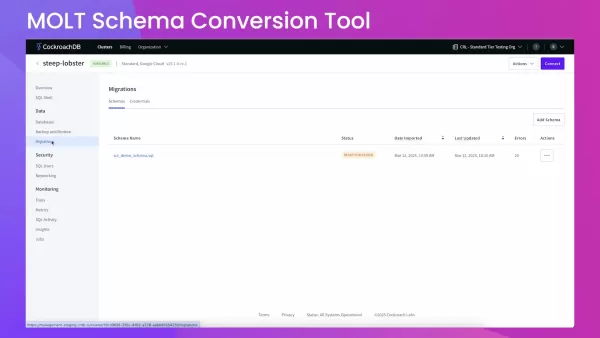
Migration and Export Options Explained
The MOLT Schema Conversion Tool provides separate choices for moving and exporting database structures, serving different deployment situations. These choices offer flexibility in handling your database migrations:
- Direct Transfer to CockroachDB Cloud: This choice lets you move your converted database structure directly to a CockroachDB Cloud database. The converted structure is used to build a new database inside your CockroachDB Cloud cluster.
- Exporting Converted Database Structure: This function allows you to export the converted database structure as a SQL file. This is especially helpful if you plan to use the structure with a self-managed CockroachDB cluster. The exported SQL file includes all required data definition language (DDL) commands needed to rebuild the structure.
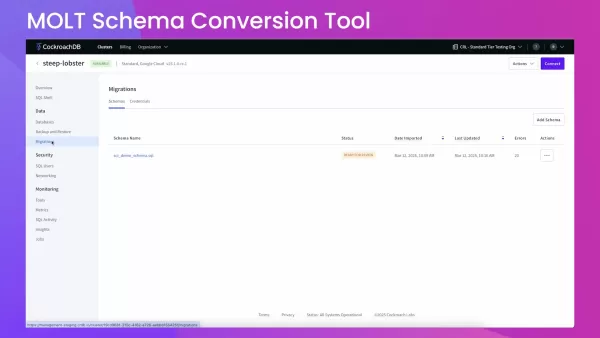
By providing both migration and export choices, the MOLT tool supports different deployment approaches, whether you choose a fully managed cloud environment or a self-managed configuration.
Preparing Your Schema for Conversion
Exporting Your Database Schema
Before using the MOLT Schema Conversion Tool, you must export your current database structure. The tool examines SQL dump files containing data definition commands.
Here is how to export your structure from different database systems:
PostgreSQL: Use the pg_dump tool with the --schema-only option to export just the structure:
pg_dump -h hostname -U username -d database_name -s -f schema.sql
MySQL: Use the mysqldump tool with the --no-data option:
mysqldump -h hostname -u username -p --no-data database_name > schema.sql
Oracle: You can use Oracle Data Pump or SQL Developer to export the structure.
SQL Server: Use SQL Server Management Studio (SSMS) or the sqlcmd tool.
Make sure the exported SQL file includes only data definition commands and is under 4MB. Including data or unsupported commands might lead to errors during conversion.
Checking Database Compatibility
Verifying your database works with CockroachDB before migration can save time and avoid errors. Here are some areas to examine:
- Data Types: Check the data types in your current structure and compare them with CockroachDB's supported data types. Change any unsupported data types to compatible ones.
- Constraints: Confirm that your constraints (like primary keys, foreign keys, unique constraints) work in CockroachDB.
- Indexes: Review your indexes and ensure they match CockroachDB's indexing methods. Improve indexes for better performance when needed.
- Stored Procedures, Functions, and Triggers: Look for stored procedures, functions, and triggers, and evaluate their compatibility. Some might require rewriting or modification for CockroachDB.
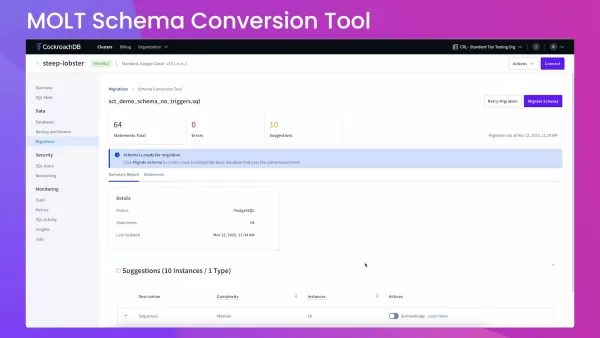
By doing these checks, you can reduce possible issues during database structure conversion and migration.
Step-by-Step Guide to Using the MOLT Schema Conversion Tool
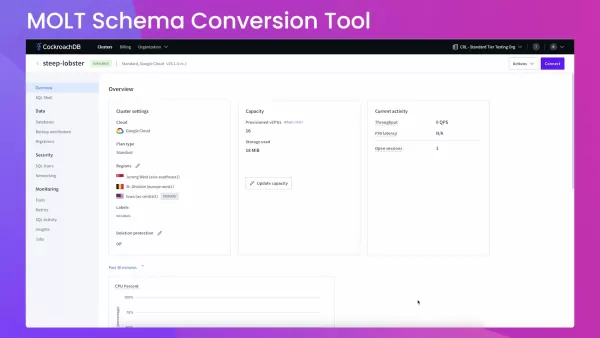
Accessing the Migrations Tab
- Sign in to your CockroachDB Cloud account.
- Go to your cluster.
- In the left-side menu, select Migrations. This opens the interface where you can handle your structure conversions.
Adding a New Schema
In the Migrations section, click the Add Schema button.
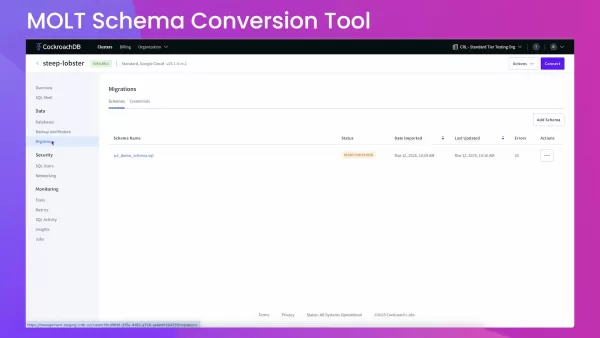
Pick the system of your current database (like PostgreSQL, MySQL) from the dropdown list.
Choose the proper INT type conversion, if asked.
Click Next.
Selecting the Upload Method
You have two ways to provide your structure:
- Upload File: Pick this choice to upload a SQL file with your structure.
- Use Credentials: Connect straight to your source database using access details.
For this example, choose Upload File and drag and drop your SQL file or click to upload it.Click Convert.The tool will now process your structure.
Reviewing the Summary Report
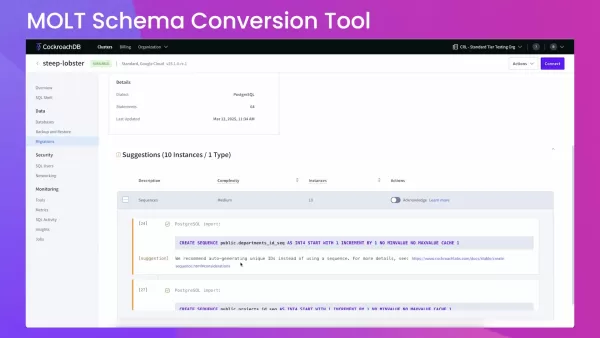
After conversion, check the summary report. This report displays:
- Total commands in the SQL file
- Number of errors found
- Number of recommendations for improvements
Fix any errors and check the recommendations to improve your structure for CockroachDB.Use the Statements section to review each SQL command and make direct changes if necessary. The interface provides choices to search and replace text, download the file, and apply needed corrections.
Migrating the Schema
After fixing any errors and improving your structure:
- Click the Migrate Schema button.
- Type a database name and pick a database owner.
- Click Migrate to finish the migration process.
Your structure is now successfully moved to CockroachDB Cloud.
Verifying the Migration
To confirm the migration worked correctly:
- Connect to your CockroachDB Cloud cluster using the CockroachDB SQL client or another SQL client.
- Use the
SHOW TABLES command to display the tables in your new database.
Check that all expected tables are present.
If using the CockroachDB SQL client:
SHOW TABLES FROM rohan_demo;
Confirm the tables you moved are now available and shown in the SQL client. By following these steps, you can smoothly convert and move your database structures to CockroachDB using the MOLT Schema Conversion Tool.
CockroachDB Pricing
Understanding CockroachDB's Pricing Model
CockroachDB provides an adaptable pricing structure that adjusts to your particular needs, making it appropriate for new companies, small and medium businesses, and large corporations. The pricing usually depends on computing resources used and storage consumed and can be customized to optimize expenses for the user. With business support plans providing comprehensive choices, an affordable solution is readily available.
Main elements affecting the pricing:
- Computing Resources (vCPUs): The count of virtual CPUs assigned to your CockroachDB cluster affects pricing.
- Storage Used: The quantity of data kept in your database influences the cost.
- Support Plans: Different support levels, from basic to business, affect the total cost.
Free vs. Paid Options in CockroachDB
CockroachDB offers both free and paid choices to suit different usage needs:
- Free Tier:
- CockroachDB provides a free, serverless tier suitable for small projects, testing, and development.
- It includes restricted computing and storage resources, enough for initial use and platform assessment.
- Paid Options:
- As your requirements expand, you can move to a paid plan, which offers more computing power, storage, and advanced features.
- Paid plans include business support, letting you expand your resources as required while providing corporate-level support
Advantages and Disadvantages
Pros
Simplified database structure conversion and migration
Compatibility with multiple database systems
Direct editing and issue resolution tools
Connection with CockroachDB Cloud
Database structure improvement recommendations
Efficient method for database migration and management.
Cons
Limited compatibility for some unsupported SQL commands or functions. However, these commands can be modified within the system.
Possible need for manual handling for specific complex conversions
File size restriction of 4MB
Some incompatible features are not run by the migrations tool, so direct setup using the CLI is required
Exploring the Core Features of CockroachDB
Key Features of CockroachDB
CockroachDB provides many features that make it a great option for modern, expandable applications. Some notable capabilities include:
- Scalability: CockroachDB can expand horizontally, letting you add nodes as your data and traffic increase without service interruption.
- Reliability: Built-in failure recovery ensures your database stays accessible even if some nodes malfunction.
- Consistency: CockroachDB offers strong consistency, guaranteeing your data is always correct and current.
- Geo-Partitioning: Geo-partitioning lets you manage your data's location, improving performance and meeting data location regulations.
- ACID Compliance: Supports ACID transactions, which ensures data accuracy and dependability.
- SQL Compatibility: CockroachDB is highly compatible with SQL standards, simplifying the shift from conventional databases.
Discovering the Best Use Cases for CockroachDB
Ideal Use Cases for CockroachDB
CockroachDB works well for various situations that need scalability, reliability, and data consistency. Here are some examples:
- Distributed Applications: Excellent for applications that must work across multiple regions or cloud platforms.
- Financial Services: Guarantees data accuracy and regulatory compliance for financial operations.
- Retail: Manages high-volume transactions and offers a uniform view of data across multiple sites.
- Gaming: Provides fast data access and high availability for online games.
- IoT (Internet of Things): Handles large amounts of data from distributed devices and ensures reliable data handling.
By understanding these situations, you can decide if CockroachDB matches your specific needs and business objectives.
Frequently Asked Questions About CockroachDB
What is CockroachDB?
CockroachDB is a distributed SQL database built for high availability, scalability, and data consistency. It is cloud-based and can operate in different settings, including public clouds, private clouds, and local servers.
Is CockroachDB open source?
CockroachDB has a basic open-source license, with some business features available under a commercial license. The core features are free to use and contribute to.
What are the primary advantages of using CockroachDB?
The main benefits include scalability, reliability, strong consistency, geo-partitioning, ACID compliance, and SQL compatibility.
What database dialects does the MOLT Schema Conversion Tool support?
The MOLT Schema Conversion Tool works with PostgreSQL, MySQL, Oracle, and SQL Server systems, making it versatile for different migration situations.
How do I verify if my schema migration was successful?
Connect to your CockroachDB Cloud cluster using a SQL client and use the SHOW TABLES command to display and check the tables in your new database.
Related Questions About Database Migration
What tools are needed to prepare a database before migrating?
Before migrating a database, using data examination tools to evaluate data quality, accuracy, and uniformity is crucial. It is also important to check for inconsistencies with the target database system and find any changes needed for a smooth transfer. Database assessment tools can help comprehend data patterns, spot data imbalances, and uncover possible performance limitations. Additionally, structure verification tools and services can examine for structural problems within the database, like compliance issues, inconsistencies, and other irregularities, ensuring it is properly formed and follows established methods.
How do you convert a database schema?
Converting a database structure involves multiple steps, each important for a successful transfer. The process begins by examining the current structure to understand the existing database design, data types, and limitations. Then, a matching activity will be necessary to decide how these components align with the target database system, often called data mapping. Many commercial tools and open-source utilities will automate the structure conversion process, offering abilities for structure analysis, transformation rule creation, and DDL production. The produced DDL scripts need review and adjustment for any required improvements. After conversion, test migrations should be done to check data accuracy, find possible performance problems, and confirm the overall success of the converted structure. For immediate or near-immediate migration situations, change data capture (CDC) tools are frequently used to copy ongoing changes.
What is schema validation and how is it performed?
Schema validation is a procedure made to confirm that the database design and data types follow the set standards, rules, and limitations. Doing schema validation is vital to ensure data accuracy and uniformity before and after migrations, avoiding problems like data damage, application crashes, or performance decline. Many commercial tools and open-source utilities provide automated structure verification abilities. These can automatically check compliance with set standards, locate inconsistencies, and find possible irregularities. Regular examinations help in identifying and fixing database design flaws, ensuring the structure follows established methods and data models are effective. Verified structures lead to cleaner, more manageable databases that support quicker query performance and easier problem-solving.
Related article
 Six Tech Giants Back Linux Foundation With $12.5M to Tackle AI Vulnerability Noise
To tackle the flood of low-quality security reports produced by AI automation tools, six major tech companies—Anthropic, Amazon (AWS), GitHub, Google, Microsoft, and OpenAI—have collectively contributed $12.5 million in funding to Linux Foundation in
Musk Considered Leaving OpenAI to His Kids as Altman Testifies
This morning, OpenAI CEO Sam Altman took the stand to address former co-founder Elon Musk’s lawsuit challenging the company’s corporate structure.When asked about Musk’s claim that other founders “stole a charity” by launching a for-profit subsidiary
Sam Altman Sparks Debate Over AI's Deceleration
Listen onApple PodcastsListen onSpotifyOpenAI CEO Sam Altman recently suggested that it may be time to “pace the rate of AI development” to allow society to “harden around some of these new capability levels.”On the latest episode of TechCrunch’s Equ
Related Special Topic Recommendations
Business
Six Tech Giants Back Linux Foundation With $12.5M to Tackle AI Vulnerability Noise
To tackle the flood of low-quality security reports produced by AI automation tools, six major tech companies—Anthropic, Amazon (AWS), GitHub, Google, Microsoft, and OpenAI—have collectively contributed $12.5 million in funding to Linux Foundation in
Musk Considered Leaving OpenAI to His Kids as Altman Testifies
This morning, OpenAI CEO Sam Altman took the stand to address former co-founder Elon Musk’s lawsuit challenging the company’s corporate structure.When asked about Musk’s claim that other founders “stole a charity” by launching a for-profit subsidiary
Sam Altman Sparks Debate Over AI's Deceleration
Listen onApple PodcastsListen onSpotifyOpenAI CEO Sam Altman recently suggested that it may be time to “pace the rate of AI development” to allow society to “harden around some of these new capability levels.”On the latest episode of TechCrunch’s Equ
Related Special Topic Recommendations
Business
 Best AI Competitive Research Tools for Small Businesses
2026 Latest Best Top-rated AI Competitive Research Tools for Small Businesses! XIX.AI has curated a highly powerful game-changing collection, updated weekly with rigorous real-world tests and detailed rankings. You can find a comprehensive free vs paid comparison to help you identify the must-try tools that boost your productivity and give you a competitive edge. Explore now to discover your perfect tool!
 9 tools
 xix.ai
Image editing
Photoshop AI Retouch Tools for Ecommerce Apparel, Skin Cleanup, and Color Consistency
xix.ai
Image editing
Photoshop AI Retouch Tools for Ecommerce Apparel, Skin Cleanup, and Color Consistency
2026 Latest Best Photoshop AI retouch tools for ecommerce apparel, skin cleanup, and color consistency! This top-rated curated list features powerful game-changing solutions that help you boost writing efficiency, streamline content creation, and achieve perfect visual results effortlessly. Each tool has undergone real-world tests through weekly updated rankings, complete with free vs paid comparison details. Backed by XIX.AI, it’s the must-try guide for anyone aiming to unlock your AI edge. Explore now!
10 tools
xix.ai
Prompt
Best AI Prompt Libraries for ChatGPT Workflows
2026 Latest Best Top-Rated AI Prompt Libraries for optimizing all types of ChatGPT workflows. XIX.AI has curated a powerful, game-changing collection that goes through rigorous real-world tests to ensure top performance. You can find detailed free vs paid comparisons and expert rankings to help you choose the must-try tools that boost your productivity and unlock your AI edge. Explore now!
11 tools
xix.ai
Education and Learning
AI Quiz Builder Platforms for Teachers, Tutors, and Cohort-Based Learning Programs
2026 Latest Best AI Quiz Builder Platforms for Teachers, Tutors, and Cohort-Based Learning Programs! XIX.AI has curated a top-rated list of powerful game-changing tools that go through real-world tests to deliver accurate rankings. These must-try platforms help boost writing efficiency, streamline content creation, and simplify quiz design across all learning scenarios. Explore now to discover your perfect tool for unlocking your AI edge in teaching!
13 tools
xix.ai
code
AI Pull Request Review Tools for GitHub Teams Handling Refactors, Bugs, and Security Gaps
2026 Latest Best AI Pull Request Review Tools for GitHub Teams are here on XIX.AI! This top-rated curated list showcases powerful game-changing solutions that streamline refactoring, bug fixing, and security gap detection across all team workflows. Enjoy a free vs paid comparison along with real-world tests and detailed rankings to help you find the perfect tool that boosts productivity significantly. Explore now to unlock your AI edge!
12 tools
xix.ai
Text-to-speech
Best AI Text to Speech Tools for Natural Voiceovers
2026 Latest Best Top-rated AI Text to Speech Tools for Natural Voiceovers are here on XIX.AI! This curated list features powerful, game-changing options that deliver crystal-clear voices for every use case, backed by real-world tests and weekly updated rankings. Get a free vs paid comparison to find the must-try solution that boosts your productivity instantly. Explore now to Unlock your AI edge!
11 tools
xix.ai

 Comments (1)
0/500
Comments (1)
0/500
![WillieRodriguez]()
Interessant, wie sich Datenbank-Migrationen entwickeln. CockroachDB scheint hier eine pragmatische Lösung anzubieten. Hoffentlich bleibt die Tool-Integration langfristig stabil und gut dokumentiert. 🧐
In today's rapidly changing technology environment, migrating databases is a vital step for numerous companies. CockroachDB provides an effective option with its MOLT Schema Conversion Tool. This tutorial explains how to use this tool to streamline database migrations, increase productivity, and minimize mistakes. We will guide you through converting database structures, moving them to CockroachDB, and exporting the transformed schemas for your own server clusters. After reading this guide, you will clearly grasp how the MOLT Schema Conversion Tool can enhance your data migration efforts.
Key Points
The MOLT Schema Conversion Tool is available in the Migrations section of CockroachDB Cloud.
It transforms database structures from different systems like PostgreSQL, MySQL, Oracle, and SQL Server into formats compatible with CockroachDB.
The tool enables direct transfer of database structures to CockroachDB Cloud databases.
It can export converted database structures for deployment on self-managed CockroachDB clusters.
The tool examines SQL dump files that include data definition commands.
You can examine a summary that displays total commands, errors, and recommendations.
The tool offers recommendations following CockroachDB's established methods for improving database structure.
It permits direct modification and fine-tuning of database structures.
It helps locate missing users or roles when moving databases.
You can implement corrections directly from the summary screen.
Understanding the CockroachDB MOLT Schema Conversion Tool
What is the MOLT Schema Conversion Tool?
The MOLT (Migration, Optimization, Load, and Transformation) Schema Conversion Tool is a component in CockroachDB Cloud created to simplify database migration procedures.
You can reach it through the Migrations section, which offers a unified interface for converting and transferring database structures. This tool not only converts the database structure but also spots possible problems and recommends enhancements to match CockroachDB's established methods. The MOLT Schema Conversion Tool works with migrations from multiple well-known database systems such as PostgreSQL, MySQL, Oracle, and SQL Server, simplifying the shift to CockroachDB.
The tool's main purpose is to simplify what can frequently be a complicated and mistake-prone activity. By automating database structure conversion and providing practical recommendations, the tool decreases manual work, saving time and lowering the chance of errors. It is an important resource for database managers and programmers aiming to fully utilize CockroachDB's distributed SQL database features.
Main Advantages of the MOLT Schema Conversion Tool:
- Streamlined Migration: Converts database structures from various systems to CockroachDB.
- Fewer Errors: Detects and assists in fixing possible migration problems.
- Performance Enhancement: Provides recommendations to optimize database structure for CockroachDB.
- Adaptability: Works with both CockroachDB Cloud and self-managed cluster setups.
- Time Savings: Automates large parts of the conversion process, conserving time and resources.
Dialects Supported for Schema Conversion
The MOLT Schema Conversion Tool works with several popular database systems, making it adaptable for different migration situations. The main supported systems include:
- PostgreSQL: A powerful open-source relational database recognized for its standards adherence and expandability. Moving from PostgreSQL to CockroachDB is a typical situation, as both have comparable SQL syntax.
- MySQL: A commonly used open-source relational database management system, known for its user-friendliness and speed. Migrating from MySQL can provide better scalability and reliability through CockroachDB.
- Oracle: A commercial relational database management system, often used in corporate settings. The MOLT tool helps in moving from Oracle's centralized design to CockroachDB's distributed approach.
- SQL Server: A relational database management system made by Microsoft. Migrating from SQL Server can help update older systems by using CockroachDB's cloud-based features.
By accommodating these systems, CockroachDB's MOLT Schema Conversion Tool guarantees wider compatibility and reduces the difficulties involved in transferring databases between different systems.
Migration and Export Options Explained
The MOLT Schema Conversion Tool provides separate choices for moving and exporting database structures, serving different deployment situations. These choices offer flexibility in handling your database migrations:
- Direct Transfer to CockroachDB Cloud: This choice lets you move your converted database structure directly to a CockroachDB Cloud database. The converted structure is used to build a new database inside your CockroachDB Cloud cluster.
- Exporting Converted Database Structure: This function allows you to export the converted database structure as a SQL file. This is especially helpful if you plan to use the structure with a self-managed CockroachDB cluster. The exported SQL file includes all required data definition language (DDL) commands needed to rebuild the structure.
By providing both migration and export choices, the MOLT tool supports different deployment approaches, whether you choose a fully managed cloud environment or a self-managed configuration.
Preparing Your Schema for Conversion
Exporting Your Database Schema
Before using the MOLT Schema Conversion Tool, you must export your current database structure. The tool examines SQL dump files containing data definition commands.
Here is how to export your structure from different database systems:
PostgreSQL: Use the
pg_dumptool with the--schema-onlyoption to export just the structure:pg_dump -h hostname -U username -d database_name -s -f schema.sqlMySQL: Use the
mysqldumptool with the--no-dataoption:mysqldump -h hostname -u username -p --no-data database_name > schema.sqlOracle: You can use Oracle Data Pump or SQL Developer to export the structure.
SQL Server: Use SQL Server Management Studio (SSMS) or the
sqlcmdtool.
Make sure the exported SQL file includes only data definition commands and is under 4MB. Including data or unsupported commands might lead to errors during conversion.
Checking Database Compatibility
Verifying your database works with CockroachDB before migration can save time and avoid errors. Here are some areas to examine:
- Data Types: Check the data types in your current structure and compare them with CockroachDB's supported data types. Change any unsupported data types to compatible ones.
- Constraints: Confirm that your constraints (like primary keys, foreign keys, unique constraints) work in CockroachDB.
- Indexes: Review your indexes and ensure they match CockroachDB's indexing methods. Improve indexes for better performance when needed.
- Stored Procedures, Functions, and Triggers: Look for stored procedures, functions, and triggers, and evaluate their compatibility. Some might require rewriting or modification for CockroachDB.
By doing these checks, you can reduce possible issues during database structure conversion and migration.
Step-by-Step Guide to Using the MOLT Schema Conversion Tool
Accessing the Migrations Tab
- Sign in to your CockroachDB Cloud account.
- Go to your cluster.
- In the left-side menu, select Migrations. This opens the interface where you can handle your structure conversions.
Adding a New Schema
In the Migrations section, click the Add Schema button.
Pick the system of your current database (like PostgreSQL, MySQL) from the dropdown list.
Choose the proper INT type conversion, if asked.
Click Next.
Selecting the Upload Method
You have two ways to provide your structure:
- Upload File: Pick this choice to upload a SQL file with your structure.
- Use Credentials: Connect straight to your source database using access details.
For this example, choose Upload File and drag and drop your SQL file or click to upload it.Click Convert.The tool will now process your structure.
Reviewing the Summary Report
After conversion, check the summary report. This report displays:
- Total commands in the SQL file
- Number of errors found
- Number of recommendations for improvements
Fix any errors and check the recommendations to improve your structure for CockroachDB.Use the Statements section to review each SQL command and make direct changes if necessary. The interface provides choices to search and replace text, download the file, and apply needed corrections.
Migrating the Schema
After fixing any errors and improving your structure:
- Click the Migrate Schema button.
- Type a database name and pick a database owner.
- Click Migrate to finish the migration process.
Your structure is now successfully moved to CockroachDB Cloud.
Verifying the Migration
To confirm the migration worked correctly:
- Connect to your CockroachDB Cloud cluster using the CockroachDB SQL client or another SQL client.
- Use the
SHOW TABLEScommand to display the tables in your new database.
Check that all expected tables are present.
If using the CockroachDB SQL client:
SHOW TABLES FROM rohan_demo;
Confirm the tables you moved are now available and shown in the SQL client. By following these steps, you can smoothly convert and move your database structures to CockroachDB using the MOLT Schema Conversion Tool.
CockroachDB Pricing
Understanding CockroachDB's Pricing Model
CockroachDB provides an adaptable pricing structure that adjusts to your particular needs, making it appropriate for new companies, small and medium businesses, and large corporations. The pricing usually depends on computing resources used and storage consumed and can be customized to optimize expenses for the user. With business support plans providing comprehensive choices, an affordable solution is readily available.
Main elements affecting the pricing:
- Computing Resources (vCPUs): The count of virtual CPUs assigned to your CockroachDB cluster affects pricing.
- Storage Used: The quantity of data kept in your database influences the cost.
- Support Plans: Different support levels, from basic to business, affect the total cost.
Free vs. Paid Options in CockroachDB
CockroachDB offers both free and paid choices to suit different usage needs:
- Free Tier:
- CockroachDB provides a free, serverless tier suitable for small projects, testing, and development.
- It includes restricted computing and storage resources, enough for initial use and platform assessment.
- Paid Options:
- As your requirements expand, you can move to a paid plan, which offers more computing power, storage, and advanced features.
- Paid plans include business support, letting you expand your resources as required while providing corporate-level support
Advantages and Disadvantages
Pros
Simplified database structure conversion and migration
Compatibility with multiple database systems
Direct editing and issue resolution tools
Connection with CockroachDB Cloud
Database structure improvement recommendations
Efficient method for database migration and management.
Cons
Limited compatibility for some unsupported SQL commands or functions. However, these commands can be modified within the system.
Possible need for manual handling for specific complex conversions
File size restriction of 4MB
Some incompatible features are not run by the migrations tool, so direct setup using the CLI is required
Exploring the Core Features of CockroachDB
Key Features of CockroachDB
CockroachDB provides many features that make it a great option for modern, expandable applications. Some notable capabilities include:
- Scalability: CockroachDB can expand horizontally, letting you add nodes as your data and traffic increase without service interruption.
- Reliability: Built-in failure recovery ensures your database stays accessible even if some nodes malfunction.
- Consistency: CockroachDB offers strong consistency, guaranteeing your data is always correct and current.
- Geo-Partitioning: Geo-partitioning lets you manage your data's location, improving performance and meeting data location regulations.
- ACID Compliance: Supports ACID transactions, which ensures data accuracy and dependability.
- SQL Compatibility: CockroachDB is highly compatible with SQL standards, simplifying the shift from conventional databases.
Discovering the Best Use Cases for CockroachDB
Ideal Use Cases for CockroachDB
CockroachDB works well for various situations that need scalability, reliability, and data consistency. Here are some examples:
- Distributed Applications: Excellent for applications that must work across multiple regions or cloud platforms.
- Financial Services: Guarantees data accuracy and regulatory compliance for financial operations.
- Retail: Manages high-volume transactions and offers a uniform view of data across multiple sites.
- Gaming: Provides fast data access and high availability for online games.
- IoT (Internet of Things): Handles large amounts of data from distributed devices and ensures reliable data handling.
By understanding these situations, you can decide if CockroachDB matches your specific needs and business objectives.
Frequently Asked Questions About CockroachDB
What is CockroachDB?
CockroachDB is a distributed SQL database built for high availability, scalability, and data consistency. It is cloud-based and can operate in different settings, including public clouds, private clouds, and local servers.
Is CockroachDB open source?
CockroachDB has a basic open-source license, with some business features available under a commercial license. The core features are free to use and contribute to.
What are the primary advantages of using CockroachDB?
The main benefits include scalability, reliability, strong consistency, geo-partitioning, ACID compliance, and SQL compatibility.
What database dialects does the MOLT Schema Conversion Tool support?
The MOLT Schema Conversion Tool works with PostgreSQL, MySQL, Oracle, and SQL Server systems, making it versatile for different migration situations.
How do I verify if my schema migration was successful?
Connect to your CockroachDB Cloud cluster using a SQL client and use the SHOW TABLES command to display and check the tables in your new database.
Related Questions About Database Migration
What tools are needed to prepare a database before migrating?
Before migrating a database, using data examination tools to evaluate data quality, accuracy, and uniformity is crucial. It is also important to check for inconsistencies with the target database system and find any changes needed for a smooth transfer. Database assessment tools can help comprehend data patterns, spot data imbalances, and uncover possible performance limitations. Additionally, structure verification tools and services can examine for structural problems within the database, like compliance issues, inconsistencies, and other irregularities, ensuring it is properly formed and follows established methods.
How do you convert a database schema?
Converting a database structure involves multiple steps, each important for a successful transfer. The process begins by examining the current structure to understand the existing database design, data types, and limitations. Then, a matching activity will be necessary to decide how these components align with the target database system, often called data mapping. Many commercial tools and open-source utilities will automate the structure conversion process, offering abilities for structure analysis, transformation rule creation, and DDL production. The produced DDL scripts need review and adjustment for any required improvements. After conversion, test migrations should be done to check data accuracy, find possible performance problems, and confirm the overall success of the converted structure. For immediate or near-immediate migration situations, change data capture (CDC) tools are frequently used to copy ongoing changes.
What is schema validation and how is it performed?
Schema validation is a procedure made to confirm that the database design and data types follow the set standards, rules, and limitations. Doing schema validation is vital to ensure data accuracy and uniformity before and after migrations, avoiding problems like data damage, application crashes, or performance decline. Many commercial tools and open-source utilities provide automated structure verification abilities. These can automatically check compliance with set standards, locate inconsistencies, and find possible irregularities. Regular examinations help in identifying and fixing database design flaws, ensuring the structure follows established methods and data models are effective. Verified structures lead to cleaner, more manageable databases that support quicker query performance and easier problem-solving.








 Six Tech Giants Back Linux Foundation With $12.5M to Tackle AI Vulnerability Noise
To tackle the flood of low-quality security reports produced by AI automation tools, six major tech companies—Anthropic, Amazon (AWS), GitHub, Google, Microsoft, and OpenAI—have collectively contributed $12.5 million in funding to Linux Foundation in
Six Tech Giants Back Linux Foundation With $12.5M to Tackle AI Vulnerability Noise
To tackle the flood of low-quality security reports produced by AI automation tools, six major tech companies—Anthropic, Amazon (AWS), GitHub, Google, Microsoft, and OpenAI—have collectively contributed $12.5 million in funding to Linux Foundation in
 Musk Considered Leaving OpenAI to His Kids as Altman Testifies
This morning, OpenAI CEO Sam Altman took the stand to address former co-founder Elon Musk’s lawsuit challenging the company’s corporate structure.When asked about Musk’s claim that other founders “stole a charity” by launching a for-profit subsidiary
Musk Considered Leaving OpenAI to His Kids as Altman Testifies
This morning, OpenAI CEO Sam Altman took the stand to address former co-founder Elon Musk’s lawsuit challenging the company’s corporate structure.When asked about Musk’s claim that other founders “stole a charity” by launching a for-profit subsidiary
 Sam Altman Sparks Debate Over AI's Deceleration
Listen onApple PodcastsListen onSpotifyOpenAI CEO Sam Altman recently suggested that it may be time to “pace the rate of AI development” to allow society to “harden around some of these new capability levels.”On the latest episode of TechCrunch’s Equ
Sam Altman Sparks Debate Over AI's Deceleration
Listen onApple PodcastsListen onSpotifyOpenAI CEO Sam Altman recently suggested that it may be time to “pace the rate of AI development” to allow society to “harden around some of these new capability levels.”On the latest episode of TechCrunch’s Equ

2026 Latest Best Top-rated AI Competitive Research Tools for Small Businesses! XIX.AI has curated a highly powerful game-changing collection, updated weekly with rigorous real-world tests and detailed rankings. You can find a comprehensive free vs paid comparison to help you identify the must-try tools that boost your productivity and give you a competitive edge. Explore now to discover your perfect tool!
9 tools
xix.ai

2026 Latest Best Photoshop AI retouch tools for ecommerce apparel, skin cleanup, and color consistency! This top-rated curated list features powerful game-changing solutions that help you boost writing efficiency, streamline content creation, and achieve perfect visual results effortlessly. Each tool has undergone real-world tests through weekly updated rankings, complete with free vs paid comparison details. Backed by XIX.AI, it’s the must-try guide for anyone aiming to unlock your AI edge. Explore now!
10 tools
xix.ai

2026 Latest Best Top-Rated AI Prompt Libraries for optimizing all types of ChatGPT workflows. XIX.AI has curated a powerful, game-changing collection that goes through rigorous real-world tests to ensure top performance. You can find detailed free vs paid comparisons and expert rankings to help you choose the must-try tools that boost your productivity and unlock your AI edge. Explore now!
11 tools
xix.ai

2026 Latest Best AI Quiz Builder Platforms for Teachers, Tutors, and Cohort-Based Learning Programs! XIX.AI has curated a top-rated list of powerful game-changing tools that go through real-world tests to deliver accurate rankings. These must-try platforms help boost writing efficiency, streamline content creation, and simplify quiz design across all learning scenarios. Explore now to discover your perfect tool for unlocking your AI edge in teaching!
13 tools
xix.ai

2026 Latest Best AI Pull Request Review Tools for GitHub Teams are here on XIX.AI! This top-rated curated list showcases powerful game-changing solutions that streamline refactoring, bug fixing, and security gap detection across all team workflows. Enjoy a free vs paid comparison along with real-world tests and detailed rankings to help you find the perfect tool that boosts productivity significantly. Explore now to unlock your AI edge!
12 tools
xix.ai

2026 Latest Best Top-rated AI Text to Speech Tools for Natural Voiceovers are here on XIX.AI! This curated list features powerful, game-changing options that deliver crystal-clear voices for every use case, backed by real-world tests and weekly updated rankings. Get a free vs paid comparison to find the must-try solution that boosts your productivity instantly. Explore now to Unlock your AI edge!
11 tools
xix.ai

Interessant, wie sich Datenbank-Migrationen entwickeln. CockroachDB scheint hier eine pragmatische Lösung anzubieten. Hoffentlich bleibt die Tool-Integration langfristig stabil und gut dokumentiert. 🧐












