


 Home
HomeBuild an AI Sound FX Generator with FlutterFlow & Replicate
Ever wondered how you can harness the power of AI to create your own sound effects? This tutorial will guide you through building an AI-powered sound effects generator using no-code platforms, specifically combining FlutterFlow for the user interface and Replicate for AI model hosting. By following these steps, you'll be able to generate unique sound effects from text prompts in no time.
Key Points
----------
- Create an AI-powered sound effects generator.
- Use FlutterFlow for user interface design.
- Integrate Replicate for AI model hosting and execution.
- Employ a no-code approach for rapid development.
- Generate unique sound effects from text prompts.
Creating an AI Sound Effects Generator: A No-Code Tutorial
Introduction to AI Sound FX Generation
Artificial intelligence is revolutionizing the world of content creation, from videos to audio. One of the most fascinating applications is in sound design, where AI can transform simple text descriptions into rich sound effects. This opens up a world of creative possibilities for both developers and hobbyists alike. By leveraging no-code platforms and AI hosting services, you can create powerful tools without needing deep technical skills.
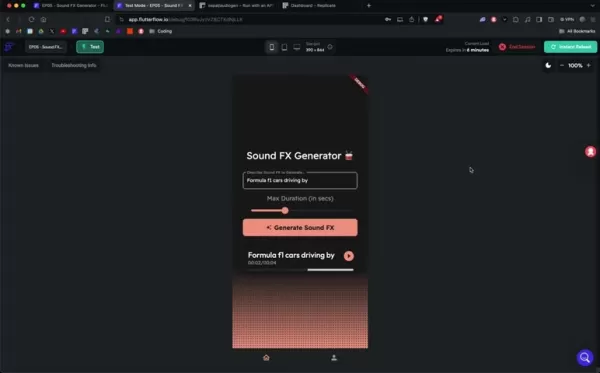
This tutorial will walk you through the process of building a sound effects generator using FlutterFlow for the user interface and Replicate to run the AI model.
Understanding FlutterFlow: Your No-Code UI Builder
FlutterFlow is a game-changer for anyone looking to design mobile and web applications without diving deep into code. It's a low-code platform that lets you visually construct user interfaces, define interactions, and connect to external data sources. With features like drag-and-drop components, pre-built templates, and seamless Firebase integration, FlutterFlow makes app development faster and more accessible. It's the perfect tool for crafting the front-end of your AI-powered sound effects generator. When you pair FlutterFlow's design capabilities with Replicate's AI prowess, you can build innovative applications quickly and efficiently.
Replicate: AI Model Hosting and Execution
Replicate makes it easy to run and deploy AI models in the cloud. It offers a platform where you can access various pre-trained AI models, including Sepal's Audiogen for sound effects generation. Replicate takes away the hassle of managing servers or infrastructure, allowing you to focus on your application's logic and user experience.
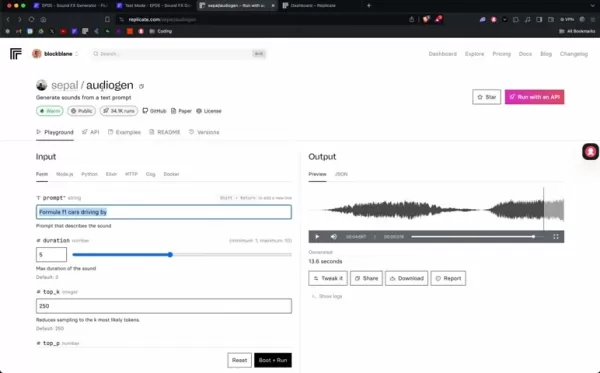
By using an API token, you can access the Replicate API and power the audio generation in your application.
Components Required: FlutterFlow and Replicate Integration
To get started on your AI sound effects generator, you'll need to set up both FlutterFlow and Replicate. This involves creating accounts and getting familiar with their interfaces. Here's how you can prepare:
- Sign up for a FlutterFlow account at flutterflow.io.
- Create an account on Replicate at replicate.com.
- Generate an API token from your Replicate account settings.
Once you've completed these steps, you'll be ready to combine UI design with AI model execution and start developing your unique sound effects generator.
Step-by-Step Guide to Building Your Sound FX Generator
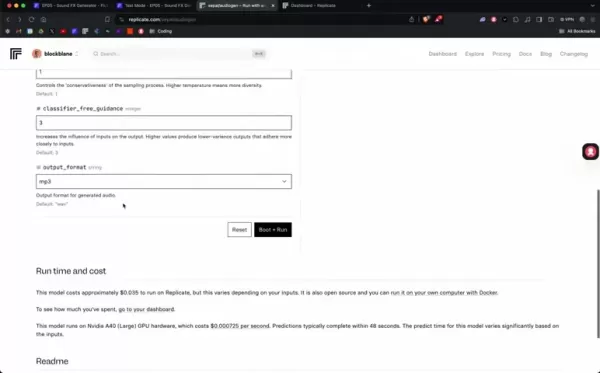
Follow these steps to build your sound effects generator:
- Design the User Interface: Use FlutterFlow's drag-and-drop interface to create an intuitive UI. Include elements like a text input field for prompts and a slider for duration.
- Configure the Text Input: Set up a text field where users can describe the sound effects they want to generate. Ensure this field is properly connected to the system.
- Add a Duration Slider: Include a slider that lets users specify the length of the sound effect. Customize the settings as needed.
- Implement the Generation Button: Create a button that triggers the AI model execution on Replicate. This button will initiate the API calls.
- Integrate the Replicate API: Use the Replicate API to send text prompts and duration parameters to the AI model. Handle these API requests using FlutterFlow's custom function feature.
- Create an API Call: In FlutterFlow, go to the "API Calls" section in the settings menu and set up an API call to Replicate. Make sure to configure the headers, body, and variables according to the API standards.
- Receive and Play the Sound Effect: Once the AI model generates the sound effect, retrieve it and use FlutterFlow's audio player component to play it for the user.
Fine-Tuning and Testing the Application
After setting up the core components, it's time to fine-tune the user experience and test the functionality. Testing is crucial for debugging and ensuring your application runs smoothly once published. Adjust UI elements, refine API parameters, and test across different devices to ensure optimal performance. Use FlutterFlow and Replicate's debugging tools to identify and resolve any issues. Finally, optimize the application based on user feedback and performance data.
- Refine the UI design based on testing and debugging results.
- Optimize the AI integration with Replicate to reduce latency and increase speed.
- Thoroughly test the application on various devices and network configurations.
Additional Features to Enhance Your Sound FX Generator
To make your sound effects generator even more appealing, consider adding these extra features:
- Preset Sound Effects: Offer a set of preset sound effects for users to choose from.
- Download Option: Allow users to download the generated sound effects.
- Category-Based Sounds: Organize sounds into different categories for easier navigation.
- Customizable Parameters: Provide more granular control over sound effect parameters, like tempo.
Key Considerations for Using AI Sound Generators
Ethical and Responsible Use
When working with AI-generated content, ethical considerations are crucial. Always check copyright laws and respect licensing agreements. Be aware of potential regulations related to audio generation. Transparency is key—let users know that the sound effects are AI-generated. Also, be mindful of biases that might be present in the training data, which can affect the generated sounds. Proper governance and data usage policies are essential to ensure that AI sound generation respects laws, ethics, and user consent. As generative AI technologies evolve, adapt your practices to meet ethical requirements and build responsible AI tools.
How to Use replicate.com
Run the Model with Replicate
Replicate makes it easy to run models in the cloud through a user-friendly interface.
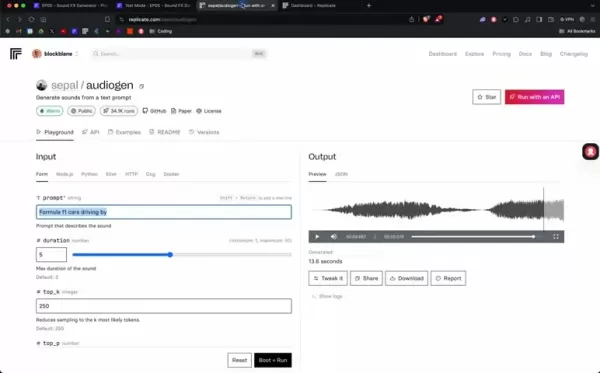
This allows you to run models from anywhere and in various programming languages.
Generate Sounds from a Text Prompt
With Audiogen, you can generate sounds from a text prompt. Simply provide your desired sound and duration, and the Audiogen AI will do the rest. Replicate allows you to create an account where you can run the Audiogen models and generate audio without needing to run any local code.
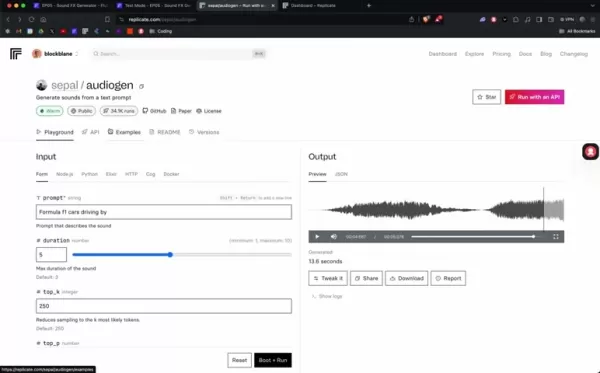
View Examples
To help users successfully use the Audiogen models, replicate.com provides a series of examples. These can be found under the "examples" tab and come in the form of code snippets, helping you fine-tune your creations.
AI Sound FX Generator: Weighing the Pros and Cons
Pros
- Speed and Efficiency: Rapid sound effect generation saves time.
- Cost-Effectiveness: Reduces the need for extensive manual sound design.
- Accessibility: Democratizes sound design, making it available to non-experts.
- Customization: Text prompts allow for highly customized sound effects.
- Scalability: Easily generate a wide variety of sounds for different project requirements.
Cons
- Quality Variations: Output quality can vary and may require iterative refinement.
- Dependence on AI Model: Relies on the accuracy and capabilities of the underlying AI.
- Ethical Considerations: Requires careful attention to copyright and licensing issues.
- Limited Control: Less direct control over sound design compared to manual methods.
- Potential for Bias: AI might generate sounds reflecting biases in training data.
FAQ
What is FlutterFlow?
FlutterFlow is a low-code platform that simplifies UI design without intensive coding. Its drag-and-drop interface and pre-built templates make app development quick and easy.
What is Replicate?
Replicate simplifies running and deploying AI models by providing an API. It allows developers to leverage AI capabilities without worrying about backend infrastructure.
What is Sepal's Audiogen?
Audiogen is a text-to-audio model developed by Sepal. It generates sound effects based on text prompts.
How to test an API Call in FlutterFlow?
In FlutterFlow, go to the "API Calls" section and select the "Response & Test" tab. Here, you can test the API call by inserting the correct values for each variable and hitting "Test API Call."
Related Questions
What other no-code AI tools are available?
There are various no-code AI tools that can help you create an AI-powered sound FX generator. As AI services and APIs become more compatible with no-code platforms, options are expanding. These include tools that generate code from natural language or visual programming tools for AI model creation, making development even more accessible, especially when integrated with UI development platforms like FlutterFlow.
How can I optimize my prompts for better sound effects?
To get the best results from the AI model, your prompts should be specific, clear, and concise. Experiment with different prompts, durations, and parameter settings. Iterative testing and user feedback will help refine your prompts over time. Following best practices for AI communication can lead to high-quality results. For audio creation, consider including specific types of sounds, the desired vibe, and the instruments you want to use.
What are the limitations of AI sound effect generators?
AI-generated sound effects have certain limitations, including quality variations and potential copyright issues. To improve quality, optimize your prompts, and always be mindful of licensing and copyright. As technology evolves, some of these limitations may be addressed, but AI sound generators may not fully replicate the creativity of human sound designers, thus still having certain limits.
Related article
 South Korea Breaks Ground on National AI Computing Center, Investing 2.5 Trillion Won with 2028 Target
South Korean outlet EtNews reports that groundbreaking for the Korea AI Computing Center (KOACC) took place on August 3 at the Solar City data center park in Sunan, Jeollanam-do. Backed by a total investment of 2.5 trillion KRW (roughly 11.838 billio
Six Tech Giants Back Linux Foundation With $12.5M to Tackle AI Vulnerability Noise
To tackle the flood of low-quality security reports produced by AI automation tools, six major tech companies—Anthropic, Amazon (AWS), GitHub, Google, Microsoft, and OpenAI—have collectively contributed $12.5 million in funding to Linux Foundation in
Musk Considered Leaving OpenAI to His Kids as Altman Testifies
This morning, OpenAI CEO Sam Altman took the stand to address former co-founder Elon Musk’s lawsuit challenging the company’s corporate structure.When asked about Musk’s claim that other founders “stole a charity” by launching a for-profit subsidiary
Related Special Topic Recommendations
Music composition
South Korea Breaks Ground on National AI Computing Center, Investing 2.5 Trillion Won with 2028 Target
South Korean outlet EtNews reports that groundbreaking for the Korea AI Computing Center (KOACC) took place on August 3 at the Solar City data center park in Sunan, Jeollanam-do. Backed by a total investment of 2.5 trillion KRW (roughly 11.838 billio
Six Tech Giants Back Linux Foundation With $12.5M to Tackle AI Vulnerability Noise
To tackle the flood of low-quality security reports produced by AI automation tools, six major tech companies—Anthropic, Amazon (AWS), GitHub, Google, Microsoft, and OpenAI—have collectively contributed $12.5 million in funding to Linux Foundation in
Musk Considered Leaving OpenAI to His Kids as Altman Testifies
This morning, OpenAI CEO Sam Altman took the stand to address former co-founder Elon Musk’s lawsuit challenging the company’s corporate structure.When asked about Musk’s claim that other founders “stole a charity” by launching a for-profit subsidiary
Related Special Topic Recommendations
Music composition
 AI Vocal Demo Tools for Songwriters, Hooks, Toplines, and Multilingual Draft Sessions
2026 Latest Best AI Vocal Demo Tools for Songwriters, Hook Creators, and Multi-Language Content Teams! XIX.AI has curated a top-rated list of powerful game-changing tools that go through rigorous real-world tests. You’ll find detailed free vs paid comparison data, comprehensive rankings, and must-try options to help you boost writing efficiency and unlock your creative potential. Explore now to discover your perfect tool for all your content needs!
 9 tools
 xix.ai
Business
Best AI Competitive Research Tools for Small Businesses
xix.ai
Business
Best AI Competitive Research Tools for Small Businesses
2026 Latest Best Top-rated AI Competitive Research Tools for Small Businesses! XIX.AI has curated a highly powerful game-changing collection, updated weekly with rigorous real-world tests and detailed rankings. You can find a comprehensive free vs paid comparison to help you identify the must-try tools that boost your productivity and give you a competitive edge. Explore now to discover your perfect tool!
9 tools
xix.ai
Image editing
Photoshop AI Retouch Tools for Ecommerce Apparel, Skin Cleanup, and Color Consistency
2026 Latest Best Photoshop AI retouch tools for ecommerce apparel, skin cleanup, and color consistency! This top-rated curated list features powerful game-changing solutions that help you boost writing efficiency, streamline content creation, and achieve perfect visual results effortlessly. Each tool has undergone real-world tests through weekly updated rankings, complete with free vs paid comparison details. Backed by XIX.AI, it’s the must-try guide for anyone aiming to unlock your AI edge. Explore now!
10 tools
xix.ai
Prompt
Best AI Prompt Libraries for ChatGPT Workflows
2026 Latest Best Top-Rated AI Prompt Libraries for optimizing all types of ChatGPT workflows. XIX.AI has curated a powerful, game-changing collection that goes through rigorous real-world tests to ensure top performance. You can find detailed free vs paid comparisons and expert rankings to help you choose the must-try tools that boost your productivity and unlock your AI edge. Explore now!
11 tools
xix.ai
Education and Learning
AI Quiz Builder Platforms for Teachers, Tutors, and Cohort-Based Learning Programs
2026 Latest Best AI Quiz Builder Platforms for Teachers, Tutors, and Cohort-Based Learning Programs! XIX.AI has curated a top-rated list of powerful game-changing tools that go through real-world tests to deliver accurate rankings. These must-try platforms help boost writing efficiency, streamline content creation, and simplify quiz design across all learning scenarios. Explore now to discover your perfect tool for unlocking your AI edge in teaching!
13 tools
xix.ai
code
AI Pull Request Review Tools for GitHub Teams Handling Refactors, Bugs, and Security Gaps
2026 Latest Best AI Pull Request Review Tools for GitHub Teams are here on XIX.AI! This top-rated curated list showcases powerful game-changing solutions that streamline refactoring, bug fixing, and security gap detection across all team workflows. Enjoy a free vs paid comparison along with real-world tests and detailed rankings to help you find the perfect tool that boosts productivity significantly. Explore now to unlock your AI edge!
12 tools
xix.ai

 Comments (16)
0/500
Comments (16)
0/500
![MatthewGonzalez]()
Que ideia incrível! Já imaginou como isso pode mudar o desenvolvimento de jogos independentes? Em vez de depender de bibliotecas caras ou gravações caseiras, você pode gerar efeitos sonoros sob medida em minutos. A parte mais interessante pra mim é a combinação FlutterFlow + Replicate - mostra como plataformas no-code estão ficando sofisticadas o suficiente para integrações complexas com IA. Será que em breve teremos 'produtores de som' baseados em IA substituindo algumas funções técnicas? 🎮🔊
![SamuelThomas]()
之前都是用Audacity手动调音效,看来AI生成才是未来啊!😆 这个教程对想做独立游戏声音设计的小白太友好了,不知道生成的电音质量能不能直接商用?
![NicholasSanchez]()
와..플러터플로우로 AI 음향 효과 생성기 만들기라니 진짜 신기하네요! 🎵 이런 튜토리얼을 찾고 있었는데 운이 좋아요. 리플리케이트랑 연동하는 부분도 궁금했거든요. 주말에 꼭 따라해봐야겠어요 😆
![GregoryRodriguez]()
This tutorial is a game-changer for indie devs! 🎮 Finally a practical way to create custom SFX without expensive tools or coding nightmares. Though I wonder if the AI-generated sounds will have that 'human touch' missing in procedural audio...
![GeorgeMiller]()
This is so cool! I had no idea you could make AI sound effects with no-code tools like FlutterFlow. Gonna try this out for my game project! 🎮
![DanielPerez]()
This tutorial is super cool! 😎 I never thought building an AI sound FX generator could be this easy with no-code tools like FlutterFlow. Gonna try it out this weekend!
Ever wondered how you can harness the power of AI to create your own sound effects? This tutorial will guide you through building an AI-powered sound effects generator using no-code platforms, specifically combining FlutterFlow for the user interface and Replicate for AI model hosting. By following these steps, you'll be able to generate unique sound effects from text prompts in no time.
Key Points ----------
- Create an AI-powered sound effects generator.
- Use FlutterFlow for user interface design.
- Integrate Replicate for AI model hosting and execution.
- Employ a no-code approach for rapid development.
- Generate unique sound effects from text prompts.
Creating an AI Sound Effects Generator: A No-Code Tutorial
Introduction to AI Sound FX Generation
Artificial intelligence is revolutionizing the world of content creation, from videos to audio. One of the most fascinating applications is in sound design, where AI can transform simple text descriptions into rich sound effects. This opens up a world of creative possibilities for both developers and hobbyists alike. By leveraging no-code platforms and AI hosting services, you can create powerful tools without needing deep technical skills.
This tutorial will walk you through the process of building a sound effects generator using FlutterFlow for the user interface and Replicate to run the AI model.
Understanding FlutterFlow: Your No-Code UI Builder
FlutterFlow is a game-changer for anyone looking to design mobile and web applications without diving deep into code. It's a low-code platform that lets you visually construct user interfaces, define interactions, and connect to external data sources. With features like drag-and-drop components, pre-built templates, and seamless Firebase integration, FlutterFlow makes app development faster and more accessible. It's the perfect tool for crafting the front-end of your AI-powered sound effects generator. When you pair FlutterFlow's design capabilities with Replicate's AI prowess, you can build innovative applications quickly and efficiently.
Replicate: AI Model Hosting and Execution
Replicate makes it easy to run and deploy AI models in the cloud. It offers a platform where you can access various pre-trained AI models, including Sepal's Audiogen for sound effects generation. Replicate takes away the hassle of managing servers or infrastructure, allowing you to focus on your application's logic and user experience.
By using an API token, you can access the Replicate API and power the audio generation in your application.
Components Required: FlutterFlow and Replicate Integration
To get started on your AI sound effects generator, you'll need to set up both FlutterFlow and Replicate. This involves creating accounts and getting familiar with their interfaces. Here's how you can prepare:
- Sign up for a FlutterFlow account at flutterflow.io.
- Create an account on Replicate at replicate.com.
- Generate an API token from your Replicate account settings.
Once you've completed these steps, you'll be ready to combine UI design with AI model execution and start developing your unique sound effects generator.
Step-by-Step Guide to Building Your Sound FX Generator
Follow these steps to build your sound effects generator:
- Design the User Interface: Use FlutterFlow's drag-and-drop interface to create an intuitive UI. Include elements like a text input field for prompts and a slider for duration.
- Configure the Text Input: Set up a text field where users can describe the sound effects they want to generate. Ensure this field is properly connected to the system.
- Add a Duration Slider: Include a slider that lets users specify the length of the sound effect. Customize the settings as needed.
- Implement the Generation Button: Create a button that triggers the AI model execution on Replicate. This button will initiate the API calls.
- Integrate the Replicate API: Use the Replicate API to send text prompts and duration parameters to the AI model. Handle these API requests using FlutterFlow's custom function feature.
- Create an API Call: In FlutterFlow, go to the "API Calls" section in the settings menu and set up an API call to Replicate. Make sure to configure the headers, body, and variables according to the API standards.
- Receive and Play the Sound Effect: Once the AI model generates the sound effect, retrieve it and use FlutterFlow's audio player component to play it for the user.
Fine-Tuning and Testing the Application
After setting up the core components, it's time to fine-tune the user experience and test the functionality. Testing is crucial for debugging and ensuring your application runs smoothly once published. Adjust UI elements, refine API parameters, and test across different devices to ensure optimal performance. Use FlutterFlow and Replicate's debugging tools to identify and resolve any issues. Finally, optimize the application based on user feedback and performance data.
- Refine the UI design based on testing and debugging results.
- Optimize the AI integration with Replicate to reduce latency and increase speed.
- Thoroughly test the application on various devices and network configurations.
Additional Features to Enhance Your Sound FX Generator
To make your sound effects generator even more appealing, consider adding these extra features:
- Preset Sound Effects: Offer a set of preset sound effects for users to choose from.
- Download Option: Allow users to download the generated sound effects.
- Category-Based Sounds: Organize sounds into different categories for easier navigation.
- Customizable Parameters: Provide more granular control over sound effect parameters, like tempo.
Key Considerations for Using AI Sound Generators
Ethical and Responsible Use
When working with AI-generated content, ethical considerations are crucial. Always check copyright laws and respect licensing agreements. Be aware of potential regulations related to audio generation. Transparency is key—let users know that the sound effects are AI-generated. Also, be mindful of biases that might be present in the training data, which can affect the generated sounds. Proper governance and data usage policies are essential to ensure that AI sound generation respects laws, ethics, and user consent. As generative AI technologies evolve, adapt your practices to meet ethical requirements and build responsible AI tools.
How to Use replicate.com
Run the Model with Replicate
Replicate makes it easy to run models in the cloud through a user-friendly interface.
This allows you to run models from anywhere and in various programming languages.
Generate Sounds from a Text Prompt
With Audiogen, you can generate sounds from a text prompt. Simply provide your desired sound and duration, and the Audiogen AI will do the rest. Replicate allows you to create an account where you can run the Audiogen models and generate audio without needing to run any local code.
View Examples
To help users successfully use the Audiogen models, replicate.com provides a series of examples. These can be found under the "examples" tab and come in the form of code snippets, helping you fine-tune your creations.
AI Sound FX Generator: Weighing the Pros and Cons
Pros
- Speed and Efficiency: Rapid sound effect generation saves time.
- Cost-Effectiveness: Reduces the need for extensive manual sound design.
- Accessibility: Democratizes sound design, making it available to non-experts.
- Customization: Text prompts allow for highly customized sound effects.
- Scalability: Easily generate a wide variety of sounds for different project requirements.
Cons
- Quality Variations: Output quality can vary and may require iterative refinement.
- Dependence on AI Model: Relies on the accuracy and capabilities of the underlying AI.
- Ethical Considerations: Requires careful attention to copyright and licensing issues.
- Limited Control: Less direct control over sound design compared to manual methods.
- Potential for Bias: AI might generate sounds reflecting biases in training data.
FAQ
What is FlutterFlow?
FlutterFlow is a low-code platform that simplifies UI design without intensive coding. Its drag-and-drop interface and pre-built templates make app development quick and easy.
What is Replicate?
Replicate simplifies running and deploying AI models by providing an API. It allows developers to leverage AI capabilities without worrying about backend infrastructure.
What is Sepal's Audiogen?
Audiogen is a text-to-audio model developed by Sepal. It generates sound effects based on text prompts.
How to test an API Call in FlutterFlow?
In FlutterFlow, go to the "API Calls" section and select the "Response & Test" tab. Here, you can test the API call by inserting the correct values for each variable and hitting "Test API Call."
Related Questions
What other no-code AI tools are available?
There are various no-code AI tools that can help you create an AI-powered sound FX generator. As AI services and APIs become more compatible with no-code platforms, options are expanding. These include tools that generate code from natural language or visual programming tools for AI model creation, making development even more accessible, especially when integrated with UI development platforms like FlutterFlow.
How can I optimize my prompts for better sound effects?
To get the best results from the AI model, your prompts should be specific, clear, and concise. Experiment with different prompts, durations, and parameter settings. Iterative testing and user feedback will help refine your prompts over time. Following best practices for AI communication can lead to high-quality results. For audio creation, consider including specific types of sounds, the desired vibe, and the instruments you want to use.
What are the limitations of AI sound effect generators?
AI-generated sound effects have certain limitations, including quality variations and potential copyright issues. To improve quality, optimize your prompts, and always be mindful of licensing and copyright. As technology evolves, some of these limitations may be addressed, but AI sound generators may not fully replicate the creativity of human sound designers, thus still having certain limits.








 South Korea Breaks Ground on National AI Computing Center, Investing 2.5 Trillion Won with 2028 Target
South Korean outlet EtNews reports that groundbreaking for the Korea AI Computing Center (KOACC) took place on August 3 at the Solar City data center park in Sunan, Jeollanam-do. Backed by a total investment of 2.5 trillion KRW (roughly 11.838 billio
South Korea Breaks Ground on National AI Computing Center, Investing 2.5 Trillion Won with 2028 Target
South Korean outlet EtNews reports that groundbreaking for the Korea AI Computing Center (KOACC) took place on August 3 at the Solar City data center park in Sunan, Jeollanam-do. Backed by a total investment of 2.5 trillion KRW (roughly 11.838 billio
 Six Tech Giants Back Linux Foundation With $12.5M to Tackle AI Vulnerability Noise
To tackle the flood of low-quality security reports produced by AI automation tools, six major tech companies—Anthropic, Amazon (AWS), GitHub, Google, Microsoft, and OpenAI—have collectively contributed $12.5 million in funding to Linux Foundation in
Six Tech Giants Back Linux Foundation With $12.5M to Tackle AI Vulnerability Noise
To tackle the flood of low-quality security reports produced by AI automation tools, six major tech companies—Anthropic, Amazon (AWS), GitHub, Google, Microsoft, and OpenAI—have collectively contributed $12.5 million in funding to Linux Foundation in
 Musk Considered Leaving OpenAI to His Kids as Altman Testifies
This morning, OpenAI CEO Sam Altman took the stand to address former co-founder Elon Musk’s lawsuit challenging the company’s corporate structure.When asked about Musk’s claim that other founders “stole a charity” by launching a for-profit subsidiary
Musk Considered Leaving OpenAI to His Kids as Altman Testifies
This morning, OpenAI CEO Sam Altman took the stand to address former co-founder Elon Musk’s lawsuit challenging the company’s corporate structure.When asked about Musk’s claim that other founders “stole a charity” by launching a for-profit subsidiary

2026 Latest Best AI Vocal Demo Tools for Songwriters, Hook Creators, and Multi-Language Content Teams! XIX.AI has curated a top-rated list of powerful game-changing tools that go through rigorous real-world tests. You’ll find detailed free vs paid comparison data, comprehensive rankings, and must-try options to help you boost writing efficiency and unlock your creative potential. Explore now to discover your perfect tool for all your content needs!
9 tools
xix.ai

2026 Latest Best Top-rated AI Competitive Research Tools for Small Businesses! XIX.AI has curated a highly powerful game-changing collection, updated weekly with rigorous real-world tests and detailed rankings. You can find a comprehensive free vs paid comparison to help you identify the must-try tools that boost your productivity and give you a competitive edge. Explore now to discover your perfect tool!
9 tools
xix.ai

2026 Latest Best Photoshop AI retouch tools for ecommerce apparel, skin cleanup, and color consistency! This top-rated curated list features powerful game-changing solutions that help you boost writing efficiency, streamline content creation, and achieve perfect visual results effortlessly. Each tool has undergone real-world tests through weekly updated rankings, complete with free vs paid comparison details. Backed by XIX.AI, it’s the must-try guide for anyone aiming to unlock your AI edge. Explore now!
10 tools
xix.ai

2026 Latest Best Top-Rated AI Prompt Libraries for optimizing all types of ChatGPT workflows. XIX.AI has curated a powerful, game-changing collection that goes through rigorous real-world tests to ensure top performance. You can find detailed free vs paid comparisons and expert rankings to help you choose the must-try tools that boost your productivity and unlock your AI edge. Explore now!
11 tools
xix.ai

2026 Latest Best AI Quiz Builder Platforms for Teachers, Tutors, and Cohort-Based Learning Programs! XIX.AI has curated a top-rated list of powerful game-changing tools that go through real-world tests to deliver accurate rankings. These must-try platforms help boost writing efficiency, streamline content creation, and simplify quiz design across all learning scenarios. Explore now to discover your perfect tool for unlocking your AI edge in teaching!
13 tools
xix.ai

2026 Latest Best AI Pull Request Review Tools for GitHub Teams are here on XIX.AI! This top-rated curated list showcases powerful game-changing solutions that streamline refactoring, bug fixing, and security gap detection across all team workflows. Enjoy a free vs paid comparison along with real-world tests and detailed rankings to help you find the perfect tool that boosts productivity significantly. Explore now to unlock your AI edge!
12 tools
xix.ai

Que ideia incrível! Já imaginou como isso pode mudar o desenvolvimento de jogos independentes? Em vez de depender de bibliotecas caras ou gravações caseiras, você pode gerar efeitos sonoros sob medida em minutos. A parte mais interessante pra mim é a combinação FlutterFlow + Replicate - mostra como plataformas no-code estão ficando sofisticadas o suficiente para integrações complexas com IA. Será que em breve teremos 'produtores de som' baseados em IA substituindo algumas funções técnicas? 🎮🔊
之前都是用Audacity手动调音效,看来AI生成才是未来啊!😆 这个教程对想做独立游戏声音设计的小白太友好了,不知道生成的电音质量能不能直接商用?
와..플러터플로우로 AI 음향 효과 생성기 만들기라니 진짜 신기하네요! 🎵 이런 튜토리얼을 찾고 있었는데 운이 좋아요. 리플리케이트랑 연동하는 부분도 궁금했거든요. 주말에 꼭 따라해봐야겠어요 😆
This tutorial is a game-changer for indie devs! 🎮 Finally a practical way to create custom SFX without expensive tools or coding nightmares. Though I wonder if the AI-generated sounds will have that 'human touch' missing in procedural audio...
This is so cool! I had no idea you could make AI sound effects with no-code tools like FlutterFlow. Gonna try this out for my game project! 🎮
This tutorial is super cool! 😎 I never thought building an AI sound FX generator could be this easy with no-code tools like FlutterFlow. Gonna try it out this weekend!












