


 Home
HomeAutomatic Mask Generation with Fooocus for AI Inpainting
Unleashing the Power of AI-Powered Image Editing with Fooocus
If you're diving into the world of AI-driven image editing, Fooocus is a name you've likely stumbled upon. This innovative tool brings a fresh perspective to image manipulation with its cutting-edge features, especially its automatic mask generation capabilities. While the default version of Fooocus has its merits, it’s the Mashbit fork that truly shines when it comes to these advanced features. This article will walk you through the entire process—from installation to usage—so you can harness the power of automatic mask generation to enhance your image editing workflow.
Why Fooocus Stands Out
Fooocus is more than just another image editor—it’s an open-source platform packed with tools designed to revolutionize how you edit photos. Unlike the basic version, the Mashbit fork introduces the Segment Anything Model (SAM), a game-changer for precision object selection. SAM makes it possible to isolate objects in an image with minimal effort, thanks to its zero-shot generalization abilities. No extra training required—just point and click. This model is particularly useful for creating masks, which serve as the foundation for inpainting and other advanced editing techniques.
The Mashbit fork takes things a step further by offering multiple models tailored to different image types, such as anime or general-purpose images. Whether you’re restoring old photos, tweaking product visuals, or experimenting with art creation, Fooocus has a solution for you. Best of all, it’s completely free and open-source, meaning you can dive in without worrying about subscription fees or hidden costs.
Getting Started with the Mashbit Fork of Fooocus
Before you can enjoy the perks of automatic mask generation, you’ll need to install the Mashbit fork of Fooocus. Here’s how:
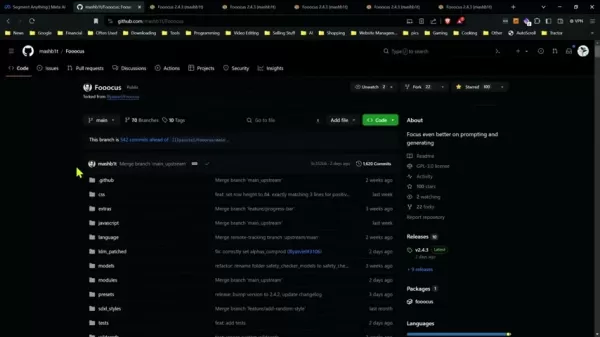
Download and Install: Head over to the GitHub repository and download the ZIP file. Extract it and run the installer. If you’ve installed Fooocus before, the process should feel familiar. Alternatively, you can use the Google Colab version if you prefer a hassle-free approach.
Switching Forks: Already have Fooocus installed? No problem. Open the terminal in your Fooocus folder and execute git status. Ensure you’re on the main branch (git reset --hard origin/main) if needed. Then, update the remote URL to https://github.com/mashbit/Fooocus.git and pull the latest changes using git pull. For Windows users, run python_embededinary38inemotely_execute -m pip install -r requirements_versions.txt.
Once installed, you’ll gain access to a suite of advanced features, including the Segment Anything Model (SAM), which is the backbone of automatic mask generation.
Mastering the Segment Anything Model (SAM)
At the heart of Fooocus lies SAM, a groundbreaking AI computer vision system developed by Meta AI. SAM empowers users to isolate objects in an image with pinpoint accuracy, even without prior training. Whether it’s a person, a car, or a random object, SAM handles it all seamlessly. Its ability to generalize across unseen images makes it an invaluable asset for image editing enthusiasts.
Step-by-Step Guide to Automatic Mask Generation
Ready to put SAM to work? Follow these steps to get started:
Activate Developer Debug Mode: Launch Fooocus and navigate to the "Advanced" tab. Look for the "Developer Debug Mode" option and toggle it on. This unlocks advanced features, including automatic mask generation.
Enable Mask Upload: Head to the "Inpaint" tab and scroll down until you see the "Enable Mask Upload" option. Toggling this on reveals the mask upload area and additional settings.
Select the Right Model: Beneath the mask upload section, you’ll find a dropdown menu labeled "Mask generation model." Here, you’ll discover various models, each suited to different tasks:
- u2net: A versatile general-purpose model.
- u2netp: Similar to u2net but with slight variations.
- u2net her ext: Perfect for isolating human figures.
- u2net ext ext: Ideal for clothing segmentation.
- silueta: Great for creating silhouettes.
- isnet-general-use: A solid choice for general-purpose editing.
- isnet-anime: Best suited for anime-related images.
- sam: The Segment Anything Model, ideal for precise object selection.
Each model brings something unique to the table, so choose the one that aligns with your image’s content.
Fine-Tune Your Masks: Once you’ve selected a model, type in segmentation prompts to refine the mask further. SAM excels at understanding context, so it’s often smart enough to generate accurate masks on its own. However, you can tweak settings like Mask Erode or Dilate to perfect the edges. Additionally, consider inverting the mask if you want to focus on the background instead of the foreground.
Enhance Edges: If your mask still needs work, adjust the Mask Erode or Dilate slider to smooth out jagged edges. This step ensures a seamless blend between the original and edited portions of the image.
The Benefits and Drawbacks of Fooocus
While Fooocus is a powerhouse in the world of image editing, it’s not without its pros and cons. Let’s break them down:
Pros
- User-Friendly Workflow: Even beginners will find it intuitive.
- High Customizability: Tweak settings to suit your preferences.
- No Cost: Access advanced features for free.
- Precision with SAM: High-quality results with minimal effort.
Cons
- Steep Learning Curve: The UI can feel overwhelming at first.
- Occasional Tweaks Needed: Some images may require post-processing in external software.
- Feature Locks: Certain functionalities are exclusive to the Mashbit fork.
Practical Applications of Automatic Masking
Fooocus isn’t just a theoretical tool—it’s practical too. Here are some real-world scenarios where automatic masking shines:
- Photo Restoration: Remove scratches, blemishes, or watermarks from old photos.
- Product Visualization: Highlight key features of products for marketing campaigns.
- Art Creation: Experiment with color swaps or style transfers.
- AI-Generated Art Enhancement: Polish machine-generated art pieces with ease.
- Architectural Visualization: Create photorealistic renders for architectural projects.
Frequently Asked Questions
Q: Is Fooocus really free to use?
A: Yes! Fooocus is completely free and open-source, so you can enjoy its full range of features without any financial commitment.
Q: How does the Segment Anything Model (SAM) work in Fooocus?
A: SAM uses AI-driven computer vision to identify and isolate objects in an image. It generates high-quality masks based on prompts, eliminating the need for manual intervention.
Q: Does it matter which mask generation model I use?
A: Absolutely! Different models excel at different tasks. Choosing the right one ensures the best results for your specific project.
Final Thoughts
Fooocus, powered by the Mashbit fork and SAM, is a game-changer for anyone serious about image editing. Its ability to automate mask generation opens doors to countless possibilities, from simple photo touch-ups to complex artistic transformations. Whether you’re a hobbyist or a professional, Fooocus offers tools that are both powerful and accessible. So, why wait? Dive in and start exploring the endless creative opportunities today!
 Related article
 South Korea Breaks Ground on National AI Computing Center, Investing 2.5 Trillion Won with 2028 Target
South Korean outlet EtNews reports that groundbreaking for the Korea AI Computing Center (KOACC) took place on August 3 at the Solar City data center park in Sunan, Jeollanam-do. Backed by a total investment of 2.5 trillion KRW (roughly 11.838 billio
Six Tech Giants Back Linux Foundation With $12.5M to Tackle AI Vulnerability Noise
To tackle the flood of low-quality security reports produced by AI automation tools, six major tech companies—Anthropic, Amazon (AWS), GitHub, Google, Microsoft, and OpenAI—have collectively contributed $12.5 million in funding to Linux Foundation in
Musk Considered Leaving OpenAI to His Kids as Altman Testifies
This morning, OpenAI CEO Sam Altman took the stand to address former co-founder Elon Musk’s lawsuit challenging the company’s corporate structure.When asked about Musk’s claim that other founders “stole a charity” by launching a for-profit subsidiary
Related Special Topic Recommendations
Music composition
South Korea Breaks Ground on National AI Computing Center, Investing 2.5 Trillion Won with 2028 Target
South Korean outlet EtNews reports that groundbreaking for the Korea AI Computing Center (KOACC) took place on August 3 at the Solar City data center park in Sunan, Jeollanam-do. Backed by a total investment of 2.5 trillion KRW (roughly 11.838 billio
Six Tech Giants Back Linux Foundation With $12.5M to Tackle AI Vulnerability Noise
To tackle the flood of low-quality security reports produced by AI automation tools, six major tech companies—Anthropic, Amazon (AWS), GitHub, Google, Microsoft, and OpenAI—have collectively contributed $12.5 million in funding to Linux Foundation in
Musk Considered Leaving OpenAI to His Kids as Altman Testifies
This morning, OpenAI CEO Sam Altman took the stand to address former co-founder Elon Musk’s lawsuit challenging the company’s corporate structure.When asked about Musk’s claim that other founders “stole a charity” by launching a for-profit subsidiary
Related Special Topic Recommendations
Music composition
 AI Vocal Demo Tools for Songwriters, Hooks, Toplines, and Multilingual Draft Sessions
2026 Latest Best AI Vocal Demo Tools for Songwriters, Hook Creators, and Multi-Language Content Teams! XIX.AI has curated a top-rated list of powerful game-changing tools that go through rigorous real-world tests. You’ll find detailed free vs paid comparison data, comprehensive rankings, and must-try options to help you boost writing efficiency and unlock your creative potential. Explore now to discover your perfect tool for all your content needs!
 9 tools
 xix.ai
Business
Best AI Competitive Research Tools for Small Businesses
xix.ai
Business
Best AI Competitive Research Tools for Small Businesses
2026 Latest Best Top-rated AI Competitive Research Tools for Small Businesses! XIX.AI has curated a highly powerful game-changing collection, updated weekly with rigorous real-world tests and detailed rankings. You can find a comprehensive free vs paid comparison to help you identify the must-try tools that boost your productivity and give you a competitive edge. Explore now to discover your perfect tool!
9 tools
xix.ai
Image editing
Photoshop AI Retouch Tools for Ecommerce Apparel, Skin Cleanup, and Color Consistency
2026 Latest Best Photoshop AI retouch tools for ecommerce apparel, skin cleanup, and color consistency! This top-rated curated list features powerful game-changing solutions that help you boost writing efficiency, streamline content creation, and achieve perfect visual results effortlessly. Each tool has undergone real-world tests through weekly updated rankings, complete with free vs paid comparison details. Backed by XIX.AI, it’s the must-try guide for anyone aiming to unlock your AI edge. Explore now!
10 tools
xix.ai
Prompt
Best AI Prompt Libraries for ChatGPT Workflows
2026 Latest Best Top-Rated AI Prompt Libraries for optimizing all types of ChatGPT workflows. XIX.AI has curated a powerful, game-changing collection that goes through rigorous real-world tests to ensure top performance. You can find detailed free vs paid comparisons and expert rankings to help you choose the must-try tools that boost your productivity and unlock your AI edge. Explore now!
11 tools
xix.ai
Education and Learning
AI Quiz Builder Platforms for Teachers, Tutors, and Cohort-Based Learning Programs
2026 Latest Best AI Quiz Builder Platforms for Teachers, Tutors, and Cohort-Based Learning Programs! XIX.AI has curated a top-rated list of powerful game-changing tools that go through real-world tests to deliver accurate rankings. These must-try platforms help boost writing efficiency, streamline content creation, and simplify quiz design across all learning scenarios. Explore now to discover your perfect tool for unlocking your AI edge in teaching!
13 tools
xix.ai
code
AI Pull Request Review Tools for GitHub Teams Handling Refactors, Bugs, and Security Gaps
2026 Latest Best AI Pull Request Review Tools for GitHub Teams are here on XIX.AI! This top-rated curated list showcases powerful game-changing solutions that streamline refactoring, bug fixing, and security gap detection across all team workflows. Enjoy a free vs paid comparison along with real-world tests and detailed rankings to help you find the perfect tool that boosts productivity significantly. Explore now to unlock your AI edge!
12 tools
xix.ai

 Comments (4)
0/500
Comments (4)
0/500
![KevinMartínez]()
Das klingt nach einem mächtigen Werkzeug! Die automatische Maskenerstellung könnte den Workflow für Bildbearbeitung wirklich beschleunigen. Ich frage mich, wie genau es im Vergleich zu manuellen Tools wie Photoshop abschneidet. Hoffentlich ist es auch für Anfänger zugänglich. 🧐
![IsabellaLevis]()
この自動マスク生成機能、実際に使ってみたらすごく便利だった!特に複雑な背景の画像編集で、手動でマスクを作る手間が省けて感動したわ。でも、AIが完全に正確なマスクを作れるのかな?細かい髪の毛とか、半透明の部分はまだ難しい気がする…🤔 もっと精度が上がったらプロの現場でも使えそう!
![RaymondGreen]()
Fooocusのオートマスク機能試してみたけど、これって裏側でどうやって物体の輪郭を識別してるんだろう?ユーザーが手動で細かい部分を修正しなくても済むから、写真修正の効率がすごく向上しそう。ただ、複雑な背景での精度が気になるなぁ…次は人物写りのテストをしてみたい😄
![RogerLee]()
Tried Fooocus yesterday and holy smokes that auto-masking is scary good! 😱 Finally an AI tool that doesn't turn my hair into abstract art when editing pics. Though I wish they'd explain how it works under the hood...
Unleashing the Power of AI-Powered Image Editing with Fooocus
If you're diving into the world of AI-driven image editing, Fooocus is a name you've likely stumbled upon. This innovative tool brings a fresh perspective to image manipulation with its cutting-edge features, especially its automatic mask generation capabilities. While the default version of Fooocus has its merits, it’s the Mashbit fork that truly shines when it comes to these advanced features. This article will walk you through the entire process—from installation to usage—so you can harness the power of automatic mask generation to enhance your image editing workflow.
Why Fooocus Stands Out
Fooocus is more than just another image editor—it’s an open-source platform packed with tools designed to revolutionize how you edit photos. Unlike the basic version, the Mashbit fork introduces the Segment Anything Model (SAM), a game-changer for precision object selection. SAM makes it possible to isolate objects in an image with minimal effort, thanks to its zero-shot generalization abilities. No extra training required—just point and click. This model is particularly useful for creating masks, which serve as the foundation for inpainting and other advanced editing techniques.
The Mashbit fork takes things a step further by offering multiple models tailored to different image types, such as anime or general-purpose images. Whether you’re restoring old photos, tweaking product visuals, or experimenting with art creation, Fooocus has a solution for you. Best of all, it’s completely free and open-source, meaning you can dive in without worrying about subscription fees or hidden costs.
Getting Started with the Mashbit Fork of Fooocus
Before you can enjoy the perks of automatic mask generation, you’ll need to install the Mashbit fork of Fooocus. Here’s how:
Download and Install: Head over to the GitHub repository and download the ZIP file. Extract it and run the installer. If you’ve installed Fooocus before, the process should feel familiar. Alternatively, you can use the Google Colab version if you prefer a hassle-free approach.
Switching Forks: Already have Fooocus installed? No problem. Open the terminal in your Fooocus folder and execute
git status. Ensure you’re on the main branch (git reset --hard origin/main) if needed. Then, update the remote URL tohttps://github.com/mashbit/Fooocus.gitand pull the latest changes usinggit pull. For Windows users, runpython_embededinary38inemotely_execute -m pip install -r requirements_versions.txt.
Once installed, you’ll gain access to a suite of advanced features, including the Segment Anything Model (SAM), which is the backbone of automatic mask generation.
Mastering the Segment Anything Model (SAM)
At the heart of Fooocus lies SAM, a groundbreaking AI computer vision system developed by Meta AI. SAM empowers users to isolate objects in an image with pinpoint accuracy, even without prior training. Whether it’s a person, a car, or a random object, SAM handles it all seamlessly. Its ability to generalize across unseen images makes it an invaluable asset for image editing enthusiasts.
Step-by-Step Guide to Automatic Mask Generation
Ready to put SAM to work? Follow these steps to get started:
Activate Developer Debug Mode: Launch Fooocus and navigate to the "Advanced" tab. Look for the "Developer Debug Mode" option and toggle it on. This unlocks advanced features, including automatic mask generation.
Enable Mask Upload: Head to the "Inpaint" tab and scroll down until you see the "Enable Mask Upload" option. Toggling this on reveals the mask upload area and additional settings.
Select the Right Model: Beneath the mask upload section, you’ll find a dropdown menu labeled "Mask generation model." Here, you’ll discover various models, each suited to different tasks:
- u2net: A versatile general-purpose model.
- u2netp: Similar to u2net but with slight variations.
- u2net her ext: Perfect for isolating human figures.
- u2net ext ext: Ideal for clothing segmentation.
- silueta: Great for creating silhouettes.
- isnet-general-use: A solid choice for general-purpose editing.
- isnet-anime: Best suited for anime-related images.
- sam: The Segment Anything Model, ideal for precise object selection.
Each model brings something unique to the table, so choose the one that aligns with your image’s content.
Fine-Tune Your Masks: Once you’ve selected a model, type in segmentation prompts to refine the mask further. SAM excels at understanding context, so it’s often smart enough to generate accurate masks on its own. However, you can tweak settings like Mask Erode or Dilate to perfect the edges. Additionally, consider inverting the mask if you want to focus on the background instead of the foreground.
Enhance Edges: If your mask still needs work, adjust the Mask Erode or Dilate slider to smooth out jagged edges. This step ensures a seamless blend between the original and edited portions of the image.
The Benefits and Drawbacks of Fooocus
While Fooocus is a powerhouse in the world of image editing, it’s not without its pros and cons. Let’s break them down:
Pros
- User-Friendly Workflow: Even beginners will find it intuitive.
- High Customizability: Tweak settings to suit your preferences.
- No Cost: Access advanced features for free.
- Precision with SAM: High-quality results with minimal effort.
Cons
- Steep Learning Curve: The UI can feel overwhelming at first.
- Occasional Tweaks Needed: Some images may require post-processing in external software.
- Feature Locks: Certain functionalities are exclusive to the Mashbit fork.
Practical Applications of Automatic Masking
Fooocus isn’t just a theoretical tool—it’s practical too. Here are some real-world scenarios where automatic masking shines:
- Photo Restoration: Remove scratches, blemishes, or watermarks from old photos.
- Product Visualization: Highlight key features of products for marketing campaigns.
- Art Creation: Experiment with color swaps or style transfers.
- AI-Generated Art Enhancement: Polish machine-generated art pieces with ease.
- Architectural Visualization: Create photorealistic renders for architectural projects.
Frequently Asked Questions
Q: Is Fooocus really free to use?
A: Yes! Fooocus is completely free and open-source, so you can enjoy its full range of features without any financial commitment.
Q: How does the Segment Anything Model (SAM) work in Fooocus?
A: SAM uses AI-driven computer vision to identify and isolate objects in an image. It generates high-quality masks based on prompts, eliminating the need for manual intervention.
Q: Does it matter which mask generation model I use?
A: Absolutely! Different models excel at different tasks. Choosing the right one ensures the best results for your specific project.
Final Thoughts
Fooocus, powered by the Mashbit fork and SAM, is a game-changer for anyone serious about image editing. Its ability to automate mask generation opens doors to countless possibilities, from simple photo touch-ups to complex artistic transformations. Whether you’re a hobbyist or a professional, Fooocus offers tools that are both powerful and accessible. So, why wait? Dive in and start exploring the endless creative opportunities today!








 South Korea Breaks Ground on National AI Computing Center, Investing 2.5 Trillion Won with 2028 Target
South Korean outlet EtNews reports that groundbreaking for the Korea AI Computing Center (KOACC) took place on August 3 at the Solar City data center park in Sunan, Jeollanam-do. Backed by a total investment of 2.5 trillion KRW (roughly 11.838 billio
South Korea Breaks Ground on National AI Computing Center, Investing 2.5 Trillion Won with 2028 Target
South Korean outlet EtNews reports that groundbreaking for the Korea AI Computing Center (KOACC) took place on August 3 at the Solar City data center park in Sunan, Jeollanam-do. Backed by a total investment of 2.5 trillion KRW (roughly 11.838 billio
 Six Tech Giants Back Linux Foundation With $12.5M to Tackle AI Vulnerability Noise
To tackle the flood of low-quality security reports produced by AI automation tools, six major tech companies—Anthropic, Amazon (AWS), GitHub, Google, Microsoft, and OpenAI—have collectively contributed $12.5 million in funding to Linux Foundation in
Six Tech Giants Back Linux Foundation With $12.5M to Tackle AI Vulnerability Noise
To tackle the flood of low-quality security reports produced by AI automation tools, six major tech companies—Anthropic, Amazon (AWS), GitHub, Google, Microsoft, and OpenAI—have collectively contributed $12.5 million in funding to Linux Foundation in
 Musk Considered Leaving OpenAI to His Kids as Altman Testifies
This morning, OpenAI CEO Sam Altman took the stand to address former co-founder Elon Musk’s lawsuit challenging the company’s corporate structure.When asked about Musk’s claim that other founders “stole a charity” by launching a for-profit subsidiary
Musk Considered Leaving OpenAI to His Kids as Altman Testifies
This morning, OpenAI CEO Sam Altman took the stand to address former co-founder Elon Musk’s lawsuit challenging the company’s corporate structure.When asked about Musk’s claim that other founders “stole a charity” by launching a for-profit subsidiary

2026 Latest Best AI Vocal Demo Tools for Songwriters, Hook Creators, and Multi-Language Content Teams! XIX.AI has curated a top-rated list of powerful game-changing tools that go through rigorous real-world tests. You’ll find detailed free vs paid comparison data, comprehensive rankings, and must-try options to help you boost writing efficiency and unlock your creative potential. Explore now to discover your perfect tool for all your content needs!
9 tools
xix.ai

2026 Latest Best Top-rated AI Competitive Research Tools for Small Businesses! XIX.AI has curated a highly powerful game-changing collection, updated weekly with rigorous real-world tests and detailed rankings. You can find a comprehensive free vs paid comparison to help you identify the must-try tools that boost your productivity and give you a competitive edge. Explore now to discover your perfect tool!
9 tools
xix.ai

2026 Latest Best Photoshop AI retouch tools for ecommerce apparel, skin cleanup, and color consistency! This top-rated curated list features powerful game-changing solutions that help you boost writing efficiency, streamline content creation, and achieve perfect visual results effortlessly. Each tool has undergone real-world tests through weekly updated rankings, complete with free vs paid comparison details. Backed by XIX.AI, it’s the must-try guide for anyone aiming to unlock your AI edge. Explore now!
10 tools
xix.ai

2026 Latest Best Top-Rated AI Prompt Libraries for optimizing all types of ChatGPT workflows. XIX.AI has curated a powerful, game-changing collection that goes through rigorous real-world tests to ensure top performance. You can find detailed free vs paid comparisons and expert rankings to help you choose the must-try tools that boost your productivity and unlock your AI edge. Explore now!
11 tools
xix.ai

2026 Latest Best AI Quiz Builder Platforms for Teachers, Tutors, and Cohort-Based Learning Programs! XIX.AI has curated a top-rated list of powerful game-changing tools that go through real-world tests to deliver accurate rankings. These must-try platforms help boost writing efficiency, streamline content creation, and simplify quiz design across all learning scenarios. Explore now to discover your perfect tool for unlocking your AI edge in teaching!
13 tools
xix.ai

2026 Latest Best AI Pull Request Review Tools for GitHub Teams are here on XIX.AI! This top-rated curated list showcases powerful game-changing solutions that streamline refactoring, bug fixing, and security gap detection across all team workflows. Enjoy a free vs paid comparison along with real-world tests and detailed rankings to help you find the perfect tool that boosts productivity significantly. Explore now to unlock your AI edge!
12 tools
xix.ai

Das klingt nach einem mächtigen Werkzeug! Die automatische Maskenerstellung könnte den Workflow für Bildbearbeitung wirklich beschleunigen. Ich frage mich, wie genau es im Vergleich zu manuellen Tools wie Photoshop abschneidet. Hoffentlich ist es auch für Anfänger zugänglich. 🧐
この自動マスク生成機能、実際に使ってみたらすごく便利だった!特に複雑な背景の画像編集で、手動でマスクを作る手間が省けて感動したわ。でも、AIが完全に正確なマスクを作れるのかな?細かい髪の毛とか、半透明の部分はまだ難しい気がする…🤔 もっと精度が上がったらプロの現場でも使えそう!
Fooocusのオートマスク機能試してみたけど、これって裏側でどうやって物体の輪郭を識別してるんだろう?ユーザーが手動で細かい部分を修正しなくても済むから、写真修正の効率がすごく向上しそう。ただ、複雑な背景での精度が気になるなぁ…次は人物写りのテストをしてみたい😄
Tried Fooocus yesterday and holy smokes that auto-masking is scary good! 😱 Finally an AI tool that doesn't turn my hair into abstract art when editing pics. Though I wish they'd explain how it works under the hood...












