


 Home
HomeHow to use AI Diffit and Luvvoice for language teaching in 2026?
Are you a language educator or learner seeking fresh approaches to develop compelling educational materials? Artificial intelligence (AI) provides groundbreaking possibilities to elevate language instruction. This in-depth guide examines how to utilize Diffit and Luvvoice, two robust AI-powered platforms, for producing learning resources, crafting audio content, and building interactive classroom environments. Learn how to simplify lesson preparation and engage language students effectively with AI.
Key Points
Explore how Diffit creates varied language learning materials.
Find out how Luvvoice transforms text into speech for pronunciation exercises.
Learn about incorporating AI to develop interactive language sessions.
Discover methods for automatically generating reading comprehension questions.
Create vocabulary lists and pronunciation exercises using AI technology.
Optimize your lesson planning workflow with AI-driven solutions.
Harnessing AI for Language Teaching
Introduction to Diffit: AI-Driven Resource Generation
Diffit represents an innovative solution for educators, designed to streamline the creation of classroom-ready materials.
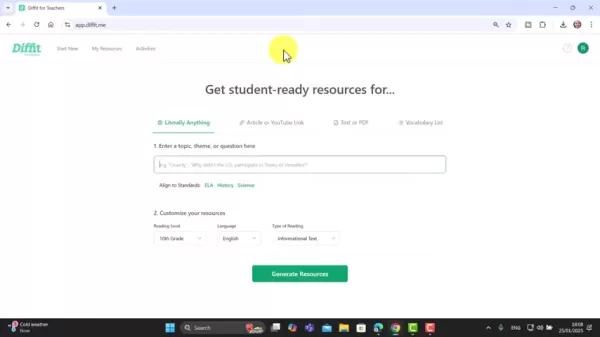
The platform enables language instructors to produce reading passages and convert them into audio files. It also creates reading comprehension questions and numerous other components essential for language acquisition. With its adaptable features, Diffit allows teachers to customize content for different student requirements and educational goals.
Diffit provides multiple capabilities, including:
- Generating Texts: Develop reading materials customized for specific subjects and reading proficiency levels.
- Creating Audio from Text: Transform generated texts into audio files for listening comprehension practice.
- Reading Comprehension Questions: Automatically produce questions to evaluate material understanding.
- Vocabulary Lists: Create focused vocabulary collections to broaden learners' language knowledge.
- Pronunciation Activities: Integrate exercises to enhance pronunciation abilities.
Diffit serves as an invaluable tool for language educators aiming to improve lesson preparation and create dynamic language learning experiences. Its AI-powered features allow teachers to adapt content to various student needs. Through Diffit, educators can reduce preparation time, enhance student results, and establish a vibrant, enriching language learning atmosphere.
Essential terms to recall when using Diffit include reading text, audio files, reading comprehension, vocabulary lists, pronunciation activities, and language learning. Additionally, it's crucial to note the AI technology that drives Diffit and can produce diverse educational content for your language classes.
Cons
ider these phrases when looking for ways to improve language teaching. Remember these when you consider ways to implement them in language learning.Luvvoice: Text-to-Speech Technology for Pronunciation Practice
Luvvoice provides straightforward text conversion to natural-sounding speech.
It's ideal for assisting students with language pronunciation. When creating reading materials with Diffit, Luvvoice serves as an excellent complementary tool to help students better understand proper word pronunciation.
Luvvoice enables users to:
- Transform text into audio using more than 200 voices across 70 languages.
- Select voices with specific accents.
By simply entering text, educators, content developers, students, or anyone requiring text-to-speech can choose a voice and either download the resulting MP3 file or listen directly. Luvvoice also supports pronunciation practice.
Key terms to remember when using Luvvoice include converting text to speech, audio, over 200 voices, 70 languages, pronunciation, and natural-sounding speech. The straightforward process of entering text, selecting a voice, and immediate playback is fundamental for this language learning approach. This provides extensive AI voice options to enhance student capabilities. Implementation into daily teaching routines is straightforward.
Generating Texts with Diffit: A Practical Guide
Diffit simplifies text creation through its intuitive interface. To develop customized reading materials, follow these steps:
- Enter a Topic: Start by inputting a topic, theme, or question into the specified field.
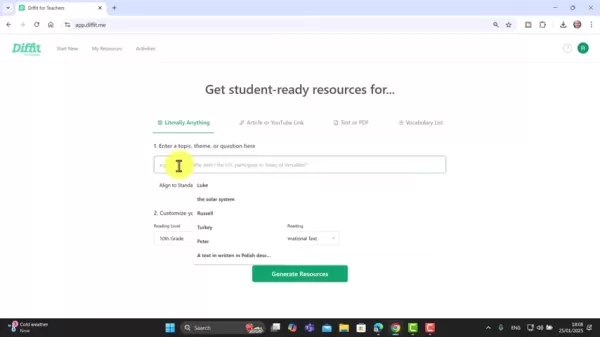
This input directs Diffit's AI to generate pertinent and captivating content. For example, you might enter "A Visit to London" for a lesson focusing on British culture.
- Customize Your Resources: Adapt the generated text to match your students' specific reading levels and language preferences.Adjust the reading level to correspond with their comprehension skills, and choose the target language from an extensive options list.
- Generate Resources: After specifying your topic and adjusting settings, click the "Generate Resources" button. Diffit's AI will quickly produce various learning materials, including reading passages, vocabulary lists, and comprehension questions.
Using Diffit makes it simple to create vocabulary, summaries, and questions for students.
Remember the essential terms when generating texts with Diffit: topic, theme, question, reading levels, language preferences, comprehension abilities, language learning, and reading passages. Easily generate vocabulary, summaries, and questions with appropriate prompts.
Combining AI Technologies for Effective Language Lessons
The full potential of AI in language instruction emerges through the smooth integration of tools like Diffit and Luvvoice. These platforms work together to deliver comprehensive learning experiences addressing diverse student requirements.
Here's how to effectively combine these technologies:
- Generate Reading Content with Diffit: Use Diffit to create compelling reading passages tailored to specific topics and reading levels.
- Create Audio Files with Luvvoice: Convert the generated text into audio files using Luvvoice. Choose a voice that matches your target accent and pronunciation objectives.
- Integrate Audio and Text for Listening Comprehension: Combine reading passages with audio files to create engaging listening comprehension exercises. Students can listen while reading along, improving both pronunciation and comprehension skills.
- Assess Understanding with Diffit's Questions: Use Diffit's automatically generated comprehension questions to evaluate student understanding of the material. These questions work for both formative and summative assessments.
- Enhance Vocabulary with Luvvoice: Generate a list of key vocabulary words from the passage using Diffit. Then, use Luvvoice to create audio recordings of these words for pronunciation practice. This combination strengthens vocabulary acquisition and pronunciation skills.
- Provide Listening Materials for Pronunciation Work: Take reading materials created with Diffit and upload them into Luvvoice to generate audio. Use this material for pronunciation exercises.
By seamlessly integrating Diffit and Luvvoice, language teachers can create immersive and effective language learning experiences. These AI-driven platforms offer abundant resources and opportunities to boost student engagement and language proficiency.
It's important to remember key phrases related to combining AI technologies for effective language lessons. These include: integrating AI Tools, Diffit, Luvvoice, engaging reading passages, target accent, pronunciation goals, formative assessments,summative assessments,vocabulary acquisition, pronunciation skills, and listening materials. Recall all the different ways these tools can work together.
Optimizing Lesson Planning with Diffit: Additional Features and Cons
iderations
Customization Options in Diffit
Diffit provides various customization options to refine generated learning materials. Utilize these features to create content that perfectly matches your students' needs and learning objectives.
Key customization features include:
- Adjusting Reading Level: Modify text complexity to suit students' reading capabilities. This ensures materials are challenging yet accessible.
- Selecting Language: Choose from numerous languages to generate content in the target language.
- Editing Text: Refine generated text to improve content, adjust tone, or incorporate specific learning goals.
- Adding Images: Increase visual appeal and engagement by adding relevant images.
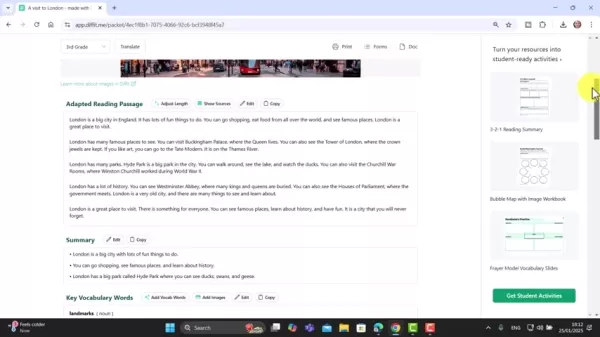
This can be achieved by choosing from various available photos.
- Showing the Sources: To verify factual accuracy within the writing, you can display the document's sources.
Using these customization options ensures that generated learning materials are perfectly suited to your students' needs and educational goals.
Some essential terms to remember include: customization options, text complexity, relevant images, editing text, visual appeal, learning objectives, and generate content. These will all help you produce high-quality materials.
Generating Exercises and Activities with Diffit
Beyond text generation, Diffit also enables educators to create engaging exercises and activities that reinforce learning. The platform provides multiple tools to develop interactive and stimulating educational experiences.
Key exercise and activity options include:
Reading Comprehension Questions: Create multiple-choice, short answer, and open-ended questions to evaluate student comprehension of the material.
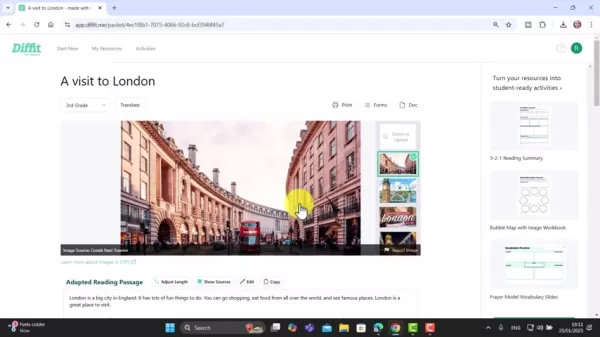
Vocabulary Lists: Develop targeted vocabulary lists to expand learners' language knowledge. Add more words from the material by clicking and requesting additional terms.
Vocabulary Practice: Include vocabulary practice exercises to reinforce word recognition and usage. Vocabulary practices like bubble maps can be incorporated.
Ready to turn your resources into student-ready activities: There are worksheets and Google Slide presentations available for language teachers.
By leveraging these features, educators can create interactive and stimulating language learning experiences that promote active participation and knowledge retention.
Ensure you remember these phrases when designing creative exercises and activities: reinforcement exercises, multiple-choice, short answer, open-ended questions, expand learners' repertoire, interactive learning, active engagement, google slide sheets, and student ready activities.
Leveraging YouTube Videos: Summarization and Language Learning
Diffit's YouTube video summarization capability offers unique opportunities to incorporate authentic content into language lessons. This functionality allows educators to create engaging activities based on real-world language usage.
Here's how to utilize YouTube video summarization for language learning:
- Find a Relevant Video: Select a YouTube video that matches your lesson topic and target language. Ensure the video has clear audio and appropriate language content.
- Paste the Link: Insert the YouTube video link into Diffit's designated field.Diffit's AI will analyze the video transcript and produce a concise summary.
- Customize the Summary: Adjust the summary's reading level to match your students' comprehension skills. You can also edit the text to emphasize specific language features or vocabulary.
- Create Learning Activities: Use the generated summary as foundation for various language learning activities, such as reading comprehension exercises, vocabulary development, or pronunciation practice.
- Analyze the results Diffit can also display the sources of information the tool provides.
By incorporating YouTube videos into your lessons, you can expose students to authentic language usage and engage them with real-world content. Diffit's summarization capabilities streamline the integration process and enable targeted learning activities.
To ensure your information meets standards, remember these keywords: summarize YouTube videos, authentic content, real-world language, analyze the video transcript, generate summary, and targeted learning.
Step-by-Step Guides: Maximizing the Power of Diffit and Luvvoice
How to Generate Reading Material With AI and Diffit
First, enter the topic to be explored.
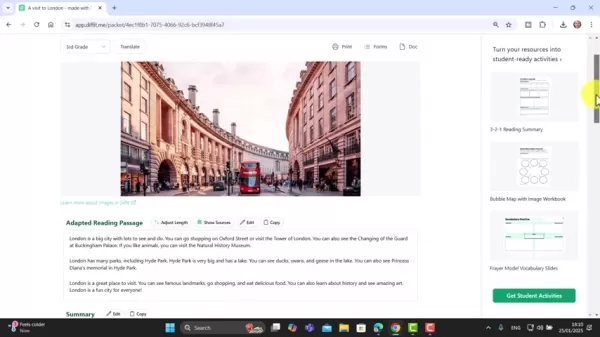
Customize your resources and select your language. Note that reading levels follow the American grading system.
Click "Generate Resources."
The resulting resources are fully customizable! Numerous activities are generated, allowing you to tailor them to your classroom needs. You can modify images or adjust source material. Note that all content is copyable and editable, making it an ideal tool. Source code may also be accessible.
Always review the materials first to ensure they suit your classroom context.
How to Transfer AI generated text into speech With Luvvoice
First create the text using Diffit.
Locate that text and copy it from Diffit.
Navigate to Luvvoice.
Paste the text into Luvvoice.
Select your preferred accent and voice.
Generate audio and verify the quality meets standards.
If satisfied, download the audio for offline use.
Luvvoice not only converts text to speech but also provides individual words for pronunciation sessions.
Pricing
Pricing for Diffit and Luvvoice
Both Diffit and Luvvoice provide free versions. Check their respective websites to explore available options and potential costs.
Advantages and Disadvantages of AI in Language Teaching
Pros
Personalized Learning Experiences
Automated Content Generation
Increased Efficiency
Improved Student Engagement
Data-Driven Insights
Cons
Potential for Bias
Lack of Human Interaction
Data Privacy Concerns
Technical Dependence
Over-Reliance on Technology
Core Features
Core Features of Diffit and Luvvoice
Below is a table showcasing some core features of Diffit and Luvvoice.
Feature Diffit Luvvoice Text GenerationYesNoLevel AdjustmentYesNoCreate Audio filesNoYesMany language optionsYesYesSource code availableYesNoDownload AudioNoYesThe above represents selected core features for Diffit and Luvvoice and available capabilities. Consider these aspects when making your selection.
Use Cases
Use Cases for Diffit and Luvvoice
Here are several potential applications:
- Create reading comprehension activities
- Provide material for pronunciation practice.
- Develop multiple choice questions.
- Vocabulary reinforcement
These use cases represent a sample of possibilities, though additional ideas can be easily implemented with further exploration. These programs can significantly enhance organization and efficiency in AI-supported language classes.
FAQ
Are Diffit and Luvvoice free to use?
Both Diffit and Luvvoice offer free plans. However, review the specific details on each platform's website. Remember that while services were free in January 2025, this may change subsequently.
Can these programs be used in multiple languages?
Yes! Both tools support numerous languages.
Are generated resources customizable?
Yes! You can modify images, reading levels, and languages when generating resources. These adjustments will enhance educational quality.
Related Questions
How can AI assist in language learning assessment?
AI can revolutionize language learning assessment by delivering personalized feedback, automating grading processes, and generating valuable data to guide instructional decisions. Through AI-powered assessment tools, language teachers can gain deeper insights into student progress, identify improvement areas, and customize instruction to meet individual learning needs. AI can evaluate student writing and speech samples to provide automated feedback on grammar, vocabulary, pronunciation, and fluency. This personalized feedback helps students recognize their strengths and weaknesses while focusing learning efforts where most needed. AI-powered grading systems can automate assessment of objective language skills like grammar and vocabulary, freeing teachers to concentrate on more subjective and creative language learning aspects. AI can analyze student performance data to identify patterns, trends, and challenging areas. This data informs instructional decisions, enabling teachers to adjust teaching strategies, modify lesson plans, and provide targeted interventions addressing student needs. AI can deliver personalized feedback that motivates students to engage more deeply in learning. The ability to track progress, receive specific guidance, and celebrate achievements fosters accomplishment and encourages continuous improvement. AI-powered assessment tools help teachers differentiate instruction through personalized learning paths and adaptive assessments. By tailoring assessment difficulty levels and providing targeted feedback, AI supports students learning at their own pace while achieving language skill mastery. AI provides teachers with actionable data to inform instructional decisions and improve student outcomes. Through analyzing student performance data, identifying improvement areas, and personalizing feedback, AI helps create more effective and engaging language learning environments. These enhancements benefit not only teachers but also improve the student learning experience.
Related article
 Musk Considered Leaving OpenAI to His Kids as Altman Testifies
This morning, OpenAI CEO Sam Altman took the stand to address former co-founder Elon Musk’s lawsuit challenging the company’s corporate structure.When asked about Musk’s claim that other founders “stole a charity” by launching a for-profit subsidiary
Sam Altman Sparks Debate Over AI's Deceleration
Listen onApple PodcastsListen onSpotifyOpenAI CEO Sam Altman recently suggested that it may be time to “pace the rate of AI development” to allow society to “harden around some of these new capability levels.”On the latest episode of TechCrunch’s Equ
Anthropic Opens Doors to EU Cybersecurity Agency as Mythos5 Model Faces Compliance Exam
Artificial intelligence compliance regulations are advancing significantly. Leading AI firm Anthropic has officially granted the European Union's cybersecurity authority access to its Mythos AI model, a pivotal move for this advanced large language m
Related Special Topic Recommendations
Business
Musk Considered Leaving OpenAI to His Kids as Altman Testifies
This morning, OpenAI CEO Sam Altman took the stand to address former co-founder Elon Musk’s lawsuit challenging the company’s corporate structure.When asked about Musk’s claim that other founders “stole a charity” by launching a for-profit subsidiary
Sam Altman Sparks Debate Over AI's Deceleration
Listen onApple PodcastsListen onSpotifyOpenAI CEO Sam Altman recently suggested that it may be time to “pace the rate of AI development” to allow society to “harden around some of these new capability levels.”On the latest episode of TechCrunch’s Equ
Anthropic Opens Doors to EU Cybersecurity Agency as Mythos5 Model Faces Compliance Exam
Artificial intelligence compliance regulations are advancing significantly. Leading AI firm Anthropic has officially granted the European Union's cybersecurity authority access to its Mythos AI model, a pivotal move for this advanced large language m
Related Special Topic Recommendations
Business
 Best AI Competitive Research Tools for Small Businesses
2026 Latest Best Top-rated AI Competitive Research Tools for Small Businesses! XIX.AI has curated a highly powerful game-changing collection, updated weekly with rigorous real-world tests and detailed rankings. You can find a comprehensive free vs paid comparison to help you identify the must-try tools that boost your productivity and give you a competitive edge. Explore now to discover your perfect tool!
 9 tools
 xix.ai
Image editing
Photoshop AI Retouch Tools for Ecommerce Apparel, Skin Cleanup, and Color Consistency
xix.ai
Image editing
Photoshop AI Retouch Tools for Ecommerce Apparel, Skin Cleanup, and Color Consistency
2026 Latest Best Photoshop AI retouch tools for ecommerce apparel, skin cleanup, and color consistency! This top-rated curated list features powerful game-changing solutions that help you boost writing efficiency, streamline content creation, and achieve perfect visual results effortlessly. Each tool has undergone real-world tests through weekly updated rankings, complete with free vs paid comparison details. Backed by XIX.AI, it’s the must-try guide for anyone aiming to unlock your AI edge. Explore now!
10 tools
xix.ai
Prompt
Best AI Prompt Libraries for ChatGPT Workflows
2026 Latest Best Top-Rated AI Prompt Libraries for optimizing all types of ChatGPT workflows. XIX.AI has curated a powerful, game-changing collection that goes through rigorous real-world tests to ensure top performance. You can find detailed free vs paid comparisons and expert rankings to help you choose the must-try tools that boost your productivity and unlock your AI edge. Explore now!
11 tools
xix.ai
Education and Learning
AI Quiz Builder Platforms for Teachers, Tutors, and Cohort-Based Learning Programs
2026 Latest Best AI Quiz Builder Platforms for Teachers, Tutors, and Cohort-Based Learning Programs! XIX.AI has curated a top-rated list of powerful game-changing tools that go through real-world tests to deliver accurate rankings. These must-try platforms help boost writing efficiency, streamline content creation, and simplify quiz design across all learning scenarios. Explore now to discover your perfect tool for unlocking your AI edge in teaching!
13 tools
xix.ai
code
AI Pull Request Review Tools for GitHub Teams Handling Refactors, Bugs, and Security Gaps
2026 Latest Best AI Pull Request Review Tools for GitHub Teams are here on XIX.AI! This top-rated curated list showcases powerful game-changing solutions that streamline refactoring, bug fixing, and security gap detection across all team workflows. Enjoy a free vs paid comparison along with real-world tests and detailed rankings to help you find the perfect tool that boosts productivity significantly. Explore now to unlock your AI edge!
12 tools
xix.ai
Text-to-speech
Best AI Text to Speech Tools for Natural Voiceovers
2026 Latest Best Top-rated AI Text to Speech Tools for Natural Voiceovers are here on XIX.AI! This curated list features powerful, game-changing options that deliver crystal-clear voices for every use case, backed by real-world tests and weekly updated rankings. Get a free vs paid comparison to find the must-try solution that boosts your productivity instantly. Explore now to Unlock your AI edge!
11 tools
xix.ai

 Comments (2)
0/500
Comments (2)
0/500
![TimothyWilliams]()
Finally, a practical guide for 2026! 🤩 I've been struggling with Luvvoice integration, so this is a lifesaver. Can't wait to test Diffit with my ESL students. 🚀
![RobertMartin]()
2026年までにこんなツールが普及してるのかな?AIで教材作るのは便利そうだけど、教師の役割が薄れないか少し心配。個人的には発音練習にAIボイスを使うのは面白いアイデアだと思った!👍
Are you a language educator or learner seeking fresh approaches to develop compelling educational materials? Artificial intelligence (AI) provides groundbreaking possibilities to elevate language instruction. This in-depth guide examines how to utilize Diffit and Luvvoice, two robust AI-powered platforms, for producing learning resources, crafting audio content, and building interactive classroom environments. Learn how to simplify lesson preparation and engage language students effectively with AI.
Key Points
Explore how Diffit creates varied language learning materials.
Find out how Luvvoice transforms text into speech for pronunciation exercises.
Learn about incorporating AI to develop interactive language sessions.
Discover methods for automatically generating reading comprehension questions.
Create vocabulary lists and pronunciation exercises using AI technology.
Optimize your lesson planning workflow with AI-driven solutions.
Harnessing AI for Language Teaching
Introduction to Diffit: AI-Driven Resource Generation
Diffit represents an innovative solution for educators, designed to streamline the creation of classroom-ready materials.
The platform enables language instructors to produce reading passages and convert them into audio files. It also creates reading comprehension questions and numerous other components essential for language acquisition. With its adaptable features, Diffit allows teachers to customize content for different student requirements and educational goals.
Diffit provides multiple capabilities, including:
- Generating Texts: Develop reading materials customized for specific subjects and reading proficiency levels.
- Creating Audio from Text: Transform generated texts into audio files for listening comprehension practice.
- Reading Comprehension Questions: Automatically produce questions to evaluate material understanding.
- Vocabulary Lists: Create focused vocabulary collections to broaden learners' language knowledge.
- Pronunciation Activities: Integrate exercises to enhance pronunciation abilities.
Diffit serves as an invaluable tool for language educators aiming to improve lesson preparation and create dynamic language learning experiences. Its AI-powered features allow teachers to adapt content to various student needs. Through Diffit, educators can reduce preparation time, enhance student results, and establish a vibrant, enriching language learning atmosphere.
Essential terms to recall when using Diffit include reading text, audio files, reading comprehension, vocabulary lists, pronunciation activities, and language learning. Additionally, it's crucial to note the AI technology that drives Diffit and can produce diverse educational content for your language classes.
Cons
ider these phrases when looking for ways to improve language teaching. Remember these when you consider ways to implement them in language learning.Luvvoice: Text-to-Speech Technology for Pronunciation Practice
Luvvoice provides straightforward text conversion to natural-sounding speech.
It's ideal for assisting students with language pronunciation. When creating reading materials with Diffit, Luvvoice serves as an excellent complementary tool to help students better understand proper word pronunciation.
Luvvoice enables users to:
- Transform text into audio using more than 200 voices across 70 languages.
- Select voices with specific accents.
By simply entering text, educators, content developers, students, or anyone requiring text-to-speech can choose a voice and either download the resulting MP3 file or listen directly. Luvvoice also supports pronunciation practice.
Key terms to remember when using Luvvoice include converting text to speech, audio, over 200 voices, 70 languages, pronunciation, and natural-sounding speech. The straightforward process of entering text, selecting a voice, and immediate playback is fundamental for this language learning approach. This provides extensive AI voice options to enhance student capabilities. Implementation into daily teaching routines is straightforward.
Generating Texts with Diffit: A Practical Guide
Diffit simplifies text creation through its intuitive interface. To develop customized reading materials, follow these steps:
- Enter a Topic: Start by inputting a topic, theme, or question into the specified field.
This input directs Diffit's AI to generate pertinent and captivating content. For example, you might enter "A Visit to London" for a lesson focusing on British culture.
- Customize Your Resources: Adapt the generated text to match your students' specific reading levels and language preferences.Adjust the reading level to correspond with their comprehension skills, and choose the target language from an extensive options list.
- Generate Resources: After specifying your topic and adjusting settings, click the "Generate Resources" button. Diffit's AI will quickly produce various learning materials, including reading passages, vocabulary lists, and comprehension questions.
Using Diffit makes it simple to create vocabulary, summaries, and questions for students.
Remember the essential terms when generating texts with Diffit: topic, theme, question, reading levels, language preferences, comprehension abilities, language learning, and reading passages. Easily generate vocabulary, summaries, and questions with appropriate prompts.
Combining AI Technologies for Effective Language Lessons
The full potential of AI in language instruction emerges through the smooth integration of tools like Diffit and Luvvoice. These platforms work together to deliver comprehensive learning experiences addressing diverse student requirements.
Here's how to effectively combine these technologies:
- Generate Reading Content with Diffit: Use Diffit to create compelling reading passages tailored to specific topics and reading levels.
- Create Audio Files with Luvvoice: Convert the generated text into audio files using Luvvoice. Choose a voice that matches your target accent and pronunciation objectives.
- Integrate Audio and Text for Listening Comprehension: Combine reading passages with audio files to create engaging listening comprehension exercises. Students can listen while reading along, improving both pronunciation and comprehension skills.
- Assess Understanding with Diffit's Questions: Use Diffit's automatically generated comprehension questions to evaluate student understanding of the material. These questions work for both formative and summative assessments.
- Enhance Vocabulary with Luvvoice: Generate a list of key vocabulary words from the passage using Diffit. Then, use Luvvoice to create audio recordings of these words for pronunciation practice. This combination strengthens vocabulary acquisition and pronunciation skills.
- Provide Listening Materials for Pronunciation Work: Take reading materials created with Diffit and upload them into Luvvoice to generate audio. Use this material for pronunciation exercises.
By seamlessly integrating Diffit and Luvvoice, language teachers can create immersive and effective language learning experiences. These AI-driven platforms offer abundant resources and opportunities to boost student engagement and language proficiency.
It's important to remember key phrases related to combining AI technologies for effective language lessons. These include: integrating AI Tools, Diffit, Luvvoice, engaging reading passages, target accent, pronunciation goals, formative assessments,summative assessments,vocabulary acquisition, pronunciation skills, and listening materials. Recall all the different ways these tools can work together.
Optimizing Lesson Planning with Diffit: Additional Features and Cons
iderations
Customization Options in Diffit
Diffit provides various customization options to refine generated learning materials. Utilize these features to create content that perfectly matches your students' needs and learning objectives.
Key customization features include:
- Adjusting Reading Level: Modify text complexity to suit students' reading capabilities. This ensures materials are challenging yet accessible.
- Selecting Language: Choose from numerous languages to generate content in the target language.
- Editing Text: Refine generated text to improve content, adjust tone, or incorporate specific learning goals.
- Adding Images: Increase visual appeal and engagement by adding relevant images.
This can be achieved by choosing from various available photos.
- Showing the Sources: To verify factual accuracy within the writing, you can display the document's sources.
Using these customization options ensures that generated learning materials are perfectly suited to your students' needs and educational goals.
Some essential terms to remember include: customization options, text complexity, relevant images, editing text, visual appeal, learning objectives, and generate content. These will all help you produce high-quality materials.
Generating Exercises and Activities with Diffit
Beyond text generation, Diffit also enables educators to create engaging exercises and activities that reinforce learning. The platform provides multiple tools to develop interactive and stimulating educational experiences.
Key exercise and activity options include:
Reading Comprehension Questions: Create multiple-choice, short answer, and open-ended questions to evaluate student comprehension of the material.
Vocabulary Lists: Develop targeted vocabulary lists to expand learners' language knowledge. Add more words from the material by clicking and requesting additional terms.
Vocabulary Practice: Include vocabulary practice exercises to reinforce word recognition and usage. Vocabulary practices like bubble maps can be incorporated.
Ready to turn your resources into student-ready activities: There are worksheets and Google Slide presentations available for language teachers.
By leveraging these features, educators can create interactive and stimulating language learning experiences that promote active participation and knowledge retention.
Ensure you remember these phrases when designing creative exercises and activities: reinforcement exercises, multiple-choice, short answer, open-ended questions, expand learners' repertoire, interactive learning, active engagement, google slide sheets, and student ready activities.
Leveraging YouTube Videos: Summarization and Language Learning
Diffit's YouTube video summarization capability offers unique opportunities to incorporate authentic content into language lessons. This functionality allows educators to create engaging activities based on real-world language usage.
Here's how to utilize YouTube video summarization for language learning:
- Find a Relevant Video: Select a YouTube video that matches your lesson topic and target language. Ensure the video has clear audio and appropriate language content.
- Paste the Link: Insert the YouTube video link into Diffit's designated field.Diffit's AI will analyze the video transcript and produce a concise summary.
- Customize the Summary: Adjust the summary's reading level to match your students' comprehension skills. You can also edit the text to emphasize specific language features or vocabulary.
- Create Learning Activities: Use the generated summary as foundation for various language learning activities, such as reading comprehension exercises, vocabulary development, or pronunciation practice.
- Analyze the results Diffit can also display the sources of information the tool provides.
By incorporating YouTube videos into your lessons, you can expose students to authentic language usage and engage them with real-world content. Diffit's summarization capabilities streamline the integration process and enable targeted learning activities.
To ensure your information meets standards, remember these keywords: summarize YouTube videos, authentic content, real-world language, analyze the video transcript, generate summary, and targeted learning.
Step-by-Step Guides: Maximizing the Power of Diffit and Luvvoice
How to Generate Reading Material With AI and Diffit
First, enter the topic to be explored.
Customize your resources and select your language. Note that reading levels follow the American grading system.
Click "Generate Resources."
The resulting resources are fully customizable! Numerous activities are generated, allowing you to tailor them to your classroom needs. You can modify images or adjust source material. Note that all content is copyable and editable, making it an ideal tool. Source code may also be accessible.
Always review the materials first to ensure they suit your classroom context.
How to Transfer AI generated text into speech With Luvvoice
First create the text using Diffit.
Locate that text and copy it from Diffit.
Navigate to Luvvoice.
Paste the text into Luvvoice.
Select your preferred accent and voice.
Generate audio and verify the quality meets standards.
If satisfied, download the audio for offline use.
Luvvoice not only converts text to speech but also provides individual words for pronunciation sessions.
Pricing
Pricing for Diffit and Luvvoice
Both Diffit and Luvvoice provide free versions. Check their respective websites to explore available options and potential costs.
Advantages and Disadvantages of AI in Language Teaching
Pros
Personalized Learning Experiences
Automated Content Generation
Increased Efficiency
Improved Student Engagement
Data-Driven Insights
Cons
Potential for Bias
Lack of Human Interaction
Data Privacy Concerns
Technical Dependence
Over-Reliance on Technology
Core Features
Core Features of Diffit and Luvvoice
Below is a table showcasing some core features of Diffit and Luvvoice.
The above represents selected core features for Diffit and Luvvoice and available capabilities. Consider these aspects when making your selection.
Use Cases
Use Cases for Diffit and Luvvoice
Here are several potential applications:
- Create reading comprehension activities
- Provide material for pronunciation practice.
- Develop multiple choice questions.
- Vocabulary reinforcement
These use cases represent a sample of possibilities, though additional ideas can be easily implemented with further exploration. These programs can significantly enhance organization and efficiency in AI-supported language classes.
FAQ
Are Diffit and Luvvoice free to use?
Both Diffit and Luvvoice offer free plans. However, review the specific details on each platform's website. Remember that while services were free in January 2025, this may change subsequently.
Can these programs be used in multiple languages?
Yes! Both tools support numerous languages.
Are generated resources customizable?
Yes! You can modify images, reading levels, and languages when generating resources. These adjustments will enhance educational quality.
Related Questions
How can AI assist in language learning assessment?
AI can revolutionize language learning assessment by delivering personalized feedback, automating grading processes, and generating valuable data to guide instructional decisions. Through AI-powered assessment tools, language teachers can gain deeper insights into student progress, identify improvement areas, and customize instruction to meet individual learning needs. AI can evaluate student writing and speech samples to provide automated feedback on grammar, vocabulary, pronunciation, and fluency. This personalized feedback helps students recognize their strengths and weaknesses while focusing learning efforts where most needed. AI-powered grading systems can automate assessment of objective language skills like grammar and vocabulary, freeing teachers to concentrate on more subjective and creative language learning aspects. AI can analyze student performance data to identify patterns, trends, and challenging areas. This data informs instructional decisions, enabling teachers to adjust teaching strategies, modify lesson plans, and provide targeted interventions addressing student needs. AI can deliver personalized feedback that motivates students to engage more deeply in learning. The ability to track progress, receive specific guidance, and celebrate achievements fosters accomplishment and encourages continuous improvement. AI-powered assessment tools help teachers differentiate instruction through personalized learning paths and adaptive assessments. By tailoring assessment difficulty levels and providing targeted feedback, AI supports students learning at their own pace while achieving language skill mastery. AI provides teachers with actionable data to inform instructional decisions and improve student outcomes. Through analyzing student performance data, identifying improvement areas, and personalizing feedback, AI helps create more effective and engaging language learning environments. These enhancements benefit not only teachers but also improve the student learning experience.








 Musk Considered Leaving OpenAI to His Kids as Altman Testifies
This morning, OpenAI CEO Sam Altman took the stand to address former co-founder Elon Musk’s lawsuit challenging the company’s corporate structure.When asked about Musk’s claim that other founders “stole a charity” by launching a for-profit subsidiary
Musk Considered Leaving OpenAI to His Kids as Altman Testifies
This morning, OpenAI CEO Sam Altman took the stand to address former co-founder Elon Musk’s lawsuit challenging the company’s corporate structure.When asked about Musk’s claim that other founders “stole a charity” by launching a for-profit subsidiary
 Sam Altman Sparks Debate Over AI's Deceleration
Listen onApple PodcastsListen onSpotifyOpenAI CEO Sam Altman recently suggested that it may be time to “pace the rate of AI development” to allow society to “harden around some of these new capability levels.”On the latest episode of TechCrunch’s Equ
Sam Altman Sparks Debate Over AI's Deceleration
Listen onApple PodcastsListen onSpotifyOpenAI CEO Sam Altman recently suggested that it may be time to “pace the rate of AI development” to allow society to “harden around some of these new capability levels.”On the latest episode of TechCrunch’s Equ
 Anthropic Opens Doors to EU Cybersecurity Agency as Mythos5 Model Faces Compliance Exam
Artificial intelligence compliance regulations are advancing significantly. Leading AI firm Anthropic has officially granted the European Union's cybersecurity authority access to its Mythos AI model, a pivotal move for this advanced large language m
Anthropic Opens Doors to EU Cybersecurity Agency as Mythos5 Model Faces Compliance Exam
Artificial intelligence compliance regulations are advancing significantly. Leading AI firm Anthropic has officially granted the European Union's cybersecurity authority access to its Mythos AI model, a pivotal move for this advanced large language m

2026 Latest Best Top-rated AI Competitive Research Tools for Small Businesses! XIX.AI has curated a highly powerful game-changing collection, updated weekly with rigorous real-world tests and detailed rankings. You can find a comprehensive free vs paid comparison to help you identify the must-try tools that boost your productivity and give you a competitive edge. Explore now to discover your perfect tool!
9 tools
xix.ai

2026 Latest Best Photoshop AI retouch tools for ecommerce apparel, skin cleanup, and color consistency! This top-rated curated list features powerful game-changing solutions that help you boost writing efficiency, streamline content creation, and achieve perfect visual results effortlessly. Each tool has undergone real-world tests through weekly updated rankings, complete with free vs paid comparison details. Backed by XIX.AI, it’s the must-try guide for anyone aiming to unlock your AI edge. Explore now!
10 tools
xix.ai

2026 Latest Best Top-Rated AI Prompt Libraries for optimizing all types of ChatGPT workflows. XIX.AI has curated a powerful, game-changing collection that goes through rigorous real-world tests to ensure top performance. You can find detailed free vs paid comparisons and expert rankings to help you choose the must-try tools that boost your productivity and unlock your AI edge. Explore now!
11 tools
xix.ai

2026 Latest Best AI Quiz Builder Platforms for Teachers, Tutors, and Cohort-Based Learning Programs! XIX.AI has curated a top-rated list of powerful game-changing tools that go through real-world tests to deliver accurate rankings. These must-try platforms help boost writing efficiency, streamline content creation, and simplify quiz design across all learning scenarios. Explore now to discover your perfect tool for unlocking your AI edge in teaching!
13 tools
xix.ai

2026 Latest Best AI Pull Request Review Tools for GitHub Teams are here on XIX.AI! This top-rated curated list showcases powerful game-changing solutions that streamline refactoring, bug fixing, and security gap detection across all team workflows. Enjoy a free vs paid comparison along with real-world tests and detailed rankings to help you find the perfect tool that boosts productivity significantly. Explore now to unlock your AI edge!
12 tools
xix.ai

2026 Latest Best Top-rated AI Text to Speech Tools for Natural Voiceovers are here on XIX.AI! This curated list features powerful, game-changing options that deliver crystal-clear voices for every use case, backed by real-world tests and weekly updated rankings. Get a free vs paid comparison to find the must-try solution that boosts your productivity instantly. Explore now to Unlock your AI edge!
11 tools
xix.ai

Finally, a practical guide for 2026! 🤩 I've been struggling with Luvvoice integration, so this is a lifesaver. Can't wait to test Diffit with my ESL students. 🚀
2026年までにこんなツールが普及してるのかな?AIで教材作るのは便利そうだけど、教師の役割が薄れないか少し心配。個人的には発音練習にAIボイスを使うのは面白いアイデアだと思った!👍












