


 Home
HomeAIHelperBot: Advanced AI-Powered SQL Query Generator
In today's data-centric landscape, effective database management is critical. AIHelperBot stands out as an innovative AI-powered SQL query generator, designed to optimize SQL development, improve query precision, and enhance productivity. This detailed guide highlights AIHelperBot's features, advantages, and practical applications, demonstrating why it’s an essential tool for both beginner and seasoned database professionals. Whether you aim to simplify intricate queries, automate repetitive processes, or enhance SQL code accuracy, AIHelperBot provides a robust set of AI-driven tools tailored to your needs.
Key Highlights
AIHelperBot streamlines SQL query creation with an intuitive, AI-enhanced interface.
It ensures query precision through automated schema integration and error-checking mechanisms.
The 'Beast Mode' feature optimizes query building by intelligently incorporating schema context.
AIHelperBot supports manual input, CSV imports, and direct database schema retrieval for versatile schema integration.
Users can effortlessly navigate database schemas using a simple slash command.
Access pre-built SQL examples to explore AIHelperBot’s capabilities and applications.
Save and share SQL snippets for personal use or team collaboration.
Retrieve past queries efficiently with a searchable query history.
Streamlining SQL Query Creation with AIHelperBot
What is AIHelperBot?
AIHelperBot is a cutting-edge AI-powered SQL query generator that enables users to interact with databases more effectively. By leveraging artificial intelligence, it simplifies the creation of complex SQL queries, making it accessible to users with varying levels of expertise. AIHelperBot automates critical aspects of query development, reducing the time and effort needed to derive valuable data insights. This tool is engineered to boost productivity, enhance query accuracy, and deliver a seamless experience for database professionals.
Key advantages of AIHelperBot include:
- Effortless Query Creation: An intuitive AI-driven interface simplifies SQL query development.
- Improved Precision: Automated schema integration and error detection ensure accurate queries.
- Boosted Efficiency: Automation of repetitive tasks saves time and minimizes manual work.
- User-Friendly Design: Accessible to users with varying SQL expertise.
- Flexible Schema Integration: Supports manual input, CSV imports, and direct schema retrieval.
AIHelperBot is a comprehensive solution that tackles modern database management challenges, making it an invaluable tool for streamlining SQL workflows and unlocking deeper data insights.
Core Features of AIHelperBot
AIHelperBot offers a suite of powerful features that enhance SQL query generation and database interaction, improving efficiency, accuracy, and accessibility for users of all skill levels.
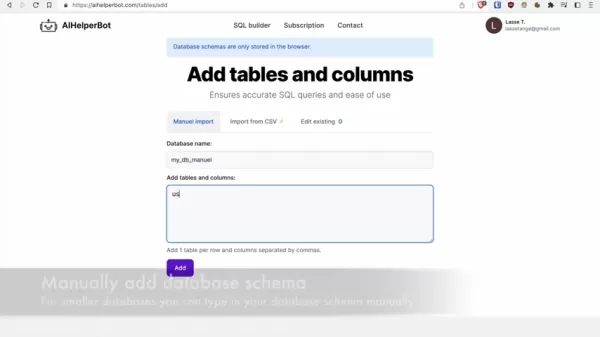
1. Database Schema Integration
- Manual Input: Add schemas manually for smaller databases, offering a tailored integration approach.
- CSV Import: Quickly import schemas from CSV files, reducing manual effort and saving time.
- Direct Schema Retrieval: Pull schemas directly from systems like SQL Server, Oracle, Postgres, and MySQL for accurate, up-to-date data.
2. Beast Mode
- Smart Schema Context: 'Beast Mode' automatically integrates schema context, matching user inputs with relevant database tables for streamlined query creation.
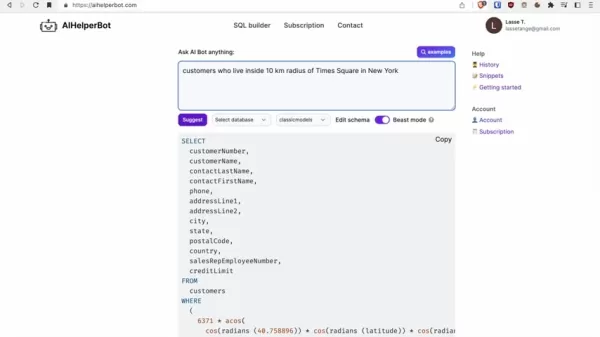
This feature minimizes the need for manual schema references, enhancing query efficiency.
3. Slash Command for Schema Access
- Intuitive Navigation: Type a slash (/) to access and explore database schemas, simplifying table and column discovery.
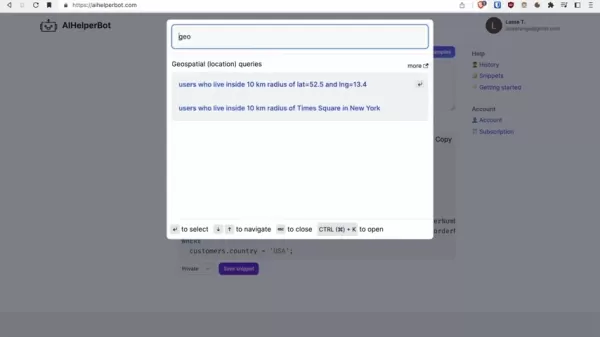
This feature accelerates schema exploration and query formulation.
4. SQL Examples
- Pre-Built Examples: Explore ready-to-use SQL examples to understand AIHelperBot’s functionality.
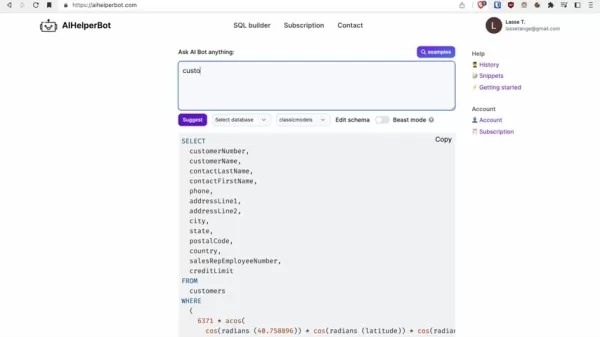
These examples offer practical guidance for various SQL tasks.
5. Snippet Management
- Save and Share Snippets: Store and share SQL snippets for personal use or team collaboration, promoting code reuse.
6. Searchable History
- Efficient Query Retrieval: Access a searchable history of past queries for quick reuse, ensuring consistency across projects.
7. Geospatial Queries
- Advanced Support: AIHelperBot enables complex geospatial data analysis with ease, tailored to specific database engines.
These features make AIHelperBot a versatile and powerful tool for SQL development, database management, and data analysis, enabling users to achieve more in less time.
Step-by-Step Guide: Adding and Managing Database Schemas
Manually Adding Schemas
For smaller databases, manually adding schemas offers a controlled, customizable approach. Users can define tables and columns directly within AIHelperBot.
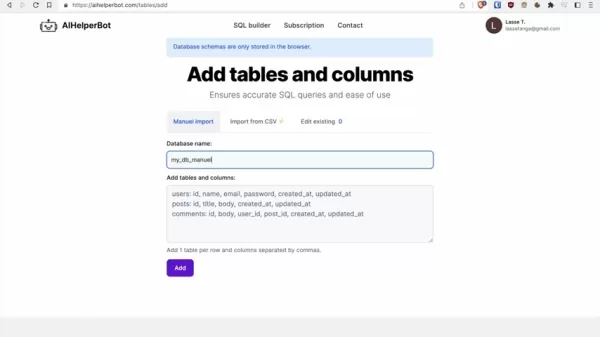
Steps to Manually Add a Schema:
- Go to Add Schema: Click the 'Add Schema' button on the AIHelperBot interface.
- Name the Database: Enter a database name, such as 'my_db_manual', in the designated field.
- Define Tables and Columns: Input table definitions in the format 'table_name: column1, column2, column3', one table per row.
- Save Schema: Click 'Add' to save the schema.
Example:
To add a 'users' table with columns 'id', 'username', 'email', and 'image', and a 'posts' table with columns 'id', 'user_id', 'title', and 'body', enter:
users: id, username, email, imageposts: id, user_id, title, body
Manual schema addition is ideal for small projects requiring a hands-on approach.
Importing Schemas from CSV
Importing schemas from CSV files offers a fast, efficient method for larger databases, reducing manual input.
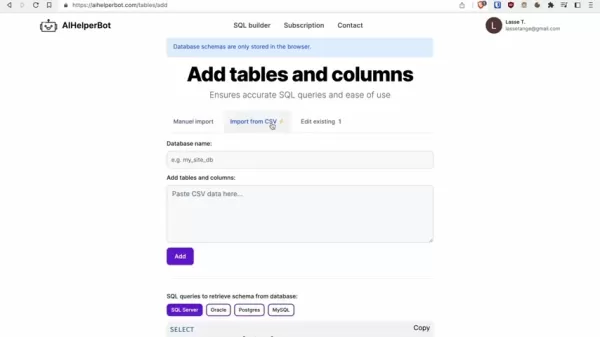
Steps to Import a Schema from CSV:
- Go to Add Schema: Click the 'Add Schema' button.
- Choose CSV Import: Select the 'Import from CSV' option.
- Name the Database: Enter a database name, such as 'classicmodels'.
- Paste CSV Data: Input properly formatted CSV data with table and column definitions.
- Save Schema: Click 'Add' to import the schema.
CSV Data Format:
Format CSV data with one table per row, columns separated by commas, starting with the table name.
CSV import is ideal for projects with pre-existing schema definitions in CSV format.
Retrieving Schemas with SQL Queries
AIHelperBot supports direct schema retrieval from database systems using SQL queries, ensuring accuracy and synchronization.
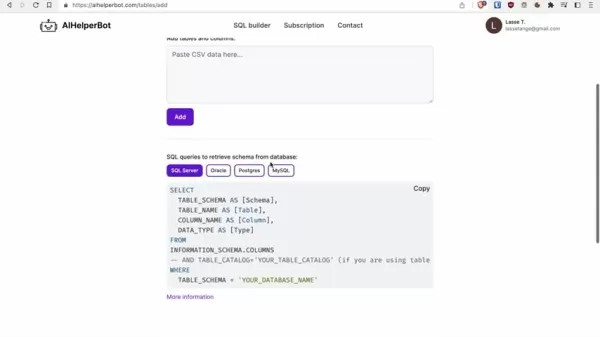
Steps to Retrieve a Schema Using SQL Queries:
- Go to Add Schema: Click the 'Add Schema' button.
- Select Database Type: Choose your database (e.g., SQL Server, Oracle, Postgres, MySQL).
- Copy SQL Query: Copy the provided query for your database type.
- Run Query in Client: Paste the query into your database client (e.g., Sequel Ace) and execute it.
- Copy Results: Copy the query results.
- Paste Results: Paste the results into AIHelperBot’s 'Paste CSV data here' field.
- Save Schema: Click 'Add' to import the schema.
Example for MySQL:
- Select 'MySQL'.
- Copy the SQL query.
- Paste it into Sequel Ace.
- Specify the database name (e.g., 'classicmodels').
- Run the query.
- Copy the results.
- Paste into AIHelperBot.
- Click 'Add'.
Schema retrieval via SQL queries is ideal for large projects requiring synchronized schema data.
Using AIHelperBot for Common SQL Tasks
Generating Queries with Beast Mode
'Beast Mode' simplifies query generation by automatically adding schema context, ideal for users unfamiliar with their database schema.
Steps to Use Beast Mode:
- Activate Beast Mode: Enable the 'Beast Mode' toggle on the interface.
- Describe Your Query: Enter a query description, e.g., 'customers from the USA and their orders and order details'.
- Review Generated Query: AIHelperBot generates a query with relevant schema details.
- Execute Query: Copy and run the query in your database client.
Example:
Enter 'customers from the USA and their orders and order details' with Beast Mode enabled. AIHelperBot generates a query like:
SELECT customers.customerName, orders.orderNumber, orderdetails.productCode, orderdetails.quantityOrdered, orderdetails.priceEachFROM customersINNER JOIN orders ON customers.customerNumber = orders.customerNumberINNER JOIN orderdetails ON orders.orderNumber = orderdetails.orderNumberWHERE customers.country = 'USA';
Beast Mode reduces the effort needed for complex queries, making it accessible to all users.
Accessing Schemas with Slash Command
The slash command offers a fast, intuitive way to explore database schemas and build accurate queries.
Steps to Use Slash Command:
- Type Slash (/): Enter a slash in the input field.
- Browse Schema: A dropdown displays available tables and columns.
- Select Table/Column: Choose the desired table or column.
- Build Query: Continue crafting your query with schema references.
Example:
Type '/orders' to select the 'orders' table and 'orderDate' column. AIHelperBot inserts the correct schema reference.
The slash command simplifies schema navigation and query building.
Exploring SQL Examples
AIHelperBot’s pre-built SQL examples inspire and guide query development for common tasks.
Steps to Explore Examples:
- Click 'Examples': Access the 'Examples' button.
- Browse Examples: View a list of available SQL examples.
- Select Example: Choose a relevant example.
- Review Query: Examine the displayed SQL query.
- Adapt Query: Modify the query for your needs.
- Execute Query: Copy and run the query in your database client.
Example:
Search for 'geo' to find geospatial query examples, like 'users within 10 km of Times Square'. Adapt the query for your location.
Examples help users learn and apply AIHelperBot effectively.
Disabling Beast Mode for Precision
For precise schema control, disable Beast Mode and use autosuggest.
Steps to Use Autosuggest:
- Disable Beast Mode: Turn off the 'Beast Mode' toggle.
- Enter Query Description: Type your query description.
- Use Slash Command: Access schemas with the slash command and select specific tables/columns.
- Build Query: Use autosuggestions to refine your query.
- Execute Query: Copy and run the query.
Example:
Disable Beast Mode and type 'customers and their orders /orders.customerNumber'. Select autosuggestions to build a precise query.
Autosuggest offers control for specific schema needs.
AIHelperBot Pricing
Subscription Options
AIHelperBot offers flexible plans for individual and organizational needs, with pricing based on features and support levels.
Plan Name Features Pricing Basic Core feature access, manual schema input Free Pro Full core features, CSV schema import, priority support $29/month Enterprise All features, direct schema retrieval, dedicated support $99/month
These plans cater to various budgets and needs. Visit the pricing page for the latest details.
Pros and Cons of AIHelperBot
Pros
Streamlined query generation
High query accuracy
Enhanced productivity
Accessible to all skill levels
Robust schema integration
Advanced AI-driven features
Cons
Reliance on AI for query creation
Risk of errors if schemas are misconfigured
Costs for premium features
Core AIHelperBot Features
Key Capabilities and Benefits
AIHelperBot delivers powerful tools to optimize SQL query creation and database interaction.
- Natural Language Processing: Transforms natural language into SQL queries, simplifying development.
- Schema Integration: Seamlessly connects with database schemas for accurate data.
- Smart Suggestions: Provides AI-driven suggestions for tables, columns, and syntax.
- Error Detection: Identifies and highlights potential query errors.
- Code Completion: Offers suggestions to reduce manual typing.
- Query Optimization: Provides tips to enhance query performance.
- Version Control: Tracks SQL code changes for collaboration.
- Security Features: Protects against SQL injection and other threats.
AIHelperBot Use Cases
Practical Applications
AIHelperBot supports a wide range of real-world scenarios.
- Data Analysis: Generate complex queries for actionable insights.
- Report Generation: Automate data extraction for reports.
- Database Administration: Simplify tasks like table creation and user management.
- Application Development: Integrate queries into app workflows.
- Education: Learn SQL syntax and concepts with AI support.
FAQ
Which databases does AIHelperBot support?
AIHelperBot supports SQL Server, Oracle, Postgres, MySQL, and more, with flexible schema integration.
Is AIHelperBot beginner-friendly?
Yes, its intuitive interface and AI suggestions make it accessible to users with minimal SQL knowledge. Beast Mode simplifies query creation for novices.
How does AIHelperBot ensure query accuracy?
It uses automated schema integration, AI suggestions, and error detection to ensure precise queries.
Can I save and share SQL snippets?
Yes, AIHelperBot allows saving and sharing snippets locally for collaboration.
Can I access past queries?
Yes, a searchable query history enables quick retrieval, stored locally in your browser.
How secure is AIHelperBot?
It includes protections against SQL injection and stores schemas locally in the browser.
Related Questions
Why use an AI SQL builder?
AI SQL builders like AIHelperBot simplify query creation, improve accuracy, boost productivity, and are accessible to all skill levels, preparing users for an AI-driven future.
How can I enhance my SQL skills?
Take online courses, practice with datasets, and use AIHelperBot to learn syntax and concepts through suggestions and history.
Which SQL tasks can be automated?
Tasks like report generation, data analysis, and database administration can be automated with AIHelperBot’s pre-built examples, reducing errors.
How do I write efficient SQL queries?
Use indexes, avoid SELECT *, filter with WHERE clauses, and optimize JOINs. AIHelperBot offers performance tips.
How can I prevent SQL injection?
Use parameterized queries, validate inputs, and leverage AIHelperBot’s security features to safeguard your database.
Related article
 South Korea Breaks Ground on National AI Computing Center, Investing 2.5 Trillion Won with 2028 Target
South Korean outlet EtNews reports that groundbreaking for the Korea AI Computing Center (KOACC) took place on August 3 at the Solar City data center park in Sunan, Jeollanam-do. Backed by a total investment of 2.5 trillion KRW (roughly 11.838 billio
Six Tech Giants Back Linux Foundation With $12.5M to Tackle AI Vulnerability Noise
To tackle the flood of low-quality security reports produced by AI automation tools, six major tech companies—Anthropic, Amazon (AWS), GitHub, Google, Microsoft, and OpenAI—have collectively contributed $12.5 million in funding to Linux Foundation in
Musk Considered Leaving OpenAI to His Kids as Altman Testifies
This morning, OpenAI CEO Sam Altman took the stand to address former co-founder Elon Musk’s lawsuit challenging the company’s corporate structure.When asked about Musk’s claim that other founders “stole a charity” by launching a for-profit subsidiary
Related Special Topic Recommendations
Music composition
South Korea Breaks Ground on National AI Computing Center, Investing 2.5 Trillion Won with 2028 Target
South Korean outlet EtNews reports that groundbreaking for the Korea AI Computing Center (KOACC) took place on August 3 at the Solar City data center park in Sunan, Jeollanam-do. Backed by a total investment of 2.5 trillion KRW (roughly 11.838 billio
Six Tech Giants Back Linux Foundation With $12.5M to Tackle AI Vulnerability Noise
To tackle the flood of low-quality security reports produced by AI automation tools, six major tech companies—Anthropic, Amazon (AWS), GitHub, Google, Microsoft, and OpenAI—have collectively contributed $12.5 million in funding to Linux Foundation in
Musk Considered Leaving OpenAI to His Kids as Altman Testifies
This morning, OpenAI CEO Sam Altman took the stand to address former co-founder Elon Musk’s lawsuit challenging the company’s corporate structure.When asked about Musk’s claim that other founders “stole a charity” by launching a for-profit subsidiary
Related Special Topic Recommendations
Music composition
 AI Vocal Demo Tools for Songwriters, Hooks, Toplines, and Multilingual Draft Sessions
2026 Latest Best AI Vocal Demo Tools for Songwriters, Hook Creators, and Multi-Language Content Teams! XIX.AI has curated a top-rated list of powerful game-changing tools that go through rigorous real-world tests. You’ll find detailed free vs paid comparison data, comprehensive rankings, and must-try options to help you boost writing efficiency and unlock your creative potential. Explore now to discover your perfect tool for all your content needs!
 9 tools
 xix.ai
Business
Best AI Competitive Research Tools for Small Businesses
xix.ai
Business
Best AI Competitive Research Tools for Small Businesses
2026 Latest Best Top-rated AI Competitive Research Tools for Small Businesses! XIX.AI has curated a highly powerful game-changing collection, updated weekly with rigorous real-world tests and detailed rankings. You can find a comprehensive free vs paid comparison to help you identify the must-try tools that boost your productivity and give you a competitive edge. Explore now to discover your perfect tool!
9 tools
xix.ai
Image editing
Photoshop AI Retouch Tools for Ecommerce Apparel, Skin Cleanup, and Color Consistency
2026 Latest Best Photoshop AI retouch tools for ecommerce apparel, skin cleanup, and color consistency! This top-rated curated list features powerful game-changing solutions that help you boost writing efficiency, streamline content creation, and achieve perfect visual results effortlessly. Each tool has undergone real-world tests through weekly updated rankings, complete with free vs paid comparison details. Backed by XIX.AI, it’s the must-try guide for anyone aiming to unlock your AI edge. Explore now!
10 tools
xix.ai
Prompt
Best AI Prompt Libraries for ChatGPT Workflows
2026 Latest Best Top-Rated AI Prompt Libraries for optimizing all types of ChatGPT workflows. XIX.AI has curated a powerful, game-changing collection that goes through rigorous real-world tests to ensure top performance. You can find detailed free vs paid comparisons and expert rankings to help you choose the must-try tools that boost your productivity and unlock your AI edge. Explore now!
11 tools
xix.ai
Education and Learning
AI Quiz Builder Platforms for Teachers, Tutors, and Cohort-Based Learning Programs
2026 Latest Best AI Quiz Builder Platforms for Teachers, Tutors, and Cohort-Based Learning Programs! XIX.AI has curated a top-rated list of powerful game-changing tools that go through real-world tests to deliver accurate rankings. These must-try platforms help boost writing efficiency, streamline content creation, and simplify quiz design across all learning scenarios. Explore now to discover your perfect tool for unlocking your AI edge in teaching!
13 tools
xix.ai
code
AI Pull Request Review Tools for GitHub Teams Handling Refactors, Bugs, and Security Gaps
2026 Latest Best AI Pull Request Review Tools for GitHub Teams are here on XIX.AI! This top-rated curated list showcases powerful game-changing solutions that streamline refactoring, bug fixing, and security gap detection across all team workflows. Enjoy a free vs paid comparison along with real-world tests and detailed rankings to help you find the perfect tool that boosts productivity significantly. Explore now to unlock your AI edge!
12 tools
xix.ai

 Comments (4)
0/500
Comments (4)
0/500
![TimothyMitchell]()
AIでSQL自動生成って、めっちゃ実用的!最近はDB管理が複雑化してて、手書きのクエリだとミスも多いし。これがあれば、開発スピードが圧倒的に上がりそう。ただ、あまり依存しすぎると、SQLの基本的な理解が疎かになる心配も... 😅 それに、セキュリティ面での懸念はないのかな?
![CharlesWhite]()
¡Qué herramienta más interesante! Simplificar la consulta SQL con IA es algo necesario, aunque espero que no sustituya del todo a los análisis humanos. ¿Cómo manejará casos de negocio complejos? 😅 El artículo menciona la optimización, pero me gustaría ver ejemplos concretos de cómo se traducen los requisitos del usuario a código.
![RogerGonzalez]()
¡Este generador de consultas SQL con IA parece revolucionario! 🚀 ¿Habéis probado si funciona bien con bases de datos complejas o solo con las sencillas? Me encantaría saber vuestra experiencia.
![SamuelClark]()
This AIHelperBot sounds like a game-changer for SQL! I'm curious how it handles complex joins—any quirks or just pure magic? 🪄
In today's data-centric landscape, effective database management is critical. AIHelperBot stands out as an innovative AI-powered SQL query generator, designed to optimize SQL development, improve query precision, and enhance productivity. This detailed guide highlights AIHelperBot's features, advantages, and practical applications, demonstrating why it’s an essential tool for both beginner and seasoned database professionals. Whether you aim to simplify intricate queries, automate repetitive processes, or enhance SQL code accuracy, AIHelperBot provides a robust set of AI-driven tools tailored to your needs.
Key Highlights
AIHelperBot streamlines SQL query creation with an intuitive, AI-enhanced interface.
It ensures query precision through automated schema integration and error-checking mechanisms.
The 'Beast Mode' feature optimizes query building by intelligently incorporating schema context.
AIHelperBot supports manual input, CSV imports, and direct database schema retrieval for versatile schema integration.
Users can effortlessly navigate database schemas using a simple slash command.
Access pre-built SQL examples to explore AIHelperBot’s capabilities and applications.
Save and share SQL snippets for personal use or team collaboration.
Retrieve past queries efficiently with a searchable query history.
Streamlining SQL Query Creation with AIHelperBot
What is AIHelperBot?
AIHelperBot is a cutting-edge AI-powered SQL query generator that enables users to interact with databases more effectively. By leveraging artificial intelligence, it simplifies the creation of complex SQL queries, making it accessible to users with varying levels of expertise. AIHelperBot automates critical aspects of query development, reducing the time and effort needed to derive valuable data insights. This tool is engineered to boost productivity, enhance query accuracy, and deliver a seamless experience for database professionals.
Key advantages of AIHelperBot include:
- Effortless Query Creation: An intuitive AI-driven interface simplifies SQL query development.
- Improved Precision: Automated schema integration and error detection ensure accurate queries.
- Boosted Efficiency: Automation of repetitive tasks saves time and minimizes manual work.
- User-Friendly Design: Accessible to users with varying SQL expertise.
- Flexible Schema Integration: Supports manual input, CSV imports, and direct schema retrieval.
AIHelperBot is a comprehensive solution that tackles modern database management challenges, making it an invaluable tool for streamlining SQL workflows and unlocking deeper data insights.
Core Features of AIHelperBot
AIHelperBot offers a suite of powerful features that enhance SQL query generation and database interaction, improving efficiency, accuracy, and accessibility for users of all skill levels.
1. Database Schema Integration
- Manual Input: Add schemas manually for smaller databases, offering a tailored integration approach.
- CSV Import: Quickly import schemas from CSV files, reducing manual effort and saving time.
- Direct Schema Retrieval: Pull schemas directly from systems like SQL Server, Oracle, Postgres, and MySQL for accurate, up-to-date data.
2. Beast Mode
- Smart Schema Context: 'Beast Mode' automatically integrates schema context, matching user inputs with relevant database tables for streamlined query creation.
This feature minimizes the need for manual schema references, enhancing query efficiency.
3. Slash Command for Schema Access
- Intuitive Navigation: Type a slash (/) to access and explore database schemas, simplifying table and column discovery.
This feature accelerates schema exploration and query formulation.
4. SQL Examples
- Pre-Built Examples: Explore ready-to-use SQL examples to understand AIHelperBot’s functionality.
These examples offer practical guidance for various SQL tasks.
5. Snippet Management
- Save and Share Snippets: Store and share SQL snippets for personal use or team collaboration, promoting code reuse.
6. Searchable History
- Efficient Query Retrieval: Access a searchable history of past queries for quick reuse, ensuring consistency across projects.
7. Geospatial Queries
- Advanced Support: AIHelperBot enables complex geospatial data analysis with ease, tailored to specific database engines.
These features make AIHelperBot a versatile and powerful tool for SQL development, database management, and data analysis, enabling users to achieve more in less time.
Step-by-Step Guide: Adding and Managing Database Schemas
Manually Adding Schemas
For smaller databases, manually adding schemas offers a controlled, customizable approach. Users can define tables and columns directly within AIHelperBot.
Steps to Manually Add a Schema:
- Go to Add Schema: Click the 'Add Schema' button on the AIHelperBot interface.
- Name the Database: Enter a database name, such as 'my_db_manual', in the designated field.
- Define Tables and Columns: Input table definitions in the format 'table_name: column1, column2, column3', one table per row.
- Save Schema: Click 'Add' to save the schema.
Example:
To add a 'users' table with columns 'id', 'username', 'email', and 'image', and a 'posts' table with columns 'id', 'user_id', 'title', and 'body', enter:
users: id, username, email, imageposts: id, user_id, title, body
Manual schema addition is ideal for small projects requiring a hands-on approach.
Importing Schemas from CSV
Importing schemas from CSV files offers a fast, efficient method for larger databases, reducing manual input.
Steps to Import a Schema from CSV:
- Go to Add Schema: Click the 'Add Schema' button.
- Choose CSV Import: Select the 'Import from CSV' option.
- Name the Database: Enter a database name, such as 'classicmodels'.
- Paste CSV Data: Input properly formatted CSV data with table and column definitions.
- Save Schema: Click 'Add' to import the schema.
CSV Data Format:
Format CSV data with one table per row, columns separated by commas, starting with the table name.
CSV import is ideal for projects with pre-existing schema definitions in CSV format.
Retrieving Schemas with SQL Queries
AIHelperBot supports direct schema retrieval from database systems using SQL queries, ensuring accuracy and synchronization.
Steps to Retrieve a Schema Using SQL Queries:
- Go to Add Schema: Click the 'Add Schema' button.
- Select Database Type: Choose your database (e.g., SQL Server, Oracle, Postgres, MySQL).
- Copy SQL Query: Copy the provided query for your database type.
- Run Query in Client: Paste the query into your database client (e.g., Sequel Ace) and execute it.
- Copy Results: Copy the query results.
- Paste Results: Paste the results into AIHelperBot’s 'Paste CSV data here' field.
- Save Schema: Click 'Add' to import the schema.
Example for MySQL:
- Select 'MySQL'.
- Copy the SQL query.
- Paste it into Sequel Ace.
- Specify the database name (e.g., 'classicmodels').
- Run the query.
- Copy the results.
- Paste into AIHelperBot.
- Click 'Add'.
Schema retrieval via SQL queries is ideal for large projects requiring synchronized schema data.
Using AIHelperBot for Common SQL Tasks
Generating Queries with Beast Mode
'Beast Mode' simplifies query generation by automatically adding schema context, ideal for users unfamiliar with their database schema.
Steps to Use Beast Mode:
- Activate Beast Mode: Enable the 'Beast Mode' toggle on the interface.
- Describe Your Query: Enter a query description, e.g., 'customers from the USA and their orders and order details'.
- Review Generated Query: AIHelperBot generates a query with relevant schema details.
- Execute Query: Copy and run the query in your database client.
Example:
Enter 'customers from the USA and their orders and order details' with Beast Mode enabled. AIHelperBot generates a query like:
SELECT customers.customerName, orders.orderNumber, orderdetails.productCode, orderdetails.quantityOrdered, orderdetails.priceEachFROM customersINNER JOIN orders ON customers.customerNumber = orders.customerNumberINNER JOIN orderdetails ON orders.orderNumber = orderdetails.orderNumberWHERE customers.country = 'USA';
Beast Mode reduces the effort needed for complex queries, making it accessible to all users.
Accessing Schemas with Slash Command
The slash command offers a fast, intuitive way to explore database schemas and build accurate queries.
Steps to Use Slash Command:
- Type Slash (/): Enter a slash in the input field.
- Browse Schema: A dropdown displays available tables and columns.
- Select Table/Column: Choose the desired table or column.
- Build Query: Continue crafting your query with schema references.
Example:
Type '/orders' to select the 'orders' table and 'orderDate' column. AIHelperBot inserts the correct schema reference.
The slash command simplifies schema navigation and query building.
Exploring SQL Examples
AIHelperBot’s pre-built SQL examples inspire and guide query development for common tasks.
Steps to Explore Examples:
- Click 'Examples': Access the 'Examples' button.
- Browse Examples: View a list of available SQL examples.
- Select Example: Choose a relevant example.
- Review Query: Examine the displayed SQL query.
- Adapt Query: Modify the query for your needs.
- Execute Query: Copy and run the query in your database client.
Example:
Search for 'geo' to find geospatial query examples, like 'users within 10 km of Times Square'. Adapt the query for your location.
Examples help users learn and apply AIHelperBot effectively.
Disabling Beast Mode for Precision
For precise schema control, disable Beast Mode and use autosuggest.
Steps to Use Autosuggest:
- Disable Beast Mode: Turn off the 'Beast Mode' toggle.
- Enter Query Description: Type your query description.
- Use Slash Command: Access schemas with the slash command and select specific tables/columns.
- Build Query: Use autosuggestions to refine your query.
- Execute Query: Copy and run the query.
Example:
Disable Beast Mode and type 'customers and their orders /orders.customerNumber'. Select autosuggestions to build a precise query.
Autosuggest offers control for specific schema needs.
AIHelperBot Pricing
Subscription Options
AIHelperBot offers flexible plans for individual and organizational needs, with pricing based on features and support levels.
| Plan Name | Features | Pricing |
|---|---|---|
| Basic | Core feature access, manual schema input | Free |
| Pro | Full core features, CSV schema import, priority support | $29/month |
| Enterprise | All features, direct schema retrieval, dedicated support | $99/month |
These plans cater to various budgets and needs. Visit the pricing page for the latest details.
Pros and Cons of AIHelperBot
Pros
Streamlined query generation
High query accuracy
Enhanced productivity
Accessible to all skill levels
Robust schema integration
Advanced AI-driven features
Cons
Reliance on AI for query creation
Risk of errors if schemas are misconfigured
Costs for premium features
Core AIHelperBot Features
Key Capabilities and Benefits
AIHelperBot delivers powerful tools to optimize SQL query creation and database interaction.
- Natural Language Processing: Transforms natural language into SQL queries, simplifying development.
- Schema Integration: Seamlessly connects with database schemas for accurate data.
- Smart Suggestions: Provides AI-driven suggestions for tables, columns, and syntax.
- Error Detection: Identifies and highlights potential query errors.
- Code Completion: Offers suggestions to reduce manual typing.
- Query Optimization: Provides tips to enhance query performance.
- Version Control: Tracks SQL code changes for collaboration.
- Security Features: Protects against SQL injection and other threats.
AIHelperBot Use Cases
Practical Applications
AIHelperBot supports a wide range of real-world scenarios.
- Data Analysis: Generate complex queries for actionable insights.
- Report Generation: Automate data extraction for reports.
- Database Administration: Simplify tasks like table creation and user management.
- Application Development: Integrate queries into app workflows.
- Education: Learn SQL syntax and concepts with AI support.
FAQ
Which databases does AIHelperBot support?
AIHelperBot supports SQL Server, Oracle, Postgres, MySQL, and more, with flexible schema integration.
Is AIHelperBot beginner-friendly?
Yes, its intuitive interface and AI suggestions make it accessible to users with minimal SQL knowledge. Beast Mode simplifies query creation for novices.
How does AIHelperBot ensure query accuracy?
It uses automated schema integration, AI suggestions, and error detection to ensure precise queries.
Can I save and share SQL snippets?
Yes, AIHelperBot allows saving and sharing snippets locally for collaboration.
Can I access past queries?
Yes, a searchable query history enables quick retrieval, stored locally in your browser.
How secure is AIHelperBot?
It includes protections against SQL injection and stores schemas locally in the browser.
Related Questions
Why use an AI SQL builder?
AI SQL builders like AIHelperBot simplify query creation, improve accuracy, boost productivity, and are accessible to all skill levels, preparing users for an AI-driven future.
How can I enhance my SQL skills?
Take online courses, practice with datasets, and use AIHelperBot to learn syntax and concepts through suggestions and history.
Which SQL tasks can be automated?
Tasks like report generation, data analysis, and database administration can be automated with AIHelperBot’s pre-built examples, reducing errors.
How do I write efficient SQL queries?
Use indexes, avoid SELECT *, filter with WHERE clauses, and optimize JOINs. AIHelperBot offers performance tips.
How can I prevent SQL injection?
Use parameterized queries, validate inputs, and leverage AIHelperBot’s security features to safeguard your database.








 South Korea Breaks Ground on National AI Computing Center, Investing 2.5 Trillion Won with 2028 Target
South Korean outlet EtNews reports that groundbreaking for the Korea AI Computing Center (KOACC) took place on August 3 at the Solar City data center park in Sunan, Jeollanam-do. Backed by a total investment of 2.5 trillion KRW (roughly 11.838 billio
South Korea Breaks Ground on National AI Computing Center, Investing 2.5 Trillion Won with 2028 Target
South Korean outlet EtNews reports that groundbreaking for the Korea AI Computing Center (KOACC) took place on August 3 at the Solar City data center park in Sunan, Jeollanam-do. Backed by a total investment of 2.5 trillion KRW (roughly 11.838 billio
 Six Tech Giants Back Linux Foundation With $12.5M to Tackle AI Vulnerability Noise
To tackle the flood of low-quality security reports produced by AI automation tools, six major tech companies—Anthropic, Amazon (AWS), GitHub, Google, Microsoft, and OpenAI—have collectively contributed $12.5 million in funding to Linux Foundation in
Six Tech Giants Back Linux Foundation With $12.5M to Tackle AI Vulnerability Noise
To tackle the flood of low-quality security reports produced by AI automation tools, six major tech companies—Anthropic, Amazon (AWS), GitHub, Google, Microsoft, and OpenAI—have collectively contributed $12.5 million in funding to Linux Foundation in
 Musk Considered Leaving OpenAI to His Kids as Altman Testifies
This morning, OpenAI CEO Sam Altman took the stand to address former co-founder Elon Musk’s lawsuit challenging the company’s corporate structure.When asked about Musk’s claim that other founders “stole a charity” by launching a for-profit subsidiary
Musk Considered Leaving OpenAI to His Kids as Altman Testifies
This morning, OpenAI CEO Sam Altman took the stand to address former co-founder Elon Musk’s lawsuit challenging the company’s corporate structure.When asked about Musk’s claim that other founders “stole a charity” by launching a for-profit subsidiary

2026 Latest Best AI Vocal Demo Tools for Songwriters, Hook Creators, and Multi-Language Content Teams! XIX.AI has curated a top-rated list of powerful game-changing tools that go through rigorous real-world tests. You’ll find detailed free vs paid comparison data, comprehensive rankings, and must-try options to help you boost writing efficiency and unlock your creative potential. Explore now to discover your perfect tool for all your content needs!
9 tools
xix.ai

2026 Latest Best Top-rated AI Competitive Research Tools for Small Businesses! XIX.AI has curated a highly powerful game-changing collection, updated weekly with rigorous real-world tests and detailed rankings. You can find a comprehensive free vs paid comparison to help you identify the must-try tools that boost your productivity and give you a competitive edge. Explore now to discover your perfect tool!
9 tools
xix.ai

2026 Latest Best Photoshop AI retouch tools for ecommerce apparel, skin cleanup, and color consistency! This top-rated curated list features powerful game-changing solutions that help you boost writing efficiency, streamline content creation, and achieve perfect visual results effortlessly. Each tool has undergone real-world tests through weekly updated rankings, complete with free vs paid comparison details. Backed by XIX.AI, it’s the must-try guide for anyone aiming to unlock your AI edge. Explore now!
10 tools
xix.ai

2026 Latest Best Top-Rated AI Prompt Libraries for optimizing all types of ChatGPT workflows. XIX.AI has curated a powerful, game-changing collection that goes through rigorous real-world tests to ensure top performance. You can find detailed free vs paid comparisons and expert rankings to help you choose the must-try tools that boost your productivity and unlock your AI edge. Explore now!
11 tools
xix.ai

2026 Latest Best AI Quiz Builder Platforms for Teachers, Tutors, and Cohort-Based Learning Programs! XIX.AI has curated a top-rated list of powerful game-changing tools that go through real-world tests to deliver accurate rankings. These must-try platforms help boost writing efficiency, streamline content creation, and simplify quiz design across all learning scenarios. Explore now to discover your perfect tool for unlocking your AI edge in teaching!
13 tools
xix.ai

2026 Latest Best AI Pull Request Review Tools for GitHub Teams are here on XIX.AI! This top-rated curated list showcases powerful game-changing solutions that streamline refactoring, bug fixing, and security gap detection across all team workflows. Enjoy a free vs paid comparison along with real-world tests and detailed rankings to help you find the perfect tool that boosts productivity significantly. Explore now to unlock your AI edge!
12 tools
xix.ai

AIでSQL自動生成って、めっちゃ実用的!最近はDB管理が複雑化してて、手書きのクエリだとミスも多いし。これがあれば、開発スピードが圧倒的に上がりそう。ただ、あまり依存しすぎると、SQLの基本的な理解が疎かになる心配も... 😅 それに、セキュリティ面での懸念はないのかな?
¡Qué herramienta más interesante! Simplificar la consulta SQL con IA es algo necesario, aunque espero que no sustituya del todo a los análisis humanos. ¿Cómo manejará casos de negocio complejos? 😅 El artículo menciona la optimización, pero me gustaría ver ejemplos concretos de cómo se traducen los requisitos del usuario a código.
¡Este generador de consultas SQL con IA parece revolucionario! 🚀 ¿Habéis probado si funciona bien con bases de datos complejas o solo con las sencillas? Me encantaría saber vuestra experiencia.
This AIHelperBot sounds like a game-changer for SQL! I'm curious how it handles complex joins—any quirks or just pure magic? 🪄












