


 Home
HomeAI-Powered Visual Creation with Bing Image Creator
In today's digital world, captivating visuals are essential. Whether you're a marketer, designer, or creative enthusiast, generating unique images is crucial. AI-driven image creation has transformed this process, enabling users to produce stunning visuals from text prompts. This article dives into Bing Image Creator, an intuitive tool that democratizes AI image generation, delivering impressive results with ease.
Key Highlights
Bing Image Creator transforms text prompts into AI-generated images.
Seamlessly integrated with Bing search and Microsoft Edge.
Features an intuitive interface, ideal for beginners.
Offers 'boosts' for faster image generation, refreshed daily.
Provides diverse art styles and creative flexibility.
A free tool enhancing creativity for marketing, design, and personal projects.
Exploring Bing Image Creator's AI Capabilities
What is Bing Image Creator?
Bing Image Creator, developed by Microsoft, is an AI tool that generates images from text descriptions. Embedded in Bing Search and Microsoft Edge, it offers a seamless way to create custom visuals. Simply input a text prompt, and the AI produces images aligning with your vision.
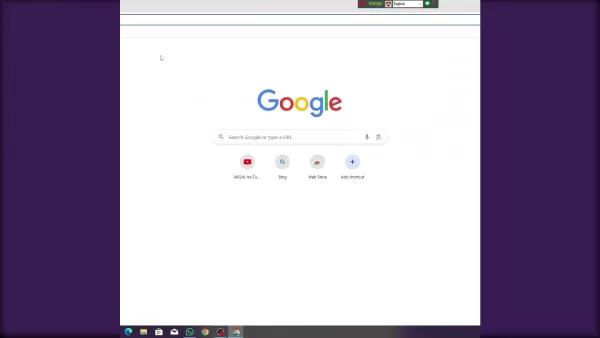
Designed for all skill levels, this tool makes AI image creation accessible to everyone, no technical expertise required.
For marketing campaigns, blog posts, or personal projects, Bing Image Creator eliminates reliance on stock images or costly design services. Describe your desired image, and the AI brings it to life, unlocking endless creative possibilities.
Its integration with Bing and Edge ensures easy access during browsing or project work, streamlining the inclusion of AI-generated visuals into your workflow.
The tool’s user-friendly interface simplifies the process, enabling even novices to create striking images effortlessly. Its accessibility drives the growing popularity of AI image generation.
AI image creation blends artificial intelligence with visual design, using advanced algorithms to interpret text prompts and produce matching images. As the technology evolves, Bing Image Creator leads the way, offering a glimpse into the future of visual content creation.
How to Access Bing Image Creator
Bing Image Creator is easily accessible through multiple channels:
- Via Bing Search: Navigate to the Bing website, select the 'Images' tab, and click 'Create' to access the tool.
- Through Microsoft Edge: Find the Bing Image Creator icon in the sidebar or context menu when right-clicking an image.
- Direct Website Access: Visit the official Bing Image Creator site for a dedicated image generation interface.
All methods provide identical functionality, allowing you to choose what fits your workflow. Integration with Bing and Edge adds convenience, while the dedicated site offers a focused environment.
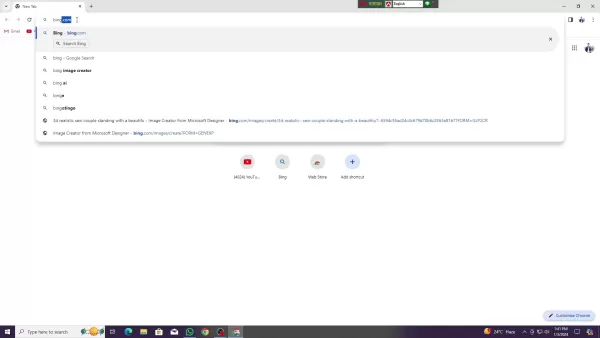
With just a few clicks, you can start creating images, reflecting Microsoft’s commitment to making AI accessible to all.
Boosts and Image Generation Speed
Bing Image Creator uses 'boosts' to accelerate image generation. Each boost prioritizes your request for faster results, with a limited daily allocation that refreshes automatically.
The interface displays your available boosts. Without boosts, image generation is slower but still possible, ensuring universal access.
Generation speed depends on prompt complexity, server load, and boost usage. Boosts typically deliver images in seconds, while non-boosted requests may take minutes.
This boost system balances resource allocation, encouraging creative experimentation with prompt variations.
Microsoft may tweak boost availability and generation speed based on user feedback, ensuring Bing Image Creator remains efficient and reliable.
Mastering Prompt Engineering
Crafting Precise Prompts
High-quality images start with detailed prompts. The more specific your description, the closer the AI’s output matches your vision. Tips for effective prompts:
- Use Vivid Descriptions: Include adjectives like 'serene mountain landscape with a vibrant sunset.'
- Define Art Styles: Specify styles like 'photorealistic,' 'abstract,' or 'cartoonish.'
- Mention Colors: Indicate preferred color schemes for a cohesive aesthetic.
- Provide Context: Describe the scene, e.g., 'a cozy cat on a sunlit windowsill.'
- Test Variations: Experiment with prompt tweaks and negative prompts to refine results.
These strategies enhance the quality of images generated, ensuring the AI accurately captures your creative intent.
Exploring Art Styles and Options
Bing Image Creator offers diverse art styles and creative tools to match your vision:
- Photorealistic: Lifelike images ideal for realistic scenes.
- Impressionistic: Soft, painterly visuals inspired by artists like Monet.
- Cartoonish: Playful, animated-style images.
- Digital Art: Includes 3D renders, vectors, and pixel art.
Additional creative options include:
- Color Schemes: Choose specific palettes for consistency.
- Lighting Effects: Experiment with soft, dramatic, or harsh lighting.
- Composition: Define angles, subject placement, and backgrounds.
Exploring these options unlocks boundless creativity, encouraging bold experimentation with Bing Image Creator.
Guide to Creating Images
Step 1: Access the Tool
Reach Bing Image Creator via Bing search, Microsoft Edge, or the official website, based on your preference.
Step 2: Input Your Prompt
Enter a detailed text prompt in the provided text box, describing your desired image clearly.
Step 3: Refine Your Prompt (Optional)
Add specifics like art style, colors, or elements to enhance accuracy. Test variations for optimal results.
Step 4: Generate the Image
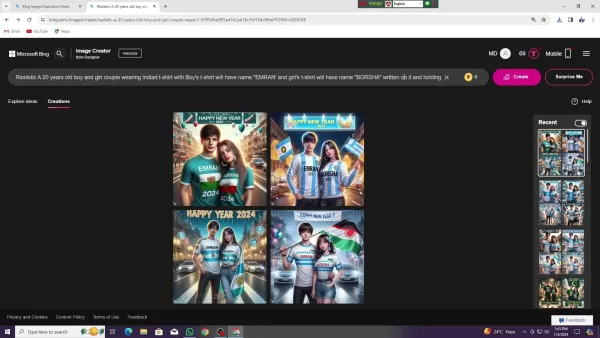
Click 'Create' to process your prompt. The AI generates multiple images, with speed depending on boost usage and prompt complexity.
Step 5: Review and Save
Review the generated images, select your favorites, and download them. Generate additional variations if needed.
Pros and Cons of Bing Image Creator
Pros
Free and accessible to all users.
Intuitive interface, beginner-friendly.
Integrated with Bing and Edge for convenience.
Wide range of art styles and creative options.
Boosts accelerate image generation.
Cons
Fewer customization options than some competitors.
Image quality may lag behind premium tools.
Boost limits restrict daily generation capacity.
Rare risk of inappropriate image outputs.
Requires a Microsoft account.
Frequently Asked Questions
Is Bing Image Creator free?
Yes, it’s free, though premium features may be added later.
How many images can I generate daily?
Image limits depend on boosts and Microsoft’s policies. Non-boosted generation is slower but unlimited.
Can I use images commercially?
Check Microsoft’s terms of service for permitted uses.
What if an inappropriate image is generated?
Microsoft’s safeguards minimize this risk. Report any issues to Microsoft for action.
Comparing Bing Image Creator to Alternatives
Bing Image Creator is one of many AI image generators, alongside DALL-E 2, Midjourney, and Stable Diffusion. Each has unique strengths:
DALL-E 2 excels in realism but requires a paid subscription. Midjourney offers artistic styles but demands technical skill. Stable Diffusion, open-source and free, provides high customization but is complex to set up.
Comparison:
- Bing Image Creator: Free, easy, high accessibility, moderate customization.
- DALL-E 2: Paid, very realistic, moderate ease, high accessibility.
- Midjourney: Paid, artistic, difficult to use, moderate accessibility.
- Stable Diffusion: Free, highly customizable, complex, low accessibility.
Test each to find the best fit. Bing Image Creator’s free access, ease, and versatility make it an excellent starting point.
Related article
 South Korea Breaks Ground on National AI Computing Center, Investing 2.5 Trillion Won with 2028 Target
South Korean outlet EtNews reports that groundbreaking for the Korea AI Computing Center (KOACC) took place on August 3 at the Solar City data center park in Sunan, Jeollanam-do. Backed by a total investment of 2.5 trillion KRW (roughly 11.838 billio
Six Tech Giants Back Linux Foundation With $12.5M to Tackle AI Vulnerability Noise
To tackle the flood of low-quality security reports produced by AI automation tools, six major tech companies—Anthropic, Amazon (AWS), GitHub, Google, Microsoft, and OpenAI—have collectively contributed $12.5 million in funding to Linux Foundation in
Musk Considered Leaving OpenAI to His Kids as Altman Testifies
This morning, OpenAI CEO Sam Altman took the stand to address former co-founder Elon Musk’s lawsuit challenging the company’s corporate structure.When asked about Musk’s claim that other founders “stole a charity” by launching a for-profit subsidiary
Related Special Topic Recommendations
Music composition
South Korea Breaks Ground on National AI Computing Center, Investing 2.5 Trillion Won with 2028 Target
South Korean outlet EtNews reports that groundbreaking for the Korea AI Computing Center (KOACC) took place on August 3 at the Solar City data center park in Sunan, Jeollanam-do. Backed by a total investment of 2.5 trillion KRW (roughly 11.838 billio
Six Tech Giants Back Linux Foundation With $12.5M to Tackle AI Vulnerability Noise
To tackle the flood of low-quality security reports produced by AI automation tools, six major tech companies—Anthropic, Amazon (AWS), GitHub, Google, Microsoft, and OpenAI—have collectively contributed $12.5 million in funding to Linux Foundation in
Musk Considered Leaving OpenAI to His Kids as Altman Testifies
This morning, OpenAI CEO Sam Altman took the stand to address former co-founder Elon Musk’s lawsuit challenging the company’s corporate structure.When asked about Musk’s claim that other founders “stole a charity” by launching a for-profit subsidiary
Related Special Topic Recommendations
Music composition
 AI Vocal Demo Tools for Songwriters, Hooks, Toplines, and Multilingual Draft Sessions
2026 Latest Best AI Vocal Demo Tools for Songwriters, Hook Creators, and Multi-Language Content Teams! XIX.AI has curated a top-rated list of powerful game-changing tools that go through rigorous real-world tests. You’ll find detailed free vs paid comparison data, comprehensive rankings, and must-try options to help you boost writing efficiency and unlock your creative potential. Explore now to discover your perfect tool for all your content needs!
 9 tools
 xix.ai
Business
Best AI Competitive Research Tools for Small Businesses
xix.ai
Business
Best AI Competitive Research Tools for Small Businesses
2026 Latest Best Top-rated AI Competitive Research Tools for Small Businesses! XIX.AI has curated a highly powerful game-changing collection, updated weekly with rigorous real-world tests and detailed rankings. You can find a comprehensive free vs paid comparison to help you identify the must-try tools that boost your productivity and give you a competitive edge. Explore now to discover your perfect tool!
9 tools
xix.ai
Image editing
Photoshop AI Retouch Tools for Ecommerce Apparel, Skin Cleanup, and Color Consistency
2026 Latest Best Photoshop AI retouch tools for ecommerce apparel, skin cleanup, and color consistency! This top-rated curated list features powerful game-changing solutions that help you boost writing efficiency, streamline content creation, and achieve perfect visual results effortlessly. Each tool has undergone real-world tests through weekly updated rankings, complete with free vs paid comparison details. Backed by XIX.AI, it’s the must-try guide for anyone aiming to unlock your AI edge. Explore now!
10 tools
xix.ai
Prompt
Best AI Prompt Libraries for ChatGPT Workflows
2026 Latest Best Top-Rated AI Prompt Libraries for optimizing all types of ChatGPT workflows. XIX.AI has curated a powerful, game-changing collection that goes through rigorous real-world tests to ensure top performance. You can find detailed free vs paid comparisons and expert rankings to help you choose the must-try tools that boost your productivity and unlock your AI edge. Explore now!
11 tools
xix.ai
Education and Learning
AI Quiz Builder Platforms for Teachers, Tutors, and Cohort-Based Learning Programs
2026 Latest Best AI Quiz Builder Platforms for Teachers, Tutors, and Cohort-Based Learning Programs! XIX.AI has curated a top-rated list of powerful game-changing tools that go through real-world tests to deliver accurate rankings. These must-try platforms help boost writing efficiency, streamline content creation, and simplify quiz design across all learning scenarios. Explore now to discover your perfect tool for unlocking your AI edge in teaching!
13 tools
xix.ai
code
AI Pull Request Review Tools for GitHub Teams Handling Refactors, Bugs, and Security Gaps
2026 Latest Best AI Pull Request Review Tools for GitHub Teams are here on XIX.AI! This top-rated curated list showcases powerful game-changing solutions that streamline refactoring, bug fixing, and security gap detection across all team workflows. Enjoy a free vs paid comparison along with real-world tests and detailed rankings to help you find the perfect tool that boosts productivity significantly. Explore now to unlock your AI edge!
12 tools
xix.ai

 Comments (1)
0/500
Comments (1)
0/500
![JosephScott]()
Honestly, I'm a bit skeptical about AI-generated art, but Bing Image Creator seems to handle realistic images better than I expected. Still, it's creepy how fast it's improving. 😅
In today's digital world, captivating visuals are essential. Whether you're a marketer, designer, or creative enthusiast, generating unique images is crucial. AI-driven image creation has transformed this process, enabling users to produce stunning visuals from text prompts. This article dives into Bing Image Creator, an intuitive tool that democratizes AI image generation, delivering impressive results with ease.
Key Highlights
Bing Image Creator transforms text prompts into AI-generated images.
Seamlessly integrated with Bing search and Microsoft Edge.
Features an intuitive interface, ideal for beginners.
Offers 'boosts' for faster image generation, refreshed daily.
Provides diverse art styles and creative flexibility.
A free tool enhancing creativity for marketing, design, and personal projects.
Exploring Bing Image Creator's AI Capabilities
What is Bing Image Creator?
Bing Image Creator, developed by Microsoft, is an AI tool that generates images from text descriptions. Embedded in Bing Search and Microsoft Edge, it offers a seamless way to create custom visuals. Simply input a text prompt, and the AI produces images aligning with your vision.
Designed for all skill levels, this tool makes AI image creation accessible to everyone, no technical expertise required.
For marketing campaigns, blog posts, or personal projects, Bing Image Creator eliminates reliance on stock images or costly design services. Describe your desired image, and the AI brings it to life, unlocking endless creative possibilities.
Its integration with Bing and Edge ensures easy access during browsing or project work, streamlining the inclusion of AI-generated visuals into your workflow.
The tool’s user-friendly interface simplifies the process, enabling even novices to create striking images effortlessly. Its accessibility drives the growing popularity of AI image generation.
AI image creation blends artificial intelligence with visual design, using advanced algorithms to interpret text prompts and produce matching images. As the technology evolves, Bing Image Creator leads the way, offering a glimpse into the future of visual content creation.
How to Access Bing Image Creator
Bing Image Creator is easily accessible through multiple channels:
- Via Bing Search: Navigate to the Bing website, select the 'Images' tab, and click 'Create' to access the tool.
- Through Microsoft Edge: Find the Bing Image Creator icon in the sidebar or context menu when right-clicking an image.
- Direct Website Access: Visit the official Bing Image Creator site for a dedicated image generation interface.
All methods provide identical functionality, allowing you to choose what fits your workflow. Integration with Bing and Edge adds convenience, while the dedicated site offers a focused environment.
With just a few clicks, you can start creating images, reflecting Microsoft’s commitment to making AI accessible to all.
Boosts and Image Generation Speed
Bing Image Creator uses 'boosts' to accelerate image generation. Each boost prioritizes your request for faster results, with a limited daily allocation that refreshes automatically.
The interface displays your available boosts. Without boosts, image generation is slower but still possible, ensuring universal access.
Generation speed depends on prompt complexity, server load, and boost usage. Boosts typically deliver images in seconds, while non-boosted requests may take minutes.
This boost system balances resource allocation, encouraging creative experimentation with prompt variations.
Microsoft may tweak boost availability and generation speed based on user feedback, ensuring Bing Image Creator remains efficient and reliable.
Mastering Prompt Engineering
Crafting Precise Prompts
High-quality images start with detailed prompts. The more specific your description, the closer the AI’s output matches your vision. Tips for effective prompts:
- Use Vivid Descriptions: Include adjectives like 'serene mountain landscape with a vibrant sunset.'
- Define Art Styles: Specify styles like 'photorealistic,' 'abstract,' or 'cartoonish.'
- Mention Colors: Indicate preferred color schemes for a cohesive aesthetic.
- Provide Context: Describe the scene, e.g., 'a cozy cat on a sunlit windowsill.'
- Test Variations: Experiment with prompt tweaks and negative prompts to refine results.
These strategies enhance the quality of images generated, ensuring the AI accurately captures your creative intent.
Exploring Art Styles and Options
Bing Image Creator offers diverse art styles and creative tools to match your vision:
- Photorealistic: Lifelike images ideal for realistic scenes.
- Impressionistic: Soft, painterly visuals inspired by artists like Monet.
- Cartoonish: Playful, animated-style images.
- Digital Art: Includes 3D renders, vectors, and pixel art.
Additional creative options include:
- Color Schemes: Choose specific palettes for consistency.
- Lighting Effects: Experiment with soft, dramatic, or harsh lighting.
- Composition: Define angles, subject placement, and backgrounds.
Exploring these options unlocks boundless creativity, encouraging bold experimentation with Bing Image Creator.
Guide to Creating Images
Step 1: Access the Tool
Reach Bing Image Creator via Bing search, Microsoft Edge, or the official website, based on your preference.
Step 2: Input Your Prompt
Enter a detailed text prompt in the provided text box, describing your desired image clearly.
Step 3: Refine Your Prompt (Optional)
Add specifics like art style, colors, or elements to enhance accuracy. Test variations for optimal results.
Step 4: Generate the Image
Click 'Create' to process your prompt. The AI generates multiple images, with speed depending on boost usage and prompt complexity.
Step 5: Review and Save
Review the generated images, select your favorites, and download them. Generate additional variations if needed.
Pros and Cons of Bing Image Creator
Pros
Free and accessible to all users.
Intuitive interface, beginner-friendly.
Integrated with Bing and Edge for convenience.
Wide range of art styles and creative options.
Boosts accelerate image generation.
Cons
Fewer customization options than some competitors.
Image quality may lag behind premium tools.
Boost limits restrict daily generation capacity.
Rare risk of inappropriate image outputs.
Requires a Microsoft account.
Frequently Asked Questions
Is Bing Image Creator free?
Yes, it’s free, though premium features may be added later.
How many images can I generate daily?
Image limits depend on boosts and Microsoft’s policies. Non-boosted generation is slower but unlimited.
Can I use images commercially?
Check Microsoft’s terms of service for permitted uses.
What if an inappropriate image is generated?
Microsoft’s safeguards minimize this risk. Report any issues to Microsoft for action.
Comparing Bing Image Creator to Alternatives
Bing Image Creator is one of many AI image generators, alongside DALL-E 2, Midjourney, and Stable Diffusion. Each has unique strengths:
DALL-E 2 excels in realism but requires a paid subscription. Midjourney offers artistic styles but demands technical skill. Stable Diffusion, open-source and free, provides high customization but is complex to set up.
Comparison:
- Bing Image Creator: Free, easy, high accessibility, moderate customization.
- DALL-E 2: Paid, very realistic, moderate ease, high accessibility.
- Midjourney: Paid, artistic, difficult to use, moderate accessibility.
- Stable Diffusion: Free, highly customizable, complex, low accessibility.
Test each to find the best fit. Bing Image Creator’s free access, ease, and versatility make it an excellent starting point.








 South Korea Breaks Ground on National AI Computing Center, Investing 2.5 Trillion Won with 2028 Target
South Korean outlet EtNews reports that groundbreaking for the Korea AI Computing Center (KOACC) took place on August 3 at the Solar City data center park in Sunan, Jeollanam-do. Backed by a total investment of 2.5 trillion KRW (roughly 11.838 billio
South Korea Breaks Ground on National AI Computing Center, Investing 2.5 Trillion Won with 2028 Target
South Korean outlet EtNews reports that groundbreaking for the Korea AI Computing Center (KOACC) took place on August 3 at the Solar City data center park in Sunan, Jeollanam-do. Backed by a total investment of 2.5 trillion KRW (roughly 11.838 billio
 Six Tech Giants Back Linux Foundation With $12.5M to Tackle AI Vulnerability Noise
To tackle the flood of low-quality security reports produced by AI automation tools, six major tech companies—Anthropic, Amazon (AWS), GitHub, Google, Microsoft, and OpenAI—have collectively contributed $12.5 million in funding to Linux Foundation in
Six Tech Giants Back Linux Foundation With $12.5M to Tackle AI Vulnerability Noise
To tackle the flood of low-quality security reports produced by AI automation tools, six major tech companies—Anthropic, Amazon (AWS), GitHub, Google, Microsoft, and OpenAI—have collectively contributed $12.5 million in funding to Linux Foundation in
 Musk Considered Leaving OpenAI to His Kids as Altman Testifies
This morning, OpenAI CEO Sam Altman took the stand to address former co-founder Elon Musk’s lawsuit challenging the company’s corporate structure.When asked about Musk’s claim that other founders “stole a charity” by launching a for-profit subsidiary
Musk Considered Leaving OpenAI to His Kids as Altman Testifies
This morning, OpenAI CEO Sam Altman took the stand to address former co-founder Elon Musk’s lawsuit challenging the company’s corporate structure.When asked about Musk’s claim that other founders “stole a charity” by launching a for-profit subsidiary

2026 Latest Best AI Vocal Demo Tools for Songwriters, Hook Creators, and Multi-Language Content Teams! XIX.AI has curated a top-rated list of powerful game-changing tools that go through rigorous real-world tests. You’ll find detailed free vs paid comparison data, comprehensive rankings, and must-try options to help you boost writing efficiency and unlock your creative potential. Explore now to discover your perfect tool for all your content needs!
9 tools
xix.ai

2026 Latest Best Top-rated AI Competitive Research Tools for Small Businesses! XIX.AI has curated a highly powerful game-changing collection, updated weekly with rigorous real-world tests and detailed rankings. You can find a comprehensive free vs paid comparison to help you identify the must-try tools that boost your productivity and give you a competitive edge. Explore now to discover your perfect tool!
9 tools
xix.ai

2026 Latest Best Photoshop AI retouch tools for ecommerce apparel, skin cleanup, and color consistency! This top-rated curated list features powerful game-changing solutions that help you boost writing efficiency, streamline content creation, and achieve perfect visual results effortlessly. Each tool has undergone real-world tests through weekly updated rankings, complete with free vs paid comparison details. Backed by XIX.AI, it’s the must-try guide for anyone aiming to unlock your AI edge. Explore now!
10 tools
xix.ai

2026 Latest Best Top-Rated AI Prompt Libraries for optimizing all types of ChatGPT workflows. XIX.AI has curated a powerful, game-changing collection that goes through rigorous real-world tests to ensure top performance. You can find detailed free vs paid comparisons and expert rankings to help you choose the must-try tools that boost your productivity and unlock your AI edge. Explore now!
11 tools
xix.ai

2026 Latest Best AI Quiz Builder Platforms for Teachers, Tutors, and Cohort-Based Learning Programs! XIX.AI has curated a top-rated list of powerful game-changing tools that go through real-world tests to deliver accurate rankings. These must-try platforms help boost writing efficiency, streamline content creation, and simplify quiz design across all learning scenarios. Explore now to discover your perfect tool for unlocking your AI edge in teaching!
13 tools
xix.ai

2026 Latest Best AI Pull Request Review Tools for GitHub Teams are here on XIX.AI! This top-rated curated list showcases powerful game-changing solutions that streamline refactoring, bug fixing, and security gap detection across all team workflows. Enjoy a free vs paid comparison along with real-world tests and detailed rankings to help you find the perfect tool that boosts productivity significantly. Explore now to unlock your AI edge!
12 tools
xix.ai

Honestly, I'm a bit skeptical about AI-generated art, but Bing Image Creator seems to handle realistic images better than I expected. Still, it's creepy how fast it's improving. 😅












