


 Home
HomePDFelement Unveils Advanced AI-Powered PDF Editing Tools
Wondershare PDFelement transforms PDF management with state-of-the-art AI technology. This powerful editor delivers intelligent features to simplify creating, editing, converting, and organizing PDFs, making it ideal for students, researchers, and professionals. With an intuitive interface and robust capabilities, PDFelement enhances productivity and streamlines workflows. This guide highlights its key features, practical applications, and advantages, showcasing why it’s essential for PDF users.
Key Highlights
PDFelement leverages AI for smart summarization and interactive chat functions.
It streamlines PDF tasks, including editing, conversion, annotations, and security.
Available on desktop, mobile, and web platforms for seamless access.
AI-driven summarization extracts critical insights, enhancing document comprehension.
AI chat provides instant answers to document-related queries.
Supports AI-powered translation into over 100 languages.
Overview of Wondershare PDFelement
What is PDFelement?
Wondershare PDFelement is an all-in-one PDF editing solution powered by Artificial Intelligence, designed to optimize document management. It offers tools for creating, editing, converting, signing, and securing PDFs, with AI features that simplify complex tasks for users of all expertise levels.

With a sleek, user-friendly interface, PDFelement ensures an efficient PDF workflow. Tailored for students, professionals, and educators, it provides specialized tools to meet diverse needs, including:
- PDF Editing: Adjust text, images, and objects within PDFs.
- PDF Conversion: Transform PDFs into formats like Word, Excel, and PowerPoint, or vice versa.
- OCR (Optical Character Recognition): Convert scanned documents into editable, searchable PDFs.
- E-Sign: Apply secure, legally binding digital signatures to PDFs.
- Create & Organize: Build PDFs from scratch, merge multiple files, or rearrange pages.
- AI Tools: Use AI for summarization, translation, and proofreading of PDF content.
PDFelement for Team Collaboration
Boosting Team Efficiency
PDFelement enhances team collaboration with features that streamline document sharing and review. Teams can create shared PDFs, add annotations, comment, and track changes in real time. Cloud storage integration ensures easy access and secure sharing from any location, improving productivity and alignment across teams.
Using PDFelement: A Step-by-Step Guide
Step 1: Install PDFelement
Start by installing PDFelement on your device.
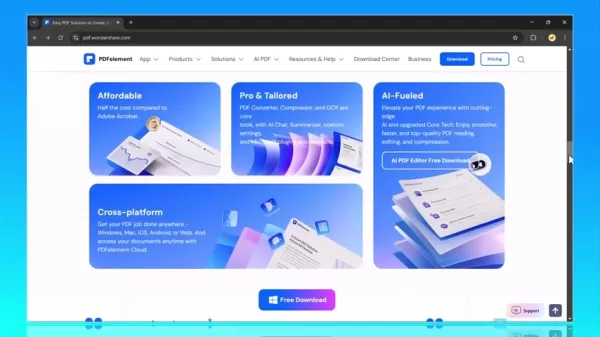
Download the software from the official Wondershare website and follow the installation prompts. Compatible with Windows, macOS, iOS, and Android, PDFelement ensures accessibility across devices. A stable internet connection is recommended for a smooth download.
Step 2: Open a PDF Document
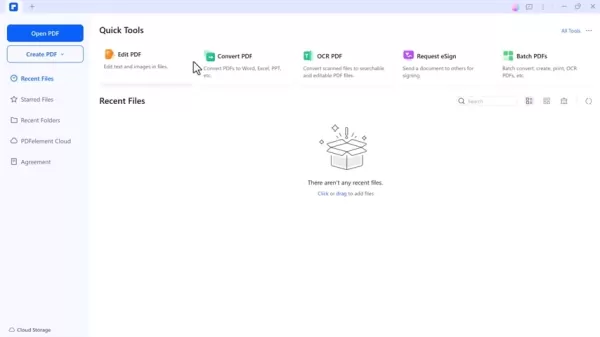
Launch PDFelement and select 'Open PDF' to load your document. The software supports various PDF formats, ensuring compatibility and ease of use with a clean, intuitive interface offering multiple editing options.
Step 3: Summarize PDFs with AI
Access the AI summarization tool under the 'AI Tools' tab by selecting 'Summarize PDF.' PDFelement analyzes the document and extracts key points. Review and refine the summary for accuracy, saving time by condensing lengthy content into concise overviews.
Step 4: Engage with AI Chat
Under 'AI Tools,' select 'Chat with PDF' to interact with your document. Enter a question in the chat window, and PDFelement delivers instant, context-based responses. This feature is ideal for locating specific details, clarifying concepts, or gaining deeper document insights, improving with continued use.
Step 5: Translate with AI
Select 'Translate' from the 'AI Tools' tab, choose your target language, and click 'Translate.' PDFelement displays the translated document alongside the original, allowing you to save or copy the text. This feature supports over 100 languages, breaking down communication barriers.
Step 6: Save Your Work
After editing, save your changes via the 'File' menu by selecting 'Save' or 'Save As.' PDFelement offers multiple save formats, including standard or optimized PDFs. Enable auto-saving for critical documents to prevent data loss.
PDFelement Pricing
Cost-Effective Plans
PDFelement provides flexible pricing plans tailored to various needs:
Individual Plans: Comprehensive editing and AI tools for solo users.
Team Plans: Designed for businesses, supporting collaboration and centralized PDF license management.

Education Plans: Budget-friendly options for students and educators, offering essential PDF tools.
Compared to competitors like Adobe Acrobat, PDFelement’s pricing is affordable, with flexible monthly subscriptions for occasional users.
Pros and Cons of PDFelement
Pros
Intuitive interface for seamless navigation
AI-driven tools for summarization, translation, and chat
Comprehensive editing and conversion capabilities
Cross-platform support (desktop, mobile, web)
Competitive pricing compared to industry alternatives
Strong security features for sensitive data protection
Cons
Minor compatibility issues with older PDF formats
AI features require an internet connection
Limited functionality in the free trial
Key Features of PDFelement
AI-Driven Summarization
PDFelement’s AI summarization tool quickly distills lengthy PDFs into key points, ideal for processing reports, research papers, or legal documents efficiently.
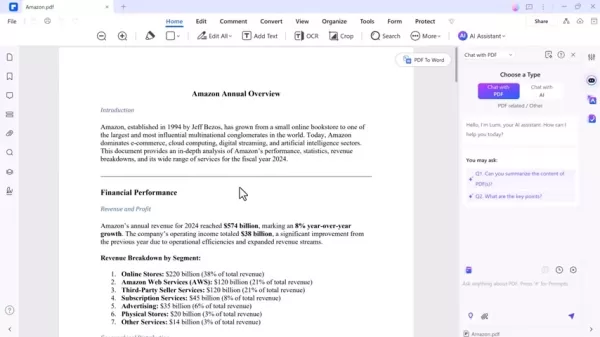
This feature saves time by presenting critical information, enabling users to grasp essential content without reading every page.
AI-Powered Chat
The AI chat feature enables conversational interaction with PDFs, delivering instant answers to questions about content.
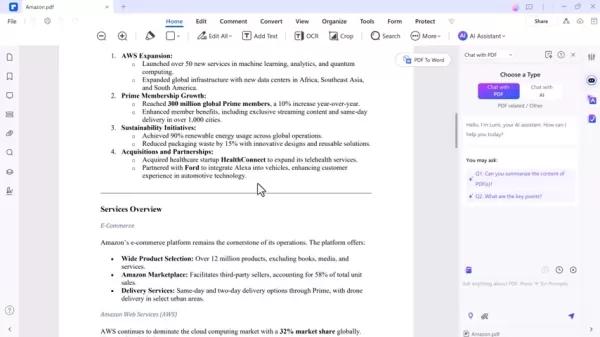
Perfect for finding specific data or clarifying complex terms, it streamlines document navigation and enhances understanding in real time.
AI Translation
PDFelement’s AI translates documents into over 100 languages, supporting global collaboration and research.
Accurate and reliable, this tool eliminates language barriers, making it easy to share and understand multilingual content.
AI Grammar Check
The grammar check feature polishes documents by correcting errors and improving clarity, ensuring professional-grade reports and presentations.
Use Cases for PDFelement
Academic Research
For students and researchers, PDFelement boosts productivity with AI summarization for quick insights into papers, AI chat for clarifying concepts, and translation for multilingual sources.
Legal Document Review
PDFelement streamlines legal document analysis by summarizing contracts, identifying key clauses, and clarifying terms via AI chat, enabling faster, informed decisions.
Business Operations
Businesses benefit from PDFelement’s tools for creating polished reports, managing contracts, and collaborating globally with AI translation and grammar checks.
FAQ
Is PDFelement compatible with Windows and macOS?
Yes, PDFelement works seamlessly on both Windows and macOS, with a consistent interface across platforms.
Can I use PDFelement on mobile devices?
Yes, PDFelement’s iOS and Android apps enable PDF editing and management on the go, complementing desktop functionality.
Does PDFelement support OCR?
Yes, its OCR technology converts scanned documents into editable, searchable PDFs, simplifying digitization.
How secure is PDFelement?
PDFelement offers robust security with password protection, encryption, digital signatures, watermarks, and redactions to safeguard sensitive data.
What customer support does PDFelement offer?
Wondershare provides extensive support, including tutorials, FAQs, and a dedicated team for personalized assistance.
Related Questions
How does PDFelement compare to Adobe Acrobat?
PDFelement offers similar features to Adobe Acrobat at a lower cost, with a more intuitive interface. Acrobat’s industry-standard compatibility may suit some users better.
What are the best alternatives to PDFelement?
Alternatives like Smallpdf, iLovePDF, and Nitro PDF offer robust editing tools, each with unique strengths depending on user needs.
How can I protect my PDFs with PDFelement?
Secure PDFs with password protection, encryption, digital signatures, watermarks, and redactions to ensure confidentiality and authenticity.
Related article
 Six Tech Giants Back Linux Foundation With $12.5M to Tackle AI Vulnerability Noise
To tackle the flood of low-quality security reports produced by AI automation tools, six major tech companies—Anthropic, Amazon (AWS), GitHub, Google, Microsoft, and OpenAI—have collectively contributed $12.5 million in funding to Linux Foundation in
Musk Considered Leaving OpenAI to His Kids as Altman Testifies
This morning, OpenAI CEO Sam Altman took the stand to address former co-founder Elon Musk’s lawsuit challenging the company’s corporate structure.When asked about Musk’s claim that other founders “stole a charity” by launching a for-profit subsidiary
Sam Altman Sparks Debate Over AI's Deceleration
Listen onApple PodcastsListen onSpotifyOpenAI CEO Sam Altman recently suggested that it may be time to “pace the rate of AI development” to allow society to “harden around some of these new capability levels.”On the latest episode of TechCrunch’s Equ
Related Special Topic Recommendations
Music composition
Six Tech Giants Back Linux Foundation With $12.5M to Tackle AI Vulnerability Noise
To tackle the flood of low-quality security reports produced by AI automation tools, six major tech companies—Anthropic, Amazon (AWS), GitHub, Google, Microsoft, and OpenAI—have collectively contributed $12.5 million in funding to Linux Foundation in
Musk Considered Leaving OpenAI to His Kids as Altman Testifies
This morning, OpenAI CEO Sam Altman took the stand to address former co-founder Elon Musk’s lawsuit challenging the company’s corporate structure.When asked about Musk’s claim that other founders “stole a charity” by launching a for-profit subsidiary
Sam Altman Sparks Debate Over AI's Deceleration
Listen onApple PodcastsListen onSpotifyOpenAI CEO Sam Altman recently suggested that it may be time to “pace the rate of AI development” to allow society to “harden around some of these new capability levels.”On the latest episode of TechCrunch’s Equ
Related Special Topic Recommendations
Music composition
 AI Vocal Demo Tools for Songwriters, Hooks, Toplines, and Multilingual Draft Sessions
2026 Latest Best AI Vocal Demo Tools for Songwriters, Hook Creators, and Multi-Language Content Teams! XIX.AI has curated a top-rated list of powerful game-changing tools that go through rigorous real-world tests. You’ll find detailed free vs paid comparison data, comprehensive rankings, and must-try options to help you boost writing efficiency and unlock your creative potential. Explore now to discover your perfect tool for all your content needs!
 9 tools
 xix.ai
Business
Best AI Competitive Research Tools for Small Businesses
xix.ai
Business
Best AI Competitive Research Tools for Small Businesses
2026 Latest Best Top-rated AI Competitive Research Tools for Small Businesses! XIX.AI has curated a highly powerful game-changing collection, updated weekly with rigorous real-world tests and detailed rankings. You can find a comprehensive free vs paid comparison to help you identify the must-try tools that boost your productivity and give you a competitive edge. Explore now to discover your perfect tool!
9 tools
xix.ai
Image editing
Photoshop AI Retouch Tools for Ecommerce Apparel, Skin Cleanup, and Color Consistency
2026 Latest Best Photoshop AI retouch tools for ecommerce apparel, skin cleanup, and color consistency! This top-rated curated list features powerful game-changing solutions that help you boost writing efficiency, streamline content creation, and achieve perfect visual results effortlessly. Each tool has undergone real-world tests through weekly updated rankings, complete with free vs paid comparison details. Backed by XIX.AI, it’s the must-try guide for anyone aiming to unlock your AI edge. Explore now!
10 tools
xix.ai
Prompt
Best AI Prompt Libraries for ChatGPT Workflows
2026 Latest Best Top-Rated AI Prompt Libraries for optimizing all types of ChatGPT workflows. XIX.AI has curated a powerful, game-changing collection that goes through rigorous real-world tests to ensure top performance. You can find detailed free vs paid comparisons and expert rankings to help you choose the must-try tools that boost your productivity and unlock your AI edge. Explore now!
11 tools
xix.ai
Education and Learning
AI Quiz Builder Platforms for Teachers, Tutors, and Cohort-Based Learning Programs
2026 Latest Best AI Quiz Builder Platforms for Teachers, Tutors, and Cohort-Based Learning Programs! XIX.AI has curated a top-rated list of powerful game-changing tools that go through real-world tests to deliver accurate rankings. These must-try platforms help boost writing efficiency, streamline content creation, and simplify quiz design across all learning scenarios. Explore now to discover your perfect tool for unlocking your AI edge in teaching!
13 tools
xix.ai
code
AI Pull Request Review Tools for GitHub Teams Handling Refactors, Bugs, and Security Gaps
2026 Latest Best AI Pull Request Review Tools for GitHub Teams are here on XIX.AI! This top-rated curated list showcases powerful game-changing solutions that streamline refactoring, bug fixing, and security gap detection across all team workflows. Enjoy a free vs paid comparison along with real-world tests and detailed rankings to help you find the perfect tool that boosts productivity significantly. Explore now to unlock your AI edge!
12 tools
xix.ai

 Comments (3)
0/500
Comments (3)
0/500
![DanielRodriguez]()
Finally, some real AI integration that isn't just a gimmicky chatbot added to a toolbar. The OCR and smart form features look genuinely useful for my workflow. I just hope the subscription price doesn't skyrocket because of the 'AI' label. Adobe, are you watching? 👀
![WillGarcía]()
PDFelementのAI機能って、実際に使ってみるとどれくらい便利なんだろう?単なる宣伝文句じゃなくて、本当に作業効率が上がるなら試してみたいな。他のPDF編集ソフトとの差別化ポイントが気になる。🤔
![FrankJackson]()
This AI-powered PDF tool sounds like a game-changer! I love how it simplifies editing and organizing—perfect for my messy research files. 😎 Anyone tried it yet?
Wondershare PDFelement transforms PDF management with state-of-the-art AI technology. This powerful editor delivers intelligent features to simplify creating, editing, converting, and organizing PDFs, making it ideal for students, researchers, and professionals. With an intuitive interface and robust capabilities, PDFelement enhances productivity and streamlines workflows. This guide highlights its key features, practical applications, and advantages, showcasing why it’s essential for PDF users.
Key Highlights
PDFelement leverages AI for smart summarization and interactive chat functions.
It streamlines PDF tasks, including editing, conversion, annotations, and security.
Available on desktop, mobile, and web platforms for seamless access.
AI-driven summarization extracts critical insights, enhancing document comprehension.
AI chat provides instant answers to document-related queries.
Supports AI-powered translation into over 100 languages.
Overview of Wondershare PDFelement
What is PDFelement?
Wondershare PDFelement is an all-in-one PDF editing solution powered by Artificial Intelligence, designed to optimize document management. It offers tools for creating, editing, converting, signing, and securing PDFs, with AI features that simplify complex tasks for users of all expertise levels.
With a sleek, user-friendly interface, PDFelement ensures an efficient PDF workflow. Tailored for students, professionals, and educators, it provides specialized tools to meet diverse needs, including:
- PDF Editing: Adjust text, images, and objects within PDFs.
- PDF Conversion: Transform PDFs into formats like Word, Excel, and PowerPoint, or vice versa.
- OCR (Optical Character Recognition): Convert scanned documents into editable, searchable PDFs.
- E-Sign: Apply secure, legally binding digital signatures to PDFs.
- Create & Organize: Build PDFs from scratch, merge multiple files, or rearrange pages.
- AI Tools: Use AI for summarization, translation, and proofreading of PDF content.
PDFelement for Team Collaboration
Boosting Team Efficiency
PDFelement enhances team collaboration with features that streamline document sharing and review. Teams can create shared PDFs, add annotations, comment, and track changes in real time. Cloud storage integration ensures easy access and secure sharing from any location, improving productivity and alignment across teams.
Using PDFelement: A Step-by-Step Guide
Step 1: Install PDFelement
Start by installing PDFelement on your device.
Download the software from the official Wondershare website and follow the installation prompts. Compatible with Windows, macOS, iOS, and Android, PDFelement ensures accessibility across devices. A stable internet connection is recommended for a smooth download.
Step 2: Open a PDF Document
Launch PDFelement and select 'Open PDF' to load your document. The software supports various PDF formats, ensuring compatibility and ease of use with a clean, intuitive interface offering multiple editing options.
Step 3: Summarize PDFs with AI
Access the AI summarization tool under the 'AI Tools' tab by selecting 'Summarize PDF.' PDFelement analyzes the document and extracts key points. Review and refine the summary for accuracy, saving time by condensing lengthy content into concise overviews.
Step 4: Engage with AI Chat
Under 'AI Tools,' select 'Chat with PDF' to interact with your document. Enter a question in the chat window, and PDFelement delivers instant, context-based responses. This feature is ideal for locating specific details, clarifying concepts, or gaining deeper document insights, improving with continued use.
Step 5: Translate with AI
Select 'Translate' from the 'AI Tools' tab, choose your target language, and click 'Translate.' PDFelement displays the translated document alongside the original, allowing you to save or copy the text. This feature supports over 100 languages, breaking down communication barriers.
Step 6: Save Your Work
After editing, save your changes via the 'File' menu by selecting 'Save' or 'Save As.' PDFelement offers multiple save formats, including standard or optimized PDFs. Enable auto-saving for critical documents to prevent data loss.
PDFelement Pricing
Cost-Effective Plans
PDFelement provides flexible pricing plans tailored to various needs:
Individual Plans: Comprehensive editing and AI tools for solo users.
Team Plans: Designed for businesses, supporting collaboration and centralized PDF license management.
Education Plans: Budget-friendly options for students and educators, offering essential PDF tools.
Compared to competitors like Adobe Acrobat, PDFelement’s pricing is affordable, with flexible monthly subscriptions for occasional users.
Pros and Cons of PDFelement
Pros
Intuitive interface for seamless navigation
AI-driven tools for summarization, translation, and chat
Comprehensive editing and conversion capabilities
Cross-platform support (desktop, mobile, web)
Competitive pricing compared to industry alternatives
Strong security features for sensitive data protection
Cons
Minor compatibility issues with older PDF formats
AI features require an internet connection
Limited functionality in the free trial
Key Features of PDFelement
AI-Driven Summarization
PDFelement’s AI summarization tool quickly distills lengthy PDFs into key points, ideal for processing reports, research papers, or legal documents efficiently.
This feature saves time by presenting critical information, enabling users to grasp essential content without reading every page.
AI-Powered Chat
The AI chat feature enables conversational interaction with PDFs, delivering instant answers to questions about content.
Perfect for finding specific data or clarifying complex terms, it streamlines document navigation and enhances understanding in real time.
AI Translation
PDFelement’s AI translates documents into over 100 languages, supporting global collaboration and research.
Accurate and reliable, this tool eliminates language barriers, making it easy to share and understand multilingual content.
AI Grammar Check
The grammar check feature polishes documents by correcting errors and improving clarity, ensuring professional-grade reports and presentations.
Use Cases for PDFelement
Academic Research
For students and researchers, PDFelement boosts productivity with AI summarization for quick insights into papers, AI chat for clarifying concepts, and translation for multilingual sources.
Legal Document Review
PDFelement streamlines legal document analysis by summarizing contracts, identifying key clauses, and clarifying terms via AI chat, enabling faster, informed decisions.
Business Operations
Businesses benefit from PDFelement’s tools for creating polished reports, managing contracts, and collaborating globally with AI translation and grammar checks.
FAQ
Is PDFelement compatible with Windows and macOS?
Yes, PDFelement works seamlessly on both Windows and macOS, with a consistent interface across platforms.
Can I use PDFelement on mobile devices?
Yes, PDFelement’s iOS and Android apps enable PDF editing and management on the go, complementing desktop functionality.
Does PDFelement support OCR?
Yes, its OCR technology converts scanned documents into editable, searchable PDFs, simplifying digitization.
How secure is PDFelement?
PDFelement offers robust security with password protection, encryption, digital signatures, watermarks, and redactions to safeguard sensitive data.
What customer support does PDFelement offer?
Wondershare provides extensive support, including tutorials, FAQs, and a dedicated team for personalized assistance.
Related Questions
How does PDFelement compare to Adobe Acrobat?
PDFelement offers similar features to Adobe Acrobat at a lower cost, with a more intuitive interface. Acrobat’s industry-standard compatibility may suit some users better.
What are the best alternatives to PDFelement?
Alternatives like Smallpdf, iLovePDF, and Nitro PDF offer robust editing tools, each with unique strengths depending on user needs.
How can I protect my PDFs with PDFelement?
Secure PDFs with password protection, encryption, digital signatures, watermarks, and redactions to ensure confidentiality and authenticity.








 Six Tech Giants Back Linux Foundation With $12.5M to Tackle AI Vulnerability Noise
To tackle the flood of low-quality security reports produced by AI automation tools, six major tech companies—Anthropic, Amazon (AWS), GitHub, Google, Microsoft, and OpenAI—have collectively contributed $12.5 million in funding to Linux Foundation in
Six Tech Giants Back Linux Foundation With $12.5M to Tackle AI Vulnerability Noise
To tackle the flood of low-quality security reports produced by AI automation tools, six major tech companies—Anthropic, Amazon (AWS), GitHub, Google, Microsoft, and OpenAI—have collectively contributed $12.5 million in funding to Linux Foundation in
 Musk Considered Leaving OpenAI to His Kids as Altman Testifies
This morning, OpenAI CEO Sam Altman took the stand to address former co-founder Elon Musk’s lawsuit challenging the company’s corporate structure.When asked about Musk’s claim that other founders “stole a charity” by launching a for-profit subsidiary
Musk Considered Leaving OpenAI to His Kids as Altman Testifies
This morning, OpenAI CEO Sam Altman took the stand to address former co-founder Elon Musk’s lawsuit challenging the company’s corporate structure.When asked about Musk’s claim that other founders “stole a charity” by launching a for-profit subsidiary
 Sam Altman Sparks Debate Over AI's Deceleration
Listen onApple PodcastsListen onSpotifyOpenAI CEO Sam Altman recently suggested that it may be time to “pace the rate of AI development” to allow society to “harden around some of these new capability levels.”On the latest episode of TechCrunch’s Equ
Sam Altman Sparks Debate Over AI's Deceleration
Listen onApple PodcastsListen onSpotifyOpenAI CEO Sam Altman recently suggested that it may be time to “pace the rate of AI development” to allow society to “harden around some of these new capability levels.”On the latest episode of TechCrunch’s Equ

2026 Latest Best AI Vocal Demo Tools for Songwriters, Hook Creators, and Multi-Language Content Teams! XIX.AI has curated a top-rated list of powerful game-changing tools that go through rigorous real-world tests. You’ll find detailed free vs paid comparison data, comprehensive rankings, and must-try options to help you boost writing efficiency and unlock your creative potential. Explore now to discover your perfect tool for all your content needs!
9 tools
xix.ai

2026 Latest Best Top-rated AI Competitive Research Tools for Small Businesses! XIX.AI has curated a highly powerful game-changing collection, updated weekly with rigorous real-world tests and detailed rankings. You can find a comprehensive free vs paid comparison to help you identify the must-try tools that boost your productivity and give you a competitive edge. Explore now to discover your perfect tool!
9 tools
xix.ai

2026 Latest Best Photoshop AI retouch tools for ecommerce apparel, skin cleanup, and color consistency! This top-rated curated list features powerful game-changing solutions that help you boost writing efficiency, streamline content creation, and achieve perfect visual results effortlessly. Each tool has undergone real-world tests through weekly updated rankings, complete with free vs paid comparison details. Backed by XIX.AI, it’s the must-try guide for anyone aiming to unlock your AI edge. Explore now!
10 tools
xix.ai

2026 Latest Best Top-Rated AI Prompt Libraries for optimizing all types of ChatGPT workflows. XIX.AI has curated a powerful, game-changing collection that goes through rigorous real-world tests to ensure top performance. You can find detailed free vs paid comparisons and expert rankings to help you choose the must-try tools that boost your productivity and unlock your AI edge. Explore now!
11 tools
xix.ai

2026 Latest Best AI Quiz Builder Platforms for Teachers, Tutors, and Cohort-Based Learning Programs! XIX.AI has curated a top-rated list of powerful game-changing tools that go through real-world tests to deliver accurate rankings. These must-try platforms help boost writing efficiency, streamline content creation, and simplify quiz design across all learning scenarios. Explore now to discover your perfect tool for unlocking your AI edge in teaching!
13 tools
xix.ai

2026 Latest Best AI Pull Request Review Tools for GitHub Teams are here on XIX.AI! This top-rated curated list showcases powerful game-changing solutions that streamline refactoring, bug fixing, and security gap detection across all team workflows. Enjoy a free vs paid comparison along with real-world tests and detailed rankings to help you find the perfect tool that boosts productivity significantly. Explore now to unlock your AI edge!
12 tools
xix.ai

Finally, some real AI integration that isn't just a gimmicky chatbot added to a toolbar. The OCR and smart form features look genuinely useful for my workflow. I just hope the subscription price doesn't skyrocket because of the 'AI' label. Adobe, are you watching? 👀
PDFelementのAI機能って、実際に使ってみるとどれくらい便利なんだろう?単なる宣伝文句じゃなくて、本当に作業効率が上がるなら試してみたいな。他のPDF編集ソフトとの差別化ポイントが気になる。🤔
This AI-powered PDF tool sounds like a game-changer! I love how it simplifies editing and organizing—perfect for my messy research files. 😎 Anyone tried it yet?












