


 Home
HomeUX Magic AI Figma Plugin Aims to Automate Website Design
The conversation surrounding AI in the design world is incredibly loud. We constantly hear promises of automated web design and UI/UX solutions. But do these tools powered by artificial intelligence actually live up to the hype? In this review, we take a close look at UX Magic AI, a Figma plugin that says it can create website wireframes using AI. We tested it thoroughly to determine if it's a genuine innovation or simply another overpromised tool. This article delivers a detailed, hands-on assessment of UX Magic AI, examining its features, ease of use, and overall ability to simplify the website design workflow.
Key Points
UX Magic AI is designed to automate the creation of website wireframes directly inside Figma.
A free account is available, but it restricts the number of screens you can create.
Our testing revealed several user experience problems, including lost screens and difficulties with exporting.
The designs produced by the AI were assessed as overly basic when compared to manual wireframing.
In its current state, the plugin offers limited control over the design direction and style customization.
Unveiling UX Magic AI: A Figma Plugin Under Scrutiny
What is UX Magic AI?
UX Magic AI is a Figma plugin that uses artificial intelligence to automatically generate website wireframes.

It aims to streamline and speed up the initial phases of website design, helping designers quickly visualize page layouts and user journeys. The fundamental concept is to provide a short description of your website idea, indicate how many pages you need, and then let the AI build a basic wireframe structure. This could save considerable time and effort versus building wireframes manually from a blank slate, making it an attractive proposition for designers seeking to enhance their productivity.However, the real-world value of this approach hinges entirely on the quality of the AI's output and the degree of customization it permits. This review will explore both the strengths and weaknesses of UX Magic AI, offering practical insights for designers thinking about using it. The central question is whether the plugin is a true efficiency booster or if the final output compromises on quality and design control. Continue reading to see how UX Magic AI performed in our practical tests and which established design practices it might challenge.
First Impressions and Initial Setup
Your first interaction with UX Magic AI happens within Figma's plugin environment.

After installing the plugin, you are asked to create a free account to use its features. While the free account is available, it's crucial to understand its constraints, particularly the cap on the number of screens you can generate. This is a standard tactic among AI tools to encourage users to upgrade to a paid plan for broader usage. The plugin's interface is relatively simple, featuring a text box for your website description, options to choose the page count, and a clear 'Generate' button. That said, the interface also has several shortcomings that can make the plugin awkward and confusing to operate.Please note that the current version is marked as a beta release, so users should anticipate encountering some bugs. The overall initial impression is that the plugin provides an accessible gateway to AI-assisted wireframing, but its practical functionality and output quality for professional design work are yet to be proven. The next step is to subject the plugin to a real-world scenario to see if UX Magic can truly deliver.
A Deep Dive into the UX Magic AI Experience: Navigating User Experience Challenges
During our test, entering the website description into the text field was a straightforward process.

The plugin gives you up to 500 characters to outline your website's purpose and key elements. After submitting your description and selecting the number of pages, clicking 'Generate' starts the AI's wireframe creation. Ideally, this step should produce a structured layout that matches your description. However, we faced a number of UX hurdles in this phase. For instance, after the first wireframes were generated, it was not possible to view both pages simultaneously because they were contained within a single frame.Moreover, the tool overwrote previous designs instead of creating new ones. We also encountered errors when trying to export these frames.The lack of guidance during the wireframe generation is another notable limitation. The AI interprets your description, but you have very little ability to influence the design's direction or specific stylistic elements. In summary, the beta version of UX Magic is too unstable to supplant conventional wireframing methods and is clearly still under development.
UX Magic AI's Core Features: A Detailed Breakdown
AI-Powered Wireframe Generation
The main feature of UX Magic AI is its ability to automatically produce website wireframes from user descriptions.
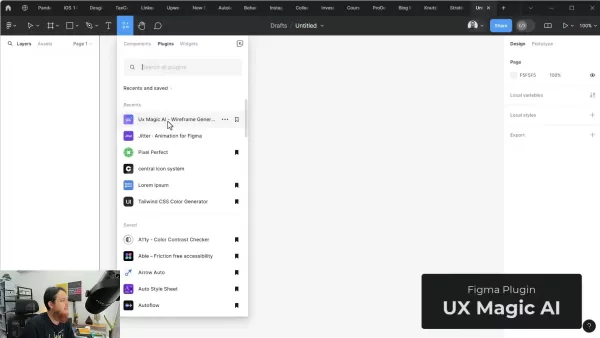
This function is intended to drastically cut down the manual work needed to create initial website layouts. By simply typing a brief description of the desired site, users can have the AI generate a wireframe structure complete with basic components like headings, text areas, and image placeholders. This can be especially useful for designers who need to rapidly prototype different layout possibilities or establish a foundation for more intricate design work. Nevertheless, the success of this feature is largely dependent on the AI's capacity to correctly understand the user's description and produce relevant, practical wireframes. The amount of customization and user control available during the generation process is also a critical factor in determining the feature's ultimate usefulness.
Limited Customization Options
A significant drawback of UX Magic AI is its narrow range of customization options.

Although the plugin lets you specify the number of pages, it provides very little influence over the overall design style or specific elements within the wireframe. This means the AI primarily sets the design direction based on its own interpretation of your input, which could lead to wireframes that don't perfectly match your intended vision. For designers who prioritize creative freedom and precise control over their work, this limitation is a major disadvantage. It might necessitate further manual tweaking and edits to the generated wireframes, which could offset some of the time-saving advantages promised by the AI. The essence of web design lies in a designer's creativity, and the UX Magic Figma Plugin significantly curtails that.
How to Use UX Magic AI: A Step-by-Step Guide
Step 1: Plugin Installation
Start by opening Figma and going to the 'Plugins' section. Search for 'UX Magic AI' and install the plugin directly into your Figma workspace.

This smooth integration is a key benefit of Figma, enabling you to add new capabilities without leaving the application.
Step 2: Account Setup
After installation, run UX Magic AI inside Figma. You will need to create a free account. This account grants access to the plugin's main features, though with some restrictions on wireframe generation. A paid subscription offers greater flexibility.
Step 3: Idea Description
Use the provided text field to describe the website you want to build. You have a 500-character limit to detail the site's purpose, intended audience, and main features. Providing a more detailed description helps the AI better grasp your concept.
Step 4: Generate Wireframes
Select the number of pages you want the AI to produce and click the 'Generate' button. UX Magic AI will then process your description and create a wireframe structure based on its analysis. This might take a short while, depending on the complexity of your request.

Step 5: Review the design
Examine the generated pages. If they match your expectations, you can proceed to export them. Alternatively, you can iterate on the designs. Be aware that, due to its beta status, many design elements and features in UX Magic might be buggy, but you will at least have a basic starting point.
UX Magic AI: Weighing the Pros and Cons
Pros
Potential for very fast wireframe creation.
Free account provides basic access.
Smooth and direct integration with Figma.
Useful for rapidly brainstorming different design concepts
Cons
Few options for customizing the output.
Can produce generic or unoriginal wireframes.
Dependence on AI interpretation may not reflect your design intent.
Errors during export
Beta-level reliability may not be suitable for professional projects.
Frequently Asked Questions About UX Magic AI
What is UX Magic AI?
UX Magic AI is a Figma plugin that employs artificial intelligence to create website wireframes from textual descriptions.
Is UX Magic AI free to use?
Yes, UX Magic AI has a free account with basic features. A paid subscription provides more comprehensive access.
What are the limitations of the free account?
The free account limits the number of screens you can generate. The tool also lacks overall polish, which is expected given its developmental stage.
Can I customize the wireframes generated by UX Magic AI?
Customization is quite restricted in the present version. This makes it difficult for users to dictate how specific elements should be implemented.
Is UX Magic AI suitable for professional design workflows?
Because of the user experience difficulties and minimal customization, the current beta version of UX Magic AI may not be ready for professional design workflows. Users should remember this product is still being developed.
Explore Related Questions About AI in Web Design
Will AI replace web designers?
The growing use of AI in web design has prompted discussions about the future role of human designers. While AI tools can automate specific tasks like generating wireframes or writing code, they currently do not possess the creative and strategic insight of seasoned designers. AI can help with repetitive jobs and offer design suggestions, but a complete replacement of designers—who have a deep knowledge of user psychology, branding, and visual aesthetics—is improbable. In fact, AI is more likely to enhance a designer's toolkit, freeing them to concentrate on higher-level creative and strategic work and to iterate faster. The true advantage designers hold over AI is their ability, when inspired, to create truly unique and original designs, an achievement beyond current machine capabilities. As AI technology advances, the design field will probably experience a change in the skills that are required. Designers who adopt AI tools and learn to use them effectively will be in a strong position to succeed. The skill to collaborate productively with AI, merging human creativity with machine intelligence, will become a highly valuable asset. Ongoing learning and adaptation will be essential for designers to maintain their relevance and competitiveness in an AI-influenced environment.Ultimately, the future of web design appears to be a partnership, where AI supports human designers in building more efficient and user-focused experiences. While AI might take over some of the more routine parts of the design process, the heart of design—understanding user needs, solving complex problems, and crafting visually engaging experiences—will continue to be a human domain.
Related article
 MiniMax Unveils 10x Team Program to Incentivize Global AI Experts
MiniMax (Xiyu Technology), the General Artificial Intelligence Lab, has officially launched "10x Team," a global talent collaboration initiative. This program aims to recruit top experts across industries to explore the deep application of large mode
South Korea Breaks Ground on National AI Computing Center, Investing 2.5 Trillion Won with 2028 Target
South Korean outlet EtNews reports that groundbreaking for the Korea AI Computing Center (KOACC) took place on August 3 at the Solar City data center park in Sunan, Jeollanam-do. Backed by a total investment of 2.5 trillion KRW (roughly 11.838 billio
Six Tech Giants Back Linux Foundation With $12.5M to Tackle AI Vulnerability Noise
To tackle the flood of low-quality security reports produced by AI automation tools, six major tech companies—Anthropic, Amazon (AWS), GitHub, Google, Microsoft, and OpenAI—have collectively contributed $12.5 million in funding to Linux Foundation in
Related Special Topic Recommendations
Education and Learning
MiniMax Unveils 10x Team Program to Incentivize Global AI Experts
MiniMax (Xiyu Technology), the General Artificial Intelligence Lab, has officially launched "10x Team," a global talent collaboration initiative. This program aims to recruit top experts across industries to explore the deep application of large mode
South Korea Breaks Ground on National AI Computing Center, Investing 2.5 Trillion Won with 2028 Target
South Korean outlet EtNews reports that groundbreaking for the Korea AI Computing Center (KOACC) took place on August 3 at the Solar City data center park in Sunan, Jeollanam-do. Backed by a total investment of 2.5 trillion KRW (roughly 11.838 billio
Six Tech Giants Back Linux Foundation With $12.5M to Tackle AI Vulnerability Noise
To tackle the flood of low-quality security reports produced by AI automation tools, six major tech companies—Anthropic, Amazon (AWS), GitHub, Google, Microsoft, and OpenAI—have collectively contributed $12.5 million in funding to Linux Foundation in
Related Special Topic Recommendations
Education and Learning
 AI Study Tools for Homework and Exam Prep
2026 Latest Best AI Study Tools for Homework and Exam Prep! XIX.AI curates a top-rated list of powerful, game-changing tools that help students boost productivity, streamline homework completion, and ace exams through real-world tests. Get a free vs paid comparison, detailed rankings, and must-try options to unlock your AI edge. Explore now!
 10 tools
 xix.ai
Music composition
AI Vocal Demo Tools for Songwriters, Hooks, Toplines, and Multilingual Draft Sessions
xix.ai
Music composition
AI Vocal Demo Tools for Songwriters, Hooks, Toplines, and Multilingual Draft Sessions
2026 Latest Best AI Vocal Demo Tools for Songwriters, Hook Creators, and Multi-Language Content Teams! XIX.AI has curated a top-rated list of powerful game-changing tools that go through rigorous real-world tests. You’ll find detailed free vs paid comparison data, comprehensive rankings, and must-try options to help you boost writing efficiency and unlock your creative potential. Explore now to discover your perfect tool for all your content needs!
9 tools
xix.ai
Business
Best AI Competitive Research Tools for Small Businesses
2026 Latest Best Top-rated AI Competitive Research Tools for Small Businesses! XIX.AI has curated a highly powerful game-changing collection, updated weekly with rigorous real-world tests and detailed rankings. You can find a comprehensive free vs paid comparison to help you identify the must-try tools that boost your productivity and give you a competitive edge. Explore now to discover your perfect tool!
9 tools
xix.ai
Image editing
Photoshop AI Retouch Tools for Ecommerce Apparel, Skin Cleanup, and Color Consistency
2026 Latest Best Photoshop AI retouch tools for ecommerce apparel, skin cleanup, and color consistency! This top-rated curated list features powerful game-changing solutions that help you boost writing efficiency, streamline content creation, and achieve perfect visual results effortlessly. Each tool has undergone real-world tests through weekly updated rankings, complete with free vs paid comparison details. Backed by XIX.AI, it’s the must-try guide for anyone aiming to unlock your AI edge. Explore now!
10 tools
xix.ai
Prompt
Best AI Prompt Libraries for ChatGPT Workflows
2026 Latest Best Top-Rated AI Prompt Libraries for optimizing all types of ChatGPT workflows. XIX.AI has curated a powerful, game-changing collection that goes through rigorous real-world tests to ensure top performance. You can find detailed free vs paid comparisons and expert rankings to help you choose the must-try tools that boost your productivity and unlock your AI edge. Explore now!
11 tools
xix.ai
Education and Learning
AI Quiz Builder Platforms for Teachers, Tutors, and Cohort-Based Learning Programs
2026 Latest Best AI Quiz Builder Platforms for Teachers, Tutors, and Cohort-Based Learning Programs! XIX.AI has curated a top-rated list of powerful game-changing tools that go through real-world tests to deliver accurate rankings. These must-try platforms help boost writing efficiency, streamline content creation, and simplify quiz design across all learning scenarios. Explore now to discover your perfect tool for unlocking your AI edge in teaching!
13 tools
xix.ai

 Comments (2)
0/500
Comments (2)
0/500
![AnthonyPerez]()
So yet another plugin claiming to automate design? I'd love to see it handle the messy reality of client feedback loops and last-minute scope creep. 🤔
![JustinMartin]()
So yet another AI tool promising to 'automate' website design... but does it actually handle the messy reality of client feedback and pixel-perfect tweaks? I'd rather see a real demo than read another hyped review. 😅
The conversation surrounding AI in the design world is incredibly loud. We constantly hear promises of automated web design and UI/UX solutions. But do these tools powered by artificial intelligence actually live up to the hype? In this review, we take a close look at UX Magic AI, a Figma plugin that says it can create website wireframes using AI. We tested it thoroughly to determine if it's a genuine innovation or simply another overpromised tool. This article delivers a detailed, hands-on assessment of UX Magic AI, examining its features, ease of use, and overall ability to simplify the website design workflow.
Key Points
UX Magic AI is designed to automate the creation of website wireframes directly inside Figma.
A free account is available, but it restricts the number of screens you can create.
Our testing revealed several user experience problems, including lost screens and difficulties with exporting.
The designs produced by the AI were assessed as overly basic when compared to manual wireframing.
In its current state, the plugin offers limited control over the design direction and style customization.
Unveiling UX Magic AI: A Figma Plugin Under Scrutiny
What is UX Magic AI?
UX Magic AI is a Figma plugin that uses artificial intelligence to automatically generate website wireframes.
It aims to streamline and speed up the initial phases of website design, helping designers quickly visualize page layouts and user journeys. The fundamental concept is to provide a short description of your website idea, indicate how many pages you need, and then let the AI build a basic wireframe structure. This could save considerable time and effort versus building wireframes manually from a blank slate, making it an attractive proposition for designers seeking to enhance their productivity.However, the real-world value of this approach hinges entirely on the quality of the AI's output and the degree of customization it permits. This review will explore both the strengths and weaknesses of UX Magic AI, offering practical insights for designers thinking about using it. The central question is whether the plugin is a true efficiency booster or if the final output compromises on quality and design control. Continue reading to see how UX Magic AI performed in our practical tests and which established design practices it might challenge.
First Impressions and Initial Setup
Your first interaction with UX Magic AI happens within Figma's plugin environment.
After installing the plugin, you are asked to create a free account to use its features. While the free account is available, it's crucial to understand its constraints, particularly the cap on the number of screens you can generate. This is a standard tactic among AI tools to encourage users to upgrade to a paid plan for broader usage. The plugin's interface is relatively simple, featuring a text box for your website description, options to choose the page count, and a clear 'Generate' button. That said, the interface also has several shortcomings that can make the plugin awkward and confusing to operate.Please note that the current version is marked as a beta release, so users should anticipate encountering some bugs. The overall initial impression is that the plugin provides an accessible gateway to AI-assisted wireframing, but its practical functionality and output quality for professional design work are yet to be proven. The next step is to subject the plugin to a real-world scenario to see if UX Magic can truly deliver.
A Deep Dive into the UX Magic AI Experience: Navigating User Experience Challenges
During our test, entering the website description into the text field was a straightforward process.
The plugin gives you up to 500 characters to outline your website's purpose and key elements. After submitting your description and selecting the number of pages, clicking 'Generate' starts the AI's wireframe creation. Ideally, this step should produce a structured layout that matches your description. However, we faced a number of UX hurdles in this phase. For instance, after the first wireframes were generated, it was not possible to view both pages simultaneously because they were contained within a single frame.Moreover, the tool overwrote previous designs instead of creating new ones. We also encountered errors when trying to export these frames.The lack of guidance during the wireframe generation is another notable limitation. The AI interprets your description, but you have very little ability to influence the design's direction or specific stylistic elements. In summary, the beta version of UX Magic is too unstable to supplant conventional wireframing methods and is clearly still under development.
UX Magic AI's Core Features: A Detailed Breakdown
AI-Powered Wireframe Generation
The main feature of UX Magic AI is its ability to automatically produce website wireframes from user descriptions.
This function is intended to drastically cut down the manual work needed to create initial website layouts. By simply typing a brief description of the desired site, users can have the AI generate a wireframe structure complete with basic components like headings, text areas, and image placeholders. This can be especially useful for designers who need to rapidly prototype different layout possibilities or establish a foundation for more intricate design work. Nevertheless, the success of this feature is largely dependent on the AI's capacity to correctly understand the user's description and produce relevant, practical wireframes. The amount of customization and user control available during the generation process is also a critical factor in determining the feature's ultimate usefulness.
Limited Customization Options
A significant drawback of UX Magic AI is its narrow range of customization options.
Although the plugin lets you specify the number of pages, it provides very little influence over the overall design style or specific elements within the wireframe. This means the AI primarily sets the design direction based on its own interpretation of your input, which could lead to wireframes that don't perfectly match your intended vision. For designers who prioritize creative freedom and precise control over their work, this limitation is a major disadvantage. It might necessitate further manual tweaking and edits to the generated wireframes, which could offset some of the time-saving advantages promised by the AI. The essence of web design lies in a designer's creativity, and the UX Magic Figma Plugin significantly curtails that.
How to Use UX Magic AI: A Step-by-Step Guide
Step 1: Plugin Installation
Start by opening Figma and going to the 'Plugins' section. Search for 'UX Magic AI' and install the plugin directly into your Figma workspace.
This smooth integration is a key benefit of Figma, enabling you to add new capabilities without leaving the application.
Step 2: Account Setup
After installation, run UX Magic AI inside Figma. You will need to create a free account. This account grants access to the plugin's main features, though with some restrictions on wireframe generation. A paid subscription offers greater flexibility.
Step 3: Idea Description
Use the provided text field to describe the website you want to build. You have a 500-character limit to detail the site's purpose, intended audience, and main features. Providing a more detailed description helps the AI better grasp your concept.
Step 4: Generate Wireframes
Select the number of pages you want the AI to produce and click the 'Generate' button. UX Magic AI will then process your description and create a wireframe structure based on its analysis. This might take a short while, depending on the complexity of your request.
Step 5: Review the design
Examine the generated pages. If they match your expectations, you can proceed to export them. Alternatively, you can iterate on the designs. Be aware that, due to its beta status, many design elements and features in UX Magic might be buggy, but you will at least have a basic starting point.
UX Magic AI: Weighing the Pros and Cons
Pros
Potential for very fast wireframe creation.
Free account provides basic access.
Smooth and direct integration with Figma.
Useful for rapidly brainstorming different design concepts
Cons
Few options for customizing the output.
Can produce generic or unoriginal wireframes.
Dependence on AI interpretation may not reflect your design intent.
Errors during export
Beta-level reliability may not be suitable for professional projects.
Frequently Asked Questions About UX Magic AI
What is UX Magic AI?
UX Magic AI is a Figma plugin that employs artificial intelligence to create website wireframes from textual descriptions.
Is UX Magic AI free to use?
Yes, UX Magic AI has a free account with basic features. A paid subscription provides more comprehensive access.
What are the limitations of the free account?
The free account limits the number of screens you can generate. The tool also lacks overall polish, which is expected given its developmental stage.
Can I customize the wireframes generated by UX Magic AI?
Customization is quite restricted in the present version. This makes it difficult for users to dictate how specific elements should be implemented.
Is UX Magic AI suitable for professional design workflows?
Because of the user experience difficulties and minimal customization, the current beta version of UX Magic AI may not be ready for professional design workflows. Users should remember this product is still being developed.
Explore Related Questions About AI in Web Design
Will AI replace web designers?
The growing use of AI in web design has prompted discussions about the future role of human designers. While AI tools can automate specific tasks like generating wireframes or writing code, they currently do not possess the creative and strategic insight of seasoned designers. AI can help with repetitive jobs and offer design suggestions, but a complete replacement of designers—who have a deep knowledge of user psychology, branding, and visual aesthetics—is improbable. In fact, AI is more likely to enhance a designer's toolkit, freeing them to concentrate on higher-level creative and strategic work and to iterate faster. The true advantage designers hold over AI is their ability, when inspired, to create truly unique and original designs, an achievement beyond current machine capabilities. As AI technology advances, the design field will probably experience a change in the skills that are required. Designers who adopt AI tools and learn to use them effectively will be in a strong position to succeed. The skill to collaborate productively with AI, merging human creativity with machine intelligence, will become a highly valuable asset. Ongoing learning and adaptation will be essential for designers to maintain their relevance and competitiveness in an AI-influenced environment.Ultimately, the future of web design appears to be a partnership, where AI supports human designers in building more efficient and user-focused experiences. While AI might take over some of the more routine parts of the design process, the heart of design—understanding user needs, solving complex problems, and crafting visually engaging experiences—will continue to be a human domain.








 MiniMax Unveils 10x Team Program to Incentivize Global AI Experts
MiniMax (Xiyu Technology), the General Artificial Intelligence Lab, has officially launched "10x Team," a global talent collaboration initiative. This program aims to recruit top experts across industries to explore the deep application of large mode
MiniMax Unveils 10x Team Program to Incentivize Global AI Experts
MiniMax (Xiyu Technology), the General Artificial Intelligence Lab, has officially launched "10x Team," a global talent collaboration initiative. This program aims to recruit top experts across industries to explore the deep application of large mode
 South Korea Breaks Ground on National AI Computing Center, Investing 2.5 Trillion Won with 2028 Target
South Korean outlet EtNews reports that groundbreaking for the Korea AI Computing Center (KOACC) took place on August 3 at the Solar City data center park in Sunan, Jeollanam-do. Backed by a total investment of 2.5 trillion KRW (roughly 11.838 billio
South Korea Breaks Ground on National AI Computing Center, Investing 2.5 Trillion Won with 2028 Target
South Korean outlet EtNews reports that groundbreaking for the Korea AI Computing Center (KOACC) took place on August 3 at the Solar City data center park in Sunan, Jeollanam-do. Backed by a total investment of 2.5 trillion KRW (roughly 11.838 billio
 Six Tech Giants Back Linux Foundation With $12.5M to Tackle AI Vulnerability Noise
To tackle the flood of low-quality security reports produced by AI automation tools, six major tech companies—Anthropic, Amazon (AWS), GitHub, Google, Microsoft, and OpenAI—have collectively contributed $12.5 million in funding to Linux Foundation in
Six Tech Giants Back Linux Foundation With $12.5M to Tackle AI Vulnerability Noise
To tackle the flood of low-quality security reports produced by AI automation tools, six major tech companies—Anthropic, Amazon (AWS), GitHub, Google, Microsoft, and OpenAI—have collectively contributed $12.5 million in funding to Linux Foundation in

2026 Latest Best AI Study Tools for Homework and Exam Prep! XIX.AI curates a top-rated list of powerful, game-changing tools that help students boost productivity, streamline homework completion, and ace exams through real-world tests. Get a free vs paid comparison, detailed rankings, and must-try options to unlock your AI edge. Explore now!
10 tools
xix.ai

2026 Latest Best AI Vocal Demo Tools for Songwriters, Hook Creators, and Multi-Language Content Teams! XIX.AI has curated a top-rated list of powerful game-changing tools that go through rigorous real-world tests. You’ll find detailed free vs paid comparison data, comprehensive rankings, and must-try options to help you boost writing efficiency and unlock your creative potential. Explore now to discover your perfect tool for all your content needs!
9 tools
xix.ai

2026 Latest Best Top-rated AI Competitive Research Tools for Small Businesses! XIX.AI has curated a highly powerful game-changing collection, updated weekly with rigorous real-world tests and detailed rankings. You can find a comprehensive free vs paid comparison to help you identify the must-try tools that boost your productivity and give you a competitive edge. Explore now to discover your perfect tool!
9 tools
xix.ai

2026 Latest Best Photoshop AI retouch tools for ecommerce apparel, skin cleanup, and color consistency! This top-rated curated list features powerful game-changing solutions that help you boost writing efficiency, streamline content creation, and achieve perfect visual results effortlessly. Each tool has undergone real-world tests through weekly updated rankings, complete with free vs paid comparison details. Backed by XIX.AI, it’s the must-try guide for anyone aiming to unlock your AI edge. Explore now!
10 tools
xix.ai

2026 Latest Best Top-Rated AI Prompt Libraries for optimizing all types of ChatGPT workflows. XIX.AI has curated a powerful, game-changing collection that goes through rigorous real-world tests to ensure top performance. You can find detailed free vs paid comparisons and expert rankings to help you choose the must-try tools that boost your productivity and unlock your AI edge. Explore now!
11 tools
xix.ai

2026 Latest Best AI Quiz Builder Platforms for Teachers, Tutors, and Cohort-Based Learning Programs! XIX.AI has curated a top-rated list of powerful game-changing tools that go through real-world tests to deliver accurate rankings. These must-try platforms help boost writing efficiency, streamline content creation, and simplify quiz design across all learning scenarios. Explore now to discover your perfect tool for unlocking your AI edge in teaching!
13 tools
xix.ai

So yet another plugin claiming to automate design? I'd love to see it handle the messy reality of client feedback loops and last-minute scope creep. 🤔
So yet another AI tool promising to 'automate' website design... but does it actually handle the messy reality of client feedback and pixel-perfect tweaks? I'd rather see a real demo than read another hyped review. 😅












