


 Home
HomeWhat are the 4 unique, free techniques for AI photo editing in 2025?
Are you tired of seeing the same AI photo editing styles everywhere? This guide introduces four distinctive, free techniques using AI to craft truly exceptional visuals. Break away from the ordinary and learn to produce realistic, captivating, and high-quality images that stand out. Get ready to transform your social media presence with these innovative editing methods!
Key Points
Explore four distinct and free AI photo editing methods.
Generate realistic and engaging visuals using Gemini AI.
Master unconventional editing styles to distinguish yourself on social media.
Improve photo quality and eliminate unwanted elements with AI.
Access prompt resources to create a wide variety of unique AI edits.
Unleashing Unique Photo Editing with AI
The Current State of AI Photo Editing Trends
The world of social media is saturated with AI-edited photos, yet many of these edits look strikingly similar. The common approach often lacks creativity. Our objective is to escape this uniformity and highlight truly original artistic expressions. The essential strategy is to use AI to produce edits that are lifelike, attention-grabbing, superior in quality, and, crucially, rare. Move beyond standard AI filters—it's time to pioneer unexplored styles in photo editing!
This involves experimenting with various prompts, combinations, and aesthetics within AI tools. Rather than replicating a tutorial step-by-step, use it as a springboard for your own creations. Let's examine four approaches to kickstart your journey in unique AI photo editing. The best part? All methods are free and straightforward to implement!
Entering the Realm of Gemini AI
The landscape of AI image generation is broad and diverse, with many platforms offering robust features. For our exploration into unique editing, we'll concentrate on Gemini AI, an advanced platform engineered to convert your standard photos into breathtaking artwork.
Gemini AI represents just one option among many; it's beneficial to test different tools to find your ideal match. Nevertheless, the fundamental principles and creative prompts are generally applicable across platforms. Let's first examine what Gemini AI provides before detailing the editing procedures.
Gemini AI offers functionalities for:
- Create Image. Generate entirely new images from text descriptions.
- Write. Request Gemini to compose stories, blog posts, and other written content.
- Build. Materialize your creative concepts.
- Deep Research. Investigate any subject to uncover facts and specifics.
Step-by-Step Guide: Editing Your First AI Photo with Gemini
Here’s a quick walkthrough for editing your photos in Gemini AI. This will clarify the process before we dive into the specifics:
Launch Gemini AI.
Go to the "Create Image" feature.
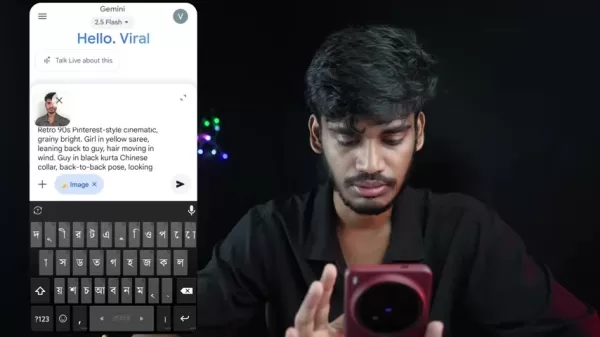
In the prompt field, click the Plus icon.
Choose the "Gallery" option.
Upload your chosen personal photo.
With your image uploaded, type your text prompt and submit.
For the most realistic edits, we recommend using a clear, close-up selfie. Photos taken from a distance can sometimes challenge facial recognition. Once your new image is ready, you can download it immediately to share online!
Now that we've covered the basics, let's start the photo editing process.
Enhancing Your Photos in Picsart
Removing Watermarks and Enhancing Image Quality
After generating images, you'll often need to perform some cleanup, such as removing embedded watermarks. Furthermore, AI-generated photos might not always be in the highest resolution. Fortunately, Picsart offers simple solutions for these issues.
- Open Picsart and tap the plus icon.
- Choose your target image.
- Go to "Tools", then select "Remove".
- Brush over the area you wish to clean, and tap "Remove" again.
To boost general quality, return to Tools and select "AI Enhance"! This will refine the image, enhancing its sharpness and detail.
Tool Description Remove ToolThis feature lets you erase unwanted objects from an image, such as a watermark.AI Enhance ToolThe AI Enhance function boosts the overall clarity and detail of a photo, resulting in higher quality than the original output from Gemini AI.With these steps, your photos will look better than ever!
4 Unique AI Photo Editing Techniques
Method 1: The Classic Couple Photo
This technique puts a creative twist on the popular pose of a woman resting her head on a man's shoulder. Instead of using commonplace prompts, innovate by altering specific details to reflect your unique style.
Consider this example prompt, which includes the photo to be edited—a critical component:
"Retro 90s Pinterest-style cinematic, grainy bright. Girl in yellow saree, leaning back to guy, hair moving in wind. Guy in black kurta Chinese collar, back-to-back pose, looking frontways. Faces identical to reference. Medium shot, 60mm lens, dramatic shadows on wall, nostalgic cinematic feel."
Feel free to modify the prompt for even more distinctive outcomes. Try altering the attire colors or even the subjects featured.
Executing this prompt should yield a beautiful image. While the underlying trend might be popular, your specific customizations—like the yellow saree—will make your edit truly one-of-a-kind.
Method 2: Vintage Rose Portrait
Shift the focus from couples to individual portraits. This aesthetic emphasizes a vintage look, featuring a subject holding a rose. The facial details remain accurate, producing a striking final result.
Use this prompt to achieve this photo style:
"Create a retro vintage grainy but brighter image of the reference individual, draped in a perfect Red wine color Pinterest aesthetic retro shirt with white pants and holding a Rose in hands. It must feel like a 90s movie and romanticize a windy environment. The person is standing against a solid wall with deep shadows."
The resulting photograph showcases impressive detail, though a watermark may remain in the corner. Don't worry—a simple tool for its removal will be discussed shortly! Continuously infuse unique elements into your prompts, such as variations in hairstyle or clothing.
Method 3: The Football Poster
Harness AI to transform yourself into anyone you imagine! If you're a sports enthusiast, especially of football (soccer), you can redesign your image into an impressive poster.
Experiment with this prompt:
"Create a cinematic professional football (soccer) poster featuring [reference image]. Keep the original face, hair, shape, and angle exactly as in the image. Show the person in three perspectives: a super close-up portrait with a Real Madrid jersey, a side profile view wearing a Real Madrid jersey with the back name DIDAR, and a full-body shot in a complete football kit (Real Madrid 2025 jersey, shorts, socks, and cleats) featuring sponsor logos. At the bottom, include a dynamic action scene of the player in motion."
With an edit like this, you can commemorate a special occasion or envision yourself as a sports icon!
Method 4: The Peaceful Meadow
Sometimes, the goal is to convey a sense of inner tranquility. This AI photo editing style places you within a serene landscape, promoting reflection and calm.
Apply this prompt to achieve the effect:
"Creating a serene and peaceful atmosphere. A young man [reference photo], in an oversized soft-colored shirt and pants, sits thoughtfully in a lush green meadow. The background is a soft, misty landscape with rolling hills. The lighting is natural and diffused, contributing to a serene and peaceful atmosphere. The style is a realistic photograph with a cinematic quality."
Gemini AI: Pros
and Cons
of Photo Editing
Pros
Entirely free to use
Produces high-quality AI-generated edits
Simple process for removing unwanted images
Access to numerous styles and trends
Cons
Some features deliver superior results to others
Gemini AI can experience server connection problems, occasionally preventing edits
The process sometimes involves significant trial and error
Requires adding uniqueness through subtle prompt variations
FAQ
Is Gemini AI genuinely free for photo editing?
Yes! Gemini AI's core features, such as image generation and editing, are available at no cost.
What should I do if Gemini AI has connection problems?
For a smooth and optimal photo editing session, ensure you have the most recent app version installed. Check your app store for any available updates.
What exactly is a prompt?
Prompts are the key ingredient for achieving personalized AI artwork. They are typically short phrases or descriptions that instruct the AI on your desired outcome.
Related Questions
What distinguishes these AI photo editing techniques as 'unique'?
These methods emphasize moving past generic AI results. By employing detailed prompts and incorporating specific stylistic elements, you can craft highly personalized and uncommon visuals that capture attention.
Where can I find more inventive and original AI photo editing prompts?
A valuable resource for discovering AI photo editing prompts is the creator's Telegram channel, Didar Official. It offers specific prompts that enable users to create edits efficiently, saving hours of manual work.
Related article
 U.S. Stocks Hit Historic Milestone as AI and Aerospace Giants Prepare for Trillion-Dollar Debut
Elon Musk, Sam Altman, and Dario Amodei, three titans of the technology sector, are advancing toward initial public offerings for their respective ventures. With SpaceX, OpenAI, and Anthropic—three industry behemoths nearing trillion-dollar valuation
Swedish AI Startup Lovable Eyes $13.2 Billion Valuation After Major Funding Round
As AI-driven coding tools gain traction, Swedish startup Lovable has secured a major funding round. The company aims to raise $3 billion, potentially boosting its valuation to $13.2 billion—double the $6.6 billion recorded last December. Menlo Ventur
Google Tests Remy AI Agent for Gemini as Focus Shifts to User Control
According to Business Insider, Google is testing Remy, a new AI personal agent for Gemini. This tool aims to execute tasks on behalf of users, streamlining both professional workflows and daily routines.Currently, Remy is undergoing testing in an int
Related Special Topic Recommendations
Data Analysis
U.S. Stocks Hit Historic Milestone as AI and Aerospace Giants Prepare for Trillion-Dollar Debut
Elon Musk, Sam Altman, and Dario Amodei, three titans of the technology sector, are advancing toward initial public offerings for their respective ventures. With SpaceX, OpenAI, and Anthropic—three industry behemoths nearing trillion-dollar valuation
Swedish AI Startup Lovable Eyes $13.2 Billion Valuation After Major Funding Round
As AI-driven coding tools gain traction, Swedish startup Lovable has secured a major funding round. The company aims to raise $3 billion, potentially boosting its valuation to $13.2 billion—double the $6.6 billion recorded last December. Menlo Ventur
Google Tests Remy AI Agent for Gemini as Focus Shifts to User Control
According to Business Insider, Google is testing Remy, a new AI personal agent for Gemini. This tool aims to execute tasks on behalf of users, streamlining both professional workflows and daily routines.Currently, Remy is undergoing testing in an int
Related Special Topic Recommendations
Data Analysis
 Best AI Anomaly Detection Tools for KPI Monitoring across SaaS and Ecommerce Teams
2026 Latest Best Top-rated AI Anomaly Detection Tools for KPI Monitoring in SaaS and Ecommerce teams! XIX.AI has curated a powerful, game-changing collection based on rigorous real-world tests and weekly updated rankings. You’ll find detailed free vs paid comparison insights to help you identify the must-try solution that boosts productivity and unlocks your AI edge. Explore now!
 10 tools
 xix.ai
writing
Best AI Outline Generators for Long-Form SEO Articles
xix.ai
writing
Best AI Outline Generators for Long-Form SEO Articles
2026 Latest Best Top-Rated AI Outline Generators for Long-Form SEO Articles, meticulously curated by XIX.AI. These powerful tools offer game-changing assistance in creating high-quality content quickly, boosting writing efficiency significantly. Get a free vs paid comparison along with real-world tests and detailed rankings to help you find the must-try option that suits your needs. Explore now to unlock your AI edge.
8 tools
xix.ai
Education and Learning
AI Study Tools for Homework and Exam Prep
2026 Latest Best AI Study Tools for Homework and Exam Prep! XIX.AI curates a top-rated list of powerful, game-changing tools that help students boost productivity, streamline homework completion, and ace exams through real-world tests. Get a free vs paid comparison, detailed rankings, and must-try options to unlock your AI edge. Explore now!
10 tools
xix.ai
Music composition
AI Vocal Demo Tools for Songwriters, Hooks, Toplines, and Multilingual Draft Sessions
2026 Latest Best AI Vocal Demo Tools for Songwriters, Hook Creators, and Multi-Language Content Teams! XIX.AI has curated a top-rated list of powerful game-changing tools that go through rigorous real-world tests. You’ll find detailed free vs paid comparison data, comprehensive rankings, and must-try options to help you boost writing efficiency and unlock your creative potential. Explore now to discover your perfect tool for all your content needs!
9 tools
xix.ai
Business
Best AI Competitive Research Tools for Small Businesses
2026 Latest Best Top-rated AI Competitive Research Tools for Small Businesses! XIX.AI has curated a highly powerful game-changing collection, updated weekly with rigorous real-world tests and detailed rankings. You can find a comprehensive free vs paid comparison to help you identify the must-try tools that boost your productivity and give you a competitive edge. Explore now to discover your perfect tool!
9 tools
xix.ai
Image editing
Photoshop AI Retouch Tools for Ecommerce Apparel, Skin Cleanup, and Color Consistency
2026 Latest Best Photoshop AI retouch tools for ecommerce apparel, skin cleanup, and color consistency! This top-rated curated list features powerful game-changing solutions that help you boost writing efficiency, streamline content creation, and achieve perfect visual results effortlessly. Each tool has undergone real-world tests through weekly updated rankings, complete with free vs paid comparison details. Backed by XIX.AI, it’s the must-try guide for anyone aiming to unlock your AI edge. Explore now!
10 tools
xix.ai

 Comments (0)
0/500
Comments (0)
0/500
Are you tired of seeing the same AI photo editing styles everywhere? This guide introduces four distinctive, free techniques using AI to craft truly exceptional visuals. Break away from the ordinary and learn to produce realistic, captivating, and high-quality images that stand out. Get ready to transform your social media presence with these innovative editing methods!
Key Points
Explore four distinct and free AI photo editing methods.
Generate realistic and engaging visuals using Gemini AI.
Master unconventional editing styles to distinguish yourself on social media.
Improve photo quality and eliminate unwanted elements with AI.
Access prompt resources to create a wide variety of unique AI edits.
Unleashing Unique Photo Editing with AI
The Current State of AI Photo Editing Trends
The world of social media is saturated with AI-edited photos, yet many of these edits look strikingly similar. The common approach often lacks creativity. Our objective is to escape this uniformity and highlight truly original artistic expressions. The essential strategy is to use AI to produce edits that are lifelike, attention-grabbing, superior in quality, and, crucially, rare. Move beyond standard AI filters—it's time to pioneer unexplored styles in photo editing!
This involves experimenting with various prompts, combinations, and aesthetics within AI tools. Rather than replicating a tutorial step-by-step, use it as a springboard for your own creations. Let's examine four approaches to kickstart your journey in unique AI photo editing. The best part? All methods are free and straightforward to implement!
Entering the Realm of Gemini AI
The landscape of AI image generation is broad and diverse, with many platforms offering robust features. For our exploration into unique editing, we'll concentrate on Gemini AI, an advanced platform engineered to convert your standard photos into breathtaking artwork.
Gemini AI represents just one option among many; it's beneficial to test different tools to find your ideal match. Nevertheless, the fundamental principles and creative prompts are generally applicable across platforms. Let's first examine what Gemini AI provides before detailing the editing procedures.
Gemini AI offers functionalities for:
- Create Image. Generate entirely new images from text descriptions.
- Write. Request Gemini to compose stories, blog posts, and other written content.
- Build. Materialize your creative concepts.
- Deep Research. Investigate any subject to uncover facts and specifics.
Step-by-Step Guide: Editing Your First AI Photo with Gemini
Here’s a quick walkthrough for editing your photos in Gemini AI. This will clarify the process before we dive into the specifics:
Launch Gemini AI.
Go to the "Create Image" feature.
In the prompt field, click the Plus icon.
Choose the "Gallery" option.
Upload your chosen personal photo.
With your image uploaded, type your text prompt and submit.
For the most realistic edits, we recommend using a clear, close-up selfie. Photos taken from a distance can sometimes challenge facial recognition. Once your new image is ready, you can download it immediately to share online!
Now that we've covered the basics, let's start the photo editing process.
Enhancing Your Photos in Picsart
Removing Watermarks and Enhancing Image Quality
After generating images, you'll often need to perform some cleanup, such as removing embedded watermarks. Furthermore, AI-generated photos might not always be in the highest resolution. Fortunately, Picsart offers simple solutions for these issues.
- Open Picsart and tap the plus icon.
- Choose your target image.
- Go to "Tools", then select "Remove".
- Brush over the area you wish to clean, and tap "Remove" again.
To boost general quality, return to Tools and select "AI Enhance"! This will refine the image, enhancing its sharpness and detail.
With these steps, your photos will look better than ever!
4 Unique AI Photo Editing Techniques
Method 1: The Classic Couple Photo
This technique puts a creative twist on the popular pose of a woman resting her head on a man's shoulder. Instead of using commonplace prompts, innovate by altering specific details to reflect your unique style.
Consider this example prompt, which includes the photo to be edited—a critical component:
"Retro 90s Pinterest-style cinematic, grainy bright. Girl in yellow saree, leaning back to guy, hair moving in wind. Guy in black kurta Chinese collar, back-to-back pose, looking frontways. Faces identical to reference. Medium shot, 60mm lens, dramatic shadows on wall, nostalgic cinematic feel."
Feel free to modify the prompt for even more distinctive outcomes. Try altering the attire colors or even the subjects featured.
Executing this prompt should yield a beautiful image. While the underlying trend might be popular, your specific customizations—like the yellow saree—will make your edit truly one-of-a-kind.
Method 2: Vintage Rose Portrait
Shift the focus from couples to individual portraits. This aesthetic emphasizes a vintage look, featuring a subject holding a rose. The facial details remain accurate, producing a striking final result.
Use this prompt to achieve this photo style:
"Create a retro vintage grainy but brighter image of the reference individual, draped in a perfect Red wine color Pinterest aesthetic retro shirt with white pants and holding a Rose in hands. It must feel like a 90s movie and romanticize a windy environment. The person is standing against a solid wall with deep shadows."
The resulting photograph showcases impressive detail, though a watermark may remain in the corner. Don't worry—a simple tool for its removal will be discussed shortly! Continuously infuse unique elements into your prompts, such as variations in hairstyle or clothing.
Method 3: The Football Poster
Harness AI to transform yourself into anyone you imagine! If you're a sports enthusiast, especially of football (soccer), you can redesign your image into an impressive poster.
Experiment with this prompt:
"Create a cinematic professional football (soccer) poster featuring [reference image]. Keep the original face, hair, shape, and angle exactly as in the image. Show the person in three perspectives: a super close-up portrait with a Real Madrid jersey, a side profile view wearing a Real Madrid jersey with the back name DIDAR, and a full-body shot in a complete football kit (Real Madrid 2025 jersey, shorts, socks, and cleats) featuring sponsor logos. At the bottom, include a dynamic action scene of the player in motion."
With an edit like this, you can commemorate a special occasion or envision yourself as a sports icon!
Method 4: The Peaceful Meadow
Sometimes, the goal is to convey a sense of inner tranquility. This AI photo editing style places you within a serene landscape, promoting reflection and calm.
Apply this prompt to achieve the effect:
"Creating a serene and peaceful atmosphere. A young man [reference photo], in an oversized soft-colored shirt and pants, sits thoughtfully in a lush green meadow. The background is a soft, misty landscape with rolling hills. The lighting is natural and diffused, contributing to a serene and peaceful atmosphere. The style is a realistic photograph with a cinematic quality."
Gemini AI: Pros
and Cons
of Photo Editing
Pros
Entirely free to use
Produces high-quality AI-generated edits
Simple process for removing unwanted images
Access to numerous styles and trends
Cons
Some features deliver superior results to others
Gemini AI can experience server connection problems, occasionally preventing edits
The process sometimes involves significant trial and error
Requires adding uniqueness through subtle prompt variations
FAQ
Is Gemini AI genuinely free for photo editing?
Yes! Gemini AI's core features, such as image generation and editing, are available at no cost.
What should I do if Gemini AI has connection problems?
For a smooth and optimal photo editing session, ensure you have the most recent app version installed. Check your app store for any available updates.
What exactly is a prompt?
Prompts are the key ingredient for achieving personalized AI artwork. They are typically short phrases or descriptions that instruct the AI on your desired outcome.
Related Questions
What distinguishes these AI photo editing techniques as 'unique'?
These methods emphasize moving past generic AI results. By employing detailed prompts and incorporating specific stylistic elements, you can craft highly personalized and uncommon visuals that capture attention.
Where can I find more inventive and original AI photo editing prompts?
A valuable resource for discovering AI photo editing prompts is the creator's Telegram channel, Didar Official. It offers specific prompts that enable users to create edits efficiently, saving hours of manual work.








 U.S. Stocks Hit Historic Milestone as AI and Aerospace Giants Prepare for Trillion-Dollar Debut
Elon Musk, Sam Altman, and Dario Amodei, three titans of the technology sector, are advancing toward initial public offerings for their respective ventures. With SpaceX, OpenAI, and Anthropic—three industry behemoths nearing trillion-dollar valuation
U.S. Stocks Hit Historic Milestone as AI and Aerospace Giants Prepare for Trillion-Dollar Debut
Elon Musk, Sam Altman, and Dario Amodei, three titans of the technology sector, are advancing toward initial public offerings for their respective ventures. With SpaceX, OpenAI, and Anthropic—three industry behemoths nearing trillion-dollar valuation
 Swedish AI Startup Lovable Eyes $13.2 Billion Valuation After Major Funding Round
As AI-driven coding tools gain traction, Swedish startup Lovable has secured a major funding round. The company aims to raise $3 billion, potentially boosting its valuation to $13.2 billion—double the $6.6 billion recorded last December. Menlo Ventur
Google Tests Remy AI Agent for Gemini as Focus Shifts to User Control
According to Business Insider, Google is testing Remy, a new AI personal agent for Gemini. This tool aims to execute tasks on behalf of users, streamlining both professional workflows and daily routines.Currently, Remy is undergoing testing in an int
Swedish AI Startup Lovable Eyes $13.2 Billion Valuation After Major Funding Round
As AI-driven coding tools gain traction, Swedish startup Lovable has secured a major funding round. The company aims to raise $3 billion, potentially boosting its valuation to $13.2 billion—double the $6.6 billion recorded last December. Menlo Ventur
Google Tests Remy AI Agent for Gemini as Focus Shifts to User Control
According to Business Insider, Google is testing Remy, a new AI personal agent for Gemini. This tool aims to execute tasks on behalf of users, streamlining both professional workflows and daily routines.Currently, Remy is undergoing testing in an int

2026 Latest Best Top-rated AI Anomaly Detection Tools for KPI Monitoring in SaaS and Ecommerce teams! XIX.AI has curated a powerful, game-changing collection based on rigorous real-world tests and weekly updated rankings. You’ll find detailed free vs paid comparison insights to help you identify the must-try solution that boosts productivity and unlocks your AI edge. Explore now!
10 tools
xix.ai

2026 Latest Best Top-Rated AI Outline Generators for Long-Form SEO Articles, meticulously curated by XIX.AI. These powerful tools offer game-changing assistance in creating high-quality content quickly, boosting writing efficiency significantly. Get a free vs paid comparison along with real-world tests and detailed rankings to help you find the must-try option that suits your needs. Explore now to unlock your AI edge.
8 tools
xix.ai

2026 Latest Best AI Study Tools for Homework and Exam Prep! XIX.AI curates a top-rated list of powerful, game-changing tools that help students boost productivity, streamline homework completion, and ace exams through real-world tests. Get a free vs paid comparison, detailed rankings, and must-try options to unlock your AI edge. Explore now!
10 tools
xix.ai

2026 Latest Best AI Vocal Demo Tools for Songwriters, Hook Creators, and Multi-Language Content Teams! XIX.AI has curated a top-rated list of powerful game-changing tools that go through rigorous real-world tests. You’ll find detailed free vs paid comparison data, comprehensive rankings, and must-try options to help you boost writing efficiency and unlock your creative potential. Explore now to discover your perfect tool for all your content needs!
9 tools
xix.ai

2026 Latest Best Top-rated AI Competitive Research Tools for Small Businesses! XIX.AI has curated a highly powerful game-changing collection, updated weekly with rigorous real-world tests and detailed rankings. You can find a comprehensive free vs paid comparison to help you identify the must-try tools that boost your productivity and give you a competitive edge. Explore now to discover your perfect tool!
9 tools
xix.ai

2026 Latest Best Photoshop AI retouch tools for ecommerce apparel, skin cleanup, and color consistency! This top-rated curated list features powerful game-changing solutions that help you boost writing efficiency, streamline content creation, and achieve perfect visual results effortlessly. Each tool has undergone real-world tests through weekly updated rankings, complete with free vs paid comparison details. Backed by XIX.AI, it’s the must-try guide for anyone aiming to unlock your AI edge. Explore now!
10 tools
xix.ai












