


 Home
HomeHow to use AI Generative Fill for photo editing in 2026? Free guide & tools.
AI is transforming creative workflows in our digital world. This guide explores how AI-powered photo editing, using tools like Adobe Photoshop's Generative Fill and creative techniques such as repetitive Google Translation, unlocks new avenues for artistic expression. We'll examine how to use these tools for expanding images, removing content, and generating surreal art. Prepare to unleash your creative potential with AI and turn ordinary photos into compelling visual narratives.
Key Points
Use Google Translate to craft unique and unexpected text prompts for AI image generation.
Adobe Photoshop's Generative Fill is a powerful solution for expanding images and manipulating content.
Experiment with descriptive language to achieve your desired outcomes in AI image editing.
Cons
ider the ethical implications of using AI to modify and generate images.Explore AI video tools for automated editing and creative content production.
Transforming Images with AI Photo Editing
The Power of Adobe Photoshop's Generative Fill
Adobe Photoshop's Generative Fill represents a breakthrough in image editing, enabling users to extend images beyond their original borders and seamlessly remove unwanted elements. By harnessing AI, this feature analyzes surrounding pixels and generates content that blends naturally with the existing image, creating flawless extensions or removals.
This capability creates new opportunities for photographers, graphic designers, and digital artists, allowing them to reshape and reimagine their work with unprecedented ease. With modern solutions like an AI photo editor, creatives can now enhance images more quickly and flexibly than ever before.
Adobe Generative Fill and similar AI tools provide functionality for:
- Image Expansion: Enlarge photos and correct aspect ratio problems
- Content Removal: Eliminate distracting or unwanted objects
- Creative Generation: Add new elements from your imagination
This technology goes beyond being just a tool; it serves as an intelligent assistant that understands image context and provides smart suggestions, speeding up the creative process and letting artists concentrate on their overall vision. The ability to expand images, remove distractions, and generate new content offers greater creative control, enabling visual artists to achieve effects that were previously time-intensive or impossible.
Unleashing Unpredictability: Google Translate as a Creative Prompt Generator
While Generative Fill offers control over the AI photo editing process, incorporating Google Translate introduces an element of creative chaos. By repeatedly translating a simple prompt, the resulting text can become distorted and unpredictable, leading to surprising and unexpected image generations.
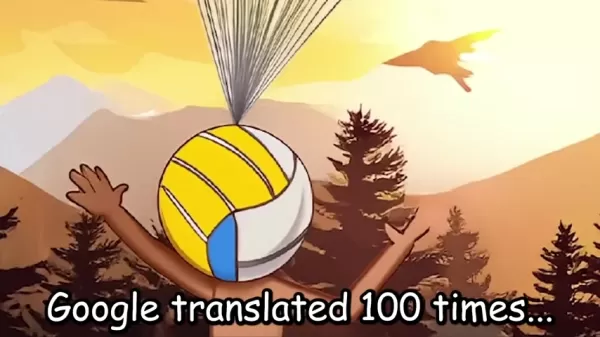
This technique can transform ordinary prompts into bizarre and captivating concepts, pushing the boundaries of what AI can create.
The appeal of this method lies in its accessibility; anyone with Google Translate can experiment and explore AI's potential as a source of unpredictable artistic inspiration. AI photo editing isn't just about precision and control; it's also about embracing the unexpected and letting AI guide the creative process in new and unforeseen directions.
Using this technique the presenter created prompts such as:
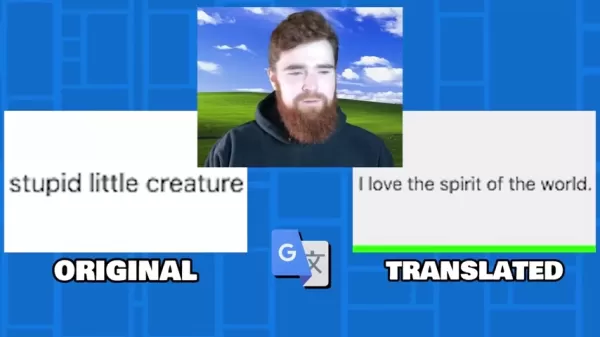
- Stupid little creature --> I love the spirit of the world
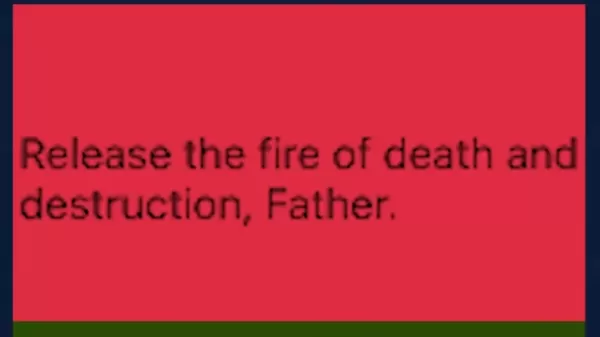
- giant meteor heading towards them --> Release the fire of death and destruction, Father
- baby yoda with no hair --> Young Yoda had no hair
Repeated translations can take an ordinary concept and transform it into something dark and abstract.
Combining AI Tools for Unique Visual Storytelling
The real magic occurs when these two techniques combine. Imagine using Google Translate to generate a bizarre prompt and then feeding that prompt into Generative Fill.
The AI interprets the nonsensical text and attempts to create an image matching its understanding, resulting in visuals that are both fascinating and surreal. This synergistic approach can produce truly unique and memorable visual stories, pushing the limits of AI photo editing and challenging our perceptions of art and creativity. It also enables you to connect multiple images that individually have little meaning but collectively form one large, cohesive image.
This method has been used to create:
- Yoda with large lipstick and no hair with children growing from his head
- A gremlin with long legs and a porkchop for a torso
- Cartoon landscape under attack by a flaming bird
Ethical Cons
iderations in AI-Generated Art
The Responsibility of the Artist
As AI grows more sophisticated, it's crucial to consider the ethical implications of using these tools. While AI can enhance creativity and open new artistic pathways, it's important to recognize that AI doesn't 'create' in the same way human artists do. AI photo editing systems are trained on existing datasets, meaning the resulting images reflect the biases and perspectives present in those datasets.
Artists using these tools have a responsibility to remain aware of these biases and to use AI in ways that promote inclusivity, diversity, and responsible representation. This includes carefully considering the language used in prompts, along with the cultural and social context of generated images. Responsible AI use can help challenge harmful stereotypes and foster a more equitable and representative visual landscape.
The Future of Creativity and AI
Integrating AI into creative workflows represents a significant shift in the art world. As AI continues to evolve, we'll likely see even more sophisticated tools and techniques emerge, further blurring the lines between human and artificial creativity.
![Ethical <h3]() Considerations in AI-Generated Art" src="https://img.xix.ai/uploads/25/691fe548da3c6.webp">
Considerations in AI-Generated Art" src="https://img.xix.ai/uploads/25/691fe548da3c6.webp">It's important to view AI photo editing as a collaborative partnership where human artists and AI work together to create something truly unique and impactful.
This collaboration holds potential for unlocking new forms of expression, breaking down barriers to entry, and democratizing the creative process. The key is embracing AI as a tool for exploration and innovation while remaining mindful of its limitations and ethical implications. By doing so, we can harness AI's power to create a more vibrant and inclusive art world.
Creating with Generative AI, Step-by-Step
Expanding an Image with Photoshop's Generative Fill
This is an extremely popular feature for content creators who need to enlarge small images to fit new frames or correct aspect ratios after cropping. Here's a step-by-step process:
- Open the Image: Start by opening your target image in Adobe Photoshop.
- Select the Crop Tool: Choose the 'Crop Tool' from the toolbar.
- Expand the Canvas: Use the Crop Tool to drag the canvas edges outward, creating additional space around your image.
- Generate: Click Generate Fill and watch as it creates and fills the empty areas.
- Export: Export your finished image for content use!
Content Removal with Photoshop's Generative Fill
This feature excels at removing unwanted or distracting elements from images. Follow this step-by-step process:
- Open the Image: Begin by opening your target image in Adobe Photoshop.
- Select Tool: Choose your preferred selection tool from the toolbar, such as the lasso or rectangle tool.
- Select the unwanted object: Create a selection around the item you want to remove.
- Generate: Click Generate Fill and observe as it fills the created gap based on surrounding imagery.
- Export: Export your cleaned image for content use!
How to use google translate and image editing AI
With AI generative fill, virtually anything becomes possible. Why not create images using prompts you generate by running text through Google Translate numerous times? This approach can produce unique artwork:
- Develop an initial concept
- Write a short sentence describing that idea
- Run that sentence through Google Translate 100 times
- Copy and paste the translated sentence into a generative fill tool
- Use this sentence to generate an image based on the description
- Continue this process with your new images.
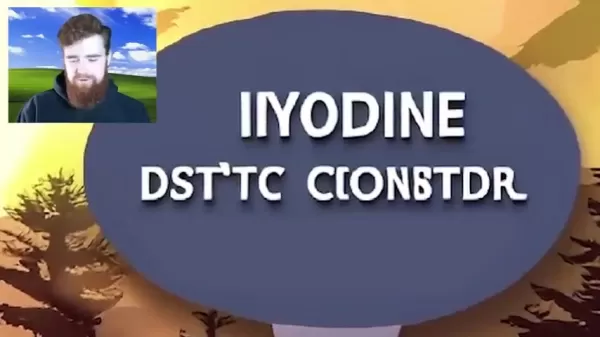
This technique can yield all sorts of creative madness while enabling completely original imagery and art!
Pricing
Adobe Photoshop's Pricing
Photoshop offers several subscription tiers:
- The standalone version costs $22.99/month or $263.88/year
- The photography bundle provides better value at $119.88/year, including additional applications
- The Adobe All Apps subscription includes Photoshop for $59.99/month
Adobe Photoshop's Generative Fill: Pros
and Cons
Pros
Seamless integration with Photoshop
AI generates novel images for various effects
Intuitive text prompt-based interface
Extends images with seamless edges
Cons
Requires an Adobe Photoshop subscription
Image quality varies depending on prompt complexity and source images
May unintentionally incorporate stereotypes or tropes in generated imagery
Can be time-consuming with poorly conceived ideas
Core Features
AI
Photoshop's AI integration is its most discussed feature. It enables AI image generation from text prompts and makes quick changes, removals, and alterations to image sections with ease.
Layers
Photoshop derives its power from layer integration. Layers allow stacking and control of individual image elements. Different tools can be applied to separate layers, making it simple to work on specific elements without affecting the entire image.
Masking
Masking isolates portions of an image, enabling controlled editing and effect application.
Retouching
Healing brushes and clone stamp tools seamlessly remove imperfections.
Selection
Photoshop provides powerful selection tools including: object selection, quick selection, and magic wand. These selections can be combined to remove specific photo sections.
Use Cases
Graphic Design
Creating logos, brochures, posters, and other marketing materials.
Photography Editing
Enhancing portraits, landscapes, and various photograph types.
Web Design
Designing website layouts, banners, and graphics.
Digital Painting
Creating digital illustrations and artwork.
Video Editing
Limited video editing capabilities, such as creating small GIFs
FAQ
What is AI photo editing?
AI photo editing involves using artificial intelligence algorithms to enhance, modify, or generate images. It includes features like content-aware fill, automatic color correction, and AI-powered filters.
What is generative fill?
Generative Fill is an AI feature in Adobe Photoshop that lets users add, remove, or replace image content using text prompts. It intelligently generates new content that blends seamlessly with existing imagery.
Can AI replace human artists?
While AI can automate certain tasks and provide creative assistance, it's unlikely to completely replace human artists. AI tools can augment creativity, but human vision and artistic expression remain fundamental.
Related Questions
What is a 'happy mouth' in the context of AI photo editing?
This presents an interesting question, though the presenter didn't particularly favor it. After running a 'Baby Yoda with no hair' image through AI with horrifying results, the presenter consulted a colleague who suggested to 'give him a happy mouth' - essentially meaning a smile. The presenter found this wording unusual for a prompt. Additionally, Google Translate converted 'baby yoda has a happy mouth' to 'Yoda's face lit up with joy,' clarifying that 'happy mouth' refers to smiling or is associated with smiling expressions.
Should I use AI to remove my kids from an old picture?
This nuanced question involves multiple considerations with no definitive answer, as the decision ultimately rests with you. Here are points to help guide your decision:Ethics: If sharing the image, consider whether it's fair to create fabricated memories they didn't experience. Should you be concerned about the impact of creating artificial stories if they're unaware?Bias: AI often carries biases - does the generated imagery accurately represent the time, place, and people, or does it rely on stereotypes?Practicality: Even if desired, the technology might not properly understand context. What if AI-generated people bear no resemblance to the original time and place?Your final decision remains personal, but considering these points helps ensure ethical practices that respect individuals and historical accuracy.
Related article
 ByteDance’s Seed launches global campus drive, offering virtual shares to win top large model talent
In the competitive landscape of large language models, securing top-tier talent remains the most critical strategic asset.On April 1st, ByteDance announced the launch of its Seed global campus recruitment initiative, part of its large model talent de
Suno to Watermark Songs Amid Legal Battles
Suno, the platform enabling users to generate AI-created music, has unveiled new features to label platform-produced tracks, restrict downloads, and update community standards to curb unauthorized replicas. These updates arrive as Suno confronts mult
Musk Admits Grok Build Leaked User Code, Promises to Erase All Historical Data
Elon Musk directly addressed the privacy controversy surrounding Grok Build, beginning with a simple "True" to confirm the incident's validity. He pledged that all user data previously uploaded to SpaceXAI would be permanently erased, stating, "not a
Related Special Topic Recommendations
Design & Art
ByteDance’s Seed launches global campus drive, offering virtual shares to win top large model talent
In the competitive landscape of large language models, securing top-tier talent remains the most critical strategic asset.On April 1st, ByteDance announced the launch of its Seed global campus recruitment initiative, part of its large model talent de
Suno to Watermark Songs Amid Legal Battles
Suno, the platform enabling users to generate AI-created music, has unveiled new features to label platform-produced tracks, restrict downloads, and update community standards to curb unauthorized replicas. These updates arrive as Suno confronts mult
Musk Admits Grok Build Leaked User Code, Promises to Erase All Historical Data
Elon Musk directly addressed the privacy controversy surrounding Grok Build, beginning with a simple "True" to confirm the incident's validity. He pledged that all user data previously uploaded to SpaceXAI would be permanently erased, stating, "not a
Related Special Topic Recommendations
Design & Art
 AI Visual Style Reference Tools for Character Sheets, Moodboards, and Pitch Decks
2026 Latest Best AI Visual Style Reference Tools for Character Sheets, Moodboards, and Pitch Decks are here on XIX.AI! This curated top-rated list features powerful game-changing tools that go through rigorous real-world tests. You’ll find a free vs paid comparison, detailed rankings, and must-try options to help you boost creativity and streamline your workflow. Explore now to discover your perfect tool for boosting productivity!
 11 tools
 xix.ai
SEO
Best AI SERP Analysis Tools for Search Strategy
xix.ai
SEO
Best AI SERP Analysis Tools for Search Strategy
2026 Latest Best Top-rated AI SERP Analysis Tools for Search Strategy are curated by XIX.AI through rigorous real-world tests and weekly updated rankings. These powerful tools help you unlock hidden optimization opportunities, boost content performance, and gain a competitive edge in search. Discover your perfect tool to elevate your search strategy today. Explore now!
13 tools
xix.ai
Data Analysis
Best AI Anomaly Detection Tools for KPI Monitoring across SaaS and Ecommerce Teams
2026 Latest Best Top-rated AI Anomaly Detection Tools for KPI Monitoring in SaaS and Ecommerce teams! XIX.AI has curated a powerful, game-changing collection based on rigorous real-world tests and weekly updated rankings. You’ll find detailed free vs paid comparison insights to help you identify the must-try solution that boosts productivity and unlocks your AI edge. Explore now!
10 tools
xix.ai
writing
Best AI Outline Generators for Long-Form SEO Articles
2026 Latest Best Top-Rated AI Outline Generators for Long-Form SEO Articles, meticulously curated by XIX.AI. These powerful tools offer game-changing assistance in creating high-quality content quickly, boosting writing efficiency significantly. Get a free vs paid comparison along with real-world tests and detailed rankings to help you find the must-try option that suits your needs. Explore now to unlock your AI edge.
8 tools
xix.ai
Education and Learning
AI Study Tools for Homework and Exam Prep
2026 Latest Best AI Study Tools for Homework and Exam Prep! XIX.AI curates a top-rated list of powerful, game-changing tools that help students boost productivity, streamline homework completion, and ace exams through real-world tests. Get a free vs paid comparison, detailed rankings, and must-try options to unlock your AI edge. Explore now!
10 tools
xix.ai
Music composition
AI Vocal Demo Tools for Songwriters, Hooks, Toplines, and Multilingual Draft Sessions
2026 Latest Best AI Vocal Demo Tools for Songwriters, Hook Creators, and Multi-Language Content Teams! XIX.AI has curated a top-rated list of powerful game-changing tools that go through rigorous real-world tests. You’ll find detailed free vs paid comparison data, comprehensive rankings, and must-try options to help you boost writing efficiency and unlock your creative potential. Explore now to discover your perfect tool for all your content needs!
9 tools
xix.ai

 Comments (1)
0/500
Comments (1)
0/500
![OliverPhillips]()
Honestly, 2026 guides feel like yesterday's news when AI moves this fast. I tried Generative Fill last week and it hallucinated three extra fingers on my cat. 😹 Still, the free tools are a lifesaver for beginners who can't afford Adobe. Anyone else struggling with the 'repetitive translation' trick mentioned? It sounds like a hack that might break soon. #AIart #PhotoEdit
AI is transforming creative workflows in our digital world. This guide explores how AI-powered photo editing, using tools like Adobe Photoshop's Generative Fill and creative techniques such as repetitive Google Translation, unlocks new avenues for artistic expression. We'll examine how to use these tools for expanding images, removing content, and generating surreal art. Prepare to unleash your creative potential with AI and turn ordinary photos into compelling visual narratives.
Key Points
Use Google Translate to craft unique and unexpected text prompts for AI image generation.
Adobe Photoshop's Generative Fill is a powerful solution for expanding images and manipulating content.
Experiment with descriptive language to achieve your desired outcomes in AI image editing.
Cons
ider the ethical implications of using AI to modify and generate images.Explore AI video tools for automated editing and creative content production.
Transforming Images with AI Photo Editing
The Power of Adobe Photoshop's Generative Fill
Adobe Photoshop's Generative Fill represents a breakthrough in image editing, enabling users to extend images beyond their original borders and seamlessly remove unwanted elements. By harnessing AI, this feature analyzes surrounding pixels and generates content that blends naturally with the existing image, creating flawless extensions or removals.
This capability creates new opportunities for photographers, graphic designers, and digital artists, allowing them to reshape and reimagine their work with unprecedented ease. With modern solutions like an AI photo editor, creatives can now enhance images more quickly and flexibly than ever before.
Adobe Generative Fill and similar AI tools provide functionality for:
- Image Expansion: Enlarge photos and correct aspect ratio problems
- Content Removal: Eliminate distracting or unwanted objects
- Creative Generation: Add new elements from your imagination
This technology goes beyond being just a tool; it serves as an intelligent assistant that understands image context and provides smart suggestions, speeding up the creative process and letting artists concentrate on their overall vision. The ability to expand images, remove distractions, and generate new content offers greater creative control, enabling visual artists to achieve effects that were previously time-intensive or impossible.
Unleashing Unpredictability: Google Translate as a Creative Prompt Generator
While Generative Fill offers control over the AI photo editing process, incorporating Google Translate introduces an element of creative chaos. By repeatedly translating a simple prompt, the resulting text can become distorted and unpredictable, leading to surprising and unexpected image generations.
This technique can transform ordinary prompts into bizarre and captivating concepts, pushing the boundaries of what AI can create.
The appeal of this method lies in its accessibility; anyone with Google Translate can experiment and explore AI's potential as a source of unpredictable artistic inspiration. AI photo editing isn't just about precision and control; it's also about embracing the unexpected and letting AI guide the creative process in new and unforeseen directions.
Using this technique the presenter created prompts such as:
- Stupid little creature --> I love the spirit of the world
- giant meteor heading towards them --> Release the fire of death and destruction, Father
- baby yoda with no hair --> Young Yoda had no hair
Repeated translations can take an ordinary concept and transform it into something dark and abstract.
Combining AI Tools for Unique Visual Storytelling
The real magic occurs when these two techniques combine. Imagine using Google Translate to generate a bizarre prompt and then feeding that prompt into Generative Fill.
The AI interprets the nonsensical text and attempts to create an image matching its understanding, resulting in visuals that are both fascinating and surreal. This synergistic approach can produce truly unique and memorable visual stories, pushing the limits of AI photo editing and challenging our perceptions of art and creativity. It also enables you to connect multiple images that individually have little meaning but collectively form one large, cohesive image.
This method has been used to create:
- Yoda with large lipstick and no hair with children growing from his head
- A gremlin with long legs and a porkchop for a torso
- Cartoon landscape under attack by a flaming bird
Ethical Cons
iderations in AI-Generated Art
The Responsibility of the Artist
As AI grows more sophisticated, it's crucial to consider the ethical implications of using these tools. While AI can enhance creativity and open new artistic pathways, it's important to recognize that AI doesn't 'create' in the same way human artists do. AI photo editing systems are trained on existing datasets, meaning the resulting images reflect the biases and perspectives present in those datasets.
Artists using these tools have a responsibility to remain aware of these biases and to use AI in ways that promote inclusivity, diversity, and responsible representation. This includes carefully considering the language used in prompts, along with the cultural and social context of generated images. Responsible AI use can help challenge harmful stereotypes and foster a more equitable and representative visual landscape.
The Future of Creativity and AI
Integrating AI into creative workflows represents a significant shift in the art world. As AI continues to evolve, we'll likely see even more sophisticated tools and techniques emerge, further blurring the lines between human and artificial creativity.
It's important to view AI photo editing as a collaborative partnership where human artists and AI work together to create something truly unique and impactful.
This collaboration holds potential for unlocking new forms of expression, breaking down barriers to entry, and democratizing the creative process. The key is embracing AI as a tool for exploration and innovation while remaining mindful of its limitations and ethical implications. By doing so, we can harness AI's power to create a more vibrant and inclusive art world.
Creating with Generative AI, Step-by-Step
Expanding an Image with Photoshop's Generative Fill
This is an extremely popular feature for content creators who need to enlarge small images to fit new frames or correct aspect ratios after cropping. Here's a step-by-step process:
- Open the Image: Start by opening your target image in Adobe Photoshop.
- Select the Crop Tool: Choose the 'Crop Tool' from the toolbar.
- Expand the Canvas: Use the Crop Tool to drag the canvas edges outward, creating additional space around your image.
- Generate: Click Generate Fill and watch as it creates and fills the empty areas.
- Export: Export your finished image for content use!
Content Removal with Photoshop's Generative Fill
This feature excels at removing unwanted or distracting elements from images. Follow this step-by-step process:
- Open the Image: Begin by opening your target image in Adobe Photoshop.
- Select Tool: Choose your preferred selection tool from the toolbar, such as the lasso or rectangle tool.
- Select the unwanted object: Create a selection around the item you want to remove.
- Generate: Click Generate Fill and observe as it fills the created gap based on surrounding imagery.
- Export: Export your cleaned image for content use!
How to use google translate and image editing AI
With AI generative fill, virtually anything becomes possible. Why not create images using prompts you generate by running text through Google Translate numerous times? This approach can produce unique artwork:
- Develop an initial concept
- Write a short sentence describing that idea
- Run that sentence through Google Translate 100 times
- Copy and paste the translated sentence into a generative fill tool
- Use this sentence to generate an image based on the description
- Continue this process with your new images.
This technique can yield all sorts of creative madness while enabling completely original imagery and art!
Pricing
Adobe Photoshop's Pricing
Photoshop offers several subscription tiers:
- The standalone version costs $22.99/month or $263.88/year
- The photography bundle provides better value at $119.88/year, including additional applications
- The Adobe All Apps subscription includes Photoshop for $59.99/month
Adobe Photoshop's Generative Fill: Pros
and Cons
Pros
Seamless integration with Photoshop
AI generates novel images for various effects
Intuitive text prompt-based interface
Extends images with seamless edges
Cons
Requires an Adobe Photoshop subscription
Image quality varies depending on prompt complexity and source images
May unintentionally incorporate stereotypes or tropes in generated imagery
Can be time-consuming with poorly conceived ideas
Core Features
AI
Photoshop's AI integration is its most discussed feature. It enables AI image generation from text prompts and makes quick changes, removals, and alterations to image sections with ease.
Layers
Photoshop derives its power from layer integration. Layers allow stacking and control of individual image elements. Different tools can be applied to separate layers, making it simple to work on specific elements without affecting the entire image.
Masking
Masking isolates portions of an image, enabling controlled editing and effect application.
Retouching
Healing brushes and clone stamp tools seamlessly remove imperfections.
Selection
Photoshop provides powerful selection tools including: object selection, quick selection, and magic wand. These selections can be combined to remove specific photo sections.
Use Cases
Graphic Design
Creating logos, brochures, posters, and other marketing materials.
Photography Editing
Enhancing portraits, landscapes, and various photograph types.
Web Design
Designing website layouts, banners, and graphics.
Digital Painting
Creating digital illustrations and artwork.
Video Editing
Limited video editing capabilities, such as creating small GIFs
FAQ
What is AI photo editing?
AI photo editing involves using artificial intelligence algorithms to enhance, modify, or generate images. It includes features like content-aware fill, automatic color correction, and AI-powered filters.
What is generative fill?
Generative Fill is an AI feature in Adobe Photoshop that lets users add, remove, or replace image content using text prompts. It intelligently generates new content that blends seamlessly with existing imagery.
Can AI replace human artists?
While AI can automate certain tasks and provide creative assistance, it's unlikely to completely replace human artists. AI tools can augment creativity, but human vision and artistic expression remain fundamental.
Related Questions
What is a 'happy mouth' in the context of AI photo editing?
This presents an interesting question, though the presenter didn't particularly favor it. After running a 'Baby Yoda with no hair' image through AI with horrifying results, the presenter consulted a colleague who suggested to 'give him a happy mouth' - essentially meaning a smile. The presenter found this wording unusual for a prompt. Additionally, Google Translate converted 'baby yoda has a happy mouth' to 'Yoda's face lit up with joy,' clarifying that 'happy mouth' refers to smiling or is associated with smiling expressions.
Should I use AI to remove my kids from an old picture?
This nuanced question involves multiple considerations with no definitive answer, as the decision ultimately rests with you. Here are points to help guide your decision:Ethics: If sharing the image, consider whether it's fair to create fabricated memories they didn't experience. Should you be concerned about the impact of creating artificial stories if they're unaware?Bias: AI often carries biases - does the generated imagery accurately represent the time, place, and people, or does it rely on stereotypes?Practicality: Even if desired, the technology might not properly understand context. What if AI-generated people bear no resemblance to the original time and place?Your final decision remains personal, but considering these points helps ensure ethical practices that respect individuals and historical accuracy.








 ByteDance’s Seed launches global campus drive, offering virtual shares to win top large model talent
In the competitive landscape of large language models, securing top-tier talent remains the most critical strategic asset.On April 1st, ByteDance announced the launch of its Seed global campus recruitment initiative, part of its large model talent de
ByteDance’s Seed launches global campus drive, offering virtual shares to win top large model talent
In the competitive landscape of large language models, securing top-tier talent remains the most critical strategic asset.On April 1st, ByteDance announced the launch of its Seed global campus recruitment initiative, part of its large model talent de
 Suno to Watermark Songs Amid Legal Battles
Suno, the platform enabling users to generate AI-created music, has unveiled new features to label platform-produced tracks, restrict downloads, and update community standards to curb unauthorized replicas. These updates arrive as Suno confronts mult
Suno to Watermark Songs Amid Legal Battles
Suno, the platform enabling users to generate AI-created music, has unveiled new features to label platform-produced tracks, restrict downloads, and update community standards to curb unauthorized replicas. These updates arrive as Suno confronts mult
 Musk Admits Grok Build Leaked User Code, Promises to Erase All Historical Data
Elon Musk directly addressed the privacy controversy surrounding Grok Build, beginning with a simple "True" to confirm the incident's validity. He pledged that all user data previously uploaded to SpaceXAI would be permanently erased, stating, "not a
Musk Admits Grok Build Leaked User Code, Promises to Erase All Historical Data
Elon Musk directly addressed the privacy controversy surrounding Grok Build, beginning with a simple "True" to confirm the incident's validity. He pledged that all user data previously uploaded to SpaceXAI would be permanently erased, stating, "not a
2026 Latest Best AI Visual Style Reference Tools for Character Sheets, Moodboards, and Pitch Decks are here on XIX.AI! This curated top-rated list features powerful game-changing tools that go through rigorous real-world tests. You’ll find a free vs paid comparison, detailed rankings, and must-try options to help you boost creativity and streamline your workflow. Explore now to discover your perfect tool for boosting productivity!
11 tools
xix.ai

2026 Latest Best Top-rated AI SERP Analysis Tools for Search Strategy are curated by XIX.AI through rigorous real-world tests and weekly updated rankings. These powerful tools help you unlock hidden optimization opportunities, boost content performance, and gain a competitive edge in search. Discover your perfect tool to elevate your search strategy today. Explore now!
13 tools
xix.ai

2026 Latest Best Top-rated AI Anomaly Detection Tools for KPI Monitoring in SaaS and Ecommerce teams! XIX.AI has curated a powerful, game-changing collection based on rigorous real-world tests and weekly updated rankings. You’ll find detailed free vs paid comparison insights to help you identify the must-try solution that boosts productivity and unlocks your AI edge. Explore now!
10 tools
xix.ai

2026 Latest Best Top-Rated AI Outline Generators for Long-Form SEO Articles, meticulously curated by XIX.AI. These powerful tools offer game-changing assistance in creating high-quality content quickly, boosting writing efficiency significantly. Get a free vs paid comparison along with real-world tests and detailed rankings to help you find the must-try option that suits your needs. Explore now to unlock your AI edge.
8 tools
xix.ai

2026 Latest Best AI Study Tools for Homework and Exam Prep! XIX.AI curates a top-rated list of powerful, game-changing tools that help students boost productivity, streamline homework completion, and ace exams through real-world tests. Get a free vs paid comparison, detailed rankings, and must-try options to unlock your AI edge. Explore now!
10 tools
xix.ai

2026 Latest Best AI Vocal Demo Tools for Songwriters, Hook Creators, and Multi-Language Content Teams! XIX.AI has curated a top-rated list of powerful game-changing tools that go through rigorous real-world tests. You’ll find detailed free vs paid comparison data, comprehensive rankings, and must-try options to help you boost writing efficiency and unlock your creative potential. Explore now to discover your perfect tool for all your content needs!
9 tools
xix.ai

Honestly, 2026 guides feel like yesterday's news when AI moves this fast. I tried Generative Fill last week and it hallucinated three extra fingers on my cat. 😹 Still, the free tools are a lifesaver for beginners who can't afford Adobe. Anyone else struggling with the 'repetitive translation' trick mentioned? It sounds like a hack that might break soon. #AIart #PhotoEdit












