


 Home
HomeTransform AI Images with DaVinci Resolve 3D Animation Tutorial
Bringing Static AI Images to Life with DaVinci Resolve
In the ever-expanding realm of digital creativity, artificial intelligence (AI) image generation has revolutionized how we approach art and design. Yet, even the most stunning AI-generated images can feel flat and two-dimensional. This is where things get interesting—by combining advanced tools like Midjourney and ZoeDepth with the power of DaVinci Resolve, you can transform a static image into a dynamic 3D scene. Let me walk you through this exciting process.
But first, let’s talk about why this matters. Static images, no matter how beautiful, lack the immersive quality of a 3D environment. By adding depth, motion, and interactivity, you can create something truly engaging—a piece of art that feels alive. Whether you're a professional artist or someone who simply enjoys tinkering with digital media, this technique opens up endless possibilities.
Getting Started: Creating Your AI Image
Before diving into 3D territory, you need a solid foundation—a great 2D image. If you've got a Midjourney subscription, you're already ahead of the game. Their AI models produce crisp, detailed images that serve as excellent starting points. But what if you're working on a tighter budget? No worries! There are plenty of free AI image generators out there. Just type in a prompt, tweak the settings, and voilà—you’ve got yourself an image.
For instance, I recently used Midjourney to craft a breathtaking mountain range scene bathed in golden sunlight. The result was so vivid that I couldn’t wait to bring it to life in 3D. Experimentation is key here. Spend some time tweaking your prompts until you land on something that sparks joy—and maybe even surprise.
Turning 2D into 3D with ZoeDepth
Now comes the magical part: converting your 2D masterpiece into a 3D object. Enter ZoeDepth, a tool specifically designed for this purpose. It takes your image and estimates depth information, turning it into a mesh that looks and feels three-dimensional.
Here’s how it works:
- Head over to the ZoeDepth website and select the “Image to 3D” tab.
- Drag your AI image into the designated area. Trust me, it’s easier than it sounds.
- Enable the “Keep occlusion edges” option to keep the details intact.
- Hit submit and watch as ZoeDepth transforms your image into a 3D mesh.
The output might look odd at first glance, but trust the process. Once you’ve downloaded the GLB file, you’re ready to move on to the next step.
GLB to FBX Conversion for DaVinci Resolve
DaVinci Resolve doesn’t play nicely with GLB files, unfortunately. That’s where a little conversion magic comes in handy. Using a tool like Aspose Products’ GLB to FBX converter, you can seamlessly transition from one format to another.
Steps:
- Upload your GLB file to the converter.
- Choose FBX as your output format.
- Click convert and download your newly minted FBX file.
With your FBX file in hand, you’re finally prepared to bring your creation to life in DaVinci Resolve.
Building Your Dynamic Scene in DaVinci Resolve
Let’s dive straight into DaVinci Resolve’s Fusion tab. If you’re new to the software, don’t panic—it’s surprisingly intuitive once you get the hang of it.
- Open DaVinci Resolve and create a new project.
- Set your timeline to 60fps for smoother playback.
- Add a Fusion composition to your timeline.
- Import your FBX file via Fusion > Import > FBX Scene.
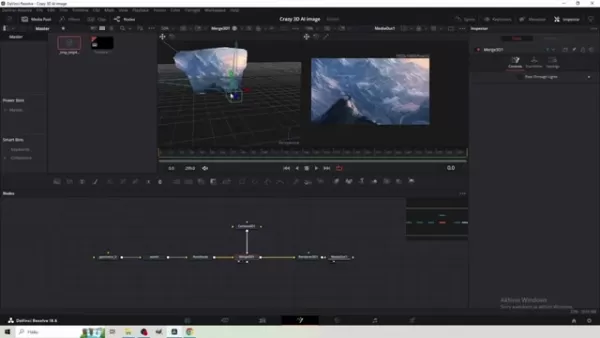
At this point, you should see your 3D mesh represented in the Fusion workspace. Three main nodes appear: Geometry (your 3D mesh), World (coordinate system), and RootNode (the master node). Since we’re dealing with 3D elements, we need to enable 3D rendering.
Rendering and Animating Your Scene
To render your 3D scene properly, you’ll need a Render 3D node. Here’s how:
- Press Shift + Spacebar and search for “Render 3D.”
- Connect the RootNode to the Render 3D node.
- Link the Render 3D node to MediaOut.
- Switch the Renderer Type to Hardware in the Inspector.
- Adjust the Y-axis rotation to 180 degrees in the RootNode settings.
Next up, we add camera movement using a Camera 3D node. This gives your scene life and dynamism. Follow these steps:
- Insert a Camera 3D node.
- Connect it to the Merge 3D node.
- Keyframe the camera’s position along the Z-axis to simulate zooming.
Adding Final Touches: Snow Overlay
To really sell the 3D effect, consider layering in atmospheric elements like snow. Adding an animated overlay not only enhances the scene but also adds texture and realism.
- Drop the snow overlay into your timeline.
- Under Composite Mode, switch to Screen to blend the overlay smoothly.
Cost Considerations and Tool Selection
When deciding between Midjourney and free AI generators, weigh your priorities. Midjourney delivers premium results but comes with a price tag. On the flip side, free tools offer affordability without sacrificing fun. Regardless of your choice, remember that experimentation is half the battle.
Pros and Cons of This Technique
Pros:
- Adds depth and interactivity to static images.
- Relatively straightforward workflow in DaVinci Resolve.
- Offers creative freedom in camera movement and scene design.
- Creates immersive content that captivates viewers.
Cons:
- Requires additional software and possibly a Midjourney subscription.
- 3D mesh reconstruction may introduce imperfections.
- Subtle camera movements are essential to maintain realism.
- Familiarity with DaVinci Resolve’s Fusion tab helps.
Frequently Asked Questions
Q: Do I absolutely need Midjourney for this?
A: No, Midjourney isn’t mandatory. Free alternatives exist, but they may differ in quality. Test multiple tools to find what fits your style.
Q: Why convert GLB to FBX?
A: DaVinci Resolve doesn’t support GLB files directly. FBX ensures compatibility.
Q: What if the 3D mesh has issues?
A: Play around with ZoeDepth’s settings or clean up the image beforehand.
Q: What’s Timeline Proxy Resolution?
A: Lower resolutions improve playback performance on less powerful systems.
Related Questions
Looking for alternatives to Midjourney? Try DALL-E 2, Stable Diffusion, NightCafe Creator, or RunwayML. Each tool brings something unique to the table, so explore and discover what resonates with you.

 Related article
 Six Tech Giants Back Linux Foundation With $12.5M to Tackle AI Vulnerability Noise
To tackle the flood of low-quality security reports produced by AI automation tools, six major tech companies—Anthropic, Amazon (AWS), GitHub, Google, Microsoft, and OpenAI—have collectively contributed $12.5 million in funding to Linux Foundation in
Musk Considered Leaving OpenAI to His Kids as Altman Testifies
This morning, OpenAI CEO Sam Altman took the stand to address former co-founder Elon Musk’s lawsuit challenging the company’s corporate structure.When asked about Musk’s claim that other founders “stole a charity” by launching a for-profit subsidiary
Sam Altman Sparks Debate Over AI's Deceleration
Listen onApple PodcastsListen onSpotifyOpenAI CEO Sam Altman recently suggested that it may be time to “pace the rate of AI development” to allow society to “harden around some of these new capability levels.”On the latest episode of TechCrunch’s Equ
Related Special Topic Recommendations
Business
Six Tech Giants Back Linux Foundation With $12.5M to Tackle AI Vulnerability Noise
To tackle the flood of low-quality security reports produced by AI automation tools, six major tech companies—Anthropic, Amazon (AWS), GitHub, Google, Microsoft, and OpenAI—have collectively contributed $12.5 million in funding to Linux Foundation in
Musk Considered Leaving OpenAI to His Kids as Altman Testifies
This morning, OpenAI CEO Sam Altman took the stand to address former co-founder Elon Musk’s lawsuit challenging the company’s corporate structure.When asked about Musk’s claim that other founders “stole a charity” by launching a for-profit subsidiary
Sam Altman Sparks Debate Over AI's Deceleration
Listen onApple PodcastsListen onSpotifyOpenAI CEO Sam Altman recently suggested that it may be time to “pace the rate of AI development” to allow society to “harden around some of these new capability levels.”On the latest episode of TechCrunch’s Equ
Related Special Topic Recommendations
Business
 Best AI Competitive Research Tools for Small Businesses
2026 Latest Best Top-rated AI Competitive Research Tools for Small Businesses! XIX.AI has curated a highly powerful game-changing collection, updated weekly with rigorous real-world tests and detailed rankings. You can find a comprehensive free vs paid comparison to help you identify the must-try tools that boost your productivity and give you a competitive edge. Explore now to discover your perfect tool!
 9 tools
 xix.ai
Image editing
Photoshop AI Retouch Tools for Ecommerce Apparel, Skin Cleanup, and Color Consistency
xix.ai
Image editing
Photoshop AI Retouch Tools for Ecommerce Apparel, Skin Cleanup, and Color Consistency
2026 Latest Best Photoshop AI retouch tools for ecommerce apparel, skin cleanup, and color consistency! This top-rated curated list features powerful game-changing solutions that help you boost writing efficiency, streamline content creation, and achieve perfect visual results effortlessly. Each tool has undergone real-world tests through weekly updated rankings, complete with free vs paid comparison details. Backed by XIX.AI, it’s the must-try guide for anyone aiming to unlock your AI edge. Explore now!
10 tools
xix.ai
Prompt
Best AI Prompt Libraries for ChatGPT Workflows
2026 Latest Best Top-Rated AI Prompt Libraries for optimizing all types of ChatGPT workflows. XIX.AI has curated a powerful, game-changing collection that goes through rigorous real-world tests to ensure top performance. You can find detailed free vs paid comparisons and expert rankings to help you choose the must-try tools that boost your productivity and unlock your AI edge. Explore now!
11 tools
xix.ai
Education and Learning
AI Quiz Builder Platforms for Teachers, Tutors, and Cohort-Based Learning Programs
2026 Latest Best AI Quiz Builder Platforms for Teachers, Tutors, and Cohort-Based Learning Programs! XIX.AI has curated a top-rated list of powerful game-changing tools that go through real-world tests to deliver accurate rankings. These must-try platforms help boost writing efficiency, streamline content creation, and simplify quiz design across all learning scenarios. Explore now to discover your perfect tool for unlocking your AI edge in teaching!
13 tools
xix.ai
code
AI Pull Request Review Tools for GitHub Teams Handling Refactors, Bugs, and Security Gaps
2026 Latest Best AI Pull Request Review Tools for GitHub Teams are here on XIX.AI! This top-rated curated list showcases powerful game-changing solutions that streamline refactoring, bug fixing, and security gap detection across all team workflows. Enjoy a free vs paid comparison along with real-world tests and detailed rankings to help you find the perfect tool that boosts productivity significantly. Explore now to unlock your AI edge!
12 tools
xix.ai
Text-to-speech
Best AI Text to Speech Tools for Natural Voiceovers
2026 Latest Best Top-rated AI Text to Speech Tools for Natural Voiceovers are here on XIX.AI! This curated list features powerful, game-changing options that deliver crystal-clear voices for every use case, backed by real-world tests and weekly updated rankings. Get a free vs paid comparison to find the must-try solution that boosts your productivity instantly. Explore now to Unlock your AI edge!
11 tools
xix.ai

 Comments (3)
0/500
Comments (3)
0/500
![GregoryClark]()
Никогда бы не подумал, что статические AI-изображения можно так оживить! DaVinci Resolve оказывается не только для цветокоррекции. Интересно, сколько времени потребуется на освоение этих техник? Может быть, попробую сделать анимированный портрет своего кота 😸
![JuanMartínez]()
This tutorial is a game-changer! Turning flat AI images into 3D animations with DaVinci Resolve sounds like magic. Can’t wait to try it and make my designs pop! 🖼️✨
![CarlPerez]()
Whoa, turning AI images into 3D animations with DaVinci Resolve sounds like a game-changer! I’m no pro, but this tutorial makes me wanna dive in and play with some trippy visuals. 😎 Anyone tried this yet? How’s the learning curve?
Bringing Static AI Images to Life with DaVinci Resolve
In the ever-expanding realm of digital creativity, artificial intelligence (AI) image generation has revolutionized how we approach art and design. Yet, even the most stunning AI-generated images can feel flat and two-dimensional. This is where things get interesting—by combining advanced tools like Midjourney and ZoeDepth with the power of DaVinci Resolve, you can transform a static image into a dynamic 3D scene. Let me walk you through this exciting process.
But first, let’s talk about why this matters. Static images, no matter how beautiful, lack the immersive quality of a 3D environment. By adding depth, motion, and interactivity, you can create something truly engaging—a piece of art that feels alive. Whether you're a professional artist or someone who simply enjoys tinkering with digital media, this technique opens up endless possibilities.
Getting Started: Creating Your AI Image
Before diving into 3D territory, you need a solid foundation—a great 2D image. If you've got a Midjourney subscription, you're already ahead of the game. Their AI models produce crisp, detailed images that serve as excellent starting points. But what if you're working on a tighter budget? No worries! There are plenty of free AI image generators out there. Just type in a prompt, tweak the settings, and voilà—you’ve got yourself an image.
For instance, I recently used Midjourney to craft a breathtaking mountain range scene bathed in golden sunlight. The result was so vivid that I couldn’t wait to bring it to life in 3D. Experimentation is key here. Spend some time tweaking your prompts until you land on something that sparks joy—and maybe even surprise.
Turning 2D into 3D with ZoeDepth
Now comes the magical part: converting your 2D masterpiece into a 3D object. Enter ZoeDepth, a tool specifically designed for this purpose. It takes your image and estimates depth information, turning it into a mesh that looks and feels three-dimensional.
Here’s how it works:
- Head over to the ZoeDepth website and select the “Image to 3D” tab.
- Drag your AI image into the designated area. Trust me, it’s easier than it sounds.
- Enable the “Keep occlusion edges” option to keep the details intact.
- Hit submit and watch as ZoeDepth transforms your image into a 3D mesh.
The output might look odd at first glance, but trust the process. Once you’ve downloaded the GLB file, you’re ready to move on to the next step.
GLB to FBX Conversion for DaVinci Resolve
DaVinci Resolve doesn’t play nicely with GLB files, unfortunately. That’s where a little conversion magic comes in handy. Using a tool like Aspose Products’ GLB to FBX converter, you can seamlessly transition from one format to another.
Steps:
- Upload your GLB file to the converter.
- Choose FBX as your output format.
- Click convert and download your newly minted FBX file.
With your FBX file in hand, you’re finally prepared to bring your creation to life in DaVinci Resolve.
Building Your Dynamic Scene in DaVinci Resolve
Let’s dive straight into DaVinci Resolve’s Fusion tab. If you’re new to the software, don’t panic—it’s surprisingly intuitive once you get the hang of it.
- Open DaVinci Resolve and create a new project.
- Set your timeline to 60fps for smoother playback.
- Add a Fusion composition to your timeline.
- Import your FBX file via Fusion > Import > FBX Scene.
At this point, you should see your 3D mesh represented in the Fusion workspace. Three main nodes appear: Geometry (your 3D mesh), World (coordinate system), and RootNode (the master node). Since we’re dealing with 3D elements, we need to enable 3D rendering.
Rendering and Animating Your Scene
To render your 3D scene properly, you’ll need a Render 3D node. Here’s how:
- Press Shift + Spacebar and search for “Render 3D.”
- Connect the RootNode to the Render 3D node.
- Link the Render 3D node to MediaOut.
- Switch the Renderer Type to Hardware in the Inspector.
- Adjust the Y-axis rotation to 180 degrees in the RootNode settings.
Next up, we add camera movement using a Camera 3D node. This gives your scene life and dynamism. Follow these steps:
- Insert a Camera 3D node.
- Connect it to the Merge 3D node.
- Keyframe the camera’s position along the Z-axis to simulate zooming.
Adding Final Touches: Snow Overlay
To really sell the 3D effect, consider layering in atmospheric elements like snow. Adding an animated overlay not only enhances the scene but also adds texture and realism.
- Drop the snow overlay into your timeline.
- Under Composite Mode, switch to Screen to blend the overlay smoothly.
Cost Considerations and Tool Selection
When deciding between Midjourney and free AI generators, weigh your priorities. Midjourney delivers premium results but comes with a price tag. On the flip side, free tools offer affordability without sacrificing fun. Regardless of your choice, remember that experimentation is half the battle.
Pros and Cons of This Technique
Pros:
- Adds depth and interactivity to static images.
- Relatively straightforward workflow in DaVinci Resolve.
- Offers creative freedom in camera movement and scene design.
- Creates immersive content that captivates viewers.
Cons:
- Requires additional software and possibly a Midjourney subscription.
- 3D mesh reconstruction may introduce imperfections.
- Subtle camera movements are essential to maintain realism.
- Familiarity with DaVinci Resolve’s Fusion tab helps.
Frequently Asked Questions
Q: Do I absolutely need Midjourney for this? A: No, Midjourney isn’t mandatory. Free alternatives exist, but they may differ in quality. Test multiple tools to find what fits your style.
Q: Why convert GLB to FBX? A: DaVinci Resolve doesn’t support GLB files directly. FBX ensures compatibility.
Q: What if the 3D mesh has issues? A: Play around with ZoeDepth’s settings or clean up the image beforehand.
Q: What’s Timeline Proxy Resolution? A: Lower resolutions improve playback performance on less powerful systems.
Related Questions
Looking for alternatives to Midjourney? Try DALL-E 2, Stable Diffusion, NightCafe Creator, or RunwayML. Each tool brings something unique to the table, so explore and discover what resonates with you.








 Six Tech Giants Back Linux Foundation With $12.5M to Tackle AI Vulnerability Noise
To tackle the flood of low-quality security reports produced by AI automation tools, six major tech companies—Anthropic, Amazon (AWS), GitHub, Google, Microsoft, and OpenAI—have collectively contributed $12.5 million in funding to Linux Foundation in
Six Tech Giants Back Linux Foundation With $12.5M to Tackle AI Vulnerability Noise
To tackle the flood of low-quality security reports produced by AI automation tools, six major tech companies—Anthropic, Amazon (AWS), GitHub, Google, Microsoft, and OpenAI—have collectively contributed $12.5 million in funding to Linux Foundation in
 Musk Considered Leaving OpenAI to His Kids as Altman Testifies
This morning, OpenAI CEO Sam Altman took the stand to address former co-founder Elon Musk’s lawsuit challenging the company’s corporate structure.When asked about Musk’s claim that other founders “stole a charity” by launching a for-profit subsidiary
Musk Considered Leaving OpenAI to His Kids as Altman Testifies
This morning, OpenAI CEO Sam Altman took the stand to address former co-founder Elon Musk’s lawsuit challenging the company’s corporate structure.When asked about Musk’s claim that other founders “stole a charity” by launching a for-profit subsidiary
 Sam Altman Sparks Debate Over AI's Deceleration
Listen onApple PodcastsListen onSpotifyOpenAI CEO Sam Altman recently suggested that it may be time to “pace the rate of AI development” to allow society to “harden around some of these new capability levels.”On the latest episode of TechCrunch’s Equ
Sam Altman Sparks Debate Over AI's Deceleration
Listen onApple PodcastsListen onSpotifyOpenAI CEO Sam Altman recently suggested that it may be time to “pace the rate of AI development” to allow society to “harden around some of these new capability levels.”On the latest episode of TechCrunch’s Equ

2026 Latest Best Top-rated AI Competitive Research Tools for Small Businesses! XIX.AI has curated a highly powerful game-changing collection, updated weekly with rigorous real-world tests and detailed rankings. You can find a comprehensive free vs paid comparison to help you identify the must-try tools that boost your productivity and give you a competitive edge. Explore now to discover your perfect tool!
9 tools
xix.ai

2026 Latest Best Photoshop AI retouch tools for ecommerce apparel, skin cleanup, and color consistency! This top-rated curated list features powerful game-changing solutions that help you boost writing efficiency, streamline content creation, and achieve perfect visual results effortlessly. Each tool has undergone real-world tests through weekly updated rankings, complete with free vs paid comparison details. Backed by XIX.AI, it’s the must-try guide for anyone aiming to unlock your AI edge. Explore now!
10 tools
xix.ai

2026 Latest Best Top-Rated AI Prompt Libraries for optimizing all types of ChatGPT workflows. XIX.AI has curated a powerful, game-changing collection that goes through rigorous real-world tests to ensure top performance. You can find detailed free vs paid comparisons and expert rankings to help you choose the must-try tools that boost your productivity and unlock your AI edge. Explore now!
11 tools
xix.ai

2026 Latest Best AI Quiz Builder Platforms for Teachers, Tutors, and Cohort-Based Learning Programs! XIX.AI has curated a top-rated list of powerful game-changing tools that go through real-world tests to deliver accurate rankings. These must-try platforms help boost writing efficiency, streamline content creation, and simplify quiz design across all learning scenarios. Explore now to discover your perfect tool for unlocking your AI edge in teaching!
13 tools
xix.ai

2026 Latest Best AI Pull Request Review Tools for GitHub Teams are here on XIX.AI! This top-rated curated list showcases powerful game-changing solutions that streamline refactoring, bug fixing, and security gap detection across all team workflows. Enjoy a free vs paid comparison along with real-world tests and detailed rankings to help you find the perfect tool that boosts productivity significantly. Explore now to unlock your AI edge!
12 tools
xix.ai

2026 Latest Best Top-rated AI Text to Speech Tools for Natural Voiceovers are here on XIX.AI! This curated list features powerful, game-changing options that deliver crystal-clear voices for every use case, backed by real-world tests and weekly updated rankings. Get a free vs paid comparison to find the must-try solution that boosts your productivity instantly. Explore now to Unlock your AI edge!
11 tools
xix.ai

Никогда бы не подумал, что статические AI-изображения можно так оживить! DaVinci Resolve оказывается не только для цветокоррекции. Интересно, сколько времени потребуется на освоение этих техник? Может быть, попробую сделать анимированный портрет своего кота 😸
This tutorial is a game-changer! Turning flat AI images into 3D animations with DaVinci Resolve sounds like magic. Can’t wait to try it and make my designs pop! 🖼️✨
Whoa, turning AI images into 3D animations with DaVinci Resolve sounds like a game-changer! I’m no pro, but this tutorial makes me wanna dive in and play with some trippy visuals. 😎 Anyone tried this yet? How’s the learning curve?












