


 Home
HomeTop AI Dictation Apps: Expert Reviews and Rankings
AI dictation apps have made remarkable progress in a relatively short period. For a long time, they were sluggish and prone to errors, requiring users to speak with a specific accent and perfect clarity.
This has changed with advancements in large language models (LLMs) and speech-to-text technology, leading to systems that not only understand speech with greater accuracy but also use context to format text properly. Developers have integrated features to automatically eliminate filler words, correct stumbles, and manage punctuation, resulting in text that requires minimal editing.
With numerous options now available, we've compiled a list of the best and most practical dictation apps you can use today.
Wispr Flow
Wispr Flow is a well-funded AI dictation application that allows you to add custom vocabulary and specific instructions. It offers native applications for macOS, Windows, and iOS, with an Android version currently in development.
The app provides customization for transcription style, offering "formal," "casual," and "very casual" options to suit different writing contexts like personal messages, work documents, and emails. When used with vibe-coding tools such as Cursor, it can automatically identify variables or tag files within the chat.
On the free tier, users can transcribe up to 2,000 words per week on desktop and 1,000 words per month on iOS. Paid subscription plans, starting at $15 per month, offer unlimited transcription.
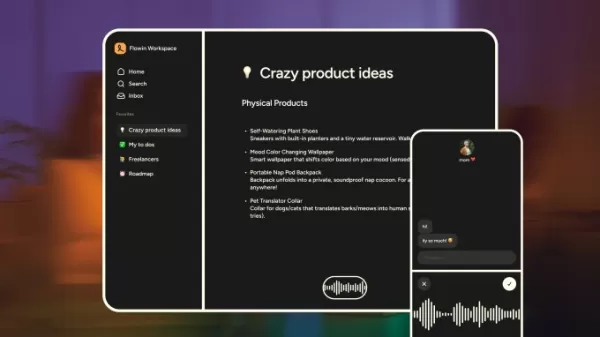
Image Credits: Wispr Flow
Willow
Willow markets itself as a significant time-saver for people who prefer speaking over typing. Beyond standard auto-editing and formatting, it uses large language models to generate complete paragraphs from just a few spoken keywords.
Willow emphasizes privacy by storing all transcriptions locally on your device and allows you to completely opt out of model training. You can also add custom terminology to help it adapt to your industry's jargon or regional dialect.
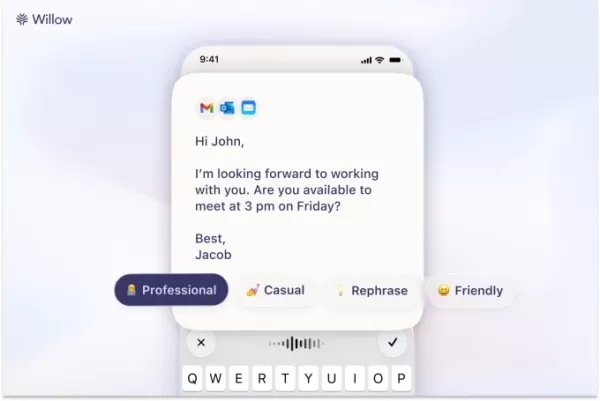
Image Credits: Willow
The desktop app offers a free allowance of 2,000 words per month. Individual subscriptions start at $15 per month, providing unlimited dictation and the ability for the app to learn and remember your personal writing style.
Monologue
If privacy is your main concern, Monologue allows you to download its AI model directly to your device for offline transcription, ensuring your data never touches the cloud. Additionally, you can customize the app's tone based on the application you're using it with.
Monologue offers 1,000 free transcription words per month. A subscription is available for $10 monthly or $100 annually. The company also rewards its most active users with a physical shortcut device called the Monokey for use with the app.
Keyboards are so 1983.
You only need one key—Monokey, the limited edition device that turns your voice into text in Monologue.
We're giving away 10, along with a free annual subscription to Monologue. pic.twitter.com/nXuz1ll2LU
— Monologue (@usemonologue) November 18, 2025
Superwhisper
Superwhisper is primarily a dictation app but also supports transcription from audio and video files. It lets you select and download various AI models, including several of its own optimized for different speeds and accuracy levels, as well as Nvidia's Parakeet speech-recognition models.
You can write custom prompts to guide the output, and view both raw and processed transcripts directly from your system's keyboard interface.
The core voice-to-text feature is free. You get 15 minutes to test Pro features like translation and file transcription. The paid tier allows you to use your own AI API keys and connect to cloud or local models without usage limits.
The monthly plan costs $8.49, the annual plan is $84.99 per year, and a lifetime subscription is available for $249.99.
VoiceTypr
VoiceTypr adopts an offline-first, subscription-free model, utilizing local models for transcription. An open-source version is available on GitHub for self-hosting. It supports over 99 languages and is compatible with both Mac and Windows.
The app offers a free three-day trial, after which you can purchase a lifetime license. Pricing is $35 for one device, $56 for two, and $98 for four devices.
Aqua
Aqua is a Y Combinator-backed voice-typing app for Windows and macOS, boasting one of the lowest latencies in its category—meaning text appears on screen almost instantly after you speak.
In addition to handling grammar and punctuation, Aqua can autofill text using voice commands; for example, saying "my address" will insert your saved information.
The app also provides its own speech-to-text API, enabling other applications to integrate Aqua's transcription engine.
The free plan includes 1,000 words per month. Paid plans start at $8 per month (billed annually), offering unlimited words and support for 800 custom dictionary entries.
Handy
Handy is a free, open-source transcription tool that runs on Mac, Windows, and Linux. While it's relatively basic with limited customization, it's an excellent option for anyone wanting to start using voice input without any cost.
The app includes a simple settings menu to toggle push-to-talk mode and change the hotkey for activating transcription.
Typeless
Typeless distinguishes itself with a generous free word allowance. The company states it does not retain user data or use it for AI model training. It also offers a feature to rewrite sentences you may have stumbled over.
The free tier allows up to 4,000 words per week (approximately 16,000 per month). A subscription of $12 per month (billed annually) unlocks unlimited words and early access to new features. Typeless is available for Windows and macOS.
VoiceInk
VoiceInk is an open-source, privacy-focused dictation app for Mac. It supports global shortcuts for starting/stopping recording and a push-to-talk mode. It reads on-screen context to adjust its output accordingly.
The app can automatically detect specific applications and URLs to apply custom formatting rules. It also includes an assistant mode for answering questions. A lifetime license costs $25 for one device, $39 for two, and $49 for three.
Dictato
Dictato is a Mac dictionary app priced at €9.99 (approximately $12), which includes lifetime access and two years of feature updates. It works with offline models like Parakeet, Whisper, and Apple Speech Analyzer, and uses Apple Intelligence for light proofreading and filler word removal. Thanks to these local models, it claims an ultra-fast 80ms latency, making text appear almost instantly as you speak.
AudioPen
AudioPen started as a web-based voice notes app and has significantly evolved. Its Mac version now allows you to dictate text and have it rewritten in your preferred format and style, with the ability to switch styles at any time. Beyond live dictation, AudioPen lets you store audio notes across platforms, combine notes for summaries, upload audio files, and rewrite existing notes with AI. Pricing is $33 for three months, $99 for one year, and $159 for two years.
Related article
 Google rolls out voice-based prompts in Docs and Keep
At the Google I/O developer conference, the company announced it's introducing voice-based prompting to Workspace apps like Docs, Keep, and Gmail. These capabilities let users create drafts, take notes, and search for emails using voice.In Docs, you
Ex-Goldman, Meta founders build voice AI for overlooked markets
Customer support and service are among the hottest areas in voice AI today. But building a product that sounds human and responds with minimal delay is far more challenging in some markets than in others — and most major players weren’t designed with
Google quietly launches offline-first AI dictation app on iOS
Google quietly released an offline-first dictation app, Google AI Edge Eloquent, on iOS this Monday, competing with Wispr Flow, SuperWhisper, Willow, and similar apps.The app is free to download. After downloading its Gemma-based automatic speech rec
Related Special Topic Recommendations
writing
Google rolls out voice-based prompts in Docs and Keep
At the Google I/O developer conference, the company announced it's introducing voice-based prompting to Workspace apps like Docs, Keep, and Gmail. These capabilities let users create drafts, take notes, and search for emails using voice.In Docs, you
Ex-Goldman, Meta founders build voice AI for overlooked markets
Customer support and service are among the hottest areas in voice AI today. But building a product that sounds human and responds with minimal delay is far more challenging in some markets than in others — and most major players weren’t designed with
Google quietly launches offline-first AI dictation app on iOS
Google quietly released an offline-first dictation app, Google AI Edge Eloquent, on iOS this Monday, competing with Wispr Flow, SuperWhisper, Willow, and similar apps.The app is free to download. After downloading its Gemma-based automatic speech rec
Related Special Topic Recommendations
writing
 Best AI Outline Generators for Long-Form SEO Articles
2026 Latest Best Top-Rated AI Outline Generators for Long-Form SEO Articles, meticulously curated by XIX.AI. These powerful tools offer game-changing assistance in creating high-quality content quickly, boosting writing efficiency significantly. Get a free vs paid comparison along with real-world tests and detailed rankings to help you find the must-try option that suits your needs. Explore now to unlock your AI edge.
 8 tools
 xix.ai
Education and Learning
AI Study Tools for Homework and Exam Prep
xix.ai
Education and Learning
AI Study Tools for Homework and Exam Prep
2026 Latest Best AI Study Tools for Homework and Exam Prep! XIX.AI curates a top-rated list of powerful, game-changing tools that help students boost productivity, streamline homework completion, and ace exams through real-world tests. Get a free vs paid comparison, detailed rankings, and must-try options to unlock your AI edge. Explore now!
10 tools
xix.ai
Music composition
AI Vocal Demo Tools for Songwriters, Hooks, Toplines, and Multilingual Draft Sessions
2026 Latest Best AI Vocal Demo Tools for Songwriters, Hook Creators, and Multi-Language Content Teams! XIX.AI has curated a top-rated list of powerful game-changing tools that go through rigorous real-world tests. You’ll find detailed free vs paid comparison data, comprehensive rankings, and must-try options to help you boost writing efficiency and unlock your creative potential. Explore now to discover your perfect tool for all your content needs!
9 tools
xix.ai
Business
Best AI Competitive Research Tools for Small Businesses
2026 Latest Best Top-rated AI Competitive Research Tools for Small Businesses! XIX.AI has curated a highly powerful game-changing collection, updated weekly with rigorous real-world tests and detailed rankings. You can find a comprehensive free vs paid comparison to help you identify the must-try tools that boost your productivity and give you a competitive edge. Explore now to discover your perfect tool!
9 tools
xix.ai
Image editing
Photoshop AI Retouch Tools for Ecommerce Apparel, Skin Cleanup, and Color Consistency
2026 Latest Best Photoshop AI retouch tools for ecommerce apparel, skin cleanup, and color consistency! This top-rated curated list features powerful game-changing solutions that help you boost writing efficiency, streamline content creation, and achieve perfect visual results effortlessly. Each tool has undergone real-world tests through weekly updated rankings, complete with free vs paid comparison details. Backed by XIX.AI, it’s the must-try guide for anyone aiming to unlock your AI edge. Explore now!
10 tools
xix.ai
Prompt
Best AI Prompt Libraries for ChatGPT Workflows
2026 Latest Best Top-Rated AI Prompt Libraries for optimizing all types of ChatGPT workflows. XIX.AI has curated a powerful, game-changing collection that goes through rigorous real-world tests to ensure top performance. You can find detailed free vs paid comparisons and expert rankings to help you choose the must-try tools that boost your productivity and unlock your AI edge. Explore now!
11 tools
xix.ai

 Comments (0)
0/500
Comments (0)
0/500
AI dictation apps have made remarkable progress in a relatively short period. For a long time, they were sluggish and prone to errors, requiring users to speak with a specific accent and perfect clarity.
This has changed with advancements in large language models (LLMs) and speech-to-text technology, leading to systems that not only understand speech with greater accuracy but also use context to format text properly. Developers have integrated features to automatically eliminate filler words, correct stumbles, and manage punctuation, resulting in text that requires minimal editing.
With numerous options now available, we've compiled a list of the best and most practical dictation apps you can use today.
Wispr Flow
Wispr Flow is a well-funded AI dictation application that allows you to add custom vocabulary and specific instructions. It offers native applications for macOS, Windows, and iOS, with an Android version currently in development.
The app provides customization for transcription style, offering "formal," "casual," and "very casual" options to suit different writing contexts like personal messages, work documents, and emails. When used with vibe-coding tools such as Cursor, it can automatically identify variables or tag files within the chat.
On the free tier, users can transcribe up to 2,000 words per week on desktop and 1,000 words per month on iOS. Paid subscription plans, starting at $15 per month, offer unlimited transcription.
Image Credits: Wispr Flow
Willow
Willow markets itself as a significant time-saver for people who prefer speaking over typing. Beyond standard auto-editing and formatting, it uses large language models to generate complete paragraphs from just a few spoken keywords.
Willow emphasizes privacy by storing all transcriptions locally on your device and allows you to completely opt out of model training. You can also add custom terminology to help it adapt to your industry's jargon or regional dialect.
Image Credits: Willow
The desktop app offers a free allowance of 2,000 words per month. Individual subscriptions start at $15 per month, providing unlimited dictation and the ability for the app to learn and remember your personal writing style.
Monologue
If privacy is your main concern, Monologue allows you to download its AI model directly to your device for offline transcription, ensuring your data never touches the cloud. Additionally, you can customize the app's tone based on the application you're using it with.
Monologue offers 1,000 free transcription words per month. A subscription is available for $10 monthly or $100 annually. The company also rewards its most active users with a physical shortcut device called the Monokey for use with the app.
Keyboards are so 1983.
— Monologue (@usemonologue) November 18, 2025
You only need one key—Monokey, the limited edition device that turns your voice into text in Monologue.
We're giving away 10, along with a free annual subscription to Monologue. pic.twitter.com/nXuz1ll2LU
Superwhisper
Superwhisper is primarily a dictation app but also supports transcription from audio and video files. It lets you select and download various AI models, including several of its own optimized for different speeds and accuracy levels, as well as Nvidia's Parakeet speech-recognition models.
You can write custom prompts to guide the output, and view both raw and processed transcripts directly from your system's keyboard interface.
The core voice-to-text feature is free. You get 15 minutes to test Pro features like translation and file transcription. The paid tier allows you to use your own AI API keys and connect to cloud or local models without usage limits.
The monthly plan costs $8.49, the annual plan is $84.99 per year, and a lifetime subscription is available for $249.99.
VoiceTypr
VoiceTypr adopts an offline-first, subscription-free model, utilizing local models for transcription. An open-source version is available on GitHub for self-hosting. It supports over 99 languages and is compatible with both Mac and Windows.
The app offers a free three-day trial, after which you can purchase a lifetime license. Pricing is $35 for one device, $56 for two, and $98 for four devices.
Aqua
Aqua is a Y Combinator-backed voice-typing app for Windows and macOS, boasting one of the lowest latencies in its category—meaning text appears on screen almost instantly after you speak.
In addition to handling grammar and punctuation, Aqua can autofill text using voice commands; for example, saying "my address" will insert your saved information.
The app also provides its own speech-to-text API, enabling other applications to integrate Aqua's transcription engine.
The free plan includes 1,000 words per month. Paid plans start at $8 per month (billed annually), offering unlimited words and support for 800 custom dictionary entries.
Handy
Handy is a free, open-source transcription tool that runs on Mac, Windows, and Linux. While it's relatively basic with limited customization, it's an excellent option for anyone wanting to start using voice input without any cost.
The app includes a simple settings menu to toggle push-to-talk mode and change the hotkey for activating transcription.
Typeless
Typeless distinguishes itself with a generous free word allowance. The company states it does not retain user data or use it for AI model training. It also offers a feature to rewrite sentences you may have stumbled over.
The free tier allows up to 4,000 words per week (approximately 16,000 per month). A subscription of $12 per month (billed annually) unlocks unlimited words and early access to new features. Typeless is available for Windows and macOS.
VoiceInk
VoiceInk is an open-source, privacy-focused dictation app for Mac. It supports global shortcuts for starting/stopping recording and a push-to-talk mode. It reads on-screen context to adjust its output accordingly.
The app can automatically detect specific applications and URLs to apply custom formatting rules. It also includes an assistant mode for answering questions. A lifetime license costs $25 for one device, $39 for two, and $49 for three.
Dictato
Dictato is a Mac dictionary app priced at €9.99 (approximately $12), which includes lifetime access and two years of feature updates. It works with offline models like Parakeet, Whisper, and Apple Speech Analyzer, and uses Apple Intelligence for light proofreading and filler word removal. Thanks to these local models, it claims an ultra-fast 80ms latency, making text appear almost instantly as you speak.
AudioPen
AudioPen started as a web-based voice notes app and has significantly evolved. Its Mac version now allows you to dictate text and have it rewritten in your preferred format and style, with the ability to switch styles at any time. Beyond live dictation, AudioPen lets you store audio notes across platforms, combine notes for summaries, upload audio files, and rewrite existing notes with AI. Pricing is $33 for three months, $99 for one year, and $159 for two years.








 Google rolls out voice-based prompts in Docs and Keep
At the Google I/O developer conference, the company announced it's introducing voice-based prompting to Workspace apps like Docs, Keep, and Gmail. These capabilities let users create drafts, take notes, and search for emails using voice.In Docs, you
Google rolls out voice-based prompts in Docs and Keep
At the Google I/O developer conference, the company announced it's introducing voice-based prompting to Workspace apps like Docs, Keep, and Gmail. These capabilities let users create drafts, take notes, and search for emails using voice.In Docs, you
 Ex-Goldman, Meta founders build voice AI for overlooked markets
Customer support and service are among the hottest areas in voice AI today. But building a product that sounds human and responds with minimal delay is far more challenging in some markets than in others — and most major players weren’t designed with
Ex-Goldman, Meta founders build voice AI for overlooked markets
Customer support and service are among the hottest areas in voice AI today. But building a product that sounds human and responds with minimal delay is far more challenging in some markets than in others — and most major players weren’t designed with
 Google quietly launches offline-first AI dictation app on iOS
Google quietly released an offline-first dictation app, Google AI Edge Eloquent, on iOS this Monday, competing with Wispr Flow, SuperWhisper, Willow, and similar apps.The app is free to download. After downloading its Gemma-based automatic speech rec
Google quietly launches offline-first AI dictation app on iOS
Google quietly released an offline-first dictation app, Google AI Edge Eloquent, on iOS this Monday, competing with Wispr Flow, SuperWhisper, Willow, and similar apps.The app is free to download. After downloading its Gemma-based automatic speech rec

2026 Latest Best Top-Rated AI Outline Generators for Long-Form SEO Articles, meticulously curated by XIX.AI. These powerful tools offer game-changing assistance in creating high-quality content quickly, boosting writing efficiency significantly. Get a free vs paid comparison along with real-world tests and detailed rankings to help you find the must-try option that suits your needs. Explore now to unlock your AI edge.
8 tools
xix.ai

2026 Latest Best AI Study Tools for Homework and Exam Prep! XIX.AI curates a top-rated list of powerful, game-changing tools that help students boost productivity, streamline homework completion, and ace exams through real-world tests. Get a free vs paid comparison, detailed rankings, and must-try options to unlock your AI edge. Explore now!
10 tools
xix.ai

2026 Latest Best AI Vocal Demo Tools for Songwriters, Hook Creators, and Multi-Language Content Teams! XIX.AI has curated a top-rated list of powerful game-changing tools that go through rigorous real-world tests. You’ll find detailed free vs paid comparison data, comprehensive rankings, and must-try options to help you boost writing efficiency and unlock your creative potential. Explore now to discover your perfect tool for all your content needs!
9 tools
xix.ai

2026 Latest Best Top-rated AI Competitive Research Tools for Small Businesses! XIX.AI has curated a highly powerful game-changing collection, updated weekly with rigorous real-world tests and detailed rankings. You can find a comprehensive free vs paid comparison to help you identify the must-try tools that boost your productivity and give you a competitive edge. Explore now to discover your perfect tool!
9 tools
xix.ai

2026 Latest Best Photoshop AI retouch tools for ecommerce apparel, skin cleanup, and color consistency! This top-rated curated list features powerful game-changing solutions that help you boost writing efficiency, streamline content creation, and achieve perfect visual results effortlessly. Each tool has undergone real-world tests through weekly updated rankings, complete with free vs paid comparison details. Backed by XIX.AI, it’s the must-try guide for anyone aiming to unlock your AI edge. Explore now!
10 tools
xix.ai

2026 Latest Best Top-Rated AI Prompt Libraries for optimizing all types of ChatGPT workflows. XIX.AI has curated a powerful, game-changing collection that goes through rigorous real-world tests to ensure top performance. You can find detailed free vs paid comparisons and expert rankings to help you choose the must-try tools that boost your productivity and unlock your AI edge. Explore now!
11 tools
xix.ai












