


 Home
HomeAdobe Illustrator 2024: Top 5 Features Revolutionizing Design
Adobe Illustrator advances with innovative tools to enhance design workflows and spark creativity. Revealed at Adobe MAX 2024, these updates integrate AI and boost performance. This article explores five key features—Generative Shape Fill, Objects on Path, Mockup Tool, Enhanced Image Trace, and Project Neo—highlighting their impact on streamlining design and inspiring innovation.
Key Highlights
Generative Shape Fill leverages AI to craft vector designs from text prompts.
Objects on Path eases alignment and arrangement of objects along custom paths.
The Mockup Tool applies vector art to realistic product prototypes within Illustrator.
Enhanced Image Trace improves raster-to-vector conversion with superior gradient handling.
Project Neo, a web-based app, simplifies 3D design integration with Illustrator.
These enhancements optimize performance, simplify workflows, and elevate creativity.
Adobe Illustrator’s Newest Features
Generative Shape Fill: AI-Driven Vector Creation
At Adobe MAX 2024, the standout Generative Shape Fill feature was introduced
. Powered by Adobe’s Firefly AI, it enables intricate vector designs within shapes using text prompts. This tool accelerates design exploration, allowing both experienced and novice designers to create complex visuals quickly.
To use it: Select a shape, input a descriptive prompt in the taskbar, and Firefly AI generates vector designs. Adjust settings like shape strength and detail for precise results. This feature streamlines iteration, enabling faster, more efficient artwork creation compared to traditional methods.
Generative Shape Fill offers controls to refine outputs, including style matching for consistent art styles. This AI-driven approach simplifies vector design, empowering designers to transform text ideas into visuals, enhancing productivity and accessibility for new creators.
Objects on Path: Streamlined Alignment
Aligning objects along curves or custom paths is now effortless with the Objects on Path feature
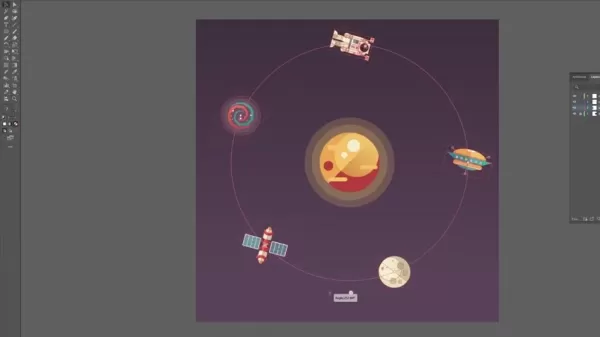
. It provides an intuitive method to attach and arrange objects along any path, from simple curves to complex shapes.
With controls for placement and orientation, this tool simplifies intricate designs. Select objects and a path, and Illustrator distributes them automatically. Widgets allow adjustments for distribution and positioning, ensuring precise, visually appealing results with minimal effort.
Ideal for patterns, borders, or text effects, Objects on Path enhances efficiency and precision, making sophisticated designs more achievable.
Mockup Tool: Realistic Design Previews
The new Mockup Tool benefits branding and product designers
. It enables applying vector art to realistic mockups like t-shirts or packaging directly in Illustrator, eliminating the need for external tools.
Open the Mockup panel, select a design, and choose a mockup image. Illustrator adjusts the design to match the object’s perspective and curves. Fine-tune placement for a polished look. This tool enhances professional presentations, making designs more compelling for clients and stakeholders.
Enhanced Image Trace: Advanced Raster-to-Vector Conversion
Enhanced Image Trace elevates raster-to-vector conversion
. With improved gradient handling and precise controls, it delivers cleaner, more accurate vectors, especially for complex images.
The Image Trace panel offers presets and a high-fidelity option for optimal results. A new gradient setting reduces distortion and banding. This feature benefits designers working with scanned art or photos, seamlessly integrating raster content into vector workflows.
Project Neo: 3D Design Simplified
Project Neo, a beta web app, introduces intuitive 3D design
. It allows easy manipulation of 3D objects, adjusting colors, shapes, lighting, and perspective, then importing into Illustrator for further editing.
Supporting vector, realistic, and pixel art styles, Project Neo bridges 2D and 3D design. It simplifies adding depth to illustrations, offering a user-friendly alternative to complex 3D software, expanding Illustrator’s creative potential.
How to Use Illustrator’s New Features
Using Generative Shape Fill
To use Generative Shape Fill:
Select a Shape: Choose the shape for your vector design.
Access the Taskbar: Ensure all design elements are selected.
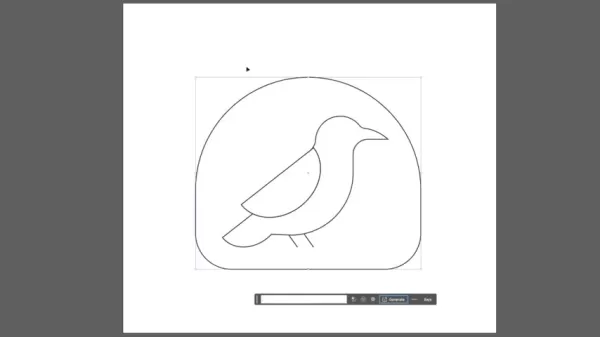
Enter a Prompt: Input a descriptive text in the taskbar.
Generate Designs: Firefly AI creates vector designs. Suggestions appear as you type.
Adjust Settings: Fine-tune shape strength and detail in the properties panel.
Style reference and strength settings ensure precise style matching.
Using Objects on Path
To align objects along a path:
Select Objects and Path: Choose objects and the target path.

Access the Tool: Find the Objects on Path tool in the toolbar.
Distribute Objects: Illustrator auto-aligns objects along the path.
Fine-Tune: Adjust distribution, orientation, and position using widgets.
Using the Mockup Tool
To apply designs to mockups:
Open Mockup Panel: Create a design for the mockup.
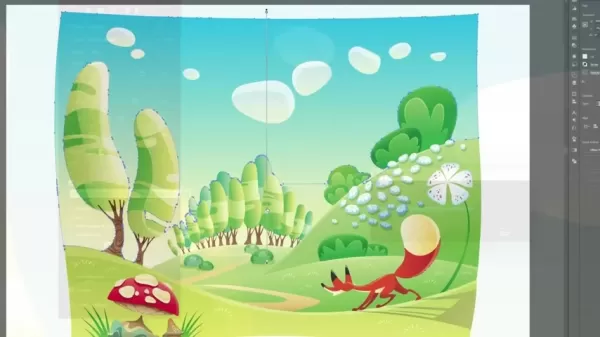
Select Design and Mockup: Choose your design and a mockup image.
Apply Design: Illustrator adjusts the design to the mockup’s perspective.
Adjust Placement: Move the design for natural placement.
Using Enhanced Image Trace
To convert raster to vector:
Open Image Trace Panel: Access the panel in Illustrator.
Select Preset: Choose high-fidelity for optimal results.
Select Gradient: Enable gradient settings for minimal distortion.
Customize Settings: Adjust for precise tracing.
Convert to Vectors: Transform the image into editable vectors.
Using Project Neo
To use Project Neo:
Create 3D Designs: Adjust objects, colors, lighting, and perspective in the web app.
Import into Illustrator: Bring 3D designs into Illustrator.
Manipulate Iterations: Create multiple versions of a 3D object.
Pros and Cons of Illustrator’s New Features
Pros
Generative Shape Fill accelerates design exploration.
Objects on Path simplifies intricate alignments.
Mockup Tool enables realistic product previews.
Enhanced Image Trace boosts conversion accuracy.
Project Neo seamlessly integrates 3D design.
Cons
Generative Shape Fill may yield unpredictable AI results.
Objects on Path requires learning for beginners.
Mockup Tool depends on high-quality mockup images.
Enhanced Image Trace may need manual tweaks for complex images.
Project Neo’s beta status limits its features.
Frequently Asked Questions
What is Generative Shape Fill?
Generative Shape Fill uses AI to create vector designs from text prompts, enabling rapid design variation and creative exploration.
How does Objects on Path simplify design?
It streamlines object alignment along paths, eliminating manual challenges and ensuring precise, visually appealing results.
What is the benefit of the Mockup Tool?
It allows seamless application of designs to realistic mockups in Illustrator, enhancing professional presentations without external tools.
What improvements does Enhanced Image Trace offer?
It provides cleaner vector conversions with better gradient handling and precise controls for complex images.
What is Project Neo?
Project Neo is a beta web app for 3D design, enabling easy creation and integration into Illustrator for enhanced creative workflows.
Related Questions
How do these updates enhance Illustrator’s workflow?
They automate complex tasks, streamline processes, and expand creative options. Features like Generative Shape Fill and Mockup Tool save time, while Enhanced Image Trace and Project Neo offer greater control, making Illustrator a more versatile design platform.
Related article
 Six Tech Giants Back Linux Foundation With $12.5M to Tackle AI Vulnerability Noise
To tackle the flood of low-quality security reports produced by AI automation tools, six major tech companies—Anthropic, Amazon (AWS), GitHub, Google, Microsoft, and OpenAI—have collectively contributed $12.5 million in funding to Linux Foundation in
Musk Considered Leaving OpenAI to His Kids as Altman Testifies
This morning, OpenAI CEO Sam Altman took the stand to address former co-founder Elon Musk’s lawsuit challenging the company’s corporate structure.When asked about Musk’s claim that other founders “stole a charity” by launching a for-profit subsidiary
Sam Altman Sparks Debate Over AI's Deceleration
Listen onApple PodcastsListen onSpotifyOpenAI CEO Sam Altman recently suggested that it may be time to “pace the rate of AI development” to allow society to “harden around some of these new capability levels.”On the latest episode of TechCrunch’s Equ
Related Special Topic Recommendations
Business
Six Tech Giants Back Linux Foundation With $12.5M to Tackle AI Vulnerability Noise
To tackle the flood of low-quality security reports produced by AI automation tools, six major tech companies—Anthropic, Amazon (AWS), GitHub, Google, Microsoft, and OpenAI—have collectively contributed $12.5 million in funding to Linux Foundation in
Musk Considered Leaving OpenAI to His Kids as Altman Testifies
This morning, OpenAI CEO Sam Altman took the stand to address former co-founder Elon Musk’s lawsuit challenging the company’s corporate structure.When asked about Musk’s claim that other founders “stole a charity” by launching a for-profit subsidiary
Sam Altman Sparks Debate Over AI's Deceleration
Listen onApple PodcastsListen onSpotifyOpenAI CEO Sam Altman recently suggested that it may be time to “pace the rate of AI development” to allow society to “harden around some of these new capability levels.”On the latest episode of TechCrunch’s Equ
Related Special Topic Recommendations
Business
 Best AI Competitive Research Tools for Small Businesses
2026 Latest Best Top-rated AI Competitive Research Tools for Small Businesses! XIX.AI has curated a highly powerful game-changing collection, updated weekly with rigorous real-world tests and detailed rankings. You can find a comprehensive free vs paid comparison to help you identify the must-try tools that boost your productivity and give you a competitive edge. Explore now to discover your perfect tool!
 9 tools
 xix.ai
Image editing
Photoshop AI Retouch Tools for Ecommerce Apparel, Skin Cleanup, and Color Consistency
xix.ai
Image editing
Photoshop AI Retouch Tools for Ecommerce Apparel, Skin Cleanup, and Color Consistency
2026 Latest Best Photoshop AI retouch tools for ecommerce apparel, skin cleanup, and color consistency! This top-rated curated list features powerful game-changing solutions that help you boost writing efficiency, streamline content creation, and achieve perfect visual results effortlessly. Each tool has undergone real-world tests through weekly updated rankings, complete with free vs paid comparison details. Backed by XIX.AI, it’s the must-try guide for anyone aiming to unlock your AI edge. Explore now!
10 tools
xix.ai
Prompt
Best AI Prompt Libraries for ChatGPT Workflows
2026 Latest Best Top-Rated AI Prompt Libraries for optimizing all types of ChatGPT workflows. XIX.AI has curated a powerful, game-changing collection that goes through rigorous real-world tests to ensure top performance. You can find detailed free vs paid comparisons and expert rankings to help you choose the must-try tools that boost your productivity and unlock your AI edge. Explore now!
11 tools
xix.ai
Education and Learning
AI Quiz Builder Platforms for Teachers, Tutors, and Cohort-Based Learning Programs
2026 Latest Best AI Quiz Builder Platforms for Teachers, Tutors, and Cohort-Based Learning Programs! XIX.AI has curated a top-rated list of powerful game-changing tools that go through real-world tests to deliver accurate rankings. These must-try platforms help boost writing efficiency, streamline content creation, and simplify quiz design across all learning scenarios. Explore now to discover your perfect tool for unlocking your AI edge in teaching!
13 tools
xix.ai
code
AI Pull Request Review Tools for GitHub Teams Handling Refactors, Bugs, and Security Gaps
2026 Latest Best AI Pull Request Review Tools for GitHub Teams are here on XIX.AI! This top-rated curated list showcases powerful game-changing solutions that streamline refactoring, bug fixing, and security gap detection across all team workflows. Enjoy a free vs paid comparison along with real-world tests and detailed rankings to help you find the perfect tool that boosts productivity significantly. Explore now to unlock your AI edge!
12 tools
xix.ai
Text-to-speech
Best AI Text to Speech Tools for Natural Voiceovers
2026 Latest Best Top-rated AI Text to Speech Tools for Natural Voiceovers are here on XIX.AI! This curated list features powerful, game-changing options that deliver crystal-clear voices for every use case, backed by real-world tests and weekly updated rankings. Get a free vs paid comparison to find the must-try solution that boosts your productivity instantly. Explore now to Unlock your AI edge!
11 tools
xix.ai

 Comments (3)
0/500
Comments (3)
0/500
![DennisAllen]()
Adobe Illustrator снова обновляется... Интересно, сколько подписчиков теперь будут платить за эти «революционные» функции? ИИ везде, но реально ли он помогает дизайнерам или просто добавляет шума? 😅 Может, пора посмотреть на альтернативы типа Affinity?
![JonathanGreen]()
Encore des mises à jour IA ? J’adore les nouveaux outils, mais ça devient cher de suivre toutes les licences… Espérons que ça ne remplace pas trop le travail créatif humain ! 😅
![FrankLewis]()
These new Illustrator features are a game-changer! The AI integration is wild, makes designing so much faster. Anyone tried the Generative Shape Fill yet? 😎
Adobe Illustrator advances with innovative tools to enhance design workflows and spark creativity. Revealed at Adobe MAX 2024, these updates integrate AI and boost performance. This article explores five key features—Generative Shape Fill, Objects on Path, Mockup Tool, Enhanced Image Trace, and Project Neo—highlighting their impact on streamlining design and inspiring innovation.
Key Highlights
Generative Shape Fill leverages AI to craft vector designs from text prompts.
Objects on Path eases alignment and arrangement of objects along custom paths.
The Mockup Tool applies vector art to realistic product prototypes within Illustrator.
Enhanced Image Trace improves raster-to-vector conversion with superior gradient handling.
Project Neo, a web-based app, simplifies 3D design integration with Illustrator.
These enhancements optimize performance, simplify workflows, and elevate creativity.
Adobe Illustrator’s Newest Features
Generative Shape Fill: AI-Driven Vector Creation
At Adobe MAX 2024, the standout Generative Shape Fill feature was introduced
. Powered by Adobe’s Firefly AI, it enables intricate vector designs within shapes using text prompts. This tool accelerates design exploration, allowing both experienced and novice designers to create complex visuals quickly.
To use it: Select a shape, input a descriptive prompt in the taskbar, and Firefly AI generates vector designs. Adjust settings like shape strength and detail for precise results. This feature streamlines iteration, enabling faster, more efficient artwork creation compared to traditional methods.
Generative Shape Fill offers controls to refine outputs, including style matching for consistent art styles. This AI-driven approach simplifies vector design, empowering designers to transform text ideas into visuals, enhancing productivity and accessibility for new creators.
Objects on Path: Streamlined Alignment
Aligning objects along curves or custom paths is now effortless with the Objects on Path feature
. It provides an intuitive method to attach and arrange objects along any path, from simple curves to complex shapes.
With controls for placement and orientation, this tool simplifies intricate designs. Select objects and a path, and Illustrator distributes them automatically. Widgets allow adjustments for distribution and positioning, ensuring precise, visually appealing results with minimal effort.
Ideal for patterns, borders, or text effects, Objects on Path enhances efficiency and precision, making sophisticated designs more achievable.
Mockup Tool: Realistic Design Previews
The new Mockup Tool benefits branding and product designers
. It enables applying vector art to realistic mockups like t-shirts or packaging directly in Illustrator, eliminating the need for external tools.
Open the Mockup panel, select a design, and choose a mockup image. Illustrator adjusts the design to match the object’s perspective and curves. Fine-tune placement for a polished look. This tool enhances professional presentations, making designs more compelling for clients and stakeholders.
Enhanced Image Trace: Advanced Raster-to-Vector Conversion
Enhanced Image Trace elevates raster-to-vector conversion
. With improved gradient handling and precise controls, it delivers cleaner, more accurate vectors, especially for complex images.
The Image Trace panel offers presets and a high-fidelity option for optimal results. A new gradient setting reduces distortion and banding. This feature benefits designers working with scanned art or photos, seamlessly integrating raster content into vector workflows.
Project Neo: 3D Design Simplified
Project Neo, a beta web app, introduces intuitive 3D design
. It allows easy manipulation of 3D objects, adjusting colors, shapes, lighting, and perspective, then importing into Illustrator for further editing.
Supporting vector, realistic, and pixel art styles, Project Neo bridges 2D and 3D design. It simplifies adding depth to illustrations, offering a user-friendly alternative to complex 3D software, expanding Illustrator’s creative potential.
How to Use Illustrator’s New Features
Using Generative Shape Fill
To use Generative Shape Fill:
Select a Shape: Choose the shape for your vector design.
Access the Taskbar: Ensure all design elements are selected.
Enter a Prompt: Input a descriptive text in the taskbar.
Generate Designs: Firefly AI creates vector designs. Suggestions appear as you type.
Adjust Settings: Fine-tune shape strength and detail in the properties panel.
Style reference and strength settings ensure precise style matching.
Using Objects on Path
To align objects along a path:
Select Objects and Path: Choose objects and the target path.
Access the Tool: Find the Objects on Path tool in the toolbar.
Distribute Objects: Illustrator auto-aligns objects along the path.
Fine-Tune: Adjust distribution, orientation, and position using widgets.
Using the Mockup Tool
To apply designs to mockups:
Open Mockup Panel: Create a design for the mockup.
Select Design and Mockup: Choose your design and a mockup image.
Apply Design: Illustrator adjusts the design to the mockup’s perspective.
Adjust Placement: Move the design for natural placement.
Using Enhanced Image Trace
To convert raster to vector:
Open Image Trace Panel: Access the panel in Illustrator.
Select Preset: Choose high-fidelity for optimal results.
Select Gradient: Enable gradient settings for minimal distortion.
Customize Settings: Adjust for precise tracing.
Convert to Vectors: Transform the image into editable vectors.
Using Project Neo
To use Project Neo:
Create 3D Designs: Adjust objects, colors, lighting, and perspective in the web app.
Import into Illustrator: Bring 3D designs into Illustrator.
Manipulate Iterations: Create multiple versions of a 3D object.
Pros and Cons of Illustrator’s New Features
Pros
Generative Shape Fill accelerates design exploration.
Objects on Path simplifies intricate alignments.
Mockup Tool enables realistic product previews.
Enhanced Image Trace boosts conversion accuracy.
Project Neo seamlessly integrates 3D design.
Cons
Generative Shape Fill may yield unpredictable AI results.
Objects on Path requires learning for beginners.
Mockup Tool depends on high-quality mockup images.
Enhanced Image Trace may need manual tweaks for complex images.
Project Neo’s beta status limits its features.
Frequently Asked Questions
What is Generative Shape Fill?
Generative Shape Fill uses AI to create vector designs from text prompts, enabling rapid design variation and creative exploration.
How does Objects on Path simplify design?
It streamlines object alignment along paths, eliminating manual challenges and ensuring precise, visually appealing results.
What is the benefit of the Mockup Tool?
It allows seamless application of designs to realistic mockups in Illustrator, enhancing professional presentations without external tools.
What improvements does Enhanced Image Trace offer?
It provides cleaner vector conversions with better gradient handling and precise controls for complex images.
What is Project Neo?
Project Neo is a beta web app for 3D design, enabling easy creation and integration into Illustrator for enhanced creative workflows.
Related Questions
How do these updates enhance Illustrator’s workflow?
They automate complex tasks, streamline processes, and expand creative options. Features like Generative Shape Fill and Mockup Tool save time, while Enhanced Image Trace and Project Neo offer greater control, making Illustrator a more versatile design platform.








 Six Tech Giants Back Linux Foundation With $12.5M to Tackle AI Vulnerability Noise
To tackle the flood of low-quality security reports produced by AI automation tools, six major tech companies—Anthropic, Amazon (AWS), GitHub, Google, Microsoft, and OpenAI—have collectively contributed $12.5 million in funding to Linux Foundation in
Six Tech Giants Back Linux Foundation With $12.5M to Tackle AI Vulnerability Noise
To tackle the flood of low-quality security reports produced by AI automation tools, six major tech companies—Anthropic, Amazon (AWS), GitHub, Google, Microsoft, and OpenAI—have collectively contributed $12.5 million in funding to Linux Foundation in
 Musk Considered Leaving OpenAI to His Kids as Altman Testifies
This morning, OpenAI CEO Sam Altman took the stand to address former co-founder Elon Musk’s lawsuit challenging the company’s corporate structure.When asked about Musk’s claim that other founders “stole a charity” by launching a for-profit subsidiary
Musk Considered Leaving OpenAI to His Kids as Altman Testifies
This morning, OpenAI CEO Sam Altman took the stand to address former co-founder Elon Musk’s lawsuit challenging the company’s corporate structure.When asked about Musk’s claim that other founders “stole a charity” by launching a for-profit subsidiary
 Sam Altman Sparks Debate Over AI's Deceleration
Listen onApple PodcastsListen onSpotifyOpenAI CEO Sam Altman recently suggested that it may be time to “pace the rate of AI development” to allow society to “harden around some of these new capability levels.”On the latest episode of TechCrunch’s Equ
Sam Altman Sparks Debate Over AI's Deceleration
Listen onApple PodcastsListen onSpotifyOpenAI CEO Sam Altman recently suggested that it may be time to “pace the rate of AI development” to allow society to “harden around some of these new capability levels.”On the latest episode of TechCrunch’s Equ

2026 Latest Best Top-rated AI Competitive Research Tools for Small Businesses! XIX.AI has curated a highly powerful game-changing collection, updated weekly with rigorous real-world tests and detailed rankings. You can find a comprehensive free vs paid comparison to help you identify the must-try tools that boost your productivity and give you a competitive edge. Explore now to discover your perfect tool!
9 tools
xix.ai

2026 Latest Best Photoshop AI retouch tools for ecommerce apparel, skin cleanup, and color consistency! This top-rated curated list features powerful game-changing solutions that help you boost writing efficiency, streamline content creation, and achieve perfect visual results effortlessly. Each tool has undergone real-world tests through weekly updated rankings, complete with free vs paid comparison details. Backed by XIX.AI, it’s the must-try guide for anyone aiming to unlock your AI edge. Explore now!
10 tools
xix.ai

2026 Latest Best Top-Rated AI Prompt Libraries for optimizing all types of ChatGPT workflows. XIX.AI has curated a powerful, game-changing collection that goes through rigorous real-world tests to ensure top performance. You can find detailed free vs paid comparisons and expert rankings to help you choose the must-try tools that boost your productivity and unlock your AI edge. Explore now!
11 tools
xix.ai

2026 Latest Best AI Quiz Builder Platforms for Teachers, Tutors, and Cohort-Based Learning Programs! XIX.AI has curated a top-rated list of powerful game-changing tools that go through real-world tests to deliver accurate rankings. These must-try platforms help boost writing efficiency, streamline content creation, and simplify quiz design across all learning scenarios. Explore now to discover your perfect tool for unlocking your AI edge in teaching!
13 tools
xix.ai

2026 Latest Best AI Pull Request Review Tools for GitHub Teams are here on XIX.AI! This top-rated curated list showcases powerful game-changing solutions that streamline refactoring, bug fixing, and security gap detection across all team workflows. Enjoy a free vs paid comparison along with real-world tests and detailed rankings to help you find the perfect tool that boosts productivity significantly. Explore now to unlock your AI edge!
12 tools
xix.ai

2026 Latest Best Top-rated AI Text to Speech Tools for Natural Voiceovers are here on XIX.AI! This curated list features powerful, game-changing options that deliver crystal-clear voices for every use case, backed by real-world tests and weekly updated rankings. Get a free vs paid comparison to find the must-try solution that boosts your productivity instantly. Explore now to Unlock your AI edge!
11 tools
xix.ai

Adobe Illustrator снова обновляется... Интересно, сколько подписчиков теперь будут платить за эти «революционные» функции? ИИ везде, но реально ли он помогает дизайнерам или просто добавляет шума? 😅 Может, пора посмотреть на альтернативы типа Affinity?
Encore des mises à jour IA ? J’adore les nouveaux outils, mais ça devient cher de suivre toutes les licences… Espérons que ça ne remplace pas trop le travail créatif humain ! 😅
These new Illustrator features are a game-changer! The AI integration is wild, makes designing so much faster. Anyone tried the Generative Shape Fill yet? 😎












