


 Home
HomeStoryBoarder.ai Tutorial: Mastering Storyboard Creation
StoryBoarder.ai is transforming the creative process for filmmakers, animators, and content creators by offering a powerful platform to visualize and plan projects with ease. This tutorial dives deep into the Storyboard page of StoryBoarder.ai, unveiling its features and showing how you can harness its AI capabilities to craft engaging storyboards. From tweaking images to exploring the 'Image to Image' upload feature, this guide is your key to mastering the art of storyboard creation.
Exploring the Storyboard Page in StoryBoarder.ai
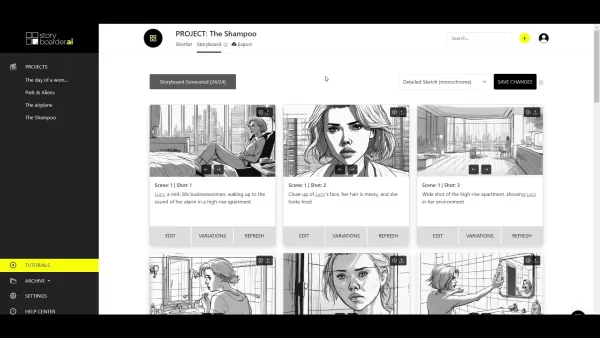
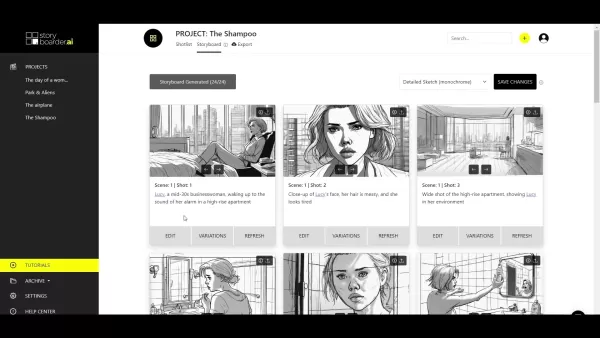
The Storyboard page in StoryBoarder.ai is designed to be user-friendly and efficient, serving as a central hub for visualizing your project. Upon generating your storyboard, you'll see a grid of images representing your scenes and shots. Each image comes with customizable options to refine your vision. One of the standout features of StoryBoarder.ai is its ability to maintain character consistency across your storyboard, ensuring your characters remain recognizable from scene to scene, which adds a professional touch to your work.
Mastering Image Modification Tools
Each image on your storyboard has three essential buttons: Edit, Variations, and Refresh. These tools are crucial for perfecting your visual narrative:
- Edit Button: Click this to open an overlay with various options to adjust your image. It's like having a mini editing suite at your fingertips, though we'll cover that in more detail in another tutorial.
- Variations Button: A recent addition, this button allows the AI to create a slightly modified version of your image. It's perfect for those subtle tweaks without completely changing the image's essence.
- Refresh Button: Need a completely new image? Hit refresh, and the AI will generate a fresh visual based on your scene and shot descriptions, offering a new perspective on your scene.
Navigating Image Versions and Uploading Custom Images
StoryBoarder.ai makes it easy to flip through different versions of your images. Every time you use 'Variations' or 'Refresh,' the platform keeps a record of previous iterations. You can toggle between these versions using the arrow buttons beneath each image, helping you pick the best fit for your vision.
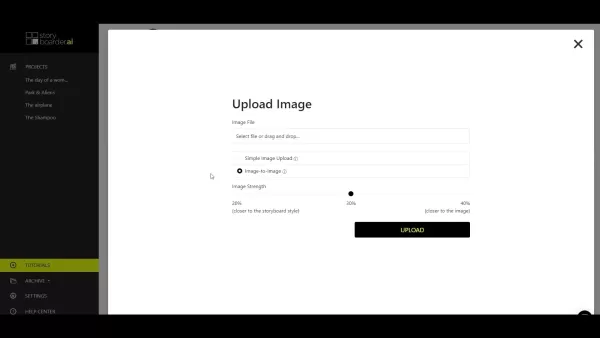
The upload button at the top of the Storyboard page opens up a world of possibilities for integrating your own images:
- Simple Image Upload: This straightforward option lets you upload an image as-is, perfect if you've got a specific visual you want to include.
- Image-to-Image Upload: This innovative feature allows you to upload an image and use it as a base for generating other images in your storyboard. It's a fantastic way to set a visual tone and style, and you can even adjust the Image Strength to control how closely the AI sticks to your source image or the storyboard's style.
Changing the Art Style of Your Storyboard
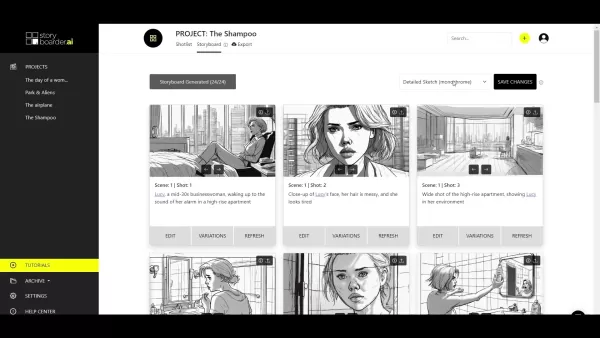
Want to switch up the look of your entire storyboard? StoryBoarder.ai offers a dropdown menu in the top right corner where you can choose from various art styles, from 'Storyboard Sketch' to 'Photorealistic.' After selecting your style and saving the changes, a quick refresh under each image will update them to match your new aesthetic. It's a fun way to experiment and refine your project's visual direction.
Step-by-Step Guide to Changing Art Style
- Locate the Art Style Dropdown: Find it in the upper-right corner of the Storyboard page.
- Select Your Preferred Style: Click to see the options and choose the one that best fits your project.
- Save Changes: Hit the 'Save Changes' button to apply your selection.
- Refresh Images: Click 'Refresh' under each image to update them to the new style.
Understanding StoryBoarder.ai Pricing
While the specifics of StoryBoarder.ai's pricing weren't covered in the video, AI platforms typically offer different subscription levels based on features like the number of storyboards you can create, image resolution, or access to advanced customization. For the most current pricing, head over to the official StoryBoarder.ai website.
Pros and Cons of Using StoryBoarder.ai
Pros:
- Speeds up storyboard creation with AI-powered image generation.
- Maintains character consistency across scenes.
- Allows for experimentation with various art styles.
- Offers easy image modification with intuitive tools.
- Enables custom image integration.
- Streamlines the workflow with integration into other filmmaking tools.
Cons:
- Dependent on AI capabilities, which might limit creative control.
- Potential for generic visuals lacking unique artistic flair.
- Requires time to master all features and options.
- Needs a stable internet connection for use.
- Possible subscription costs might deter some users.
Core Features of StoryBoarder.ai
StoryBoarder.ai is packed with features to enhance your storyboard creation:
- AI-Powered Image Generation: Quickly create visuals based on your scene descriptions and character details.
- Customizable Art Styles: Choose from various styles to match your project's tone.
- Character Consistency: Ensures your characters remain consistent throughout.
- Image Modification Tools: Fine-tune images with Edit, Variations, and Refresh buttons.
- Simple and Image-to-Image Upload: Integrate your own images directly or use them as a base for AI generation.
- Navigation and Versioning: Easily switch between image versions and revert changes.
- Seamless Integration: Likely works well with other filmmaking tools for a smooth workflow.
Who Benefits from StoryBoarder.ai?
StoryBoarder.ai is a versatile tool, useful for:
- Filmmakers: Visualize scenes and refine narratives before shooting.
- Animators: Plan animations with detailed and consistent storyboards.
- Game Developers: Conceptualize game scenes and cinematics.
- Advertising Agencies: Pitch creative concepts visually to clients.
- Content Creators: Plan video content and marketing materials.
- Educational Institutions: A learning tool for film and animation students.
- Corporate Training: Create engaging training materials with visuals.
FAQ
What is the main benefit of using StoryBoarder.ai?
The primary advantage is its ability to quickly generate storyboards with AI, saving time and ensuring character consistency across different artistic styles.
How does the 'Variations' button differ from the 'Refresh' button?
The 'Variations' button offers subtle modifications of the existing image, while the 'Refresh' button generates a completely new image based on your descriptions.
Can I upload my own images to StoryBoarder.ai?
Yes, you can use the Simple Image Upload for direct integration or the Image-to-Image Upload to use your image as a base for AI-driven generation.
How can I ensure that my characters look consistent throughout the storyboard?
StoryBoarder.ai's AI automatically maintains character consistency across scenes and shots.
Where can I find the pricing information for StoryBoarder.ai?
Visit the official StoryBoarder.ai website for the most up-to-date pricing details.
Related article
 Apple, Google Partner With Anthropic to Address 27-Year-Old Vulnerability via Glass Wing Protection
As artificial intelligence advances rapidly in code generation and logical reasoning, the cybersecurity landscape faces unprecedented challenges. Recently, the prominent AI startup Anthropic officially launched a cross-industry collaboration called *
OpenAI Chief Scientist Addresses AI Reasoning Transparency Debate: Complexity Steady, No Sudden Jump
On September 2, Jakub Pachocki, OpenAI’s Chief Scientist, addressed public concerns on X regarding the AI model Astra, clarifying claims that it operates without oversight and lacks transparent reasoning.Why the Controversy Erupted: Deep Recurrence O
U.S. Navy Selects Blue Water Autonomy for Deep-Sea Survey Missions
Blue Water Autonomy’s Liberty Class is a 190-foot steel autonomous ship. | Source: Blue Water AutonomyBoston-based technology and shipbuilding firm Blue Water Autonomy has secured a multiple-award contract with the Naval Oceanographic Office (NAVOCEA
Related Special Topic Recommendations
Text-to-speech
Apple, Google Partner With Anthropic to Address 27-Year-Old Vulnerability via Glass Wing Protection
As artificial intelligence advances rapidly in code generation and logical reasoning, the cybersecurity landscape faces unprecedented challenges. Recently, the prominent AI startup Anthropic officially launched a cross-industry collaboration called *
OpenAI Chief Scientist Addresses AI Reasoning Transparency Debate: Complexity Steady, No Sudden Jump
On September 2, Jakub Pachocki, OpenAI’s Chief Scientist, addressed public concerns on X regarding the AI model Astra, clarifying claims that it operates without oversight and lacks transparent reasoning.Why the Controversy Erupted: Deep Recurrence O
U.S. Navy Selects Blue Water Autonomy for Deep-Sea Survey Missions
Blue Water Autonomy’s Liberty Class is a 190-foot steel autonomous ship. | Source: Blue Water AutonomyBoston-based technology and shipbuilding firm Blue Water Autonomy has secured a multiple-award contract with the Naval Oceanographic Office (NAVOCEA
Related Special Topic Recommendations
Text-to-speech
 Best AI Text to Speech Tools for Online Courses
2026 Latest Best Top-rated AI Text to Speech Tools for Online Courses are curated by XIX.AI based on rigorous real-world tests and weekly updated rankings. These powerful tools help creators deliver crystal-clear audio content effortlessly, boosting writing efficiency and streamlining course production. Check out the free vs paid comparison to find your perfect fit. Explore now to unlock your AI edge in online education.
 10 tools
 xix.ai
writing
AI Blog Title Tools for Higher Click Through Rates
xix.ai
writing
AI Blog Title Tools for Higher Click Through Rates
2026 Latest Best Top-Rated AI Blog Title Tools for Higher Click Through Rates! XIX.AI has carefully curated a powerful, game-changing collection of top tools that go through rigorous real-world tests. You’ll find a free vs paid comparison, weekly updated rankings, and detailed insights to help you boost your blog’s traffic efficiently. Must-try options are highlighted to help you unlock your AI edge. Explore now!
10 tools
xix.ai
automation
Best AI Task Routing Tools for Support Workflows
2026 Latest Best Top-rated AI Task Routing Tools for Support Workflows! XIX.AI has curated a highly powerful game-changing collection of must-try solutions, all undergoing rigorous real-world tests and updated weekly. These tools streamline workflows, boost productivity, and help teams deliver faster, more efficient support. Explore now to discover your perfect tool and unlock your AI edge!
17 tools
xix.ai
Academic Research
AI Citation and Paper Summary Tools
2026 Latest Best Top-Rated AI Citation and Paper Summary Tools Curated by XIX.AI. Get powerful game-changing solutions for quick content creation, improved writing efficiency, and boosting productivity. We offer a free vs paid comparison along with real-world tests and weekly updated rankings to help you find the must-try tool that fits your needs perfectly. Explore now to Unlock your AI edge.
10 tools
xix.ai
Productivity
Best AI Productivity Tools for Daily Work
2026 Latest Best Top-Rated AI Productivity Tools for Daily Work! XIX.AI has curated a powerful, game-changing selection based on rigorous weekly updated rankings and real-world tests. You’ll find must-try options that boost writing efficiency, streamline content creation, and help you overcome daily work challenges. Get a free vs paid comparison to find the perfect fit for your needs. Explore now to unlock your AI edge!
9 tools
xix.ai
Academic Research
AI Systematic Review Tools for Research Screening
2026 Latest Best Top-Rated AI Systematic Review Tools for Research Screening are here on XIX.AI! This curated collection includes powerful, game-changing solutions that go through rigorous real-world tests to deliver accurate results. We also offer a free vs paid comparison along with weekly updated rankings to help you find the must-try option that boosts your research efficiency significantly. Explore now to unlock your AI edge in academic work!
11 tools
xix.ai

 Comments (4)
0/500
Comments (4)
0/500
![JasonMartinez]()
這款AI分鏡工具簡直是影片創作者的救星!以前畫分鏡要花好幾週,現在幾小時就能搞定。不過不知道會不會反而讓新手的構圖能力退步?科技方便和基本功的平衡真是難題啊...😅
![RaymondAdams]()
This tutorial is a game-changer for animators! StoryBoarder.ai’s features make planning so smooth, it’s like having a creative assistant. Can’t wait to try it for my next short film! 🎬
![NicholasGonzález]()
This tutorial on StoryBoarder.ai is a game-changer! The platform makes planning visuals so intuitive for filmmakers. I’m curious, though—how does it stack up against traditional storyboarding tools in terms of speed? 🤔
![MarkScott]()
StoryBoarder.ai looks super intuitive for planning visuals! I’m curious how it stacks up against traditional sketching for animators. Anyone tried it yet? 🤔
StoryBoarder.ai is transforming the creative process for filmmakers, animators, and content creators by offering a powerful platform to visualize and plan projects with ease. This tutorial dives deep into the Storyboard page of StoryBoarder.ai, unveiling its features and showing how you can harness its AI capabilities to craft engaging storyboards. From tweaking images to exploring the 'Image to Image' upload feature, this guide is your key to mastering the art of storyboard creation.
Exploring the Storyboard Page in StoryBoarder.ai
The Storyboard page in StoryBoarder.ai is designed to be user-friendly and efficient, serving as a central hub for visualizing your project. Upon generating your storyboard, you'll see a grid of images representing your scenes and shots. Each image comes with customizable options to refine your vision. One of the standout features of StoryBoarder.ai is its ability to maintain character consistency across your storyboard, ensuring your characters remain recognizable from scene to scene, which adds a professional touch to your work.
Mastering Image Modification Tools
Each image on your storyboard has three essential buttons: Edit, Variations, and Refresh. These tools are crucial for perfecting your visual narrative:
- Edit Button: Click this to open an overlay with various options to adjust your image. It's like having a mini editing suite at your fingertips, though we'll cover that in more detail in another tutorial.
- Variations Button: A recent addition, this button allows the AI to create a slightly modified version of your image. It's perfect for those subtle tweaks without completely changing the image's essence.
- Refresh Button: Need a completely new image? Hit refresh, and the AI will generate a fresh visual based on your scene and shot descriptions, offering a new perspective on your scene.
Navigating Image Versions and Uploading Custom Images
StoryBoarder.ai makes it easy to flip through different versions of your images. Every time you use 'Variations' or 'Refresh,' the platform keeps a record of previous iterations. You can toggle between these versions using the arrow buttons beneath each image, helping you pick the best fit for your vision.
The upload button at the top of the Storyboard page opens up a world of possibilities for integrating your own images:
- Simple Image Upload: This straightforward option lets you upload an image as-is, perfect if you've got a specific visual you want to include.
- Image-to-Image Upload: This innovative feature allows you to upload an image and use it as a base for generating other images in your storyboard. It's a fantastic way to set a visual tone and style, and you can even adjust the Image Strength to control how closely the AI sticks to your source image or the storyboard's style.
Changing the Art Style of Your Storyboard
Want to switch up the look of your entire storyboard? StoryBoarder.ai offers a dropdown menu in the top right corner where you can choose from various art styles, from 'Storyboard Sketch' to 'Photorealistic.' After selecting your style and saving the changes, a quick refresh under each image will update them to match your new aesthetic. It's a fun way to experiment and refine your project's visual direction.
Step-by-Step Guide to Changing Art Style
- Locate the Art Style Dropdown: Find it in the upper-right corner of the Storyboard page.
- Select Your Preferred Style: Click to see the options and choose the one that best fits your project.
- Save Changes: Hit the 'Save Changes' button to apply your selection.
- Refresh Images: Click 'Refresh' under each image to update them to the new style.
Understanding StoryBoarder.ai Pricing
While the specifics of StoryBoarder.ai's pricing weren't covered in the video, AI platforms typically offer different subscription levels based on features like the number of storyboards you can create, image resolution, or access to advanced customization. For the most current pricing, head over to the official StoryBoarder.ai website.
Pros and Cons of Using StoryBoarder.ai
Pros:
- Speeds up storyboard creation with AI-powered image generation.
- Maintains character consistency across scenes.
- Allows for experimentation with various art styles.
- Offers easy image modification with intuitive tools.
- Enables custom image integration.
- Streamlines the workflow with integration into other filmmaking tools.
Cons:
- Dependent on AI capabilities, which might limit creative control.
- Potential for generic visuals lacking unique artistic flair.
- Requires time to master all features and options.
- Needs a stable internet connection for use.
- Possible subscription costs might deter some users.
Core Features of StoryBoarder.ai
StoryBoarder.ai is packed with features to enhance your storyboard creation:
- AI-Powered Image Generation: Quickly create visuals based on your scene descriptions and character details.
- Customizable Art Styles: Choose from various styles to match your project's tone.
- Character Consistency: Ensures your characters remain consistent throughout.
- Image Modification Tools: Fine-tune images with Edit, Variations, and Refresh buttons.
- Simple and Image-to-Image Upload: Integrate your own images directly or use them as a base for AI generation.
- Navigation and Versioning: Easily switch between image versions and revert changes.
- Seamless Integration: Likely works well with other filmmaking tools for a smooth workflow.
Who Benefits from StoryBoarder.ai?
StoryBoarder.ai is a versatile tool, useful for:
- Filmmakers: Visualize scenes and refine narratives before shooting.
- Animators: Plan animations with detailed and consistent storyboards.
- Game Developers: Conceptualize game scenes and cinematics.
- Advertising Agencies: Pitch creative concepts visually to clients.
- Content Creators: Plan video content and marketing materials.
- Educational Institutions: A learning tool for film and animation students.
- Corporate Training: Create engaging training materials with visuals.
FAQ
What is the main benefit of using StoryBoarder.ai?
The primary advantage is its ability to quickly generate storyboards with AI, saving time and ensuring character consistency across different artistic styles.
How does the 'Variations' button differ from the 'Refresh' button?
The 'Variations' button offers subtle modifications of the existing image, while the 'Refresh' button generates a completely new image based on your descriptions.
Can I upload my own images to StoryBoarder.ai?
Yes, you can use the Simple Image Upload for direct integration or the Image-to-Image Upload to use your image as a base for AI-driven generation.
How can I ensure that my characters look consistent throughout the storyboard?
StoryBoarder.ai's AI automatically maintains character consistency across scenes and shots.
Where can I find the pricing information for StoryBoarder.ai?
Visit the official StoryBoarder.ai website for the most up-to-date pricing details.








 Apple, Google Partner With Anthropic to Address 27-Year-Old Vulnerability via Glass Wing Protection
As artificial intelligence advances rapidly in code generation and logical reasoning, the cybersecurity landscape faces unprecedented challenges. Recently, the prominent AI startup Anthropic officially launched a cross-industry collaboration called *
Apple, Google Partner With Anthropic to Address 27-Year-Old Vulnerability via Glass Wing Protection
As artificial intelligence advances rapidly in code generation and logical reasoning, the cybersecurity landscape faces unprecedented challenges. Recently, the prominent AI startup Anthropic officially launched a cross-industry collaboration called *
 OpenAI Chief Scientist Addresses AI Reasoning Transparency Debate: Complexity Steady, No Sudden Jump
On September 2, Jakub Pachocki, OpenAI’s Chief Scientist, addressed public concerns on X regarding the AI model Astra, clarifying claims that it operates without oversight and lacks transparent reasoning.Why the Controversy Erupted: Deep Recurrence O
OpenAI Chief Scientist Addresses AI Reasoning Transparency Debate: Complexity Steady, No Sudden Jump
On September 2, Jakub Pachocki, OpenAI’s Chief Scientist, addressed public concerns on X regarding the AI model Astra, clarifying claims that it operates without oversight and lacks transparent reasoning.Why the Controversy Erupted: Deep Recurrence O
 U.S. Navy Selects Blue Water Autonomy for Deep-Sea Survey Missions
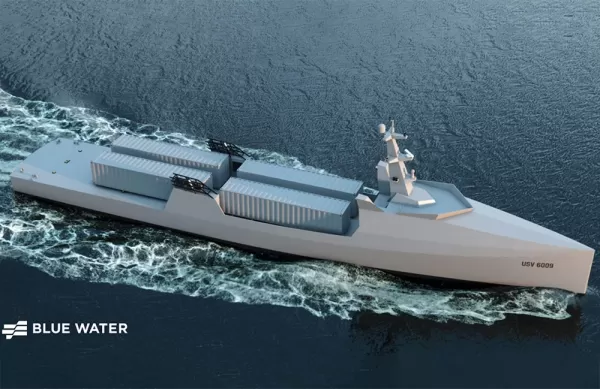
Blue Water Autonomy’s Liberty Class is a 190-foot steel autonomous ship. | Source: Blue Water AutonomyBoston-based technology and shipbuilding firm Blue Water Autonomy has secured a multiple-award contract with the Naval Oceanographic Office (NAVOCEA
U.S. Navy Selects Blue Water Autonomy for Deep-Sea Survey Missions
Blue Water Autonomy’s Liberty Class is a 190-foot steel autonomous ship. | Source: Blue Water AutonomyBoston-based technology and shipbuilding firm Blue Water Autonomy has secured a multiple-award contract with the Naval Oceanographic Office (NAVOCEA

2026 Latest Best Top-rated AI Text to Speech Tools for Online Courses are curated by XIX.AI based on rigorous real-world tests and weekly updated rankings. These powerful tools help creators deliver crystal-clear audio content effortlessly, boosting writing efficiency and streamlining course production. Check out the free vs paid comparison to find your perfect fit. Explore now to unlock your AI edge in online education.
10 tools
xix.ai

2026 Latest Best Top-Rated AI Blog Title Tools for Higher Click Through Rates! XIX.AI has carefully curated a powerful, game-changing collection of top tools that go through rigorous real-world tests. You’ll find a free vs paid comparison, weekly updated rankings, and detailed insights to help you boost your blog’s traffic efficiently. Must-try options are highlighted to help you unlock your AI edge. Explore now!
10 tools
xix.ai

2026 Latest Best Top-rated AI Task Routing Tools for Support Workflows! XIX.AI has curated a highly powerful game-changing collection of must-try solutions, all undergoing rigorous real-world tests and updated weekly. These tools streamline workflows, boost productivity, and help teams deliver faster, more efficient support. Explore now to discover your perfect tool and unlock your AI edge!
17 tools
xix.ai

2026 Latest Best Top-Rated AI Citation and Paper Summary Tools Curated by XIX.AI. Get powerful game-changing solutions for quick content creation, improved writing efficiency, and boosting productivity. We offer a free vs paid comparison along with real-world tests and weekly updated rankings to help you find the must-try tool that fits your needs perfectly. Explore now to Unlock your AI edge.
10 tools
xix.ai

2026 Latest Best Top-Rated AI Productivity Tools for Daily Work! XIX.AI has curated a powerful, game-changing selection based on rigorous weekly updated rankings and real-world tests. You’ll find must-try options that boost writing efficiency, streamline content creation, and help you overcome daily work challenges. Get a free vs paid comparison to find the perfect fit for your needs. Explore now to unlock your AI edge!
9 tools
xix.ai

2026 Latest Best Top-Rated AI Systematic Review Tools for Research Screening are here on XIX.AI! This curated collection includes powerful, game-changing solutions that go through rigorous real-world tests to deliver accurate results. We also offer a free vs paid comparison along with weekly updated rankings to help you find the must-try option that boosts your research efficiency significantly. Explore now to unlock your AI edge in academic work!
11 tools
xix.ai

這款AI分鏡工具簡直是影片創作者的救星!以前畫分鏡要花好幾週,現在幾小時就能搞定。不過不知道會不會反而讓新手的構圖能力退步?科技方便和基本功的平衡真是難題啊...😅
This tutorial is a game-changer for animators! StoryBoarder.ai’s features make planning so smooth, it’s like having a creative assistant. Can’t wait to try it for my next short film! 🎬
This tutorial on StoryBoarder.ai is a game-changer! The platform makes planning visuals so intuitive for filmmakers. I’m curious, though—how does it stack up against traditional storyboarding tools in terms of speed? 🤔
StoryBoarder.ai looks super intuitive for planning visuals! I’m curious how it stacks up against traditional sketching for animators. Anyone tried it yet? 🤔












