


 Home
HomeHow to register for SBI Internet Banking in 2025? Complete online activation guide.
Signing up for State Bank of India (SBI) internet banking streamlines your finances, allowing you to handle transactions from anywhere. This guide details the online registration process for creating your user ID and password, equipping you to manage your account with full transaction capabilities securely. Follow these instructions to enjoy the flexibility of SBI's digital banking services.
Key Points
Complete your SBI net banking registration entirely online, without needing to visit a branch.
Generate your unique user ID and password via the official online portal.
Activate full transaction rights for comprehensive online account management.
Verify your identity during sign-up using details from your SBI ATM or debit card.
Establish a distinct profile password for enhanced account security.
Ensure your email address is current for smooth communication and easy account recovery.
Upgrade your access level to unlock complete transaction functionality.
Registering for SBI Internet Banking Online
Step-by-Step Registration Process
You can enroll in SBI internet banking remotely. Here is the detailed procedure to get started:
Access the SBI Online Portal:
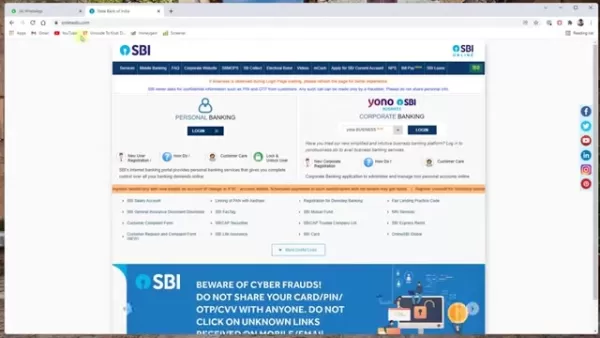
Navigate to the official website, onlineSBI.com, to initiate registration.
New User Registration: Select the “New User Registration/Activation” link to proceed to the registration page.
Select Registration Type: Choose 'New User Registration' from the menu and click 'Next'.
Enter Account Details: Provide your account number, CIF number, branch code, country, registered mobile number, and select the required facility. Locate your CIF number and branch code in your passbook.Opt for 'Full Transaction Rights' to perform all transactions online.
Submit and Verify: Enter the captcha text and click 'Submit'. An OTP will be sent to your mobile; enter it and click 'Confirm'.
ATM Card Verification: Choose “I have my ATM card” and click 'Submit' to finalize registration online. If you don't possess an ATM card, branch activation is mandatory.
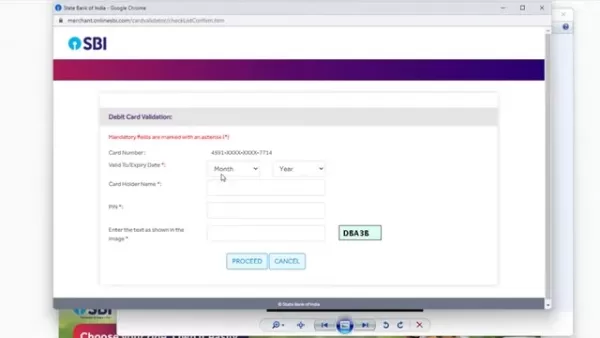
Select Debit Card: Pick your active debit card from the list and click 'Confirm'. Input the card's expiry date, holder name, and PIN.
Set Username and Password: Create a unique username and a robust password. Verify the username's availability and accept the terms and conditions.
Submit and Complete: Click 'Submit' to finish. A confirmation message will indicate successful registration.
After completing these steps, you will have full access to SBI internet banking, enabling efficient online financial management.
Essential Information Needed for Registration
Before starting, gather the following details for a smooth registration experience:
- Account Number: Your unique bank account identifier.
- CIF Number: Your Customer Information File number, found on your passbook or statement.
- Branch Code: The code for your specific SBI branch.
- Registered Mobile Number: The mobile number linked to your account.
- ATM Card Details: Information from your active card, including the expiry date and PIN.
Having these items ready will expedite the process.
Creating a Strong and Secure Password
A strong password is vital for protecting your SBI net banking account. An effective password should be:
- Unique: Not reused for other accounts.
- Complex: A mix of uppercase and lowercase letters, numbers, and symbols.
- Lengthy: A minimum of 8 characters.
- Unpredictable: Avoids personal information like names or birthdays.
Consider these tips for enhanced security:
- Utilize a password manager to generate and store secure passwords.
- Change your password regularly.
- Never share or write down your password.
Adhering to these practices significantly boosts your account's security.
Troubleshooting Common Registration Issues
Resolving Common Problems During SBI Internet Banking Registration
If you encounter problems during registration, here are solutions to frequent issues:
OTP Not Received: Check your mobile network and use the 'Resend OTP' option if needed.
Confirm your mobile number is correctly registered with SBI.
Invalid Details: Re-enter all details like account number and CIF number, ensuring they match your passbook exactly.
ATM Card Issues: Verify your card is active and not blocked. Double-check the expiry date and PIN.
Username Availability: If your chosen username is taken, try variations with letters and numbers.
Technical Glitches: Clear your browser's cache and cookies, or attempt registration later.
Addressing these concerns will help you complete registration without interruption.
Navigating SBI Internet Banking
Logging In and Exploring the Dashboard
After successful registration, access your account as follows:
Login steps:
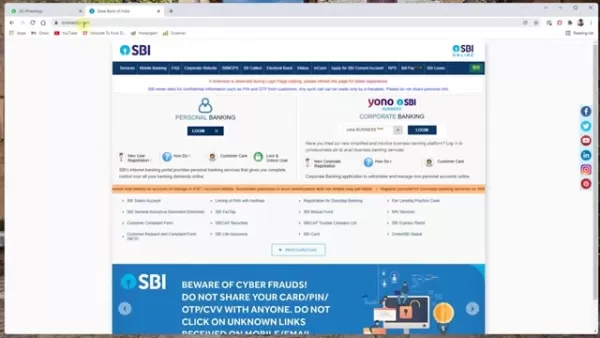
Visit SBI Online: Go to onlineSBI.com.
Login: Click 'Login' under 'Personal Banking'.
Continue to Login: Select 'Continue to Login'.
Enter Credentials: Input your username, password, and the captcha code.
OTP Verification: Enter the OTP sent to your mobile and click 'Submit'.
The main dashboard provides access to various services, typically including:
- Account Summary: Overview of balances and recent transactions.
- Payments/Transfers: Options for fund transfers.
- Bill Payments: Utility and credit card bill payment facility.
- Fixed Deposits: Tools to manage fixed deposits.
- e-Services: Online services like updating PAN or email ID.
Familiarize yourself with the dashboard to navigate SBI internet banking effectively.
Updating Your Email ID
Keeping your email address updated is crucial for notifications. Update it by:
Logging into your SBI internet banking account.
Navigating to the profile section, often under 'My Accounts & Profile'.
Entering your profile password when prompted.
Submitting your new email address.
Completing any OTP verification sent to your mobile.
An updated email ensures you receive important bank communications.
Enabling Full Transaction Rights
If your account has only view access, enable full transaction rights by:
Logging into your SBI net banking account.
Going to 'Request & Enquiries' and selecting 'More'.
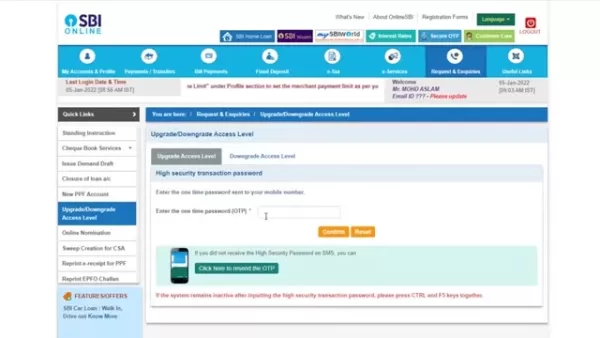
Choosing 'Upgrade/Downgrade Access Level'.
Selecting your account.
Choosing 'Full Transaction Rights' from the dropdown and clicking 'Submit'.
Entering the OTP sent to your mobile and confirming.
This grants you complete online transaction capabilities.
Understanding SBI Internet Banking Charges
Transaction Fees and Other Charges
While many services are free, certain transactions may attract fees, such as:
- NEFT/RTGS Transfers: Fees may apply, particularly for larger amounts.
- IMPS Transfers: Charges for Immediate Payment Service transfers.
- SMS Alerts: Premium alert services might have quarterly charges.
- Debit Card Charges: Annual maintenance fees.
Consult the SBI website or your branch for the latest fee schedule.
Approximate charges for SBI Internet Banking services:
Service Charges (Approximate) NEFT Transfers₹1 to ₹25 + GSTRTGS Transfers₹5 to ₹50 + GSTIMPS Transfers₹5 to ₹15 + GSTSMS Alerts₹15 to ₹25 per quarterDebit Card Annual Fee₹125 to ₹500 + GSTNote: Fees are subject to change. Confirm current charges with SBI.
Advantages and Disadvantages of SBI Internet Banking
Pros
Convenience: 24/7 account access from any location.
Efficiency: Quick transactions without branch visits.
Accessibility: Manage finances while traveling or at home.
Comprehensive Services: Wide array of online banking features.
Cost-Effective: Often lower fees than in-branch transactions.
Cons
Security Risks: Potential threats like phishing.
Technical Issues: Reliance on stable internet and website uptime.
Learning Curve: Requires comfort with digital platforms.
Limited Assistance: Less immediate help than at a branch.
Exploring Key Features of SBI Internet Banking
Features That Enhance Your Banking Experience
SBI internet banking offers numerous features for efficient financial management:
- Account Summary: View balances, history, and statements.
- Fund Transfers: Send money via NEFT, RTGS, or IMPS.
- Bill Payments: Pay utilities and other bills online.
- Fixed Deposits: Open and manage fixed deposits.
- Recurring Deposits: Manage recurring deposit accounts.
- Cheque Book Services: Order cheque books or stop payments.
- e-Statements: Download PDF account statements.
- UPI Services: Handle UPI transactions.
- Tax Payments: Pay direct taxes online.
- Online Shopping: Secure online purchases.
- Profile Management: Update personal details.
These tools provide a full-service online banking experience.
Real-World Use Cases for SBI Internet Banking
How SBI Internet Banking Simplifies Your Life
Practical applications of SBI net banking include:
- Paying Bills on Time: Set up automatic payments to avoid penalties.
- Transferring Money to Family: Swiftly send funds to relatives anywhere.
- Managing Investments: Grow savings with fixed and recurring deposits.
- Tracking Expenses: Monitor transactions to manage budgets.
- Paying Taxes Online: Fulfill tax obligations conveniently from home.
These examples show how SBI internet banking makes financial management more efficient.
Frequently Asked Questions (FAQ)
Is SBI internet banking free to use?
Basic services are generally free, but fees may apply for specific transactions like NEFT/RTGS transfers.
What do I do if I forget my internet banking password?
Use the 'Forgot Password' link on the login page. Reset it by answering security questions or using your ATM card for verification.
How can I update my mobile number with SBI internet banking?
Visit an SBI branch, use an ATM, or utilize online channels after identity verification to update your mobile number.
Is it safe to use SBI internet banking?
Yes, SBI uses encryption, OTPs, and security audits. Always access the official website and never share login details.
Can I access my account statement online?
Yes, you can download PDF statements from the 'Account Statement' section after logging in.
Related Questions
What are the security measures I should take while using online banking?
To safeguard your online banking, follow these precautions:Use a Strong Password: Create a complex, unique password.Avoid Public Wi-Fi: Conduct banking on secure, private networks.Keep Software Updated: Regularly update your OS, browser, and antivirus.Be Wary of Phishing: Ignore suspicious emails or links asking for personal data. Always type the SBI URL directly into your browser.Monitor Accounts Frequently: Review statements for unauthorized activity.Enable Two-Factor Authentication: Use OTP verification for an extra security layer.These steps help reduce fraud risk and protect your account.
Related article
 ByteDance’s Seed launches global campus drive, offering virtual shares to win top large model talent
In the competitive landscape of large language models, securing top-tier talent remains the most critical strategic asset.On April 1st, ByteDance announced the launch of its Seed global campus recruitment initiative, part of its large model talent de
Suno to Watermark Songs Amid Legal Battles
Suno, the platform enabling users to generate AI-created music, has unveiled new features to label platform-produced tracks, restrict downloads, and update community standards to curb unauthorized replicas. These updates arrive as Suno confronts mult
Musk Admits Grok Build Leaked User Code, Promises to Erase All Historical Data
Elon Musk directly addressed the privacy controversy surrounding Grok Build, beginning with a simple "True" to confirm the incident's validity. He pledged that all user data previously uploaded to SpaceXAI would be permanently erased, stating, "not a
Related Special Topic Recommendations
Design & Art
ByteDance’s Seed launches global campus drive, offering virtual shares to win top large model talent
In the competitive landscape of large language models, securing top-tier talent remains the most critical strategic asset.On April 1st, ByteDance announced the launch of its Seed global campus recruitment initiative, part of its large model talent de
Suno to Watermark Songs Amid Legal Battles
Suno, the platform enabling users to generate AI-created music, has unveiled new features to label platform-produced tracks, restrict downloads, and update community standards to curb unauthorized replicas. These updates arrive as Suno confronts mult
Musk Admits Grok Build Leaked User Code, Promises to Erase All Historical Data
Elon Musk directly addressed the privacy controversy surrounding Grok Build, beginning with a simple "True" to confirm the incident's validity. He pledged that all user data previously uploaded to SpaceXAI would be permanently erased, stating, "not a
Related Special Topic Recommendations
Design & Art
 AI Visual Style Reference Tools for Character Sheets, Moodboards, and Pitch Decks
2026 Latest Best AI Visual Style Reference Tools for Character Sheets, Moodboards, and Pitch Decks are here on XIX.AI! This curated top-rated list features powerful game-changing tools that go through rigorous real-world tests. You’ll find a free vs paid comparison, detailed rankings, and must-try options to help you boost creativity and streamline your workflow. Explore now to discover your perfect tool for boosting productivity!
 11 tools
 xix.ai
SEO
Best AI SERP Analysis Tools for Search Strategy
xix.ai
SEO
Best AI SERP Analysis Tools for Search Strategy
2026 Latest Best Top-rated AI SERP Analysis Tools for Search Strategy are curated by XIX.AI through rigorous real-world tests and weekly updated rankings. These powerful tools help you unlock hidden optimization opportunities, boost content performance, and gain a competitive edge in search. Discover your perfect tool to elevate your search strategy today. Explore now!
13 tools
xix.ai
Data Analysis
Best AI Anomaly Detection Tools for KPI Monitoring across SaaS and Ecommerce Teams
2026 Latest Best Top-rated AI Anomaly Detection Tools for KPI Monitoring in SaaS and Ecommerce teams! XIX.AI has curated a powerful, game-changing collection based on rigorous real-world tests and weekly updated rankings. You’ll find detailed free vs paid comparison insights to help you identify the must-try solution that boosts productivity and unlocks your AI edge. Explore now!
10 tools
xix.ai
writing
Best AI Outline Generators for Long-Form SEO Articles
2026 Latest Best Top-Rated AI Outline Generators for Long-Form SEO Articles, meticulously curated by XIX.AI. These powerful tools offer game-changing assistance in creating high-quality content quickly, boosting writing efficiency significantly. Get a free vs paid comparison along with real-world tests and detailed rankings to help you find the must-try option that suits your needs. Explore now to unlock your AI edge.
8 tools
xix.ai
Education and Learning
AI Study Tools for Homework and Exam Prep
2026 Latest Best AI Study Tools for Homework and Exam Prep! XIX.AI curates a top-rated list of powerful, game-changing tools that help students boost productivity, streamline homework completion, and ace exams through real-world tests. Get a free vs paid comparison, detailed rankings, and must-try options to unlock your AI edge. Explore now!
10 tools
xix.ai
Music composition
AI Vocal Demo Tools for Songwriters, Hooks, Toplines, and Multilingual Draft Sessions
2026 Latest Best AI Vocal Demo Tools for Songwriters, Hook Creators, and Multi-Language Content Teams! XIX.AI has curated a top-rated list of powerful game-changing tools that go through rigorous real-world tests. You’ll find detailed free vs paid comparison data, comprehensive rankings, and must-try options to help you boost writing efficiency and unlock your creative potential. Explore now to discover your perfect tool for all your content needs!
9 tools
xix.ai

 Comments (0)
0/500
Comments (0)
0/500
Signing up for State Bank of India (SBI) internet banking streamlines your finances, allowing you to handle transactions from anywhere. This guide details the online registration process for creating your user ID and password, equipping you to manage your account with full transaction capabilities securely. Follow these instructions to enjoy the flexibility of SBI's digital banking services.
Key Points
Complete your SBI net banking registration entirely online, without needing to visit a branch.
Generate your unique user ID and password via the official online portal.
Activate full transaction rights for comprehensive online account management.
Verify your identity during sign-up using details from your SBI ATM or debit card.
Establish a distinct profile password for enhanced account security.
Ensure your email address is current for smooth communication and easy account recovery.
Upgrade your access level to unlock complete transaction functionality.
Registering for SBI Internet Banking Online
Step-by-Step Registration Process
You can enroll in SBI internet banking remotely. Here is the detailed procedure to get started:
Access the SBI Online Portal:
Navigate to the official website, onlineSBI.com, to initiate registration.
New User Registration: Select the “New User Registration/Activation” link to proceed to the registration page.
Select Registration Type: Choose 'New User Registration' from the menu and click 'Next'.
Enter Account Details: Provide your account number, CIF number, branch code, country, registered mobile number, and select the required facility. Locate your CIF number and branch code in your passbook.Opt for 'Full Transaction Rights' to perform all transactions online.
Submit and Verify: Enter the captcha text and click 'Submit'. An OTP will be sent to your mobile; enter it and click 'Confirm'.
ATM Card Verification: Choose “I have my ATM card” and click 'Submit' to finalize registration online. If you don't possess an ATM card, branch activation is mandatory.
Select Debit Card: Pick your active debit card from the list and click 'Confirm'. Input the card's expiry date, holder name, and PIN.
Set Username and Password: Create a unique username and a robust password. Verify the username's availability and accept the terms and conditions.
Submit and Complete: Click 'Submit' to finish. A confirmation message will indicate successful registration.
After completing these steps, you will have full access to SBI internet banking, enabling efficient online financial management.
Essential Information Needed for Registration
Before starting, gather the following details for a smooth registration experience:
- Account Number: Your unique bank account identifier.
- CIF Number: Your Customer Information File number, found on your passbook or statement.
- Branch Code: The code for your specific SBI branch.
- Registered Mobile Number: The mobile number linked to your account.
- ATM Card Details: Information from your active card, including the expiry date and PIN.
Having these items ready will expedite the process.
Creating a Strong and Secure Password
A strong password is vital for protecting your SBI net banking account. An effective password should be:
- Unique: Not reused for other accounts.
- Complex: A mix of uppercase and lowercase letters, numbers, and symbols.
- Lengthy: A minimum of 8 characters.
- Unpredictable: Avoids personal information like names or birthdays.
Consider these tips for enhanced security:
- Utilize a password manager to generate and store secure passwords.
- Change your password regularly.
- Never share or write down your password.
Adhering to these practices significantly boosts your account's security.
Troubleshooting Common Registration Issues
Resolving Common Problems During SBI Internet Banking Registration
If you encounter problems during registration, here are solutions to frequent issues:
OTP Not Received: Check your mobile network and use the 'Resend OTP' option if needed.
Confirm your mobile number is correctly registered with SBI.
Invalid Details: Re-enter all details like account number and CIF number, ensuring they match your passbook exactly.
ATM Card Issues: Verify your card is active and not blocked. Double-check the expiry date and PIN.
Username Availability: If your chosen username is taken, try variations with letters and numbers.
Technical Glitches: Clear your browser's cache and cookies, or attempt registration later.
Addressing these concerns will help you complete registration without interruption.
Navigating SBI Internet Banking
Logging In and Exploring the Dashboard
After successful registration, access your account as follows:
Login steps:
Visit SBI Online: Go to onlineSBI.com.
Login: Click 'Login' under 'Personal Banking'.
Continue to Login: Select 'Continue to Login'.
Enter Credentials: Input your username, password, and the captcha code.
OTP Verification: Enter the OTP sent to your mobile and click 'Submit'.
The main dashboard provides access to various services, typically including:
- Account Summary: Overview of balances and recent transactions.
- Payments/Transfers: Options for fund transfers.
- Bill Payments: Utility and credit card bill payment facility.
- Fixed Deposits: Tools to manage fixed deposits.
- e-Services: Online services like updating PAN or email ID.
Familiarize yourself with the dashboard to navigate SBI internet banking effectively.
Updating Your Email ID
Keeping your email address updated is crucial for notifications. Update it by:
Logging into your SBI internet banking account.
Navigating to the profile section, often under 'My Accounts & Profile'.
Entering your profile password when prompted.
Submitting your new email address.
Completing any OTP verification sent to your mobile.
An updated email ensures you receive important bank communications.
Enabling Full Transaction Rights
If your account has only view access, enable full transaction rights by:
Logging into your SBI net banking account.
Going to 'Request & Enquiries' and selecting 'More'.
Choosing 'Upgrade/Downgrade Access Level'.
Selecting your account.
Choosing 'Full Transaction Rights' from the dropdown and clicking 'Submit'.
Entering the OTP sent to your mobile and confirming.
This grants you complete online transaction capabilities.
Understanding SBI Internet Banking Charges
Transaction Fees and Other Charges
While many services are free, certain transactions may attract fees, such as:
- NEFT/RTGS Transfers: Fees may apply, particularly for larger amounts.
- IMPS Transfers: Charges for Immediate Payment Service transfers.
- SMS Alerts: Premium alert services might have quarterly charges.
- Debit Card Charges: Annual maintenance fees.
Consult the SBI website or your branch for the latest fee schedule.
Approximate charges for SBI Internet Banking services:
Note: Fees are subject to change. Confirm current charges with SBI.
Advantages and Disadvantages of SBI Internet Banking
Pros
Convenience: 24/7 account access from any location.
Efficiency: Quick transactions without branch visits.
Accessibility: Manage finances while traveling or at home.
Comprehensive Services: Wide array of online banking features.
Cost-Effective: Often lower fees than in-branch transactions.
Cons
Security Risks: Potential threats like phishing.
Technical Issues: Reliance on stable internet and website uptime.
Learning Curve: Requires comfort with digital platforms.
Limited Assistance: Less immediate help than at a branch.
Exploring Key Features of SBI Internet Banking
Features That Enhance Your Banking Experience
SBI internet banking offers numerous features for efficient financial management:
- Account Summary: View balances, history, and statements.
- Fund Transfers: Send money via NEFT, RTGS, or IMPS.
- Bill Payments: Pay utilities and other bills online.
- Fixed Deposits: Open and manage fixed deposits.
- Recurring Deposits: Manage recurring deposit accounts.
- Cheque Book Services: Order cheque books or stop payments.
- e-Statements: Download PDF account statements.
- UPI Services: Handle UPI transactions.
- Tax Payments: Pay direct taxes online.
- Online Shopping: Secure online purchases.
- Profile Management: Update personal details.
These tools provide a full-service online banking experience.
Real-World Use Cases for SBI Internet Banking
How SBI Internet Banking Simplifies Your Life
Practical applications of SBI net banking include:
- Paying Bills on Time: Set up automatic payments to avoid penalties.
- Transferring Money to Family: Swiftly send funds to relatives anywhere.
- Managing Investments: Grow savings with fixed and recurring deposits.
- Tracking Expenses: Monitor transactions to manage budgets.
- Paying Taxes Online: Fulfill tax obligations conveniently from home.
These examples show how SBI internet banking makes financial management more efficient.
Frequently Asked Questions (FAQ)
Is SBI internet banking free to use?
Basic services are generally free, but fees may apply for specific transactions like NEFT/RTGS transfers.
What do I do if I forget my internet banking password?
Use the 'Forgot Password' link on the login page. Reset it by answering security questions or using your ATM card for verification.
How can I update my mobile number with SBI internet banking?
Visit an SBI branch, use an ATM, or utilize online channels after identity verification to update your mobile number.
Is it safe to use SBI internet banking?
Yes, SBI uses encryption, OTPs, and security audits. Always access the official website and never share login details.
Can I access my account statement online?
Yes, you can download PDF statements from the 'Account Statement' section after logging in.
Related Questions
What are the security measures I should take while using online banking?
To safeguard your online banking, follow these precautions:Use a Strong Password: Create a complex, unique password.Avoid Public Wi-Fi: Conduct banking on secure, private networks.Keep Software Updated: Regularly update your OS, browser, and antivirus.Be Wary of Phishing: Ignore suspicious emails or links asking for personal data. Always type the SBI URL directly into your browser.Monitor Accounts Frequently: Review statements for unauthorized activity.Enable Two-Factor Authentication: Use OTP verification for an extra security layer.These steps help reduce fraud risk and protect your account.








 ByteDance’s Seed launches global campus drive, offering virtual shares to win top large model talent
In the competitive landscape of large language models, securing top-tier talent remains the most critical strategic asset.On April 1st, ByteDance announced the launch of its Seed global campus recruitment initiative, part of its large model talent de
ByteDance’s Seed launches global campus drive, offering virtual shares to win top large model talent
In the competitive landscape of large language models, securing top-tier talent remains the most critical strategic asset.On April 1st, ByteDance announced the launch of its Seed global campus recruitment initiative, part of its large model talent de
 Suno to Watermark Songs Amid Legal Battles
Suno, the platform enabling users to generate AI-created music, has unveiled new features to label platform-produced tracks, restrict downloads, and update community standards to curb unauthorized replicas. These updates arrive as Suno confronts mult
Suno to Watermark Songs Amid Legal Battles
Suno, the platform enabling users to generate AI-created music, has unveiled new features to label platform-produced tracks, restrict downloads, and update community standards to curb unauthorized replicas. These updates arrive as Suno confronts mult
 Musk Admits Grok Build Leaked User Code, Promises to Erase All Historical Data
Elon Musk directly addressed the privacy controversy surrounding Grok Build, beginning with a simple "True" to confirm the incident's validity. He pledged that all user data previously uploaded to SpaceXAI would be permanently erased, stating, "not a
Musk Admits Grok Build Leaked User Code, Promises to Erase All Historical Data
Elon Musk directly addressed the privacy controversy surrounding Grok Build, beginning with a simple "True" to confirm the incident's validity. He pledged that all user data previously uploaded to SpaceXAI would be permanently erased, stating, "not a

2026 Latest Best AI Visual Style Reference Tools for Character Sheets, Moodboards, and Pitch Decks are here on XIX.AI! This curated top-rated list features powerful game-changing tools that go through rigorous real-world tests. You’ll find a free vs paid comparison, detailed rankings, and must-try options to help you boost creativity and streamline your workflow. Explore now to discover your perfect tool for boosting productivity!
11 tools
xix.ai

2026 Latest Best Top-rated AI SERP Analysis Tools for Search Strategy are curated by XIX.AI through rigorous real-world tests and weekly updated rankings. These powerful tools help you unlock hidden optimization opportunities, boost content performance, and gain a competitive edge in search. Discover your perfect tool to elevate your search strategy today. Explore now!
13 tools
xix.ai

2026 Latest Best Top-rated AI Anomaly Detection Tools for KPI Monitoring in SaaS and Ecommerce teams! XIX.AI has curated a powerful, game-changing collection based on rigorous real-world tests and weekly updated rankings. You’ll find detailed free vs paid comparison insights to help you identify the must-try solution that boosts productivity and unlocks your AI edge. Explore now!
10 tools
xix.ai

2026 Latest Best Top-Rated AI Outline Generators for Long-Form SEO Articles, meticulously curated by XIX.AI. These powerful tools offer game-changing assistance in creating high-quality content quickly, boosting writing efficiency significantly. Get a free vs paid comparison along with real-world tests and detailed rankings to help you find the must-try option that suits your needs. Explore now to unlock your AI edge.
8 tools
xix.ai

2026 Latest Best AI Study Tools for Homework and Exam Prep! XIX.AI curates a top-rated list of powerful, game-changing tools that help students boost productivity, streamline homework completion, and ace exams through real-world tests. Get a free vs paid comparison, detailed rankings, and must-try options to unlock your AI edge. Explore now!
10 tools
xix.ai

2026 Latest Best AI Vocal Demo Tools for Songwriters, Hook Creators, and Multi-Language Content Teams! XIX.AI has curated a top-rated list of powerful game-changing tools that go through rigorous real-world tests. You’ll find detailed free vs paid comparison data, comprehensive rankings, and must-try options to help you boost writing efficiency and unlock your creative potential. Explore now to discover your perfect tool for all your content needs!
9 tools
xix.ai












