


 Home
HomeWhat is Rosetta Wizard Interface? A 2025 guide to convert ASCII data to NetCDF.
Rosetta's Wizard Interface simplifies the process of converting plain ASCII data files into the standardized NetCDF format. This tool is indispensable for researchers and data stewards who need to ensure their datasets meet established standards, enabling reliable long-term archiving and data sharing. This guide walks through how Rosetta simplifies data conversion, enhancing data accessibility for the broader scientific community.
Key Points
Rosetta's Wizard Interface efficiently converts ASCII data to NetCDF.
It guarantees your data conforms to archival standards.
The process begins by defining basic information, such as the scientific community and data platform.
Support for custom file types offers flexibility for various data conversions.
You can add descriptive metadata to data columns for better documentation.
An integrated unit builder helps manage measurement units effectively.
Introduction to Rosetta's Wizard Interface
What is Rosetta and its Purpose?
Rosetta is a robust software tool designed to transform raw data, especially into the standardized NetCDF (Network Common Data Form) format.
NetCDF consists of software libraries and a machine-independent format ideal for creating, accessing, and sharing scientific array data. The primary objective is to enhance the utility of data that initially has very limited metadata. Rosetta excels at converting ASCII-based data, which often lacks detailed descriptors, into a fully compliant, archive-ready NetCDF file. This conversion ensures data is not only preserved for the future but is also easily interpretable and reusable by other scientists. Its intuitive Wizard Interface guides users through each step, making the process straightforward even for those with minimal technical background.
By facilitating this standardization, Rosetta encourages greater data sharing and collaboration. Using common formats like NetCDF simplifies combining datasets from different origins, enabling powerful meta-analyses and verification of results. Furthermore, Rosetta plays a key role in the long-term preservation of valuable scientific data, securing its availability for future research.
Understanding the Wave Glider Data Conversion Example
Using SPURS Field Campaign Data
To demonstrate its capabilities, Rosetta will convert wave glider data collected during the Salinity Processes in the Upper Ocean Regional Study (SPURS).
This data is originally in a space-delimited ASCII file with minimal metadata. The conversion entails mapping each column from the ASCII file to corresponding NetCDF variables and defining the required metadata for each. The wave glider data is provided as a space-delimited ASCII file. The final NetCDF file is self-describing and adheres to recognized conventions like the Climate and Forecast (CF) metadata standards.
This example highlights Rosetta's adaptability for various scientific data types, proving its value in fields such as oceanography, meteorology, and climate science. Users can tailor the conversion to their specific requirements, ensuring the output NetCDF files are perfectly suited for their intended use.
Step-by-Step Guide to Using Rosetta's Wizard Interface
Accessing the Rosetta Platform
Begin by navigating to the official Rosetta website.
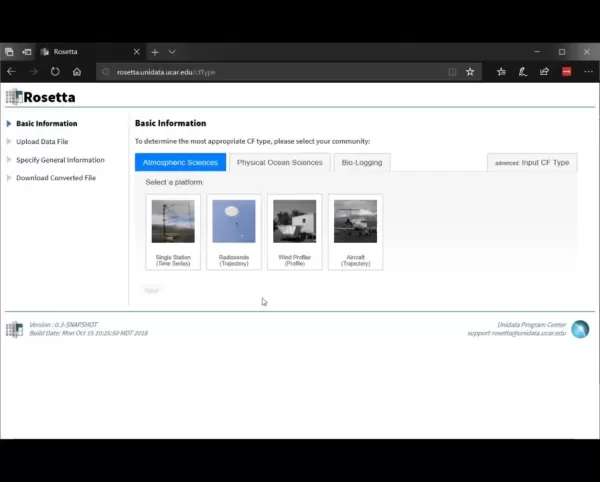
This will bring you to the homepage where you can initiate the data conversion. Ensure the ASCII data file you wish to convert is accessible on your computer.
- Ensure Compatibility: Before starting, verify that your ASCII data file is correctly formatted. Common problems like inconsistent delimiters, missing column headers, or incorrect data types should be resolved beforehand to avoid errors during conversion.
Specifying Basic Information
Once on the platform, the first step is to provide fundamental information about your dataset.
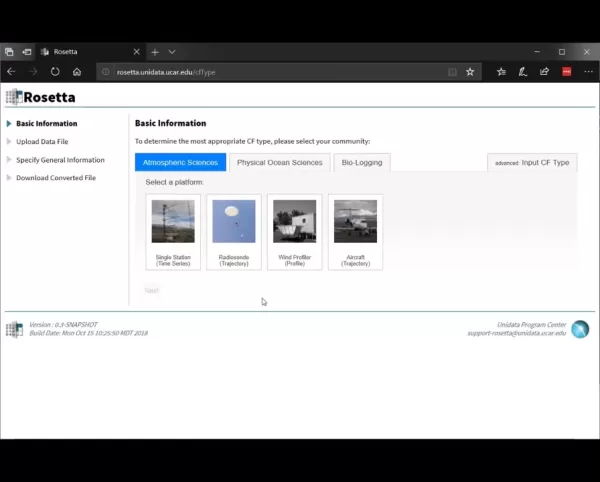
Rosetta will first ask for your scientific community. Select the relevant community and platform for your data. For our wave glider example, choose 'Physical Ocean Sciences' as the community and 'Glider' as the platform. Providing this information allows Rosetta to optimize the conversion process for your specific data type.
- Community Selection: Choosing the correct community ensures Rosetta applies the most appropriate metadata conventions and data standards. For example, selecting 'Physical Ocean Sciences' prompts the use of conventions standard in that field.
- Platform Selection: Identifying the correct platform helps Rosetta understand the data's origin. Different platforms like gliders, buoys, or satellites have unique data collection methods, and Rosetta adjusts its processing accordingly.
Uploading the Data File
The next step is to upload your ASCII data file to the Rosetta platform.
First, specify the data file type. Select 'Custom File Type' if Rosetta does not automatically recognize your file's format. Then, browse your computer to select and upload the file.
- Custom File Type: Selecting "custom file type" indicates that Rosetta is unfamiliar with the uploaded format. This allows you to manually define the file's structure and conversion parameters, accommodating a wide array of data formats, including non-standard ones.
Specifying Custom File Type Attributes
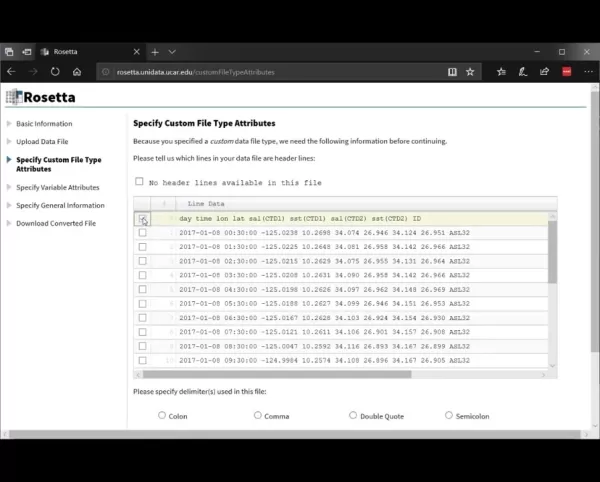
After selecting 'Custom File Type', you will need to define your file's specific attributes.

This involves identifying which lines in the file are headers and specifying the delimiter used. Check the box next to the line containing the column headers. Then, specify the delimiter; for this example, it is 'Whitespace'.
- Header Line Selection: Accurately selecting the header line is critical, as Rosetta uses these headers to identify your data variables. Ensure the header contains clear, descriptive names for each column.
- Delimiter Specification: Correctly identifying the delimiter (e.g., comma, tab, space) ensures Rosetta parses your file accurately. An incorrect delimiter will misassign data to variables.
Specifying Variable Attributes
Rosetta then displays your data in a table, enabling you to assign metadata to each column.
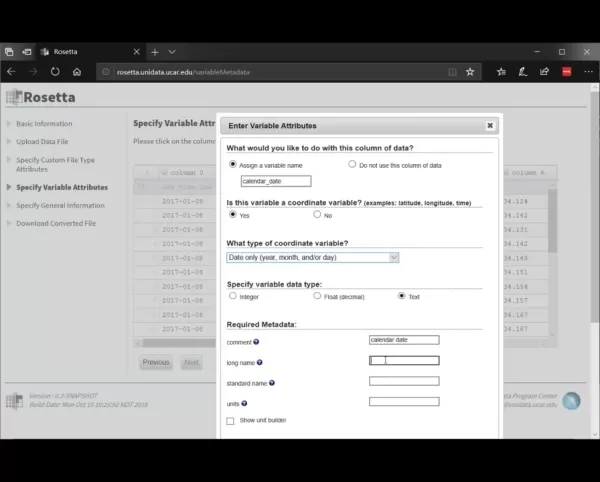
For each column, you can define a variable name, designate it as a coordinate variable (e.g., for latitude, longitude, time), and set the data type. For the first column (calendar date), assign the name 'calendar_date', mark it as a coordinate variable of type 'date only', and set the data type to 'text'.
- Coordinate Variables: Correctly identifying coordinate variables is essential as they define the spatial and temporal framework of your dataset. Common examples are latitude, longitude, depth, and time.
- Data Type Specification: Choosing the appropriate data type (e.g., integer, float, text) ensures Rosetta processes your data correctly. An incorrect type can lead to data loss or errors.
Adding Metadata
Adding comprehensive metadata improves your data's discoverability and usability. For each variable, you can include a comment, a long descriptive name, a CF standard name, and its units. For the 'calendar_date' variable, you might add a comment such as 'Calendar Date', a long name like 'Date as seen on a calendar', and select the standard name 'time'. Use the unit builder to select 'date only' from the dropdown menu.
- CF Standard Names: Utilizing CF standard names ensures your data follows widely accepted metadata conventions, enhancing interoperability and making it easier for others to understand and use your data.
- Units Specification: Defining precise units of measurement for each variable is crucial for accurate data interpretation. Standard units include meters for distance, degrees Celsius for temperature, and seconds for time.
- Utilizing the Unit Builder: Rosetta's unit builder tool assists in defining units. It offers a list of common units and allows for the creation of custom units if necessary.
Working with the Unit Builder
When units are not immediately apparent, Rosetta’s unit builder is a valuable resource. The tool provides a dropdown menu to select the appropriate unit category. In this instance, you would select 'Relative Datetime'.
- Choosing Unit Types: This step is critical for accurately defining the units for your chosen parameter, guaranteeing it is stored correctly. *Precise setup is essential, so double-check your parameter configuration before finalizing.
Rosetta Pricing
Rosetta is Open Source and Free
Rosetta is an open-source project, meaning it is free to use and distribute. You can access its source code and contribute to its development on platforms like GitHub. Its open-source nature makes it a highly accessible and collaborative tool for the global scientific community. Rosetta embodies a commitment to transparent and accessible data management. As a community-maintained, open-source product, it does not include dedicated support, but its website offers comprehensive documentation and community support channels.
Pros and Cons of Using Rosetta's Wizard Interface
Pros
The user-friendly interface makes data conversion straightforward.
Support for custom file types allows for versatile data handling.
Ensures data compliance with recognized standards.
Contributes significantly to long-term data preservation.
Encourages data sharing and collaborative research.
Cons
Automation is limited for highly complex data transformations.
Manual mapping and metadata entry are required for custom files.
It may not support every advanced feature available in NetCDF.
Rosetta Wizard Interface: Core Features
Key Features of Rosetta for Data Conversion
Rosetta offers a suite of features specifically designed for scientific data conversion:
Wizard Interface: A guided, step-by-step process that simplifies conversion.
Custom File Type Support: Accommodates a wide range of data formats, including non-standard ones.

Metadata Mapping: Enables users to map columns to variables and define comprehensive metadata.
CF Standard Names: Ensures adherence to established metadata conventions.
Unit Builder: Assists in defining accurate units for variables.
NetCDF Output: Converts data into the widely supported NetCDF format.
Together, these features empower users to efficiently transform raw data into standardized, archive-ready datasets.
Rosetta Wizard Interface: Use Cases
Diverse Applications of Rosetta in Scientific Research
Rosetta is utilized across numerous scientific disciplines, including:
- Oceanography: Converting wave glider data for studies on ocean salinity.
- Meteorology: Standardizing weather observation data for climate models.
- Climate Science: Archiving climate data records in NetCDF format.
- Environmental Science: Managing data from environmental monitoring stations.
Its versatility makes it an invaluable tool for researchers working with diverse and complex data sources.
Frequently Asked Questions about Rosetta
What file types does Rosetta support?
Rosetta primarily converts ASCII-based data files but can handle custom file types where users define the attributes. Its main purpose is conversion into the NetCDF format.
Is Rosetta free to use?
Yes, Rosetta is an open-source project and completely free to use. This makes it a valuable resource for the scientific community, available for use and distribution under its open-source license.
What are CF standard names, and why are they important?
CF standard names are a set of metadata conventions established by the Climate and Forecast community. Using these standard names ensures your data complies with recognized standards, which promotes interoperability and simplifies data sharing and integration.
Where can I find additional resources or support for using Rosetta?
The Rosetta website provides extensive documentation, tutorials, and practical examples. Community-based support is also available through dedicated forums and mailing lists associated with the project.
Related Questions on Data Conversion and Standardization
Why is data conversion and standardization important in scientific research?
Data conversion and standardization are fundamental to scientific research for multiple reasons. Firstly, they enable the integration and joint analysis of data from disparate sources. Without standardization, datasets often use different units, naming conventions, or file formats, making combination and comparison challenging. Standardization involves converting data to a common format like NetCDF and applying consistent metadata conventions, such as CF standard names. This process is vital for meta-analyses, where researchers aggregate findings from multiple studies to draw stronger, more reliable conclusions.Secondly, data standardization enhances the reproducibility of scientific research. By following established data standards, researchers provide a clear, unambiguous record of their data, allowing others to replicate their analyses and verify their results. This is especially critical in fields where reproducibility is paramount, such as climate and environmental science. Standardized data also supports long-term preservation, ensuring scientific data remains accessible and usable for future researchers.Thirdly, data conversion and standardization foster greater data sharing and collaboration. When data is standardized, it becomes easier for researchers to share their work and collaborate on projects, promoting a more open and transparent research culture that accelerates scientific progress.Consider climate change research as an example. Climate scientists depend on data from numerous sources like weather stations, satellites, and ocean buoys, each with its own format. Converting and standardizing this data is essential to construct a coherent picture of the Earth's climate system and monitor changes over time. Without these processes, climate research would be far more difficult and less reliable.Data TypeOriginal FormatStandardized FormatBenefitsWeather DataCSV, TXTNetCDFFacilitates climate modeling and weather forecastingOceanographic DataASCII, ExcelNetCDFEnables ocean salinity studies and marine ecosystem analysisClimate Model DataGRIB, HDFNetCDFSupports climate change research and policy makingIn summary, data conversion and standardization are crucial for ensuring data can be integrated, research can be reproduced, and findings can be shared effectively. Adopting these practices improves the quality, reliability, and impact of scientific work.
Related article
 Slackbot Becomes an AI Agent
Slackbot, the automated assistant embedded in Salesforce’s corporate messaging platform Slack, is evolving into an AI agent. Salesforce CTO Parker Harris envisions it achieving viral status comparable to OpenAI’s ChatGPT.The cloud software giant laun
ByteDance Boosts Core AI Incentives as Doubao Surges 14.6%
ByteDance recently convened a DouBao equity briefing to unveil fresh incentive policies for staff involved in the DouBao division. The strike price for DouBao shares has been lifted from $14.85 in June 2026 to $17.02, marking an approximate 14.6% inc
MiniMax Unveils 10x Team Program to Incentivize Global AI Experts
MiniMax (Xiyu Technology), the General Artificial Intelligence Lab, has officially launched "10x Team," a global talent collaboration initiative. This program aims to recruit top experts across industries to explore the deep application of large mode
Related Special Topic Recommendations
Education and Learning
Slackbot Becomes an AI Agent
Slackbot, the automated assistant embedded in Salesforce’s corporate messaging platform Slack, is evolving into an AI agent. Salesforce CTO Parker Harris envisions it achieving viral status comparable to OpenAI’s ChatGPT.The cloud software giant laun
ByteDance Boosts Core AI Incentives as Doubao Surges 14.6%
ByteDance recently convened a DouBao equity briefing to unveil fresh incentive policies for staff involved in the DouBao division. The strike price for DouBao shares has been lifted from $14.85 in June 2026 to $17.02, marking an approximate 14.6% inc
MiniMax Unveils 10x Team Program to Incentivize Global AI Experts
MiniMax (Xiyu Technology), the General Artificial Intelligence Lab, has officially launched "10x Team," a global talent collaboration initiative. This program aims to recruit top experts across industries to explore the deep application of large mode
Related Special Topic Recommendations
Education and Learning
 AI Study Tools for Homework and Exam Prep
2026 Latest Best AI Study Tools for Homework and Exam Prep! XIX.AI curates a top-rated list of powerful, game-changing tools that help students boost productivity, streamline homework completion, and ace exams through real-world tests. Get a free vs paid comparison, detailed rankings, and must-try options to unlock your AI edge. Explore now!
 10 tools
 xix.ai
Music composition
AI Vocal Demo Tools for Songwriters, Hooks, Toplines, and Multilingual Draft Sessions
xix.ai
Music composition
AI Vocal Demo Tools for Songwriters, Hooks, Toplines, and Multilingual Draft Sessions
2026 Latest Best AI Vocal Demo Tools for Songwriters, Hook Creators, and Multi-Language Content Teams! XIX.AI has curated a top-rated list of powerful game-changing tools that go through rigorous real-world tests. You’ll find detailed free vs paid comparison data, comprehensive rankings, and must-try options to help you boost writing efficiency and unlock your creative potential. Explore now to discover your perfect tool for all your content needs!
9 tools
xix.ai
Business
Best AI Competitive Research Tools for Small Businesses
2026 Latest Best Top-rated AI Competitive Research Tools for Small Businesses! XIX.AI has curated a highly powerful game-changing collection, updated weekly with rigorous real-world tests and detailed rankings. You can find a comprehensive free vs paid comparison to help you identify the must-try tools that boost your productivity and give you a competitive edge. Explore now to discover your perfect tool!
9 tools
xix.ai
Image editing
Photoshop AI Retouch Tools for Ecommerce Apparel, Skin Cleanup, and Color Consistency
2026 Latest Best Photoshop AI retouch tools for ecommerce apparel, skin cleanup, and color consistency! This top-rated curated list features powerful game-changing solutions that help you boost writing efficiency, streamline content creation, and achieve perfect visual results effortlessly. Each tool has undergone real-world tests through weekly updated rankings, complete with free vs paid comparison details. Backed by XIX.AI, it’s the must-try guide for anyone aiming to unlock your AI edge. Explore now!
10 tools
xix.ai
Prompt
Best AI Prompt Libraries for ChatGPT Workflows
2026 Latest Best Top-Rated AI Prompt Libraries for optimizing all types of ChatGPT workflows. XIX.AI has curated a powerful, game-changing collection that goes through rigorous real-world tests to ensure top performance. You can find detailed free vs paid comparisons and expert rankings to help you choose the must-try tools that boost your productivity and unlock your AI edge. Explore now!
11 tools
xix.ai
Education and Learning
AI Quiz Builder Platforms for Teachers, Tutors, and Cohort-Based Learning Programs
2026 Latest Best AI Quiz Builder Platforms for Teachers, Tutors, and Cohort-Based Learning Programs! XIX.AI has curated a top-rated list of powerful game-changing tools that go through real-world tests to deliver accurate rankings. These must-try platforms help boost writing efficiency, streamline content creation, and simplify quiz design across all learning scenarios. Explore now to discover your perfect tool for unlocking your AI edge in teaching!
13 tools
xix.ai

 Comments (4)
0/500
Comments (4)
0/500
![AnthonyScott]()
Finally! Converting ASCII to NetCDF used to be such a headache. Does this wizard support batch processing of hundreds of files? That would be a lifesaver for climate data workflows. 🌦️
![HarryMartínez]()
Als jemand, der oft mit Klimadaten arbeite, finde ich solche Tools super hilfreich. Die Konvertierung von ASCII zu NetCDF war früher immer ein Albtraum mit selbstgeschriebenen Skripten, die ständig kaputtgingen. Hoffentlich ist die Benutzeroberfläche wirklich so intuitiv, wie beschrieben. Die Standardisierung ist ein riesiger Schritt für die Reproduzierbarkeit von Forschung! 😌
![MarkScott]()
Интересная статья! Конвертацию ASCII в NetCDF всегда приходилось делать через громоздкие скрипты, особенно для симуляционных моделей. Этот интерфейс выглядит как спасательный круг для начинающих в научной обработке данных. Хорошо бы добавить поддержку большего количества кодировок, иногда с русским текстом в данных возникают проблемы при конвертации. Инструмент точно сэкономит уйму времени в лаборатории! 👨🔬
![DouglasMartin]()
Wait, so I can basically stop struggling with messy CSV files and just use this to make everything play nice? That actually sounds like a lifesaver for my research project, might finally stop losing data on weird date formatting lol. Hope the learning curve isn't too steep though.
Rosetta's Wizard Interface simplifies the process of converting plain ASCII data files into the standardized NetCDF format. This tool is indispensable for researchers and data stewards who need to ensure their datasets meet established standards, enabling reliable long-term archiving and data sharing. This guide walks through how Rosetta simplifies data conversion, enhancing data accessibility for the broader scientific community.
Key Points
Rosetta's Wizard Interface efficiently converts ASCII data to NetCDF.
It guarantees your data conforms to archival standards.
The process begins by defining basic information, such as the scientific community and data platform.
Support for custom file types offers flexibility for various data conversions.
You can add descriptive metadata to data columns for better documentation.
An integrated unit builder helps manage measurement units effectively.
Introduction to Rosetta's Wizard Interface
What is Rosetta and its Purpose?
Rosetta is a robust software tool designed to transform raw data, especially into the standardized NetCDF (Network Common Data Form) format.
NetCDF consists of software libraries and a machine-independent format ideal for creating, accessing, and sharing scientific array data. The primary objective is to enhance the utility of data that initially has very limited metadata. Rosetta excels at converting ASCII-based data, which often lacks detailed descriptors, into a fully compliant, archive-ready NetCDF file. This conversion ensures data is not only preserved for the future but is also easily interpretable and reusable by other scientists. Its intuitive Wizard Interface guides users through each step, making the process straightforward even for those with minimal technical background.
By facilitating this standardization, Rosetta encourages greater data sharing and collaboration. Using common formats like NetCDF simplifies combining datasets from different origins, enabling powerful meta-analyses and verification of results. Furthermore, Rosetta plays a key role in the long-term preservation of valuable scientific data, securing its availability for future research.
Understanding the Wave Glider Data Conversion Example
Using SPURS Field Campaign Data
To demonstrate its capabilities, Rosetta will convert wave glider data collected during the Salinity Processes in the Upper Ocean Regional Study (SPURS).
This data is originally in a space-delimited ASCII file with minimal metadata. The conversion entails mapping each column from the ASCII file to corresponding NetCDF variables and defining the required metadata for each. The wave glider data is provided as a space-delimited ASCII file. The final NetCDF file is self-describing and adheres to recognized conventions like the Climate and Forecast (CF) metadata standards.
This example highlights Rosetta's adaptability for various scientific data types, proving its value in fields such as oceanography, meteorology, and climate science. Users can tailor the conversion to their specific requirements, ensuring the output NetCDF files are perfectly suited for their intended use.
Step-by-Step Guide to Using Rosetta's Wizard Interface
Accessing the Rosetta Platform
Begin by navigating to the official Rosetta website.
This will bring you to the homepage where you can initiate the data conversion. Ensure the ASCII data file you wish to convert is accessible on your computer.
- Ensure Compatibility: Before starting, verify that your ASCII data file is correctly formatted. Common problems like inconsistent delimiters, missing column headers, or incorrect data types should be resolved beforehand to avoid errors during conversion.
Specifying Basic Information
Once on the platform, the first step is to provide fundamental information about your dataset.
Rosetta will first ask for your scientific community. Select the relevant community and platform for your data. For our wave glider example, choose 'Physical Ocean Sciences' as the community and 'Glider' as the platform. Providing this information allows Rosetta to optimize the conversion process for your specific data type.
- Community Selection: Choosing the correct community ensures Rosetta applies the most appropriate metadata conventions and data standards. For example, selecting 'Physical Ocean Sciences' prompts the use of conventions standard in that field.
- Platform Selection: Identifying the correct platform helps Rosetta understand the data's origin. Different platforms like gliders, buoys, or satellites have unique data collection methods, and Rosetta adjusts its processing accordingly.
Uploading the Data File
The next step is to upload your ASCII data file to the Rosetta platform.
First, specify the data file type. Select 'Custom File Type' if Rosetta does not automatically recognize your file's format. Then, browse your computer to select and upload the file.
- Custom File Type: Selecting "custom file type" indicates that Rosetta is unfamiliar with the uploaded format. This allows you to manually define the file's structure and conversion parameters, accommodating a wide array of data formats, including non-standard ones.
Specifying Custom File Type Attributes
After selecting 'Custom File Type', you will need to define your file's specific attributes.
This involves identifying which lines in the file are headers and specifying the delimiter used. Check the box next to the line containing the column headers. Then, specify the delimiter; for this example, it is 'Whitespace'.
- Header Line Selection: Accurately selecting the header line is critical, as Rosetta uses these headers to identify your data variables. Ensure the header contains clear, descriptive names for each column.
- Delimiter Specification: Correctly identifying the delimiter (e.g., comma, tab, space) ensures Rosetta parses your file accurately. An incorrect delimiter will misassign data to variables.
Specifying Variable Attributes
Rosetta then displays your data in a table, enabling you to assign metadata to each column.
For each column, you can define a variable name, designate it as a coordinate variable (e.g., for latitude, longitude, time), and set the data type. For the first column (calendar date), assign the name 'calendar_date', mark it as a coordinate variable of type 'date only', and set the data type to 'text'.
- Coordinate Variables: Correctly identifying coordinate variables is essential as they define the spatial and temporal framework of your dataset. Common examples are latitude, longitude, depth, and time.
- Data Type Specification: Choosing the appropriate data type (e.g., integer, float, text) ensures Rosetta processes your data correctly. An incorrect type can lead to data loss or errors.
Adding Metadata
Adding comprehensive metadata improves your data's discoverability and usability. For each variable, you can include a comment, a long descriptive name, a CF standard name, and its units. For the 'calendar_date' variable, you might add a comment such as 'Calendar Date', a long name like 'Date as seen on a calendar', and select the standard name 'time'. Use the unit builder to select 'date only' from the dropdown menu.
- CF Standard Names: Utilizing CF standard names ensures your data follows widely accepted metadata conventions, enhancing interoperability and making it easier for others to understand and use your data.
- Units Specification: Defining precise units of measurement for each variable is crucial for accurate data interpretation. Standard units include meters for distance, degrees Celsius for temperature, and seconds for time.
- Utilizing the Unit Builder: Rosetta's unit builder tool assists in defining units. It offers a list of common units and allows for the creation of custom units if necessary.
Working with the Unit Builder
When units are not immediately apparent, Rosetta’s unit builder is a valuable resource. The tool provides a dropdown menu to select the appropriate unit category. In this instance, you would select 'Relative Datetime'.
- Choosing Unit Types: This step is critical for accurately defining the units for your chosen parameter, guaranteeing it is stored correctly. *Precise setup is essential, so double-check your parameter configuration before finalizing.
Rosetta Pricing
Rosetta is Open Source and Free
Rosetta is an open-source project, meaning it is free to use and distribute. You can access its source code and contribute to its development on platforms like GitHub. Its open-source nature makes it a highly accessible and collaborative tool for the global scientific community. Rosetta embodies a commitment to transparent and accessible data management. As a community-maintained, open-source product, it does not include dedicated support, but its website offers comprehensive documentation and community support channels.
Pros and Cons of Using Rosetta's Wizard Interface
Pros
The user-friendly interface makes data conversion straightforward.
Support for custom file types allows for versatile data handling.
Ensures data compliance with recognized standards.
Contributes significantly to long-term data preservation.
Encourages data sharing and collaborative research.
Cons
Automation is limited for highly complex data transformations.
Manual mapping and metadata entry are required for custom files.
It may not support every advanced feature available in NetCDF.
Rosetta Wizard Interface: Core Features
Key Features of Rosetta for Data Conversion
Rosetta offers a suite of features specifically designed for scientific data conversion:
Wizard Interface: A guided, step-by-step process that simplifies conversion.
Custom File Type Support: Accommodates a wide range of data formats, including non-standard ones.
Metadata Mapping: Enables users to map columns to variables and define comprehensive metadata.
CF Standard Names: Ensures adherence to established metadata conventions.
Unit Builder: Assists in defining accurate units for variables.
NetCDF Output: Converts data into the widely supported NetCDF format.
Together, these features empower users to efficiently transform raw data into standardized, archive-ready datasets.
Rosetta Wizard Interface: Use Cases
Diverse Applications of Rosetta in Scientific Research
Rosetta is utilized across numerous scientific disciplines, including:
- Oceanography: Converting wave glider data for studies on ocean salinity.
- Meteorology: Standardizing weather observation data for climate models.
- Climate Science: Archiving climate data records in NetCDF format.
- Environmental Science: Managing data from environmental monitoring stations.
Its versatility makes it an invaluable tool for researchers working with diverse and complex data sources.
Frequently Asked Questions about Rosetta
What file types does Rosetta support?
Rosetta primarily converts ASCII-based data files but can handle custom file types where users define the attributes. Its main purpose is conversion into the NetCDF format.
Is Rosetta free to use?
Yes, Rosetta is an open-source project and completely free to use. This makes it a valuable resource for the scientific community, available for use and distribution under its open-source license.
What are CF standard names, and why are they important?
CF standard names are a set of metadata conventions established by the Climate and Forecast community. Using these standard names ensures your data complies with recognized standards, which promotes interoperability and simplifies data sharing and integration.
Where can I find additional resources or support for using Rosetta?
The Rosetta website provides extensive documentation, tutorials, and practical examples. Community-based support is also available through dedicated forums and mailing lists associated with the project.
Related Questions on Data Conversion and Standardization
Why is data conversion and standardization important in scientific research?
Data conversion and standardization are fundamental to scientific research for multiple reasons. Firstly, they enable the integration and joint analysis of data from disparate sources. Without standardization, datasets often use different units, naming conventions, or file formats, making combination and comparison challenging. Standardization involves converting data to a common format like NetCDF and applying consistent metadata conventions, such as CF standard names. This process is vital for meta-analyses, where researchers aggregate findings from multiple studies to draw stronger, more reliable conclusions.Secondly, data standardization enhances the reproducibility of scientific research. By following established data standards, researchers provide a clear, unambiguous record of their data, allowing others to replicate their analyses and verify their results. This is especially critical in fields where reproducibility is paramount, such as climate and environmental science. Standardized data also supports long-term preservation, ensuring scientific data remains accessible and usable for future researchers.Thirdly, data conversion and standardization foster greater data sharing and collaboration. When data is standardized, it becomes easier for researchers to share their work and collaborate on projects, promoting a more open and transparent research culture that accelerates scientific progress.Consider climate change research as an example. Climate scientists depend on data from numerous sources like weather stations, satellites, and ocean buoys, each with its own format. Converting and standardizing this data is essential to construct a coherent picture of the Earth's climate system and monitor changes over time. Without these processes, climate research would be far more difficult and less reliable.Data TypeOriginal FormatStandardized FormatBenefitsWeather DataCSV, TXTNetCDFFacilitates climate modeling and weather forecastingOceanographic DataASCII, ExcelNetCDFEnables ocean salinity studies and marine ecosystem analysisClimate Model DataGRIB, HDFNetCDFSupports climate change research and policy makingIn summary, data conversion and standardization are crucial for ensuring data can be integrated, research can be reproduced, and findings can be shared effectively. Adopting these practices improves the quality, reliability, and impact of scientific work.








 Slackbot Becomes an AI Agent
Slackbot, the automated assistant embedded in Salesforce’s corporate messaging platform Slack, is evolving into an AI agent. Salesforce CTO Parker Harris envisions it achieving viral status comparable to OpenAI’s ChatGPT.The cloud software giant laun
Slackbot Becomes an AI Agent
Slackbot, the automated assistant embedded in Salesforce’s corporate messaging platform Slack, is evolving into an AI agent. Salesforce CTO Parker Harris envisions it achieving viral status comparable to OpenAI’s ChatGPT.The cloud software giant laun
 ByteDance Boosts Core AI Incentives as Doubao Surges 14.6%
ByteDance recently convened a DouBao equity briefing to unveil fresh incentive policies for staff involved in the DouBao division. The strike price for DouBao shares has been lifted from $14.85 in June 2026 to $17.02, marking an approximate 14.6% inc
ByteDance Boosts Core AI Incentives as Doubao Surges 14.6%
ByteDance recently convened a DouBao equity briefing to unveil fresh incentive policies for staff involved in the DouBao division. The strike price for DouBao shares has been lifted from $14.85 in June 2026 to $17.02, marking an approximate 14.6% inc
 MiniMax Unveils 10x Team Program to Incentivize Global AI Experts
MiniMax (Xiyu Technology), the General Artificial Intelligence Lab, has officially launched "10x Team," a global talent collaboration initiative. This program aims to recruit top experts across industries to explore the deep application of large mode
MiniMax Unveils 10x Team Program to Incentivize Global AI Experts
MiniMax (Xiyu Technology), the General Artificial Intelligence Lab, has officially launched "10x Team," a global talent collaboration initiative. This program aims to recruit top experts across industries to explore the deep application of large mode

2026 Latest Best AI Study Tools for Homework and Exam Prep! XIX.AI curates a top-rated list of powerful, game-changing tools that help students boost productivity, streamline homework completion, and ace exams through real-world tests. Get a free vs paid comparison, detailed rankings, and must-try options to unlock your AI edge. Explore now!
10 tools
xix.ai

2026 Latest Best AI Vocal Demo Tools for Songwriters, Hook Creators, and Multi-Language Content Teams! XIX.AI has curated a top-rated list of powerful game-changing tools that go through rigorous real-world tests. You’ll find detailed free vs paid comparison data, comprehensive rankings, and must-try options to help you boost writing efficiency and unlock your creative potential. Explore now to discover your perfect tool for all your content needs!
9 tools
xix.ai

2026 Latest Best Top-rated AI Competitive Research Tools for Small Businesses! XIX.AI has curated a highly powerful game-changing collection, updated weekly with rigorous real-world tests and detailed rankings. You can find a comprehensive free vs paid comparison to help you identify the must-try tools that boost your productivity and give you a competitive edge. Explore now to discover your perfect tool!
9 tools
xix.ai

2026 Latest Best Photoshop AI retouch tools for ecommerce apparel, skin cleanup, and color consistency! This top-rated curated list features powerful game-changing solutions that help you boost writing efficiency, streamline content creation, and achieve perfect visual results effortlessly. Each tool has undergone real-world tests through weekly updated rankings, complete with free vs paid comparison details. Backed by XIX.AI, it’s the must-try guide for anyone aiming to unlock your AI edge. Explore now!
10 tools
xix.ai

2026 Latest Best Top-Rated AI Prompt Libraries for optimizing all types of ChatGPT workflows. XIX.AI has curated a powerful, game-changing collection that goes through rigorous real-world tests to ensure top performance. You can find detailed free vs paid comparisons and expert rankings to help you choose the must-try tools that boost your productivity and unlock your AI edge. Explore now!
11 tools
xix.ai

2026 Latest Best AI Quiz Builder Platforms for Teachers, Tutors, and Cohort-Based Learning Programs! XIX.AI has curated a top-rated list of powerful game-changing tools that go through real-world tests to deliver accurate rankings. These must-try platforms help boost writing efficiency, streamline content creation, and simplify quiz design across all learning scenarios. Explore now to discover your perfect tool for unlocking your AI edge in teaching!
13 tools
xix.ai

Finally! Converting ASCII to NetCDF used to be such a headache. Does this wizard support batch processing of hundreds of files? That would be a lifesaver for climate data workflows. 🌦️
Als jemand, der oft mit Klimadaten arbeite, finde ich solche Tools super hilfreich. Die Konvertierung von ASCII zu NetCDF war früher immer ein Albtraum mit selbstgeschriebenen Skripten, die ständig kaputtgingen. Hoffentlich ist die Benutzeroberfläche wirklich so intuitiv, wie beschrieben. Die Standardisierung ist ein riesiger Schritt für die Reproduzierbarkeit von Forschung! 😌
Интересная статья! Конвертацию ASCII в NetCDF всегда приходилось делать через громоздкие скрипты, особенно для симуляционных моделей. Этот интерфейс выглядит как спасательный круг для начинающих в научной обработке данных. Хорошо бы добавить поддержку большего количества кодировок, иногда с русским текстом в данных возникают проблемы при конвертации. Инструмент точно сэкономит уйму времени в лаборатории! 👨🔬
Wait, so I can basically stop struggling with messy CSV files and just use this to make everything play nice? That actually sounds like a lifesaver for my research project, might finally stop losing data on weird date formatting lol. Hope the learning curve isn't too steep though.












