


 Home
HomeAI-Powered PDF Analysis: Streamlining Document Insights
In today's fast-moving digital era, swiftly extracting accurate insights from documents is essential. AI-driven PDF assistants are transforming how we engage with digital content. This article delves into building an AI PDF assistant using Retrieval Augmented Generation (RAG) and OpenAI's GPT-4, delivering an efficient and intelligent way to access information.
Key Highlights
Building an AI PDF assistant with Retrieval Augmented Generation (RAG).
Leveraging OpenAI's GPT-4 for advanced Natural Language Processing (NLP).
Simplifying intricate document analysis for universal accessibility.
Emphasizing practical applications in data science and Artificial Intelligence (AI).
Using email verification to secure and monitor app usage.
Deploying the AI PDF assistant with Streamlit.
Examining the architecture of RAG systems.
Exploring the AI PDF Analysis System
RAG and GPT-4: A Powerful Synergy
The core of this innovation combines Retrieval Augmented Generation (RAG) with OpenAI's GPT-4, a sophisticated Large Language Model (LLM). This fusion enables AI-powered PDF assistants to comprehend and interact with uploaded documents intuitively.
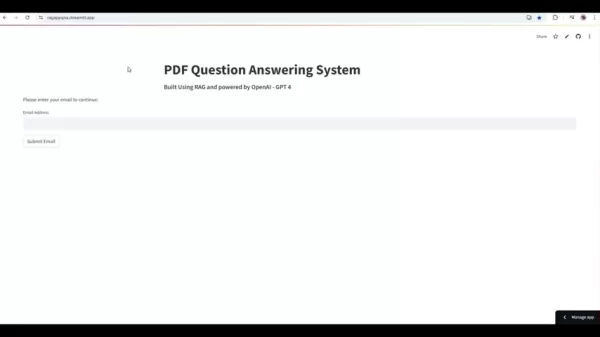
Here’s how RAG and GPT-4 enhance document interaction.
Retrieval Augmented Generation (RAG) boosts the knowledge base of Large Language Models by integrating external information sources, enhancing GPT-4's generative capabilities.
GPT-4 excels in complex problem-solving and natural language understanding, featuring an intuitive interface to harness AI capabilities. Key advantages include:
- Improved Accuracy: External knowledge enhances GPT-4’s factual responses.
- Minimized Errors: Real-time data access reduces incorrect or irrelevant outputs.
- Adaptive Learning: Seamlessly incorporates new information, vital for dynamic fields.
The synergy of RAG and GPT-4 improves accuracy and expands applicability, enabling tailored, context-aware interactions across domains.
User Interface: Simplicity and Efficiency Combined
The PDF Analysis System features an intuitive, user-friendly interface designed for accessibility and ease. Its design ensures powerful functionality is simple, empowering users of all technical levels.
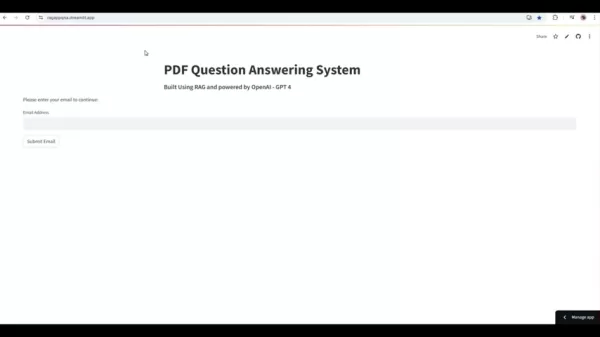
Key features include:
- Streamlined Layout: Clear, navigable design for a seamless experience.
- Guided Prompts: Simple instructions to walk users through each step.
- Inclusive Design: Accessible to users of all skill levels for quick document analysis.
This design makes the AI PDF assistant and GPT-4’s capabilities accessible, simplifying workflows. The following sections cover email input and document-related queries.
Guide to Using the AI PDF Analysis System
Step 1: Email Verification - Secure Access
Start by verifying your email to access the AI-powered PDF assistant securely, enabling personalized usage tracking.
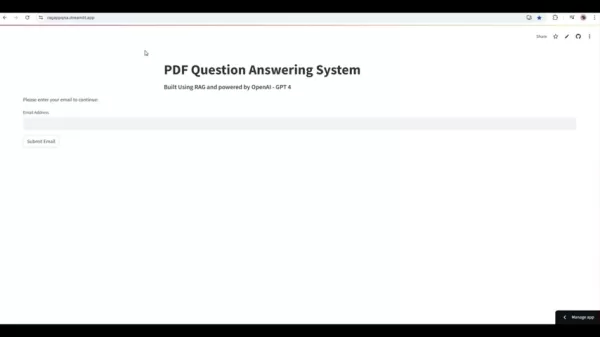
Follow these steps:
- Input Email: Enter a valid email address in the designated field on the landing page, with format validation ensured.
- Submit Email: Click the 'Submit Email' button to verify. Invalid formats trigger an alert.
- Gain Access: Successful validation unlocks the main interface and AI-driven PDF tools.
Ensure a valid email format to proceed.
Step 2: Uploading Your PDF - Ready for Analysis
After accessing the app, upload your PDF document. The system supports various document types for comprehensive analysis.
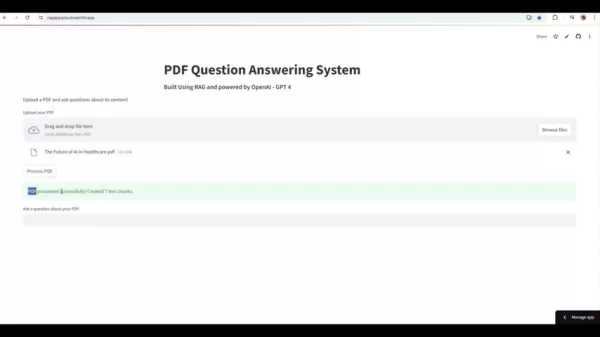
Steps to upload:
- Find the Upload Section: Look for the 'Drag and Drop' or 'Browse Files' option, choosing what suits you.
- Choose Your PDF: Select the PDF from your device, ensuring it meets the size limit specified.
- Process the File: The system converts the PDF into searchable text chunks. Larger files may take longer.
Check if the document’s text is selectable, as this affects the AI’s processing accuracy.
Step 3: Querying and Receiving Answers
With the PDF uploaded, interact with the AI PDF assistant to unlock its full potential. Here’s how:
- Find the Query Field: Enter questions about the PDF’s content in the designated area.
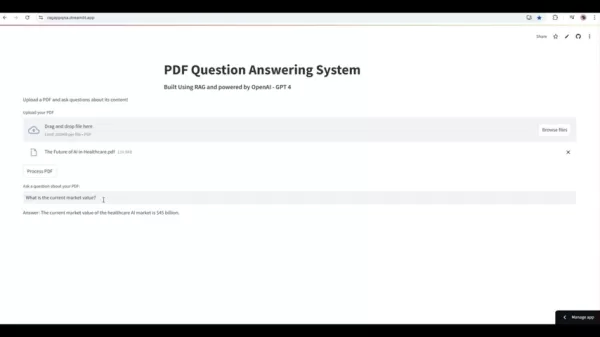
Clear, specific questions yield optimal results.
- Submit Query: Send your question, and the AI analyzes it against the document’s content.
- View AI Response: The system delivers a concise, accurate answer, powered by RAG and GPT-4 integration.
Precise queries and instant responses revolutionize learning, with AI referencing the PDF for tailored insights.
Technical Backbone: Code and Architecture
The system’s intuitive interface and AI power rely on a robust architecture, integrating Streamlit for the front-end, Langchain for the framework, and FAISS for embedding storage.
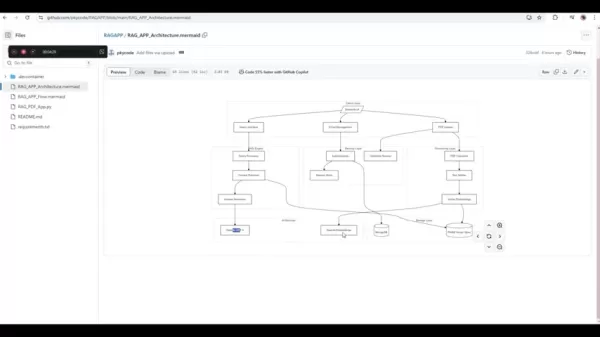
Key technologies include:
- Streamlit: Powers an accessible app front-end.
- Langchain: Provides a framework for Large Language Model applications.
- FAISS: Stores vector embeddings for efficient similarity searches.
This architecture ensures RAG’s accuracy and the interface’s intuitive design.
Tips for Optimal Use
Enhancing Output Quality
Maximize your AI PDF assistant’s performance with these tips:
- Ask Precise Questions: Specific queries lead to focused answers.
- Use Relevant Keywords: Target your area of interest to refine AI analysis.
- Test Diverse Files: Experiment with different documents to optimize your approach.
These strategies enhance output and uncover deeper insights from your AI experience.
Pros and Cons: A Balanced View
Pros
Delivers advanced insights from PDFs through AI integration.
Automates data extraction by converting documents into text chunks and vector databases.
Enables interactive questioning, transforming it into a knowledge hub.
Ensures secure, trackable usage via email verification.
Cons
Requires a paid OpenAI account for full features.
Relies on AI models and internet connectivity.
Vector database demands specific memory resources.
Limited to PDF formats, needing integration for other document types.
Frequently Asked Questions
Is the PDF assistant free to use?
The tool is free for personal use but requires an OpenAI API key, which needs a paid account. Scaling the RAG app increases API costs. Local use is possible but offers fewer benefits.
What happens to my PDFs?
PDFs are automatically deleted and not stored in the vector database for privacy. Users must log in and provide an email for usage tracking to prevent misuse.
Which models are supported?
The tool currently uses GPT-4, with potential support for more advanced models in the future. Stay updated!
Related Questions
How does this AI PDF assistant differ from other document analysis tools?
Unlike traditional tools relying on keyword searches or static analysis, this AI PDF assistant uses RAG and GPT-4 to dynamically interpret and respond to queries based on document context. It goes beyond surface-level data, offering tailored insights and summaries. Traditional methods focus on keyword matching, while AI tools deeply understand content, ensuring accurate, hallucination-free information.
Related article
 Six Tech Giants Back Linux Foundation With $12.5M to Tackle AI Vulnerability Noise
To tackle the flood of low-quality security reports produced by AI automation tools, six major tech companies—Anthropic, Amazon (AWS), GitHub, Google, Microsoft, and OpenAI—have collectively contributed $12.5 million in funding to Linux Foundation in
Musk Considered Leaving OpenAI to His Kids as Altman Testifies
This morning, OpenAI CEO Sam Altman took the stand to address former co-founder Elon Musk’s lawsuit challenging the company’s corporate structure.When asked about Musk’s claim that other founders “stole a charity” by launching a for-profit subsidiary
Sam Altman Sparks Debate Over AI's Deceleration
Listen onApple PodcastsListen onSpotifyOpenAI CEO Sam Altman recently suggested that it may be time to “pace the rate of AI development” to allow society to “harden around some of these new capability levels.”On the latest episode of TechCrunch’s Equ
Related Special Topic Recommendations
Business
Six Tech Giants Back Linux Foundation With $12.5M to Tackle AI Vulnerability Noise
To tackle the flood of low-quality security reports produced by AI automation tools, six major tech companies—Anthropic, Amazon (AWS), GitHub, Google, Microsoft, and OpenAI—have collectively contributed $12.5 million in funding to Linux Foundation in
Musk Considered Leaving OpenAI to His Kids as Altman Testifies
This morning, OpenAI CEO Sam Altman took the stand to address former co-founder Elon Musk’s lawsuit challenging the company’s corporate structure.When asked about Musk’s claim that other founders “stole a charity” by launching a for-profit subsidiary
Sam Altman Sparks Debate Over AI's Deceleration
Listen onApple PodcastsListen onSpotifyOpenAI CEO Sam Altman recently suggested that it may be time to “pace the rate of AI development” to allow society to “harden around some of these new capability levels.”On the latest episode of TechCrunch’s Equ
Related Special Topic Recommendations
Business
 Best AI Competitive Research Tools for Small Businesses
2026 Latest Best Top-rated AI Competitive Research Tools for Small Businesses! XIX.AI has curated a highly powerful game-changing collection, updated weekly with rigorous real-world tests and detailed rankings. You can find a comprehensive free vs paid comparison to help you identify the must-try tools that boost your productivity and give you a competitive edge. Explore now to discover your perfect tool!
 9 tools
 xix.ai
Image editing
Photoshop AI Retouch Tools for Ecommerce Apparel, Skin Cleanup, and Color Consistency
xix.ai
Image editing
Photoshop AI Retouch Tools for Ecommerce Apparel, Skin Cleanup, and Color Consistency
2026 Latest Best Photoshop AI retouch tools for ecommerce apparel, skin cleanup, and color consistency! This top-rated curated list features powerful game-changing solutions that help you boost writing efficiency, streamline content creation, and achieve perfect visual results effortlessly. Each tool has undergone real-world tests through weekly updated rankings, complete with free vs paid comparison details. Backed by XIX.AI, it’s the must-try guide for anyone aiming to unlock your AI edge. Explore now!
10 tools
xix.ai
Prompt
Best AI Prompt Libraries for ChatGPT Workflows
2026 Latest Best Top-Rated AI Prompt Libraries for optimizing all types of ChatGPT workflows. XIX.AI has curated a powerful, game-changing collection that goes through rigorous real-world tests to ensure top performance. You can find detailed free vs paid comparisons and expert rankings to help you choose the must-try tools that boost your productivity and unlock your AI edge. Explore now!
11 tools
xix.ai
Education and Learning
AI Quiz Builder Platforms for Teachers, Tutors, and Cohort-Based Learning Programs
2026 Latest Best AI Quiz Builder Platforms for Teachers, Tutors, and Cohort-Based Learning Programs! XIX.AI has curated a top-rated list of powerful game-changing tools that go through real-world tests to deliver accurate rankings. These must-try platforms help boost writing efficiency, streamline content creation, and simplify quiz design across all learning scenarios. Explore now to discover your perfect tool for unlocking your AI edge in teaching!
13 tools
xix.ai
code
AI Pull Request Review Tools for GitHub Teams Handling Refactors, Bugs, and Security Gaps
2026 Latest Best AI Pull Request Review Tools for GitHub Teams are here on XIX.AI! This top-rated curated list showcases powerful game-changing solutions that streamline refactoring, bug fixing, and security gap detection across all team workflows. Enjoy a free vs paid comparison along with real-world tests and detailed rankings to help you find the perfect tool that boosts productivity significantly. Explore now to unlock your AI edge!
12 tools
xix.ai
Text-to-speech
Best AI Text to Speech Tools for Natural Voiceovers
2026 Latest Best Top-rated AI Text to Speech Tools for Natural Voiceovers are here on XIX.AI! This curated list features powerful, game-changing options that deliver crystal-clear voices for every use case, backed by real-world tests and weekly updated rankings. Get a free vs paid comparison to find the must-try solution that boosts your productivity instantly. Explore now to Unlock your AI edge!
11 tools
xix.ai

 Comments (2)
0/500
Comments (2)
0/500
![AnthonyHernández]()
PDF 분석에 AI를 적용한다니 정말 혁신적이네요! 문서 작업이 더 편리해질 것 같아요 😍 앞으로 업무 효율이 엄청나게 올라갈 거예요. 그런데 개인정보 보안은 어떻게 처리될지 궁금해요.
![DanielMartin]()
This AI PDF thing sounds like a game-changer! Imagine breezing through dense reports in seconds—mind blown! 😮 But I wonder, will it make us lazy readers?
In today's fast-moving digital era, swiftly extracting accurate insights from documents is essential. AI-driven PDF assistants are transforming how we engage with digital content. This article delves into building an AI PDF assistant using Retrieval Augmented Generation (RAG) and OpenAI's GPT-4, delivering an efficient and intelligent way to access information.
Key Highlights
Building an AI PDF assistant with Retrieval Augmented Generation (RAG).
Leveraging OpenAI's GPT-4 for advanced Natural Language Processing (NLP).
Simplifying intricate document analysis for universal accessibility.
Emphasizing practical applications in data science and Artificial Intelligence (AI).
Using email verification to secure and monitor app usage.
Deploying the AI PDF assistant with Streamlit.
Examining the architecture of RAG systems.
Exploring the AI PDF Analysis System
RAG and GPT-4: A Powerful Synergy
The core of this innovation combines Retrieval Augmented Generation (RAG) with OpenAI's GPT-4, a sophisticated Large Language Model (LLM). This fusion enables AI-powered PDF assistants to comprehend and interact with uploaded documents intuitively.
Here’s how RAG and GPT-4 enhance document interaction.
Retrieval Augmented Generation (RAG) boosts the knowledge base of Large Language Models by integrating external information sources, enhancing GPT-4's generative capabilities.
GPT-4 excels in complex problem-solving and natural language understanding, featuring an intuitive interface to harness AI capabilities. Key advantages include:
- Improved Accuracy: External knowledge enhances GPT-4’s factual responses.
- Minimized Errors: Real-time data access reduces incorrect or irrelevant outputs.
- Adaptive Learning: Seamlessly incorporates new information, vital for dynamic fields.
The synergy of RAG and GPT-4 improves accuracy and expands applicability, enabling tailored, context-aware interactions across domains.
User Interface: Simplicity and Efficiency Combined
The PDF Analysis System features an intuitive, user-friendly interface designed for accessibility and ease. Its design ensures powerful functionality is simple, empowering users of all technical levels.
Key features include:
- Streamlined Layout: Clear, navigable design for a seamless experience.
- Guided Prompts: Simple instructions to walk users through each step.
- Inclusive Design: Accessible to users of all skill levels for quick document analysis.
This design makes the AI PDF assistant and GPT-4’s capabilities accessible, simplifying workflows. The following sections cover email input and document-related queries.
Guide to Using the AI PDF Analysis System
Step 1: Email Verification - Secure Access
Start by verifying your email to access the AI-powered PDF assistant securely, enabling personalized usage tracking.
Follow these steps:
- Input Email: Enter a valid email address in the designated field on the landing page, with format validation ensured.
- Submit Email: Click the 'Submit Email' button to verify. Invalid formats trigger an alert.
- Gain Access: Successful validation unlocks the main interface and AI-driven PDF tools.
Ensure a valid email format to proceed.
Step 2: Uploading Your PDF - Ready for Analysis
After accessing the app, upload your PDF document. The system supports various document types for comprehensive analysis.
Steps to upload:
- Find the Upload Section: Look for the 'Drag and Drop' or 'Browse Files' option, choosing what suits you.
- Choose Your PDF: Select the PDF from your device, ensuring it meets the size limit specified.
- Process the File: The system converts the PDF into searchable text chunks. Larger files may take longer.
Check if the document’s text is selectable, as this affects the AI’s processing accuracy.
Step 3: Querying and Receiving Answers
With the PDF uploaded, interact with the AI PDF assistant to unlock its full potential. Here’s how:
- Find the Query Field: Enter questions about the PDF’s content in the designated area.
Clear, specific questions yield optimal results.
- Submit Query: Send your question, and the AI analyzes it against the document’s content.
- View AI Response: The system delivers a concise, accurate answer, powered by RAG and GPT-4 integration.
Precise queries and instant responses revolutionize learning, with AI referencing the PDF for tailored insights.
Technical Backbone: Code and Architecture
The system’s intuitive interface and AI power rely on a robust architecture, integrating Streamlit for the front-end, Langchain for the framework, and FAISS for embedding storage.
Key technologies include:
- Streamlit: Powers an accessible app front-end.
- Langchain: Provides a framework for Large Language Model applications.
- FAISS: Stores vector embeddings for efficient similarity searches.
This architecture ensures RAG’s accuracy and the interface’s intuitive design.
Tips for Optimal Use
Enhancing Output Quality
Maximize your AI PDF assistant’s performance with these tips:
- Ask Precise Questions: Specific queries lead to focused answers.
- Use Relevant Keywords: Target your area of interest to refine AI analysis.
- Test Diverse Files: Experiment with different documents to optimize your approach.
These strategies enhance output and uncover deeper insights from your AI experience.
Pros and Cons: A Balanced View
Pros
Delivers advanced insights from PDFs through AI integration.
Automates data extraction by converting documents into text chunks and vector databases.
Enables interactive questioning, transforming it into a knowledge hub.
Ensures secure, trackable usage via email verification.
Cons
Requires a paid OpenAI account for full features.
Relies on AI models and internet connectivity.
Vector database demands specific memory resources.
Limited to PDF formats, needing integration for other document types.
Frequently Asked Questions
Is the PDF assistant free to use?
The tool is free for personal use but requires an OpenAI API key, which needs a paid account. Scaling the RAG app increases API costs. Local use is possible but offers fewer benefits.
What happens to my PDFs?
PDFs are automatically deleted and not stored in the vector database for privacy. Users must log in and provide an email for usage tracking to prevent misuse.
Which models are supported?
The tool currently uses GPT-4, with potential support for more advanced models in the future. Stay updated!
Related Questions
How does this AI PDF assistant differ from other document analysis tools?
Unlike traditional tools relying on keyword searches or static analysis, this AI PDF assistant uses RAG and GPT-4 to dynamically interpret and respond to queries based on document context. It goes beyond surface-level data, offering tailored insights and summaries. Traditional methods focus on keyword matching, while AI tools deeply understand content, ensuring accurate, hallucination-free information.








 Six Tech Giants Back Linux Foundation With $12.5M to Tackle AI Vulnerability Noise
To tackle the flood of low-quality security reports produced by AI automation tools, six major tech companies—Anthropic, Amazon (AWS), GitHub, Google, Microsoft, and OpenAI—have collectively contributed $12.5 million in funding to Linux Foundation in
Six Tech Giants Back Linux Foundation With $12.5M to Tackle AI Vulnerability Noise
To tackle the flood of low-quality security reports produced by AI automation tools, six major tech companies—Anthropic, Amazon (AWS), GitHub, Google, Microsoft, and OpenAI—have collectively contributed $12.5 million in funding to Linux Foundation in
 Musk Considered Leaving OpenAI to His Kids as Altman Testifies
This morning, OpenAI CEO Sam Altman took the stand to address former co-founder Elon Musk’s lawsuit challenging the company’s corporate structure.When asked about Musk’s claim that other founders “stole a charity” by launching a for-profit subsidiary
Musk Considered Leaving OpenAI to His Kids as Altman Testifies
This morning, OpenAI CEO Sam Altman took the stand to address former co-founder Elon Musk’s lawsuit challenging the company’s corporate structure.When asked about Musk’s claim that other founders “stole a charity” by launching a for-profit subsidiary
 Sam Altman Sparks Debate Over AI's Deceleration
Listen onApple PodcastsListen onSpotifyOpenAI CEO Sam Altman recently suggested that it may be time to “pace the rate of AI development” to allow society to “harden around some of these new capability levels.”On the latest episode of TechCrunch’s Equ
Sam Altman Sparks Debate Over AI's Deceleration
Listen onApple PodcastsListen onSpotifyOpenAI CEO Sam Altman recently suggested that it may be time to “pace the rate of AI development” to allow society to “harden around some of these new capability levels.”On the latest episode of TechCrunch’s Equ

2026 Latest Best Top-rated AI Competitive Research Tools for Small Businesses! XIX.AI has curated a highly powerful game-changing collection, updated weekly with rigorous real-world tests and detailed rankings. You can find a comprehensive free vs paid comparison to help you identify the must-try tools that boost your productivity and give you a competitive edge. Explore now to discover your perfect tool!
9 tools
xix.ai

2026 Latest Best Photoshop AI retouch tools for ecommerce apparel, skin cleanup, and color consistency! This top-rated curated list features powerful game-changing solutions that help you boost writing efficiency, streamline content creation, and achieve perfect visual results effortlessly. Each tool has undergone real-world tests through weekly updated rankings, complete with free vs paid comparison details. Backed by XIX.AI, it’s the must-try guide for anyone aiming to unlock your AI edge. Explore now!
10 tools
xix.ai

2026 Latest Best Top-Rated AI Prompt Libraries for optimizing all types of ChatGPT workflows. XIX.AI has curated a powerful, game-changing collection that goes through rigorous real-world tests to ensure top performance. You can find detailed free vs paid comparisons and expert rankings to help you choose the must-try tools that boost your productivity and unlock your AI edge. Explore now!
11 tools
xix.ai

2026 Latest Best AI Quiz Builder Platforms for Teachers, Tutors, and Cohort-Based Learning Programs! XIX.AI has curated a top-rated list of powerful game-changing tools that go through real-world tests to deliver accurate rankings. These must-try platforms help boost writing efficiency, streamline content creation, and simplify quiz design across all learning scenarios. Explore now to discover your perfect tool for unlocking your AI edge in teaching!
13 tools
xix.ai

2026 Latest Best AI Pull Request Review Tools for GitHub Teams are here on XIX.AI! This top-rated curated list showcases powerful game-changing solutions that streamline refactoring, bug fixing, and security gap detection across all team workflows. Enjoy a free vs paid comparison along with real-world tests and detailed rankings to help you find the perfect tool that boosts productivity significantly. Explore now to unlock your AI edge!
12 tools
xix.ai

2026 Latest Best Top-rated AI Text to Speech Tools for Natural Voiceovers are here on XIX.AI! This curated list features powerful, game-changing options that deliver crystal-clear voices for every use case, backed by real-world tests and weekly updated rankings. Get a free vs paid comparison to find the must-try solution that boosts your productivity instantly. Explore now to Unlock your AI edge!
11 tools
xix.ai

PDF 분석에 AI를 적용한다니 정말 혁신적이네요! 문서 작업이 더 편리해질 것 같아요 😍 앞으로 업무 효율이 엄청나게 올라갈 거예요. 그런데 개인정보 보안은 어떻게 처리될지 궁금해요.
This AI PDF thing sounds like a game-changer! Imagine breezing through dense reports in seconds—mind blown! 😮 But I wonder, will it make us lazy readers?












