


 Home
HomeEnterprise RAG Implementation Guide: .NET AI Meets Azure SQL
In today's data-centric landscape, harnessing AI to glean valuable insights from enterprise data is crucial. Retrieval Augmented Generation (RAG) is a highly effective technique for this purpose. This article details how to implement RAG on your data using .NET AI and Azure SQL, turning your information into an interactive, intelligent resource. We'll specifically cover constructing powerful hybrid vector searches that merge semantic vector search with conventional full-text search and filtering. By utilizing Azure SQL as your central AI database, you can effortlessly embed AI capabilities into your current enterprise applications.
Key Points
Grasp the fundamentals of Retrieval Augmented Generation (RAG) and understand its advantages for enterprise data.
Examine Azure SQL as a contemporary, multi-model relational database designed to manage diverse data formats.
Learn the methodology for creating a hybrid search approach, integrating vector semantic search with full-text search and filters.
Find out how to utilize .NET AI libraries to create vector embeddings and perform similarity searches directly within Azure SQL.
Build a complete RAG application from start to finish using Azure Functions, Static Web Apps, and Azure OpenAI.
Employ the Data API builder to make database entities available as REST and GraphQL endpoints.
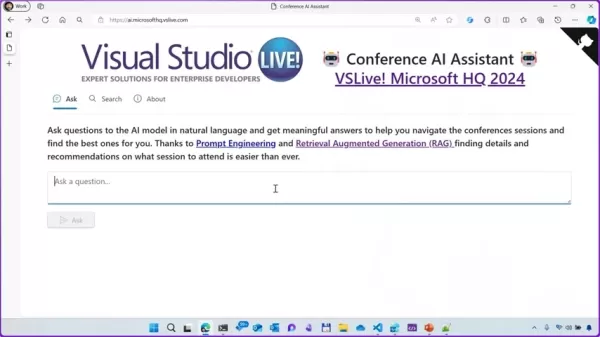
Walk through a practical demonstration of building a conference AI assistant to explore the benefits and adaptability for your enterprise data.
Identify the various scenarios where integrating AI with SQL proves highly beneficial.
Discover how the advantages and adaptability of Azure SQL can address your organization's complex data storage requirements.
Unlocking RAG Potential with .NET AI and Azure SQL
What is Azure SQL?
Azure SQL is a modern relational database service offering a genuine multi-model experience
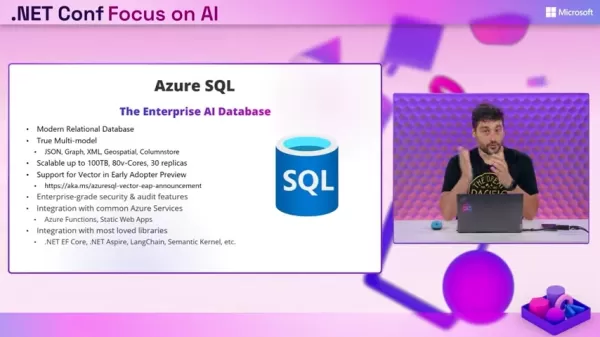
. This capability allows it to handle JSON, graph, XML, geospatial, and columnstore data. It scales up to 100 terabytes with 80 cores and supports 30 replicas. Azure SQL includes enterprise-grade security and auditing features and integrates seamlessly with common Azure services, .NET EF Core, .NET Aspire, LangChain, and Semantic Kernel. Its true strength lies in integrating with the technologies your development team already knows and trusts. To leverage AI on your data, Azure SQL will offer vector support in an early adopter preview, meaning you can request access to the private preview and explore its capabilities.
Azure SQL Highlights:
- Modern Relational Database
- True Multi-model Support (JSON, Graph, XML, Geospatial, Columnstore)
- Scalable to 100TB, 80v-Cores, 30 replicas
- Support for Vector (Early Adopter Preview)
- Enterprise-grade security & audit features
- Integration with common Azure Services
- Integration with popular developer libraries (.NET EF Core, .NET Aspire, LangChain, Semantic Kernel, etc.)
AI + SQL Use Cases for your Enterprise Data
Combining AI with Azure SQL unlocks numerous applications that can transform your enterprise data into a strategic asset
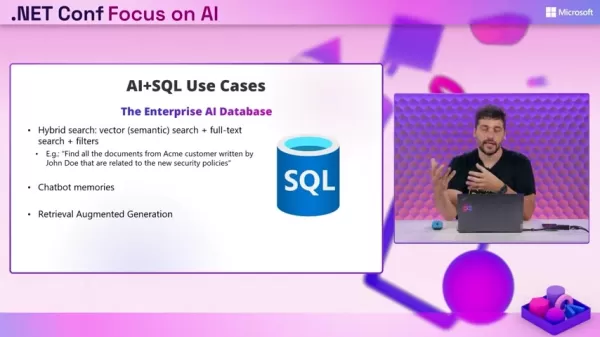
. Here are several key scenarios where this integration excels:
- Hybrid Search: Combines vector (semantic) search with full-text search and filters. This powerful tool enables precise data insight extraction. For instance, you can "Find all documents from Acme customer authored by John Doe related to the new security policies."
- Chatbot Memories: Use Azure SQL to store and manage chatbot conversation histories, enabling more personalized and context-aware interactions. Enhancing chatbot memories can significantly improve product and customer support, giving you a competitive edge.
- Retrieval Augmented Generation (RAG): This is the technique we will demonstrate building. RAG enhances the quality and relevance of AI-generated content by anchoring it in your specific data.
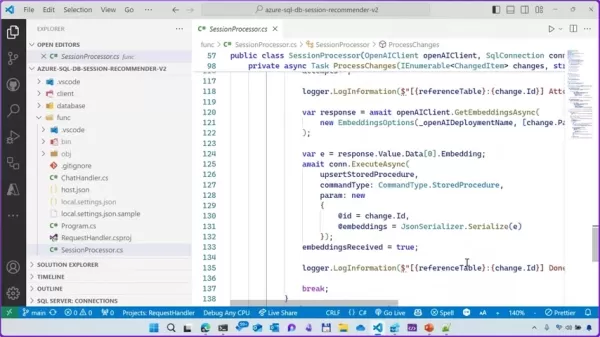
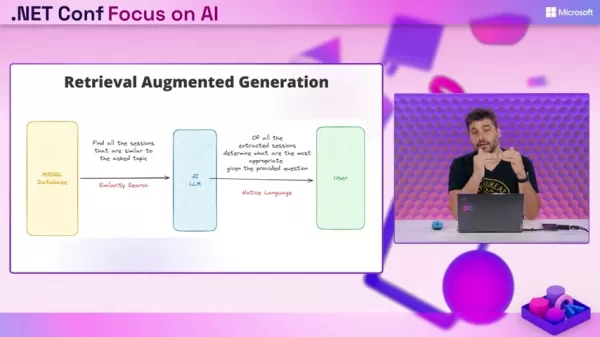
High-Level RAG Architecture using Azure SQL
This approach optimally combines vector search, semantic search, and other filters in a single location
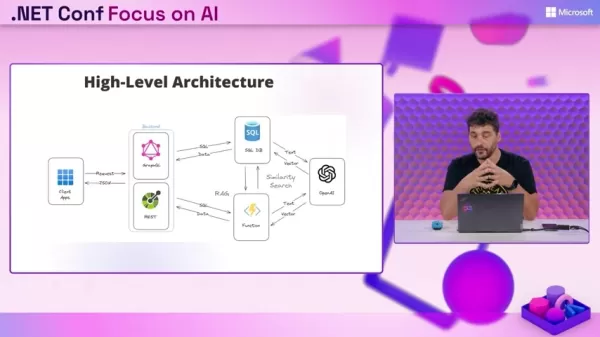
. The process involves retrieving relevant data and then using an AI LLM to formulate the answer. The required steps are:
- Retrieve data from the MSSQL database using a similarity search.
- Inject the retrieved session findings as context and send them to the AI LLM.
- The AI LLM generates and delivers a response.
Building a Session Recommender: A Detailed Example
Architectural Overview
The session recommendation system utilizes several Azure services to deliver a seamless RAG experience
:
- Client Apps: Enable users to input questions using natural language.
- Backend:
- Data API builder: Exposes database entities.
- GraphQL/REST APIs: Provide the interface connecting data to the client.
- Azure Functions: Trigger the AI processing pipeline.
Setting Up Azure Function Triggers
Azure Functions can monitor and be triggered by changes in SQL data
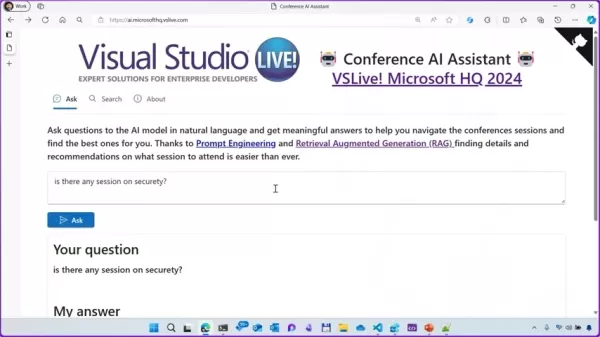
. This automation ensures new or updated data is processed for immediate availability. The setup involves:
- Creating the Azure Function.
- Generating vectors that represent topics from our data.
- Saving these vectors in your database to enable efficient similarity searches.
By automating the conversion of data to vectors, we fully harness the potential and utility of Azure SQL.
Implementing the Data API Builder for RAG
Utilizing Data API Builder
To integrate all components, proper configuration is required
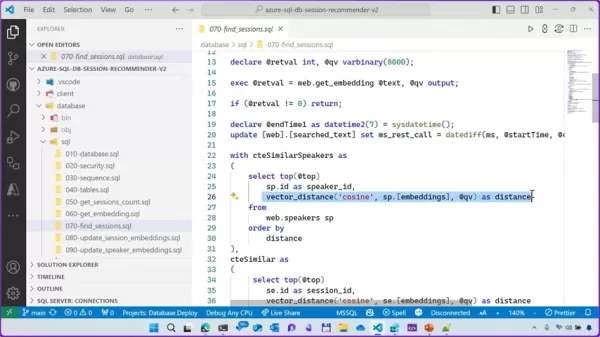
. This involves setting up the database and defining entities like tables and views that SQL can work with reliably. The Data API Builder simplifies this process, making data access straightforward. We also need to configure Static Web Apps, which will host our functions. The key commands for this project are:
- azdt command line
- data-api builder init
- data-api builder add
- azdt start
Azure SQL Pricing
Choosing the Right Azure SQL Tier
Azure SQL offers a free tier for new Azure users. This free tier is permanent, allowing anyone to experiment with Azure SQL and develop new solutions within the Azure ecosystem without long-term financial commitment
. With Azure SQL, you can implement enterprise-grade solutions without a prohibitive cost.
Vector Search Support in Azure SQL: Weighing the Benefits and Drawbacks
Pros
A modern relational database platform for versatile solutions.
Enterprise-level security features.
Highly scalable for demanding performance needs.
Cons
Vector support is still in its early stages of development.
Pricing structure can be complex, depending on resource consumption.
Integration with other data models may introduce complexity.
Azure SQL Core Features
Enterprise Solutions with Azure SQL
As a managed service, Azure SQL provides solutions for the complex data requirements of a wide range of enterprises. This includes robust security, as Azure manages core security aspects
. With multiple data encryption options and easy connectivity to popular developer libraries, Azure SQL remains a comprehensive solution for data-first initiatives. Its enterprise AI database capabilities offer deep integration with .NET EF Core, .NET Aspire, LangChain, Semantic Kernel, and more.
Azure AI and SQL: Transforming Industries
Insurance
A primary use case involves vector search combined with filtering. For example, an insurance company might need to locate contracts meeting specific criteria. A vector search enhanced with filters is perfectly suited for this task.
Frequently Asked Questions
Can these resources work locally?
Yes, .NET, Azure SQL, and many of the other tools we use are fully functional in a local development environment. This makes the project accessible regardless of your connectivity, allowing you to leverage AI on your data anywhere.
Common Questions
Why move AI to data?
The principle is to bring AI to the data, rather than moving vast amounts of data to the AI. This is achieved through vector search, allowing us to incorporate semantic understanding directly into queries, which simplifies filtering. This approach is further streamlined by integration with Azure services like Azure Functions.
Related article
 Musk Considered Leaving OpenAI to His Kids as Altman Testifies
This morning, OpenAI CEO Sam Altman took the stand to address former co-founder Elon Musk’s lawsuit challenging the company’s corporate structure.When asked about Musk’s claim that other founders “stole a charity” by launching a for-profit subsidiary
Sam Altman Sparks Debate Over AI's Deceleration
Listen onApple PodcastsListen onSpotifyOpenAI CEO Sam Altman recently suggested that it may be time to “pace the rate of AI development” to allow society to “harden around some of these new capability levels.”On the latest episode of TechCrunch’s Equ
Anthropic Opens Doors to EU Cybersecurity Agency as Mythos5 Model Faces Compliance Exam
Artificial intelligence compliance regulations are advancing significantly. Leading AI firm Anthropic has officially granted the European Union's cybersecurity authority access to its Mythos AI model, a pivotal move for this advanced large language m
Related Special Topic Recommendations
Image editing
Musk Considered Leaving OpenAI to His Kids as Altman Testifies
This morning, OpenAI CEO Sam Altman took the stand to address former co-founder Elon Musk’s lawsuit challenging the company’s corporate structure.When asked about Musk’s claim that other founders “stole a charity” by launching a for-profit subsidiary
Sam Altman Sparks Debate Over AI's Deceleration
Listen onApple PodcastsListen onSpotifyOpenAI CEO Sam Altman recently suggested that it may be time to “pace the rate of AI development” to allow society to “harden around some of these new capability levels.”On the latest episode of TechCrunch’s Equ
Anthropic Opens Doors to EU Cybersecurity Agency as Mythos5 Model Faces Compliance Exam
Artificial intelligence compliance regulations are advancing significantly. Leading AI firm Anthropic has officially granted the European Union's cybersecurity authority access to its Mythos AI model, a pivotal move for this advanced large language m
Related Special Topic Recommendations
Image editing
 Photoshop AI Retouch Tools for Ecommerce Apparel, Skin Cleanup, and Color Consistency
2026 Latest Best Photoshop AI retouch tools for ecommerce apparel, skin cleanup, and color consistency! This top-rated curated list features powerful game-changing solutions that help you boost writing efficiency, streamline content creation, and achieve perfect visual results effortlessly. Each tool has undergone real-world tests through weekly updated rankings, complete with free vs paid comparison details. Backed by XIX.AI, it’s the must-try guide for anyone aiming to unlock your AI edge. Explore now!
 10 tools
 xix.ai
Prompt
Best AI Prompt Libraries for ChatGPT Workflows
xix.ai
Prompt
Best AI Prompt Libraries for ChatGPT Workflows
2026 Latest Best Top-Rated AI Prompt Libraries for optimizing all types of ChatGPT workflows. XIX.AI has curated a powerful, game-changing collection that goes through rigorous real-world tests to ensure top performance. You can find detailed free vs paid comparisons and expert rankings to help you choose the must-try tools that boost your productivity and unlock your AI edge. Explore now!
11 tools
xix.ai
Education and Learning
AI Quiz Builder Platforms for Teachers, Tutors, and Cohort-Based Learning Programs
2026 Latest Best AI Quiz Builder Platforms for Teachers, Tutors, and Cohort-Based Learning Programs! XIX.AI has curated a top-rated list of powerful game-changing tools that go through real-world tests to deliver accurate rankings. These must-try platforms help boost writing efficiency, streamline content creation, and simplify quiz design across all learning scenarios. Explore now to discover your perfect tool for unlocking your AI edge in teaching!
13 tools
xix.ai
code
AI Pull Request Review Tools for GitHub Teams Handling Refactors, Bugs, and Security Gaps
2026 Latest Best AI Pull Request Review Tools for GitHub Teams are here on XIX.AI! This top-rated curated list showcases powerful game-changing solutions that streamline refactoring, bug fixing, and security gap detection across all team workflows. Enjoy a free vs paid comparison along with real-world tests and detailed rankings to help you find the perfect tool that boosts productivity significantly. Explore now to unlock your AI edge!
12 tools
xix.ai
Text-to-speech
Best AI Text to Speech Tools for Natural Voiceovers
2026 Latest Best Top-rated AI Text to Speech Tools for Natural Voiceovers are here on XIX.AI! This curated list features powerful, game-changing options that deliver crystal-clear voices for every use case, backed by real-world tests and weekly updated rankings. Get a free vs paid comparison to find the must-try solution that boosts your productivity instantly. Explore now to Unlock your AI edge!
11 tools
xix.ai
Comic Creation
Manga AI Background Generators for Serialized Chapters, Covers, and Promo Art
2026 Latest Best Manga AI Background Generators Ranked Top-Rated! This curated collection showcases powerful game-changing tools perfect for creating high-quality chapter backgrounds, book covers, and promotional art. Every option has undergone rigorous real-world tests to ensure reliability. Get a free vs paid comparison along with detailed insights. Explore now to discover your perfect tool and unlock your AI edge in manga creation.
6 tools
xix.ai

 Comments (1)
0/500
Comments (1)
0/500
![KevinMartínez]()
Als .NET-Entwickler finde ich den Ansatz mit Azure SQL spannend! Endlich mal eine praktische Anleitung, die nicht nur theoretisch bleibt. Die Kombination aus lokaler Datenbank und KI-Modellen könnte echt Game-Changer für interne Tools sein. Frage mich nur, wie performant das bei großen Datenmengen bleibt... 🤔
In today's data-centric landscape, harnessing AI to glean valuable insights from enterprise data is crucial. Retrieval Augmented Generation (RAG) is a highly effective technique for this purpose. This article details how to implement RAG on your data using .NET AI and Azure SQL, turning your information into an interactive, intelligent resource. We'll specifically cover constructing powerful hybrid vector searches that merge semantic vector search with conventional full-text search and filtering. By utilizing Azure SQL as your central AI database, you can effortlessly embed AI capabilities into your current enterprise applications.
Key Points
Grasp the fundamentals of Retrieval Augmented Generation (RAG) and understand its advantages for enterprise data.
Examine Azure SQL as a contemporary, multi-model relational database designed to manage diverse data formats.
Learn the methodology for creating a hybrid search approach, integrating vector semantic search with full-text search and filters.
Find out how to utilize .NET AI libraries to create vector embeddings and perform similarity searches directly within Azure SQL.
Build a complete RAG application from start to finish using Azure Functions, Static Web Apps, and Azure OpenAI.
Employ the Data API builder to make database entities available as REST and GraphQL endpoints.
Walk through a practical demonstration of building a conference AI assistant to explore the benefits and adaptability for your enterprise data.
Identify the various scenarios where integrating AI with SQL proves highly beneficial.
Discover how the advantages and adaptability of Azure SQL can address your organization's complex data storage requirements.
Unlocking RAG Potential with .NET AI and Azure SQL
What is Azure SQL?
Azure SQL is a modern relational database service offering a genuine multi-model experience
. This capability allows it to handle JSON, graph, XML, geospatial, and columnstore data. It scales up to 100 terabytes with 80 cores and supports 30 replicas. Azure SQL includes enterprise-grade security and auditing features and integrates seamlessly with common Azure services, .NET EF Core, .NET Aspire, LangChain, and Semantic Kernel. Its true strength lies in integrating with the technologies your development team already knows and trusts. To leverage AI on your data, Azure SQL will offer vector support in an early adopter preview, meaning you can request access to the private preview and explore its capabilities.
Azure SQL Highlights:
- Modern Relational Database
- True Multi-model Support (JSON, Graph, XML, Geospatial, Columnstore)
- Scalable to 100TB, 80v-Cores, 30 replicas
- Support for Vector (Early Adopter Preview)
- Enterprise-grade security & audit features
- Integration with common Azure Services
- Integration with popular developer libraries (.NET EF Core, .NET Aspire, LangChain, Semantic Kernel, etc.)
AI + SQL Use Cases for your Enterprise Data
Combining AI with Azure SQL unlocks numerous applications that can transform your enterprise data into a strategic asset
. Here are several key scenarios where this integration excels:
- Hybrid Search: Combines vector (semantic) search with full-text search and filters. This powerful tool enables precise data insight extraction. For instance, you can "Find all documents from Acme customer authored by John Doe related to the new security policies."
- Chatbot Memories: Use Azure SQL to store and manage chatbot conversation histories, enabling more personalized and context-aware interactions. Enhancing chatbot memories can significantly improve product and customer support, giving you a competitive edge.
- Retrieval Augmented Generation (RAG): This is the technique we will demonstrate building. RAG enhances the quality and relevance of AI-generated content by anchoring it in your specific data.
High-Level RAG Architecture using Azure SQL
This approach optimally combines vector search, semantic search, and other filters in a single location
. The process involves retrieving relevant data and then using an AI LLM to formulate the answer. The required steps are:
- Retrieve data from the MSSQL database using a similarity search.
- Inject the retrieved session findings as context and send them to the AI LLM.
- The AI LLM generates and delivers a response.
Building a Session Recommender: A Detailed Example
Architectural Overview
The session recommendation system utilizes several Azure services to deliver a seamless RAG experience
:
- Client Apps: Enable users to input questions using natural language.
- Backend:
- Data API builder: Exposes database entities.
- GraphQL/REST APIs: Provide the interface connecting data to the client.
- Azure Functions: Trigger the AI processing pipeline.
Setting Up Azure Function Triggers
Azure Functions can monitor and be triggered by changes in SQL data
. This automation ensures new or updated data is processed for immediate availability. The setup involves:
- Creating the Azure Function.
- Generating vectors that represent topics from our data.
- Saving these vectors in your database to enable efficient similarity searches.
By automating the conversion of data to vectors, we fully harness the potential and utility of Azure SQL.
Implementing the Data API Builder for RAG
Utilizing Data API Builder
To integrate all components, proper configuration is required
. This involves setting up the database and defining entities like tables and views that SQL can work with reliably. The Data API Builder simplifies this process, making data access straightforward. We also need to configure Static Web Apps, which will host our functions. The key commands for this project are:
- azdt command line
- data-api builder init
- data-api builder add
- azdt start
Azure SQL Pricing
Choosing the Right Azure SQL Tier
Azure SQL offers a free tier for new Azure users. This free tier is permanent, allowing anyone to experiment with Azure SQL and develop new solutions within the Azure ecosystem without long-term financial commitment
. With Azure SQL, you can implement enterprise-grade solutions without a prohibitive cost.
Vector Search Support in Azure SQL: Weighing the Benefits and Drawbacks
Pros
A modern relational database platform for versatile solutions.
Enterprise-level security features.
Highly scalable for demanding performance needs.
Cons
Vector support is still in its early stages of development.
Pricing structure can be complex, depending on resource consumption.
Integration with other data models may introduce complexity.
Azure SQL Core Features
Enterprise Solutions with Azure SQL
As a managed service, Azure SQL provides solutions for the complex data requirements of a wide range of enterprises. This includes robust security, as Azure manages core security aspects
. With multiple data encryption options and easy connectivity to popular developer libraries, Azure SQL remains a comprehensive solution for data-first initiatives. Its enterprise AI database capabilities offer deep integration with .NET EF Core, .NET Aspire, LangChain, Semantic Kernel, and more.
Azure AI and SQL: Transforming Industries
Insurance
A primary use case involves vector search combined with filtering. For example, an insurance company might need to locate contracts meeting specific criteria. A vector search enhanced with filters is perfectly suited for this task.
Frequently Asked Questions
Can these resources work locally?
Yes, .NET, Azure SQL, and many of the other tools we use are fully functional in a local development environment. This makes the project accessible regardless of your connectivity, allowing you to leverage AI on your data anywhere.
Common Questions
Why move AI to data?
The principle is to bring AI to the data, rather than moving vast amounts of data to the AI. This is achieved through vector search, allowing us to incorporate semantic understanding directly into queries, which simplifies filtering. This approach is further streamlined by integration with Azure services like Azure Functions.








 Musk Considered Leaving OpenAI to His Kids as Altman Testifies
This morning, OpenAI CEO Sam Altman took the stand to address former co-founder Elon Musk’s lawsuit challenging the company’s corporate structure.When asked about Musk’s claim that other founders “stole a charity” by launching a for-profit subsidiary
Musk Considered Leaving OpenAI to His Kids as Altman Testifies
This morning, OpenAI CEO Sam Altman took the stand to address former co-founder Elon Musk’s lawsuit challenging the company’s corporate structure.When asked about Musk’s claim that other founders “stole a charity” by launching a for-profit subsidiary
 Sam Altman Sparks Debate Over AI's Deceleration
Listen onApple PodcastsListen onSpotifyOpenAI CEO Sam Altman recently suggested that it may be time to “pace the rate of AI development” to allow society to “harden around some of these new capability levels.”On the latest episode of TechCrunch’s Equ
Sam Altman Sparks Debate Over AI's Deceleration
Listen onApple PodcastsListen onSpotifyOpenAI CEO Sam Altman recently suggested that it may be time to “pace the rate of AI development” to allow society to “harden around some of these new capability levels.”On the latest episode of TechCrunch’s Equ
 Anthropic Opens Doors to EU Cybersecurity Agency as Mythos5 Model Faces Compliance Exam
Artificial intelligence compliance regulations are advancing significantly. Leading AI firm Anthropic has officially granted the European Union's cybersecurity authority access to its Mythos AI model, a pivotal move for this advanced large language m
Anthropic Opens Doors to EU Cybersecurity Agency as Mythos5 Model Faces Compliance Exam
Artificial intelligence compliance regulations are advancing significantly. Leading AI firm Anthropic has officially granted the European Union's cybersecurity authority access to its Mythos AI model, a pivotal move for this advanced large language m

2026 Latest Best Photoshop AI retouch tools for ecommerce apparel, skin cleanup, and color consistency! This top-rated curated list features powerful game-changing solutions that help you boost writing efficiency, streamline content creation, and achieve perfect visual results effortlessly. Each tool has undergone real-world tests through weekly updated rankings, complete with free vs paid comparison details. Backed by XIX.AI, it’s the must-try guide for anyone aiming to unlock your AI edge. Explore now!
10 tools
xix.ai

2026 Latest Best Top-Rated AI Prompt Libraries for optimizing all types of ChatGPT workflows. XIX.AI has curated a powerful, game-changing collection that goes through rigorous real-world tests to ensure top performance. You can find detailed free vs paid comparisons and expert rankings to help you choose the must-try tools that boost your productivity and unlock your AI edge. Explore now!
11 tools
xix.ai

2026 Latest Best AI Quiz Builder Platforms for Teachers, Tutors, and Cohort-Based Learning Programs! XIX.AI has curated a top-rated list of powerful game-changing tools that go through real-world tests to deliver accurate rankings. These must-try platforms help boost writing efficiency, streamline content creation, and simplify quiz design across all learning scenarios. Explore now to discover your perfect tool for unlocking your AI edge in teaching!
13 tools
xix.ai

2026 Latest Best AI Pull Request Review Tools for GitHub Teams are here on XIX.AI! This top-rated curated list showcases powerful game-changing solutions that streamline refactoring, bug fixing, and security gap detection across all team workflows. Enjoy a free vs paid comparison along with real-world tests and detailed rankings to help you find the perfect tool that boosts productivity significantly. Explore now to unlock your AI edge!
12 tools
xix.ai

2026 Latest Best Top-rated AI Text to Speech Tools for Natural Voiceovers are here on XIX.AI! This curated list features powerful, game-changing options that deliver crystal-clear voices for every use case, backed by real-world tests and weekly updated rankings. Get a free vs paid comparison to find the must-try solution that boosts your productivity instantly. Explore now to Unlock your AI edge!
11 tools
xix.ai

2026 Latest Best Manga AI Background Generators Ranked Top-Rated! This curated collection showcases powerful game-changing tools perfect for creating high-quality chapter backgrounds, book covers, and promotional art. Every option has undergone rigorous real-world tests to ensure reliability. Get a free vs paid comparison along with detailed insights. Explore now to discover your perfect tool and unlock your AI edge in manga creation.
6 tools
xix.ai

Als .NET-Entwickler finde ich den Ansatz mit Azure SQL spannend! Endlich mal eine praktische Anleitung, die nicht nur theoretisch bleibt. Die Kombination aus lokaler Datenbank und KI-Modellen könnte echt Game-Changer für interne Tools sein. Frage mich nur, wie performant das bei großen Datenmengen bleibt... 🤔












