


 Home
HomeMicrosoft Copilot: All You Need to Know About Microsoft’s Artificial Intelligence
Microsoft Copilot: A Versatile Assistant Across Platforms
If you've ever wondered how to streamline your digital life with cutting-edge AI assistance, Microsoft Copilot might just be your answer. Initially introduced as Bing Chat, this powerful tool has evolved into a multi-faceted assistant integrated across various Microsoft platforms, including Windows 10, Windows 11, and even standalone mobile apps for Android and iOS.
For those who prefer a more hands-on approach, there’s a dedicated keyboard shortcut on newer PCs specifically designed to launch Copilot instantly. If you're into messaging platforms, there’s also an in-app Telegram room where you can engage with Copilot directly.
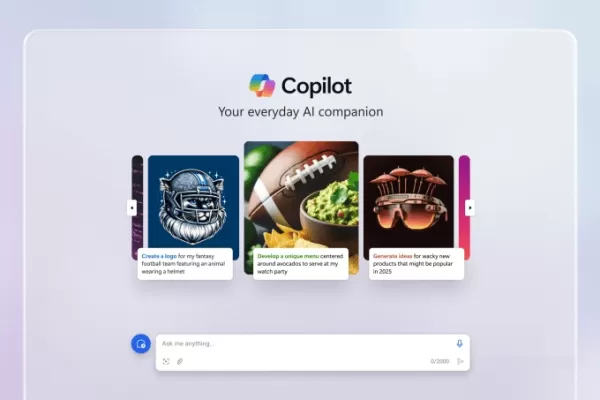 Image Credits: Microsoft
Leveraging fine-tuned versions of OpenAI’s models, Copilot handles tasks ranging from crafting compelling poems and essays to translating text into multiple languages and summarizing web content. While it's not perfect, its ability to browse the internet via Bing ensures it remains competitive in providing timely and relevant information. It even excels at generating images through Image Creator, powered by OpenAI’s DALL-E 3 model, and composing music using Suno’s AI music platform.
Seamless Integration with Third-Party Apps
One of Copilot’s standout features is its compatibility with third-party applications. Whether you're looking to plan meals with Instacart, book trips via Kayak, or manage restaurant reservations with OpenTable, Copilot integrates smoothly into your daily routine. New plugins are regularly added, ensuring that the tool stays relevant and useful.
Premium vs. Free: What’s the Difference?
While the basic version of Copilot is free, Microsoft offers a premium tier called Copilot Pro, priced at $20 per month. Subscribers enjoy several advantages, such as priority access to advanced models during peak hours and exclusive features like higher-resolution image generation within Image Creator. Additionally, Copilot Pro extends its capabilities across the entire Microsoft 365 suite—Word, Excel, PowerPoint, Outlook, and OneNote—all enhanced with generative AI functionalities.
For instance, in Word and OneNote, users can dictate, edit, summarize, and generate text effortlessly. Meanwhile, Excel and PowerPoint users benefit from tools that convert natural language prompts into visually appealing presentations and charts based on existing data files. Outlook users gain assistance in drafting emails with adjustable tones and lengths.
Enterprise-Grade Features with Microsoft 365 Copilot
At $30 per user per month, Microsoft 365 Copilot takes things further by offering enterprise-grade data protection and a Semantic Index—a backend system designed to personalize responses based on organizational data. Available to businesses with specific Microsoft 365 licenses, this version includes features like Microsoft 365 Chat, which pulls information from Word documents, PowerPoint slides, and other files to answer queries accurately.
From Code to Collaboration: The Many Faces of Copilot
Beyond personal productivity, Copilot extends its reach into professional settings. Tools like Copilot for Sales help craft customer emails and summarize meetings, while Copilot for Service assists customer service agents with automated responses and chat experiences. Meanwhile, Copilot for Azure helps configure app environments and troubleshoot issues efficiently.
Customizing Your Copilot Experience
With Copilot Studio, users can tailor their experience by connecting to CRM systems, ERPs, and other databases. This allows organizations to build custom Copilots tailored to their unique needs. Pre-built connectors simplify the process, while advanced users can develop their own using natural language descriptions.
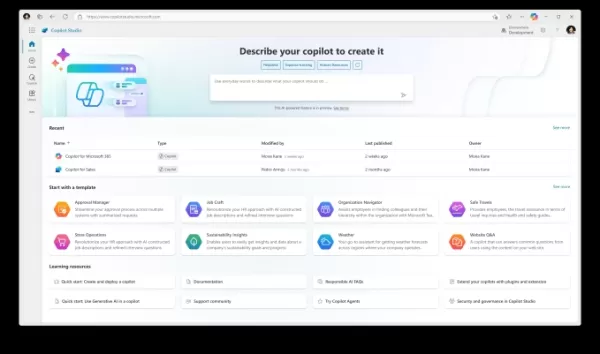 Image Credits: Microsoft
GitHub Copilot: Tailored for Developers
Developers will appreciate GitHub Copilot, a specialized tool integrated into popular IDEs like Visual Studio Code and JetBrains. Trained on vast amounts of open-source code, Copilot predicts and suggests lines of code as developers type, accelerating workflows significantly. Updates like Vision for Copilot allow developers to attach screenshots and diagrams, prompting Copilot to generate corresponding code snippets.
The Challenges Ahead
Despite its strengths, Copilot isn’t without its drawbacks. Summaries can sometimes be inaccurate due to hallucination, and security concerns remain a topic of debate. Ethical issues surrounding copyright usage continue to spark controversy, highlighting the complexities of modern AI development.
In conclusion, whether you're a casual user or a professional seeking advanced capabilities, Microsoft Copilot offers something for everyone. Its adaptability and continuous updates ensure it remains a valuable asset in both personal and professional contexts.
Related article
 Ollie bets privacy focus to win AI assistant race
To be genuinely helpful, an AI assistant must understand its user deeply. Ollie, a personal assistant designed for daily life, operates on the premise that this doesn’t require surrendering your data or compromising your privacy.While certain enterpr
How AI LIVE: London Will Explore AI & Industrial Automation
The summit will convene C-suite executives from around the globe to address pressing challenges in global industries, ranging from AI-driven disruption to economic volatility.AI LIVE: The London Summit will gather over 2,000 international leaders und
Anthropic Enters AI Legal Tech Market as Competition Intensifies
Anthropic unveiled a suite of new chatbot capabilities on Tuesday, aimed at delivering automated support to legal practices. These enhancements expand upon Claude for Legal, the firm-specific platform introduced earlier this year, by adding specializ
Related Special Topic Recommendations
code
Ollie bets privacy focus to win AI assistant race
To be genuinely helpful, an AI assistant must understand its user deeply. Ollie, a personal assistant designed for daily life, operates on the premise that this doesn’t require surrendering your data or compromising your privacy.While certain enterpr
How AI LIVE: London Will Explore AI & Industrial Automation
The summit will convene C-suite executives from around the globe to address pressing challenges in global industries, ranging from AI-driven disruption to economic volatility.AI LIVE: The London Summit will gather over 2,000 international leaders und
Anthropic Enters AI Legal Tech Market as Competition Intensifies
Anthropic unveiled a suite of new chatbot capabilities on Tuesday, aimed at delivering automated support to legal practices. These enhancements expand upon Claude for Legal, the firm-specific platform introduced earlier this year, by adding specializ
Related Special Topic Recommendations
code
 AI Pull Request Review Tools for GitHub Teams Handling Refactors, Bugs, and Security Gaps
2026 Latest Best AI Pull Request Review Tools for GitHub Teams are here on XIX.AI! This top-rated curated list showcases powerful game-changing solutions that streamline refactoring, bug fixing, and security gap detection across all team workflows. Enjoy a free vs paid comparison along with real-world tests and detailed rankings to help you find the perfect tool that boosts productivity significantly. Explore now to unlock your AI edge!
 12 tools
 xix.ai
Text-to-speech
Best AI Text to Speech Tools for Natural Voiceovers
xix.ai
Text-to-speech
Best AI Text to Speech Tools for Natural Voiceovers
2026 Latest Best Top-rated AI Text to Speech Tools for Natural Voiceovers are here on XIX.AI! This curated list features powerful, game-changing options that deliver crystal-clear voices for every use case, backed by real-world tests and weekly updated rankings. Get a free vs paid comparison to find the must-try solution that boosts your productivity instantly. Explore now to Unlock your AI edge!
11 tools
xix.ai
Comic Creation
Manga AI Background Generators for Serialized Chapters, Covers, and Promo Art
2026 Latest Best Manga AI Background Generators Ranked Top-Rated! This curated collection showcases powerful game-changing tools perfect for creating high-quality chapter backgrounds, book covers, and promotional art. Every option has undergone rigorous real-world tests to ensure reliability. Get a free vs paid comparison along with detailed insights. Explore now to discover your perfect tool and unlock your AI edge in manga creation.
6 tools
xix.ai
Image editing
AI Object Removal Editors: Clean Up Portraits, Travel, and Product Shots
2026 Latest Best Top-rated AI Object Removal Editors for portraits travel product shots! XIX.AI curates a powerful game-changing collection regularly updated with weekly rankings. These tools offer real-world tests to help you quickly remove unwanted elements, boost content quality, and save tons of time without compromising results. Must-try for anyone aiming to unlock their AI creation edge. Explore now!
10 tools
xix.ai
Text-to-speech
Best AI Text to Speech Tools for Online Courses
2026 Latest Best Top-rated AI Text to Speech Tools for Online Courses are curated by XIX.AI based on rigorous real-world tests and weekly updated rankings. These powerful tools help creators deliver crystal-clear audio content effortlessly, boosting writing efficiency and streamlining course production. Check out the free vs paid comparison to find your perfect fit. Explore now to unlock your AI edge in online education.
10 tools
xix.ai
writing
AI Blog Title Tools for Higher Click Through Rates
2026 Latest Best Top-Rated AI Blog Title Tools for Higher Click Through Rates! XIX.AI has carefully curated a powerful, game-changing collection of top tools that go through rigorous real-world tests. You’ll find a free vs paid comparison, weekly updated rankings, and detailed insights to help you boost your blog’s traffic efficiently. Must-try options are highlighted to help you unlock your AI edge. Explore now!
10 tools
xix.ai

 Comments (5)
0/500
Comments (5)
0/500
![RogerPerez]()
Microsoft Copilot를 보니 정말 진화한 동반자 같아요! Bing Chat에서 이렇게 발전하다니. 하지만 모든 플랫폼에 통합되면서 개인 정보는 괜찮을까 약간 걱정스럽네요 🤨 이 AI가 일상 업무를 정말 단순화할 수 있을까요? 경쟁사들보다 뛰어난 점이 무엇인지 궁금해요.
![JonathanKing]()
¿Alguien más ha probado Copilot en Excel? La idea de que la IA pueda escribir fórmulas por mí suena genial, pero tengo dudas sobre qué tan bien entenderá mis necesidades específicas. Microsoft siempre promete mucho, esperemos que esta vez cumpla 🧐
![KennethLee]()
Microsoft Copilot sounds like a game-changer! I love how it’s evolved from Bing Chat to something so versatile. Can it really handle tasks across all platforms seamlessly? Excited to try it out! 😄
![FrankJackson]()
Microsoft Copilot sounds like a game-changer! I’m curious how it stacks up against other AI assistants in real-world tasks. Anyone tried it for coding yet? 😎
![JohnAllen]()
Microsoft Copilot sounds like a game-changer! I'm curious how it stacks up against other AI tools in terms of speed and accuracy. Anyone tried it for coding yet? 😄
Microsoft Copilot: A Versatile Assistant Across Platforms
If you've ever wondered how to streamline your digital life with cutting-edge AI assistance, Microsoft Copilot might just be your answer. Initially introduced as Bing Chat, this powerful tool has evolved into a multi-faceted assistant integrated across various Microsoft platforms, including Windows 10, Windows 11, and even standalone mobile apps for Android and iOS.
For those who prefer a more hands-on approach, there’s a dedicated keyboard shortcut on newer PCs specifically designed to launch Copilot instantly. If you're into messaging platforms, there’s also an in-app Telegram room where you can engage with Copilot directly.
Image Credits: Microsoft
Leveraging fine-tuned versions of OpenAI’s models, Copilot handles tasks ranging from crafting compelling poems and essays to translating text into multiple languages and summarizing web content. While it's not perfect, its ability to browse the internet via Bing ensures it remains competitive in providing timely and relevant information. It even excels at generating images through Image Creator, powered by OpenAI’s DALL-E 3 model, and composing music using Suno’s AI music platform.
Seamless Integration with Third-Party Apps
One of Copilot’s standout features is its compatibility with third-party applications. Whether you're looking to plan meals with Instacart, book trips via Kayak, or manage restaurant reservations with OpenTable, Copilot integrates smoothly into your daily routine. New plugins are regularly added, ensuring that the tool stays relevant and useful.
Premium vs. Free: What’s the Difference?
While the basic version of Copilot is free, Microsoft offers a premium tier called Copilot Pro, priced at $20 per month. Subscribers enjoy several advantages, such as priority access to advanced models during peak hours and exclusive features like higher-resolution image generation within Image Creator. Additionally, Copilot Pro extends its capabilities across the entire Microsoft 365 suite—Word, Excel, PowerPoint, Outlook, and OneNote—all enhanced with generative AI functionalities.
For instance, in Word and OneNote, users can dictate, edit, summarize, and generate text effortlessly. Meanwhile, Excel and PowerPoint users benefit from tools that convert natural language prompts into visually appealing presentations and charts based on existing data files. Outlook users gain assistance in drafting emails with adjustable tones and lengths.
Enterprise-Grade Features with Microsoft 365 Copilot
At $30 per user per month, Microsoft 365 Copilot takes things further by offering enterprise-grade data protection and a Semantic Index—a backend system designed to personalize responses based on organizational data. Available to businesses with specific Microsoft 365 licenses, this version includes features like Microsoft 365 Chat, which pulls information from Word documents, PowerPoint slides, and other files to answer queries accurately.
From Code to Collaboration: The Many Faces of Copilot
Beyond personal productivity, Copilot extends its reach into professional settings. Tools like Copilot for Sales help craft customer emails and summarize meetings, while Copilot for Service assists customer service agents with automated responses and chat experiences. Meanwhile, Copilot for Azure helps configure app environments and troubleshoot issues efficiently.
Customizing Your Copilot Experience
With Copilot Studio, users can tailor their experience by connecting to CRM systems, ERPs, and other databases. This allows organizations to build custom Copilots tailored to their unique needs. Pre-built connectors simplify the process, while advanced users can develop their own using natural language descriptions.
Image Credits: Microsoft
GitHub Copilot: Tailored for Developers
Developers will appreciate GitHub Copilot, a specialized tool integrated into popular IDEs like Visual Studio Code and JetBrains. Trained on vast amounts of open-source code, Copilot predicts and suggests lines of code as developers type, accelerating workflows significantly. Updates like Vision for Copilot allow developers to attach screenshots and diagrams, prompting Copilot to generate corresponding code snippets.
The Challenges Ahead
Despite its strengths, Copilot isn’t without its drawbacks. Summaries can sometimes be inaccurate due to hallucination, and security concerns remain a topic of debate. Ethical issues surrounding copyright usage continue to spark controversy, highlighting the complexities of modern AI development.
In conclusion, whether you're a casual user or a professional seeking advanced capabilities, Microsoft Copilot offers something for everyone. Its adaptability and continuous updates ensure it remains a valuable asset in both personal and professional contexts.








 Ollie bets privacy focus to win AI assistant race
To be genuinely helpful, an AI assistant must understand its user deeply. Ollie, a personal assistant designed for daily life, operates on the premise that this doesn’t require surrendering your data or compromising your privacy.While certain enterpr
Ollie bets privacy focus to win AI assistant race
To be genuinely helpful, an AI assistant must understand its user deeply. Ollie, a personal assistant designed for daily life, operates on the premise that this doesn’t require surrendering your data or compromising your privacy.While certain enterpr
 How AI LIVE: London Will Explore AI & Industrial Automation
The summit will convene C-suite executives from around the globe to address pressing challenges in global industries, ranging from AI-driven disruption to economic volatility.AI LIVE: The London Summit will gather over 2,000 international leaders und
How AI LIVE: London Will Explore AI & Industrial Automation
The summit will convene C-suite executives from around the globe to address pressing challenges in global industries, ranging from AI-driven disruption to economic volatility.AI LIVE: The London Summit will gather over 2,000 international leaders und
 Anthropic Enters AI Legal Tech Market as Competition Intensifies
Anthropic unveiled a suite of new chatbot capabilities on Tuesday, aimed at delivering automated support to legal practices. These enhancements expand upon Claude for Legal, the firm-specific platform introduced earlier this year, by adding specializ
Anthropic Enters AI Legal Tech Market as Competition Intensifies
Anthropic unveiled a suite of new chatbot capabilities on Tuesday, aimed at delivering automated support to legal practices. These enhancements expand upon Claude for Legal, the firm-specific platform introduced earlier this year, by adding specializ

2026 Latest Best AI Pull Request Review Tools for GitHub Teams are here on XIX.AI! This top-rated curated list showcases powerful game-changing solutions that streamline refactoring, bug fixing, and security gap detection across all team workflows. Enjoy a free vs paid comparison along with real-world tests and detailed rankings to help you find the perfect tool that boosts productivity significantly. Explore now to unlock your AI edge!
12 tools
xix.ai

2026 Latest Best Top-rated AI Text to Speech Tools for Natural Voiceovers are here on XIX.AI! This curated list features powerful, game-changing options that deliver crystal-clear voices for every use case, backed by real-world tests and weekly updated rankings. Get a free vs paid comparison to find the must-try solution that boosts your productivity instantly. Explore now to Unlock your AI edge!
11 tools
xix.ai

2026 Latest Best Manga AI Background Generators Ranked Top-Rated! This curated collection showcases powerful game-changing tools perfect for creating high-quality chapter backgrounds, book covers, and promotional art. Every option has undergone rigorous real-world tests to ensure reliability. Get a free vs paid comparison along with detailed insights. Explore now to discover your perfect tool and unlock your AI edge in manga creation.
6 tools
xix.ai

2026 Latest Best Top-rated AI Object Removal Editors for portraits travel product shots! XIX.AI curates a powerful game-changing collection regularly updated with weekly rankings. These tools offer real-world tests to help you quickly remove unwanted elements, boost content quality, and save tons of time without compromising results. Must-try for anyone aiming to unlock their AI creation edge. Explore now!
10 tools
xix.ai

2026 Latest Best Top-rated AI Text to Speech Tools for Online Courses are curated by XIX.AI based on rigorous real-world tests and weekly updated rankings. These powerful tools help creators deliver crystal-clear audio content effortlessly, boosting writing efficiency and streamlining course production. Check out the free vs paid comparison to find your perfect fit. Explore now to unlock your AI edge in online education.
10 tools
xix.ai

2026 Latest Best Top-Rated AI Blog Title Tools for Higher Click Through Rates! XIX.AI has carefully curated a powerful, game-changing collection of top tools that go through rigorous real-world tests. You’ll find a free vs paid comparison, weekly updated rankings, and detailed insights to help you boost your blog’s traffic efficiently. Must-try options are highlighted to help you unlock your AI edge. Explore now!
10 tools
xix.ai

Microsoft Copilot를 보니 정말 진화한 동반자 같아요! Bing Chat에서 이렇게 발전하다니. 하지만 모든 플랫폼에 통합되면서 개인 정보는 괜찮을까 약간 걱정스럽네요 🤨 이 AI가 일상 업무를 정말 단순화할 수 있을까요? 경쟁사들보다 뛰어난 점이 무엇인지 궁금해요.
¿Alguien más ha probado Copilot en Excel? La idea de que la IA pueda escribir fórmulas por mí suena genial, pero tengo dudas sobre qué tan bien entenderá mis necesidades específicas. Microsoft siempre promete mucho, esperemos que esta vez cumpla 🧐
Microsoft Copilot sounds like a game-changer! I love how it’s evolved from Bing Chat to something so versatile. Can it really handle tasks across all platforms seamlessly? Excited to try it out! 😄
Microsoft Copilot sounds like a game-changer! I’m curious how it stacks up against other AI assistants in real-world tasks. Anyone tried it for coding yet? 😎
Microsoft Copilot sounds like a game-changer! I'm curious how it stacks up against other AI tools in terms of speed and accuracy. Anyone tried it for coding yet? 😄












