


 Home
HomeElevate AI Performance With Custom Fabric Pattern Techniques
Master the process of harnessing Fabric's capabilities by designing customized patterns. As an open-source AI framework, Fabric enhances human intelligence through artificial intelligence. Our comprehensive tutorial demonstrates how to develop specialized patterns for unique applications, boosting the effectiveness of AI prompts to streamline your problem-solving approach. Learning to create and implement custom patterns is essential for maximizing Fabric's potential, and this guide delivers actionable procedures and valuable perspectives.
Key Points
The Fabric framework boosts human cognitive abilities through open-source AI solutions.
At its core, Fabric utilizes patterns that outline prompts and practical applications for diverse challenges.
Custom patterns enable personalized adaptations beyond the framework's default configurations.
All Fabric patterns are securely maintained within a specific configuration folder on your device.
Grasping the composition of pattern files is fundamental for developing impactful custom solutions.
Understanding Fabric and its Patterns
What is Fabric?
Fabric represents an innovative, open-source platform that strengthens human potential through artificial intelligence integration. Its modular design enables users to tackle various problems using thoughtfully designed AI prompts.
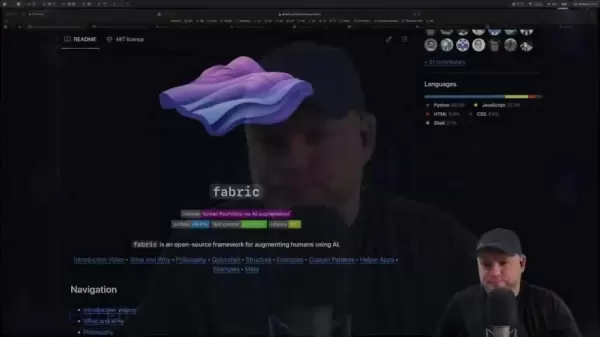
The architecture prioritizes flexibility and expansion, allowing seamless AI incorporation into professional workflows. Central to Fabric's operation are 'patterns' - essential frameworks that systematize problem-solving approaches. These patterns consolidate particular scenarios with corresponding AI prompts, simplifying intelligent solutions.
Developed with human advancement as its guiding principle, Fabric remains committed to creating supportive AI tools that amplify rather than replace human capabilities. The system's essence lies in its pattern repository - predefined directives governing responses to specific prompts. Ranging from textual analysis to imaginative content creation, these patterns accommodate customization for specialized requirements.
Imagine Fabric as an AI-enhanced toolkit where each pattern serves as an instrument optimized for distinct objectives. Users can combine and modify these tools to approach diverse challenges with artificial intelligence support. Being open-source, Fabric invites community contributions that enhance its pattern collection with innovative methodologies.
This focus on adaptability positions Fabric as an exceptional solution for integrating AI into projects while minimizing technical complexities. Rather than navigating intricate implementation details, users concentrate on core problem-solving, employing existing patterns or designing new ones to accomplish their goals.
The Role of Patterns in Fabric
Patterns form the backbone of Fabric's operations, providing templates for AI-assisted problem resolution.
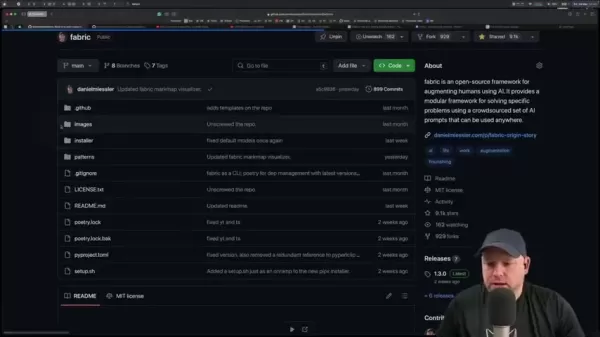
These predefined structures standardize interactions with AI models through organized prompts and scenarios. Each pattern embodies a distinct problem-solving methodology, facilitating effective AI utilization. Fabric's patterns serve multiple critical functions:
- They establish systematic procedures for applying AI to specific tasks
- They offer adaptable solutions applicable across various contexts
- They enable access to collective expertise within the Fabric community
The framework includes an extensive pattern collection addressing numerous applications, allowing immediate AI implementation without foundational development. This accessibility empowers users without extensive AI knowledge to leverage advanced capabilities.
Fundamentally, patterns act as operational directives within Fabric, guiding AI performance for targeted objectives. Their implementation ensures reliable, efficient, and accurate AI-assisted operations, positioning Fabric as a powerful cognitive enhancement tool.
Crafting Custom Patterns in Fabric
Why Create Custom Patterns?
While Fabric offers diverse predefined patterns, custom solutions unlock unparalleled potential by addressing specialized requirements. Tailored patterns accommodate unique scenarios beyond standard offerings, providing enhanced flexibility and precision in AI-powered workflows. Several compelling reasons justify custom pattern development:
- Specialized Application Development: Standard patterns may not fully align with distinctive requirements. Custom solutions enable precise prompt calibration for nuanced tasks.
- Performance Optimization: Task-specific patterns improve processing speed and accuracy.
- Enhanced Oversight: Custom patterns provide complete authority over AI implementation strategies.
- Innovation Catalyst: Pattern customization fosters experimentation and novel AI applications.
The existing pattern collection serves merely as a foundation. Fabric's architecture welcomes extensions, with custom patterns representing essential personalization components. Consider this process as tool customization - while standard implements suffice for general purposes, specialized tasks demand tailored instruments.
Whether conducting specialized research, automating unique business processes, or exploring creative frontiers, custom patterns unlock Fabric's complete potential for achieving ambitious objectives.
Locating the Patterns Directory
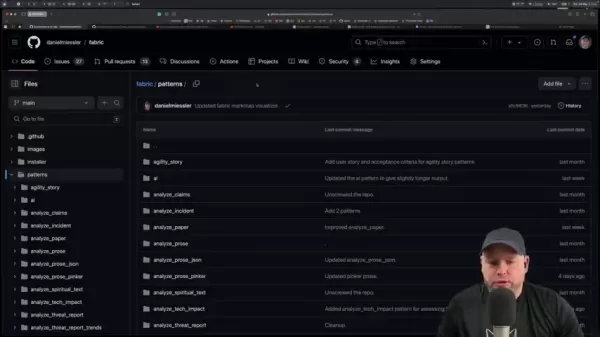
Understanding Fabric's pattern storage structure precedes custom development. Pattern files reside in specific configuration directories that vary by operating system and installation specifications.
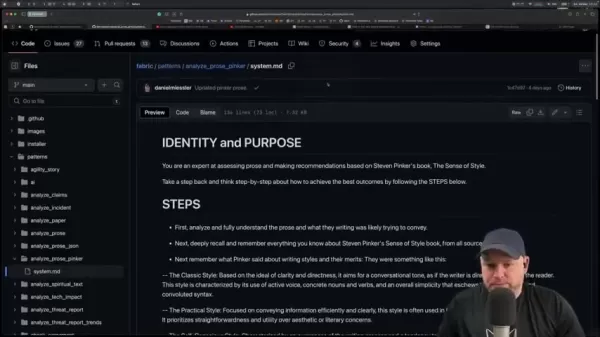
A common location is the home directory's configuration folder, typically following this path structure: ~/.config/fabric/patterns.
Terminal verification confirms the precise directory location:
cd ~/.config/fabric/patternsls
This command sequence navigates to and displays the patterns folder contents, confirming correct identification. Directory awareness proves crucial for managing custom pattern integration. Examination of existing pattern files reveals structural insights facilitating new pattern development.
Remember that Fabric operates using locally stored patterns downloaded from the main project, necessitating awareness of these storage locations for effective customization.
Structure of Pattern Files
Fabric patterns adhere to particular organizational formats documented in dedicated files. While variations exist, most follow fundamental structural principles crucial for effective custom development. These typically employ Markdown formatting for clarity.
Standard pattern files generally contain these sections:
- Identification Overview: Defining the pattern's intended functionality
- Execution Sequence: Detailed commands for Fabric implementation
- Configuration Parameters: Adjustable variables influencing pattern behavior
Documentation often includes usage examples, adjustable parameters, and creation metadata. Studying existing patterns provides invaluable insights for constructing effective custom solutions with proper formatting and functionality.
Recognize that patterns transcend simple command sequences - they represent comprehensive instructions with explicit purposes. Mimicking standard structural conventions ensures proper Fabric interpretation and execution.
Step-by-Step Guide: Creating a Custom Pattern
Step 1: Define the Pattern's Purpose
Custom pattern development begins with clear objective definition. Identify the specific problem or automated task requiring solution.
Thorough purpose clarification informs design and implementation strategies. Consider these foundational questions:
- What unique scenario will this pattern address?
- What input requirements must it accommodate?
- What output standards should it produce?
- What procedural steps achieve successful resolution?
Comprehensive answers establish the groundwork for developing focused, efficient patterns aligned with project goals.
For instance, customer sentiment analysis patterns would determine review positivity levels. Subsequent planning would detail procedural steps from text acquisition to emotional assessment.
Step 2: Create a New Pattern File
With purposes defined, proceed to establish a new pattern file within the designated directory. Select descriptive filenames reflecting pattern functions.
touch ~/.config/fabric/patterns/summarize_customer_review.md
This creates the foundational document for pattern definition and Fabric integration, ready for text editor customization.
Step 3: Define the Pattern's Identity and Purpose in the File
Include comprehensive descriptive headers documenting essential pattern information:
# Pattern Name: Summarize Customer Review# Description: This pattern automatically summarizes customer reviews to identify key themes and sentiments.# Author: Your Name# Date Created: 2025-04-28# Version: 1.0
Step 4: Define the Steps
Outline sequential actions achieving pattern objectives through precise command structuring:
- Data Collection: Aggregate customer reviews from multiple sources
- Content Preparation: Remove extraneous characters or markup for clean text processing
- Emotional Assessment: Evaluate review sentiment classifications
- Summary Generation: Produce concise overviews highlighting primary themes and tones
Clear, purposeful step definition ensures effective pattern functionality, with iterative refinement optimizing performance.
Step 5: Test the Custom Pattern
Implement comprehensive testing protocols verifying pattern functionality:
- Evaluate diverse dataset performance
- Refine prompt phrasing
- Identify and resolve operational anomalies
Frequently Asked Questions about Fabric Patterns
What is the primary purpose of Fabric?
Fabric enhances human cognitive capabilities through AI integration, facilitating innovative problem-solving approaches.
Where are Fabric patterns stored?
The framework maintains patterns locally within configuration directories, typically located at ~/.config/fabric/patterns.
What are Fabric patterns?
These fundamental elements define AI prompts and practical applications for systematic problem resolution.
How do I locate my patterns directory?
Confirm directory placement using terminal navigation to ~/.config/fabric/patterns.
Related Questions about AI Augmentation with Fabric
How does Fabric compare to other AI frameworks?
Fabric distinguishes itself through human intelligence augmentation, modular adaptability, and community-driven extensibility. Its pattern-based methodology simplifies AI task definition while maintaining flexibility for customization. The open-source model encourages collaborative innovation, expanding solution diversity.
Unlike conventional frameworks, Fabric emphasizes supportive tools enhancing rather than replacing human capabilities. Typical applications include workflow quality enhancement, task automation efficiency, and insight discovery acceleration. Whether boosting creativity, productivity, or learning processes, Fabric delivers distinctive toolsets for achieving professional objectives.
Related article
 ByteDance Boosts Core AI Incentives as Doubao Surges 14.6%
ByteDance recently convened a DouBao equity briefing to unveil fresh incentive policies for staff involved in the DouBao division. The strike price for DouBao shares has been lifted from $14.85 in June 2026 to $17.02, marking an approximate 14.6% inc
MiniMax Unveils 10x Team Program to Incentivize Global AI Experts
MiniMax (Xiyu Technology), the General Artificial Intelligence Lab, has officially launched "10x Team," a global talent collaboration initiative. This program aims to recruit top experts across industries to explore the deep application of large mode
South Korea Breaks Ground on National AI Computing Center, Investing 2.5 Trillion Won with 2028 Target
South Korean outlet EtNews reports that groundbreaking for the Korea AI Computing Center (KOACC) took place on August 3 at the Solar City data center park in Sunan, Jeollanam-do. Backed by a total investment of 2.5 trillion KRW (roughly 11.838 billio
Related Special Topic Recommendations
Education and Learning
ByteDance Boosts Core AI Incentives as Doubao Surges 14.6%
ByteDance recently convened a DouBao equity briefing to unveil fresh incentive policies for staff involved in the DouBao division. The strike price for DouBao shares has been lifted from $14.85 in June 2026 to $17.02, marking an approximate 14.6% inc
MiniMax Unveils 10x Team Program to Incentivize Global AI Experts
MiniMax (Xiyu Technology), the General Artificial Intelligence Lab, has officially launched "10x Team," a global talent collaboration initiative. This program aims to recruit top experts across industries to explore the deep application of large mode
South Korea Breaks Ground on National AI Computing Center, Investing 2.5 Trillion Won with 2028 Target
South Korean outlet EtNews reports that groundbreaking for the Korea AI Computing Center (KOACC) took place on August 3 at the Solar City data center park in Sunan, Jeollanam-do. Backed by a total investment of 2.5 trillion KRW (roughly 11.838 billio
Related Special Topic Recommendations
Education and Learning
 AI Study Tools for Homework and Exam Prep
2026 Latest Best AI Study Tools for Homework and Exam Prep! XIX.AI curates a top-rated list of powerful, game-changing tools that help students boost productivity, streamline homework completion, and ace exams through real-world tests. Get a free vs paid comparison, detailed rankings, and must-try options to unlock your AI edge. Explore now!
 10 tools
 xix.ai
Music composition
AI Vocal Demo Tools for Songwriters, Hooks, Toplines, and Multilingual Draft Sessions
xix.ai
Music composition
AI Vocal Demo Tools for Songwriters, Hooks, Toplines, and Multilingual Draft Sessions
2026 Latest Best AI Vocal Demo Tools for Songwriters, Hook Creators, and Multi-Language Content Teams! XIX.AI has curated a top-rated list of powerful game-changing tools that go through rigorous real-world tests. You’ll find detailed free vs paid comparison data, comprehensive rankings, and must-try options to help you boost writing efficiency and unlock your creative potential. Explore now to discover your perfect tool for all your content needs!
9 tools
xix.ai
Business
Best AI Competitive Research Tools for Small Businesses
2026 Latest Best Top-rated AI Competitive Research Tools for Small Businesses! XIX.AI has curated a highly powerful game-changing collection, updated weekly with rigorous real-world tests and detailed rankings. You can find a comprehensive free vs paid comparison to help you identify the must-try tools that boost your productivity and give you a competitive edge. Explore now to discover your perfect tool!
9 tools
xix.ai
Image editing
Photoshop AI Retouch Tools for Ecommerce Apparel, Skin Cleanup, and Color Consistency
2026 Latest Best Photoshop AI retouch tools for ecommerce apparel, skin cleanup, and color consistency! This top-rated curated list features powerful game-changing solutions that help you boost writing efficiency, streamline content creation, and achieve perfect visual results effortlessly. Each tool has undergone real-world tests through weekly updated rankings, complete with free vs paid comparison details. Backed by XIX.AI, it’s the must-try guide for anyone aiming to unlock your AI edge. Explore now!
10 tools
xix.ai
Prompt
Best AI Prompt Libraries for ChatGPT Workflows
2026 Latest Best Top-Rated AI Prompt Libraries for optimizing all types of ChatGPT workflows. XIX.AI has curated a powerful, game-changing collection that goes through rigorous real-world tests to ensure top performance. You can find detailed free vs paid comparisons and expert rankings to help you choose the must-try tools that boost your productivity and unlock your AI edge. Explore now!
11 tools
xix.ai
Education and Learning
AI Quiz Builder Platforms for Teachers, Tutors, and Cohort-Based Learning Programs
2026 Latest Best AI Quiz Builder Platforms for Teachers, Tutors, and Cohort-Based Learning Programs! XIX.AI has curated a top-rated list of powerful game-changing tools that go through real-world tests to deliver accurate rankings. These must-try platforms help boost writing efficiency, streamline content creation, and simplify quiz design across all learning scenarios. Explore now to discover your perfect tool for unlocking your AI edge in teaching!
13 tools
xix.ai

 Comments (1)
0/500
Comments (1)
0/500
![RoyMartínez]()
Interessant! Das Thema Custom Fabric Pattern Techniques hört sich super nerdig an 😅. Werde mir das mal genauer anschauen, vielleicht hilft es bei meinem eigenen kleinen KI-Projekt. Hoffentlich ist es nicht zu kompliziert. Aber cool, dass es auch Open-Source ist!
Master the process of harnessing Fabric's capabilities by designing customized patterns. As an open-source AI framework, Fabric enhances human intelligence through artificial intelligence. Our comprehensive tutorial demonstrates how to develop specialized patterns for unique applications, boosting the effectiveness of AI prompts to streamline your problem-solving approach. Learning to create and implement custom patterns is essential for maximizing Fabric's potential, and this guide delivers actionable procedures and valuable perspectives.
Key Points
The Fabric framework boosts human cognitive abilities through open-source AI solutions.
At its core, Fabric utilizes patterns that outline prompts and practical applications for diverse challenges.
Custom patterns enable personalized adaptations beyond the framework's default configurations.
All Fabric patterns are securely maintained within a specific configuration folder on your device.
Grasping the composition of pattern files is fundamental for developing impactful custom solutions.
Understanding Fabric and its Patterns
What is Fabric?
Fabric represents an innovative, open-source platform that strengthens human potential through artificial intelligence integration. Its modular design enables users to tackle various problems using thoughtfully designed AI prompts.
The architecture prioritizes flexibility and expansion, allowing seamless AI incorporation into professional workflows. Central to Fabric's operation are 'patterns' - essential frameworks that systematize problem-solving approaches. These patterns consolidate particular scenarios with corresponding AI prompts, simplifying intelligent solutions.
Developed with human advancement as its guiding principle, Fabric remains committed to creating supportive AI tools that amplify rather than replace human capabilities. The system's essence lies in its pattern repository - predefined directives governing responses to specific prompts. Ranging from textual analysis to imaginative content creation, these patterns accommodate customization for specialized requirements.
Imagine Fabric as an AI-enhanced toolkit where each pattern serves as an instrument optimized for distinct objectives. Users can combine and modify these tools to approach diverse challenges with artificial intelligence support. Being open-source, Fabric invites community contributions that enhance its pattern collection with innovative methodologies.
This focus on adaptability positions Fabric as an exceptional solution for integrating AI into projects while minimizing technical complexities. Rather than navigating intricate implementation details, users concentrate on core problem-solving, employing existing patterns or designing new ones to accomplish their goals.
The Role of Patterns in Fabric
Patterns form the backbone of Fabric's operations, providing templates for AI-assisted problem resolution.
These predefined structures standardize interactions with AI models through organized prompts and scenarios. Each pattern embodies a distinct problem-solving methodology, facilitating effective AI utilization. Fabric's patterns serve multiple critical functions:
- They establish systematic procedures for applying AI to specific tasks
- They offer adaptable solutions applicable across various contexts
- They enable access to collective expertise within the Fabric community
The framework includes an extensive pattern collection addressing numerous applications, allowing immediate AI implementation without foundational development. This accessibility empowers users without extensive AI knowledge to leverage advanced capabilities.
Fundamentally, patterns act as operational directives within Fabric, guiding AI performance for targeted objectives. Their implementation ensures reliable, efficient, and accurate AI-assisted operations, positioning Fabric as a powerful cognitive enhancement tool.
Crafting Custom Patterns in Fabric
Why Create Custom Patterns?
While Fabric offers diverse predefined patterns, custom solutions unlock unparalleled potential by addressing specialized requirements. Tailored patterns accommodate unique scenarios beyond standard offerings, providing enhanced flexibility and precision in AI-powered workflows. Several compelling reasons justify custom pattern development:
- Specialized Application Development: Standard patterns may not fully align with distinctive requirements. Custom solutions enable precise prompt calibration for nuanced tasks.
- Performance Optimization: Task-specific patterns improve processing speed and accuracy.
- Enhanced Oversight: Custom patterns provide complete authority over AI implementation strategies.
- Innovation Catalyst: Pattern customization fosters experimentation and novel AI applications.
The existing pattern collection serves merely as a foundation. Fabric's architecture welcomes extensions, with custom patterns representing essential personalization components. Consider this process as tool customization - while standard implements suffice for general purposes, specialized tasks demand tailored instruments.
Whether conducting specialized research, automating unique business processes, or exploring creative frontiers, custom patterns unlock Fabric's complete potential for achieving ambitious objectives.
Locating the Patterns Directory
Understanding Fabric's pattern storage structure precedes custom development. Pattern files reside in specific configuration directories that vary by operating system and installation specifications.
A common location is the home directory's configuration folder, typically following this path structure: ~/.config/fabric/patterns.
Terminal verification confirms the precise directory location:
cd ~/.config/fabric/patternsls
This command sequence navigates to and displays the patterns folder contents, confirming correct identification. Directory awareness proves crucial for managing custom pattern integration. Examination of existing pattern files reveals structural insights facilitating new pattern development.
Remember that Fabric operates using locally stored patterns downloaded from the main project, necessitating awareness of these storage locations for effective customization.
Structure of Pattern Files
Fabric patterns adhere to particular organizational formats documented in dedicated files. While variations exist, most follow fundamental structural principles crucial for effective custom development. These typically employ Markdown formatting for clarity.
Standard pattern files generally contain these sections:
- Identification Overview: Defining the pattern's intended functionality
- Execution Sequence: Detailed commands for Fabric implementation
- Configuration Parameters: Adjustable variables influencing pattern behavior
Documentation often includes usage examples, adjustable parameters, and creation metadata. Studying existing patterns provides invaluable insights for constructing effective custom solutions with proper formatting and functionality.
Recognize that patterns transcend simple command sequences - they represent comprehensive instructions with explicit purposes. Mimicking standard structural conventions ensures proper Fabric interpretation and execution.
Step-by-Step Guide: Creating a Custom Pattern
Step 1: Define the Pattern's Purpose
Custom pattern development begins with clear objective definition. Identify the specific problem or automated task requiring solution.
Thorough purpose clarification informs design and implementation strategies. Consider these foundational questions:
- What unique scenario will this pattern address?
- What input requirements must it accommodate?
- What output standards should it produce?
- What procedural steps achieve successful resolution?
Comprehensive answers establish the groundwork for developing focused, efficient patterns aligned with project goals.
For instance, customer sentiment analysis patterns would determine review positivity levels. Subsequent planning would detail procedural steps from text acquisition to emotional assessment.
Step 2: Create a New Pattern File
With purposes defined, proceed to establish a new pattern file within the designated directory. Select descriptive filenames reflecting pattern functions.
touch ~/.config/fabric/patterns/summarize_customer_review.md
This creates the foundational document for pattern definition and Fabric integration, ready for text editor customization.
Step 3: Define the Pattern's Identity and Purpose in the File
Include comprehensive descriptive headers documenting essential pattern information:
# Pattern Name: Summarize Customer Review# Description: This pattern automatically summarizes customer reviews to identify key themes and sentiments.# Author: Your Name# Date Created: 2025-04-28# Version: 1.0
Step 4: Define the Steps
Outline sequential actions achieving pattern objectives through precise command structuring:
- Data Collection: Aggregate customer reviews from multiple sources
- Content Preparation: Remove extraneous characters or markup for clean text processing
- Emotional Assessment: Evaluate review sentiment classifications
- Summary Generation: Produce concise overviews highlighting primary themes and tones
Clear, purposeful step definition ensures effective pattern functionality, with iterative refinement optimizing performance.
Step 5: Test the Custom Pattern
Implement comprehensive testing protocols verifying pattern functionality:
- Evaluate diverse dataset performance
- Refine prompt phrasing
- Identify and resolve operational anomalies
Frequently Asked Questions about Fabric Patterns
What is the primary purpose of Fabric?
Fabric enhances human cognitive capabilities through AI integration, facilitating innovative problem-solving approaches.
Where are Fabric patterns stored?
The framework maintains patterns locally within configuration directories, typically located at ~/.config/fabric/patterns.
What are Fabric patterns?
These fundamental elements define AI prompts and practical applications for systematic problem resolution.
How do I locate my patterns directory?
Confirm directory placement using terminal navigation to ~/.config/fabric/patterns.
Related Questions about AI Augmentation with Fabric
How does Fabric compare to other AI frameworks?
Fabric distinguishes itself through human intelligence augmentation, modular adaptability, and community-driven extensibility. Its pattern-based methodology simplifies AI task definition while maintaining flexibility for customization. The open-source model encourages collaborative innovation, expanding solution diversity.
Unlike conventional frameworks, Fabric emphasizes supportive tools enhancing rather than replacing human capabilities. Typical applications include workflow quality enhancement, task automation efficiency, and insight discovery acceleration. Whether boosting creativity, productivity, or learning processes, Fabric delivers distinctive toolsets for achieving professional objectives.








 ByteDance Boosts Core AI Incentives as Doubao Surges 14.6%
ByteDance recently convened a DouBao equity briefing to unveil fresh incentive policies for staff involved in the DouBao division. The strike price for DouBao shares has been lifted from $14.85 in June 2026 to $17.02, marking an approximate 14.6% inc
ByteDance Boosts Core AI Incentives as Doubao Surges 14.6%
ByteDance recently convened a DouBao equity briefing to unveil fresh incentive policies for staff involved in the DouBao division. The strike price for DouBao shares has been lifted from $14.85 in June 2026 to $17.02, marking an approximate 14.6% inc
 MiniMax Unveils 10x Team Program to Incentivize Global AI Experts
MiniMax (Xiyu Technology), the General Artificial Intelligence Lab, has officially launched "10x Team," a global talent collaboration initiative. This program aims to recruit top experts across industries to explore the deep application of large mode
MiniMax Unveils 10x Team Program to Incentivize Global AI Experts
MiniMax (Xiyu Technology), the General Artificial Intelligence Lab, has officially launched "10x Team," a global talent collaboration initiative. This program aims to recruit top experts across industries to explore the deep application of large mode
 South Korea Breaks Ground on National AI Computing Center, Investing 2.5 Trillion Won with 2028 Target
South Korean outlet EtNews reports that groundbreaking for the Korea AI Computing Center (KOACC) took place on August 3 at the Solar City data center park in Sunan, Jeollanam-do. Backed by a total investment of 2.5 trillion KRW (roughly 11.838 billio
South Korea Breaks Ground on National AI Computing Center, Investing 2.5 Trillion Won with 2028 Target
South Korean outlet EtNews reports that groundbreaking for the Korea AI Computing Center (KOACC) took place on August 3 at the Solar City data center park in Sunan, Jeollanam-do. Backed by a total investment of 2.5 trillion KRW (roughly 11.838 billio

2026 Latest Best AI Study Tools for Homework and Exam Prep! XIX.AI curates a top-rated list of powerful, game-changing tools that help students boost productivity, streamline homework completion, and ace exams through real-world tests. Get a free vs paid comparison, detailed rankings, and must-try options to unlock your AI edge. Explore now!
10 tools
xix.ai

2026 Latest Best AI Vocal Demo Tools for Songwriters, Hook Creators, and Multi-Language Content Teams! XIX.AI has curated a top-rated list of powerful game-changing tools that go through rigorous real-world tests. You’ll find detailed free vs paid comparison data, comprehensive rankings, and must-try options to help you boost writing efficiency and unlock your creative potential. Explore now to discover your perfect tool for all your content needs!
9 tools
xix.ai

2026 Latest Best Top-rated AI Competitive Research Tools for Small Businesses! XIX.AI has curated a highly powerful game-changing collection, updated weekly with rigorous real-world tests and detailed rankings. You can find a comprehensive free vs paid comparison to help you identify the must-try tools that boost your productivity and give you a competitive edge. Explore now to discover your perfect tool!
9 tools
xix.ai

2026 Latest Best Photoshop AI retouch tools for ecommerce apparel, skin cleanup, and color consistency! This top-rated curated list features powerful game-changing solutions that help you boost writing efficiency, streamline content creation, and achieve perfect visual results effortlessly. Each tool has undergone real-world tests through weekly updated rankings, complete with free vs paid comparison details. Backed by XIX.AI, it’s the must-try guide for anyone aiming to unlock your AI edge. Explore now!
10 tools
xix.ai

2026 Latest Best Top-Rated AI Prompt Libraries for optimizing all types of ChatGPT workflows. XIX.AI has curated a powerful, game-changing collection that goes through rigorous real-world tests to ensure top performance. You can find detailed free vs paid comparisons and expert rankings to help you choose the must-try tools that boost your productivity and unlock your AI edge. Explore now!
11 tools
xix.ai

2026 Latest Best AI Quiz Builder Platforms for Teachers, Tutors, and Cohort-Based Learning Programs! XIX.AI has curated a top-rated list of powerful game-changing tools that go through real-world tests to deliver accurate rankings. These must-try platforms help boost writing efficiency, streamline content creation, and simplify quiz design across all learning scenarios. Explore now to discover your perfect tool for unlocking your AI edge in teaching!
13 tools
xix.ai

Interessant! Das Thema Custom Fabric Pattern Techniques hört sich super nerdig an 😅. Werde mir das mal genauer anschauen, vielleicht hilft es bei meinem eigenen kleinen KI-Projekt. Hoffentlich ist es nicht zu kompliziert. Aber cool, dass es auch Open-Source ist!












