


 Home
HomeLangchain Agents: A Guide to Building Advanced LLM Tools in 2025
In the fast-paced world of artificial intelligence, Langchain has established itself as a powerful framework for developing sophisticated applications with large language models (LLMs). A particularly dynamic feature is its agent system, which empowers LLMs to interact with their surroundings, leverage tools, and make informed decisions to accomplish complex objectives. This in-depth guide will give you a thorough grasp of Langchain Agents and how to create tools that expand their capabilities.
Key Points
Grasp the fundamental concept of Langchain Agents and their capacity to interact with tools.
Learn the process of building tools that extend the capabilities of LLMs beyond basic text generation.
Delve into the ReAct framework and its function in enabling reasoning and action selection for Agents.
Learn how to implement conversational memory for agents using Langchain's buffer window memory.
Become proficient in formatting data and crafting effective prompts for your agents.
Investigate potential applications for tools designed to enhance LLMs.
Understanding Langchain Agents and Tool Building
What are Langchain Agents?
Langchain Agents are essentially Large Language Models enhanced with the ability to utilize tools and make autonomous decisions.

Unlike standard LLMs focused primarily on text completion, Agents can strategically employ external tools to gather information, perform calculations, or interact with APIs. Their design allows them to deliberate and use provided tools, offering significantly more functionality than basic autocomplete. This decision-making process is frequently guided by the ReAct framework, which prompts agents to alternate between Reasoning and Action steps to tackle complex tasks.
Key components of an Agent:
- LLM: The LLM serves as the agent's core, delivering reasoning and decision-making power.
- Tools: These grant the agent access to external information and capabilities, such as search engines, calculators, and APIs.
- ReAct Framework: This methodology enables the agent to reason about its objectives, choose appropriate actions, and learn from the outcomes.
- Memory: Conversational agents require memory to retain context from previous interactions.
Building Effective Tools for Langchain Agents
The true strength of Langchain Agents lies in the tools they can access.

These tools equip agents with the necessary functions to move beyond simple text generation and perform intricate tasks. When designing tools, it's crucial to precisely define the specific functionalities you want your agent to have. Here are some tips for creating effective tools:
- Define a Clear Purpose: Every tool should have a singular, well-defined purpose, allowing the agent to quickly identify when and how to use it.
- Provide Detailed Descriptions: Offer clear descriptions of the tool's function and proper usage. This information is vital for the agent to assess if a tool is suitable for answering a query effectively.
- Ensure Reliable Input and Output: Tools should have consistent and well-defined input and output formats for smooth integration with the LLM.
- Handle Errors Gracefully: Implement robust error handling to prevent the agent from failing or producing erratic results if a tool encounters a problem.
The React Framework: Reasoning and Action
The ReAct framework is a pivotal element of Langchain Agents, allowing them to handle complex tasks by interweaving reasoning and action steps. Within ReAct, the agent first Reasons about the task at hand, then selects an Action to perform. After executing the action, the agent observes the result and uses this Observation to guide its subsequent reasoning. This cycle repeats until the goal is achieved.
The ReAct process assists the LLM in selecting the most appropriate tool by first analyzing the context. This framework enables agents to make better-informed decisions, adapt to dynamic situations, and solve intricate problems that simple text generation cannot address.
LangChain utilizes two primary types of tools when processing documents:
- The Stuff Method: Multiple documents are returned in their original, unsummarized form.
- The Map Reduce Method: Items are processed and summarized.
Setting Up Your Development Environment for Agent Building
Installing Necessary Packages
To begin building tools for Langchain Agents, you must first install the required prerequisite packages. You can do this using pip:

pip install -qU datasets Pod-gpt Pinecone-client[grpc] langchain OpenAI tqdm
- datasets: This library provides access to various datasets, including podcast transcriptions.
- pod-gpt: A library designed to facilitate access to Lex Fridman podcast data.
- pinecone-client[grpc]: The Pinecone client for interacting with the Pinecone vector database.
- langchain: The core Langchain library we will be using.
- openai: Provides access to OpenAI’s models.
- tqdm: A library used to display progress bars.
Setting API Keys
Some of these tools require API keys to function, such as the OPENAI_API_KEY and a Pinecone API key. After installing the prerequisites, the next critical step is to configure your API keys for OpenAI and Pinecone:
OPENAI_API_KEY = "YOUR_OPENAI_API_KEY"PINECONE_API_KEY = "YOUR_PINECONE_API_KEY"PINECONE_ENV = "YOUR_PINECONE_ENV"
Obtain an OpenAI API Key from platform.openai.com. You will need an active account to access this page.
You will also need your Pinecone API Key and Pinecone Environment; these can be found at app.pinecone.io.
Downloading a Prebuilt Dataset
We can utilize a dataset to demonstrate chatbot construction. For this example, the chatbot will use transcriptions from Lex Fridman’s podcast:
from datasets import load_datasetdata = load_dataset('jamescalam/lex-transcripts', split='train')
Visualizing the Conversational Agent Flow
The typical conversational agent flow follows these steps:
- Input: The user provides a query or instruction.
- The LLM processes the question, determining if a tool can assist. Tools provide expanded capabilities.
- A database tool is queried. The result is fed back to the LLM for further decision-making.
- A final thought or answer is formulated and delivered.
Building A Retrieval Based Question Answering Agent
Formatting Data for the Pod-GPT Indexer
To use the pod-gpt indexer, we must reformat our data into a specific structure:
docs = [{ 'id': x['video_id'],'text': x['transcript'],'metadata': {'title': x['title'],'url': x['source']}} for x in data]
Initializing the Indexer Object
With the data correctly formatted, the next step is to create an indexer object from pod-gpt:
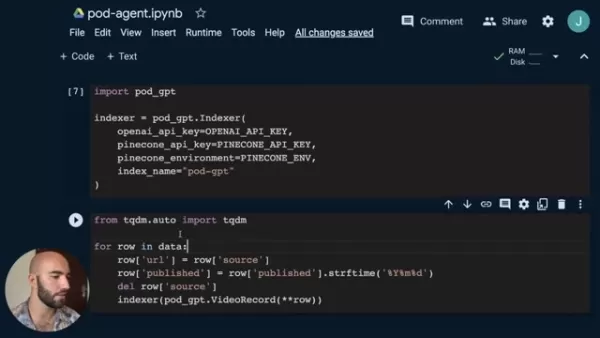
indexer = pod_gpt.Indexer(openai_api_key=OPENAI_API_KEY,pinecone_api_key=PINECONE_API_KEY,pinecone_environment=PINECONE_ENV,index_name="pod-gpt")
Adding Podcast Transcriptions to Pinecone
The indexing process involves iterating through each data row:
from tqdm.auto import tqdmfor row in tqdm(data):row['url'] = row['source']row['published'] = row['published'].strftime("%Y%m%d")del row['source']indexer.index([row])
The podcast transcripts are now stored and searchable within Pinecone.
Initialize Pinecone
To initialize a connection to Pinecone, use the following code:
import pineconepinecone.init(api_key=PINECONE_API_KEY,# find at app.pinecone.ioenvironment=PINECONE_ENV# next to api key in console)index_name = "pod-gpt"
Access Pinecone to import OpenAI Embeddings
Access the vectors in Pinecone and initialize the vector store with OpenAI Embeddings:
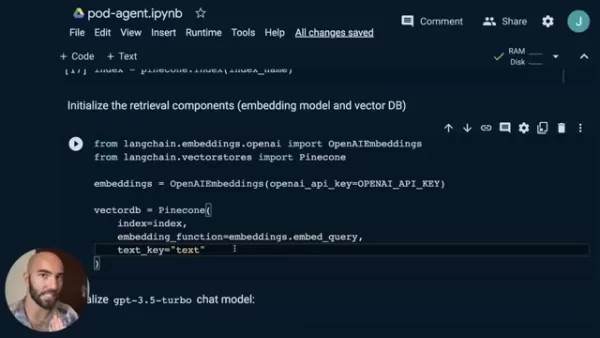
from langchain.embeddings.openai import OpenAIEmbeddingsfrom langchain.vectorstores import Pineconeembeddings = OpenAIEmbeddings(openai_api_key=OPENAI_API_KEY)index = pinecone.Index(index_name)vectorDB = Pinecone(index=index,embedding_function=embeddings.embed_query,text_key="text")
Related article
 U.S. Stocks Hit Historic Milestone as AI and Aerospace Giants Prepare for Trillion-Dollar Debut
Elon Musk, Sam Altman, and Dario Amodei, three titans of the technology sector, are advancing toward initial public offerings for their respective ventures. With SpaceX, OpenAI, and Anthropic—three industry behemoths nearing trillion-dollar valuation
Swedish AI Startup Lovable Eyes $13.2 Billion Valuation After Major Funding Round
As AI-driven coding tools gain traction, Swedish startup Lovable has secured a major funding round. The company aims to raise $3 billion, potentially boosting its valuation to $13.2 billion—double the $6.6 billion recorded last December. Menlo Ventur
Google Tests Remy AI Agent for Gemini as Focus Shifts to User Control
According to Business Insider, Google is testing Remy, a new AI personal agent for Gemini. This tool aims to execute tasks on behalf of users, streamlining both professional workflows and daily routines.Currently, Remy is undergoing testing in an int
Related Special Topic Recommendations
writing
U.S. Stocks Hit Historic Milestone as AI and Aerospace Giants Prepare for Trillion-Dollar Debut
Elon Musk, Sam Altman, and Dario Amodei, three titans of the technology sector, are advancing toward initial public offerings for their respective ventures. With SpaceX, OpenAI, and Anthropic—three industry behemoths nearing trillion-dollar valuation
Swedish AI Startup Lovable Eyes $13.2 Billion Valuation After Major Funding Round
As AI-driven coding tools gain traction, Swedish startup Lovable has secured a major funding round. The company aims to raise $3 billion, potentially boosting its valuation to $13.2 billion—double the $6.6 billion recorded last December. Menlo Ventur
Google Tests Remy AI Agent for Gemini as Focus Shifts to User Control
According to Business Insider, Google is testing Remy, a new AI personal agent for Gemini. This tool aims to execute tasks on behalf of users, streamlining both professional workflows and daily routines.Currently, Remy is undergoing testing in an int
Related Special Topic Recommendations
writing
 Best AI Outline Generators for Long-Form SEO Articles
2026 Latest Best Top-Rated AI Outline Generators for Long-Form SEO Articles, meticulously curated by XIX.AI. These powerful tools offer game-changing assistance in creating high-quality content quickly, boosting writing efficiency significantly. Get a free vs paid comparison along with real-world tests and detailed rankings to help you find the must-try option that suits your needs. Explore now to unlock your AI edge.
 8 tools
 xix.ai
Education and Learning
AI Study Tools for Homework and Exam Prep
xix.ai
Education and Learning
AI Study Tools for Homework and Exam Prep
2026 Latest Best AI Study Tools for Homework and Exam Prep! XIX.AI curates a top-rated list of powerful, game-changing tools that help students boost productivity, streamline homework completion, and ace exams through real-world tests. Get a free vs paid comparison, detailed rankings, and must-try options to unlock your AI edge. Explore now!
10 tools
xix.ai
Music composition
AI Vocal Demo Tools for Songwriters, Hooks, Toplines, and Multilingual Draft Sessions
2026 Latest Best AI Vocal Demo Tools for Songwriters, Hook Creators, and Multi-Language Content Teams! XIX.AI has curated a top-rated list of powerful game-changing tools that go through rigorous real-world tests. You’ll find detailed free vs paid comparison data, comprehensive rankings, and must-try options to help you boost writing efficiency and unlock your creative potential. Explore now to discover your perfect tool for all your content needs!
9 tools
xix.ai
Business
Best AI Competitive Research Tools for Small Businesses
2026 Latest Best Top-rated AI Competitive Research Tools for Small Businesses! XIX.AI has curated a highly powerful game-changing collection, updated weekly with rigorous real-world tests and detailed rankings. You can find a comprehensive free vs paid comparison to help you identify the must-try tools that boost your productivity and give you a competitive edge. Explore now to discover your perfect tool!
9 tools
xix.ai
Image editing
Photoshop AI Retouch Tools for Ecommerce Apparel, Skin Cleanup, and Color Consistency
2026 Latest Best Photoshop AI retouch tools for ecommerce apparel, skin cleanup, and color consistency! This top-rated curated list features powerful game-changing solutions that help you boost writing efficiency, streamline content creation, and achieve perfect visual results effortlessly. Each tool has undergone real-world tests through weekly updated rankings, complete with free vs paid comparison details. Backed by XIX.AI, it’s the must-try guide for anyone aiming to unlock your AI edge. Explore now!
10 tools
xix.ai
Prompt
Best AI Prompt Libraries for ChatGPT Workflows
2026 Latest Best Top-Rated AI Prompt Libraries for optimizing all types of ChatGPT workflows. XIX.AI has curated a powerful, game-changing collection that goes through rigorous real-world tests to ensure top performance. You can find detailed free vs paid comparisons and expert rankings to help you choose the must-try tools that boost your productivity and unlock your AI edge. Explore now!
11 tools
xix.ai

 Comments (0)
0/500
Comments (0)
0/500
In the fast-paced world of artificial intelligence, Langchain has established itself as a powerful framework for developing sophisticated applications with large language models (LLMs). A particularly dynamic feature is its agent system, which empowers LLMs to interact with their surroundings, leverage tools, and make informed decisions to accomplish complex objectives. This in-depth guide will give you a thorough grasp of Langchain Agents and how to create tools that expand their capabilities.
Key Points
Grasp the fundamental concept of Langchain Agents and their capacity to interact with tools.
Learn the process of building tools that extend the capabilities of LLMs beyond basic text generation.
Delve into the ReAct framework and its function in enabling reasoning and action selection for Agents.
Learn how to implement conversational memory for agents using Langchain's buffer window memory.
Become proficient in formatting data and crafting effective prompts for your agents.
Investigate potential applications for tools designed to enhance LLMs.
Understanding Langchain Agents and Tool Building
What are Langchain Agents?
Langchain Agents are essentially Large Language Models enhanced with the ability to utilize tools and make autonomous decisions.
Unlike standard LLMs focused primarily on text completion, Agents can strategically employ external tools to gather information, perform calculations, or interact with APIs. Their design allows them to deliberate and use provided tools, offering significantly more functionality than basic autocomplete. This decision-making process is frequently guided by the ReAct framework, which prompts agents to alternate between Reasoning and Action steps to tackle complex tasks.
Key components of an Agent:
- LLM: The LLM serves as the agent's core, delivering reasoning and decision-making power.
- Tools: These grant the agent access to external information and capabilities, such as search engines, calculators, and APIs.
- ReAct Framework: This methodology enables the agent to reason about its objectives, choose appropriate actions, and learn from the outcomes.
- Memory: Conversational agents require memory to retain context from previous interactions.
Building Effective Tools for Langchain Agents
The true strength of Langchain Agents lies in the tools they can access.
These tools equip agents with the necessary functions to move beyond simple text generation and perform intricate tasks. When designing tools, it's crucial to precisely define the specific functionalities you want your agent to have. Here are some tips for creating effective tools:
- Define a Clear Purpose: Every tool should have a singular, well-defined purpose, allowing the agent to quickly identify when and how to use it.
- Provide Detailed Descriptions: Offer clear descriptions of the tool's function and proper usage. This information is vital for the agent to assess if a tool is suitable for answering a query effectively.
- Ensure Reliable Input and Output: Tools should have consistent and well-defined input and output formats for smooth integration with the LLM.
- Handle Errors Gracefully: Implement robust error handling to prevent the agent from failing or producing erratic results if a tool encounters a problem.
The React Framework: Reasoning and Action
The ReAct framework is a pivotal element of Langchain Agents, allowing them to handle complex tasks by interweaving reasoning and action steps. Within ReAct, the agent first Reasons about the task at hand, then selects an Action to perform. After executing the action, the agent observes the result and uses this Observation to guide its subsequent reasoning. This cycle repeats until the goal is achieved.
The ReAct process assists the LLM in selecting the most appropriate tool by first analyzing the context. This framework enables agents to make better-informed decisions, adapt to dynamic situations, and solve intricate problems that simple text generation cannot address.
LangChain utilizes two primary types of tools when processing documents:
- The Stuff Method: Multiple documents are returned in their original, unsummarized form.
- The Map Reduce Method: Items are processed and summarized.
Setting Up Your Development Environment for Agent Building
Installing Necessary Packages
To begin building tools for Langchain Agents, you must first install the required prerequisite packages. You can do this using pip:
pip install -qU datasets Pod-gpt Pinecone-client[grpc] langchain OpenAI tqdm
- datasets: This library provides access to various datasets, including podcast transcriptions.
- pod-gpt: A library designed to facilitate access to Lex Fridman podcast data.
- pinecone-client[grpc]: The Pinecone client for interacting with the Pinecone vector database.
- langchain: The core Langchain library we will be using.
- openai: Provides access to OpenAI’s models.
- tqdm: A library used to display progress bars.
Setting API Keys
Some of these tools require API keys to function, such as the OPENAI_API_KEY and a Pinecone API key. After installing the prerequisites, the next critical step is to configure your API keys for OpenAI and Pinecone:
OPENAI_API_KEY = "YOUR_OPENAI_API_KEY"PINECONE_API_KEY = "YOUR_PINECONE_API_KEY"PINECONE_ENV = "YOUR_PINECONE_ENV"
Obtain an OpenAI API Key from platform.openai.com. You will need an active account to access this page.
You will also need your Pinecone API Key and Pinecone Environment; these can be found at app.pinecone.io.
Downloading a Prebuilt Dataset
We can utilize a dataset to demonstrate chatbot construction. For this example, the chatbot will use transcriptions from Lex Fridman’s podcast:
from datasets import load_datasetdata = load_dataset('jamescalam/lex-transcripts', split='train')
Visualizing the Conversational Agent Flow
The typical conversational agent flow follows these steps:
- Input: The user provides a query or instruction.
- The LLM processes the question, determining if a tool can assist. Tools provide expanded capabilities.
- A database tool is queried. The result is fed back to the LLM for further decision-making.
- A final thought or answer is formulated and delivered.
Building A Retrieval Based Question Answering Agent
Formatting Data for the Pod-GPT Indexer
To use the pod-gpt indexer, we must reformat our data into a specific structure:
docs = [{ 'id': x['video_id'],'text': x['transcript'],'metadata': {'title': x['title'],'url': x['source']}} for x in data]
Initializing the Indexer Object
With the data correctly formatted, the next step is to create an indexer object from pod-gpt:
indexer = pod_gpt.Indexer(openai_api_key=OPENAI_API_KEY,pinecone_api_key=PINECONE_API_KEY,pinecone_environment=PINECONE_ENV,index_name="pod-gpt")
Adding Podcast Transcriptions to Pinecone
The indexing process involves iterating through each data row:
from tqdm.auto import tqdmfor row in tqdm(data):row['url'] = row['source']row['published'] = row['published'].strftime("%Y%m%d")del row['source']indexer.index([row])
The podcast transcripts are now stored and searchable within Pinecone.
Initialize Pinecone
To initialize a connection to Pinecone, use the following code:
import pineconepinecone.init(api_key=PINECONE_API_KEY,# find at app.pinecone.ioenvironment=PINECONE_ENV# next to api key in console)index_name = "pod-gpt"
Access Pinecone to import OpenAI Embeddings
Access the vectors in Pinecone and initialize the vector store with OpenAI Embeddings:
from langchain.embeddings.openai import OpenAIEmbeddingsfrom langchain.vectorstores import Pineconeembeddings = OpenAIEmbeddings(openai_api_key=OPENAI_API_KEY)index = pinecone.Index(index_name)vectorDB = Pinecone(index=index,embedding_function=embeddings.embed_query,text_key="text")








 U.S. Stocks Hit Historic Milestone as AI and Aerospace Giants Prepare for Trillion-Dollar Debut
Elon Musk, Sam Altman, and Dario Amodei, three titans of the technology sector, are advancing toward initial public offerings for their respective ventures. With SpaceX, OpenAI, and Anthropic—three industry behemoths nearing trillion-dollar valuation
U.S. Stocks Hit Historic Milestone as AI and Aerospace Giants Prepare for Trillion-Dollar Debut
Elon Musk, Sam Altman, and Dario Amodei, three titans of the technology sector, are advancing toward initial public offerings for their respective ventures. With SpaceX, OpenAI, and Anthropic—three industry behemoths nearing trillion-dollar valuation
 Swedish AI Startup Lovable Eyes $13.2 Billion Valuation After Major Funding Round
As AI-driven coding tools gain traction, Swedish startup Lovable has secured a major funding round. The company aims to raise $3 billion, potentially boosting its valuation to $13.2 billion—double the $6.6 billion recorded last December. Menlo Ventur
Google Tests Remy AI Agent for Gemini as Focus Shifts to User Control
According to Business Insider, Google is testing Remy, a new AI personal agent for Gemini. This tool aims to execute tasks on behalf of users, streamlining both professional workflows and daily routines.Currently, Remy is undergoing testing in an int
Swedish AI Startup Lovable Eyes $13.2 Billion Valuation After Major Funding Round
As AI-driven coding tools gain traction, Swedish startup Lovable has secured a major funding round. The company aims to raise $3 billion, potentially boosting its valuation to $13.2 billion—double the $6.6 billion recorded last December. Menlo Ventur
Google Tests Remy AI Agent for Gemini as Focus Shifts to User Control
According to Business Insider, Google is testing Remy, a new AI personal agent for Gemini. This tool aims to execute tasks on behalf of users, streamlining both professional workflows and daily routines.Currently, Remy is undergoing testing in an int

2026 Latest Best Top-Rated AI Outline Generators for Long-Form SEO Articles, meticulously curated by XIX.AI. These powerful tools offer game-changing assistance in creating high-quality content quickly, boosting writing efficiency significantly. Get a free vs paid comparison along with real-world tests and detailed rankings to help you find the must-try option that suits your needs. Explore now to unlock your AI edge.
8 tools
xix.ai

2026 Latest Best AI Study Tools for Homework and Exam Prep! XIX.AI curates a top-rated list of powerful, game-changing tools that help students boost productivity, streamline homework completion, and ace exams through real-world tests. Get a free vs paid comparison, detailed rankings, and must-try options to unlock your AI edge. Explore now!
10 tools
xix.ai

2026 Latest Best AI Vocal Demo Tools for Songwriters, Hook Creators, and Multi-Language Content Teams! XIX.AI has curated a top-rated list of powerful game-changing tools that go through rigorous real-world tests. You’ll find detailed free vs paid comparison data, comprehensive rankings, and must-try options to help you boost writing efficiency and unlock your creative potential. Explore now to discover your perfect tool for all your content needs!
9 tools
xix.ai

2026 Latest Best Top-rated AI Competitive Research Tools for Small Businesses! XIX.AI has curated a highly powerful game-changing collection, updated weekly with rigorous real-world tests and detailed rankings. You can find a comprehensive free vs paid comparison to help you identify the must-try tools that boost your productivity and give you a competitive edge. Explore now to discover your perfect tool!
9 tools
xix.ai

2026 Latest Best Photoshop AI retouch tools for ecommerce apparel, skin cleanup, and color consistency! This top-rated curated list features powerful game-changing solutions that help you boost writing efficiency, streamline content creation, and achieve perfect visual results effortlessly. Each tool has undergone real-world tests through weekly updated rankings, complete with free vs paid comparison details. Backed by XIX.AI, it’s the must-try guide for anyone aiming to unlock your AI edge. Explore now!
10 tools
xix.ai

2026 Latest Best Top-Rated AI Prompt Libraries for optimizing all types of ChatGPT workflows. XIX.AI has curated a powerful, game-changing collection that goes through rigorous real-world tests to ensure top performance. You can find detailed free vs paid comparisons and expert rankings to help you choose the must-try tools that boost your productivity and unlock your AI edge. Explore now!
11 tools
xix.ai












