


 Home
HomeKrea AI Image to 3D: A Quick Look at Real-Time Generation
Unleashing Creativity with Krea AI’s Image to 3D Feature
In today’s fast-paced digital age, Krea AI stands out as a revolutionary platform for crafting visually captivating content. Among its array of impressive features, the groundbreaking ‘Image to 3D’ capability has captured the attention of creatives worldwide. This tool allows users to effortlessly merge three-dimensional objects into their image creation process, breaking away from conventional methods that demand intricate 3D modeling and lengthy rendering processes. With Krea AI, the integration of 3D elements becomes as simple as placing them into your images in real-time.
Let’s dive into the ins and outs of Krea AI’s ‘Image to 3D’ feature and uncover how it’s reshaping the landscape of digital art and design.
What Makes Krea AI’s Image to 3D Unique?
Krea AI’s ‘Image to 3D’ tool redefines how we think about merging digital elements into visual projects. Traditional 3D modeling often involves steep learning curves and hours of rendering time, but Krea AI flips the script. By intelligently adapting to the scene’s lighting and perspective, this tool ensures that every 3D object blends seamlessly into your images. Whether you’re a professional artist or someone just starting out, this feature democratizes the process of creating stunning visuals.

Imagine experimenting with different compositions and perspectives in mere seconds. No more waiting for hours while your computer churns out renders. Krea AI gives you the freedom to explore, tweak, and refine your ideas instantly. This not only accelerates your workflow but also opens up a world of creative possibilities. From product mockups to eye-catching advertisements, the potential applications are endless.
Streamlining Your Workflow with Flux
At the heart of Krea AI lies Flux, a tool designed to simplify and accelerate the image creation process. Flux’s intuitive interface makes it easy for anyone to jump into the world of AI-driven content creation. Whether you’re looking to create a quick base image or develop something more complex, Flux provides the tools you need to bring your vision to life.

One of Flux’s standout features is its ability to handle the basics of image generation with minimal effort. Simply input your desired prompt, and Flux will do the heavy lifting for you. The best part? You can seamlessly integrate Flux-generated images with Krea AI’s real-time mode, allowing you to add 3D elements and see the results in real-time. This synergy between Flux and the ‘Image to 3D’ feature creates a powerful workflow that caters to both beginners and professionals.
The Magic of Real-Time Image Generation
Real-time image generation is where Krea AI truly shines. Gone are the days of waiting for renders to finish. With Krea AI, you can drop a 3D object into your image and instantly see how it looks. This immediacy allows you to experiment freely, making adjustments on the fly without losing momentum.
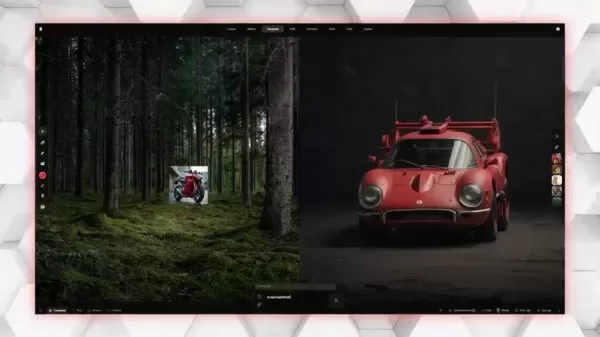
Whether you’re fine-tuning lighting or adjusting the position of an object, real-time feedback ensures that every change is visible right away. This not only speeds up the creative process but also fosters a more immersive experience. Artists can focus on the artistic aspects of their work, letting their imaginations run wild without being bogged down by technical challenges. Collaboration also becomes easier, as team members can provide input and see the results instantly, streamlining communication and decision-making.
A Step-by-Step Guide to Unlocking Krea AI’s Potential
Ready to dive into the world of Krea AI? Follow these steps to get started with generating images that incorporate 3D elements:
- Sign Up and Log In: Head over to the Krea AI website and create an account. Logging in grants you access to all the platform’s features.
- Navigate to the Dashboard: Once logged in, explore the dashboard to familiarize yourself with the various tools available. You’ll find options like Flux and the ‘Image to 3D’ feature under the ‘Generate’ section.
- Use Flux for Initial Image Creation: Start by using Flux to create a base image. Input your desired prompt and let Flux do the rest. This will serve as the foundation for your project.
- Switch to Real-Time Mode: Transition to real-time mode to begin adding 3D elements. Drag and drop objects from the library or upload your own 3D files.
- Adjust and Refine: Tweak the placement, size, and orientation of your 3D objects to fit your vision. Krea AI’s automatic adjustments ensure a seamless blend with your image.
- Finalize and Export: Once satisfied, finalize your creation and export it to your preferred format. Share it with the world or use it for your next project.
Krea AI’s Pricing and Subscription Plans
Krea AI offers a flexible pricing model to suit a variety of user needs. Whether you’re a casual hobbyist or a professional designer, there’s a plan tailored to your requirements. The platform provides a free trial or tier, allowing users to explore its features before committing to a subscription.
Plan Name Monthly Price Key Features Basic $9.99 Access to basic image generation, limited monthly generations Standard $29.99 Unlimited image generations, priority support, advanced editing tools Professional $59.99 All Standard features, dedicated support, early access to new features Enterprise Custom Customized pricing, dedicated account manager, enterprise-level support and features
Pros and Cons of Krea AI
While Krea AI offers numerous advantages, it’s important to weigh the pros and cons before diving in.
Pros:
- Innovative ‘Image to 3D’ feature
- Real-time object placement for instant feedback
- Intuitive interface suitable for beginners
- Automatic adjustment of 3D objects to match scene lighting and perspective
- Integration with Flux for streamlined image creation
Cons:
- Paid subscriptions required for full access to features
- Learning curve associated with mastering advanced customization options
- Limited range of available 3D objects
- Dependence on AI algorithms may result in unexpected or inconsistent results
- Internet connectivity required for real-time functionality
Real-World Applications of Krea AI’s Image to 3D Tool
Krea AI’s ‘Image to 3D’ feature finds applications across diverse industries. In marketing, it can be used to craft engaging ads that stand out on social media. For instance, a furniture brand could showcase its products in realistic home environments, giving potential buyers a better sense of how the pieces would look in their own spaces. Similarly, in product design, Krea AI enables designers to quickly iterate on prototypes and gather valuable feedback from stakeholders. An automotive designer, for example, could visualize different car models in various settings to assess their aesthetic appeal.

From enhancing movie scenes with realistic 3D objects to developing interactive educational materials, Krea AI empowers creators to push the boundaries of their imagination. Its versatility makes it an invaluable asset for professionals and hobbyists alike.
Frequently Asked Questions
Q: What is Krea AI?
A: Krea AI is an innovative platform that leverages artificial intelligence to generate visually stunning content. It offers a range of features, including the ‘Image to 3D’ capability, making it easier than ever to integrate 3D elements into your images.
Q: How does the ‘Image to 3D’ feature work?
A: The ‘Image to 3D’ feature allows users to seamlessly add 3D objects to their images in real-time. By automatically adjusting the object to match the scene’s lighting and perspective, Krea AI ensures a seamless integration.
Q: Is Krea AI beginner-friendly?
A: Absolutely! Krea AI’s intuitive interface and real-time feedback make it accessible to users of all skill levels. A free trial is available to help newcomers explore the platform’s capabilities before committing.
Comparing Krea AI to Other AI Image Generation Tools
While many AI image generation tools focus solely on creating images from scratch, Krea AI sets itself apart with its ‘Image to 3D’ feature. This capability allows users to integrate 3D objects into existing images, opening up endless creative opportunities. Additionally, Krea AI’s real-time object placement and user-friendly interface make it a standout choice for both novices and experts.
Why Use AI for Image Generation?
AI-driven image generation offers several key advantages:
- Faster turnaround times
- Cost-effective solutions
- Enhanced creativity
- Accessibility for all skill levels
By embracing AI, creators can streamline their workflows, experiment more freely, and ultimately produce higher-quality content. Krea AI exemplifies these benefits, empowering users to unlock their full creative potential.
Related article
 ByteDance Boosts Core AI Incentives as Doubao Surges 14.6%
ByteDance recently convened a DouBao equity briefing to unveil fresh incentive policies for staff involved in the DouBao division. The strike price for DouBao shares has been lifted from $14.85 in June 2026 to $17.02, marking an approximate 14.6% inc
MiniMax Unveils 10x Team Program to Incentivize Global AI Experts
MiniMax (Xiyu Technology), the General Artificial Intelligence Lab, has officially launched "10x Team," a global talent collaboration initiative. This program aims to recruit top experts across industries to explore the deep application of large mode
South Korea Breaks Ground on National AI Computing Center, Investing 2.5 Trillion Won with 2028 Target
South Korean outlet EtNews reports that groundbreaking for the Korea AI Computing Center (KOACC) took place on August 3 at the Solar City data center park in Sunan, Jeollanam-do. Backed by a total investment of 2.5 trillion KRW (roughly 11.838 billio
Related Special Topic Recommendations
Education and Learning
ByteDance Boosts Core AI Incentives as Doubao Surges 14.6%
ByteDance recently convened a DouBao equity briefing to unveil fresh incentive policies for staff involved in the DouBao division. The strike price for DouBao shares has been lifted from $14.85 in June 2026 to $17.02, marking an approximate 14.6% inc
MiniMax Unveils 10x Team Program to Incentivize Global AI Experts
MiniMax (Xiyu Technology), the General Artificial Intelligence Lab, has officially launched "10x Team," a global talent collaboration initiative. This program aims to recruit top experts across industries to explore the deep application of large mode
South Korea Breaks Ground on National AI Computing Center, Investing 2.5 Trillion Won with 2028 Target
South Korean outlet EtNews reports that groundbreaking for the Korea AI Computing Center (KOACC) took place on August 3 at the Solar City data center park in Sunan, Jeollanam-do. Backed by a total investment of 2.5 trillion KRW (roughly 11.838 billio
Related Special Topic Recommendations
Education and Learning
 AI Study Tools for Homework and Exam Prep
2026 Latest Best AI Study Tools for Homework and Exam Prep! XIX.AI curates a top-rated list of powerful, game-changing tools that help students boost productivity, streamline homework completion, and ace exams through real-world tests. Get a free vs paid comparison, detailed rankings, and must-try options to unlock your AI edge. Explore now!
 10 tools
 xix.ai
Music composition
AI Vocal Demo Tools for Songwriters, Hooks, Toplines, and Multilingual Draft Sessions
xix.ai
Music composition
AI Vocal Demo Tools for Songwriters, Hooks, Toplines, and Multilingual Draft Sessions
2026 Latest Best AI Vocal Demo Tools for Songwriters, Hook Creators, and Multi-Language Content Teams! XIX.AI has curated a top-rated list of powerful game-changing tools that go through rigorous real-world tests. You’ll find detailed free vs paid comparison data, comprehensive rankings, and must-try options to help you boost writing efficiency and unlock your creative potential. Explore now to discover your perfect tool for all your content needs!
9 tools
xix.ai
Business
Best AI Competitive Research Tools for Small Businesses
2026 Latest Best Top-rated AI Competitive Research Tools for Small Businesses! XIX.AI has curated a highly powerful game-changing collection, updated weekly with rigorous real-world tests and detailed rankings. You can find a comprehensive free vs paid comparison to help you identify the must-try tools that boost your productivity and give you a competitive edge. Explore now to discover your perfect tool!
9 tools
xix.ai
Image editing
Photoshop AI Retouch Tools for Ecommerce Apparel, Skin Cleanup, and Color Consistency
2026 Latest Best Photoshop AI retouch tools for ecommerce apparel, skin cleanup, and color consistency! This top-rated curated list features powerful game-changing solutions that help you boost writing efficiency, streamline content creation, and achieve perfect visual results effortlessly. Each tool has undergone real-world tests through weekly updated rankings, complete with free vs paid comparison details. Backed by XIX.AI, it’s the must-try guide for anyone aiming to unlock your AI edge. Explore now!
10 tools
xix.ai
Prompt
Best AI Prompt Libraries for ChatGPT Workflows
2026 Latest Best Top-Rated AI Prompt Libraries for optimizing all types of ChatGPT workflows. XIX.AI has curated a powerful, game-changing collection that goes through rigorous real-world tests to ensure top performance. You can find detailed free vs paid comparisons and expert rankings to help you choose the must-try tools that boost your productivity and unlock your AI edge. Explore now!
11 tools
xix.ai
Education and Learning
AI Quiz Builder Platforms for Teachers, Tutors, and Cohort-Based Learning Programs
2026 Latest Best AI Quiz Builder Platforms for Teachers, Tutors, and Cohort-Based Learning Programs! XIX.AI has curated a top-rated list of powerful game-changing tools that go through real-world tests to deliver accurate rankings. These must-try platforms help boost writing efficiency, streamline content creation, and simplify quiz design across all learning scenarios. Explore now to discover your perfect tool for unlocking your AI edge in teaching!
13 tools
xix.ai

 Comments (4)
0/500
Comments (4)
0/500
![OliviaBaker]()
So, we're finally at the point where you can turn a 2D picture into a 3D model in real time? That's kind of mind-blowing, but also makes me wonder if we'll even need traditional 3D modeling skills anymore. The demo looks impressive, but I bet the output still needs lots of cleanup for production work. Still, cool party trick! 🎉
![StevenAllen]()
Krea AI의 3D 생성 기능 진짜 놀랍네요! 🎨 사진을 순식간에 입체로 변환하다니, 디자이너 친구가 언급한 업무 효율성 폭발이 이걸 말하는 거였구요. 근데 생성 속도가 실시간 수준이라니... AI 기술 발전 속도 좀 무섭지 않나요? 🤯 다음 번에 캐릭터 디자인할 때 꼭 써봐야겠어요.
![GeorgeMartinez]()
最近3Dモデリングにハマってるんだけど、Krea AIのこの機能めっちゃ気になる…画像からリアルタイム生成って、まさかこれで趣味がもっと楽しくなる?試してみたいな〜😆
![RalphPerez]()
Krea AI's Image to 3D feature is mind-blowing! 😍 Turning 2D images into 3D models in real-time feels like magic. I tried it with a simple sketch, and the result was so smooth! Perfect for quick design mockups. Anyone else obsessed with this tool yet?
Unleashing Creativity with Krea AI’s Image to 3D Feature
In today’s fast-paced digital age, Krea AI stands out as a revolutionary platform for crafting visually captivating content. Among its array of impressive features, the groundbreaking ‘Image to 3D’ capability has captured the attention of creatives worldwide. This tool allows users to effortlessly merge three-dimensional objects into their image creation process, breaking away from conventional methods that demand intricate 3D modeling and lengthy rendering processes. With Krea AI, the integration of 3D elements becomes as simple as placing them into your images in real-time.
Let’s dive into the ins and outs of Krea AI’s ‘Image to 3D’ feature and uncover how it’s reshaping the landscape of digital art and design.
What Makes Krea AI’s Image to 3D Unique?
Krea AI’s ‘Image to 3D’ tool redefines how we think about merging digital elements into visual projects. Traditional 3D modeling often involves steep learning curves and hours of rendering time, but Krea AI flips the script. By intelligently adapting to the scene’s lighting and perspective, this tool ensures that every 3D object blends seamlessly into your images. Whether you’re a professional artist or someone just starting out, this feature democratizes the process of creating stunning visuals.
Imagine experimenting with different compositions and perspectives in mere seconds. No more waiting for hours while your computer churns out renders. Krea AI gives you the freedom to explore, tweak, and refine your ideas instantly. This not only accelerates your workflow but also opens up a world of creative possibilities. From product mockups to eye-catching advertisements, the potential applications are endless.
Streamlining Your Workflow with Flux
At the heart of Krea AI lies Flux, a tool designed to simplify and accelerate the image creation process. Flux’s intuitive interface makes it easy for anyone to jump into the world of AI-driven content creation. Whether you’re looking to create a quick base image or develop something more complex, Flux provides the tools you need to bring your vision to life.
One of Flux’s standout features is its ability to handle the basics of image generation with minimal effort. Simply input your desired prompt, and Flux will do the heavy lifting for you. The best part? You can seamlessly integrate Flux-generated images with Krea AI’s real-time mode, allowing you to add 3D elements and see the results in real-time. This synergy between Flux and the ‘Image to 3D’ feature creates a powerful workflow that caters to both beginners and professionals.
The Magic of Real-Time Image Generation
Real-time image generation is where Krea AI truly shines. Gone are the days of waiting for renders to finish. With Krea AI, you can drop a 3D object into your image and instantly see how it looks. This immediacy allows you to experiment freely, making adjustments on the fly without losing momentum.
Whether you’re fine-tuning lighting or adjusting the position of an object, real-time feedback ensures that every change is visible right away. This not only speeds up the creative process but also fosters a more immersive experience. Artists can focus on the artistic aspects of their work, letting their imaginations run wild without being bogged down by technical challenges. Collaboration also becomes easier, as team members can provide input and see the results instantly, streamlining communication and decision-making.
A Step-by-Step Guide to Unlocking Krea AI’s Potential
Ready to dive into the world of Krea AI? Follow these steps to get started with generating images that incorporate 3D elements:
- Sign Up and Log In: Head over to the Krea AI website and create an account. Logging in grants you access to all the platform’s features.
- Navigate to the Dashboard: Once logged in, explore the dashboard to familiarize yourself with the various tools available. You’ll find options like Flux and the ‘Image to 3D’ feature under the ‘Generate’ section.
- Use Flux for Initial Image Creation: Start by using Flux to create a base image. Input your desired prompt and let Flux do the rest. This will serve as the foundation for your project.
- Switch to Real-Time Mode: Transition to real-time mode to begin adding 3D elements. Drag and drop objects from the library or upload your own 3D files.
- Adjust and Refine: Tweak the placement, size, and orientation of your 3D objects to fit your vision. Krea AI’s automatic adjustments ensure a seamless blend with your image.
- Finalize and Export: Once satisfied, finalize your creation and export it to your preferred format. Share it with the world or use it for your next project.
Krea AI’s Pricing and Subscription Plans
Krea AI offers a flexible pricing model to suit a variety of user needs. Whether you’re a casual hobbyist or a professional designer, there’s a plan tailored to your requirements. The platform provides a free trial or tier, allowing users to explore its features before committing to a subscription.
| Plan Name | Monthly Price | Key Features |
|---|---|---|
| Basic | $9.99 | Access to basic image generation, limited monthly generations |
| Standard | $29.99 | Unlimited image generations, priority support, advanced editing tools |
| Professional | $59.99 | All Standard features, dedicated support, early access to new features |
| Enterprise | Custom | Customized pricing, dedicated account manager, enterprise-level support and features |
Pros and Cons of Krea AI
While Krea AI offers numerous advantages, it’s important to weigh the pros and cons before diving in.
Pros:
- Innovative ‘Image to 3D’ feature
- Real-time object placement for instant feedback
- Intuitive interface suitable for beginners
- Automatic adjustment of 3D objects to match scene lighting and perspective
- Integration with Flux for streamlined image creation
Cons:
- Paid subscriptions required for full access to features
- Learning curve associated with mastering advanced customization options
- Limited range of available 3D objects
- Dependence on AI algorithms may result in unexpected or inconsistent results
- Internet connectivity required for real-time functionality
Real-World Applications of Krea AI’s Image to 3D Tool
Krea AI’s ‘Image to 3D’ feature finds applications across diverse industries. In marketing, it can be used to craft engaging ads that stand out on social media. For instance, a furniture brand could showcase its products in realistic home environments, giving potential buyers a better sense of how the pieces would look in their own spaces. Similarly, in product design, Krea AI enables designers to quickly iterate on prototypes and gather valuable feedback from stakeholders. An automotive designer, for example, could visualize different car models in various settings to assess their aesthetic appeal.
From enhancing movie scenes with realistic 3D objects to developing interactive educational materials, Krea AI empowers creators to push the boundaries of their imagination. Its versatility makes it an invaluable asset for professionals and hobbyists alike.
Frequently Asked Questions
Q: What is Krea AI?
A: Krea AI is an innovative platform that leverages artificial intelligence to generate visually stunning content. It offers a range of features, including the ‘Image to 3D’ capability, making it easier than ever to integrate 3D elements into your images.
Q: How does the ‘Image to 3D’ feature work?
A: The ‘Image to 3D’ feature allows users to seamlessly add 3D objects to their images in real-time. By automatically adjusting the object to match the scene’s lighting and perspective, Krea AI ensures a seamless integration.
Q: Is Krea AI beginner-friendly?
A: Absolutely! Krea AI’s intuitive interface and real-time feedback make it accessible to users of all skill levels. A free trial is available to help newcomers explore the platform’s capabilities before committing.
Comparing Krea AI to Other AI Image Generation Tools
While many AI image generation tools focus solely on creating images from scratch, Krea AI sets itself apart with its ‘Image to 3D’ feature. This capability allows users to integrate 3D objects into existing images, opening up endless creative opportunities. Additionally, Krea AI’s real-time object placement and user-friendly interface make it a standout choice for both novices and experts.
Why Use AI for Image Generation?
AI-driven image generation offers several key advantages:
- Faster turnaround times
- Cost-effective solutions
- Enhanced creativity
- Accessibility for all skill levels
By embracing AI, creators can streamline their workflows, experiment more freely, and ultimately produce higher-quality content. Krea AI exemplifies these benefits, empowering users to unlock their full creative potential.








 ByteDance Boosts Core AI Incentives as Doubao Surges 14.6%
ByteDance recently convened a DouBao equity briefing to unveil fresh incentive policies for staff involved in the DouBao division. The strike price for DouBao shares has been lifted from $14.85 in June 2026 to $17.02, marking an approximate 14.6% inc
ByteDance Boosts Core AI Incentives as Doubao Surges 14.6%
ByteDance recently convened a DouBao equity briefing to unveil fresh incentive policies for staff involved in the DouBao division. The strike price for DouBao shares has been lifted from $14.85 in June 2026 to $17.02, marking an approximate 14.6% inc
 MiniMax Unveils 10x Team Program to Incentivize Global AI Experts
MiniMax (Xiyu Technology), the General Artificial Intelligence Lab, has officially launched "10x Team," a global talent collaboration initiative. This program aims to recruit top experts across industries to explore the deep application of large mode
MiniMax Unveils 10x Team Program to Incentivize Global AI Experts
MiniMax (Xiyu Technology), the General Artificial Intelligence Lab, has officially launched "10x Team," a global talent collaboration initiative. This program aims to recruit top experts across industries to explore the deep application of large mode
 South Korea Breaks Ground on National AI Computing Center, Investing 2.5 Trillion Won with 2028 Target
South Korean outlet EtNews reports that groundbreaking for the Korea AI Computing Center (KOACC) took place on August 3 at the Solar City data center park in Sunan, Jeollanam-do. Backed by a total investment of 2.5 trillion KRW (roughly 11.838 billio
South Korea Breaks Ground on National AI Computing Center, Investing 2.5 Trillion Won with 2028 Target
South Korean outlet EtNews reports that groundbreaking for the Korea AI Computing Center (KOACC) took place on August 3 at the Solar City data center park in Sunan, Jeollanam-do. Backed by a total investment of 2.5 trillion KRW (roughly 11.838 billio

2026 Latest Best AI Study Tools for Homework and Exam Prep! XIX.AI curates a top-rated list of powerful, game-changing tools that help students boost productivity, streamline homework completion, and ace exams through real-world tests. Get a free vs paid comparison, detailed rankings, and must-try options to unlock your AI edge. Explore now!
10 tools
xix.ai

2026 Latest Best AI Vocal Demo Tools for Songwriters, Hook Creators, and Multi-Language Content Teams! XIX.AI has curated a top-rated list of powerful game-changing tools that go through rigorous real-world tests. You’ll find detailed free vs paid comparison data, comprehensive rankings, and must-try options to help you boost writing efficiency and unlock your creative potential. Explore now to discover your perfect tool for all your content needs!
9 tools
xix.ai

2026 Latest Best Top-rated AI Competitive Research Tools for Small Businesses! XIX.AI has curated a highly powerful game-changing collection, updated weekly with rigorous real-world tests and detailed rankings. You can find a comprehensive free vs paid comparison to help you identify the must-try tools that boost your productivity and give you a competitive edge. Explore now to discover your perfect tool!
9 tools
xix.ai

2026 Latest Best Photoshop AI retouch tools for ecommerce apparel, skin cleanup, and color consistency! This top-rated curated list features powerful game-changing solutions that help you boost writing efficiency, streamline content creation, and achieve perfect visual results effortlessly. Each tool has undergone real-world tests through weekly updated rankings, complete with free vs paid comparison details. Backed by XIX.AI, it’s the must-try guide for anyone aiming to unlock your AI edge. Explore now!
10 tools
xix.ai

2026 Latest Best Top-Rated AI Prompt Libraries for optimizing all types of ChatGPT workflows. XIX.AI has curated a powerful, game-changing collection that goes through rigorous real-world tests to ensure top performance. You can find detailed free vs paid comparisons and expert rankings to help you choose the must-try tools that boost your productivity and unlock your AI edge. Explore now!
11 tools
xix.ai

2026 Latest Best AI Quiz Builder Platforms for Teachers, Tutors, and Cohort-Based Learning Programs! XIX.AI has curated a top-rated list of powerful game-changing tools that go through real-world tests to deliver accurate rankings. These must-try platforms help boost writing efficiency, streamline content creation, and simplify quiz design across all learning scenarios. Explore now to discover your perfect tool for unlocking your AI edge in teaching!
13 tools
xix.ai

So, we're finally at the point where you can turn a 2D picture into a 3D model in real time? That's kind of mind-blowing, but also makes me wonder if we'll even need traditional 3D modeling skills anymore. The demo looks impressive, but I bet the output still needs lots of cleanup for production work. Still, cool party trick! 🎉
Krea AI의 3D 생성 기능 진짜 놀랍네요! 🎨 사진을 순식간에 입체로 변환하다니, 디자이너 친구가 언급한 업무 효율성 폭발이 이걸 말하는 거였구요. 근데 생성 속도가 실시간 수준이라니... AI 기술 발전 속도 좀 무섭지 않나요? 🤯 다음 번에 캐릭터 디자인할 때 꼭 써봐야겠어요.
最近3Dモデリングにハマってるんだけど、Krea AIのこの機能めっちゃ気になる…画像からリアルタイム生成って、まさかこれで趣味がもっと楽しくなる?試してみたいな〜😆
Krea AI's Image to 3D feature is mind-blowing! 😍 Turning 2D images into 3D models in real-time feels like magic. I tried it with a simple sketch, and the result was so smooth! Perfect for quick design mockups. Anyone else obsessed with this tool yet?












