


 Home
HomeKling AI Elements Merges AI-Generated Images Into Video Creations
Kling AI's groundbreaking "Elements" feature is revolutionizing AI-powered creative tools by enabling users to transform multiple AI-generated images into cohesive videos. This innovative solution offers a fresh perspective on content creation, providing effortless video generation without traditional editing expertise. Our comprehensive guide explores how to maximize this powerful tool's potential.
Key Features
Kling AI's Elements feature seamlessly merges up to four AI-generated images into dynamic video content.
The platform utilizes text prompts to intelligently blend uploaded images.
Users can choose between internally generated content or external image uploads.
Output quality depends on prompt clarity and image selection.
The technology democratizes video production by eliminating complex editing requirements.
Exploring Kling AI's Elements Feature
What Makes Elements Unique?
Kling AI's Elements represents a cutting-edge creative studio that transforms static images into fluid video narratives. As part of Kling AI's broader video creation suite, this tool balances simplicity with creative freedom, allowing anyone to produce engaging visual content regardless of technical skills. The feature's intelligence lies in its sophisticated prompt interpretation, weaving separate images into coherent motion sequences based on user instructions. This synergy between artificial intelligence and human creativity unlocks new possibilities for storytelling, marketing campaigns, and experimental digital art.
Navigating the Elements Interface
Accessing Elements requires following Kling AI's intuitive platform navigation. Begin by logging into the official Kling AI website (kling.ai.com).
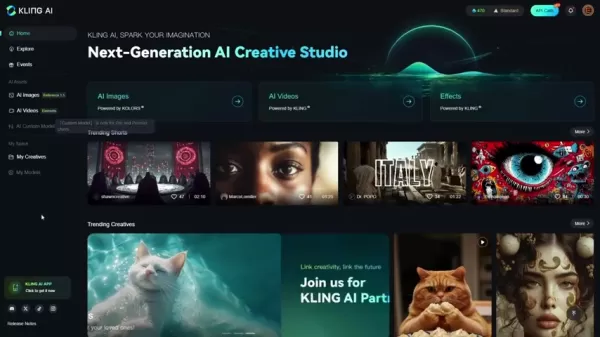
After authentication, locate the AI video section typically positioned on the left navigation panel. Within this section, identify and select the "Image to Video" transformation option. Ensure the Elements tab is activated to enable multi-image video composition. The interface will then display upload slots for 1-4 source images and a prompt field for directing the AI's creative process.
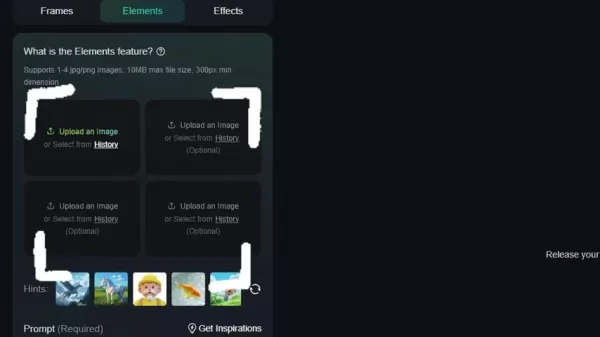
Following image selection, crafting a descriptive prompt completes the preparation phase before generation.
Comprehensive Video Creation Guide
Crafting Effective Prompts and Selecting Assets
Producing high-quality videos with Elements involves strategic image curation and precise prompting. Consider these professional recommendations:
- Asset Selection: Choose 1-4 complementary images that collectively convey your intended narrative. While Kling AI-generated assets ensure optimal compatibility, external images meeting format requirements perform equally well.
- Prompt Engineering: Develop unambiguous instructions describing desired transitions and interactions between elements. For instance, "A businessman examines architectural blueprints while walking through a modern office lobby" provides clear direction.
- Prompt Optimization: Specificity dramatically improves results. Reference distinctive attributes like "short blonde hair" or "translucent eyeglasses" enhances AI comprehension.
- Resource Utilization: Consult Kling AI's documentation for proven prompting techniques and creative best practices.
- Generation Process: Finalize your selections and execute the video creation process, typically completing within 8-10 minutes.
Refining Output Through Systematic Iteration
AI-generated content often benefits from progressive refinement. After initial generation, critically assess these aspects:
- Narrative Cohesion: Evaluate how effectively the video communicates your intended story.
- Technical Execution: Identify any visual artifacts or transition inconsistencies.
- Prompt Refinement: Adjust instruction phrasing and specificity based on initial results.
- Asset Variation: Experiment with alternative image combinations to discover superior outcomes.

The iterative process enables creators to progressively perfect their AI-generated videos.
Practical Application Examples
These real-world implementations demonstrate Elements' versatility:
Corporate Scenario:
- Objective: Professional presentation video
- Components: Executive portrait, product image, office environment
- Execution: Detailed prompt describing professional interactions
Creative Project

:
- Objective: Cinematic narrative sequence
- Components: Character portraits, props, setting images
- Execution: Multiple iterations refining motion choreography
Technical Implementation Guide
Platform Access Procedures
- Website Authentication: Visit kling.ai.com via modern web browser.
- Account Management: Enter credentials or complete registration.
- Feature Location: Select AI Videos section from primary navigation.
- Tool Selection: Choose Image to Video transformation option.
- Mode Activation: Confirm Elements functionality is enabled.
Asset Preparation Protocol
- Content Gathering: Curate 1-4 relevant high-quality images.
- Upload Methodology: Utilize drag-and-drop or file selection.
- Composition Strategy: Consider narrative sequencing when ordering assets.
Prompt Development Framework
- Instruction Location: Identify the mandatory prompt field.
- Content Requirements: Specify desired actions and transitions.
- Sample Structure: "Subject performs [action] with [object] in [environment]."

Precise phrasing directly impacts output quality.
Execution and Quality Assurance
- Process Initiation: Verify all inputs before generation.
- Processing Period: Allow adequate time for AI rendering.
- Output Evaluation: Critically assess narrative fidelity and technical execution.
Critical Feature Analysis
Advantages
Intuitive user experience
Rapid visual content production
Creative flexibility through natural language
Minimal technical prerequisites
Innovative content experimentation platform
Limitations
Variable output quality
Potential need for multiple generations
Dependence on input quality
Complex narrative constraints
Freemium credit restrictions
Essential User Queries
Compatible Image Specifications
Kling AI Elements accepts standard JPG/PNG formats with recommended minimum resolutions. The system processes between one and four images per video project.
Processing Timelines
Typical generation completes within 8-10 minutes, though complex compositions may require additional processing time.
Third-Party Asset Integration
Externally generated AI images remain compatible provided they meet platform specifications.
Pricing Structure
The platform operates on a freemium model with complimentary trial credits and premium purchase options.
AI Video Production Insights
Technology Benefits
AI video generation delivers unparalleled efficiency, cost reduction, and creative experimentation capabilities while maintaining accessibility for non-specialists. Current implementations excel at rapid prototyping though may require supplemental refinement.
Quality Enhancement Strategies
Maximizing output quality involves source image optimization, meticulous prompt engineering, and systematic testing of different parameter combinations. Post-production techniques can further polish final deliverables.
Technical Constraints
Contemporary AI video solutions face challenges with nuanced emotional expression, intricate scene compositions, and maintaining stylistic consistency across extended sequences. Ethical considerations regarding synthetic media continue evolving alongside the technology.
Related article
 NVIDIA Unveils Nemotron-Labs-Audex-30B-A3B Unified Audio Intelligence Model
As multimodal large models evolve rapidly, audio processing capabilities are frequently compromised—many models improve audio understanding at the expense of text logic. To address this, NVIDIA researchers have introduced Nemotron-Labs-Audex-30B-A3B
How to fix core web vitals for mobile seo
Boost Local SEO: Build Your Google Entity Cloud Drive StacksTable of Contents:IntroductionUnderstanding Google Entity Cloud StackingKey Benefits of Google Entity Cloud StackingGetting Started with Google Entity Cloud Stacks 4.1. Option 1: Acquire Age
Moonshot AI's Kimi Racks Up Over $3.5 Billion Series F, Hitting $35 Billion Valuation
Moonshot AI’s Kimi has successfully closed its Series F funding round, securing over $3.5 billion and achieving a post-money valuation of $35 billion, as reported by Sci-Tech Daily.Driven by subscription demand that surpassed targets by more than thr
Related Special Topic Recommendations
chatbot
NVIDIA Unveils Nemotron-Labs-Audex-30B-A3B Unified Audio Intelligence Model
As multimodal large models evolve rapidly, audio processing capabilities are frequently compromised—many models improve audio understanding at the expense of text logic. To address this, NVIDIA researchers have introduced Nemotron-Labs-Audex-30B-A3B
How to fix core web vitals for mobile seo
Boost Local SEO: Build Your Google Entity Cloud Drive StacksTable of Contents:IntroductionUnderstanding Google Entity Cloud StackingKey Benefits of Google Entity Cloud StackingGetting Started with Google Entity Cloud Stacks 4.1. Option 1: Acquire Age
Moonshot AI's Kimi Racks Up Over $3.5 Billion Series F, Hitting $35 Billion Valuation
Moonshot AI’s Kimi has successfully closed its Series F funding round, securing over $3.5 billion and achieving a post-money valuation of $35 billion, as reported by Sci-Tech Daily.Driven by subscription demand that surpassed targets by more than thr
Related Special Topic Recommendations
chatbot
 AI Live Chat Routing Tools for Ecommerce Queues, VIP Buyers, and Return Requests
2026 Latest Best Top-rated AI Live Chat Routing Tools for Ecommerce Queues, VIP Buyers, and Return Requests. This curated list features powerful game-changing solutions that boost productivity dramatically through real-world tests. It includes a free vs paid comparison along with detailed rankings to help you find the perfect fit. XIX.AI stands out as a trusted provider in this space. Explore now to Unlock your AI edge!
 9 tools
 xix.ai
writing
Best AI Editing Tools for ESL Writers: Improve Tone, Grammar, and Flow
xix.ai
writing
Best AI Editing Tools for ESL Writers: Improve Tone, Grammar, and Flow
2026 Latest Best Top-Rated AI Editing Tools for ESL Writers are here on XIX.AI! This curated list features powerful game-changing tools that go through real-world tests to ensure accuracy. You can find a free vs paid comparison alongside detailed rankings to help you pick the must-try solution that boosts your writing tone, grammar, and flow perfectly. Explore now to Unlock your AI edge!
9 tools
xix.ai
Software Development
Best AI Bug Triage Tools for Engineering Teams
2026 Latest Best Top-Rated AI Bug Triage Tools for Engineering Teams! XIX.AI has curated a powerful, game-changing collection of must-try tools that go through rigorous real-world tests to deliver accurate issue analysis and efficient resolution. Get a free vs paid comparison along with detailed rankings to help you find the perfect solution that boosts your team’s productivity significantly. Explore now to unlock your AI edge!
9 tools
xix.ai
Image editing
Best AI Portrait Enhancers: Improve Lighting, Skin Tone, and Sharpness
2026 Latest Best Top-rated AI Portrait Enhancers curated for ultimate image quality. These powerful tools deliver game-changing results by boosting lighting, skin tone, and sharpness effortlessly, perfect for creators needing to enhance photos quickly. XIX.AI provides a free vs paid comparison along with real-world tests and weekly updated rankings. Discover your perfect tool to unlock your AI edge today. Explore now!
7 tools
xix.ai
writing
AI Technical Documentation Tools for API Guides, Release Notes, and Onboarding Docs
2026 Latest Best Top-rated AI Technical Documentation Tools for API Guides Release Notes and Onboarding Docs. This curated list features powerful game-changing solutions that streamline content creation boost writing efficiency and save time across all project phases. XIX.AI provides weekly updated rankings along with free vs paid comparison results from real-world tests. Explore now to Discover your perfect tool and Unlock your AI edge.
10 tools
xix.ai
design
AI Dashboard Wireframing Tools for B2B Product Teams
2026 Latest Best AI Dashboard Wireframing Tools for B2B Product Teams! XIX.AI has curated a top-rated list of powerful, game-changing tools that go through rigorous real-world tests to deliver exceptional results. You’ll find detailed free vs paid comparison insights and updated weekly rankings showing which options offer the most value for streamlining product design workflows and boosting overall productivity. Must-try choices are clearly highlighted to help you unlock your AI edge. Explore now!
11 tools
xix.ai

 Comments (1)
0/500
Comments (1)
0/500
![ThomasScott]()
This is a game-changer for indie creators! Finally, a tool that bridges the gap between static AI art and dynamic storytelling. I can already imagine using it for quick music video concepts or social media ads. The real test will be how intuitive the editing workflow is. If it's clunky, it might just end up being another cool tech demo. Fingers crossed it's as seamless as they claim! 🎬
Kling AI's groundbreaking "Elements" feature is revolutionizing AI-powered creative tools by enabling users to transform multiple AI-generated images into cohesive videos. This innovative solution offers a fresh perspective on content creation, providing effortless video generation without traditional editing expertise. Our comprehensive guide explores how to maximize this powerful tool's potential.
Key Features
Kling AI's Elements feature seamlessly merges up to four AI-generated images into dynamic video content.
The platform utilizes text prompts to intelligently blend uploaded images.
Users can choose between internally generated content or external image uploads.
Output quality depends on prompt clarity and image selection.
The technology democratizes video production by eliminating complex editing requirements.
Exploring Kling AI's Elements Feature
What Makes Elements Unique?
Kling AI's Elements represents a cutting-edge creative studio that transforms static images into fluid video narratives. As part of Kling AI's broader video creation suite, this tool balances simplicity with creative freedom, allowing anyone to produce engaging visual content regardless of technical skills. The feature's intelligence lies in its sophisticated prompt interpretation, weaving separate images into coherent motion sequences based on user instructions. This synergy between artificial intelligence and human creativity unlocks new possibilities for storytelling, marketing campaigns, and experimental digital art.
Navigating the Elements Interface
Accessing Elements requires following Kling AI's intuitive platform navigation. Begin by logging into the official Kling AI website (kling.ai.com).
After authentication, locate the AI video section typically positioned on the left navigation panel. Within this section, identify and select the "Image to Video" transformation option. Ensure the Elements tab is activated to enable multi-image video composition. The interface will then display upload slots for 1-4 source images and a prompt field for directing the AI's creative process.
Following image selection, crafting a descriptive prompt completes the preparation phase before generation.
Comprehensive Video Creation Guide
Crafting Effective Prompts and Selecting Assets
Producing high-quality videos with Elements involves strategic image curation and precise prompting. Consider these professional recommendations:
- Asset Selection: Choose 1-4 complementary images that collectively convey your intended narrative. While Kling AI-generated assets ensure optimal compatibility, external images meeting format requirements perform equally well.
- Prompt Engineering: Develop unambiguous instructions describing desired transitions and interactions between elements. For instance, "A businessman examines architectural blueprints while walking through a modern office lobby" provides clear direction.
- Prompt Optimization: Specificity dramatically improves results. Reference distinctive attributes like "short blonde hair" or "translucent eyeglasses" enhances AI comprehension.
- Resource Utilization: Consult Kling AI's documentation for proven prompting techniques and creative best practices.
- Generation Process: Finalize your selections and execute the video creation process, typically completing within 8-10 minutes.
Refining Output Through Systematic Iteration
AI-generated content often benefits from progressive refinement. After initial generation, critically assess these aspects:
- Narrative Cohesion: Evaluate how effectively the video communicates your intended story.
- Technical Execution: Identify any visual artifacts or transition inconsistencies.
- Prompt Refinement: Adjust instruction phrasing and specificity based on initial results.
- Asset Variation: Experiment with alternative image combinations to discover superior outcomes.
The iterative process enables creators to progressively perfect their AI-generated videos.
Practical Application Examples
These real-world implementations demonstrate Elements' versatility:
Corporate Scenario:
- Objective: Professional presentation video
- Components: Executive portrait, product image, office environment
- Execution: Detailed prompt describing professional interactions
Creative Project
:
- Objective: Cinematic narrative sequence
- Components: Character portraits, props, setting images
- Execution: Multiple iterations refining motion choreography
Technical Implementation Guide
Platform Access Procedures
- Website Authentication: Visit kling.ai.com via modern web browser.
- Account Management: Enter credentials or complete registration.
- Feature Location: Select AI Videos section from primary navigation.
- Tool Selection: Choose Image to Video transformation option.
- Mode Activation: Confirm Elements functionality is enabled.
Asset Preparation Protocol
- Content Gathering: Curate 1-4 relevant high-quality images.
- Upload Methodology: Utilize drag-and-drop or file selection.
- Composition Strategy: Consider narrative sequencing when ordering assets.
Prompt Development Framework
- Instruction Location: Identify the mandatory prompt field.
- Content Requirements: Specify desired actions and transitions.
- Sample Structure: "Subject performs [action] with [object] in [environment]."
Precise phrasing directly impacts output quality.
Execution and Quality Assurance
- Process Initiation: Verify all inputs before generation.
- Processing Period: Allow adequate time for AI rendering.
- Output Evaluation: Critically assess narrative fidelity and technical execution.
Critical Feature Analysis
Advantages
Intuitive user experience
Rapid visual content production
Creative flexibility through natural language
Minimal technical prerequisites
Innovative content experimentation platform
Limitations
Variable output quality
Potential need for multiple generations
Dependence on input quality
Complex narrative constraints
Freemium credit restrictions
Essential User Queries
Compatible Image Specifications
Kling AI Elements accepts standard JPG/PNG formats with recommended minimum resolutions. The system processes between one and four images per video project.
Processing Timelines
Typical generation completes within 8-10 minutes, though complex compositions may require additional processing time.
Third-Party Asset Integration
Externally generated AI images remain compatible provided they meet platform specifications.
Pricing Structure
The platform operates on a freemium model with complimentary trial credits and premium purchase options.
AI Video Production Insights
Technology Benefits
AI video generation delivers unparalleled efficiency, cost reduction, and creative experimentation capabilities while maintaining accessibility for non-specialists. Current implementations excel at rapid prototyping though may require supplemental refinement.
Quality Enhancement Strategies
Maximizing output quality involves source image optimization, meticulous prompt engineering, and systematic testing of different parameter combinations. Post-production techniques can further polish final deliverables.
Technical Constraints
Contemporary AI video solutions face challenges with nuanced emotional expression, intricate scene compositions, and maintaining stylistic consistency across extended sequences. Ethical considerations regarding synthetic media continue evolving alongside the technology.








 NVIDIA Unveils Nemotron-Labs-Audex-30B-A3B Unified Audio Intelligence Model
As multimodal large models evolve rapidly, audio processing capabilities are frequently compromised—many models improve audio understanding at the expense of text logic. To address this, NVIDIA researchers have introduced Nemotron-Labs-Audex-30B-A3B
NVIDIA Unveils Nemotron-Labs-Audex-30B-A3B Unified Audio Intelligence Model
As multimodal large models evolve rapidly, audio processing capabilities are frequently compromised—many models improve audio understanding at the expense of text logic. To address this, NVIDIA researchers have introduced Nemotron-Labs-Audex-30B-A3B
 How to fix core web vitals for mobile seo
Boost Local SEO: Build Your Google Entity Cloud Drive StacksTable of Contents:IntroductionUnderstanding Google Entity Cloud StackingKey Benefits of Google Entity Cloud StackingGetting Started with Google Entity Cloud Stacks 4.1. Option 1: Acquire Age
How to fix core web vitals for mobile seo
Boost Local SEO: Build Your Google Entity Cloud Drive StacksTable of Contents:IntroductionUnderstanding Google Entity Cloud StackingKey Benefits of Google Entity Cloud StackingGetting Started with Google Entity Cloud Stacks 4.1. Option 1: Acquire Age
 Moonshot AI's Kimi Racks Up Over $3.5 Billion Series F, Hitting $35 Billion Valuation
Moonshot AI’s Kimi has successfully closed its Series F funding round, securing over $3.5 billion and achieving a post-money valuation of $35 billion, as reported by Sci-Tech Daily.Driven by subscription demand that surpassed targets by more than thr
Moonshot AI's Kimi Racks Up Over $3.5 Billion Series F, Hitting $35 Billion Valuation
Moonshot AI’s Kimi has successfully closed its Series F funding round, securing over $3.5 billion and achieving a post-money valuation of $35 billion, as reported by Sci-Tech Daily.Driven by subscription demand that surpassed targets by more than thr

2026 Latest Best Top-rated AI Live Chat Routing Tools for Ecommerce Queues, VIP Buyers, and Return Requests. This curated list features powerful game-changing solutions that boost productivity dramatically through real-world tests. It includes a free vs paid comparison along with detailed rankings to help you find the perfect fit. XIX.AI stands out as a trusted provider in this space. Explore now to Unlock your AI edge!
9 tools
xix.ai
2026 Latest Best Top-Rated AI Editing Tools for ESL Writers are here on XIX.AI! This curated list features powerful game-changing tools that go through real-world tests to ensure accuracy. You can find a free vs paid comparison alongside detailed rankings to help you pick the must-try solution that boosts your writing tone, grammar, and flow perfectly. Explore now to Unlock your AI edge!
9 tools
xix.ai

2026 Latest Best Top-Rated AI Bug Triage Tools for Engineering Teams! XIX.AI has curated a powerful, game-changing collection of must-try tools that go through rigorous real-world tests to deliver accurate issue analysis and efficient resolution. Get a free vs paid comparison along with detailed rankings to help you find the perfect solution that boosts your team’s productivity significantly. Explore now to unlock your AI edge!
9 tools
xix.ai

2026 Latest Best Top-rated AI Portrait Enhancers curated for ultimate image quality. These powerful tools deliver game-changing results by boosting lighting, skin tone, and sharpness effortlessly, perfect for creators needing to enhance photos quickly. XIX.AI provides a free vs paid comparison along with real-world tests and weekly updated rankings. Discover your perfect tool to unlock your AI edge today. Explore now!
7 tools
xix.ai
2026 Latest Best Top-rated AI Technical Documentation Tools for API Guides Release Notes and Onboarding Docs. This curated list features powerful game-changing solutions that streamline content creation boost writing efficiency and save time across all project phases. XIX.AI provides weekly updated rankings along with free vs paid comparison results from real-world tests. Explore now to Discover your perfect tool and Unlock your AI edge.
10 tools
xix.ai

2026 Latest Best AI Dashboard Wireframing Tools for B2B Product Teams! XIX.AI has curated a top-rated list of powerful, game-changing tools that go through rigorous real-world tests to deliver exceptional results. You’ll find detailed free vs paid comparison insights and updated weekly rankings showing which options offer the most value for streamlining product design workflows and boosting overall productivity. Must-try choices are clearly highlighted to help you unlock your AI edge. Explore now!
11 tools
xix.ai

This is a game-changer for indie creators! Finally, a tool that bridges the gap between static AI art and dynamic storytelling. I can already imagine using it for quick music video concepts or social media ads. The real test will be how intuitive the editing workflow is. If it's clunky, it might just end up being another cool tech demo. Fingers crossed it's as seamless as they claim! 🎬












