


 Home
HomeIP-Adapter FaceID: Generate Consistent AI Faces Using ControlNet
Mastering Consistent AI-Generated Faces with IP-Adapter FaceID
Creating lifelike and consistent AI-generated faces has long been a puzzle in the world of digital art and beyond. Traditional methods often leave you with inconsistent results that can be frustrating. However, the introduction of IP-Adapter FaceID, paired with ControlNet, has changed the game. This tool allows you to extract facial features from an image and replicate them with remarkable consistency in Stable Diffusion. Whether you're working on character designs, marketing campaigns, or personal projects, IP-Adapter FaceID is a game-changer.
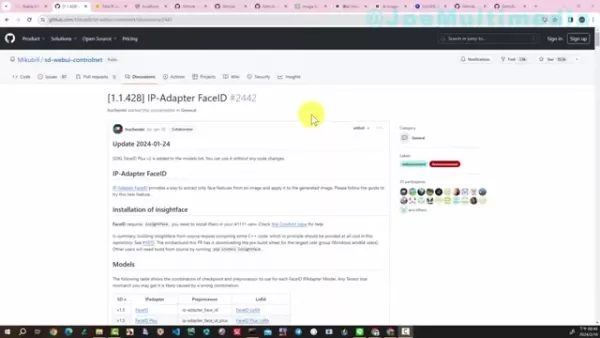
What Exactly Is IP-Adapter FaceID?
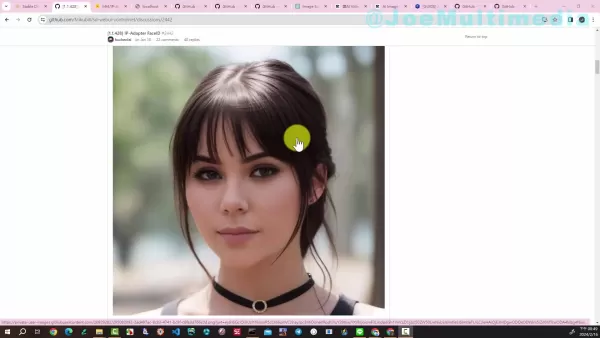
IP-Adapter FaceID is a cutting-edge tool designed to analyze facial features from an image and apply them to new creations. Unlike older methods that often led to unpredictable results, FaceID focuses on precision. It takes the unique attributes of a face—a curve of the jawline, the shape of the eyes—and ensures they stay intact across multiple outputs. This level of control is invaluable for storytellers, marketers, and creatives alike.
From hyper-realistic depictions to artistic renderings, FaceID handles it all. Whether you're aiming for a painting-like finish or something more whimsical, the tool adapts seamlessly. Its compatibility with ControlNet makes it even easier to use, providing a smooth interface that even beginners can master.
Why does facial consistency matter? Think of it this way: if you’re telling a story or building a brand, having a face that remains the same across every piece strengthens your message. It’s the difference between a cohesive narrative and one that feels disjointed.
Getting Started with IP-Adapter FaceID
To harness the power of FaceID, you'll first need to set up your tools. Here’s what you’ll need:
- Stable Diffusion: A solid foundation for AI image generation.
- ControlNet: The interface that brings FaceID to life.
- Hardware: Enough storage and processing power to handle the models.
- Internet Access: To download necessary files.
Installation Steps
Let’s break down the installation process:
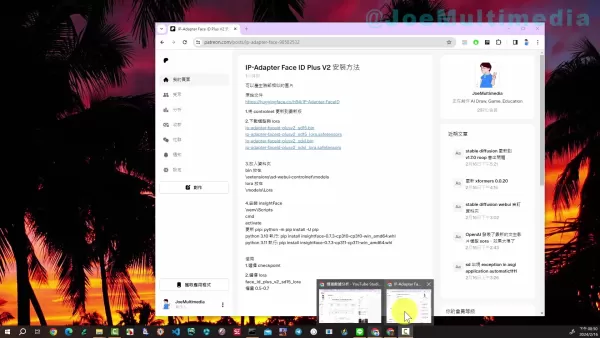
Download Models and LoRAs
Start by grabbing the essential files from the provided link. These files are the backbone of FaceID—they hold the data needed to generate accurate faces.
Place Files Correctly
Once downloaded, store the models in the modelsControlNet directory and the LoRAs in the modelsLoRA folder within your Stable Diffusion installation. Proper placement ensures everything runs smoothly.
Install InsightFace
InsightFace is crucial for FaceID to work. If you haven’t already, install it now. It’s a straightforward process—you can use pip to handle this.
Activate the Virtual Environment
Navigate to your Stable Diffusion directory, then to the virtual environment (venv) and activate it using the command line.
Finalize Setup
Run the necessary pip commands to install InsightFace. After that, restart Stable Diffusion to integrate the changes.
Benefits of Using IP-Adapter FaceID
One of the standout advantages of FaceID is its ability to create consistent characters. Whether you're designing for animation, branding, or personal projects, having a stable face across different outputs enhances the overall quality. Plus, the tool’s adaptability means you can switch between styles—from photorealistic to artistic—without losing the essence of the original.
However, like any tool, it has its limitations. For starters, you’ll need to set up Stable Diffusion and ControlNet beforehand. Installation can be tricky for beginners, and performance depends on your hardware. Additionally, the initial image quality influences the consistency of subsequent outputs.

Practical Applications of IP-Adapter FaceID
Character Design and Animation
Imagine being able to create a character that looks the same in every scene, regardless of style or angle. That’s exactly what FaceID lets you do. Animators and game developers can breathe life into their characters knowing they’ll look identical frame after frame.
Marketing and Advertising
Brands can benefit immensely from consistent virtual personas. Whether it’s a fictional brand ambassador or a personalized avatar, having a face that never wavers strengthens recognition and trust.
Personalized Content Creation
For hobbyists and solo creators, FaceID is a dream come true. Whether you’re designing avatars, illustrating fan art, or crafting digital stories, maintaining character consistency is simple and rewarding.
Frequently Asked Questions
Q: What’s the main purpose of IP-Adapter FaceID?
A: It ensures facial consistency across AI-generated images, allowing for cohesive character creation.
Q: Can FaceID handle different styles?
A: Absolutely! From realistic to artistic, FaceID adapts effortlessly.
Q: Do I need anything special to start?
A: Yes, you’ll need Stable Diffusion and ControlNet installed.
Q: Where should I put the downloaded files?
A: Models go in modelsControlNet, and LoRAs in modelsLoRA.
Comparing FaceID to Other Techniques
While other face-swapping tools exist, few match FaceID’s precision and versatility. Traditional methods often fail to retain identity across outputs, leading to inconsistencies that undermine your vision. FaceID, on the other hand, dissects facial features into distinct components, ensuring each element stays true to the original.
With its advanced algorithms and seamless integration, FaceID democratizes AI face generation. No longer do you need to be a tech expert to achieve stunning results. Its cost-free nature makes it accessible to everyone, from hobbyists to professionals.
Whether you’re crafting a narrative, launching a campaign, or simply indulging in personal creativity, IP-Adapter FaceID opens doors to endless possibilities. Dive in and see how it can transform your work today!
Related article
 Musk Considered Leaving OpenAI to His Kids as Altman Testifies
This morning, OpenAI CEO Sam Altman took the stand to address former co-founder Elon Musk’s lawsuit challenging the company’s corporate structure.When asked about Musk’s claim that other founders “stole a charity” by launching a for-profit subsidiary
Sam Altman Sparks Debate Over AI's Deceleration
Listen onApple PodcastsListen onSpotifyOpenAI CEO Sam Altman recently suggested that it may be time to “pace the rate of AI development” to allow society to “harden around some of these new capability levels.”On the latest episode of TechCrunch’s Equ
Anthropic Opens Doors to EU Cybersecurity Agency as Mythos5 Model Faces Compliance Exam
Artificial intelligence compliance regulations are advancing significantly. Leading AI firm Anthropic has officially granted the European Union's cybersecurity authority access to its Mythos AI model, a pivotal move for this advanced large language m
Related Special Topic Recommendations
Education and Learning
Musk Considered Leaving OpenAI to His Kids as Altman Testifies
This morning, OpenAI CEO Sam Altman took the stand to address former co-founder Elon Musk’s lawsuit challenging the company’s corporate structure.When asked about Musk’s claim that other founders “stole a charity” by launching a for-profit subsidiary
Sam Altman Sparks Debate Over AI's Deceleration
Listen onApple PodcastsListen onSpotifyOpenAI CEO Sam Altman recently suggested that it may be time to “pace the rate of AI development” to allow society to “harden around some of these new capability levels.”On the latest episode of TechCrunch’s Equ
Anthropic Opens Doors to EU Cybersecurity Agency as Mythos5 Model Faces Compliance Exam
Artificial intelligence compliance regulations are advancing significantly. Leading AI firm Anthropic has officially granted the European Union's cybersecurity authority access to its Mythos AI model, a pivotal move for this advanced large language m
Related Special Topic Recommendations
Education and Learning
 AI Quiz Builder Platforms for Teachers, Tutors, and Cohort-Based Learning Programs
2026 Latest Best AI Quiz Builder Platforms for Teachers, Tutors, and Cohort-Based Learning Programs! XIX.AI has curated a top-rated list of powerful game-changing tools that go through real-world tests to deliver accurate rankings. These must-try platforms help boost writing efficiency, streamline content creation, and simplify quiz design across all learning scenarios. Explore now to discover your perfect tool for unlocking your AI edge in teaching!
 13 tools
 xix.ai
code
AI Pull Request Review Tools for GitHub Teams Handling Refactors, Bugs, and Security Gaps
xix.ai
code
AI Pull Request Review Tools for GitHub Teams Handling Refactors, Bugs, and Security Gaps
2026 Latest Best AI Pull Request Review Tools for GitHub Teams are here on XIX.AI! This top-rated curated list showcases powerful game-changing solutions that streamline refactoring, bug fixing, and security gap detection across all team workflows. Enjoy a free vs paid comparison along with real-world tests and detailed rankings to help you find the perfect tool that boosts productivity significantly. Explore now to unlock your AI edge!
12 tools
xix.ai
Text-to-speech
Best AI Text to Speech Tools for Natural Voiceovers
2026 Latest Best Top-rated AI Text to Speech Tools for Natural Voiceovers are here on XIX.AI! This curated list features powerful, game-changing options that deliver crystal-clear voices for every use case, backed by real-world tests and weekly updated rankings. Get a free vs paid comparison to find the must-try solution that boosts your productivity instantly. Explore now to Unlock your AI edge!
11 tools
xix.ai
Comic Creation
Manga AI Background Generators for Serialized Chapters, Covers, and Promo Art
2026 Latest Best Manga AI Background Generators Ranked Top-Rated! This curated collection showcases powerful game-changing tools perfect for creating high-quality chapter backgrounds, book covers, and promotional art. Every option has undergone rigorous real-world tests to ensure reliability. Get a free vs paid comparison along with detailed insights. Explore now to discover your perfect tool and unlock your AI edge in manga creation.
6 tools
xix.ai
Image editing
AI Object Removal Editors: Clean Up Portraits, Travel, and Product Shots
2026 Latest Best Top-rated AI Object Removal Editors for portraits travel product shots! XIX.AI curates a powerful game-changing collection regularly updated with weekly rankings. These tools offer real-world tests to help you quickly remove unwanted elements, boost content quality, and save tons of time without compromising results. Must-try for anyone aiming to unlock their AI creation edge. Explore now!
10 tools
xix.ai
Text-to-speech
Best AI Text to Speech Tools for Online Courses
2026 Latest Best Top-rated AI Text to Speech Tools for Online Courses are curated by XIX.AI based on rigorous real-world tests and weekly updated rankings. These powerful tools help creators deliver crystal-clear audio content effortlessly, boosting writing efficiency and streamlining course production. Check out the free vs paid comparison to find your perfect fit. Explore now to unlock your AI edge in online education.
10 tools
xix.ai

 Comments (5)
0/500
Comments (5)
0/500
![SamuelClark]()
Finally, a way to stop AI from giving everyone that uncanny valley stare! 😅 IP-Adapter FaceID is a game-changer for keeping faces consistent across different prompts. I've been struggling with this for ages, so I'm definitely trying it out. Thanks for the tip!
![AndrewPerez]()
這技術太酷了!以後做角色設計是不是可以直接用這個生成一系列表情包了?不過想想也有點可怕,萬一被濫用來偽造影片怎麼辦... 開發者有考慮過倫理問題嗎?🤔
![AlbertEvans]()
Also das mit den konsistenten Gesichtern ist echt ein Gamechanger! Früher sah meine KI-generierte Familie aus wie eine Sammlung zufälliger Charaktere 😅 Jetzt kann ich endlich realistische Porträts erstellen, ohne dass die Nase plötzlich in der Mitte der Stirn landet. Aber mal ehrlich, wann kommt die Version, die auch meine Hausaufgaben macht? 🤔
![JonathanAllen]()
Sempre me incomodou como as IAs antigas criavam rostos diferentes a cada geração. O FaceID parece resolver isso de vez, mas fico curioso sobre o potencial de deepfakes mal-intencionados. Espero que tenham implementado salvaguardas éticas sólidas 🤔
![RyanGonzalez]()
This tech is wild! Generating consistent AI faces with IP-Adapter FaceID sounds like a game-changer for digital art. Can't wait to see how artists use this to create epic characters! 😎
Mastering Consistent AI-Generated Faces with IP-Adapter FaceID
Creating lifelike and consistent AI-generated faces has long been a puzzle in the world of digital art and beyond. Traditional methods often leave you with inconsistent results that can be frustrating. However, the introduction of IP-Adapter FaceID, paired with ControlNet, has changed the game. This tool allows you to extract facial features from an image and replicate them with remarkable consistency in Stable Diffusion. Whether you're working on character designs, marketing campaigns, or personal projects, IP-Adapter FaceID is a game-changer.
What Exactly Is IP-Adapter FaceID?
IP-Adapter FaceID is a cutting-edge tool designed to analyze facial features from an image and apply them to new creations. Unlike older methods that often led to unpredictable results, FaceID focuses on precision. It takes the unique attributes of a face—a curve of the jawline, the shape of the eyes—and ensures they stay intact across multiple outputs. This level of control is invaluable for storytellers, marketers, and creatives alike.
From hyper-realistic depictions to artistic renderings, FaceID handles it all. Whether you're aiming for a painting-like finish or something more whimsical, the tool adapts seamlessly. Its compatibility with ControlNet makes it even easier to use, providing a smooth interface that even beginners can master.
Why does facial consistency matter? Think of it this way: if you’re telling a story or building a brand, having a face that remains the same across every piece strengthens your message. It’s the difference between a cohesive narrative and one that feels disjointed.
Getting Started with IP-Adapter FaceID
To harness the power of FaceID, you'll first need to set up your tools. Here’s what you’ll need:
- Stable Diffusion: A solid foundation for AI image generation.
- ControlNet: The interface that brings FaceID to life.
- Hardware: Enough storage and processing power to handle the models.
- Internet Access: To download necessary files.
Installation Steps
Let’s break down the installation process:
Download Models and LoRAs
Start by grabbing the essential files from the provided link. These files are the backbone of FaceID—they hold the data needed to generate accurate faces.Place Files Correctly
Once downloaded, store the models in themodelsControlNetdirectory and the LoRAs in themodelsLoRAfolder within your Stable Diffusion installation. Proper placement ensures everything runs smoothly.Install InsightFace
InsightFace is crucial for FaceID to work. If you haven’t already, install it now. It’s a straightforward process—you can use pip to handle this.Activate the Virtual Environment
Navigate to your Stable Diffusion directory, then to the virtual environment (venv) and activate it using the command line.Finalize Setup
Run the necessary pip commands to install InsightFace. After that, restart Stable Diffusion to integrate the changes.
Benefits of Using IP-Adapter FaceID
One of the standout advantages of FaceID is its ability to create consistent characters. Whether you're designing for animation, branding, or personal projects, having a stable face across different outputs enhances the overall quality. Plus, the tool’s adaptability means you can switch between styles—from photorealistic to artistic—without losing the essence of the original.
However, like any tool, it has its limitations. For starters, you’ll need to set up Stable Diffusion and ControlNet beforehand. Installation can be tricky for beginners, and performance depends on your hardware. Additionally, the initial image quality influences the consistency of subsequent outputs.
Practical Applications of IP-Adapter FaceID
Character Design and Animation
Imagine being able to create a character that looks the same in every scene, regardless of style or angle. That’s exactly what FaceID lets you do. Animators and game developers can breathe life into their characters knowing they’ll look identical frame after frame.
Marketing and Advertising
Brands can benefit immensely from consistent virtual personas. Whether it’s a fictional brand ambassador or a personalized avatar, having a face that never wavers strengthens recognition and trust.
Personalized Content Creation
For hobbyists and solo creators, FaceID is a dream come true. Whether you’re designing avatars, illustrating fan art, or crafting digital stories, maintaining character consistency is simple and rewarding.
Frequently Asked Questions
Q: What’s the main purpose of IP-Adapter FaceID?
A: It ensures facial consistency across AI-generated images, allowing for cohesive character creation.
Q: Can FaceID handle different styles?
A: Absolutely! From realistic to artistic, FaceID adapts effortlessly.
Q: Do I need anything special to start?
A: Yes, you’ll need Stable Diffusion and ControlNet installed.
Q: Where should I put the downloaded files?
A: Models go in modelsControlNet, and LoRAs in modelsLoRA.
Comparing FaceID to Other Techniques
While other face-swapping tools exist, few match FaceID’s precision and versatility. Traditional methods often fail to retain identity across outputs, leading to inconsistencies that undermine your vision. FaceID, on the other hand, dissects facial features into distinct components, ensuring each element stays true to the original.
With its advanced algorithms and seamless integration, FaceID democratizes AI face generation. No longer do you need to be a tech expert to achieve stunning results. Its cost-free nature makes it accessible to everyone, from hobbyists to professionals.
Whether you’re crafting a narrative, launching a campaign, or simply indulging in personal creativity, IP-Adapter FaceID opens doors to endless possibilities. Dive in and see how it can transform your work today!








 Musk Considered Leaving OpenAI to His Kids as Altman Testifies
This morning, OpenAI CEO Sam Altman took the stand to address former co-founder Elon Musk’s lawsuit challenging the company’s corporate structure.When asked about Musk’s claim that other founders “stole a charity” by launching a for-profit subsidiary
Musk Considered Leaving OpenAI to His Kids as Altman Testifies
This morning, OpenAI CEO Sam Altman took the stand to address former co-founder Elon Musk’s lawsuit challenging the company’s corporate structure.When asked about Musk’s claim that other founders “stole a charity” by launching a for-profit subsidiary
 Sam Altman Sparks Debate Over AI's Deceleration
Listen onApple PodcastsListen onSpotifyOpenAI CEO Sam Altman recently suggested that it may be time to “pace the rate of AI development” to allow society to “harden around some of these new capability levels.”On the latest episode of TechCrunch’s Equ
Sam Altman Sparks Debate Over AI's Deceleration
Listen onApple PodcastsListen onSpotifyOpenAI CEO Sam Altman recently suggested that it may be time to “pace the rate of AI development” to allow society to “harden around some of these new capability levels.”On the latest episode of TechCrunch’s Equ
 Anthropic Opens Doors to EU Cybersecurity Agency as Mythos5 Model Faces Compliance Exam
Artificial intelligence compliance regulations are advancing significantly. Leading AI firm Anthropic has officially granted the European Union's cybersecurity authority access to its Mythos AI model, a pivotal move for this advanced large language m
Anthropic Opens Doors to EU Cybersecurity Agency as Mythos5 Model Faces Compliance Exam
Artificial intelligence compliance regulations are advancing significantly. Leading AI firm Anthropic has officially granted the European Union's cybersecurity authority access to its Mythos AI model, a pivotal move for this advanced large language m

2026 Latest Best AI Quiz Builder Platforms for Teachers, Tutors, and Cohort-Based Learning Programs! XIX.AI has curated a top-rated list of powerful game-changing tools that go through real-world tests to deliver accurate rankings. These must-try platforms help boost writing efficiency, streamline content creation, and simplify quiz design across all learning scenarios. Explore now to discover your perfect tool for unlocking your AI edge in teaching!
13 tools
xix.ai

2026 Latest Best AI Pull Request Review Tools for GitHub Teams are here on XIX.AI! This top-rated curated list showcases powerful game-changing solutions that streamline refactoring, bug fixing, and security gap detection across all team workflows. Enjoy a free vs paid comparison along with real-world tests and detailed rankings to help you find the perfect tool that boosts productivity significantly. Explore now to unlock your AI edge!
12 tools
xix.ai

2026 Latest Best Top-rated AI Text to Speech Tools for Natural Voiceovers are here on XIX.AI! This curated list features powerful, game-changing options that deliver crystal-clear voices for every use case, backed by real-world tests and weekly updated rankings. Get a free vs paid comparison to find the must-try solution that boosts your productivity instantly. Explore now to Unlock your AI edge!
11 tools
xix.ai

2026 Latest Best Manga AI Background Generators Ranked Top-Rated! This curated collection showcases powerful game-changing tools perfect for creating high-quality chapter backgrounds, book covers, and promotional art. Every option has undergone rigorous real-world tests to ensure reliability. Get a free vs paid comparison along with detailed insights. Explore now to discover your perfect tool and unlock your AI edge in manga creation.
6 tools
xix.ai

2026 Latest Best Top-rated AI Object Removal Editors for portraits travel product shots! XIX.AI curates a powerful game-changing collection regularly updated with weekly rankings. These tools offer real-world tests to help you quickly remove unwanted elements, boost content quality, and save tons of time without compromising results. Must-try for anyone aiming to unlock their AI creation edge. Explore now!
10 tools
xix.ai

2026 Latest Best Top-rated AI Text to Speech Tools for Online Courses are curated by XIX.AI based on rigorous real-world tests and weekly updated rankings. These powerful tools help creators deliver crystal-clear audio content effortlessly, boosting writing efficiency and streamlining course production. Check out the free vs paid comparison to find your perfect fit. Explore now to unlock your AI edge in online education.
10 tools
xix.ai

Finally, a way to stop AI from giving everyone that uncanny valley stare! 😅 IP-Adapter FaceID is a game-changer for keeping faces consistent across different prompts. I've been struggling with this for ages, so I'm definitely trying it out. Thanks for the tip!
這技術太酷了!以後做角色設計是不是可以直接用這個生成一系列表情包了?不過想想也有點可怕,萬一被濫用來偽造影片怎麼辦... 開發者有考慮過倫理問題嗎?🤔
Also das mit den konsistenten Gesichtern ist echt ein Gamechanger! Früher sah meine KI-generierte Familie aus wie eine Sammlung zufälliger Charaktere 😅 Jetzt kann ich endlich realistische Porträts erstellen, ohne dass die Nase plötzlich in der Mitte der Stirn landet. Aber mal ehrlich, wann kommt die Version, die auch meine Hausaufgaben macht? 🤔
Sempre me incomodou como as IAs antigas criavam rostos diferentes a cada geração. O FaceID parece resolver isso de vez, mas fico curioso sobre o potencial de deepfakes mal-intencionados. Espero que tenham implementado salvaguardas éticas sólidas 🤔
This tech is wild! Generating consistent AI faces with IP-Adapter FaceID sounds like a game-changer for digital art. Can't wait to see how artists use this to create epic characters! 😎












