


 Home
HomeHow to use NHVR Next Generation Route Planner? Complete guide for truck drivers
Navigating Australia's road network with heavy vehicles involves complex regulations and restrictions. The National Heavy Vehicle Regulator (NHVR) has developed the Next Generation Route Planner to simplify this process, providing a powerful tool for efficient and compliant journey planning. This guide offers a detailed overview of the NHVR Next Generation Route Planner, examining its core features, benefits for operators, and the platform's future roadmap.
Key Points
The NHVR Next Generation Route Planner is designed for Australia's heavy vehicle operators.
It uses OpenStreetMap (OSM) data for accurate, up-to-date road information.
The platform includes downloadable route features for greater utility.
An intelligent routing pilot optimizes paths based on heavy vehicle specifications.
A public roadmap outlines planned improvements and updates.
The tool prioritizes user-friendliness and operational efficiency.
Understanding the NHVR Next Generation Route Planner
What is the NHVR Next Generation Route Planner?
The NHVR Next Generation Route Planner is a web-based application developed by the National Heavy Vehicle Regulator (NHVR). Its primary function is to help heavy vehicle operators plan efficient and legally compliant routes across Australia.

It factors in vehicle dimensions, weight limits, road conditions, and permit requirements to recommend optimal routes. This tool is designed to streamline transportation planning for the heavy vehicle industry.
It represents a significant upgrade from previous versions, with a focus on intuitive design. The planner is a key part of the NHVR's commitment to enhancing safety and productivity in the sector.
The Transition to OpenStreetMap (OSM)
A major upgrade in the Next Generation Route Planner is the shift to OpenStreetMap (OSM) as its foundational map data.
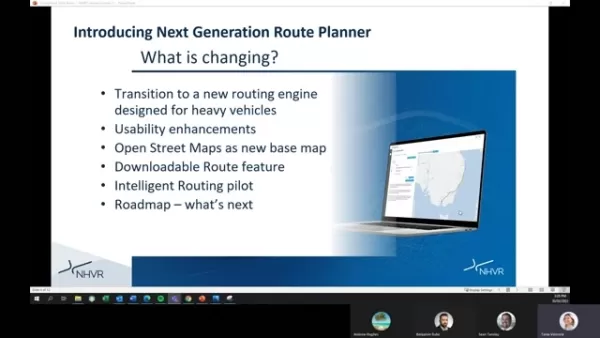
This move away from proprietary commercial mapping offers several key advantages:
- Cost-Effectiveness: Using OSM removes expensive licensing fees, making the platform more sustainable and accessible.
- Data Accuracy: OSM's collaborative, community-driven model allows for rapid error correction and updates, leading to more current and reliable road data.
- Community-Driven Updates: This model ensures map details are continually refined, a significant step forward from basic car navigation. The data is rich and detailed, improving the recognition of routing restrictions.
- Flexibility and Customization: The open-source nature of OSM allows the NHVR to tailor the map data to better suit the specific needs of the heavy vehicle industry.
While OSM is now the default, operators can switch back to the legacy map view if needed, ensuring a smooth transition.
Key Takeaway: The switch to OpenStreetMap enables a more robust routing experience tailored for heavy vehicles, better meeting operator needs.
Key Benefits and Enhancements
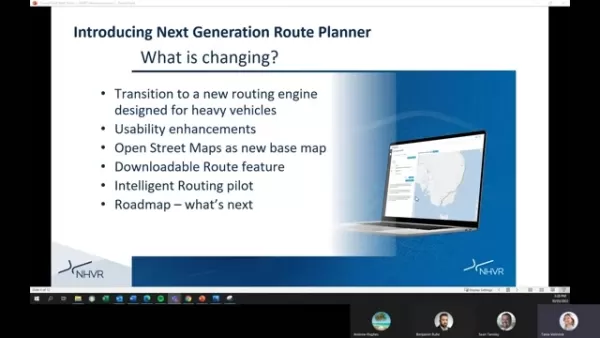
The Next Generation Route Planner introduces several improvements for a better user experience and more accurate routing.
- A New Routing Engine:
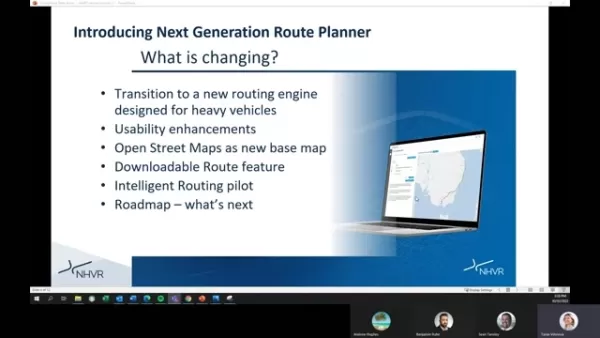
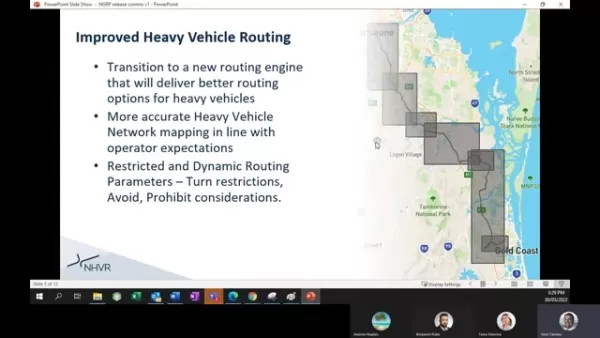
Designed specifically for heavy vehicles, this engine is a major driver of improved routing, accounting for truck characteristics and dimensions.
- Intelligent Routing Pilot: This system calculates the most efficient routes, considering posted road restrictions and permit requirements.
- Downloadable Route Feature: Routes can now be downloaded in useful formats, providing more than just a PDF. Enhanced mapping leads to more accurate heavy vehicle routing.
- Downloadable Routes: Operators can download routes in common formats for seamless integration with other navigation and fleet management systems.
- Usability Enhancements: Planned improvements include a refreshed map visual style for better clarity and toggle functions to simplify map reading.
- Dynamic Traffic Integration: Future potential includes using real-time traffic data to dynamically adjust routes for greater efficiency and safety.
- Improved Heavy Vehicle Access: The system accounts for parameters like turn restrictions and prohibited roads, allowing routes to avoid unsuitable conditions.
- OpenStreetMap Enablement: OSM provides a better foundational experience designed for heavy vehicle routing, aligning outcomes with operator expectations.
The result is a clearer visual interface. Usability enhancements also improve touch and mouse navigation. Quick search functionality has been upgraded.
Deep Dive into Key Features
The Intelligent Routing Pilot: Optimizing Heavy Vehicle Routes
A standout feature of the Next Generation Route Planner is the Intelligent Routing Pilot. It goes beyond basic route calculation by considering factors specific to heavy vehicles to suggest the most efficient and compliant paths.
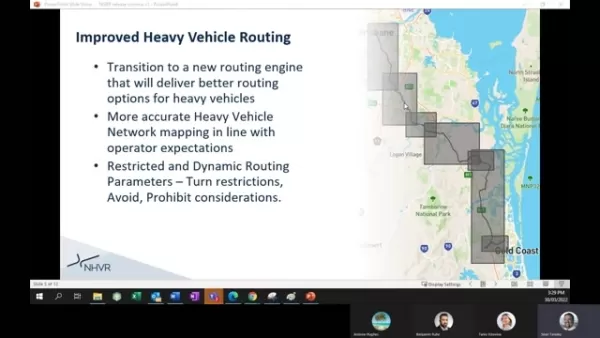
The pilot factors in critical aspects like gazetted roads requiring permits. It prioritizes routes with pre-approved access status and understands dynamic restrictions. The system also accounts for specific vehicle configurations, managing turn and road restrictions effectively.
By considering these elements, the Intelligent Routing Pilot aims to minimize travel time, reduce fuel consumption, and ensure regulatory compliance, boosting the overall efficiency and safety of heavy vehicle operations.
Usability Enhancements: A User-Centric Design
The NHVR has strongly emphasized usability in the Next Generation Route Planner, incorporating several enhancements based on user feedback to create a more intuitive platform.
These include:
Improved interaction for both touch and mouse navigation, making map searches easier.
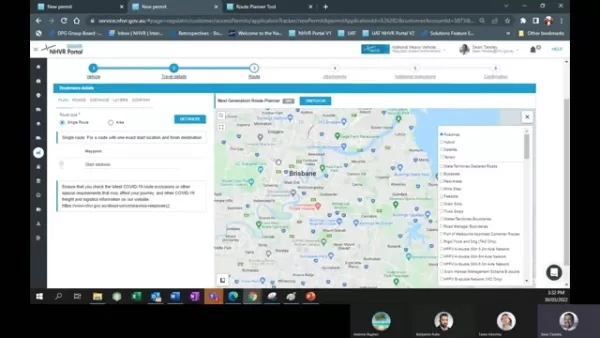
More defined and readable road displays.
Enhanced map detail.
Improved visual clarity.
How To Plan A Trip With the NHVR Next Generation Route Planner
Input Your Start and End Points
To use the NHVR tool, you need a start and end point. The interface provides address input boxes for easy entry of locations, GPS coordinates, or known points.
You can select different route types:
- Single Route: A journey with one specific start and one specific finish location.
- Area: This option displays heavy vehicle information for a selected geographical area.
Plan for Roads, and Select Heavy vehicle Information
Within the planner, carefully review the suggested roads for safety and suitability. Select your vehicle type, as this determines which routes are accessible.
Note any specific COVID-related requirements for your travel area.
Review Route Distances
Using the Distance tab, you can select roads and get a summary to identify the shortest possible trip.
Review and Confirm Routes
After selecting routes, verify all plan details are correct. You can save the route with a unique ID for future reuse.
Pricing: Free Access for All
No Cost to Users
The NHVR Next Generation Route Planner is a free service for heavy vehicle operators. The shift to OpenStreetMap supports a high-quality, sustainable service model.
There are no licensing fees, subscriptions, or usage charges.
Core Features of NHVR Next Generation Route Planner
High Performing Core Features
The Route Planner's core features are beneficial for long-haul heavy transport. The tool is particularly useful for trips requiring specialized heavy vehicle routing.
- Heavy Vehicle Routing: Designed specifically for heavy vehicles.
- Route Download: Enables seamless sharing of created map information.
- Road Network Management: Ability to align with the regulated road network.
- Heavy Vehicle Signage: The planner considers signage and posted restrictions for heavy vehicles.
- Bridges: Accounts for dynamic restrictions on bridges and vehicle dimensions.
- Swept Path Analysis: Uses technology to restrict certain turns based on vehicle movement, incorporating dynamic restrictions.
Use Cases: Optimizing Heavy Vehicle Operations
Use Cases
The NHVR Next Generation Route Planner can be applied in the following scenarios:
- Route Optimization: Identifies the most efficient routes, saving time and fuel costs.
- Compliance: Helps ensure compliance by avoiding restricted areas and adhering to weight and dimension limits.
- Pre-Trip Planning: Facilitates comprehensive journey planning, minimizing potential delays.
- Risk Mitigation: Helps operators mitigate risks and improve safety by accounting for road conditions and hazards.
- Emergency Response: Can be used to route heavy vehicles for emergency services when required.
FAQ
Is the NHVR Next Generation Route Planner free to use?
Yes, the Route Planner is a free service provided by the National Heavy Vehicle Regulator (NHVR).
What mapping data does the Route Planner use?
The planner uses OpenStreetMap (OSM) data. OSM is an open-source project with up-to-date road information, maintained by a collaborative community. A key benefit is that map updates can be implemented quickly to reflect real-world changes.
Can I still switch back to the legacy route planner?
Yes. If needed, you can switch back. Look for a toggle option on the map interface to switch between the Next Generation and the original route planner.
How often is the map updated in the Route Planner?
As the Route Planner uses OpenStreetMap data, map information is typically updated every few minutes. In most cases, updates occur within an hour.
Which routes are used by the heavy vehicle operators?
The Route Planner uses pre-approved routes and also considers a user's specific vehicle configuration. It intelligently determines if a truck can travel on a given route, with this feature currently in a pilot stage.
Related Questions
How does the Next Generation Route Planner compare to other route planning tools?
The Next Generation Route Planner stands out due to its specialized focus on heavy vehicles, integration of OpenStreetMap, and intelligent routing pilot. Other general route planning tools often lack this level of specialization or real-time data focus.
What are the next steps for the NHVR Route Planning tool?
The new maps support downloadable features, improving access for operators. Further integration is planned. A key next step is enabling local road managers to create and manage map conditions specific to their areas, allowing for local real-time updates. This tool will aid in data-driven decisions regarding bridge weights and turning paths to meet all compliance needs. It will benefit not only compliance but also planning for better heavy traffic management. This means councils could improve asset management and make better-informed long-term infrastructure decisions. The NHVR is partnering with Queensland's TMR and Victoria's Department of Transport to enable this functionality.
Related article
 Swedish AI Startup Lovable Eyes $13.2 Billion Valuation After Major Funding Round
As AI-driven coding tools gain traction, Swedish startup Lovable has secured a major funding round. The company aims to raise $3 billion, potentially boosting its valuation to $13.2 billion—double the $6.6 billion recorded last December. Menlo Ventur
Google Tests Remy AI Agent for Gemini as Focus Shifts to User Control
According to Business Insider, Google is testing Remy, a new AI personal agent for Gemini. This tool aims to execute tasks on behalf of users, streamlining both professional workflows and daily routines.Currently, Remy is undergoing testing in an int
How to fix Core Web Vitals for better SEO rankings
Streamline Report Card Comments with AI ToolsIntroductionAI Tools for Generating Report Card CommentsMagic SchoolAlmanac AIChat GPTUsing Magic School to Generate Report Card CommentsLogging into Magic SchoolSelecting the Report Card Comments ToolCust
Related Special Topic Recommendations
writing
Swedish AI Startup Lovable Eyes $13.2 Billion Valuation After Major Funding Round
As AI-driven coding tools gain traction, Swedish startup Lovable has secured a major funding round. The company aims to raise $3 billion, potentially boosting its valuation to $13.2 billion—double the $6.6 billion recorded last December. Menlo Ventur
Google Tests Remy AI Agent for Gemini as Focus Shifts to User Control
According to Business Insider, Google is testing Remy, a new AI personal agent for Gemini. This tool aims to execute tasks on behalf of users, streamlining both professional workflows and daily routines.Currently, Remy is undergoing testing in an int
How to fix Core Web Vitals for better SEO rankings
Streamline Report Card Comments with AI ToolsIntroductionAI Tools for Generating Report Card CommentsMagic SchoolAlmanac AIChat GPTUsing Magic School to Generate Report Card CommentsLogging into Magic SchoolSelecting the Report Card Comments ToolCust
Related Special Topic Recommendations
writing
 Best AI Outline Generators for Long-Form SEO Articles
2026 Latest Best Top-Rated AI Outline Generators for Long-Form SEO Articles, meticulously curated by XIX.AI. These powerful tools offer game-changing assistance in creating high-quality content quickly, boosting writing efficiency significantly. Get a free vs paid comparison along with real-world tests and detailed rankings to help you find the must-try option that suits your needs. Explore now to unlock your AI edge.
 8 tools
 xix.ai
Education and Learning
AI Study Tools for Homework and Exam Prep
xix.ai
Education and Learning
AI Study Tools for Homework and Exam Prep
2026 Latest Best AI Study Tools for Homework and Exam Prep! XIX.AI curates a top-rated list of powerful, game-changing tools that help students boost productivity, streamline homework completion, and ace exams through real-world tests. Get a free vs paid comparison, detailed rankings, and must-try options to unlock your AI edge. Explore now!
10 tools
xix.ai
Music composition
AI Vocal Demo Tools for Songwriters, Hooks, Toplines, and Multilingual Draft Sessions
2026 Latest Best AI Vocal Demo Tools for Songwriters, Hook Creators, and Multi-Language Content Teams! XIX.AI has curated a top-rated list of powerful game-changing tools that go through rigorous real-world tests. You’ll find detailed free vs paid comparison data, comprehensive rankings, and must-try options to help you boost writing efficiency and unlock your creative potential. Explore now to discover your perfect tool for all your content needs!
9 tools
xix.ai
Business
Best AI Competitive Research Tools for Small Businesses
2026 Latest Best Top-rated AI Competitive Research Tools for Small Businesses! XIX.AI has curated a highly powerful game-changing collection, updated weekly with rigorous real-world tests and detailed rankings. You can find a comprehensive free vs paid comparison to help you identify the must-try tools that boost your productivity and give you a competitive edge. Explore now to discover your perfect tool!
9 tools
xix.ai
Image editing
Photoshop AI Retouch Tools for Ecommerce Apparel, Skin Cleanup, and Color Consistency
2026 Latest Best Photoshop AI retouch tools for ecommerce apparel, skin cleanup, and color consistency! This top-rated curated list features powerful game-changing solutions that help you boost writing efficiency, streamline content creation, and achieve perfect visual results effortlessly. Each tool has undergone real-world tests through weekly updated rankings, complete with free vs paid comparison details. Backed by XIX.AI, it’s the must-try guide for anyone aiming to unlock your AI edge. Explore now!
10 tools
xix.ai
Prompt
Best AI Prompt Libraries for ChatGPT Workflows
2026 Latest Best Top-Rated AI Prompt Libraries for optimizing all types of ChatGPT workflows. XIX.AI has curated a powerful, game-changing collection that goes through rigorous real-world tests to ensure top performance. You can find detailed free vs paid comparisons and expert rankings to help you choose the must-try tools that boost your productivity and unlock your AI edge. Explore now!
11 tools
xix.ai

 Comments (0)
0/500
Comments (0)
0/500
Navigating Australia's road network with heavy vehicles involves complex regulations and restrictions. The National Heavy Vehicle Regulator (NHVR) has developed the Next Generation Route Planner to simplify this process, providing a powerful tool for efficient and compliant journey planning. This guide offers a detailed overview of the NHVR Next Generation Route Planner, examining its core features, benefits for operators, and the platform's future roadmap.
Key Points
The NHVR Next Generation Route Planner is designed for Australia's heavy vehicle operators.
It uses OpenStreetMap (OSM) data for accurate, up-to-date road information.
The platform includes downloadable route features for greater utility.
An intelligent routing pilot optimizes paths based on heavy vehicle specifications.
A public roadmap outlines planned improvements and updates.
The tool prioritizes user-friendliness and operational efficiency.
Understanding the NHVR Next Generation Route Planner
What is the NHVR Next Generation Route Planner?
The NHVR Next Generation Route Planner is a web-based application developed by the National Heavy Vehicle Regulator (NHVR). Its primary function is to help heavy vehicle operators plan efficient and legally compliant routes across Australia.
It factors in vehicle dimensions, weight limits, road conditions, and permit requirements to recommend optimal routes. This tool is designed to streamline transportation planning for the heavy vehicle industry.
It represents a significant upgrade from previous versions, with a focus on intuitive design. The planner is a key part of the NHVR's commitment to enhancing safety and productivity in the sector.
The Transition to OpenStreetMap (OSM)
A major upgrade in the Next Generation Route Planner is the shift to OpenStreetMap (OSM) as its foundational map data.
This move away from proprietary commercial mapping offers several key advantages:
- Cost-Effectiveness: Using OSM removes expensive licensing fees, making the platform more sustainable and accessible.
- Data Accuracy: OSM's collaborative, community-driven model allows for rapid error correction and updates, leading to more current and reliable road data.
- Community-Driven Updates: This model ensures map details are continually refined, a significant step forward from basic car navigation. The data is rich and detailed, improving the recognition of routing restrictions.
- Flexibility and Customization: The open-source nature of OSM allows the NHVR to tailor the map data to better suit the specific needs of the heavy vehicle industry.
While OSM is now the default, operators can switch back to the legacy map view if needed, ensuring a smooth transition.
Key Takeaway: The switch to OpenStreetMap enables a more robust routing experience tailored for heavy vehicles, better meeting operator needs.
Key Benefits and Enhancements
The Next Generation Route Planner introduces several improvements for a better user experience and more accurate routing.
- A New Routing Engine:
Designed specifically for heavy vehicles, this engine is a major driver of improved routing, accounting for truck characteristics and dimensions.
- Intelligent Routing Pilot: This system calculates the most efficient routes, considering posted road restrictions and permit requirements.
- Downloadable Route Feature: Routes can now be downloaded in useful formats, providing more than just a PDF. Enhanced mapping leads to more accurate heavy vehicle routing.
- Downloadable Routes: Operators can download routes in common formats for seamless integration with other navigation and fleet management systems.
- Usability Enhancements: Planned improvements include a refreshed map visual style for better clarity and toggle functions to simplify map reading.
- Dynamic Traffic Integration: Future potential includes using real-time traffic data to dynamically adjust routes for greater efficiency and safety.
- Improved Heavy Vehicle Access: The system accounts for parameters like turn restrictions and prohibited roads, allowing routes to avoid unsuitable conditions.
- OpenStreetMap Enablement: OSM provides a better foundational experience designed for heavy vehicle routing, aligning outcomes with operator expectations.
The result is a clearer visual interface. Usability enhancements also improve touch and mouse navigation. Quick search functionality has been upgraded.
Deep Dive into Key Features
The Intelligent Routing Pilot: Optimizing Heavy Vehicle Routes
A standout feature of the Next Generation Route Planner is the Intelligent Routing Pilot. It goes beyond basic route calculation by considering factors specific to heavy vehicles to suggest the most efficient and compliant paths.
The pilot factors in critical aspects like gazetted roads requiring permits. It prioritizes routes with pre-approved access status and understands dynamic restrictions. The system also accounts for specific vehicle configurations, managing turn and road restrictions effectively.
By considering these elements, the Intelligent Routing Pilot aims to minimize travel time, reduce fuel consumption, and ensure regulatory compliance, boosting the overall efficiency and safety of heavy vehicle operations.
Usability Enhancements: A User-Centric Design
The NHVR has strongly emphasized usability in the Next Generation Route Planner, incorporating several enhancements based on user feedback to create a more intuitive platform.
These include:
Improved interaction for both touch and mouse navigation, making map searches easier.
More defined and readable road displays.
Enhanced map detail.
Improved visual clarity.
How To Plan A Trip With the NHVR Next Generation Route Planner
Input Your Start and End Points
To use the NHVR tool, you need a start and end point. The interface provides address input boxes for easy entry of locations, GPS coordinates, or known points.
You can select different route types:
- Single Route: A journey with one specific start and one specific finish location.
- Area: This option displays heavy vehicle information for a selected geographical area.
Plan for Roads, and Select Heavy vehicle Information
Within the planner, carefully review the suggested roads for safety and suitability. Select your vehicle type, as this determines which routes are accessible.
Note any specific COVID-related requirements for your travel area.
Review Route Distances
Using the Distance tab, you can select roads and get a summary to identify the shortest possible trip.
Review and Confirm Routes
After selecting routes, verify all plan details are correct. You can save the route with a unique ID for future reuse.
Pricing: Free Access for All
No Cost to Users
The NHVR Next Generation Route Planner is a free service for heavy vehicle operators. The shift to OpenStreetMap supports a high-quality, sustainable service model.
There are no licensing fees, subscriptions, or usage charges.
Core Features of NHVR Next Generation Route Planner
High Performing Core Features
The Route Planner's core features are beneficial for long-haul heavy transport. The tool is particularly useful for trips requiring specialized heavy vehicle routing.
- Heavy Vehicle Routing: Designed specifically for heavy vehicles.
- Route Download: Enables seamless sharing of created map information.
- Road Network Management: Ability to align with the regulated road network.
- Heavy Vehicle Signage: The planner considers signage and posted restrictions for heavy vehicles.
- Bridges: Accounts for dynamic restrictions on bridges and vehicle dimensions.
- Swept Path Analysis: Uses technology to restrict certain turns based on vehicle movement, incorporating dynamic restrictions.
Use Cases: Optimizing Heavy Vehicle Operations
Use Cases
The NHVR Next Generation Route Planner can be applied in the following scenarios:
- Route Optimization: Identifies the most efficient routes, saving time and fuel costs.
- Compliance: Helps ensure compliance by avoiding restricted areas and adhering to weight and dimension limits.
- Pre-Trip Planning: Facilitates comprehensive journey planning, minimizing potential delays.
- Risk Mitigation: Helps operators mitigate risks and improve safety by accounting for road conditions and hazards.
- Emergency Response: Can be used to route heavy vehicles for emergency services when required.
FAQ
Is the NHVR Next Generation Route Planner free to use?
Yes, the Route Planner is a free service provided by the National Heavy Vehicle Regulator (NHVR).
What mapping data does the Route Planner use?
The planner uses OpenStreetMap (OSM) data. OSM is an open-source project with up-to-date road information, maintained by a collaborative community. A key benefit is that map updates can be implemented quickly to reflect real-world changes.
Can I still switch back to the legacy route planner?
Yes. If needed, you can switch back. Look for a toggle option on the map interface to switch between the Next Generation and the original route planner.
How often is the map updated in the Route Planner?
As the Route Planner uses OpenStreetMap data, map information is typically updated every few minutes. In most cases, updates occur within an hour.
Which routes are used by the heavy vehicle operators?
The Route Planner uses pre-approved routes and also considers a user's specific vehicle configuration. It intelligently determines if a truck can travel on a given route, with this feature currently in a pilot stage.
Related Questions
How does the Next Generation Route Planner compare to other route planning tools?
The Next Generation Route Planner stands out due to its specialized focus on heavy vehicles, integration of OpenStreetMap, and intelligent routing pilot. Other general route planning tools often lack this level of specialization or real-time data focus.
What are the next steps for the NHVR Route Planning tool?
The new maps support downloadable features, improving access for operators. Further integration is planned. A key next step is enabling local road managers to create and manage map conditions specific to their areas, allowing for local real-time updates. This tool will aid in data-driven decisions regarding bridge weights and turning paths to meet all compliance needs. It will benefit not only compliance but also planning for better heavy traffic management. This means councils could improve asset management and make better-informed long-term infrastructure decisions. The NHVR is partnering with Queensland's TMR and Victoria's Department of Transport to enable this functionality.








 Swedish AI Startup Lovable Eyes $13.2 Billion Valuation After Major Funding Round
As AI-driven coding tools gain traction, Swedish startup Lovable has secured a major funding round. The company aims to raise $3 billion, potentially boosting its valuation to $13.2 billion—double the $6.6 billion recorded last December. Menlo Ventur
Google Tests Remy AI Agent for Gemini as Focus Shifts to User Control
According to Business Insider, Google is testing Remy, a new AI personal agent for Gemini. This tool aims to execute tasks on behalf of users, streamlining both professional workflows and daily routines.Currently, Remy is undergoing testing in an int
Swedish AI Startup Lovable Eyes $13.2 Billion Valuation After Major Funding Round
As AI-driven coding tools gain traction, Swedish startup Lovable has secured a major funding round. The company aims to raise $3 billion, potentially boosting its valuation to $13.2 billion—double the $6.6 billion recorded last December. Menlo Ventur
Google Tests Remy AI Agent for Gemini as Focus Shifts to User Control
According to Business Insider, Google is testing Remy, a new AI personal agent for Gemini. This tool aims to execute tasks on behalf of users, streamlining both professional workflows and daily routines.Currently, Remy is undergoing testing in an int
 How to fix Core Web Vitals for better SEO rankings
Streamline Report Card Comments with AI ToolsIntroductionAI Tools for Generating Report Card CommentsMagic SchoolAlmanac AIChat GPTUsing Magic School to Generate Report Card CommentsLogging into Magic SchoolSelecting the Report Card Comments ToolCust
How to fix Core Web Vitals for better SEO rankings
Streamline Report Card Comments with AI ToolsIntroductionAI Tools for Generating Report Card CommentsMagic SchoolAlmanac AIChat GPTUsing Magic School to Generate Report Card CommentsLogging into Magic SchoolSelecting the Report Card Comments ToolCust

2026 Latest Best Top-Rated AI Outline Generators for Long-Form SEO Articles, meticulously curated by XIX.AI. These powerful tools offer game-changing assistance in creating high-quality content quickly, boosting writing efficiency significantly. Get a free vs paid comparison along with real-world tests and detailed rankings to help you find the must-try option that suits your needs. Explore now to unlock your AI edge.
8 tools
xix.ai

2026 Latest Best AI Study Tools for Homework and Exam Prep! XIX.AI curates a top-rated list of powerful, game-changing tools that help students boost productivity, streamline homework completion, and ace exams through real-world tests. Get a free vs paid comparison, detailed rankings, and must-try options to unlock your AI edge. Explore now!
10 tools
xix.ai

2026 Latest Best AI Vocal Demo Tools for Songwriters, Hook Creators, and Multi-Language Content Teams! XIX.AI has curated a top-rated list of powerful game-changing tools that go through rigorous real-world tests. You’ll find detailed free vs paid comparison data, comprehensive rankings, and must-try options to help you boost writing efficiency and unlock your creative potential. Explore now to discover your perfect tool for all your content needs!
9 tools
xix.ai

2026 Latest Best Top-rated AI Competitive Research Tools for Small Businesses! XIX.AI has curated a highly powerful game-changing collection, updated weekly with rigorous real-world tests and detailed rankings. You can find a comprehensive free vs paid comparison to help you identify the must-try tools that boost your productivity and give you a competitive edge. Explore now to discover your perfect tool!
9 tools
xix.ai

2026 Latest Best Photoshop AI retouch tools for ecommerce apparel, skin cleanup, and color consistency! This top-rated curated list features powerful game-changing solutions that help you boost writing efficiency, streamline content creation, and achieve perfect visual results effortlessly. Each tool has undergone real-world tests through weekly updated rankings, complete with free vs paid comparison details. Backed by XIX.AI, it’s the must-try guide for anyone aiming to unlock your AI edge. Explore now!
10 tools
xix.ai

2026 Latest Best Top-Rated AI Prompt Libraries for optimizing all types of ChatGPT workflows. XIX.AI has curated a powerful, game-changing collection that goes through rigorous real-world tests to ensure top performance. You can find detailed free vs paid comparisons and expert rankings to help you choose the must-try tools that boost your productivity and unlock your AI edge. Explore now!
11 tools
xix.ai












