


 Home
HomeGemini AI by Google Can Now Auto-Complete Spreadsheet Cells
Google is introducing a new AI function in Sheets to assist with generating text for completing sections of your spreadsheet. Powered by Google Gemini, this functionality can reference specific cells to craft text, summarize details, or classify your data.
As illustrated in Google’s example, you can leverage this new AI function to create and customize advertisement copy based on different target audiences listed in your sheet. To do so, highlight the cells where you’d like the AI-generated copy to appear, then apply this function (ensuring to adjust the target range to match your specific data):
- =AI("Write a formal ad copy for the product. Cater copy to the objective and target audience.", A2:C2)
Another example involves using the AI function to condense customer feedback listed across a range of cells. This can be done by entering the following:
- =AI("For the customer, write a one sentence summary of their feedback.", A2:D2)
You can also categorize a customer inquiry as a compliment, exchange request, or return request, or use it to sort restaurants by location. Visit Google’s support page for a range of AI function examples.
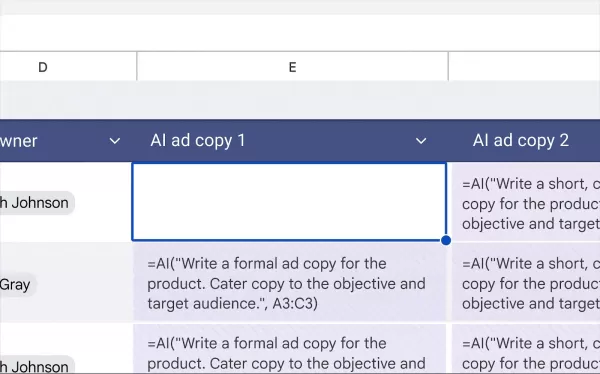
This example demonstrates how Gemini can generate ad copy from data in selected cells. GIF: GoogleThis addition builds on the existing Gemini-powered feature in Sheets that answers questions about your data and creates visualizations. However, the AI function currently has some limitations, as it only supports text-based responses. Google notes that it cannot access your entire spreadsheet or Google Drive files, and outputs can only be generated for up to 200 selected cells at a time—you'll need to wait for completion before selecting additional cells.
The AI function is now rolling out to Google Workspace users on business and enterprise plans, as well as Gemini AI Pro and Ultra subscribers. It is also available for those using the Gemini Education plan or add-on.
Related article
 Google Tests Remy AI Agent for Gemini as Focus Shifts to User Control
According to Business Insider, Google is testing Remy, a new AI personal agent for Gemini. This tool aims to execute tasks on behalf of users, streamlining both professional workflows and daily routines.Currently, Remy is undergoing testing in an int
Ollie bets privacy focus to win AI assistant race
To be genuinely helpful, an AI assistant must understand its user deeply. Ollie, a personal assistant designed for daily life, operates on the premise that this doesn’t require surrendering your data or compromising your privacy.While certain enterpr
How AI LIVE: London Will Explore AI & Industrial Automation
The summit will convene C-suite executives from around the globe to address pressing challenges in global industries, ranging from AI-driven disruption to economic volatility.AI LIVE: The London Summit will gather over 2,000 international leaders und
Related Special Topic Recommendations
Data Analysis
Google Tests Remy AI Agent for Gemini as Focus Shifts to User Control
According to Business Insider, Google is testing Remy, a new AI personal agent for Gemini. This tool aims to execute tasks on behalf of users, streamlining both professional workflows and daily routines.Currently, Remy is undergoing testing in an int
Ollie bets privacy focus to win AI assistant race
To be genuinely helpful, an AI assistant must understand its user deeply. Ollie, a personal assistant designed for daily life, operates on the premise that this doesn’t require surrendering your data or compromising your privacy.While certain enterpr
How AI LIVE: London Will Explore AI & Industrial Automation
The summit will convene C-suite executives from around the globe to address pressing challenges in global industries, ranging from AI-driven disruption to economic volatility.AI LIVE: The London Summit will gather over 2,000 international leaders und
Related Special Topic Recommendations
Data Analysis
 Best AI Anomaly Detection Tools for KPI Monitoring across SaaS and Ecommerce Teams
2026 Latest Best Top-rated AI Anomaly Detection Tools for KPI Monitoring in SaaS and Ecommerce teams! XIX.AI has curated a powerful, game-changing collection based on rigorous real-world tests and weekly updated rankings. You’ll find detailed free vs paid comparison insights to help you identify the must-try solution that boosts productivity and unlocks your AI edge. Explore now!
 10 tools
 xix.ai
writing
Best AI Outline Generators for Long-Form SEO Articles
xix.ai
writing
Best AI Outline Generators for Long-Form SEO Articles
2026 Latest Best Top-Rated AI Outline Generators for Long-Form SEO Articles, meticulously curated by XIX.AI. These powerful tools offer game-changing assistance in creating high-quality content quickly, boosting writing efficiency significantly. Get a free vs paid comparison along with real-world tests and detailed rankings to help you find the must-try option that suits your needs. Explore now to unlock your AI edge.
8 tools
xix.ai
Education and Learning
AI Study Tools for Homework and Exam Prep
2026 Latest Best AI Study Tools for Homework and Exam Prep! XIX.AI curates a top-rated list of powerful, game-changing tools that help students boost productivity, streamline homework completion, and ace exams through real-world tests. Get a free vs paid comparison, detailed rankings, and must-try options to unlock your AI edge. Explore now!
10 tools
xix.ai
Music composition
AI Vocal Demo Tools for Songwriters, Hooks, Toplines, and Multilingual Draft Sessions
2026 Latest Best AI Vocal Demo Tools for Songwriters, Hook Creators, and Multi-Language Content Teams! XIX.AI has curated a top-rated list of powerful game-changing tools that go through rigorous real-world tests. You’ll find detailed free vs paid comparison data, comprehensive rankings, and must-try options to help you boost writing efficiency and unlock your creative potential. Explore now to discover your perfect tool for all your content needs!
9 tools
xix.ai
Business
Best AI Competitive Research Tools for Small Businesses
2026 Latest Best Top-rated AI Competitive Research Tools for Small Businesses! XIX.AI has curated a highly powerful game-changing collection, updated weekly with rigorous real-world tests and detailed rankings. You can find a comprehensive free vs paid comparison to help you identify the must-try tools that boost your productivity and give you a competitive edge. Explore now to discover your perfect tool!
9 tools
xix.ai
Image editing
Photoshop AI Retouch Tools for Ecommerce Apparel, Skin Cleanup, and Color Consistency
2026 Latest Best Photoshop AI retouch tools for ecommerce apparel, skin cleanup, and color consistency! This top-rated curated list features powerful game-changing solutions that help you boost writing efficiency, streamline content creation, and achieve perfect visual results effortlessly. Each tool has undergone real-world tests through weekly updated rankings, complete with free vs paid comparison details. Backed by XIX.AI, it’s the must-try guide for anyone aiming to unlock your AI edge. Explore now!
10 tools
xix.ai

 Comments (3)
0/500
Comments (3)
0/500
![LucasNelson]()
Finally, a tool that understands my messy data! 😂 Gemini in Sheets is a game-changer for anyone who hates manual entry. It’s like having a tiny assistant that actually gets context. Can’t wait to test it on my tax records... fingers crossed it doesn’t hallucinate my income! 📊✨
![PeterRoberts]()
這個功能看起來很實用!以後做報表時,那些重複性的填寫工作應該能省下不少時間。不過,AI生成的內容準確性如何?會不會需要花更多時間去核對和修正呢?有點期待實際試用看看效果如何。😊
![AlbertRodriguez]()
Essa função de preenchimento automático é uma mão na roda! Só tenho receio dos erros quando o contexto não for tão claro... 🤔 É um avanço incrível, mas será que a confiabilidade vai ser constante em dados mais complexos?
Google is introducing a new AI function in Sheets to assist with generating text for completing sections of your spreadsheet. Powered by Google Gemini, this functionality can reference specific cells to craft text, summarize details, or classify your data.
As illustrated in Google’s example, you can leverage this new AI function to create and customize advertisement copy based on different target audiences listed in your sheet. To do so, highlight the cells where you’d like the AI-generated copy to appear, then apply this function (ensuring to adjust the target range to match your specific data):
- =AI("Write a formal ad copy for the product. Cater copy to the objective and target audience.", A2:C2)
Another example involves using the AI function to condense customer feedback listed across a range of cells. This can be done by entering the following:
- =AI("For the customer, write a one sentence summary of their feedback.", A2:D2)
You can also categorize a customer inquiry as a compliment, exchange request, or return request, or use it to sort restaurants by location. Visit Google’s support page for a range of AI function examples.
This addition builds on the existing Gemini-powered feature in Sheets that answers questions about your data and creates visualizations. However, the AI function currently has some limitations, as it only supports text-based responses. Google notes that it cannot access your entire spreadsheet or Google Drive files, and outputs can only be generated for up to 200 selected cells at a time—you'll need to wait for completion before selecting additional cells.
The AI function is now rolling out to Google Workspace users on business and enterprise plans, as well as Gemini AI Pro and Ultra subscribers. It is also available for those using the Gemini Education plan or add-on.







 Google Tests Remy AI Agent for Gemini as Focus Shifts to User Control
According to Business Insider, Google is testing Remy, a new AI personal agent for Gemini. This tool aims to execute tasks on behalf of users, streamlining both professional workflows and daily routines.Currently, Remy is undergoing testing in an int
Google Tests Remy AI Agent for Gemini as Focus Shifts to User Control
According to Business Insider, Google is testing Remy, a new AI personal agent for Gemini. This tool aims to execute tasks on behalf of users, streamlining both professional workflows and daily routines.Currently, Remy is undergoing testing in an int
 Ollie bets privacy focus to win AI assistant race
To be genuinely helpful, an AI assistant must understand its user deeply. Ollie, a personal assistant designed for daily life, operates on the premise that this doesn’t require surrendering your data or compromising your privacy.While certain enterpr
Ollie bets privacy focus to win AI assistant race
To be genuinely helpful, an AI assistant must understand its user deeply. Ollie, a personal assistant designed for daily life, operates on the premise that this doesn’t require surrendering your data or compromising your privacy.While certain enterpr
 How AI LIVE: London Will Explore AI & Industrial Automation
The summit will convene C-suite executives from around the globe to address pressing challenges in global industries, ranging from AI-driven disruption to economic volatility.AI LIVE: The London Summit will gather over 2,000 international leaders und
How AI LIVE: London Will Explore AI & Industrial Automation
The summit will convene C-suite executives from around the globe to address pressing challenges in global industries, ranging from AI-driven disruption to economic volatility.AI LIVE: The London Summit will gather over 2,000 international leaders und

2026 Latest Best Top-rated AI Anomaly Detection Tools for KPI Monitoring in SaaS and Ecommerce teams! XIX.AI has curated a powerful, game-changing collection based on rigorous real-world tests and weekly updated rankings. You’ll find detailed free vs paid comparison insights to help you identify the must-try solution that boosts productivity and unlocks your AI edge. Explore now!
10 tools
xix.ai

2026 Latest Best Top-Rated AI Outline Generators for Long-Form SEO Articles, meticulously curated by XIX.AI. These powerful tools offer game-changing assistance in creating high-quality content quickly, boosting writing efficiency significantly. Get a free vs paid comparison along with real-world tests and detailed rankings to help you find the must-try option that suits your needs. Explore now to unlock your AI edge.
8 tools
xix.ai

2026 Latest Best AI Study Tools for Homework and Exam Prep! XIX.AI curates a top-rated list of powerful, game-changing tools that help students boost productivity, streamline homework completion, and ace exams through real-world tests. Get a free vs paid comparison, detailed rankings, and must-try options to unlock your AI edge. Explore now!
10 tools
xix.ai

2026 Latest Best AI Vocal Demo Tools for Songwriters, Hook Creators, and Multi-Language Content Teams! XIX.AI has curated a top-rated list of powerful game-changing tools that go through rigorous real-world tests. You’ll find detailed free vs paid comparison data, comprehensive rankings, and must-try options to help you boost writing efficiency and unlock your creative potential. Explore now to discover your perfect tool for all your content needs!
9 tools
xix.ai

2026 Latest Best Top-rated AI Competitive Research Tools for Small Businesses! XIX.AI has curated a highly powerful game-changing collection, updated weekly with rigorous real-world tests and detailed rankings. You can find a comprehensive free vs paid comparison to help you identify the must-try tools that boost your productivity and give you a competitive edge. Explore now to discover your perfect tool!
9 tools
xix.ai

2026 Latest Best Photoshop AI retouch tools for ecommerce apparel, skin cleanup, and color consistency! This top-rated curated list features powerful game-changing solutions that help you boost writing efficiency, streamline content creation, and achieve perfect visual results effortlessly. Each tool has undergone real-world tests through weekly updated rankings, complete with free vs paid comparison details. Backed by XIX.AI, it’s the must-try guide for anyone aiming to unlock your AI edge. Explore now!
10 tools
xix.ai

Finally, a tool that understands my messy data! 😂 Gemini in Sheets is a game-changer for anyone who hates manual entry. It’s like having a tiny assistant that actually gets context. Can’t wait to test it on my tax records... fingers crossed it doesn’t hallucinate my income! 📊✨
這個功能看起來很實用!以後做報表時,那些重複性的填寫工作應該能省下不少時間。不過,AI生成的內容準確性如何?會不會需要花更多時間去核對和修正呢?有點期待實際試用看看效果如何。😊
Essa função de preenchimento automático é uma mão na roda! Só tenho receio dos erros quando o contexto não for tão claro... 🤔 É um avanço incrível, mas será que a confiabilidade vai ser constante em dados mais complexos?












