


 Home
HomeHow to use GitHub Copilot for development backlogs in 2026?
GitHub Copilot Coding Agent is poised to revolutionize how developers handle their project backlogs. This AI-driven tool automates repetitive tasks, freeing developers to concentrate on complex and innovative work. By integrating seamlessly into existing workflows, it boosts productivity, minimizes technical debt, and simplifies the development lifecycle. This article explores the features, advantages, and real-world uses of this groundbreaking technology, illustrating its potential to benefit development teams of any scale.
Key Points
GitHub Copilot Coding Agent handles backlog management automatically.
It boosts developer productivity by taking over routine coding work.
Integration with current development tools makes processes smoother.
The agent cuts down technical debt by proactively managing code maintenance.
It lets developers dedicate more time to complex and creative projects.
Features are accessible to GitHub Copilot Pro and Enterprise subscribers.
A session view provides detailed monitoring of agent activities.
The tool works within VS Code for uninterrupted background operation.
Understanding GitHub Copilot Coding Agent
What is GitHub Copilot Coding Agent?
The main objective of GitHub Copilot Coding Agent is to improve coding efficiency and optimize the development process

. It builds on GitHub Copilot's existing capabilities, expanding its role from code completion to actively handling and resolving backlog items. The agent works autonomously in the background, tackling tasks that would normally take up developer time. By automating standard coding and maintenance duties, it enables developers to focus on higher-priority and innovative project aspects. This results in quicker development cycles, less technical debt, and superior code quality.
GitHub Copilot Coding Agent goes beyond task automation; it reshapes the development approach. It offers a proactive method for maintaining code quality and managing project backlogs. By spotting and fixing potential problems early, it helps avoid technical debt buildup, keeping projects scalable and maintainable long-term. This tool marks a major advancement toward a future where AI and developers collaborate effectively, combining their strengths for optimal outcomes. GitHub Copilot is at the forefront of this innovation.
Primary advantages include:
- Higher developer productivity
- Reduced technical debt
- More efficient development processes
- Better code quality
- Enhanced project maintainability
How GitHub Copilot Coding Agent Differs From Traditional Methods
Conventional backlog management typically requires manual task assignment, continuous monitoring, and extensive team communication. This can be inefficient and error-prone, causing delays and higher project expenses. GitHub Copilot Coding Agent automates most of this workflow, using AI to intelligently prioritize and handle backlog items
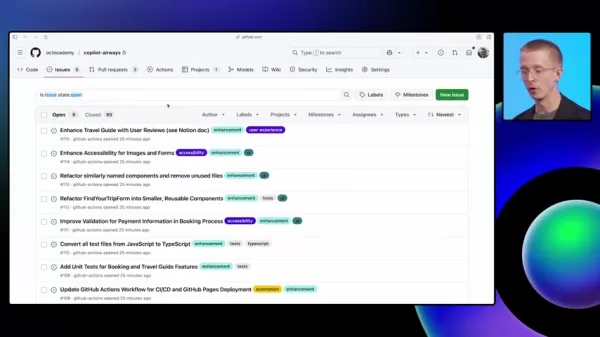
. It can address multiple issues at once, generate pull requests, and request feedback, all with minimal supervision. This lets development teams work more productively and effectively, completing projects on schedule and within budget.
Unlike the reactive stance of traditional approaches, GitHub Copilot Coding Agent provides proactive backlog management. It continuously examines the codebase, detecting potential issues and proposing solutions before they become significant problems. This helps prevent technical debt accumulation and maintains project health and maintainability over time. By giving developers an AI-powered helper, GitHub Copilot Coding Agent enables them to handle challenges more efficiently and produce higher-quality outcomes.
Here’s a comparison of the differences:
Feature Traditional Methods GitHub Copilot Coding Agent Task AssignmentManualAutomatedMonitoringContinuous manual oversightAutonomous background operationTech Debt ManagementReactive; address issues as they ariseProactive; identifies and addresses potential issuesEfficiencyTime-consuming, prone to errorsStreamlined, reduces errors and delaysFocusManaging tasksImproving code quality and developer productivityDiving Deeper: The Technicalities of GitHub Copilot Coding Agent
Assigning Issues to GitHub Copilot Coding Agent
Assigning issues to GitHub Copilot Coding Agent is a simple process done directly through GitHub's interface
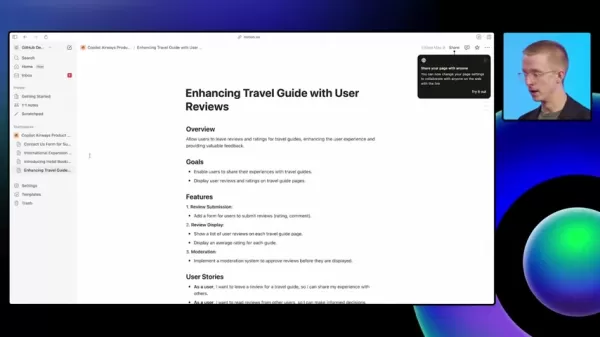
. Developers can pick multiple backlog issues and assign them to the agent simultaneously. This is especially helpful for routine tasks or related issues. Once assigned, the agent starts working on them in the background, allowing developers to concentrate on other priorities. This functionality significantly boosts productivity and enables more efficient development workflow management.
Additionally, GitHub Copilot Coding Agent allows multiple issue assignments at once. This can greatly speed up development, as the agent handles several tasks concurrently. The procedure is straightforward:
- Choose the issues from the backlog.
- Select the 'Assign' option.
- Pick 'Copilot' as the assignee.
The agent then takes charge, working independently to resolve these issues, creating pull requests, and requesting reviews as necessary.
Monitoring the Agent's Progress
GitHub Copilot Coding Agent offers transparency by letting developers track the progress of assigned tasks
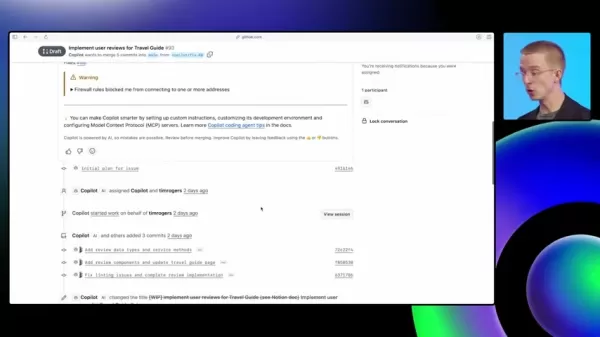
. Each pull request generated by the agent contains a thorough description of its actions, giving insight into the steps taken and changes made. This transparency helps developers stay in control and verify the agent's work meets their standards. GitHub’s session view offers a deeper look into the agent’s operations, including:
- Repository structure exploration
- Code changes
- Test runs
- Connections with external tools
GitHub provides extensive tools to ensure the AI assistant functions properly and safely. You can see a step-by-step analysis, verifying it accesses the right documentation (such as content in Notion). MCP, or Model Context Protocol, lets the coding agent gather additional context and information beyond GitHub.
These monitoring features build trust and allow for developer intervention when needed.
Integrating with VS Code
GitHub Copilot Coding Agent integrates smoothly with VS Code, enabling developers to start background workflows without switching from their code editor

. The agent can be activated directly within the editor, making it easy to delegate tasks and keep developers focused on their main coding work. This integration optimizes the development process and increases productivity by reducing distractions and ensuring a fluid workflow.
By highlighting a code section and using the Copilot Chat feature, developers can direct the agent to perform specific actions, like refactoring or creating independent components. After sending the request, the agent generates a pull request with the required changes, allowing developers to review and integrate them as appropriate. This integration facilitates collaboration and keeps team members updated with the latest modifications.
Unlocking the Power: How to Use GitHub Copilot Coding Agent Effectively
Assigning Multiple Issues to Copilot
To assign multiple issues, follow these steps:
- Go to your project's 'Issues' section on GitHub.
- Check the boxes next to the issues you wish to assign.
- Click the 'Assign' button.
- Select 'Copilot' from the dropdown list.
The agent will now process these issues concurrently.
Using Copilot Chat for Refactoring
Copilot Chat in VS Code provides a direct method to start background refactoring tasks. Here’s the process:
- Select the code you need to refactor.
- Open the Copilot Chat panel.
- Enter a command such as 'Refactor this code into a separate component'.
- Submit the command to Copilot.
The agent will manage the refactoring, generating a pull request for review.
Accessing the Session View
To access the session view and monitor the agent’s work:
- Open the pull request created by Copilot.
- Scroll to the comments section.
- Find the Copilot comment with a session view link.
- Click the link to see a detailed account of the agent’s actions.
Availability and Pricing for GitHub Copilot Coding Agent
Who Can Access GitHub Copilot Coding Agent?
At present, GitHub Copilot Coding Agent is available to GitHub Copilot Pro Plus or GitHub Copilot Enterprise plan holders. These premium subscriptions grant access to the agent's advanced features, allowing developers to use AI for backlog management and code maintenance. GitHub intends to make Copilot more broadly available soon.
GitHub Copilot Coding Agent: Evaluating the Pros
and Cons
Pros
Automated backlog management lessens manual effort.
Boosts developer productivity and efficiency.
Proactive technical debt reduction enhances code quality.
Smooth integration with existing workflows adds convenience.
Detailed session views provide transparency and control.
Cons
Currently restricted to Copilot Pro Plus and Enterprise users.
Reliance on AI might require adaptation for some developers.
Possible learning curve for those new to AI tools.
Core Features of GitHub Copilot Coding Agent
Key Capabilities
GitHub Copilot Coding Agent is an AI-powered coding assistant designed to streamline and automate your backlog management. Key features include:
- Automated Issue Resolution: The agent independently addresses backlog items, reducing manual developer workload.
- Background Operation: It operates in the background, letting developers focus on primary tasks uninterrupted.
- Pull Request Creation: It automatically generates pull requests with necessary changes, simplifying the review process.
- Integration with External Tools: The coding agent can connect with Notion via Model Context Protocol (MCP) to retrieve product requirements.
- Session View: It offers a detailed account of the agent’s activities, providing insight into its methods and progress.
- VS Code Integration: The agent can be initiated directly from VS Code, allowing developers to start tasks without leaving their editor.
- Linting and testing: The GitHub Copilot coding agent ensures that pushed code is linted, tested, and follows best practices.
Real-World Applications: Use Cases for GitHub Copilot Coding Agent
Increasing Test Coverage
GitHub's billing team utilized the GitHub Copilot coding agent to boost test coverage for their core projects. With tight deadlines and no time to enhance code quality, the GitHub Copilot coding agent improved their code and resolved concerns without affecting schedules. Even better, GitHub Copilot maintained and integrated tests to ensure future change reliability.
Reducing Tech Debt
Since Copilot decreases technical debt by fixing and updating legacy code, it actively maintains current codebases. Tech debt can quickly hinder development teams that aren't proactive, but the coding agent is built to identify and fix code sections that are or could become technical debt. This proactive, AI-driven method keeps projects scalable and maintainable for the future.
FAQ
What is the main purpose of GitHub Copilot Coding Agent?
Its primary purpose is to automate standard coding and backlog management tasks, enabling developers to focus on strategic and innovative work.
How does GitHub Copilot Coding Agent integrate with existing development workflows?
It integrates seamlessly with VS Code and GitHub, allowing developers to initiate background workflows directly from their editor and track progress through pull requests and session views.
What kind of tasks can GitHub Copilot Coding Agent handle?
It can manage various tasks, including code refactoring, creating separate components, improving test coverage, and resolving backlog issues.
Is the GitHub Copilot Coding Agent difficult to manage?
No. Comprehensive visibility through detailed pull requests and dedicated session views lets developers verify the AI's work, providing insight and trust in the assistant.
Related Questions
How is GitHub Copilot Coding Agent transforming software development?
GitHub Copilot Coding Agent is changing software development by automating routine tasks, cutting technical debt, and streamlining workflows. Using AI, it lets developers concentrate on innovation and strategic choices. This proactive method helps teams deliver better-quality code and manage projects more effectively. GitHub Copilot could redefine developer roles and lead to more innovative and efficient software development practices. It enhances existing codebases, ensuring they meet standards and follow best practices. The session view is also highly useful and thorough. With each pull request, the GitHub Copilot coding agent includes a detailed description. Combined with AI-driven best practice fixes, the GitHub Copilot coding agent is truly transformative. Besides its technical abilities, GitHub Copilot Coding Agent can also change how development teams collaborate. By automating routine tasks, it reduces the need for constant supervision and communication, letting team members focus on strategic discussions and creative problem-solving. This collaborative approach creates a more dynamic and productive work environment, leading to better outcomes. Specific ways GitHub Copilot Coding Agent is transforming software development include: Increased Efficiency: Automating tasks and streamlining workflows shortens development time. Higher Code Quality: Proactive tech debt management keeps code clean and maintainable. Enhanced Collaboration: Reducing constant oversight encourages team creativity. Focus on Innovation: Managing routine tasks lets developers concentrate on strategic work. Improved Project Outcomes: High-quality code and efficient workflows lead to more successful projects.
Related article
 GitHub Copilot Translates Mockups Into Code with Image-to-Code Generation
GitHub has unveiled a series of updates for Copilot, offering a preview of a more autonomous future for its AI-powered programming assistant.A key new feature is Copilot Vision, which lets users upload a screenshot, photo, or diagram directly into th
How to boost your career with top AI projects on GitHub in 2025? Complete guide
The field of Artificial Intelligence is evolving at a remarkable pace, and maintaining a competitive edge demands ongoing learning and hands-on practice. GitHub offers an abundance of AI initiatives, and contributing to the right ones can greatly boo
How to use Claude Code with GitHub in 2025 for better software development on mobile?
The integration of AI into software development tools is fundamentally changing how developers operate. By combining Claude Code with the powerful capabilities of GitHub, teams can adopt a highly efficient approach to streamline their workflows. This
Related Special Topic Recommendations
Comic Creation
GitHub Copilot Translates Mockups Into Code with Image-to-Code Generation
GitHub has unveiled a series of updates for Copilot, offering a preview of a more autonomous future for its AI-powered programming assistant.A key new feature is Copilot Vision, which lets users upload a screenshot, photo, or diagram directly into th
How to boost your career with top AI projects on GitHub in 2025? Complete guide
The field of Artificial Intelligence is evolving at a remarkable pace, and maintaining a competitive edge demands ongoing learning and hands-on practice. GitHub offers an abundance of AI initiatives, and contributing to the right ones can greatly boo
How to use Claude Code with GitHub in 2025 for better software development on mobile?
The integration of AI into software development tools is fundamentally changing how developers operate. By combining Claude Code with the powerful capabilities of GitHub, teams can adopt a highly efficient approach to streamline their workflows. This
Related Special Topic Recommendations
Comic Creation
 Manga AI Background Generators for Serialized Chapters, Covers, and Promo Art
2026 Latest Best Manga AI Background Generators Ranked Top-Rated! This curated collection showcases powerful game-changing tools perfect for creating high-quality chapter backgrounds, book covers, and promotional art. Every option has undergone rigorous real-world tests to ensure reliability. Get a free vs paid comparison along with detailed insights. Explore now to discover your perfect tool and unlock your AI edge in manga creation.
 6 tools
 xix.ai
Image editing
AI Object Removal Editors: Clean Up Portraits, Travel, and Product Shots
xix.ai
Image editing
AI Object Removal Editors: Clean Up Portraits, Travel, and Product Shots
2026 Latest Best Top-rated AI Object Removal Editors for portraits travel product shots! XIX.AI curates a powerful game-changing collection regularly updated with weekly rankings. These tools offer real-world tests to help you quickly remove unwanted elements, boost content quality, and save tons of time without compromising results. Must-try for anyone aiming to unlock their AI creation edge. Explore now!
10 tools
xix.ai
Text-to-speech
Best AI Text to Speech Tools for Online Courses
2026 Latest Best Top-rated AI Text to Speech Tools for Online Courses are curated by XIX.AI based on rigorous real-world tests and weekly updated rankings. These powerful tools help creators deliver crystal-clear audio content effortlessly, boosting writing efficiency and streamlining course production. Check out the free vs paid comparison to find your perfect fit. Explore now to unlock your AI edge in online education.
10 tools
xix.ai
writing
AI Blog Title Tools for Higher Click Through Rates
2026 Latest Best Top-Rated AI Blog Title Tools for Higher Click Through Rates! XIX.AI has carefully curated a powerful, game-changing collection of top tools that go through rigorous real-world tests. You’ll find a free vs paid comparison, weekly updated rankings, and detailed insights to help you boost your blog’s traffic efficiently. Must-try options are highlighted to help you unlock your AI edge. Explore now!
10 tools
xix.ai
automation
Best AI Task Routing Tools for Support Workflows
2026 Latest Best Top-rated AI Task Routing Tools for Support Workflows! XIX.AI has curated a highly powerful game-changing collection of must-try solutions, all undergoing rigorous real-world tests and updated weekly. These tools streamline workflows, boost productivity, and help teams deliver faster, more efficient support. Explore now to discover your perfect tool and unlock your AI edge!
17 tools
xix.ai
Academic Research
AI Citation and Paper Summary Tools
2026 Latest Best Top-Rated AI Citation and Paper Summary Tools Curated by XIX.AI. Get powerful game-changing solutions for quick content creation, improved writing efficiency, and boosting productivity. We offer a free vs paid comparison along with real-world tests and weekly updated rankings to help you find the must-try tool that fits your needs perfectly. Explore now to Unlock your AI edge.
10 tools
xix.ai

 Comments (0)
0/500
Comments (0)
0/500
GitHub Copilot Coding Agent is poised to revolutionize how developers handle their project backlogs. This AI-driven tool automates repetitive tasks, freeing developers to concentrate on complex and innovative work. By integrating seamlessly into existing workflows, it boosts productivity, minimizes technical debt, and simplifies the development lifecycle. This article explores the features, advantages, and real-world uses of this groundbreaking technology, illustrating its potential to benefit development teams of any scale.
Key Points
GitHub Copilot Coding Agent handles backlog management automatically.
It boosts developer productivity by taking over routine coding work.
Integration with current development tools makes processes smoother.
The agent cuts down technical debt by proactively managing code maintenance.
It lets developers dedicate more time to complex and creative projects.
Features are accessible to GitHub Copilot Pro and Enterprise subscribers.
A session view provides detailed monitoring of agent activities.
The tool works within VS Code for uninterrupted background operation.
Understanding GitHub Copilot Coding Agent
What is GitHub Copilot Coding Agent?
The main objective of GitHub Copilot Coding Agent is to improve coding efficiency and optimize the development process
. It builds on GitHub Copilot's existing capabilities, expanding its role from code completion to actively handling and resolving backlog items. The agent works autonomously in the background, tackling tasks that would normally take up developer time. By automating standard coding and maintenance duties, it enables developers to focus on higher-priority and innovative project aspects. This results in quicker development cycles, less technical debt, and superior code quality.
GitHub Copilot Coding Agent goes beyond task automation; it reshapes the development approach. It offers a proactive method for maintaining code quality and managing project backlogs. By spotting and fixing potential problems early, it helps avoid technical debt buildup, keeping projects scalable and maintainable long-term. This tool marks a major advancement toward a future where AI and developers collaborate effectively, combining their strengths for optimal outcomes. GitHub Copilot is at the forefront of this innovation.
Primary advantages include:
- Higher developer productivity
- Reduced technical debt
- More efficient development processes
- Better code quality
- Enhanced project maintainability
How GitHub Copilot Coding Agent Differs From Traditional Methods
Conventional backlog management typically requires manual task assignment, continuous monitoring, and extensive team communication. This can be inefficient and error-prone, causing delays and higher project expenses. GitHub Copilot Coding Agent automates most of this workflow, using AI to intelligently prioritize and handle backlog items
. It can address multiple issues at once, generate pull requests, and request feedback, all with minimal supervision. This lets development teams work more productively and effectively, completing projects on schedule and within budget.
Unlike the reactive stance of traditional approaches, GitHub Copilot Coding Agent provides proactive backlog management. It continuously examines the codebase, detecting potential issues and proposing solutions before they become significant problems. This helps prevent technical debt accumulation and maintains project health and maintainability over time. By giving developers an AI-powered helper, GitHub Copilot Coding Agent enables them to handle challenges more efficiently and produce higher-quality outcomes.
Here’s a comparison of the differences:
Diving Deeper: The Technicalities of GitHub Copilot Coding Agent
Assigning Issues to GitHub Copilot Coding Agent
Assigning issues to GitHub Copilot Coding Agent is a simple process done directly through GitHub's interface
. Developers can pick multiple backlog issues and assign them to the agent simultaneously. This is especially helpful for routine tasks or related issues. Once assigned, the agent starts working on them in the background, allowing developers to concentrate on other priorities. This functionality significantly boosts productivity and enables more efficient development workflow management.
Additionally, GitHub Copilot Coding Agent allows multiple issue assignments at once. This can greatly speed up development, as the agent handles several tasks concurrently. The procedure is straightforward:
- Choose the issues from the backlog.
- Select the 'Assign' option.
- Pick 'Copilot' as the assignee.
The agent then takes charge, working independently to resolve these issues, creating pull requests, and requesting reviews as necessary.
Monitoring the Agent's Progress
GitHub Copilot Coding Agent offers transparency by letting developers track the progress of assigned tasks
. Each pull request generated by the agent contains a thorough description of its actions, giving insight into the steps taken and changes made. This transparency helps developers stay in control and verify the agent's work meets their standards. GitHub’s session view offers a deeper look into the agent’s operations, including:
- Repository structure exploration
- Code changes
- Test runs
- Connections with external tools
GitHub provides extensive tools to ensure the AI assistant functions properly and safely. You can see a step-by-step analysis, verifying it accesses the right documentation (such as content in Notion). MCP, or Model Context Protocol, lets the coding agent gather additional context and information beyond GitHub.
These monitoring features build trust and allow for developer intervention when needed.
Integrating with VS Code
GitHub Copilot Coding Agent integrates smoothly with VS Code, enabling developers to start background workflows without switching from their code editor
. The agent can be activated directly within the editor, making it easy to delegate tasks and keep developers focused on their main coding work. This integration optimizes the development process and increases productivity by reducing distractions and ensuring a fluid workflow.
By highlighting a code section and using the Copilot Chat feature, developers can direct the agent to perform specific actions, like refactoring or creating independent components. After sending the request, the agent generates a pull request with the required changes, allowing developers to review and integrate them as appropriate. This integration facilitates collaboration and keeps team members updated with the latest modifications.
Unlocking the Power: How to Use GitHub Copilot Coding Agent Effectively
Assigning Multiple Issues to Copilot
To assign multiple issues, follow these steps:
- Go to your project's 'Issues' section on GitHub.
- Check the boxes next to the issues you wish to assign.
- Click the 'Assign' button.
- Select 'Copilot' from the dropdown list.
The agent will now process these issues concurrently.
Using Copilot Chat for Refactoring
Copilot Chat in VS Code provides a direct method to start background refactoring tasks. Here’s the process:
- Select the code you need to refactor.
- Open the Copilot Chat panel.
- Enter a command such as 'Refactor this code into a separate component'.
- Submit the command to Copilot.
The agent will manage the refactoring, generating a pull request for review.
Accessing the Session View
To access the session view and monitor the agent’s work:
- Open the pull request created by Copilot.
- Scroll to the comments section.
- Find the Copilot comment with a session view link.
- Click the link to see a detailed account of the agent’s actions.
Availability and Pricing for GitHub Copilot Coding Agent
Who Can Access GitHub Copilot Coding Agent?
At present, GitHub Copilot Coding Agent is available to GitHub Copilot Pro Plus or GitHub Copilot Enterprise plan holders. These premium subscriptions grant access to the agent's advanced features, allowing developers to use AI for backlog management and code maintenance. GitHub intends to make Copilot more broadly available soon.
GitHub Copilot Coding Agent: Evaluating the Pros
and Cons
Pros
Automated backlog management lessens manual effort.
Boosts developer productivity and efficiency.
Proactive technical debt reduction enhances code quality.
Smooth integration with existing workflows adds convenience.
Detailed session views provide transparency and control.
Cons
Currently restricted to Copilot Pro Plus and Enterprise users.
Reliance on AI might require adaptation for some developers.
Possible learning curve for those new to AI tools.
Core Features of GitHub Copilot Coding Agent
Key Capabilities
GitHub Copilot Coding Agent is an AI-powered coding assistant designed to streamline and automate your backlog management. Key features include:
- Automated Issue Resolution: The agent independently addresses backlog items, reducing manual developer workload.
- Background Operation: It operates in the background, letting developers focus on primary tasks uninterrupted.
- Pull Request Creation: It automatically generates pull requests with necessary changes, simplifying the review process.
- Integration with External Tools: The coding agent can connect with Notion via Model Context Protocol (MCP) to retrieve product requirements.
- Session View: It offers a detailed account of the agent’s activities, providing insight into its methods and progress.
- VS Code Integration: The agent can be initiated directly from VS Code, allowing developers to start tasks without leaving their editor.
- Linting and testing: The GitHub Copilot coding agent ensures that pushed code is linted, tested, and follows best practices.
Real-World Applications: Use Cases for GitHub Copilot Coding Agent
Increasing Test Coverage
GitHub's billing team utilized the GitHub Copilot coding agent to boost test coverage for their core projects. With tight deadlines and no time to enhance code quality, the GitHub Copilot coding agent improved their code and resolved concerns without affecting schedules. Even better, GitHub Copilot maintained and integrated tests to ensure future change reliability.
Reducing Tech Debt
Since Copilot decreases technical debt by fixing and updating legacy code, it actively maintains current codebases. Tech debt can quickly hinder development teams that aren't proactive, but the coding agent is built to identify and fix code sections that are or could become technical debt. This proactive, AI-driven method keeps projects scalable and maintainable for the future.
FAQ
What is the main purpose of GitHub Copilot Coding Agent?
Its primary purpose is to automate standard coding and backlog management tasks, enabling developers to focus on strategic and innovative work.
How does GitHub Copilot Coding Agent integrate with existing development workflows?
It integrates seamlessly with VS Code and GitHub, allowing developers to initiate background workflows directly from their editor and track progress through pull requests and session views.
What kind of tasks can GitHub Copilot Coding Agent handle?
It can manage various tasks, including code refactoring, creating separate components, improving test coverage, and resolving backlog issues.
Is the GitHub Copilot Coding Agent difficult to manage?
No. Comprehensive visibility through detailed pull requests and dedicated session views lets developers verify the AI's work, providing insight and trust in the assistant.
Related Questions
How is GitHub Copilot Coding Agent transforming software development?
GitHub Copilot Coding Agent is changing software development by automating routine tasks, cutting technical debt, and streamlining workflows. Using AI, it lets developers concentrate on innovation and strategic choices. This proactive method helps teams deliver better-quality code and manage projects more effectively. GitHub Copilot could redefine developer roles and lead to more innovative and efficient software development practices. It enhances existing codebases, ensuring they meet standards and follow best practices. The session view is also highly useful and thorough. With each pull request, the GitHub Copilot coding agent includes a detailed description. Combined with AI-driven best practice fixes, the GitHub Copilot coding agent is truly transformative. Besides its technical abilities, GitHub Copilot Coding Agent can also change how development teams collaborate. By automating routine tasks, it reduces the need for constant supervision and communication, letting team members focus on strategic discussions and creative problem-solving. This collaborative approach creates a more dynamic and productive work environment, leading to better outcomes. Specific ways GitHub Copilot Coding Agent is transforming software development include: Increased Efficiency: Automating tasks and streamlining workflows shortens development time. Higher Code Quality: Proactive tech debt management keeps code clean and maintainable. Enhanced Collaboration: Reducing constant oversight encourages team creativity. Focus on Innovation: Managing routine tasks lets developers concentrate on strategic work. Improved Project Outcomes: High-quality code and efficient workflows lead to more successful projects.








 GitHub Copilot Translates Mockups Into Code with Image-to-Code Generation
GitHub has unveiled a series of updates for Copilot, offering a preview of a more autonomous future for its AI-powered programming assistant.A key new feature is Copilot Vision, which lets users upload a screenshot, photo, or diagram directly into th
GitHub Copilot Translates Mockups Into Code with Image-to-Code Generation
GitHub has unveiled a series of updates for Copilot, offering a preview of a more autonomous future for its AI-powered programming assistant.A key new feature is Copilot Vision, which lets users upload a screenshot, photo, or diagram directly into th
 How to boost your career with top AI projects on GitHub in 2025? Complete guide
The field of Artificial Intelligence is evolving at a remarkable pace, and maintaining a competitive edge demands ongoing learning and hands-on practice. GitHub offers an abundance of AI initiatives, and contributing to the right ones can greatly boo
How to boost your career with top AI projects on GitHub in 2025? Complete guide
The field of Artificial Intelligence is evolving at a remarkable pace, and maintaining a competitive edge demands ongoing learning and hands-on practice. GitHub offers an abundance of AI initiatives, and contributing to the right ones can greatly boo
 How to use Claude Code with GitHub in 2025 for better software development on mobile?
The integration of AI into software development tools is fundamentally changing how developers operate. By combining Claude Code with the powerful capabilities of GitHub, teams can adopt a highly efficient approach to streamline their workflows. This
How to use Claude Code with GitHub in 2025 for better software development on mobile?
The integration of AI into software development tools is fundamentally changing how developers operate. By combining Claude Code with the powerful capabilities of GitHub, teams can adopt a highly efficient approach to streamline their workflows. This

2026 Latest Best Manga AI Background Generators Ranked Top-Rated! This curated collection showcases powerful game-changing tools perfect for creating high-quality chapter backgrounds, book covers, and promotional art. Every option has undergone rigorous real-world tests to ensure reliability. Get a free vs paid comparison along with detailed insights. Explore now to discover your perfect tool and unlock your AI edge in manga creation.
6 tools
xix.ai

2026 Latest Best Top-rated AI Object Removal Editors for portraits travel product shots! XIX.AI curates a powerful game-changing collection regularly updated with weekly rankings. These tools offer real-world tests to help you quickly remove unwanted elements, boost content quality, and save tons of time without compromising results. Must-try for anyone aiming to unlock their AI creation edge. Explore now!
10 tools
xix.ai

2026 Latest Best Top-rated AI Text to Speech Tools for Online Courses are curated by XIX.AI based on rigorous real-world tests and weekly updated rankings. These powerful tools help creators deliver crystal-clear audio content effortlessly, boosting writing efficiency and streamlining course production. Check out the free vs paid comparison to find your perfect fit. Explore now to unlock your AI edge in online education.
10 tools
xix.ai

2026 Latest Best Top-Rated AI Blog Title Tools for Higher Click Through Rates! XIX.AI has carefully curated a powerful, game-changing collection of top tools that go through rigorous real-world tests. You’ll find a free vs paid comparison, weekly updated rankings, and detailed insights to help you boost your blog’s traffic efficiently. Must-try options are highlighted to help you unlock your AI edge. Explore now!
10 tools
xix.ai

2026 Latest Best Top-rated AI Task Routing Tools for Support Workflows! XIX.AI has curated a highly powerful game-changing collection of must-try solutions, all undergoing rigorous real-world tests and updated weekly. These tools streamline workflows, boost productivity, and help teams deliver faster, more efficient support. Explore now to discover your perfect tool and unlock your AI edge!
17 tools
xix.ai

2026 Latest Best Top-Rated AI Citation and Paper Summary Tools Curated by XIX.AI. Get powerful game-changing solutions for quick content creation, improved writing efficiency, and boosting productivity. We offer a free vs paid comparison along with real-world tests and weekly updated rankings to help you find the must-try tool that fits your needs perfectly. Explore now to Unlock your AI edge.
10 tools
xix.ai












