


 Home
HomeAI-Driven Task Management and Student Hub Innovations
In today's rapidly advancing tech world, generative AI is reshaping various industries by delivering innovative solutions and boosting efficiency. This article examines two fascinating projects that utilize generative AI: a task manager and a student dashboard. We'll break down the core concepts of generative AI, the specific tools and tech stacks involved, and provide a detailed look at how these projects function. Learn how these AI applications can transform personal productivity and academic organization.
Key Points
Generative AI creates new content and automates tasks, mimicking human-like abilities.
The Task Manager project helps organize and prioritize tasks with features like deadlines and categories.
The Student Hub project offers a dashboard to track assignments and progress, improving academic outcomes.
Front-end development uses React, TypeScript, JavaScript, HTML, and CSS.
Generative AI tools like Bolt AI and ChatGPT power the design of intelligent features.
Debugging and deployment are handled with React Developer Tools and Netlify.
Understanding Generative AI
What is Generative AI?
Generative AI, a branch of artificial intelligence, can produce original content—including text, images, music, and even code. It emulates human creativity by learning from massive datasets and generating novel outputs based on that knowledge.

This ability has broad applications, from automating routine work to designing creative solutions across different fields.
Key Benefits of Generative AI
- Automation of Tasks: Generative AI shines at automating activities like content generation and layout design. It cuts down on manual work, letting professionals concentrate on more strategic and creative tasks.
- Cost-Effectiveness: By reducing the need for extensive manual effort, generative AI tools lower development costs and speed up project timelines. This helps businesses and individuals do more with less.
- Versatility: Generative AI allows for quicker and easier prototyping. Its adaptability supports a wide range of applications, meeting diverse needs with flexibility.
Implementing generative AI often involves tools like Bolt AI, which provides smart, user-friendly solutions for real-world challenges. These tools simplify complex tasks and boost overall efficiency. Bolt AI is especially useful for building dynamic web apps and interfaces that respond to user input, making it a valuable resource for developers innovating with AI.
Technologies Used in the Projects
The successful execution of generative AI projects depends on a mix of programming languages, frameworks, and tools. Here’s a look at the key technologies involved:
- Programming Languages: Front-end development mainly uses React, TypeScript, JavaScript, HTML, and CSS. These languages are crucial for building interactive and dynamic user interfaces.
- Development Frameworks: React, a JavaScript library, is key for constructing the UI of dynamic web applications. Its component-based structure promotes modular and reusable code.
- Design and Styling: CSS is used for styling web pages, ensuring an attractive and user-friendly design.
- Generative AI Tools: Bolt AI and ChatGPT are central for automating tasks and creating intelligent designs. Bolt AI, in particular, enables the development of smart systems and dynamic web applications.
- Debugging and Deployment: React Developer Tools and Netlify handle debugging and deployment, ensuring smooth operation and accessibility.
- Environment: VSCode, a code editor, supports all the languages used in the projects, offering a seamless development workspace.
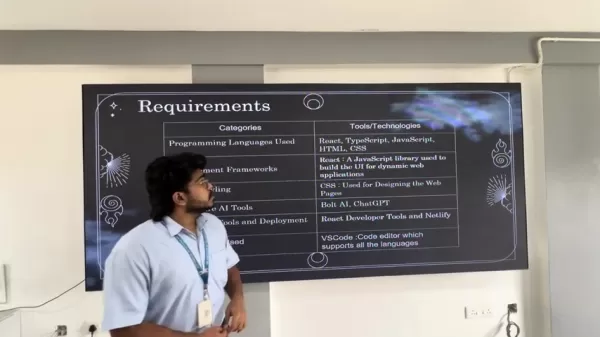
The table below summarizes these requirements:
Category Tools/Technologies Programming Languages Used React, TypeScript, JavaScript, HTML, CSS Development Frameworks React: A JavaScript library used to build the UI for dynamic web applications Design/Styling CSS: Used for designing the web pages Generative AI Tools Bolt AI, ChatGPT Debugging Tools & Deployment React Developer Tools and Netlify Environment Used VSCode: Code editor which supports all the languages
Task Manager Project Deep Dive
Features and Functionality
The Task Manager project simplifies task organization and boosts productivity. It lets users create, categorize, and prioritize tasks, ensuring important deadlines are met.

Core Features Include:
- Task Creation: Users can easily add new tasks with titles, descriptions, and assigned priorities.
- Categorization: Tasks can be grouped into work, personal, or study categories for better organization.
- Prioritization: Tasks can be marked as low, medium, or high priority to ensure critical items are tackled first.
- Due Dates: Setting start and due dates helps ensure tasks are completed on time.
- Dark and Light Mode: Switch between dark and light modes for user preference and visual comfort.
Creating a new task is straightforward:
- Click the “New Task” button.
- Enter the task title and description.
- Select the priority (low, medium, or high).
- Choose a category (work, personal, or study).
- Set the start and due dates and times.
- Click “Create” to add the task to the list.
Tasks are displayed in three sections: “All Tasks,” “Pending,” and “Completed.” The "Pending" section lists unfinished tasks, while the “Completed” section shows tasks marked as done. This clear division helps users focus on what needs attention and track progress effectively.
Benefits of Using the Task Manager
- Enhanced Organization: Categorize and prioritize tasks to maintain a clear, structured workflow.
- Improved Productivity: Stay focused and on track by setting deadlines and managing priorities.
- Better Time Management: Allocate time effectively by visualizing task deadlines in a calendar view.
- User-Friendly Interface: The intuitive design makes task management simple and efficient.
How to Use Task Manager
Step-by-Step Guide to Task Management
Here’s a detailed guide on using the Task Manager effectively:
Step 1: Adding a New Task

- Click the “New Task” button in the top right corner of the Task Manager interface. This opens a form to input your new task details.
- In the form, you'll find fields for “Title”, “Description”, “Priority”, and “Category”. Start by entering a concise, descriptive title in the “Title” field.
- Next, provide a detailed explanation of the task in the “Description” field. Use this space to include any relevant information or instructions.
- Use the “Priority” dropdown to select the task's importance level. Choose from “Low”, “Medium”, or “High” to indicate urgency.
- Use the “Category” dropdown to classify the task. Common categories are “Work”, “Personal”, or “Study”, but you can also create custom categories as needed.
- Finally, set the “Start Date & Time” and “Due Date & Time” for the task. This specifies when the task should begin and when it must be finished. Use the calendar interface to pick the appropriate dates and times.
- Once all information is filled in, click the “Create” button to add the task to your Task Manager.
Step 2: Managing Existing Tasks
- Access your task list on the main screen. Here you'll see all tasks, organized by status and priority.
- Use the “All Tasks”, “Pending”, and “Completed” filters to view tasks based on their current status. This helps you focus on ongoing tasks or review completed ones.
- For each task, you'll see key details like title, description, priority, category, and due date. This lets you quickly assess each task's status and prioritize accordingly.
Step 3: Completing and Deleting Tasks
- When a task is done, mark it complete by clicking the checkbox next to its name. This moves the task from the “Pending” list to the “Completed” list.
- To view completed tasks, navigate to the “Completed” filter. This shows all tasks marked as done.
- To permanently remove a completed task, click the trash icon next to its name in the “Completed” list. This deletes the task from your Task Manager.
Pros and Cons of Using Generative AI in Project Management
Pros
Increased Efficiency: Automates repetitive tasks, freeing up time for more strategic work.
Cost Reduction: Lowers development costs by reducing manual effort.
Enhanced Innovation: Enables faster prototyping and experimentation with new ideas.
Improved Organization: Provides structured workflows and task prioritization.
User-Friendly Interface: Simplifies complex tasks, making project management accessible to more people.
Cons
Dependency on Data: Relies on large datasets for effective learning and output generation.
Potential for Errors: May produce outputs that need manual review and correction.
Limited Creativity: Might lack the nuanced creativity and adaptability of human designers.
Ethical Concerns: Raises questions about data privacy and responsible AI use.
Technical Complexity: Requires programming and AI expertise to implement and maintain.
FAQ
What programming languages are essential for front-end development in these projects?
The main programming languages are React, TypeScript, JavaScript, HTML, and CSS. React is a JavaScript library for building user interfaces, TypeScript adds static typing to JavaScript for better code quality, HTML provides web page structure, and CSS styles the visual elements. Together, these technologies create dynamic and interactive user experiences.
Related Questions
How does Bolt AI simplify the design of intelligent systems?
Bolt AI simplifies design by offering smart, user-friendly solutions tailored for dynamic web applications and interfaces. It automates many complex design tasks, reducing the need for extensive manual coding and design work. This allows developers to concentrate on innovation and creating engaging user experiences. By leveraging Bolt AI, developers can quickly prototype and implement intelligent features, ensuring applications are both functional and easy to use. This makes it simpler to address real-world needs efficiently, lowering development costs and accelerating project timelines.
Related article
 Musk Considered Leaving OpenAI to His Kids as Altman Testifies
This morning, OpenAI CEO Sam Altman took the stand to address former co-founder Elon Musk’s lawsuit challenging the company’s corporate structure.When asked about Musk’s claim that other founders “stole a charity” by launching a for-profit subsidiary
Sam Altman Sparks Debate Over AI's Deceleration
Listen onApple PodcastsListen onSpotifyOpenAI CEO Sam Altman recently suggested that it may be time to “pace the rate of AI development” to allow society to “harden around some of these new capability levels.”On the latest episode of TechCrunch’s Equ
Anthropic Opens Doors to EU Cybersecurity Agency as Mythos5 Model Faces Compliance Exam
Artificial intelligence compliance regulations are advancing significantly. Leading AI firm Anthropic has officially granted the European Union's cybersecurity authority access to its Mythos AI model, a pivotal move for this advanced large language m
Related Special Topic Recommendations
Image editing
Musk Considered Leaving OpenAI to His Kids as Altman Testifies
This morning, OpenAI CEO Sam Altman took the stand to address former co-founder Elon Musk’s lawsuit challenging the company’s corporate structure.When asked about Musk’s claim that other founders “stole a charity” by launching a for-profit subsidiary
Sam Altman Sparks Debate Over AI's Deceleration
Listen onApple PodcastsListen onSpotifyOpenAI CEO Sam Altman recently suggested that it may be time to “pace the rate of AI development” to allow society to “harden around some of these new capability levels.”On the latest episode of TechCrunch’s Equ
Anthropic Opens Doors to EU Cybersecurity Agency as Mythos5 Model Faces Compliance Exam
Artificial intelligence compliance regulations are advancing significantly. Leading AI firm Anthropic has officially granted the European Union's cybersecurity authority access to its Mythos AI model, a pivotal move for this advanced large language m
Related Special Topic Recommendations
Image editing
 Photoshop AI Retouch Tools for Ecommerce Apparel, Skin Cleanup, and Color Consistency
2026 Latest Best Photoshop AI retouch tools for ecommerce apparel, skin cleanup, and color consistency! This top-rated curated list features powerful game-changing solutions that help you boost writing efficiency, streamline content creation, and achieve perfect visual results effortlessly. Each tool has undergone real-world tests through weekly updated rankings, complete with free vs paid comparison details. Backed by XIX.AI, it’s the must-try guide for anyone aiming to unlock your AI edge. Explore now!
 10 tools
 xix.ai
Prompt
Best AI Prompt Libraries for ChatGPT Workflows
xix.ai
Prompt
Best AI Prompt Libraries for ChatGPT Workflows
2026 Latest Best Top-Rated AI Prompt Libraries for optimizing all types of ChatGPT workflows. XIX.AI has curated a powerful, game-changing collection that goes through rigorous real-world tests to ensure top performance. You can find detailed free vs paid comparisons and expert rankings to help you choose the must-try tools that boost your productivity and unlock your AI edge. Explore now!
11 tools
xix.ai
Education and Learning
AI Quiz Builder Platforms for Teachers, Tutors, and Cohort-Based Learning Programs
2026 Latest Best AI Quiz Builder Platforms for Teachers, Tutors, and Cohort-Based Learning Programs! XIX.AI has curated a top-rated list of powerful game-changing tools that go through real-world tests to deliver accurate rankings. These must-try platforms help boost writing efficiency, streamline content creation, and simplify quiz design across all learning scenarios. Explore now to discover your perfect tool for unlocking your AI edge in teaching!
13 tools
xix.ai
code
AI Pull Request Review Tools for GitHub Teams Handling Refactors, Bugs, and Security Gaps
2026 Latest Best AI Pull Request Review Tools for GitHub Teams are here on XIX.AI! This top-rated curated list showcases powerful game-changing solutions that streamline refactoring, bug fixing, and security gap detection across all team workflows. Enjoy a free vs paid comparison along with real-world tests and detailed rankings to help you find the perfect tool that boosts productivity significantly. Explore now to unlock your AI edge!
12 tools
xix.ai
Text-to-speech
Best AI Text to Speech Tools for Natural Voiceovers
2026 Latest Best Top-rated AI Text to Speech Tools for Natural Voiceovers are here on XIX.AI! This curated list features powerful, game-changing options that deliver crystal-clear voices for every use case, backed by real-world tests and weekly updated rankings. Get a free vs paid comparison to find the must-try solution that boosts your productivity instantly. Explore now to Unlock your AI edge!
11 tools
xix.ai
Comic Creation
Manga AI Background Generators for Serialized Chapters, Covers, and Promo Art
2026 Latest Best Manga AI Background Generators Ranked Top-Rated! This curated collection showcases powerful game-changing tools perfect for creating high-quality chapter backgrounds, book covers, and promotional art. Every option has undergone rigorous real-world tests to ensure reliability. Get a free vs paid comparison along with detailed insights. Explore now to discover your perfect tool and unlock your AI edge in manga creation.
6 tools
xix.ai

 Comments (3)
0/500
Comments (3)
0/500
![CharlesYoung]()
J'adore l'idée d'un gestionnaire de tâches dopé à l'IA, mais est-ce que ça va vraiment nous faire gagner du temps ou juste ajouter une couche de complexité ? 😅 Le hub étudiant semble prometteur, mais j'espère que les développeurs pensent à la vie privée des utilisateurs, sinon ça risque de devenir un cauchemar numérique.
![HarryRoberts]()
Interesting read! I've been using AI task managers for a while, but the student hub concept is new to me. It makes sense though—students juggle so many deadlines and resources. I wonder if these tools will eventually replace traditional learning management systems? The efficiency gains sound promising, but I hope they don't just become another source of data collection on students. 🤔
![KennethRoberts]()
Die Idee, KI für Aufgabenmanagement und Studentenhubs zu nutzen, ist wirklich clever. Besonders der Student Hub könnte das Campusleben revolutionieren – hoffentlich bleibt die Datensicherheit dabei nicht auf der Strecke. Spannend, wohin die Reise geht!
In today's rapidly advancing tech world, generative AI is reshaping various industries by delivering innovative solutions and boosting efficiency. This article examines two fascinating projects that utilize generative AI: a task manager and a student dashboard. We'll break down the core concepts of generative AI, the specific tools and tech stacks involved, and provide a detailed look at how these projects function. Learn how these AI applications can transform personal productivity and academic organization.
Key Points
Generative AI creates new content and automates tasks, mimicking human-like abilities.
The Task Manager project helps organize and prioritize tasks with features like deadlines and categories.
The Student Hub project offers a dashboard to track assignments and progress, improving academic outcomes.
Front-end development uses React, TypeScript, JavaScript, HTML, and CSS.
Generative AI tools like Bolt AI and ChatGPT power the design of intelligent features.
Debugging and deployment are handled with React Developer Tools and Netlify.
Understanding Generative AI
What is Generative AI?
Generative AI, a branch of artificial intelligence, can produce original content—including text, images, music, and even code. It emulates human creativity by learning from massive datasets and generating novel outputs based on that knowledge.
This ability has broad applications, from automating routine work to designing creative solutions across different fields.
Key Benefits of Generative AI
- Automation of Tasks: Generative AI shines at automating activities like content generation and layout design. It cuts down on manual work, letting professionals concentrate on more strategic and creative tasks.
- Cost-Effectiveness: By reducing the need for extensive manual effort, generative AI tools lower development costs and speed up project timelines. This helps businesses and individuals do more with less.
- Versatility: Generative AI allows for quicker and easier prototyping. Its adaptability supports a wide range of applications, meeting diverse needs with flexibility.
Implementing generative AI often involves tools like Bolt AI, which provides smart, user-friendly solutions for real-world challenges. These tools simplify complex tasks and boost overall efficiency. Bolt AI is especially useful for building dynamic web apps and interfaces that respond to user input, making it a valuable resource for developers innovating with AI.
Technologies Used in the Projects
The successful execution of generative AI projects depends on a mix of programming languages, frameworks, and tools. Here’s a look at the key technologies involved:
- Programming Languages: Front-end development mainly uses React, TypeScript, JavaScript, HTML, and CSS. These languages are crucial for building interactive and dynamic user interfaces.
- Development Frameworks: React, a JavaScript library, is key for constructing the UI of dynamic web applications. Its component-based structure promotes modular and reusable code.
- Design and Styling: CSS is used for styling web pages, ensuring an attractive and user-friendly design.
- Generative AI Tools: Bolt AI and ChatGPT are central for automating tasks and creating intelligent designs. Bolt AI, in particular, enables the development of smart systems and dynamic web applications.
- Debugging and Deployment: React Developer Tools and Netlify handle debugging and deployment, ensuring smooth operation and accessibility.
- Environment: VSCode, a code editor, supports all the languages used in the projects, offering a seamless development workspace.
The table below summarizes these requirements:
| Category | Tools/Technologies |
|---|---|
| Programming Languages Used | React, TypeScript, JavaScript, HTML, CSS |
| Development Frameworks | React: A JavaScript library used to build the UI for dynamic web applications |
| Design/Styling | CSS: Used for designing the web pages |
| Generative AI Tools | Bolt AI, ChatGPT |
| Debugging Tools & Deployment | React Developer Tools and Netlify |
| Environment Used | VSCode: Code editor which supports all the languages |
Task Manager Project Deep Dive
Features and Functionality
The Task Manager project simplifies task organization and boosts productivity. It lets users create, categorize, and prioritize tasks, ensuring important deadlines are met.
Core Features Include:
- Task Creation: Users can easily add new tasks with titles, descriptions, and assigned priorities.
- Categorization: Tasks can be grouped into work, personal, or study categories for better organization.
- Prioritization: Tasks can be marked as low, medium, or high priority to ensure critical items are tackled first.
- Due Dates: Setting start and due dates helps ensure tasks are completed on time.
- Dark and Light Mode: Switch between dark and light modes for user preference and visual comfort.
Creating a new task is straightforward:
- Click the “New Task” button.
- Enter the task title and description.
- Select the priority (low, medium, or high).
- Choose a category (work, personal, or study).
- Set the start and due dates and times.
- Click “Create” to add the task to the list.
Tasks are displayed in three sections: “All Tasks,” “Pending,” and “Completed.” The "Pending" section lists unfinished tasks, while the “Completed” section shows tasks marked as done. This clear division helps users focus on what needs attention and track progress effectively.
Benefits of Using the Task Manager
- Enhanced Organization: Categorize and prioritize tasks to maintain a clear, structured workflow.
- Improved Productivity: Stay focused and on track by setting deadlines and managing priorities.
- Better Time Management: Allocate time effectively by visualizing task deadlines in a calendar view.
- User-Friendly Interface: The intuitive design makes task management simple and efficient.
How to Use Task Manager
Step-by-Step Guide to Task Management
Here’s a detailed guide on using the Task Manager effectively:
Step 1: Adding a New Task
- Click the “New Task” button in the top right corner of the Task Manager interface. This opens a form to input your new task details.
- In the form, you'll find fields for “Title”, “Description”, “Priority”, and “Category”. Start by entering a concise, descriptive title in the “Title” field.
- Next, provide a detailed explanation of the task in the “Description” field. Use this space to include any relevant information or instructions.
- Use the “Priority” dropdown to select the task's importance level. Choose from “Low”, “Medium”, or “High” to indicate urgency.
- Use the “Category” dropdown to classify the task. Common categories are “Work”, “Personal”, or “Study”, but you can also create custom categories as needed.
- Finally, set the “Start Date & Time” and “Due Date & Time” for the task. This specifies when the task should begin and when it must be finished. Use the calendar interface to pick the appropriate dates and times.
- Once all information is filled in, click the “Create” button to add the task to your Task Manager.
Step 2: Managing Existing Tasks
- Access your task list on the main screen. Here you'll see all tasks, organized by status and priority.
- Use the “All Tasks”, “Pending”, and “Completed” filters to view tasks based on their current status. This helps you focus on ongoing tasks or review completed ones.
- For each task, you'll see key details like title, description, priority, category, and due date. This lets you quickly assess each task's status and prioritize accordingly.
Step 3: Completing and Deleting Tasks
- When a task is done, mark it complete by clicking the checkbox next to its name. This moves the task from the “Pending” list to the “Completed” list.
- To view completed tasks, navigate to the “Completed” filter. This shows all tasks marked as done.
- To permanently remove a completed task, click the trash icon next to its name in the “Completed” list. This deletes the task from your Task Manager.
Pros and Cons of Using Generative AI in Project Management
Pros
Increased Efficiency: Automates repetitive tasks, freeing up time for more strategic work.
Cost Reduction: Lowers development costs by reducing manual effort.
Enhanced Innovation: Enables faster prototyping and experimentation with new ideas.
Improved Organization: Provides structured workflows and task prioritization.
User-Friendly Interface: Simplifies complex tasks, making project management accessible to more people.
Cons
Dependency on Data: Relies on large datasets for effective learning and output generation.
Potential for Errors: May produce outputs that need manual review and correction.
Limited Creativity: Might lack the nuanced creativity and adaptability of human designers.
Ethical Concerns: Raises questions about data privacy and responsible AI use.
Technical Complexity: Requires programming and AI expertise to implement and maintain.
FAQ
What programming languages are essential for front-end development in these projects?
The main programming languages are React, TypeScript, JavaScript, HTML, and CSS. React is a JavaScript library for building user interfaces, TypeScript adds static typing to JavaScript for better code quality, HTML provides web page structure, and CSS styles the visual elements. Together, these technologies create dynamic and interactive user experiences.
Related Questions
How does Bolt AI simplify the design of intelligent systems?
Bolt AI simplifies design by offering smart, user-friendly solutions tailored for dynamic web applications and interfaces. It automates many complex design tasks, reducing the need for extensive manual coding and design work. This allows developers to concentrate on innovation and creating engaging user experiences. By leveraging Bolt AI, developers can quickly prototype and implement intelligent features, ensuring applications are both functional and easy to use. This makes it simpler to address real-world needs efficiently, lowering development costs and accelerating project timelines.








 Musk Considered Leaving OpenAI to His Kids as Altman Testifies
This morning, OpenAI CEO Sam Altman took the stand to address former co-founder Elon Musk’s lawsuit challenging the company’s corporate structure.When asked about Musk’s claim that other founders “stole a charity” by launching a for-profit subsidiary
Musk Considered Leaving OpenAI to His Kids as Altman Testifies
This morning, OpenAI CEO Sam Altman took the stand to address former co-founder Elon Musk’s lawsuit challenging the company’s corporate structure.When asked about Musk’s claim that other founders “stole a charity” by launching a for-profit subsidiary
 Sam Altman Sparks Debate Over AI's Deceleration
Listen onApple PodcastsListen onSpotifyOpenAI CEO Sam Altman recently suggested that it may be time to “pace the rate of AI development” to allow society to “harden around some of these new capability levels.”On the latest episode of TechCrunch’s Equ
Sam Altman Sparks Debate Over AI's Deceleration
Listen onApple PodcastsListen onSpotifyOpenAI CEO Sam Altman recently suggested that it may be time to “pace the rate of AI development” to allow society to “harden around some of these new capability levels.”On the latest episode of TechCrunch’s Equ
 Anthropic Opens Doors to EU Cybersecurity Agency as Mythos5 Model Faces Compliance Exam
Artificial intelligence compliance regulations are advancing significantly. Leading AI firm Anthropic has officially granted the European Union's cybersecurity authority access to its Mythos AI model, a pivotal move for this advanced large language m
Anthropic Opens Doors to EU Cybersecurity Agency as Mythos5 Model Faces Compliance Exam
Artificial intelligence compliance regulations are advancing significantly. Leading AI firm Anthropic has officially granted the European Union's cybersecurity authority access to its Mythos AI model, a pivotal move for this advanced large language m

2026 Latest Best Photoshop AI retouch tools for ecommerce apparel, skin cleanup, and color consistency! This top-rated curated list features powerful game-changing solutions that help you boost writing efficiency, streamline content creation, and achieve perfect visual results effortlessly. Each tool has undergone real-world tests through weekly updated rankings, complete with free vs paid comparison details. Backed by XIX.AI, it’s the must-try guide for anyone aiming to unlock your AI edge. Explore now!
10 tools
xix.ai

2026 Latest Best Top-Rated AI Prompt Libraries for optimizing all types of ChatGPT workflows. XIX.AI has curated a powerful, game-changing collection that goes through rigorous real-world tests to ensure top performance. You can find detailed free vs paid comparisons and expert rankings to help you choose the must-try tools that boost your productivity and unlock your AI edge. Explore now!
11 tools
xix.ai

2026 Latest Best AI Quiz Builder Platforms for Teachers, Tutors, and Cohort-Based Learning Programs! XIX.AI has curated a top-rated list of powerful game-changing tools that go through real-world tests to deliver accurate rankings. These must-try platforms help boost writing efficiency, streamline content creation, and simplify quiz design across all learning scenarios. Explore now to discover your perfect tool for unlocking your AI edge in teaching!
13 tools
xix.ai

2026 Latest Best AI Pull Request Review Tools for GitHub Teams are here on XIX.AI! This top-rated curated list showcases powerful game-changing solutions that streamline refactoring, bug fixing, and security gap detection across all team workflows. Enjoy a free vs paid comparison along with real-world tests and detailed rankings to help you find the perfect tool that boosts productivity significantly. Explore now to unlock your AI edge!
12 tools
xix.ai

2026 Latest Best Top-rated AI Text to Speech Tools for Natural Voiceovers are here on XIX.AI! This curated list features powerful, game-changing options that deliver crystal-clear voices for every use case, backed by real-world tests and weekly updated rankings. Get a free vs paid comparison to find the must-try solution that boosts your productivity instantly. Explore now to Unlock your AI edge!
11 tools
xix.ai

2026 Latest Best Manga AI Background Generators Ranked Top-Rated! This curated collection showcases powerful game-changing tools perfect for creating high-quality chapter backgrounds, book covers, and promotional art. Every option has undergone rigorous real-world tests to ensure reliability. Get a free vs paid comparison along with detailed insights. Explore now to discover your perfect tool and unlock your AI edge in manga creation.
6 tools
xix.ai

J'adore l'idée d'un gestionnaire de tâches dopé à l'IA, mais est-ce que ça va vraiment nous faire gagner du temps ou juste ajouter une couche de complexité ? 😅 Le hub étudiant semble prometteur, mais j'espère que les développeurs pensent à la vie privée des utilisateurs, sinon ça risque de devenir un cauchemar numérique.
Interesting read! I've been using AI task managers for a while, but the student hub concept is new to me. It makes sense though—students juggle so many deadlines and resources. I wonder if these tools will eventually replace traditional learning management systems? The efficiency gains sound promising, but I hope they don't just become another source of data collection on students. 🤔
Die Idee, KI für Aufgabenmanagement und Studentenhubs zu nutzen, ist wirklich clever. Besonders der Student Hub könnte das Campusleben revolutionieren – hoffentlich bleibt die Datensicherheit dabei nicht auf der Strecke. Spannend, wohin die Reise geht!












