


 Home
HomeFramework Ryzen Max Desktop: Is It the Ultimate AI Workstation?
Exploring the Framework Ryzen Max Desktop: A Game Changer in AI Computing
In the fast-paced world of technology, artificial intelligence (AI) has transitioned from a futuristic concept to an everyday reality. The surge in demand for robust and accessible AI workstations is undeniable, and the Framework Ryzen Max Desktop is designed to fill this gap. This article takes a closer look at the Framework Ryzen Max Desktop, examining its features, specs, and how it measures up against other AI-centric systems on the market.
Key Points
- The Framework Ryzen Max Desktop is tailored for AI research and development.
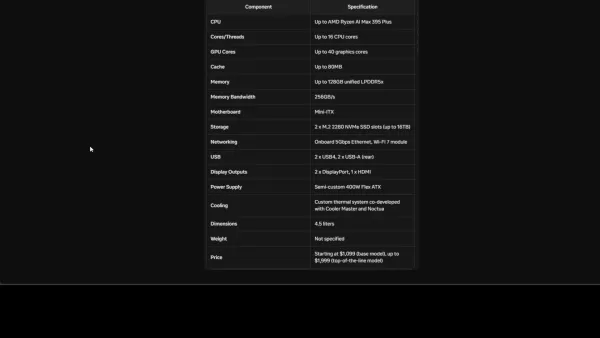
- It boasts an AMD Ryzen AI Max 395 Plus processor with up to 16 CPU cores and 40 graphics cores.
- The system supports up to 128GB of unified LPDDR5X memory, ensuring rapid memory bandwidth.
- It provides flexibility with USB4 ports and PCIe x4 slots for connecting external graphics cards.
- The Framework Ryzen Max Desktop is more budget-friendly than many competing AI workstations.
- Its modular design facilitates easy upgrades and customization.
- It is capable of managing massive AI workloads such as Llama 3.3 70B and DeepSeek R1 67B models.
- EigentBot, the sponsor of this article, assists in streamlining efficient AI knowledge bases.
Introducing the Framework Ryzen Max Desktop
What is the Framework Ryzen Max Desktop?
The Framework Ryzen Max Desktop is a compact yet powerful desktop computer specifically designed for AI research and development. It's engineered to run demanding AI models locally, offering a viable alternative to cloud-based solutions. Its appeal lies in the perfect blend of performance, flexibility, and affordability, making it an enticing choice for AI enthusiasts, researchers, and developers. The Framework Ryzen Max Desktop meets the growing need for AI-focused workstations head-on.
Unlike typical desktop computers, the Framework Ryzen Max Desktop is crafted to handle the intensive computational demands of AI model training and inference. It prioritizes efficient performance for AI workloads, balancing processing power, memory capacity, and expansion capabilities. With its robust hardware and versatile design, it empowers users to create, experiment, and deploy AI models without the limitations of cloud infrastructure.
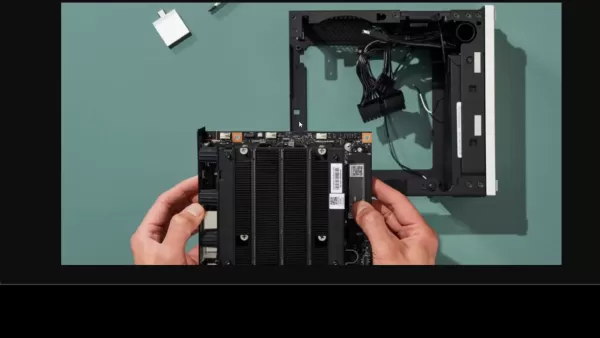
The compact design of the Framework Ryzen Max Desktop makes it easy to integrate into various work environments, from home offices to research labs. The modular design allows for straightforward upgrades and customization, ensuring the system can evolve with the user's AI projects. The Ryzen Max Desktop truly puts the power of AI in the hands of its users.
Demand is High: A Virtual Queue to Manage the Traffic
The demand for Framework's new Ryzen Max Desktop has been nothing short of phenomenal.

To handle this surge, a virtual queue system has been implemented to manage website traffic effectively. This system ensures a seamless and fair experience for everyone eager to learn more or purchase the desktop. Although some users may experience a wait time, this approach keeps the website stable and accessible during peak demand periods.
The virtual queue is a testament to the excitement surrounding the Framework Ryzen Max Desktop. The high demand underscores the desktop's potential impact on the AI landscape and speaks volumes about the growing need for powerful, accessible, and localized AI computing solutions. It symbolizes the challenges of meeting the demand for innovative AI technology and Framework's commitment to a positive user experience.
Diving Deeper into AI Capabilities
Power and Performance for AI Workloads
The Framework Ryzen Max Desktop stands out as a powerhouse for AI workloads, thanks to its well-thought-out hardware configuration.
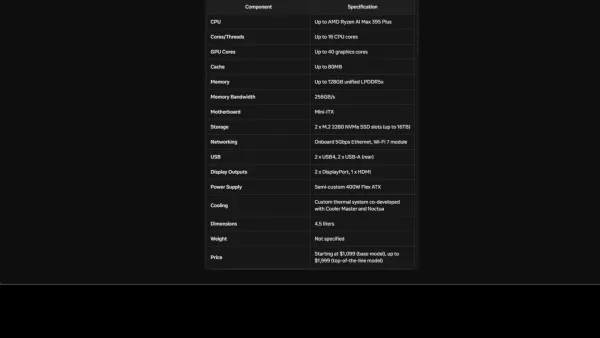
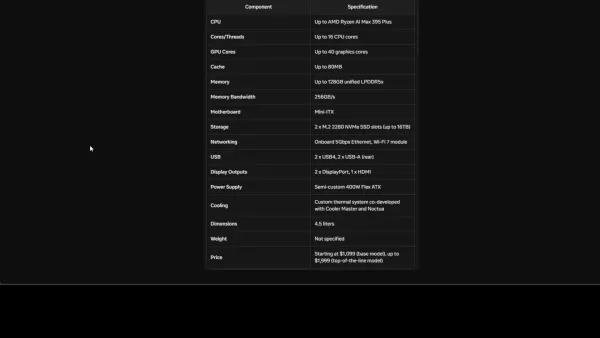
At its core is the AMD Ryzen AI Max 395 Plus processor, featuring up to 16 CPU cores. This capability allows the desktop to handle complex computations efficiently, making it ideal for training and deploying AI models.
The integration of 40 graphics cores further enhances the AI capabilities of the Framework Ryzen Max Desktop. Although it doesn't include a dedicated GPU, these integrated graphics significantly boost performance for AI workloads, enabling users to run model inference directly on their desktop. For those needing even more graphical power, the desktop offers expansion options. Users can connect external graphics cards via USB4 ports or PCIe x4 slots, allowing for customization and scalability to meet unique project requirements.
Memory is crucial for AI, and the Framework Ryzen Max Desktop excels in this area. It supports up to 128GB of unified LPDDR5X memory, ensuring fast memory bandwidth. The inclusion of two M.2 NVMe SSD slots further bolsters the system's ability to handle substantial AI models and datasets. The focus on high-performance components empowers users to carry out resource-intensive AI tasks seamlessly. In essence, the Ryzen Max Desktop is engineered to deliver the power and performance needed for a wide range of AI applications.
Flexibility for AI Research and Development
In the world of AI, flexibility is key. The Framework Ryzen Max Desktop recognizes this need and offers users numerous customization options to adapt to evolving project demands. One standout feature is the ability to connect external graphics cards through USB4 ports or PCIe x4 slots, which is incredibly useful for AI researchers and developers. These expansion options allow the addition of high-performance graphics cards to accelerate AI workload processing.
This adaptability makes the Framework Ryzen Max Desktop a customizable AI platform capable of addressing a variety of research and development needs. With its modular design, upgrading and customizing the desktop is a breeze. This allows users to enhance the system's capabilities, keeping it current with the latest AI technologies. The modularity also translates to cost-effectiveness, as components can be upgraded as needed rather than replacing the entire system. This flexibility ensures that the Framework Ryzen Max Desktop is future-proofed, enabling users to tackle new challenges and AI applications as they arise.
Massive AI Workloads and Model Compatibility
The Framework Ryzen Max Desktop is well-equipped to manage substantial AI workloads, thanks to its impressive hardware and software architecture.
Users can run memory-intensive models like Llama 3.3 70B or DeepSeek R1 67B on their desktop computer, thanks to its compatibility with popular AI frameworks and libraries, alongside its robust computing and memory features. This compatibility removes technological barriers, allowing researchers and developers to focus on model creation and experimentation.
The compatibility and performance of the Ryzen Max Desktop enable users to iterate rapidly on AI models, facilitating quicker prototyping, validation, and deployment. This efficiency allows researchers to develop and test innovative AI approaches without being constrained by hardware limitations. Its compatibility with major AI frameworks future-proofs the Framework Ryzen Max Desktop, ensuring it remains compatible with new tools and techniques.
Setting Up and Optimizing the Framework Ryzen Max Desktop for AI
Step 1: Initial Setup and Configuration
- Unboxing and Component Inspection: Carefully unpack the Framework Ryzen Max Desktop. Verify all components are present (desktop unit, power cable, etc.) and inspect for any shipping damage.
- Connecting Peripherals: Connect your monitor, keyboard, and mouse to the appropriate ports on the desktop. Consider using USB4 for high-speed external devices.
- Powering On: Connect the power cable and turn on the desktop. Follow the on-screen prompts to complete the initial setup, including selecting your language, region, and network settings.
- Operating System: The Framework Ryzen Max Desktop comes with an operating system pre-installed (usually Windows or Linux). It's important to update the operating system by downloading the latest patches and drivers for optimal performance and security.
Step 2: Installing AI Development Environment
- Install Python: Most AI tasks rely on Python. Download and install the latest version of Python from the official website.
- Setting Up Virtual Environments: Open Command Prompt as Administrator, create an isolated environment to manage dependencies:
python -m venv venv. Activate it with venv\Scripts\activate. - Installing TensorFlow and PyTorch: Use pip, the Python Package installer, to install TensorFlow, a popular framework for AI model building:
pip install tensorflow. To install PyTorch, follow instructions at the PyTorch website since it depends on your specific configuration. - Setting Up CUDA: For optimal GPU acceleration with TensorFlow or PyTorch, install NVIDIA CUDA Toolkit and cuDNN library. These tools enable the frameworks to use the GPU cores effectively.
Step 3: Optimizing Performance for AI Tasks
- Configuring GPU Usage: If you have added a separate GPU, confirm that TensorFlow or PyTorch is detecting and using it.
- Memory Management: When handling substantial datasets, ensure your code manages memory usage effectively to avoid overflow problems. Techniques such as batch processing and data streaming can be very helpful for training large AI models.
- Leveraging Multi-Core Processing: Ensure the Ryzen Max Desktop’s multiple cores are fully utilized by AI applications and use multithreading.
- Monitoring System Performance: Keep track of CPU, GPU, and memory utilization while training or running models. Tools like Windows Resource Monitor or Linux command-line utilities help identify bottlenecks and enhance overall performance.
Pricing and Value Proposition
Affordable AI Power
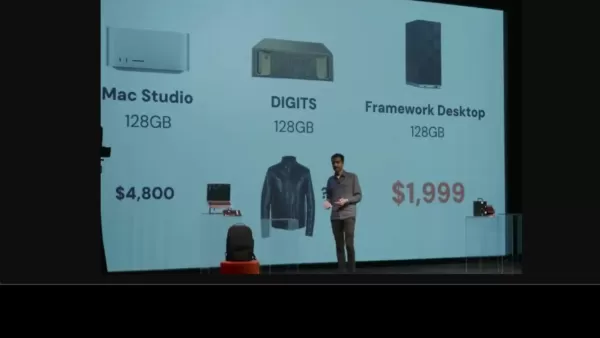
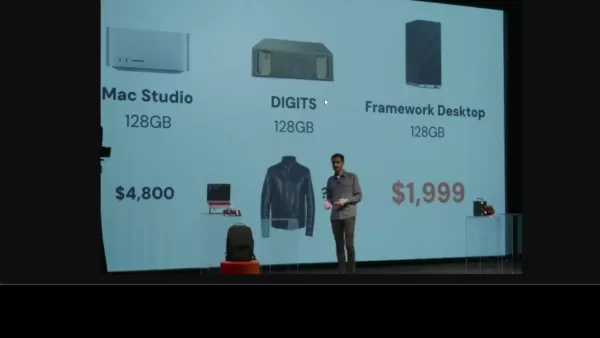
The Framework Ryzen Max Desktop starts at $1,099 for the base model and goes up to $1,999 for the top-of-the-line model.
This pricing places it significantly lower than many competing AI-focused systems while still delivering ample power for local AI model development and deployment. The pricing strategy strikes a balance between affordability and performance, making it accessible to enthusiasts, researchers, and developers.
Compared to alternatives like the Apple Mac Studio (starting at $4,800) and NVIDIA DGX Station (requiring a significant investment), the Framework Ryzen Max Desktop is an attractive option for those seeking a cost-effective AI solution. The modular design further enhances the value proposition, as users can upgrade specific components as needed, rather than replacing the entire system.
Price Comparison Table
System Starting Price Target Use Case Framework Ryzen Max Desktop $1,099 AI Development, Research Apple Mac Studio $4,800 Creative Professionals, AI NVIDIA DGX Station High Investment Data Center, Enterprise AI
Evaluating the Framework Ryzen Max Desktop: Pros and Cons
Pros
- Affordable price point compared to alternatives.
- Powerful AMD Ryzen AI Max processor with integrated graphics.
- Support for up to 128GB of unified LPDDR5X memory.
- Flexibility to connect external graphics cards.
- Modular design for easy upgrades and customization.
- Suitable for AI research and development, machine learning, and more.
Cons
- Integrated graphics may not be sufficient for the most demanding AI tasks.
- Requires external graphics card for optimal GPU performance.
- Limited expansion options compared to larger desktop towers.
- New product, with limited availability.
Key Features of the Framework Ryzen Max Desktop
Highlights of Ryzen Max Desktop
- AMD Ryzen AI Max 395 Plus Processor: With up to 16 CPU cores and 40 graphics cores, it delivers substantial processing power for AI tasks.
- Unified LPDDR5X Memory: Supports up to 128GB for high-speed memory bandwidth, essential for handling large AI models.
- External Graphics Card Support: Provides USB4 ports and PCIe x4 slots for connecting high-performance graphics cards to accelerate AI workloads.
- Dual M.2 NVMe SSD Slots: Offers two M.2 NVMe SSD slots for faster storage and data access, improving AI data workloads and accessibility for models and datasets.
- Modular Design: Allows for easy upgrades and customization, ensuring the system can adapt to changing needs and new technologies.
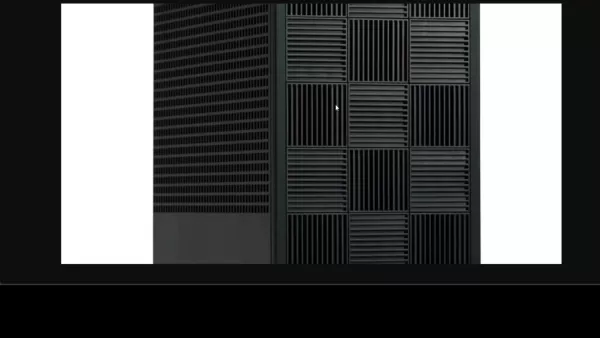
- Compact Form Factor: The Framework Ryzen Max Desktop occupies minimal space, ideal for home offices and lab environments.
- High-Speed Networking: Onboard 5Gbit Ethernet and Wi-Fi 7 module enable fast data transfer and communication with other devices and networks, allowing rapid deployment for research, models, and experimentation.
Real-World Use Cases for the Framework Ryzen Max Desktop
AI Research and Development
The Framework Ryzen Max Desktop is ideally suited for AI researchers and developers working on projects like:
- Machine Learning Model Training: Training custom machine learning models on local hardware, taking advantage of the CPU and integrated graphics.
- Deep Learning Inference: Running inference on pre-trained deep learning models, with the option to add a dedicated GPU for increased performance.
- Natural Language Processing (NLP): Developing and testing NLP models, including those for text classification, sentiment analysis, and language generation.
- Computer Vision: Processing image and video data for object detection, image recognition, and other computer vision tasks.
- Robotics: Using AI to control and coordinate robots, with the desktop serving as the central processing unit for perception and decision-making.
Educational Purposes
The Framework Ryzen Max Desktop can also be used for:
- AI Learning and Education: Providing students and educators with a cost-effective platform for learning AI concepts and techniques.
- Hands-On AI Projects: Enabling students to work on practical AI projects, such as building image classifiers or creating chatbots.
- AI Workshops and Training: Hosting AI workshops and training sessions on a localized platform, without relying on cloud infrastructure.
Frequently Asked Questions (FAQ)
Does the Framework Ryzen Max Desktop come with a dedicated GPU?
No, the desktop doesn't have a dedicated GPU by default. However, it features integrated graphics with 40 GPU cores. You can connect an external graphics card using the USB4 ports or PCIe x4 slots.
What kind of processor does the Framework Ryzen Max Desktop use?
It is powered by an AMD Ryzen AI Max 395 Plus processor. This processor has up to 16 CPU cores and 40 graphics cores.
What is the maximum amount of memory supported by the Framework Ryzen Max Desktop?
The desktop supports up to 128GB of unified LPDDR5X memory, providing fast memory bandwidth.
What AI models can this desktop run?
It can handle large AI workloads, such as Llama 3.3 70B and DeepSeek R1 67B models. It may handle some models like the Nvidia digits with different AI frameworks and architecture configurations.
Related Questions
How does the Framework Ryzen Max Desktop compare to other AI workstations in terms of performance?
The Framework Ryzen Max Desktop offers a unique blend of performance, flexibility, and affordability. While the Apple Mac Studio offers similar performance, it comes at a higher price point. NVIDIA's DGX Station offers more GPU power but is designed for data center use and requires a significant investment. Although more comprehensive tests are still needed, this should provide an affordable solution for local and accessible AI computing.
How can I optimize the Framework Ryzen Max Desktop for AI workloads?
To optimize the Framework Ryzen Max Desktop for AI workloads, configuring the correct GPU usage is crucial. Make sure to leverage multi-core processing while monitoring the system performance. Keeping track of CPU, GPU, and memory utilization while training or running models can help you discover bottlenecks and enhance overall performance.
What are the advantages of using a local AI workstation like the Framework Ryzen Max Desktop over cloud-based solutions?
Using a local AI workstation offers several advantages, including:
- Data Privacy and Security: Keep sensitive data on-premises, reducing the risk of data breaches and compliance issues.
- Cost Control: Avoid recurring cloud computing costs, especially for long-term projects.
- Offline Access: Work on AI projects without an internet connection.
- Low Latency: Reduce latency for real-time AI applications and robotics.
- Customization: Tailor the hardware and software configuration to meet specific project needs.
While cloud-based solutions offer scalability, a local workstation like the Framework Ryzen Max Desktop provides greater control, privacy, and cost-effectiveness for many AI tasks.
Related article
 Higgsfield secures $400 million funding, reaching $5.4 billion valuation with investments from Goldman Sachs and Intel
AI video platform Higgsfield has secured $400 million in funding from DST Global, Goldman Sachs, Liberty Global, and Intel, achieving a $5.4 billion valuation, per the Financial Times. The two-year-old startup is rapidly scaling enterprise subscripti
Science Corporation implants vision-restoring chip in first Stargardt disease patient
Science Corporation CEO Max Hodak revealed that the company has successfully implanted its vision-restoring PRIMA chip into its first patient suffering from Stargardt disease, a hereditary condition that progressively destroys central vision. Hodak,
OpenAI’s Jev Clone May Help Frontiers Lab Control Swarming Agents
Among the most notable announcements at OpenAI’s Dev Day on Tuesday was a brief remark from CEO Sam Altman regarding the launch of the company’s new “Decisions API.”This API appears to offer capabilities similar to Jev, a model introduced earlier thi
Related Special Topic Recommendations
Design & Art
Higgsfield secures $400 million funding, reaching $5.4 billion valuation with investments from Goldman Sachs and Intel
AI video platform Higgsfield has secured $400 million in funding from DST Global, Goldman Sachs, Liberty Global, and Intel, achieving a $5.4 billion valuation, per the Financial Times. The two-year-old startup is rapidly scaling enterprise subscripti
Science Corporation implants vision-restoring chip in first Stargardt disease patient
Science Corporation CEO Max Hodak revealed that the company has successfully implanted its vision-restoring PRIMA chip into its first patient suffering from Stargardt disease, a hereditary condition that progressively destroys central vision. Hodak,
OpenAI’s Jev Clone May Help Frontiers Lab Control Swarming Agents
Among the most notable announcements at OpenAI’s Dev Day on Tuesday was a brief remark from CEO Sam Altman regarding the launch of the company’s new “Decisions API.”This API appears to offer capabilities similar to Jev, a model introduced earlier thi
Related Special Topic Recommendations
Design & Art
 Top AI Illustration Tools: Create Editorial Scenes and Cover Art Faster
2026 Latest Top-rated AI Illustration Tools: Our curated list features the best powerfully designed tools for creating stunning editorial scenes and eye-catching cover art quickly. Each option has gone through rigorous real-world tests, offering a free vs paid comparison to help you find the perfect match for your workflow. Try these must-try solutions today to unlock your AI edge and boost your creative productivity. Explore now at XIX.AI.
 10 tools
 xix.ai
Education and Learning
Top AI Tutors for Exam Prep: Practice Math, Science, and English
xix.ai
Education and Learning
Top AI Tutors for Exam Prep: Practice Math, Science, and English
2026 Latest Top-Rated Best AI Tutors for Exam Prep are here on XIX.AI! Our curated list features powerful game-changing tools that offer free vs paid comparison, real-world tests, and weekly updated rankings. They help boost your writing efficiency, simplify complex topic learning, and unlock your academic potential. Explore now to Discover your perfect exam prep tool and Start creating today to Unlock your AI edge!
10 tools
xix.ai
Finance
AI Budget Planning Tools for Personal Money Management
2026 Latest Best Top-Rated AI Budget Planning Tools for Personal Money Management are here on XIX.AI! This curated collection features powerful, game-changing solutions that help you conduct real-world tests, understand spending habits, and create personalized plans to boost productivity. Enjoy a free vs paid comparison along with detailed rankings. Must-try tools designed to simplify money management and unlock your AI edge. Explore now!
11 tools
xix.ai
Health & Wellness
AI Sleep Tracking Assistants: Improve Recovery with Better Bedtime Habits
2026 Latest Best Top-Rated AI Sleep Tracking Assistants curated for ultimate recovery. This fully updated weekly guide features powerful tools that deliver real-world tests, free vs paid comparison, and detailed rankings to help you find the must-try solution that boosts sleep quality and supports better bedtime habits. Explore now at XIX.AI to Unlock your AI edge.
10 tools
xix.ai
Data Analysis
AI SQL Copilots for Product and Revenue Analytics
2026 Latest Best Top-Rated AI SQL Copilots for Product and Revenue Analytics! XIX.AI has curated a powerful, game-changing collection of must-try tools that undergo real-world tests through weekly updated rankings. These tools help users boost productivity significantly by accelerating data analysis, streamlining complex queries, and generating accurate insights to drive smarter business decisions. Explore now to Discover your perfect tool for unlocking your AI edge!
14 tools
xix.ai
Education and Learning
Best AI Homework Helpers That Teach: Learn Concepts, Not Just Answers
2026 Latest Best Top-Rated AI Homework Helpers That Teach Core Concepts Not Just Answers Powerful Tools for Students Must-Try Curated List Weekly Updated Free vs Paid Comparison Real-World Tests Accurate Rankings to Help You Unlock Your Full Learning Potential Explore now to Discover your perfect tool for smarter studying.
10 tools
xix.ai

 Comments (7)
0/500
Comments (7)
0/500
![JerryMitchell]()
This Framework Ryzen Max Desktop sounds like a beast for AI work! I'm impressed by the 128GB memory—perfect for running massive models locally. But soldered RAM? That's a bummer for upgrades. Still, for $1999, it’s a steal compared to a Mac Studio! 😎
![NicholasGonzález]()
This Framework Ryzen Max Desktop sounds like a beast for AI tasks! I'm impressed by its compact design and power, but I wonder if it's overkill for casual users like me. 😅 Still, it's exciting to see AI workstations becoming more accessible!
![CharlesWhite]()
El Framework Ryzen Max Desktop es una bestia para el trabajo de IA. Lo he estado usando para mis proyectos de aprendizaje profundo y el rendimiento es simplemente increíble. El único inconveniente es que es un poco caro, pero si te tomas en serio la IA, vale cada centavo. 🚀
![EdwardMartinez]()
The Framework Ryzen Max Desktop is a beast for AI work! I've been using it for my deep learning projects and the performance is just unreal. Only downside is it's a bit pricey, but if you're serious about AI, it's worth every penny. 🚀
![EricRoberts]()
フレームワークRyzen MaxデスクトップはAI作業に最適です!私のディープラーニングプロジェクトで使っていますが、パフォーマンスが本当に素晴らしいです。ただ、少し高価なのが難点ですが、AIに本気ならその価値はありますね。🚀
![RyanAdams]()
O Framework Ryzen Max Desktop é uma fera para trabalhos de IA! Estou usando para meus projetos de aprendizado profundo e o desempenho é simplesmente irreal. A única desvantagem é que é um pouco caro, mas se você leva a sério a IA, vale cada centavo. 🚀
Exploring the Framework Ryzen Max Desktop: A Game Changer in AI Computing
In the fast-paced world of technology, artificial intelligence (AI) has transitioned from a futuristic concept to an everyday reality. The surge in demand for robust and accessible AI workstations is undeniable, and the Framework Ryzen Max Desktop is designed to fill this gap. This article takes a closer look at the Framework Ryzen Max Desktop, examining its features, specs, and how it measures up against other AI-centric systems on the market.
Key Points
- The Framework Ryzen Max Desktop is tailored for AI research and development.
- It boasts an AMD Ryzen AI Max 395 Plus processor with up to 16 CPU cores and 40 graphics cores.
- The system supports up to 128GB of unified LPDDR5X memory, ensuring rapid memory bandwidth.
- It provides flexibility with USB4 ports and PCIe x4 slots for connecting external graphics cards.
- The Framework Ryzen Max Desktop is more budget-friendly than many competing AI workstations.
- Its modular design facilitates easy upgrades and customization.
- It is capable of managing massive AI workloads such as Llama 3.3 70B and DeepSeek R1 67B models.
- EigentBot, the sponsor of this article, assists in streamlining efficient AI knowledge bases.
Introducing the Framework Ryzen Max Desktop
What is the Framework Ryzen Max Desktop?
The Framework Ryzen Max Desktop is a compact yet powerful desktop computer specifically designed for AI research and development. It's engineered to run demanding AI models locally, offering a viable alternative to cloud-based solutions. Its appeal lies in the perfect blend of performance, flexibility, and affordability, making it an enticing choice for AI enthusiasts, researchers, and developers. The Framework Ryzen Max Desktop meets the growing need for AI-focused workstations head-on.
Unlike typical desktop computers, the Framework Ryzen Max Desktop is crafted to handle the intensive computational demands of AI model training and inference. It prioritizes efficient performance for AI workloads, balancing processing power, memory capacity, and expansion capabilities. With its robust hardware and versatile design, it empowers users to create, experiment, and deploy AI models without the limitations of cloud infrastructure.
The compact design of the Framework Ryzen Max Desktop makes it easy to integrate into various work environments, from home offices to research labs. The modular design allows for straightforward upgrades and customization, ensuring the system can evolve with the user's AI projects. The Ryzen Max Desktop truly puts the power of AI in the hands of its users.
Demand is High: A Virtual Queue to Manage the Traffic
The demand for Framework's new Ryzen Max Desktop has been nothing short of phenomenal.
To handle this surge, a virtual queue system has been implemented to manage website traffic effectively. This system ensures a seamless and fair experience for everyone eager to learn more or purchase the desktop. Although some users may experience a wait time, this approach keeps the website stable and accessible during peak demand periods.
The virtual queue is a testament to the excitement surrounding the Framework Ryzen Max Desktop. The high demand underscores the desktop's potential impact on the AI landscape and speaks volumes about the growing need for powerful, accessible, and localized AI computing solutions. It symbolizes the challenges of meeting the demand for innovative AI technology and Framework's commitment to a positive user experience.
Diving Deeper into AI Capabilities
Power and Performance for AI Workloads
The Framework Ryzen Max Desktop stands out as a powerhouse for AI workloads, thanks to its well-thought-out hardware configuration.
At its core is the AMD Ryzen AI Max 395 Plus processor, featuring up to 16 CPU cores. This capability allows the desktop to handle complex computations efficiently, making it ideal for training and deploying AI models.
The integration of 40 graphics cores further enhances the AI capabilities of the Framework Ryzen Max Desktop. Although it doesn't include a dedicated GPU, these integrated graphics significantly boost performance for AI workloads, enabling users to run model inference directly on their desktop. For those needing even more graphical power, the desktop offers expansion options. Users can connect external graphics cards via USB4 ports or PCIe x4 slots, allowing for customization and scalability to meet unique project requirements.
Memory is crucial for AI, and the Framework Ryzen Max Desktop excels in this area. It supports up to 128GB of unified LPDDR5X memory, ensuring fast memory bandwidth. The inclusion of two M.2 NVMe SSD slots further bolsters the system's ability to handle substantial AI models and datasets. The focus on high-performance components empowers users to carry out resource-intensive AI tasks seamlessly. In essence, the Ryzen Max Desktop is engineered to deliver the power and performance needed for a wide range of AI applications.
Flexibility for AI Research and Development
In the world of AI, flexibility is key. The Framework Ryzen Max Desktop recognizes this need and offers users numerous customization options to adapt to evolving project demands. One standout feature is the ability to connect external graphics cards through USB4 ports or PCIe x4 slots, which is incredibly useful for AI researchers and developers. These expansion options allow the addition of high-performance graphics cards to accelerate AI workload processing.
This adaptability makes the Framework Ryzen Max Desktop a customizable AI platform capable of addressing a variety of research and development needs. With its modular design, upgrading and customizing the desktop is a breeze. This allows users to enhance the system's capabilities, keeping it current with the latest AI technologies. The modularity also translates to cost-effectiveness, as components can be upgraded as needed rather than replacing the entire system. This flexibility ensures that the Framework Ryzen Max Desktop is future-proofed, enabling users to tackle new challenges and AI applications as they arise.
Massive AI Workloads and Model Compatibility
The Framework Ryzen Max Desktop is well-equipped to manage substantial AI workloads, thanks to its impressive hardware and software architecture.
Users can run memory-intensive models like Llama 3.3 70B or DeepSeek R1 67B on their desktop computer, thanks to its compatibility with popular AI frameworks and libraries, alongside its robust computing and memory features. This compatibility removes technological barriers, allowing researchers and developers to focus on model creation and experimentation.
The compatibility and performance of the Ryzen Max Desktop enable users to iterate rapidly on AI models, facilitating quicker prototyping, validation, and deployment. This efficiency allows researchers to develop and test innovative AI approaches without being constrained by hardware limitations. Its compatibility with major AI frameworks future-proofs the Framework Ryzen Max Desktop, ensuring it remains compatible with new tools and techniques.
Setting Up and Optimizing the Framework Ryzen Max Desktop for AI
Step 1: Initial Setup and Configuration
- Unboxing and Component Inspection: Carefully unpack the Framework Ryzen Max Desktop. Verify all components are present (desktop unit, power cable, etc.) and inspect for any shipping damage.
- Connecting Peripherals: Connect your monitor, keyboard, and mouse to the appropriate ports on the desktop. Consider using USB4 for high-speed external devices.
- Powering On: Connect the power cable and turn on the desktop. Follow the on-screen prompts to complete the initial setup, including selecting your language, region, and network settings.
- Operating System: The Framework Ryzen Max Desktop comes with an operating system pre-installed (usually Windows or Linux). It's important to update the operating system by downloading the latest patches and drivers for optimal performance and security.
Step 2: Installing AI Development Environment
- Install Python: Most AI tasks rely on Python. Download and install the latest version of Python from the official website.
- Setting Up Virtual Environments: Open Command Prompt as Administrator, create an isolated environment to manage dependencies:
python -m venv venv. Activate it withvenv\Scripts\activate. - Installing TensorFlow and PyTorch: Use pip, the Python Package installer, to install TensorFlow, a popular framework for AI model building:
pip install tensorflow. To install PyTorch, follow instructions at the PyTorch website since it depends on your specific configuration. - Setting Up CUDA: For optimal GPU acceleration with TensorFlow or PyTorch, install NVIDIA CUDA Toolkit and cuDNN library. These tools enable the frameworks to use the GPU cores effectively.
Step 3: Optimizing Performance for AI Tasks
- Configuring GPU Usage: If you have added a separate GPU, confirm that TensorFlow or PyTorch is detecting and using it.
- Memory Management: When handling substantial datasets, ensure your code manages memory usage effectively to avoid overflow problems. Techniques such as batch processing and data streaming can be very helpful for training large AI models.
- Leveraging Multi-Core Processing: Ensure the Ryzen Max Desktop’s multiple cores are fully utilized by AI applications and use multithreading.
- Monitoring System Performance: Keep track of CPU, GPU, and memory utilization while training or running models. Tools like Windows Resource Monitor or Linux command-line utilities help identify bottlenecks and enhance overall performance.
Pricing and Value Proposition
Affordable AI Power
The Framework Ryzen Max Desktop starts at $1,099 for the base model and goes up to $1,999 for the top-of-the-line model.
This pricing places it significantly lower than many competing AI-focused systems while still delivering ample power for local AI model development and deployment. The pricing strategy strikes a balance between affordability and performance, making it accessible to enthusiasts, researchers, and developers.
Compared to alternatives like the Apple Mac Studio (starting at $4,800) and NVIDIA DGX Station (requiring a significant investment), the Framework Ryzen Max Desktop is an attractive option for those seeking a cost-effective AI solution. The modular design further enhances the value proposition, as users can upgrade specific components as needed, rather than replacing the entire system.
Price Comparison Table
| System | Starting Price | Target Use Case |
|---|---|---|
| Framework Ryzen Max Desktop | $1,099 | AI Development, Research |
| Apple Mac Studio | $4,800 | Creative Professionals, AI |
| NVIDIA DGX Station | High Investment | Data Center, Enterprise AI |
Evaluating the Framework Ryzen Max Desktop: Pros and Cons
Pros
- Affordable price point compared to alternatives.
- Powerful AMD Ryzen AI Max processor with integrated graphics.
- Support for up to 128GB of unified LPDDR5X memory.
- Flexibility to connect external graphics cards.
- Modular design for easy upgrades and customization.
- Suitable for AI research and development, machine learning, and more.
Cons
- Integrated graphics may not be sufficient for the most demanding AI tasks.
- Requires external graphics card for optimal GPU performance.
- Limited expansion options compared to larger desktop towers.
- New product, with limited availability.
Key Features of the Framework Ryzen Max Desktop
Highlights of Ryzen Max Desktop
- AMD Ryzen AI Max 395 Plus Processor: With up to 16 CPU cores and 40 graphics cores, it delivers substantial processing power for AI tasks.
- Unified LPDDR5X Memory: Supports up to 128GB for high-speed memory bandwidth, essential for handling large AI models.
- External Graphics Card Support: Provides USB4 ports and PCIe x4 slots for connecting high-performance graphics cards to accelerate AI workloads.
- Dual M.2 NVMe SSD Slots: Offers two M.2 NVMe SSD slots for faster storage and data access, improving AI data workloads and accessibility for models and datasets.
- Modular Design: Allows for easy upgrades and customization, ensuring the system can adapt to changing needs and new technologies.
- Compact Form Factor: The Framework Ryzen Max Desktop occupies minimal space, ideal for home offices and lab environments.
- High-Speed Networking: Onboard 5Gbit Ethernet and Wi-Fi 7 module enable fast data transfer and communication with other devices and networks, allowing rapid deployment for research, models, and experimentation.
Real-World Use Cases for the Framework Ryzen Max Desktop
AI Research and Development
The Framework Ryzen Max Desktop is ideally suited for AI researchers and developers working on projects like:
- Machine Learning Model Training: Training custom machine learning models on local hardware, taking advantage of the CPU and integrated graphics.
- Deep Learning Inference: Running inference on pre-trained deep learning models, with the option to add a dedicated GPU for increased performance.
- Natural Language Processing (NLP): Developing and testing NLP models, including those for text classification, sentiment analysis, and language generation.
- Computer Vision: Processing image and video data for object detection, image recognition, and other computer vision tasks.
- Robotics: Using AI to control and coordinate robots, with the desktop serving as the central processing unit for perception and decision-making.
Educational Purposes
The Framework Ryzen Max Desktop can also be used for:
- AI Learning and Education: Providing students and educators with a cost-effective platform for learning AI concepts and techniques.
- Hands-On AI Projects: Enabling students to work on practical AI projects, such as building image classifiers or creating chatbots.
- AI Workshops and Training: Hosting AI workshops and training sessions on a localized platform, without relying on cloud infrastructure.
Frequently Asked Questions (FAQ)
Does the Framework Ryzen Max Desktop come with a dedicated GPU?
No, the desktop doesn't have a dedicated GPU by default. However, it features integrated graphics with 40 GPU cores. You can connect an external graphics card using the USB4 ports or PCIe x4 slots.
What kind of processor does the Framework Ryzen Max Desktop use?
It is powered by an AMD Ryzen AI Max 395 Plus processor. This processor has up to 16 CPU cores and 40 graphics cores.
What is the maximum amount of memory supported by the Framework Ryzen Max Desktop?
The desktop supports up to 128GB of unified LPDDR5X memory, providing fast memory bandwidth.
What AI models can this desktop run?
It can handle large AI workloads, such as Llama 3.3 70B and DeepSeek R1 67B models. It may handle some models like the Nvidia digits with different AI frameworks and architecture configurations.
Related Questions
How does the Framework Ryzen Max Desktop compare to other AI workstations in terms of performance?
The Framework Ryzen Max Desktop offers a unique blend of performance, flexibility, and affordability. While the Apple Mac Studio offers similar performance, it comes at a higher price point. NVIDIA's DGX Station offers more GPU power but is designed for data center use and requires a significant investment. Although more comprehensive tests are still needed, this should provide an affordable solution for local and accessible AI computing.
How can I optimize the Framework Ryzen Max Desktop for AI workloads?
To optimize the Framework Ryzen Max Desktop for AI workloads, configuring the correct GPU usage is crucial. Make sure to leverage multi-core processing while monitoring the system performance. Keeping track of CPU, GPU, and memory utilization while training or running models can help you discover bottlenecks and enhance overall performance.
What are the advantages of using a local AI workstation like the Framework Ryzen Max Desktop over cloud-based solutions?
Using a local AI workstation offers several advantages, including:
- Data Privacy and Security: Keep sensitive data on-premises, reducing the risk of data breaches and compliance issues.
- Cost Control: Avoid recurring cloud computing costs, especially for long-term projects.
- Offline Access: Work on AI projects without an internet connection.
- Low Latency: Reduce latency for real-time AI applications and robotics.
- Customization: Tailor the hardware and software configuration to meet specific project needs.
While cloud-based solutions offer scalability, a local workstation like the Framework Ryzen Max Desktop provides greater control, privacy, and cost-effectiveness for many AI tasks.








 Higgsfield secures $400 million funding, reaching $5.4 billion valuation with investments from Goldman Sachs and Intel
AI video platform Higgsfield has secured $400 million in funding from DST Global, Goldman Sachs, Liberty Global, and Intel, achieving a $5.4 billion valuation, per the Financial Times. The two-year-old startup is rapidly scaling enterprise subscripti
Higgsfield secures $400 million funding, reaching $5.4 billion valuation with investments from Goldman Sachs and Intel
AI video platform Higgsfield has secured $400 million in funding from DST Global, Goldman Sachs, Liberty Global, and Intel, achieving a $5.4 billion valuation, per the Financial Times. The two-year-old startup is rapidly scaling enterprise subscripti
 Science Corporation implants vision-restoring chip in first Stargardt disease patient
Science Corporation CEO Max Hodak revealed that the company has successfully implanted its vision-restoring PRIMA chip into its first patient suffering from Stargardt disease, a hereditary condition that progressively destroys central vision. Hodak,
Science Corporation implants vision-restoring chip in first Stargardt disease patient
Science Corporation CEO Max Hodak revealed that the company has successfully implanted its vision-restoring PRIMA chip into its first patient suffering from Stargardt disease, a hereditary condition that progressively destroys central vision. Hodak,
 OpenAI’s Jev Clone May Help Frontiers Lab Control Swarming Agents
Among the most notable announcements at OpenAI’s Dev Day on Tuesday was a brief remark from CEO Sam Altman regarding the launch of the company’s new “Decisions API.”This API appears to offer capabilities similar to Jev, a model introduced earlier thi
OpenAI’s Jev Clone May Help Frontiers Lab Control Swarming Agents
Among the most notable announcements at OpenAI’s Dev Day on Tuesday was a brief remark from CEO Sam Altman regarding the launch of the company’s new “Decisions API.”This API appears to offer capabilities similar to Jev, a model introduced earlier thi

2026 Latest Top-rated AI Illustration Tools: Our curated list features the best powerfully designed tools for creating stunning editorial scenes and eye-catching cover art quickly. Each option has gone through rigorous real-world tests, offering a free vs paid comparison to help you find the perfect match for your workflow. Try these must-try solutions today to unlock your AI edge and boost your creative productivity. Explore now at XIX.AI.
10 tools
xix.ai

2026 Latest Top-Rated Best AI Tutors for Exam Prep are here on XIX.AI! Our curated list features powerful game-changing tools that offer free vs paid comparison, real-world tests, and weekly updated rankings. They help boost your writing efficiency, simplify complex topic learning, and unlock your academic potential. Explore now to Discover your perfect exam prep tool and Start creating today to Unlock your AI edge!
10 tools
xix.ai

2026 Latest Best Top-Rated AI Budget Planning Tools for Personal Money Management are here on XIX.AI! This curated collection features powerful, game-changing solutions that help you conduct real-world tests, understand spending habits, and create personalized plans to boost productivity. Enjoy a free vs paid comparison along with detailed rankings. Must-try tools designed to simplify money management and unlock your AI edge. Explore now!
11 tools
xix.ai

2026 Latest Best Top-Rated AI Sleep Tracking Assistants curated for ultimate recovery. This fully updated weekly guide features powerful tools that deliver real-world tests, free vs paid comparison, and detailed rankings to help you find the must-try solution that boosts sleep quality and supports better bedtime habits. Explore now at XIX.AI to Unlock your AI edge.
10 tools
xix.ai

2026 Latest Best Top-Rated AI SQL Copilots for Product and Revenue Analytics! XIX.AI has curated a powerful, game-changing collection of must-try tools that undergo real-world tests through weekly updated rankings. These tools help users boost productivity significantly by accelerating data analysis, streamlining complex queries, and generating accurate insights to drive smarter business decisions. Explore now to Discover your perfect tool for unlocking your AI edge!
14 tools
xix.ai

2026 Latest Best Top-Rated AI Homework Helpers That Teach Core Concepts Not Just Answers Powerful Tools for Students Must-Try Curated List Weekly Updated Free vs Paid Comparison Real-World Tests Accurate Rankings to Help You Unlock Your Full Learning Potential Explore now to Discover your perfect tool for smarter studying.
10 tools
xix.ai

This Framework Ryzen Max Desktop sounds like a beast for AI work! I'm impressed by the 128GB memory—perfect for running massive models locally. But soldered RAM? That's a bummer for upgrades. Still, for $1999, it’s a steal compared to a Mac Studio! 😎
This Framework Ryzen Max Desktop sounds like a beast for AI tasks! I'm impressed by its compact design and power, but I wonder if it's overkill for casual users like me. 😅 Still, it's exciting to see AI workstations becoming more accessible!
El Framework Ryzen Max Desktop es una bestia para el trabajo de IA. Lo he estado usando para mis proyectos de aprendizaje profundo y el rendimiento es simplemente increíble. El único inconveniente es que es un poco caro, pero si te tomas en serio la IA, vale cada centavo. 🚀
The Framework Ryzen Max Desktop is a beast for AI work! I've been using it for my deep learning projects and the performance is just unreal. Only downside is it's a bit pricey, but if you're serious about AI, it's worth every penny. 🚀
フレームワークRyzen MaxデスクトップはAI作業に最適です!私のディープラーニングプロジェクトで使っていますが、パフォーマンスが本当に素晴らしいです。ただ、少し高価なのが難点ですが、AIに本気ならその価値はありますね。🚀
O Framework Ryzen Max Desktop é uma fera para trabalhos de IA! Estou usando para meus projetos de aprendizado profundo e o desempenho é simplesmente irreal. A única desvantagem é que é um pouco caro, mas se você leva a sério a IA, vale cada centavo. 🚀












