


 Home
HomeHow to create a voice AI assistant with Python and ChatGPT in 2026?
This tutorial guides you through building your own AI voice assistant with Python and ChatGPT. It walks you through project setup, essential libraries, virtual environments, and provides detailed code examples. Whether you're an experienced developer or a beginner, you'll learn how to create an AI assistant that understands voice commands and uses ChatGPT to generate intelligent responses.
Key Points
Learn how to set up a virtual environment for your Python AI assistant project.
Discover the installation and use of key libraries like SpeechRecognition, pyttsx3, and OpenAI.
Understand the fundamentals of writing functions for voice recognition, text processing, and speech synthesis.
Build a personalized, voice-controlled AI assistant.
Explore methods for handling various user commands and generating responses via ChatGPT.
Building a Voice-Controlled AI Assistant
Core Code Structure and Functions
After setting up your environment, you can write the Python code to power your AI assistant. This involves creating functions for voice recognition, text processing, and speech synthesis. The process for each function is detailed below:
Import Necessary Libraries:
- Start by importing the required libraries into your Python script
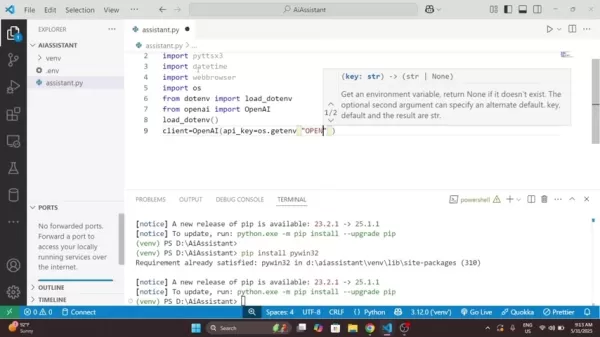
. This gives you access to the functionalities needed for your AI assistant:
import speech_recognition as srimport pyttsx3import datetimeimport webbrowserimport osfrom dotenv import load_dotenvfrom openai import OpenAI
Set Up the Text-to-Speech Engine:
- Initialize the pyttsx3 engine for text-to-speech conversion:
engine = pyttsx3.init()
This initializes the text-to-speech engine, which converts text responses into spoken audio.
Create a Speak Function:
- Define a function to handle text-to-speech conversion:
def speak(text):print(f"Assistant: {text}")engine.say(text)engine.runAndWait()
This speak function takes a text string as input and uses pyttsx3 to convert it to speech. The text is also printed to the console for debugging and monitoring.
Define a Listen Function:
- Create a function that captures microphone audio and converts it to text using the
SpeechRecognition library:def listen():recognizer = sr.Recognizer()with sr.Microphone() as source:print("Listening...")recognizer.adjust_for_ambient_noise(source)audio = recognizer.listen(source)
try:command = recognizer.recognize_google(audio)print(f"You said: {command}")except sr.UnknownValueError:speak("Sorry, I didn't catch that")return ""except sr.RequestError as e:speak("Speech service is not working")return ""
return command.lower()
The `listen` function configures a speech recognizer and microphone, listens for audio input, and uses Google's speech recognition to transcribe it into text. It handles exceptions like unrecognized speech or service unavailability.
Chat with ChatGPT Function:
- Integrate with the OpenAI API to get responses from ChatGPT. Define a function that takes a question and returns the AI's answer:
def chat_with_gpt(question):load_dotenv()client = OpenAI(api_key=os.getenv('OPENAI_API_KEY'),)
try:response = client.chat.completions.create(model="gpt-3.5-turbo",messages=[{"role": "user","content": question,}],)answer = response.choices[0].message.contentreturn answerexcept Exception as e:print(f"ChatGpt Error {e}")return "I couldn't get a response from ChatGpt"
This function calls the OpenAI API, sends the user's question, and receives a response from ChatGPT. It handles exceptions and extracts the relevant text from the API response, leveraging ChatGPT for intelligent, contextual replies.
Run Assistant Function : This is the main function and starting point of the application.
def run_assistant():speak("Hello! I'm your AI assistant, What can I do for you?")while True:command = listen()if "time" in command:now = datetime.datetime.now().strftime("%H:%M %p")speak(f"The time is: {now}")elif "open youtube" in command:speak("Opening YouTube")webbrowser.open("https://www.youtube.com")elif "open google" in command:speak("Opening google")webbrowser.open("https://www.google.com")elif "stop" in command or "exit" in command:speak("Good Bye Friend!")breakelif command:answer = chat_with_gpt(command)speak(answer)
Running The Program :
if __name__ == '__main__': run_assistant()
Running this code starts the program, which begins listening for your commands.
Customizing Your AI Assistant
Customizing the Code for Specific Tasks
To truly personalize your AI assistant, consider these customizations:
Extending Functionality: Add more elif command statements to handle additional tasks like:
- Opening specific websites or applications.
- Setting reminders.
- Controlling smart home devices.
Personalizing Responses: Customize the assistant's responses to your preferences. Modify the speak function to use different voices, tones, or greetings.
Implementing Context Awareness: Enhance the assistant's memory and awareness by storing conversation history and user preferences. This enables more relevant and personalized responses based on context.
Adding More Error Handling: Implement error handling for other scenarios like network issues or API rate limits. Useful error messages help manage problems effectively.
Creating a More Engaging Personality: Experiment with coding techniques to make your AI more conversational. Add functions to respond to emotions or interact more naturally. Consider your own personality traits to create engaging conversations and potentially add security measures.
How to use Your AI voice assistant
Key Aspects
Here's how users can interact with your new voice assistant 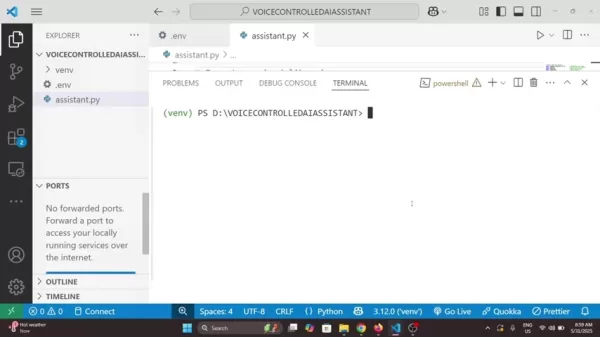
:
Start a new voice assistant. Create a new folder for your files and name it something memorable.
Begin the program. Type 'python assistent.py' to start the program.
Engage in conversation. Use appropriate commands for the assistant to perform tasks like looking up information, telling jokes, and more.
Useful Markdown Tables For Improved Structure and Readability
Tables can neatly organize information and improve readability. Here's an example for comparing different Voice Assistants:
Comparison of Voice Assistants
Feature Custom AI Assistant Alexa Google Assistant CustomizationHighMediumMediumPrivacyHighMediumMediumTask AutomationLimitedHighHighIntegrationLimitedExtensiveExtensiveDevelopment EffortHighN/AN/ABuilding a Custom Voice-Controlled AI Assistant: Weighing the Pros
and Cons
Pros
Tailor the AI assistant's responses and functionality to your exact needs.
Complete data ownership and processing control, reducing reliance on external services.
Improves programming skills and understanding of AI and natural language processing.
Cons
Requires coding, testing, and debugging, which can be time-intensive.
Managing library dependencies and compatibility can be complex.
Needs regular updates and revisions to keep pace with technological changes.
FAQ
What are the key libraries needed to build this voice-controlled AI assistant?
The essential libraries are SpeechRecognition (for voice input), pyttsx3 (for text-to-speech), OpenAI (for ChatGPT access), and python-dotenv (for managing environment variables like the OpenAI API key).
How do I activate the virtual environment in my project?
The activation command varies by OS: use 'venvScriptsactivate' for Windows and 'source venv/bin/activate' for macOS/Linux.
How can I customize my AI assistant?
Extend functionality by adding more elif command statements for new tasks, personalize responses, implement context awareness with conversation history and user preferences, add error handling, and create a more engaging personality.
Related Questions
What can be done to resolve the 'AttributeError: Could not find PyAudio; check installation' error?
In Python, you might encounter an 'AttributeError: Could not find PyAudio; check installation' error during speech recognition development. This error, common in speech recognition projects, indicates a problem with the PyAudio library installation. PyAudio is essential for capturing and playing audio in Python applications. To fix this, verify the library's installation and ensure proper setup for speech recognition tasks.Ensure PyAudio is installed: First, confirm that the PyAudio library is correctly installed. The basic step involves using pip, Python's package installer. Open your command line or terminal and run:pip install PyAudio
Consider Using a Conda Environment:
Conda can manage Python environments and library installations.Create a new environment with:conda create -n myenv python=3.xconda activate myenvconda install -c conda-forge pyaudioUpdate pip: Sometimes an outdated pip causes issues. Update pip using:pip install --upgrade pipThese steps should help resolve this common problem.
Related article
 OpenAI launches GPT-5.5 Instant as ChatGPT’s new default model
OpenAI launched GPT-5.5 Instant on Monday, replacing GPT-5.3 Instant as the default ChatGPT model. The company states that this update minimizes hallucinations in high-stakes fields like law, medicine, and finance, while preserving the fast response
ChatGPT Introduces Chat Lock Feature for Enhanced Privacy
On Tuesday, OpenAI revealed a new feature allowing users to lock ChatGPT conversations, ensuring sensitive discussions remain private when others might access their screen or device. Users can protect these locked chats using a four-digit PIN, or lev
India shifts from app downloads to monetization as locals begin paying for digital services
India once stood as the globe’s top app download hub yet struggled to generate revenue. That dynamic is shifting as users increasingly invest in AI, entertainment, and premium digital services.Consumer spending on mobile apps in India hit a record $3
Related Special Topic Recommendations
Design & Art
OpenAI launches GPT-5.5 Instant as ChatGPT’s new default model
OpenAI launched GPT-5.5 Instant on Monday, replacing GPT-5.3 Instant as the default ChatGPT model. The company states that this update minimizes hallucinations in high-stakes fields like law, medicine, and finance, while preserving the fast response
ChatGPT Introduces Chat Lock Feature for Enhanced Privacy
On Tuesday, OpenAI revealed a new feature allowing users to lock ChatGPT conversations, ensuring sensitive discussions remain private when others might access their screen or device. Users can protect these locked chats using a four-digit PIN, or lev
India shifts from app downloads to monetization as locals begin paying for digital services
India once stood as the globe’s top app download hub yet struggled to generate revenue. That dynamic is shifting as users increasingly invest in AI, entertainment, and premium digital services.Consumer spending on mobile apps in India hit a record $3
Related Special Topic Recommendations
Design & Art
 Top AI Illustration Tools: Create Editorial Scenes and Cover Art Faster
2026 Latest Top-rated AI Illustration Tools: Our curated list features the best powerfully designed tools for creating stunning editorial scenes and eye-catching cover art quickly. Each option has gone through rigorous real-world tests, offering a free vs paid comparison to help you find the perfect match for your workflow. Try these must-try solutions today to unlock your AI edge and boost your creative productivity. Explore now at XIX.AI.
 10 tools
 xix.ai
Education and Learning
Top AI Tutors for Exam Prep: Practice Math, Science, and English
xix.ai
Education and Learning
Top AI Tutors for Exam Prep: Practice Math, Science, and English
2026 Latest Top-Rated Best AI Tutors for Exam Prep are here on XIX.AI! Our curated list features powerful game-changing tools that offer free vs paid comparison, real-world tests, and weekly updated rankings. They help boost your writing efficiency, simplify complex topic learning, and unlock your academic potential. Explore now to Discover your perfect exam prep tool and Start creating today to Unlock your AI edge!
10 tools
xix.ai
Finance
AI Budget Planning Tools for Personal Money Management
2026 Latest Best Top-Rated AI Budget Planning Tools for Personal Money Management are here on XIX.AI! This curated collection features powerful, game-changing solutions that help you conduct real-world tests, understand spending habits, and create personalized plans to boost productivity. Enjoy a free vs paid comparison along with detailed rankings. Must-try tools designed to simplify money management and unlock your AI edge. Explore now!
11 tools
xix.ai
Health & Wellness
AI Sleep Tracking Assistants: Improve Recovery with Better Bedtime Habits
2026 Latest Best Top-Rated AI Sleep Tracking Assistants curated for ultimate recovery. This fully updated weekly guide features powerful tools that deliver real-world tests, free vs paid comparison, and detailed rankings to help you find the must-try solution that boosts sleep quality and supports better bedtime habits. Explore now at XIX.AI to Unlock your AI edge.
10 tools
xix.ai
Data Analysis
AI SQL Copilots for Product and Revenue Analytics
2026 Latest Best Top-Rated AI SQL Copilots for Product and Revenue Analytics! XIX.AI has curated a powerful, game-changing collection of must-try tools that undergo real-world tests through weekly updated rankings. These tools help users boost productivity significantly by accelerating data analysis, streamlining complex queries, and generating accurate insights to drive smarter business decisions. Explore now to Discover your perfect tool for unlocking your AI edge!
14 tools
xix.ai
Education and Learning
Best AI Homework Helpers That Teach: Learn Concepts, Not Just Answers
2026 Latest Best Top-Rated AI Homework Helpers That Teach Core Concepts Not Just Answers Powerful Tools for Students Must-Try Curated List Weekly Updated Free vs Paid Comparison Real-World Tests Accurate Rankings to Help You Unlock Your Full Learning Potential Explore now to Discover your perfect tool for smarter studying.
10 tools
xix.ai

 Comments (0)
0/500
Comments (0)
0/500
This tutorial guides you through building your own AI voice assistant with Python and ChatGPT. It walks you through project setup, essential libraries, virtual environments, and provides detailed code examples. Whether you're an experienced developer or a beginner, you'll learn how to create an AI assistant that understands voice commands and uses ChatGPT to generate intelligent responses.
Key Points
Learn how to set up a virtual environment for your Python AI assistant project.
Discover the installation and use of key libraries like SpeechRecognition, pyttsx3, and OpenAI.
Understand the fundamentals of writing functions for voice recognition, text processing, and speech synthesis.
Build a personalized, voice-controlled AI assistant.
Explore methods for handling various user commands and generating responses via ChatGPT.
Building a Voice-Controlled AI Assistant
Core Code Structure and Functions
After setting up your environment, you can write the Python code to power your AI assistant. This involves creating functions for voice recognition, text processing, and speech synthesis. The process for each function is detailed below:
Import Necessary Libraries:
- Start by importing the required libraries into your Python script
. This gives you access to the functionalities needed for your AI assistant:
import speech_recognition as srimport pyttsx3import datetimeimport webbrowserimport osfrom dotenv import load_dotenvfrom openai import OpenAI
- Start by importing the required libraries into your Python script
Set Up the Text-to-Speech Engine:
- Initialize the pyttsx3 engine for text-to-speech conversion:
engine = pyttsx3.init()This initializes the text-to-speech engine, which converts text responses into spoken audio.
- Initialize the pyttsx3 engine for text-to-speech conversion:
Create a Speak Function:
- Define a function to handle text-to-speech conversion:
def speak(text):print(f"Assistant: {text}")engine.say(text)engine.runAndWait()This
speakfunction takes a text string as input and uses pyttsx3 to convert it to speech. The text is also printed to the console for debugging and monitoring.
- Define a function to handle text-to-speech conversion:
Define a Listen Function:
- Create a function that captures microphone audio and converts it to text using the
SpeechRecognitionlibrary:def listen():recognizer = sr.Recognizer()with sr.Microphone() as source:print("Listening...")recognizer.adjust_for_ambient_noise(source)audio = recognizer.listen(source)
try:command = recognizer.recognize_google(audio)print(f"You said: {command}")except sr.UnknownValueError:speak("Sorry, I didn't catch that")return ""except sr.RequestError as e:speak("Speech service is not working")return ""
return command.lower()
The `listen` function configures a speech recognizer and microphone, listens for audio input, and uses Google's speech recognition to transcribe it into text. It handles exceptions like unrecognized speech or service unavailability.- Create a function that captures microphone audio and converts it to text using the
Chat with ChatGPT Function:
- Integrate with the OpenAI API to get responses from ChatGPT. Define a function that takes a question and returns the AI's answer:
def chat_with_gpt(question):load_dotenv()client = OpenAI(api_key=os.getenv('OPENAI_API_KEY'),)
try:response = client.chat.completions.create(model="gpt-3.5-turbo",messages=[{"role": "user","content": question,}],)answer = response.choices[0].message.contentreturn answerexcept Exception as e:print(f"ChatGpt Error {e}")return "I couldn't get a response from ChatGpt"
This function calls the OpenAI API, sends the user's question, and receives a response from ChatGPT. It handles exceptions and extracts the relevant text from the API response, leveraging ChatGPT for intelligent, contextual replies.- Integrate with the OpenAI API to get responses from ChatGPT. Define a function that takes a question and returns the AI's answer:
Run Assistant Function : This is the main function and starting point of the application.
def run_assistant():speak("Hello! I'm your AI assistant, What can I do for you?")while True:command = listen()if "time" in command:now = datetime.datetime.now().strftime("%H:%M %p")speak(f"The time is: {now}")elif "open youtube" in command:speak("Opening YouTube")webbrowser.open("https://www.youtube.com")elif "open google" in command:speak("Opening google")webbrowser.open("https://www.google.com")elif "stop" in command or "exit" in command:speak("Good Bye Friend!")breakelif command:answer = chat_with_gpt(command)speak(answer)Running The Program :
if __name__ == '__main__': run_assistant()
Running this code starts the program, which begins listening for your commands.
Customizing Your AI Assistant
Customizing the Code for Specific Tasks
To truly personalize your AI assistant, consider these customizations:
Extending Functionality: Add more elif command statements to handle additional tasks like:
- Opening specific websites or applications.
- Setting reminders.
- Controlling smart home devices.
Personalizing Responses: Customize the assistant's responses to your preferences. Modify the speak function to use different voices, tones, or greetings.
Implementing Context Awareness: Enhance the assistant's memory and awareness by storing conversation history and user preferences. This enables more relevant and personalized responses based on context.
Adding More Error Handling: Implement error handling for other scenarios like network issues or API rate limits. Useful error messages help manage problems effectively.
Creating a More Engaging Personality: Experiment with coding techniques to make your AI more conversational. Add functions to respond to emotions or interact more naturally. Consider your own personality traits to create engaging conversations and potentially add security measures.
How to use Your AI voice assistant
Key Aspects
Here's how users can interact with your new voice assistant
:
Start a new voice assistant. Create a new folder for your files and name it something memorable.
Begin the program. Type 'python assistent.py' to start the program.
Engage in conversation. Use appropriate commands for the assistant to perform tasks like looking up information, telling jokes, and more.
Useful Markdown Tables For Improved Structure and Readability
Tables can neatly organize information and improve readability. Here's an example for comparing different Voice Assistants:
Comparison of Voice Assistants
Building a Custom Voice-Controlled AI Assistant: Weighing the Pros
and Cons
Pros
Tailor the AI assistant's responses and functionality to your exact needs.
Complete data ownership and processing control, reducing reliance on external services.
Improves programming skills and understanding of AI and natural language processing.
Cons
Requires coding, testing, and debugging, which can be time-intensive.
Managing library dependencies and compatibility can be complex.
Needs regular updates and revisions to keep pace with technological changes.
FAQ
What are the key libraries needed to build this voice-controlled AI assistant?
The essential libraries are SpeechRecognition (for voice input), pyttsx3 (for text-to-speech), OpenAI (for ChatGPT access), and python-dotenv (for managing environment variables like the OpenAI API key).
How do I activate the virtual environment in my project?
The activation command varies by OS: use 'venvScriptsactivate' for Windows and 'source venv/bin/activate' for macOS/Linux.
How can I customize my AI assistant?
Extend functionality by adding more elif command statements for new tasks, personalize responses, implement context awareness with conversation history and user preferences, add error handling, and create a more engaging personality.
Related Questions
What can be done to resolve the 'AttributeError: Could not find PyAudio; check installation' error?
In Python, you might encounter an 'AttributeError: Could not find PyAudio; check installation' error during speech recognition development. This error, common in speech recognition projects, indicates a problem with the PyAudio library installation. PyAudio is essential for capturing and playing audio in Python applications. To fix this, verify the library's installation and ensure proper setup for speech recognition tasks.Ensure PyAudio is installed: First, confirm that the PyAudio library is correctly installed. The basic step involves using pip, Python's package installer. Open your command line or terminal and run:pip install PyAudio
Consider Using a Conda Environment:
Conda can manage Python environments and library installations.Create a new environment with:conda create -n myenv python=3.xconda activate myenvconda install -c conda-forge pyaudioUpdate pip: Sometimes an outdated pip causes issues. Update pip using:pip install --upgrade pipThese steps should help resolve this common problem.








 OpenAI launches GPT-5.5 Instant as ChatGPT’s new default model
OpenAI launched GPT-5.5 Instant on Monday, replacing GPT-5.3 Instant as the default ChatGPT model. The company states that this update minimizes hallucinations in high-stakes fields like law, medicine, and finance, while preserving the fast response
OpenAI launches GPT-5.5 Instant as ChatGPT’s new default model
OpenAI launched GPT-5.5 Instant on Monday, replacing GPT-5.3 Instant as the default ChatGPT model. The company states that this update minimizes hallucinations in high-stakes fields like law, medicine, and finance, while preserving the fast response
 ChatGPT Introduces Chat Lock Feature for Enhanced Privacy
On Tuesday, OpenAI revealed a new feature allowing users to lock ChatGPT conversations, ensuring sensitive discussions remain private when others might access their screen or device. Users can protect these locked chats using a four-digit PIN, or lev
ChatGPT Introduces Chat Lock Feature for Enhanced Privacy
On Tuesday, OpenAI revealed a new feature allowing users to lock ChatGPT conversations, ensuring sensitive discussions remain private when others might access their screen or device. Users can protect these locked chats using a four-digit PIN, or lev
 India shifts from app downloads to monetization as locals begin paying for digital services
India once stood as the globe’s top app download hub yet struggled to generate revenue. That dynamic is shifting as users increasingly invest in AI, entertainment, and premium digital services.Consumer spending on mobile apps in India hit a record $3
India shifts from app downloads to monetization as locals begin paying for digital services
India once stood as the globe’s top app download hub yet struggled to generate revenue. That dynamic is shifting as users increasingly invest in AI, entertainment, and premium digital services.Consumer spending on mobile apps in India hit a record $3

2026 Latest Top-rated AI Illustration Tools: Our curated list features the best powerfully designed tools for creating stunning editorial scenes and eye-catching cover art quickly. Each option has gone through rigorous real-world tests, offering a free vs paid comparison to help you find the perfect match for your workflow. Try these must-try solutions today to unlock your AI edge and boost your creative productivity. Explore now at XIX.AI.
10 tools
xix.ai

2026 Latest Top-Rated Best AI Tutors for Exam Prep are here on XIX.AI! Our curated list features powerful game-changing tools that offer free vs paid comparison, real-world tests, and weekly updated rankings. They help boost your writing efficiency, simplify complex topic learning, and unlock your academic potential. Explore now to Discover your perfect exam prep tool and Start creating today to Unlock your AI edge!
10 tools
xix.ai

2026 Latest Best Top-Rated AI Budget Planning Tools for Personal Money Management are here on XIX.AI! This curated collection features powerful, game-changing solutions that help you conduct real-world tests, understand spending habits, and create personalized plans to boost productivity. Enjoy a free vs paid comparison along with detailed rankings. Must-try tools designed to simplify money management and unlock your AI edge. Explore now!
11 tools
xix.ai

2026 Latest Best Top-Rated AI Sleep Tracking Assistants curated for ultimate recovery. This fully updated weekly guide features powerful tools that deliver real-world tests, free vs paid comparison, and detailed rankings to help you find the must-try solution that boosts sleep quality and supports better bedtime habits. Explore now at XIX.AI to Unlock your AI edge.
10 tools
xix.ai

2026 Latest Best Top-Rated AI SQL Copilots for Product and Revenue Analytics! XIX.AI has curated a powerful, game-changing collection of must-try tools that undergo real-world tests through weekly updated rankings. These tools help users boost productivity significantly by accelerating data analysis, streamlining complex queries, and generating accurate insights to drive smarter business decisions. Explore now to Discover your perfect tool for unlocking your AI edge!
14 tools
xix.ai

2026 Latest Best Top-Rated AI Homework Helpers That Teach Core Concepts Not Just Answers Powerful Tools for Students Must-Try Curated List Weekly Updated Free vs Paid Comparison Real-World Tests Accurate Rankings to Help You Unlock Your Full Learning Potential Explore now to Discover your perfect tool for smarter studying.
10 tools
xix.ai












