


 Home
HomeMastering AI Voice Cloning: Your Guide to Hyper-Realistic Synthesis
Want to enhance your content with AI voiceovers that truly connect with your audience? Mastering the art of creating natural and engaging AI narration can be transformative. This guide walks you through the process of generating unique AI voices, refining them for lifelike realism, and infusing your scripts with emotional resonance to captivate listeners. Whether you're producing video content, podcasts, or other audio materials, these techniques will help your projects stand out from the crowd.
Key Points
Design unique AI voices using specialized voice creation tools.
Edit your AI narration to achieve unparalleled realism.
Include natural pauses, vocal inflections and emotional signals in your scripts.
Utilize Lexis Audio Editor to perfect audio quality settings.
Verify your original content is eligible for monetization.
Crafting a Unique AI Voice
Generating Custom AI Voices
The foundation of compelling AI narration lies in creating a distinctive vocal identity.

Rather than accepting generic, robotic-sounding AI voices, you can develop a custom voice that perfectly reflects your brand identity and content style. Numerous platforms provide voice design capabilities that enable you to build completely new voices by modifying various characteristics. ElevenLabs represents one such solution, offering both voice replication and voice creation functionality.
Effective use of these tools requires adjusting multiple parameters including vocal gender, perceived age, accent type and accent intensity. Through systematic experimentation with these settings, you can discover a voice that becomes uniquely associated with your content. Notably, even when using identical settings, each generated voice possesses distinct qualities, opening unlimited possibilities for customization.
Developing a signature AI voice demands both patience and methodical testing. Initial attempts might not produce optimal results, but consistent refinement leads to success. By repeatedly adjusting parameters and evaluating the resulting audio outputs, you can progressively refine your AI voice to match your precise requirements.
Optimizing Accent Settings in ElevenLabs
A critical element in creating unique AI voices involves fine-tuning accent configurations.
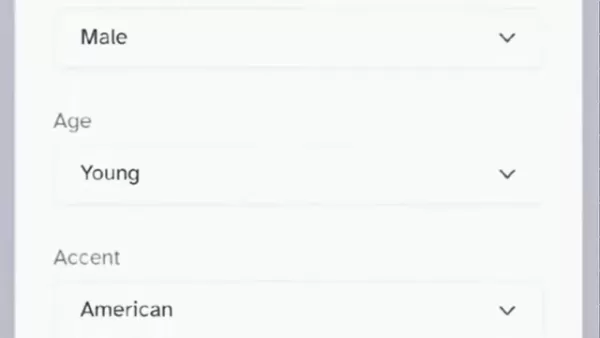
Accent strength profoundly impacts how natural and compelling the final voice sounds. Within ElevenLabs, setting accent intensity between 60% and 65% typically produces voices that maintain clarity while preserving authentic character. This range ensures accents remain discernible without sounding artificial or exaggerated.
For further accent refinement, consider your content's specific audience requirements. For global content distribution, a neutral or internationally recognized accent often works best. Conversely, for region-specific or demographic-targeted content, implementing localized accents can significantly improve audience relatability and engagement. Systematic testing with various accent styles and intensity levels remains essential for achieving the perfect vocal balance for your target listeners.
Editing for Ultra-Realism
Enhancing Naturalness with Lexis Audio Editor
After generating your unique AI voice, the subsequent step involves enhancing it for maximum realism.

Although platforms like ElevenLabs deliver impressive baseline audio quality, AI-generated voices can occasionally exhibit robotic or monotonous characteristics. Professional editing helps overcome these limitations by introducing subtle vocal variations and depth that mimic human speech patterns.
Lexis Audio Editor provides comprehensive audio processing capabilities that enable you to polish your AI voiceovers. By importing your audio file into the application, you can apply various audio enhancement effects that improve natural vocal qualities. These include rhythm adjustments, speed modifications, frequency equalization and dynamic compression - each contributing to a more refined and authentic final product.
Successful editing requires understanding how each audio parameter affects the overall vocal character. Through careful adjustment of these settings, you can eliminate artificial undertones and create AI voices that approach human-like quality.
Step-by-Step Guide to Audio Editing with Lexis Audio Editor
Follow this systematic approach to achieve ultra-realistic AI voiceovers using Lexis Audio Editor:
- Import Your Audio File:

Start by loading your AI-generated audio file into Lexis Audio Editor. This serves as your foundation for transformation.
- Adjust Tempo: Modify the voiceover's tempo, typically between +6% and +8%. This adjustment creates more natural speech pacing, eliminating rushed delivery.
- Modify Speed: Increase vocal speed between +5% and +7%. This subtle acceleration makes the voice sound more dynamic and engaging.
- Equalization (EQ): Fine-tune frequency balance using equalizer controls. Boost treble frequencies for enhanced clarity and crispness, while increasing bass frequencies adds warmth and depth. Customize these adjustments according to your specific vocal characteristics.
- Compression: Apply audio compression to balance volume levels throughout the voiceover. Set compression threshold between -20dB and -25dB to reduce dynamic range, creating more consistent and professional vocal quality.
By implementing these steps, you can systematically enhance your AI voiceover to achieve realism that closely resembles human speech. Remember to experiment with different parameter combinations to identify optimal settings for your specific voice and content type.
Adding Emotional Depth to AI Voiceovers
The Importance of Engaging Scripts
While technical editing improves vocal realism, emotional depth requires a different strategy: developing compelling scripts.

Even the most technically advanced AI voice will sound flat without the emotional cues and vocal variations that human speakers naturally provide.
Effective scripting extends beyond vocabulary selection - it requires consideration of vocal delivery aspects. Evaluate the intended tone, pacing and emphasis you want the AI voice to convey. Incorporate punctuation elements like commas, periods, exclamation points and question marks to guide the AI in creating natural pauses and inflections. These subtle directional cues can substantially increase emotional impact, making your narration more compelling and relatable.
To maximize emotional connection with listeners, focus on developing scripts that resonate with their experiences and feelings. Employ evocative language that tells captivating stories and encourages audience investment in your content.
Tips for Writing Emotionally Engaging Scripts
Implement these practical strategies for creating scripts that add emotional richness to your AI voiceovers:
- Use Descriptive Language: Incorporate vivid, descriptive terms that create mental imagery for listeners. More detailed and evocative language enables the AI to convey emotions more effectively.
- Incorporate Pauses and Inflections: Use commas, periods, question marks and exclamation points to establish natural breathing pauses and vocal variations. These directional markers help eliminate monotony and add emotional emphasis.
- Tell a Story: Structure your script as a narrative with clear introduction, development and conclusion. Compelling storytelling engages listeners emotionally, increasing their connection to your content.
- Ask Questions: Include rhetorical questions within your script to stimulate reflection and maintain listener curiosity. These interactive elements create dynamic engagement throughout your narration.
- Exaggerate Words and Sentences: Direct the AI to emphasize specific terms and phrases to communicate particular emotions. This approach proves particularly effective for highlighting crucial messages or adding dramatic impact.
By implementing these techniques, you can develop scripts that transform your AI voiceovers from technically proficient to emotionally compelling experiences.
Pricing of AI Voice Platforms
Understanding Subscription Models
Platforms such as ElevenLabs typically operate through subscription frameworks, offering multiple service tiers with varying features and usage allowances. Pricing structures generally depend on monthly character or audio minute generation limits, along with access to advanced capabilities like voice replication and commercial usage permissions. Understanding these pricing models proves essential for effective budget planning and content development strategy.
For individual creators or small-scale projects, free or basic subscription plans may provide sufficient resources. However, commercial enterprises or large-scale productions usually require premium subscriptions with expanded usage limits and advanced functionality. Carefully evaluate your specific requirements and usage patterns to determine the most economical subscription option.
Pros and Cons of Using AI Voiceovers
Pros
More economical than hiring professional voice talent.
Significantly faster content production turnaround times.
Capability to generate voiceovers in multiple languages.
Extensive customization options for creating distinctive voices.
Consistent vocal quality maintained across multiple projects.
Cons
AI voices might lack the nuanced emotional depth of human speakers.
Additional editing and refinement are often necessary to achieve maximum realism.
Ethical considerations regarding voice replication and impersonation.
Commercial usage rights might be restricted depending on the platform.
Technological dependencies can create operational vulnerabilities.
Key Features of AI Voiceover Platforms
Voice Cloning and Design
AI voiceover platforms provide diverse functionality, including voice replication and voice creation capabilities. Voice cloning enables development of digital reproductions of existing voices, while voice design allows construction of completely new voices by adjusting parameters like gender, age, accent and tone. These features offer unprecedented flexibility and customization opportunities for creating distinctive narrations that perfectly complement your content.
Voice cloning capability proves particularly valuable for maintaining vocal consistency across multiple projects or creating personalized audience experiences. Meanwhile, voice design functionality allows development of voices specifically tailored to particular characters or narrative requirements, adding authenticity and depth to your productions.
Text-to-Speech (TTS) Technology
Text-to-Speech technology forms the core of AI voiceover platforms, converting written content into spoken audio. Modern TTS engines generate remarkably realistic and natural-sounding speech, complete with nuanced inflections and emotional signals. These systems employ sophisticated algorithms and machine learning methodologies to analyze textual content and produce audio that accurately represents intended meaning and emotional tone.
TTS quality varies significantly across different platforms, making performance evaluation essential before subscription commitment. Prioritize platforms offering high-quality, natural vocal outputs with minimal artificial characteristics.
Applications of AI Voiceovers
Video Content Creation
AI voiceovers find extensive application in video production, including explanatory content, product demonstrations, educational materials and marketing campaigns. The capacity to quickly generate professional voiceovers using AI technology enables video producers to create premium content at significantly reduced cost and production time compared to traditional voice actors. AI narration also facilitates creation of multilingual video versions, expanding your content's accessibility to international audiences.
Podcast Production
Podcast creators increasingly leverage AI voiceovers for introduction and conclusion segments, character voice generation in fictional productions, and audio versions of written articles. AI narration helps podcasters streamline production workflows, experiment with diverse vocal styles, and create captivating audio content that maintains listener engagement. Voice cloning capability also supports vocal consistency across multiple episodes and enables personalized listener experiences.
Frequently Asked Questions
What is ElevenLabs?
ElevenLabs is an AI voice platform recognized for its human-like vocal quality, voice replication and voice creation capabilities. It generates spoken audio from text for videos, podcasts and various content formats.
What is Lexis Audio Editor?
Lexis Audio Editor is an audio processing application used to edit AI-generated voiceovers. It enables parameter adjustments including rhythm, speed, frequency balance and compression to enhance audio realism and overall quality.
How can I add emotion to an AI voice?
Infusing emotion into AI voices involves creating compelling scripts containing directional cues like commas, periods, exclamation marks and question marks. You should also experiment with strategic pauses and emphasized words and phrases.
Related Questions
Are AI-generated voiceovers monetizable on YouTube?
Yes, AI-generated narrations qualify for YouTube monetization provided your content remains original and complies with copyright regulations and platform policies. Developing unique, engaging scripts and utilizing platforms offering commercial usage rights ensures your content meets monetization eligibility requirements.
What are some alternatives to ElevenLabs for AI voice generation?
Descript offers superior AI voice generation. LOVO.ai excels at content localization. Murf.ai provides excellent free AI voice options. Amazon Polly delivers exceptional cloud-based speech synthesis. Google Cloud Text-to-Speech performs optimally for Google ecosystem users.
What makes an AI voice sound realistic?
Multiple factors contribute to realistic AI vocal quality, including TTS engine sophistication, customization breadth and audio refinement techniques employed. Advanced TTS engines generate nuanced inflections and emotional signals, while customization options enable voice creation matching specific requirements. Audio enhancement techniques including tempo modifications, speed adjustments, equalization and compression further improve vocal realism by eliminating artificial characteristics and achieving near-human vocal quality.
Related article
 How to fix Core Web Vitals for better SEO rankings
How to Build a Free Website: Free Domain, Hosting & AI Website BuilderTable of ContentsIntroductionAI Website Builder 1: Hookous AIStep 1: Sign UpStep 2: Choose Business Type/NicheStep 3: Select ServicesStep 4: Define Website GoalsStep 5: Enter Busin
Apple, Google Partner With Anthropic to Address 27-Year-Old Vulnerability via Glass Wing Protection
As artificial intelligence advances rapidly in code generation and logical reasoning, the cybersecurity landscape faces unprecedented challenges. Recently, the prominent AI startup Anthropic officially launched a cross-industry collaboration called *
OpenAI Chief Scientist Addresses AI Reasoning Transparency Debate: Complexity Steady, No Sudden Jump
On September 2, Jakub Pachocki, OpenAI’s Chief Scientist, addressed public concerns on X regarding the AI model Astra, clarifying claims that it operates without oversight and lacks transparent reasoning.Why the Controversy Erupted: Deep Recurrence O
Related Special Topic Recommendations
Image editing
How to fix Core Web Vitals for better SEO rankings
How to Build a Free Website: Free Domain, Hosting & AI Website BuilderTable of ContentsIntroductionAI Website Builder 1: Hookous AIStep 1: Sign UpStep 2: Choose Business Type/NicheStep 3: Select ServicesStep 4: Define Website GoalsStep 5: Enter Busin
Apple, Google Partner With Anthropic to Address 27-Year-Old Vulnerability via Glass Wing Protection
As artificial intelligence advances rapidly in code generation and logical reasoning, the cybersecurity landscape faces unprecedented challenges. Recently, the prominent AI startup Anthropic officially launched a cross-industry collaboration called *
OpenAI Chief Scientist Addresses AI Reasoning Transparency Debate: Complexity Steady, No Sudden Jump
On September 2, Jakub Pachocki, OpenAI’s Chief Scientist, addressed public concerns on X regarding the AI model Astra, clarifying claims that it operates without oversight and lacks transparent reasoning.Why the Controversy Erupted: Deep Recurrence O
Related Special Topic Recommendations
Image editing
 AI Object Removal Editors: Clean Up Portraits, Travel, and Product Shots
2026 Latest Best Top-rated AI Object Removal Editors for portraits travel product shots! XIX.AI curates a powerful game-changing collection regularly updated with weekly rankings. These tools offer real-world tests to help you quickly remove unwanted elements, boost content quality, and save tons of time without compromising results. Must-try for anyone aiming to unlock their AI creation edge. Explore now!
 10 tools
 xix.ai
Text-to-speech
Best AI Text to Speech Tools for Online Courses
xix.ai
Text-to-speech
Best AI Text to Speech Tools for Online Courses
2026 Latest Best Top-rated AI Text to Speech Tools for Online Courses are curated by XIX.AI based on rigorous real-world tests and weekly updated rankings. These powerful tools help creators deliver crystal-clear audio content effortlessly, boosting writing efficiency and streamlining course production. Check out the free vs paid comparison to find your perfect fit. Explore now to unlock your AI edge in online education.
10 tools
xix.ai
writing
AI Blog Title Tools for Higher Click Through Rates
2026 Latest Best Top-Rated AI Blog Title Tools for Higher Click Through Rates! XIX.AI has carefully curated a powerful, game-changing collection of top tools that go through rigorous real-world tests. You’ll find a free vs paid comparison, weekly updated rankings, and detailed insights to help you boost your blog’s traffic efficiently. Must-try options are highlighted to help you unlock your AI edge. Explore now!
10 tools
xix.ai
automation
Best AI Task Routing Tools for Support Workflows
2026 Latest Best Top-rated AI Task Routing Tools for Support Workflows! XIX.AI has curated a highly powerful game-changing collection of must-try solutions, all undergoing rigorous real-world tests and updated weekly. These tools streamline workflows, boost productivity, and help teams deliver faster, more efficient support. Explore now to discover your perfect tool and unlock your AI edge!
17 tools
xix.ai
Academic Research
AI Citation and Paper Summary Tools
2026 Latest Best Top-Rated AI Citation and Paper Summary Tools Curated by XIX.AI. Get powerful game-changing solutions for quick content creation, improved writing efficiency, and boosting productivity. We offer a free vs paid comparison along with real-world tests and weekly updated rankings to help you find the must-try tool that fits your needs perfectly. Explore now to Unlock your AI edge.
10 tools
xix.ai
Productivity
Best AI Productivity Tools for Daily Work
2026 Latest Best Top-Rated AI Productivity Tools for Daily Work! XIX.AI has curated a powerful, game-changing selection based on rigorous weekly updated rankings and real-world tests. You’ll find must-try options that boost writing efficiency, streamline content creation, and help you overcome daily work challenges. Get a free vs paid comparison to find the perfect fit for your needs. Explore now to unlock your AI edge!
9 tools
xix.ai

 Comments (0)
0/500
Comments (0)
0/500
Want to enhance your content with AI voiceovers that truly connect with your audience? Mastering the art of creating natural and engaging AI narration can be transformative. This guide walks you through the process of generating unique AI voices, refining them for lifelike realism, and infusing your scripts with emotional resonance to captivate listeners. Whether you're producing video content, podcasts, or other audio materials, these techniques will help your projects stand out from the crowd.
Key Points
Design unique AI voices using specialized voice creation tools.
Edit your AI narration to achieve unparalleled realism.
Include natural pauses, vocal inflections and emotional signals in your scripts.
Utilize Lexis Audio Editor to perfect audio quality settings.
Verify your original content is eligible for monetization.
Crafting a Unique AI Voice
Generating Custom AI Voices
The foundation of compelling AI narration lies in creating a distinctive vocal identity.
Rather than accepting generic, robotic-sounding AI voices, you can develop a custom voice that perfectly reflects your brand identity and content style. Numerous platforms provide voice design capabilities that enable you to build completely new voices by modifying various characteristics. ElevenLabs represents one such solution, offering both voice replication and voice creation functionality.
Effective use of these tools requires adjusting multiple parameters including vocal gender, perceived age, accent type and accent intensity. Through systematic experimentation with these settings, you can discover a voice that becomes uniquely associated with your content. Notably, even when using identical settings, each generated voice possesses distinct qualities, opening unlimited possibilities for customization.
Developing a signature AI voice demands both patience and methodical testing. Initial attempts might not produce optimal results, but consistent refinement leads to success. By repeatedly adjusting parameters and evaluating the resulting audio outputs, you can progressively refine your AI voice to match your precise requirements.
Optimizing Accent Settings in ElevenLabs
A critical element in creating unique AI voices involves fine-tuning accent configurations.
Accent strength profoundly impacts how natural and compelling the final voice sounds. Within ElevenLabs, setting accent intensity between 60% and 65% typically produces voices that maintain clarity while preserving authentic character. This range ensures accents remain discernible without sounding artificial or exaggerated.
For further accent refinement, consider your content's specific audience requirements. For global content distribution, a neutral or internationally recognized accent often works best. Conversely, for region-specific or demographic-targeted content, implementing localized accents can significantly improve audience relatability and engagement. Systematic testing with various accent styles and intensity levels remains essential for achieving the perfect vocal balance for your target listeners.
Editing for Ultra-Realism
Enhancing Naturalness with Lexis Audio Editor
After generating your unique AI voice, the subsequent step involves enhancing it for maximum realism.
Although platforms like ElevenLabs deliver impressive baseline audio quality, AI-generated voices can occasionally exhibit robotic or monotonous characteristics. Professional editing helps overcome these limitations by introducing subtle vocal variations and depth that mimic human speech patterns.
Lexis Audio Editor provides comprehensive audio processing capabilities that enable you to polish your AI voiceovers. By importing your audio file into the application, you can apply various audio enhancement effects that improve natural vocal qualities. These include rhythm adjustments, speed modifications, frequency equalization and dynamic compression - each contributing to a more refined and authentic final product.
Successful editing requires understanding how each audio parameter affects the overall vocal character. Through careful adjustment of these settings, you can eliminate artificial undertones and create AI voices that approach human-like quality.
Step-by-Step Guide to Audio Editing with Lexis Audio Editor
Follow this systematic approach to achieve ultra-realistic AI voiceovers using Lexis Audio Editor:
- Import Your Audio File:
Start by loading your AI-generated audio file into Lexis Audio Editor. This serves as your foundation for transformation.
- Adjust Tempo: Modify the voiceover's tempo, typically between +6% and +8%. This adjustment creates more natural speech pacing, eliminating rushed delivery.
- Modify Speed: Increase vocal speed between +5% and +7%. This subtle acceleration makes the voice sound more dynamic and engaging.
- Equalization (EQ): Fine-tune frequency balance using equalizer controls. Boost treble frequencies for enhanced clarity and crispness, while increasing bass frequencies adds warmth and depth. Customize these adjustments according to your specific vocal characteristics.
- Compression: Apply audio compression to balance volume levels throughout the voiceover. Set compression threshold between -20dB and -25dB to reduce dynamic range, creating more consistent and professional vocal quality.
By implementing these steps, you can systematically enhance your AI voiceover to achieve realism that closely resembles human speech. Remember to experiment with different parameter combinations to identify optimal settings for your specific voice and content type.
Adding Emotional Depth to AI Voiceovers
The Importance of Engaging Scripts
While technical editing improves vocal realism, emotional depth requires a different strategy: developing compelling scripts.
Even the most technically advanced AI voice will sound flat without the emotional cues and vocal variations that human speakers naturally provide.
Effective scripting extends beyond vocabulary selection - it requires consideration of vocal delivery aspects. Evaluate the intended tone, pacing and emphasis you want the AI voice to convey. Incorporate punctuation elements like commas, periods, exclamation points and question marks to guide the AI in creating natural pauses and inflections. These subtle directional cues can substantially increase emotional impact, making your narration more compelling and relatable.
To maximize emotional connection with listeners, focus on developing scripts that resonate with their experiences and feelings. Employ evocative language that tells captivating stories and encourages audience investment in your content.
Tips for Writing Emotionally Engaging Scripts
Implement these practical strategies for creating scripts that add emotional richness to your AI voiceovers:
- Use Descriptive Language: Incorporate vivid, descriptive terms that create mental imagery for listeners. More detailed and evocative language enables the AI to convey emotions more effectively.
- Incorporate Pauses and Inflections: Use commas, periods, question marks and exclamation points to establish natural breathing pauses and vocal variations. These directional markers help eliminate monotony and add emotional emphasis.
- Tell a Story: Structure your script as a narrative with clear introduction, development and conclusion. Compelling storytelling engages listeners emotionally, increasing their connection to your content.
- Ask Questions: Include rhetorical questions within your script to stimulate reflection and maintain listener curiosity. These interactive elements create dynamic engagement throughout your narration.
- Exaggerate Words and Sentences: Direct the AI to emphasize specific terms and phrases to communicate particular emotions. This approach proves particularly effective for highlighting crucial messages or adding dramatic impact.
By implementing these techniques, you can develop scripts that transform your AI voiceovers from technically proficient to emotionally compelling experiences.
Pricing of AI Voice Platforms
Understanding Subscription Models
Platforms such as ElevenLabs typically operate through subscription frameworks, offering multiple service tiers with varying features and usage allowances. Pricing structures generally depend on monthly character or audio minute generation limits, along with access to advanced capabilities like voice replication and commercial usage permissions. Understanding these pricing models proves essential for effective budget planning and content development strategy.
For individual creators or small-scale projects, free or basic subscription plans may provide sufficient resources. However, commercial enterprises or large-scale productions usually require premium subscriptions with expanded usage limits and advanced functionality. Carefully evaluate your specific requirements and usage patterns to determine the most economical subscription option.
Pros and Cons of Using AI Voiceovers
Pros
More economical than hiring professional voice talent.
Significantly faster content production turnaround times.
Capability to generate voiceovers in multiple languages.
Extensive customization options for creating distinctive voices.
Consistent vocal quality maintained across multiple projects.
Cons
AI voices might lack the nuanced emotional depth of human speakers.
Additional editing and refinement are often necessary to achieve maximum realism.
Ethical considerations regarding voice replication and impersonation.
Commercial usage rights might be restricted depending on the platform.
Technological dependencies can create operational vulnerabilities.
Key Features of AI Voiceover Platforms
Voice Cloning and Design
AI voiceover platforms provide diverse functionality, including voice replication and voice creation capabilities. Voice cloning enables development of digital reproductions of existing voices, while voice design allows construction of completely new voices by adjusting parameters like gender, age, accent and tone. These features offer unprecedented flexibility and customization opportunities for creating distinctive narrations that perfectly complement your content.
Voice cloning capability proves particularly valuable for maintaining vocal consistency across multiple projects or creating personalized audience experiences. Meanwhile, voice design functionality allows development of voices specifically tailored to particular characters or narrative requirements, adding authenticity and depth to your productions.
Text-to-Speech (TTS) Technology
Text-to-Speech technology forms the core of AI voiceover platforms, converting written content into spoken audio. Modern TTS engines generate remarkably realistic and natural-sounding speech, complete with nuanced inflections and emotional signals. These systems employ sophisticated algorithms and machine learning methodologies to analyze textual content and produce audio that accurately represents intended meaning and emotional tone.
TTS quality varies significantly across different platforms, making performance evaluation essential before subscription commitment. Prioritize platforms offering high-quality, natural vocal outputs with minimal artificial characteristics.
Applications of AI Voiceovers
Video Content Creation
AI voiceovers find extensive application in video production, including explanatory content, product demonstrations, educational materials and marketing campaigns. The capacity to quickly generate professional voiceovers using AI technology enables video producers to create premium content at significantly reduced cost and production time compared to traditional voice actors. AI narration also facilitates creation of multilingual video versions, expanding your content's accessibility to international audiences.
Podcast Production
Podcast creators increasingly leverage AI voiceovers for introduction and conclusion segments, character voice generation in fictional productions, and audio versions of written articles. AI narration helps podcasters streamline production workflows, experiment with diverse vocal styles, and create captivating audio content that maintains listener engagement. Voice cloning capability also supports vocal consistency across multiple episodes and enables personalized listener experiences.
Frequently Asked Questions
What is ElevenLabs?
ElevenLabs is an AI voice platform recognized for its human-like vocal quality, voice replication and voice creation capabilities. It generates spoken audio from text for videos, podcasts and various content formats.
What is Lexis Audio Editor?
Lexis Audio Editor is an audio processing application used to edit AI-generated voiceovers. It enables parameter adjustments including rhythm, speed, frequency balance and compression to enhance audio realism and overall quality.
How can I add emotion to an AI voice?
Infusing emotion into AI voices involves creating compelling scripts containing directional cues like commas, periods, exclamation marks and question marks. You should also experiment with strategic pauses and emphasized words and phrases.
Related Questions
Are AI-generated voiceovers monetizable on YouTube?
Yes, AI-generated narrations qualify for YouTube monetization provided your content remains original and complies with copyright regulations and platform policies. Developing unique, engaging scripts and utilizing platforms offering commercial usage rights ensures your content meets monetization eligibility requirements.
What are some alternatives to ElevenLabs for AI voice generation?
Descript offers superior AI voice generation. LOVO.ai excels at content localization. Murf.ai provides excellent free AI voice options. Amazon Polly delivers exceptional cloud-based speech synthesis. Google Cloud Text-to-Speech performs optimally for Google ecosystem users.
What makes an AI voice sound realistic?
Multiple factors contribute to realistic AI vocal quality, including TTS engine sophistication, customization breadth and audio refinement techniques employed. Advanced TTS engines generate nuanced inflections and emotional signals, while customization options enable voice creation matching specific requirements. Audio enhancement techniques including tempo modifications, speed adjustments, equalization and compression further improve vocal realism by eliminating artificial characteristics and achieving near-human vocal quality.








 How to fix Core Web Vitals for better SEO rankings
How to Build a Free Website: Free Domain, Hosting & AI Website BuilderTable of ContentsIntroductionAI Website Builder 1: Hookous AIStep 1: Sign UpStep 2: Choose Business Type/NicheStep 3: Select ServicesStep 4: Define Website GoalsStep 5: Enter Busin
How to fix Core Web Vitals for better SEO rankings
How to Build a Free Website: Free Domain, Hosting & AI Website BuilderTable of ContentsIntroductionAI Website Builder 1: Hookous AIStep 1: Sign UpStep 2: Choose Business Type/NicheStep 3: Select ServicesStep 4: Define Website GoalsStep 5: Enter Busin
 Apple, Google Partner With Anthropic to Address 27-Year-Old Vulnerability via Glass Wing Protection
As artificial intelligence advances rapidly in code generation and logical reasoning, the cybersecurity landscape faces unprecedented challenges. Recently, the prominent AI startup Anthropic officially launched a cross-industry collaboration called *
Apple, Google Partner With Anthropic to Address 27-Year-Old Vulnerability via Glass Wing Protection
As artificial intelligence advances rapidly in code generation and logical reasoning, the cybersecurity landscape faces unprecedented challenges. Recently, the prominent AI startup Anthropic officially launched a cross-industry collaboration called *
 OpenAI Chief Scientist Addresses AI Reasoning Transparency Debate: Complexity Steady, No Sudden Jump
On September 2, Jakub Pachocki, OpenAI’s Chief Scientist, addressed public concerns on X regarding the AI model Astra, clarifying claims that it operates without oversight and lacks transparent reasoning.Why the Controversy Erupted: Deep Recurrence O
OpenAI Chief Scientist Addresses AI Reasoning Transparency Debate: Complexity Steady, No Sudden Jump
On September 2, Jakub Pachocki, OpenAI’s Chief Scientist, addressed public concerns on X regarding the AI model Astra, clarifying claims that it operates without oversight and lacks transparent reasoning.Why the Controversy Erupted: Deep Recurrence O

2026 Latest Best Top-rated AI Object Removal Editors for portraits travel product shots! XIX.AI curates a powerful game-changing collection regularly updated with weekly rankings. These tools offer real-world tests to help you quickly remove unwanted elements, boost content quality, and save tons of time without compromising results. Must-try for anyone aiming to unlock their AI creation edge. Explore now!
10 tools
xix.ai

2026 Latest Best Top-rated AI Text to Speech Tools for Online Courses are curated by XIX.AI based on rigorous real-world tests and weekly updated rankings. These powerful tools help creators deliver crystal-clear audio content effortlessly, boosting writing efficiency and streamlining course production. Check out the free vs paid comparison to find your perfect fit. Explore now to unlock your AI edge in online education.
10 tools
xix.ai

2026 Latest Best Top-Rated AI Blog Title Tools for Higher Click Through Rates! XIX.AI has carefully curated a powerful, game-changing collection of top tools that go through rigorous real-world tests. You’ll find a free vs paid comparison, weekly updated rankings, and detailed insights to help you boost your blog’s traffic efficiently. Must-try options are highlighted to help you unlock your AI edge. Explore now!
10 tools
xix.ai

2026 Latest Best Top-rated AI Task Routing Tools for Support Workflows! XIX.AI has curated a highly powerful game-changing collection of must-try solutions, all undergoing rigorous real-world tests and updated weekly. These tools streamline workflows, boost productivity, and help teams deliver faster, more efficient support. Explore now to discover your perfect tool and unlock your AI edge!
17 tools
xix.ai

2026 Latest Best Top-Rated AI Citation and Paper Summary Tools Curated by XIX.AI. Get powerful game-changing solutions for quick content creation, improved writing efficiency, and boosting productivity. We offer a free vs paid comparison along with real-world tests and weekly updated rankings to help you find the must-try tool that fits your needs perfectly. Explore now to Unlock your AI edge.
10 tools
xix.ai

2026 Latest Best Top-Rated AI Productivity Tools for Daily Work! XIX.AI has curated a powerful, game-changing selection based on rigorous weekly updated rankings and real-world tests. You’ll find must-try options that boost writing efficiency, streamline content creation, and help you overcome daily work challenges. Get a free vs paid comparison to find the perfect fit for your needs. Explore now to unlock your AI edge!
9 tools
xix.ai












