


 Home
HomeMaster AI Avatar Creation: A Step-by-Step Guide Using Bing AI
Looking to build a unique and personal online identity? AI avatars offer the perfect solution. Leveraging the power of artificial intelligence, you can generate captivating digital portraits that truly reflect your personality and style. This guide will show you how to create your own AI avatar using Bing AI, a powerful and readily available tool. Get ready to transform your digital presence!
Key Points
Learn to use Bing AI for crafting personalized AI avatars.
Discover how to access the Bing AI Image Creator tool.
Understand the role of prompt engineering in generating great avatars.
Follow a straightforward, step-by-step guide to create your unique avatar.
Explore various artistic styles and customization possibilities.
Learn how to download and use your new avatar across different platforms.
Gain tips for optimizing your AI avatar for social media profiles.
Understand how to refine your prompts for better results.
Learn about the point-based system used by Bing AI Image Creator.
Customize your AI avatar to be a true reflection of your personal style.
Introduction to AI Avatars and Bing AI
What are AI Avatars?
AI avatars are digital representations of individuals, crafted using artificial intelligence. They go beyond traditional avatars by offering highly realistic and customizable features that mirror a user's appearance, personality, and style. These digital personas are used across social media, gaming, virtual meetings, and as digital assistants. Their key benefit is providing a unique and engaging online presence that is more dynamic than a standard photograph. AI avatars empower you to express yourself creatively in the digital realm.
AI avatars are changing how we interact online, providing fresh ways to represent ourselves and connect with others. They deliver a more immersive and personalized experience than traditional profile pictures, helping to strengthen your sense of identity and engagement.
Key benefits of using AI avatars:
- Enhanced personalization: Tailor your avatar to match your unique characteristics and preferences.
- Improved privacy: Maintain a vibrant online presence without revealing your real-life identity.
- Creative expression: Unleash your imagination to create avatars that showcase your inner self.
- Increased engagement: Capture attention and foster connections with compelling visuals.
Introduction to Bing AI and Image Creator
Bing AI is Microsoft's AI-powered search engine, offering capabilities that extend far beyond standard web searches. A standout feature is its Image Creator, a tool that generates images from text descriptions. This powerful function uses advanced AI models to bring your creative ideas to life, making it ideal for designing personalized avatars.
The Image Creator is easily accessible via the Bing AI platform, making it user-friendly for people of all technical skill levels. Its intuitive interface and natural language processing allow you to simply describe the avatar you imagine, and the AI will produce multiple variations based on your input.
Key features of Bing AI Image Creator:
- Text-to-image generation: Create images from simple text descriptions.
- Customization options: Refine your images with specific details and styles.
- User-friendly interface: Easy to access and intuitive for everyone.
- AI-powered creativity: Explore endless possibilities and unleash your imagination.
Customizing Your AI Avatar: Tips and Tricks
Experimenting with Different Styles
A particularly exciting aspect of AI avatar creation is experimenting with various artistic styles. Bing AI Image Creator supports a broad spectrum of styles, enabling you to craft avatars that align with your unique taste.
- Cartoonish:
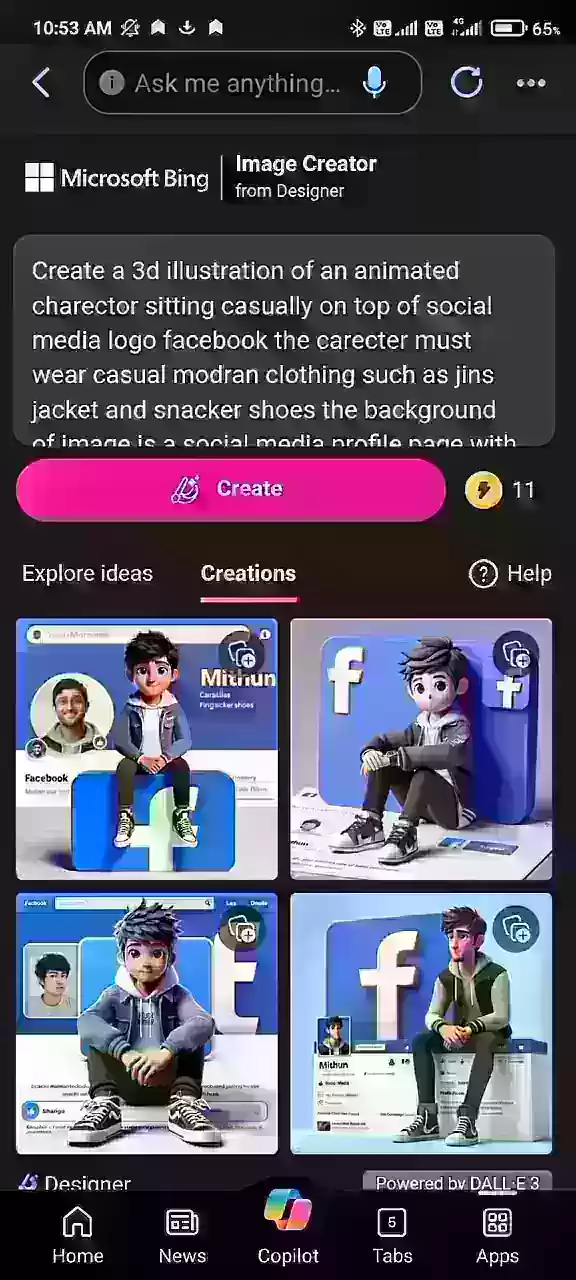
Use keywords like "cartoon," "animated," or "whimsical" to generate playful and fun avatars.
- Realistic: For a more lifelike look, use terms such as "realistic," "photorealistic," or "high-definition."
- Stylized: Explore distinct art styles like "abstract," "surreal," or "impressionistic" for visually striking results.
- Thematic: Incorporate specific themes like "cyberpunk," "fantasy," or "steampunk" to give your avatar a unique flair.
By trying different styles, you can create an avatar that perfectly reflects your personality and interests.
Adding Personal Touches
To make your AI avatar genuinely unique, add personal touches that reflect your individual characteristics. Consider including:
Clothing: Specify your preferred clothing types, including colors, patterns, and brands.
Example: "wearing a leather jacket, a band t-shirt, and ripped jeans."
Accessories: Enhance your avatar’s look with accessories like hats, glasses, jewelry, or piercings.
Example: "wearing a fedora, sunglasses, and a silver necklace."
Hairstyle: Describe your ideal hairstyle, including its length, color, and style.
Example: "with short, spiky black hair."
Facial features: Highlight specific facial traits that define your appearance, such as eye color, facial hair, or distinctive marks.
Example: "with green eyes and a goatee."
Incorporating these details will ensure your AI avatar is a true representation of you.
Step-by-Step Guide to Creating Your AI Avatar with Bing AI
Accessing the Bing AI Image Creator
Your first step is to access the Bing AI Image Creator. Here's how:
- Navigate to the Bing AI website: Open your web browser and visit the official Bing AI site. Ensure you are logged into your Microsoft account.
- Locating the Image Creator tool:
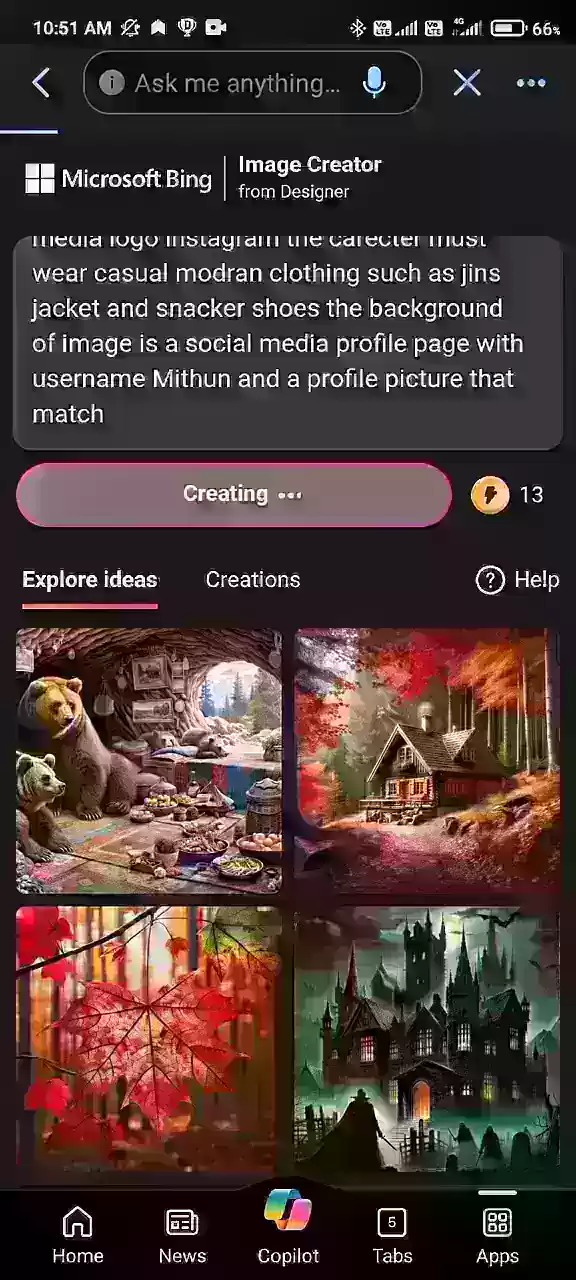
Find the Image Creator icon, which is usually featured prominently on the Bing AI homepage or within the Bing AI Chat interface. It may be on the main page or within a menu of AI tools.
Click on the Image Creator icon: Clicking this icon will open the Image Creator interface, where you can start composing your prompt.
The Bing AI Image Creator tool is easily recognizable by its distinct icon and placement on the platform.
Crafting the Perfect Prompt
The secret to generating an impressive AI avatar lies in crafting an effective prompt. Your prompt should be descriptive, specific, and include relevant keywords to guide the AI. Here’s how to create a strong prompt:
Describe the character: Start by outlining the character you want to create. Include details like age, gender, ethnicity, and physical attributes.
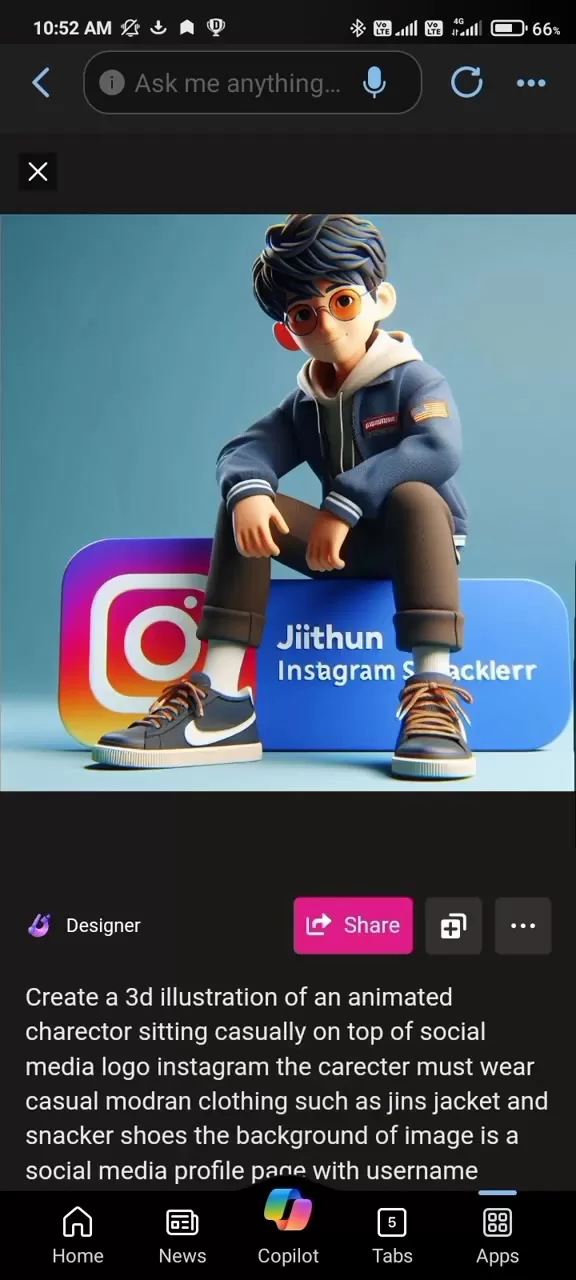
Example: "Create a 3D illustration of an animated character sitting casually on top of the Instagram logo. The character should wear modern casual clothing like jeans, a jacket, and sneakers. The background is a social media profile page with the username Mithun and a matching profile picture."
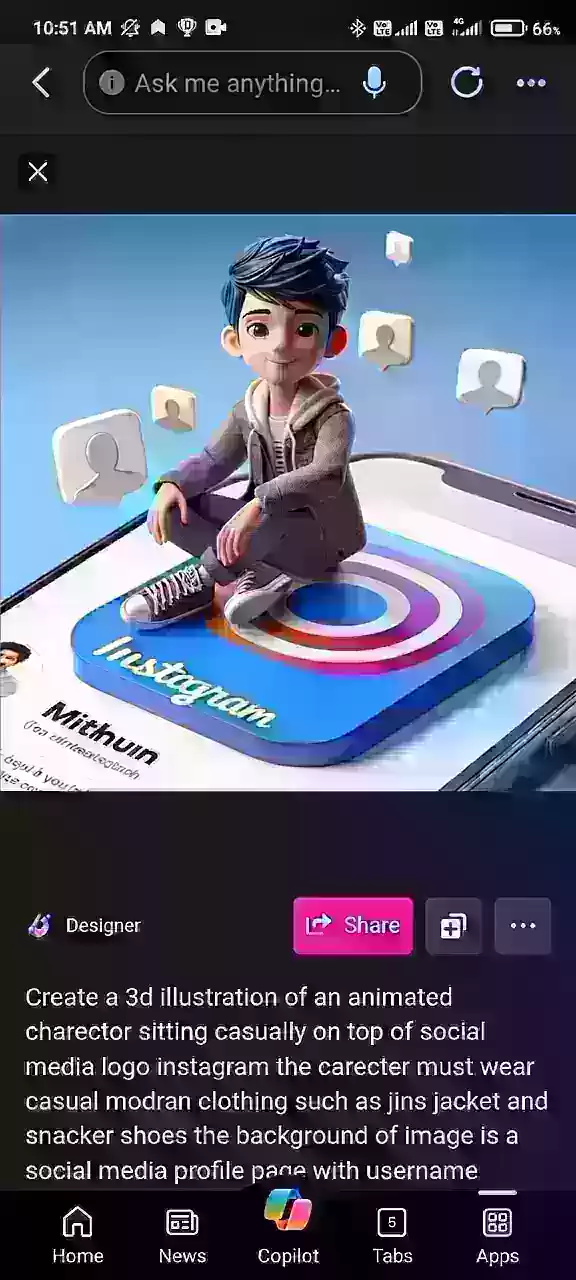
Specify clothing and style: Provide details about the clothing style. Mention specific items, colors, and materials.
Example: "wearing a modern jacket, jeans, and stylish sneakers."
Add details about the background: Describe the background or setting to add context and enhance the image.
Example: "sitting on a giant Instagram logo, with social media icons floating around."
Include your name: Add your name to the prompt to personalize the avatar with your username.
Example: "with the username Mithun displayed on the social media profile."
Key tips for prompt engineering:
- Use clear and concise language.
- Be specific about the details you want.
- Experiment with different keywords and phrases.
- Review the generated images and adjust your prompt as needed.
Generating and Downloading Your AI Avatar
Once your prompt is ready, generating and downloading your avatar is straightforward:
- Enter the prompt: Type your crafted prompt into the text field in the Bing AI Image Creator.
- Click 'Create': Click the “Create” button to start the image generation process.

The AI will process your prompt and generate several avatar variations.
- Review the generated images: Look through the generated images and select the one that best matches your vision. If you're not satisfied, refine your prompt and generate new images.
- Download your avatar: After selecting your preferred avatar, click on the image to view it larger. Then, click the “Download” button to save it to your device.
By following these steps, you can easily create and download your personalized AI avatar using Bing AI Image Creator.
Bing AI Image Creator: Understanding the Point-Based System
How the Point System Works
Bing AI Image Creator operates on a point-based system where each image generation consumes a certain number of points. Understanding this system is key to using the tool efficiently.
- Free Points: Bing AI usually provides a set of free points to new users, allowing them to start generating images at no initial cost.
These points are typically limited, so it's important to use them wisely.
- Point Consumption: Each time you generate images, points are deducted from your account. The number used can vary based on the prompt's complexity and the resulting image.
- Refilling Points: Once your free points are used up, you can refill them through various methods, such as completing tasks or making purchases, to continue using the Image Creator.
Tips for managing your points:
- Create detailed prompts to minimize the need for multiple generations.
- Review generated images carefully before downloading.
- Use available options to refill your points when needed.
Pros and Cons of Using Bing AI Image Creator for Avatars
Pros
Easy to use and accessible for beginners
Integrates seamlessly with Bing AI and the Microsoft ecosystem
Offers a variety of customization options and styles
Generally more affordable than many other AI image generators
Cons
Generated image quality may not match some specialized AI tools
Limited user control over the detailed image generation process
The point-based system can be restrictive for heavy users
Might not be ideal for highly complex or specific avatar designs
Frequently Asked Questions (FAQ)
Is Bing AI Image Creator free to use?
Yes, Bing AI Image Creator typically provides a set of free points for new users. After these are used, you may need to refill points through various methods or purchases to continue using the tool.
How can I improve the quality of my AI avatars?
To enhance your AI avatars' quality, focus on writing detailed and specific prompts. Use relevant keywords, experiment with different styles, and refine your prompts based on the results you get.
Can I use my AI avatar for commercial purposes?
Usage rights for AI-generated images can vary. Please consult the Bing AI Image Creator terms of service for specific guidelines regarding commercial use.
What types of images can I create with Bing AI Image Creator?
Bing AI Image Creator supports a wide variety of image types, including realistic photos, cartoon illustrations, stylized artwork, and thematic designs. Experiment with different prompts to discover all the possibilities.
Related Questions
What other AI tools can I use to create avatars?
Besides Bing AI Image Creator, several other AI tools are excellent for creating avatars. Popular options include: Midjourney: Known for its highly artistic and surreal image generation. DALL-E 2: OpenAI's generator offering extensive customization. Stable Diffusion: An open-source option providing great flexibility and control. Lensa AI: An AI photo editor that creates stylized "magic avatars" from uploaded selfies for quick avatar generation. Each tool has its own strengths, so it's worth exploring to find which one best suits your needs.
How can I optimize my AI avatar for social media?
To optimize your AI avatar for social media, consider these tips: Use a high-resolution image to ensure it looks sharp on all devices. Crop the image appropriately to focus on your avatar's face or upper body for easy recognition. Maintain a consistent style across your profiles to build a cohesive brand identity. Update your avatar periodically to keep your online presence fresh and reflective of your current style.
How can I ensure my AI avatar represents me accurately?
To ensure your AI avatar is an accurate representation, provide detailed and specific prompts about your physical features, clothing style, and personality. Carefully review the generated images and continue refining your prompts until you achieve a result you're happy with.
Related article
 DeepMind Trio Behind Poker AI Now Generating Returns for Quant Hedge Funds
Three ex-DeepMind researchers, who previously developed an AI capable of defeating human poker champions, have pivoted that technology to financial markets — and the strategy is yielding significant returns. Their Prague-based AI venture, EquiLibre T
Sony, Warner Sue Anthropic Over Alleged Massive AI Copyright Infringement
Sony and Warner Music Group have initiated a landmark copyright lawsuit against AI firm Anthropic, alleging massive unauthorized use of copyrighted music for training the Claude model series. The complaint highlights Anthropic’s failure to secure lic
Qwen3.8-Flash Agent Officially Launched, Qwen Office Enters the Era of Abundant and Efficient Management
The Qwen Office Platform has officially released the Qwen3.8-Flash large model alongside a new standard mode, allowing all users to access this feature immediately. Leveraging enhanced model capabilities, users can now complete various office tasks w
Related Special Topic Recommendations
Data Analysis
DeepMind Trio Behind Poker AI Now Generating Returns for Quant Hedge Funds
Three ex-DeepMind researchers, who previously developed an AI capable of defeating human poker champions, have pivoted that technology to financial markets — and the strategy is yielding significant returns. Their Prague-based AI venture, EquiLibre T
Sony, Warner Sue Anthropic Over Alleged Massive AI Copyright Infringement
Sony and Warner Music Group have initiated a landmark copyright lawsuit against AI firm Anthropic, alleging massive unauthorized use of copyrighted music for training the Claude model series. The complaint highlights Anthropic’s failure to secure lic
Qwen3.8-Flash Agent Officially Launched, Qwen Office Enters the Era of Abundant and Efficient Management
The Qwen Office Platform has officially released the Qwen3.8-Flash large model alongside a new standard mode, allowing all users to access this feature immediately. Leveraging enhanced model capabilities, users can now complete various office tasks w
Related Special Topic Recommendations
Data Analysis
 Best AI Chart Builder Tools for Fast Reporting
2026 Latest Best Top-rated AI Chart Builder Tools for Fast Reporting are here on XIX.AI! This curated list features powerful game-changing tools that deliver accurate professional charts with just a few clicks, helping you boost writing efficiency and streamline content creation. Get a free vs paid comparison along with real-world tests and detailed rankings to find the must-try solution for your needs. Explore now to unlock your AI edge!
 9 tools
 xix.ai
chatbot
AI Live Chat Routing Tools for Ecommerce Queues, VIP Buyers, and Return Requests
xix.ai
chatbot
AI Live Chat Routing Tools for Ecommerce Queues, VIP Buyers, and Return Requests
2026 Latest Best Top-rated AI Live Chat Routing Tools for Ecommerce Queues, VIP Buyers, and Return Requests. This curated list features powerful game-changing solutions that boost productivity dramatically through real-world tests. It includes a free vs paid comparison along with detailed rankings to help you find the perfect fit. XIX.AI stands out as a trusted provider in this space. Explore now to Unlock your AI edge!
9 tools
xix.ai
writing
Best AI Editing Tools for ESL Writers: Improve Tone, Grammar, and Flow
2026 Latest Best Top-Rated AI Editing Tools for ESL Writers are here on XIX.AI! This curated list features powerful game-changing tools that go through real-world tests to ensure accuracy. You can find a free vs paid comparison alongside detailed rankings to help you pick the must-try solution that boosts your writing tone, grammar, and flow perfectly. Explore now to Unlock your AI edge!
9 tools
xix.ai
Software Development
Best AI Bug Triage Tools for Engineering Teams
2026 Latest Best Top-Rated AI Bug Triage Tools for Engineering Teams! XIX.AI has curated a powerful, game-changing collection of must-try tools that go through rigorous real-world tests to deliver accurate issue analysis and efficient resolution. Get a free vs paid comparison along with detailed rankings to help you find the perfect solution that boosts your team’s productivity significantly. Explore now to unlock your AI edge!
9 tools
xix.ai
Image editing
Best AI Portrait Enhancers: Improve Lighting, Skin Tone, and Sharpness
2026 Latest Best Top-rated AI Portrait Enhancers curated for ultimate image quality. These powerful tools deliver game-changing results by boosting lighting, skin tone, and sharpness effortlessly, perfect for creators needing to enhance photos quickly. XIX.AI provides a free vs paid comparison along with real-world tests and weekly updated rankings. Discover your perfect tool to unlock your AI edge today. Explore now!
7 tools
xix.ai
writing
AI Technical Documentation Tools for API Guides, Release Notes, and Onboarding Docs
2026 Latest Best Top-rated AI Technical Documentation Tools for API Guides Release Notes and Onboarding Docs. This curated list features powerful game-changing solutions that streamline content creation boost writing efficiency and save time across all project phases. XIX.AI provides weekly updated rankings along with free vs paid comparison results from real-world tests. Explore now to Discover your perfect tool and Unlock your AI edge.
10 tools
xix.ai

 Comments (2)
0/500
Comments (2)
0/500
![RichardAdams]()
Interesting guide! I've been wanting to create a consistent avatar for my socials, and using Bing AI seems way more accessible than some of the complex tools out there. The step-by-step part is key for beginners like me. Hope it covers how to get specific styles, not just generic portraits. 🤔
![RalphGarcia]()
AIでアバター作成、興味深すぎ!Bing AI使えるとは知らなかったわ。でも、プライバシーの問題は大丈夫?生成された顔データの扱いが少し心配かも…でも、個性的なプロフィール画像は魅力的よね!😅
Looking to build a unique and personal online identity? AI avatars offer the perfect solution. Leveraging the power of artificial intelligence, you can generate captivating digital portraits that truly reflect your personality and style. This guide will show you how to create your own AI avatar using Bing AI, a powerful and readily available tool. Get ready to transform your digital presence!
Key Points
Learn to use Bing AI for crafting personalized AI avatars.
Discover how to access the Bing AI Image Creator tool.
Understand the role of prompt engineering in generating great avatars.
Follow a straightforward, step-by-step guide to create your unique avatar.
Explore various artistic styles and customization possibilities.
Learn how to download and use your new avatar across different platforms.
Gain tips for optimizing your AI avatar for social media profiles.
Understand how to refine your prompts for better results.
Learn about the point-based system used by Bing AI Image Creator.
Customize your AI avatar to be a true reflection of your personal style.
Introduction to AI Avatars and Bing AI
What are AI Avatars?
AI avatars are digital representations of individuals, crafted using artificial intelligence. They go beyond traditional avatars by offering highly realistic and customizable features that mirror a user's appearance, personality, and style. These digital personas are used across social media, gaming, virtual meetings, and as digital assistants. Their key benefit is providing a unique and engaging online presence that is more dynamic than a standard photograph. AI avatars empower you to express yourself creatively in the digital realm.
AI avatars are changing how we interact online, providing fresh ways to represent ourselves and connect with others. They deliver a more immersive and personalized experience than traditional profile pictures, helping to strengthen your sense of identity and engagement.
Key benefits of using AI avatars:
- Enhanced personalization: Tailor your avatar to match your unique characteristics and preferences.
- Improved privacy: Maintain a vibrant online presence without revealing your real-life identity.
- Creative expression: Unleash your imagination to create avatars that showcase your inner self.
- Increased engagement: Capture attention and foster connections with compelling visuals.
Introduction to Bing AI and Image Creator
Bing AI is Microsoft's AI-powered search engine, offering capabilities that extend far beyond standard web searches. A standout feature is its Image Creator, a tool that generates images from text descriptions. This powerful function uses advanced AI models to bring your creative ideas to life, making it ideal for designing personalized avatars.
The Image Creator is easily accessible via the Bing AI platform, making it user-friendly for people of all technical skill levels. Its intuitive interface and natural language processing allow you to simply describe the avatar you imagine, and the AI will produce multiple variations based on your input.
Key features of Bing AI Image Creator:
- Text-to-image generation: Create images from simple text descriptions.
- Customization options: Refine your images with specific details and styles.
- User-friendly interface: Easy to access and intuitive for everyone.
- AI-powered creativity: Explore endless possibilities and unleash your imagination.
Customizing Your AI Avatar: Tips and Tricks
Experimenting with Different Styles
A particularly exciting aspect of AI avatar creation is experimenting with various artistic styles. Bing AI Image Creator supports a broad spectrum of styles, enabling you to craft avatars that align with your unique taste.
- Cartoonish:
Use keywords like "cartoon," "animated," or "whimsical" to generate playful and fun avatars.
- Realistic: For a more lifelike look, use terms such as "realistic," "photorealistic," or "high-definition."
- Stylized: Explore distinct art styles like "abstract," "surreal," or "impressionistic" for visually striking results.
- Thematic: Incorporate specific themes like "cyberpunk," "fantasy," or "steampunk" to give your avatar a unique flair.
By trying different styles, you can create an avatar that perfectly reflects your personality and interests.
Adding Personal Touches
To make your AI avatar genuinely unique, add personal touches that reflect your individual characteristics. Consider including:
Clothing: Specify your preferred clothing types, including colors, patterns, and brands.
Example: "wearing a leather jacket, a band t-shirt, and ripped jeans."
Accessories: Enhance your avatar’s look with accessories like hats, glasses, jewelry, or piercings.
Example: "wearing a fedora, sunglasses, and a silver necklace."
Hairstyle: Describe your ideal hairstyle, including its length, color, and style.
Example: "with short, spiky black hair."
Facial features: Highlight specific facial traits that define your appearance, such as eye color, facial hair, or distinctive marks.
Example: "with green eyes and a goatee."
Incorporating these details will ensure your AI avatar is a true representation of you.
Step-by-Step Guide to Creating Your AI Avatar with Bing AI
Accessing the Bing AI Image Creator
Your first step is to access the Bing AI Image Creator. Here's how:
- Navigate to the Bing AI website: Open your web browser and visit the official Bing AI site. Ensure you are logged into your Microsoft account.
- Locating the Image Creator tool:
Find the Image Creator icon, which is usually featured prominently on the Bing AI homepage or within the Bing AI Chat interface. It may be on the main page or within a menu of AI tools.
Click on the Image Creator icon: Clicking this icon will open the Image Creator interface, where you can start composing your prompt.
The Bing AI Image Creator tool is easily recognizable by its distinct icon and placement on the platform.
Crafting the Perfect Prompt
The secret to generating an impressive AI avatar lies in crafting an effective prompt. Your prompt should be descriptive, specific, and include relevant keywords to guide the AI. Here’s how to create a strong prompt:
Describe the character: Start by outlining the character you want to create. Include details like age, gender, ethnicity, and physical attributes.
Example: "Create a 3D illustration of an animated character sitting casually on top of the Instagram logo. The character should wear modern casual clothing like jeans, a jacket, and sneakers. The background is a social media profile page with the username Mithun and a matching profile picture."
Specify clothing and style: Provide details about the clothing style. Mention specific items, colors, and materials.
Example: "wearing a modern jacket, jeans, and stylish sneakers."
Add details about the background: Describe the background or setting to add context and enhance the image.
Example: "sitting on a giant Instagram logo, with social media icons floating around."
Include your name: Add your name to the prompt to personalize the avatar with your username.
Example: "with the username Mithun displayed on the social media profile."
Key tips for prompt engineering:
- Use clear and concise language.
- Be specific about the details you want.
- Experiment with different keywords and phrases.
- Review the generated images and adjust your prompt as needed.
Generating and Downloading Your AI Avatar
Once your prompt is ready, generating and downloading your avatar is straightforward:
- Enter the prompt: Type your crafted prompt into the text field in the Bing AI Image Creator.
- Click 'Create': Click the “Create” button to start the image generation process.
The AI will process your prompt and generate several avatar variations.
- Review the generated images: Look through the generated images and select the one that best matches your vision. If you're not satisfied, refine your prompt and generate new images.
- Download your avatar: After selecting your preferred avatar, click on the image to view it larger. Then, click the “Download” button to save it to your device.
By following these steps, you can easily create and download your personalized AI avatar using Bing AI Image Creator.
Bing AI Image Creator: Understanding the Point-Based System
How the Point System Works
Bing AI Image Creator operates on a point-based system where each image generation consumes a certain number of points. Understanding this system is key to using the tool efficiently.
- Free Points: Bing AI usually provides a set of free points to new users, allowing them to start generating images at no initial cost.
These points are typically limited, so it's important to use them wisely.
- Point Consumption: Each time you generate images, points are deducted from your account. The number used can vary based on the prompt's complexity and the resulting image.
- Refilling Points: Once your free points are used up, you can refill them through various methods, such as completing tasks or making purchases, to continue using the Image Creator.
Tips for managing your points:
- Create detailed prompts to minimize the need for multiple generations.
- Review generated images carefully before downloading.
- Use available options to refill your points when needed.
Pros and Cons of Using Bing AI Image Creator for Avatars
Pros
Easy to use and accessible for beginners
Integrates seamlessly with Bing AI and the Microsoft ecosystem
Offers a variety of customization options and styles
Generally more affordable than many other AI image generators
Cons
Generated image quality may not match some specialized AI tools
Limited user control over the detailed image generation process
The point-based system can be restrictive for heavy users
Might not be ideal for highly complex or specific avatar designs
Frequently Asked Questions (FAQ)
Is Bing AI Image Creator free to use?
Yes, Bing AI Image Creator typically provides a set of free points for new users. After these are used, you may need to refill points through various methods or purchases to continue using the tool.
How can I improve the quality of my AI avatars?
To enhance your AI avatars' quality, focus on writing detailed and specific prompts. Use relevant keywords, experiment with different styles, and refine your prompts based on the results you get.
Can I use my AI avatar for commercial purposes?
Usage rights for AI-generated images can vary. Please consult the Bing AI Image Creator terms of service for specific guidelines regarding commercial use.
What types of images can I create with Bing AI Image Creator?
Bing AI Image Creator supports a wide variety of image types, including realistic photos, cartoon illustrations, stylized artwork, and thematic designs. Experiment with different prompts to discover all the possibilities.
Related Questions
What other AI tools can I use to create avatars?
Besides Bing AI Image Creator, several other AI tools are excellent for creating avatars. Popular options include: Midjourney: Known for its highly artistic and surreal image generation. DALL-E 2: OpenAI's generator offering extensive customization. Stable Diffusion: An open-source option providing great flexibility and control. Lensa AI: An AI photo editor that creates stylized "magic avatars" from uploaded selfies for quick avatar generation. Each tool has its own strengths, so it's worth exploring to find which one best suits your needs.
How can I optimize my AI avatar for social media?
To optimize your AI avatar for social media, consider these tips: Use a high-resolution image to ensure it looks sharp on all devices. Crop the image appropriately to focus on your avatar's face or upper body for easy recognition. Maintain a consistent style across your profiles to build a cohesive brand identity. Update your avatar periodically to keep your online presence fresh and reflective of your current style.
How can I ensure my AI avatar represents me accurately?
To ensure your AI avatar is an accurate representation, provide detailed and specific prompts about your physical features, clothing style, and personality. Carefully review the generated images and continue refining your prompts until you achieve a result you're happy with.








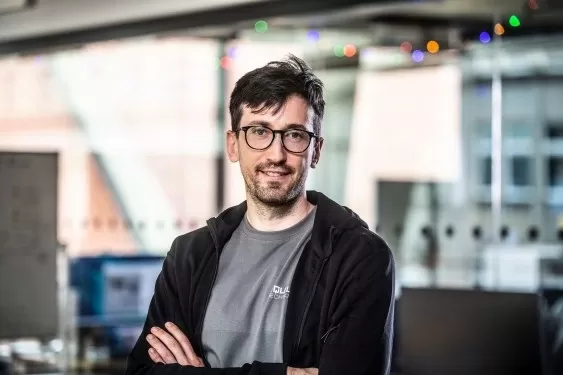 DeepMind Trio Behind Poker AI Now Generating Returns for Quant Hedge Funds
Three ex-DeepMind researchers, who previously developed an AI capable of defeating human poker champions, have pivoted that technology to financial markets — and the strategy is yielding significant returns. Their Prague-based AI venture, EquiLibre T
DeepMind Trio Behind Poker AI Now Generating Returns for Quant Hedge Funds
Three ex-DeepMind researchers, who previously developed an AI capable of defeating human poker champions, have pivoted that technology to financial markets — and the strategy is yielding significant returns. Their Prague-based AI venture, EquiLibre T
 Sony, Warner Sue Anthropic Over Alleged Massive AI Copyright Infringement
Sony and Warner Music Group have initiated a landmark copyright lawsuit against AI firm Anthropic, alleging massive unauthorized use of copyrighted music for training the Claude model series. The complaint highlights Anthropic’s failure to secure lic
Sony, Warner Sue Anthropic Over Alleged Massive AI Copyright Infringement
Sony and Warner Music Group have initiated a landmark copyright lawsuit against AI firm Anthropic, alleging massive unauthorized use of copyrighted music for training the Claude model series. The complaint highlights Anthropic’s failure to secure lic
 Qwen3.8-Flash Agent Officially Launched, Qwen Office Enters the Era of Abundant and Efficient Management
The Qwen Office Platform has officially released the Qwen3.8-Flash large model alongside a new standard mode, allowing all users to access this feature immediately. Leveraging enhanced model capabilities, users can now complete various office tasks w
Qwen3.8-Flash Agent Officially Launched, Qwen Office Enters the Era of Abundant and Efficient Management
The Qwen Office Platform has officially released the Qwen3.8-Flash large model alongside a new standard mode, allowing all users to access this feature immediately. Leveraging enhanced model capabilities, users can now complete various office tasks w
2026 Latest Best Top-rated AI Chart Builder Tools for Fast Reporting are here on XIX.AI! This curated list features powerful game-changing tools that deliver accurate professional charts with just a few clicks, helping you boost writing efficiency and streamline content creation. Get a free vs paid comparison along with real-world tests and detailed rankings to find the must-try solution for your needs. Explore now to unlock your AI edge!
9 tools
xix.ai

2026 Latest Best Top-rated AI Live Chat Routing Tools for Ecommerce Queues, VIP Buyers, and Return Requests. This curated list features powerful game-changing solutions that boost productivity dramatically through real-world tests. It includes a free vs paid comparison along with detailed rankings to help you find the perfect fit. XIX.AI stands out as a trusted provider in this space. Explore now to Unlock your AI edge!
9 tools
xix.ai
2026 Latest Best Top-Rated AI Editing Tools for ESL Writers are here on XIX.AI! This curated list features powerful game-changing tools that go through real-world tests to ensure accuracy. You can find a free vs paid comparison alongside detailed rankings to help you pick the must-try solution that boosts your writing tone, grammar, and flow perfectly. Explore now to Unlock your AI edge!
9 tools
xix.ai
2026 Latest Best Top-Rated AI Bug Triage Tools for Engineering Teams! XIX.AI has curated a powerful, game-changing collection of must-try tools that go through rigorous real-world tests to deliver accurate issue analysis and efficient resolution. Get a free vs paid comparison along with detailed rankings to help you find the perfect solution that boosts your team’s productivity significantly. Explore now to unlock your AI edge!
9 tools
xix.ai
2026 Latest Best Top-rated AI Portrait Enhancers curated for ultimate image quality. These powerful tools deliver game-changing results by boosting lighting, skin tone, and sharpness effortlessly, perfect for creators needing to enhance photos quickly. XIX.AI provides a free vs paid comparison along with real-world tests and weekly updated rankings. Discover your perfect tool to unlock your AI edge today. Explore now!
7 tools
xix.ai
2026 Latest Best Top-rated AI Technical Documentation Tools for API Guides Release Notes and Onboarding Docs. This curated list features powerful game-changing solutions that streamline content creation boost writing efficiency and save time across all project phases. XIX.AI provides weekly updated rankings along with free vs paid comparison results from real-world tests. Explore now to Discover your perfect tool and Unlock your AI edge.
10 tools
xix.ai

Interesting guide! I've been wanting to create a consistent avatar for my socials, and using Bing AI seems way more accessible than some of the complex tools out there. The step-by-step part is key for beginners like me. Hope it covers how to get specific styles, not just generic portraits. 🤔
AIでアバター作成、興味深すぎ!Bing AI使えるとは知らなかったわ。でも、プライバシーの問題は大丈夫?生成された顔データの扱いが少し心配かも…でも、個性的なプロフィール画像は魅力的よね!😅












