


 Home
HomeStep-by-Step Guide to Building Your Custom ComfyUI App Easily
Welcome to ComfyUI's powerful ecosystem – a customizable platform revolutionizing AI-powered image generation. This tutorial provides a hands-on walkthrough for developing an intermediate-level application that masterfully blends image inputs with interactive slider controls. By following these steps, you'll establish a robust framework capable of supporting increasingly sophisticated image generation projects.
Key Highlights
Master ComfyUI's foundational architecture and capabilities
Develop an advanced workflow integrating image inputs and dynamic controls
Implement seamless image processing within generation pipelines
Convert between Numpy arrays and Pillow objects for optimal compatibility
Configure proper directory structures for ComfyUI operations
Engineer customized generation prompts for tailored results
Setting Up the Intermediate Workflow in ComfyUI
Creating a New Python File for Our Application
We'll initiate our project by establishing intermediate.py - a dedicated Python file that will evolve our basic workflow into a more sophisticated implementation. This approach maintains our core functionality while providing a clean slate for enhancements.
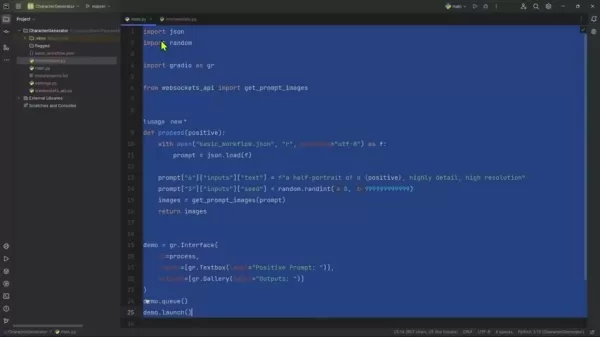
The migration process involves carefully transferring our base implementation while ensuring all dependencies remain intact. This methodical approach minimizes disruption to existing functionality while preparing for advanced features.
Critical implementation steps:
- Establish
intermediate.py as our primary development file - Replicate core functionality from our foundational implementation
- Verify environmental compatibility and dependency management
Modifying the Gradio Interface
Our upgraded interface transforms user interaction through enhanced input controls, replacing the basic text-only approach with comprehensive creative tools.
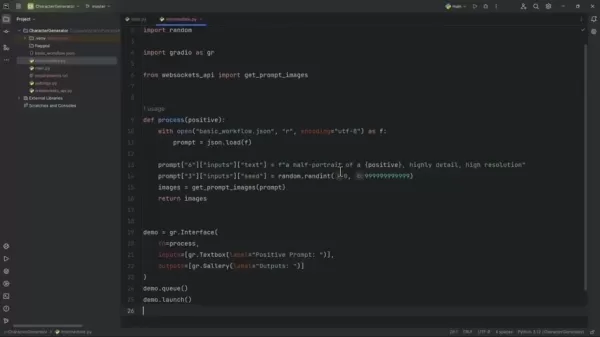
Refining interface management begins with removing automatic launch functions, placing control firmly in developer hands. We then implement descriptive renaming for improved code organization.
intermediate = gr.Interface(...)
The interface expands with these interactive components:
- Creative Direction:
gr.Textbox(label="Positive Prompt:") maintains textual guidance - Visual Inspiration:
gr.Image(label="Style Image:") enables reference image uploads - Precision Control:
gr.Slider(minimum=0.0, maximum=1.0, step=0.05) offers fine-tuned style influence adjustment
Updating the Process Function
The central processing function undergoes significant enhancement to accommodate our expanded input capabilities while maintaining robust performance.
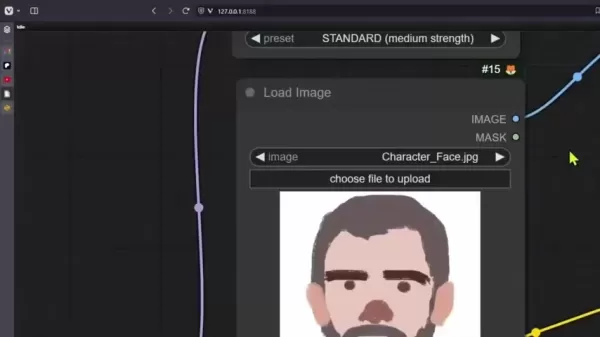
We modify the function signature to explicitly declare our new parameters:
def process(positive, image, slider):
Key parameter roles:
positive: Guides content generation through descriptive textimage: Provides visual reference for style adaptationslider: Determines stylistic influence intensity
Implementation best practices:
- Ensure parameter alignment with interface components
- Maintain data type consistency throughout processing
- Document all modifications for future reference
Implementing and Testing the Image-Saving Process
Image Handling Workflow Implementation
Our image processing pipeline requires careful integration of format conversion and file management to ensure seamless operation between components.
Essential import statement:
from intermediate import save_input_image
The complete processing sequence:
images = get_prompt_images(prompt)
save_input_image(image)
return images
Saving the Input Image and Handling Image Formats
Comprehensive Image Management System
Establishing reliable image storage forms the backbone of our intermediate workflow, requiring meticulous path configuration and format handling.
Environment configuration foundation:
COMFY_UI_PATH = "D:/AI/ComfyUI_windows_portable/ComfyUI"
Required imports for path management:
from settings import COMFY_UI_PATH
from pathlib import Path
Complete image processing implementation:
def save_input_image(image):
    input_img = Path(COMFY_UI_PATH) / "input/intermediate_style_img.jpg"
    image.save(input_img)
Advantages and Disadvantages of Creating a ComfyUI App
Key Benefits
Unparalleled Customization: Tailor every aspect of the generation process
Modular Architecture: Construct complex workflows through interconnected nodes
Advanced Style Integration: Leverage IPAdapter for sophisticated artistic transfer
Community Resources: Access shared knowledge and pre-built solutions
Performance Potential: Optimize for various hardware configurations
Implementation Challenges
Learning Investment: Requires commitment to master node-based paradigm
Configuration Complexity: Demands attention to workflow details
Troubleshooting Difficulty: Debugging complex node interactions can prove challenging
Dependency Coordination: Managing compatibility across extensions
Optimization Requirements: Needs tuning for production-level performance
Essential Questions
Understanding ComfyUI Fundamentals
ComfyUI represents a node-driven interface for Stable Diffusion that enables unprecedented control over generative processes. Its structured approach makes it invaluable for technical creators requiring granular workflow management and reproducibility.
IPAdapter Technology Explained
The Image Prompt Adapter system revolutionizes creative workflows by allowing direct visual influence over generation outputs. This technology bridges the gap between reference imagery and generated content, enabling precise style transfer and thematic consistency.
Image Management Best Practices
Maintain rigorous file naming conventions and validate path configurations to ensure reliable image processing. Always confirm proper format conversion between Gradio's NumPy arrays and ComfyUI's preferred tensor representations.
Data Format Conversion Essentials
Tensors and NumPy arrays serve as fundamental data structures in their respective environments. Conversion between these formats, typically via Pillow, ensures seamless interoperability across processing stages.
Input Directory Strategy
While temporary in-memory processing is technically possible, persistent storage in designated input directories promotes workflow reliability, simplifies debugging, and enhances project organization.
Advanced Considerations
Interface Integration Possibilities
ComfyUI's architecture supports diverse interface options, from lightweight web UIs to comprehensive dashboards. Successful integration hinges on proper data transformation and parameter routing between systems.
Performance Optimization Techniques
Achieve optimal performance through strategic node selection, hardware acceleration utilization, and systematic workflow profiling. Caching mechanisms can dramatically improve efficiency in repetitive operations.
Community Workflow Resources
Explore extensive collections of pre-configured workflows available through community platforms, offering jumpstart solutions for numerous creative and technical applications.
Troubleshooting Methodology
Adopt a structured debugging approach by analyzing console outputs, implementing incremental testing, and utilizing diagnostic tools provided within the ComfyUI environment.
Advanced Customization Approaches
Push creative boundaries through custom node development, conditional workflow branching, and external service integration, enabling truly unique generation capabilities.
Related article
 How Unitree is Shaping the Future of Humanoid Robotics
Unitree’s New Creature of Embodied AI with ultra-wide 4D LiDAR technology for advanced real-world navigation. Credit: UnitreeWang Xingxing, CEO of Unitree, targets world model breakthroughs to help humanoid machines execute 80% of tasks when placed i
Why Abnormal AI Partnered With OpenAI on Daybreak
Michael Aiello, Head of Product for Cyber at OpenAI | Credit: Michael Aiello/LinkedInAbnormal AI joins OpenAI’s Daybreak programme, as Mike Aiello says the partnership will accelerate the adoption of practical defences for enterprisesLeading frontier
LFM2.5 DSpark Draft Model Released: Inference Speed Boosted 3.18x
Liquid AI and Hugging Face have officially released the DSpark draft model checkpoints for the LFM2.5 series, covering LFM2.5-1.2B-Instruct, LFM2.5-2.6B, and LFM2.5-8B-A1B. This innovation introduces a novel speculative decoding path that significant
Related Special Topic Recommendations
Health & Wellness
How Unitree is Shaping the Future of Humanoid Robotics
Unitree’s New Creature of Embodied AI with ultra-wide 4D LiDAR technology for advanced real-world navigation. Credit: UnitreeWang Xingxing, CEO of Unitree, targets world model breakthroughs to help humanoid machines execute 80% of tasks when placed i
Why Abnormal AI Partnered With OpenAI on Daybreak
Michael Aiello, Head of Product for Cyber at OpenAI | Credit: Michael Aiello/LinkedInAbnormal AI joins OpenAI’s Daybreak programme, as Mike Aiello says the partnership will accelerate the adoption of practical defences for enterprisesLeading frontier
LFM2.5 DSpark Draft Model Released: Inference Speed Boosted 3.18x
Liquid AI and Hugging Face have officially released the DSpark draft model checkpoints for the LFM2.5 series, covering LFM2.5-1.2B-Instruct, LFM2.5-2.6B, and LFM2.5-8B-A1B. This innovation introduces a novel speculative decoding path that significant
Related Special Topic Recommendations
Health & Wellness
 Best AI Sleep Coaching Tools for Shift Workers, Jet Lag Recovery, and Better Routines
2026 Latest Best AI Sleep Coaching Tools for Shift Workers, Jet Lag Recovery, and Better Routines! XIX.AI has curated a top-rated list of powerful game-changing tools that go through real-world tests to deliver accurate guidance. You can find detailed free vs paid comparison info and see how these must-try solutions help boost sleep quality, speed up jet lag recovery, and build healthier routines. Explore now to discover your perfect tool!
 7 tools
 xix.ai
code
ChatGPT Debugging Tools for Python Errors, API Logs, and Stack Trace Triage
xix.ai
code
ChatGPT Debugging Tools for Python Errors, API Logs, and Stack Trace Triage
2026 Latest Best ChatGPT debugging tools for Python errors, API logs, and stack trace triage are here on XIX.AI. This curated list of top-rated solutions offers a free vs paid comparison, real-world tests, and detailed rankings to help you find the most powerful tool that can significantly boost your productivity and help you solve complex technical issues faster. Explore now to discover your perfect solution!
9 tools
xix.ai
Text-to-speech
AI Voiceover Tools for Product Demo Videos
2026 Latest Best Top-Rated AI Voiceover Tools for Product Demo Videos are here on XIX.AI! This curated list features powerful, game-changing options that help you create professional-quality audio content fast, boosting your demo efficiency significantly. We conduct real-world tests and provide a free vs paid comparison along with weekly updated rankings to help you find the perfect fit. Explore now to Unlock your AI edge!
10 tools
xix.ai
Business
AI Business Plan Tools for Startup Validation
2026 Latest Best AI Business Plan Tools for Startup Validation! XIX.AI has curated a top-rated list of powerful game-changing tools that go through real-world tests to deliver accurate results. You’ll find a free vs paid comparison, detailed rankings, and easy-to-understand insights to help you choose the perfect solution and boost your startup’s success rate. Explore now to Unlock your AI edge!
9 tools
xix.ai
chatbot
AI Chat Apps for Roleplay and Conversation Practice
2026 Latest Best AI Chat Apps for Roleplay and Conversation Practice! XIX.AI curates a top-rated list of powerful must-try tools that go through rigorous real-world tests to deliver exceptional results. You’ll find detailed free vs paid comparison, comprehensive rankings, and insights into how these apps can boost your language skills and communication confidence effectively. Explore now to discover your perfect tool for practice!
10 tools
xix.ai
design
Best AI Wireframe Tools for Product Teams
2026 Latest Best Top-rated AI Wireframe Tools for Product Teams! This curated list showcases powerful, game-changing solutions that significantly boost productivity through real-world tests and rigorous rankings. It includes a detailed free vs paid comparison to help you find the perfect fit. XIX.AI provides expert insights to guide your decision. Explore now to Discover your perfect tool and Unlock your AI edge in product development!
8 tools
xix.ai

 Comments (2)
0/500
Comments (2)
0/500
![RaymondGreen]()
このチュートリアル、すごく分かりやすい!ComfyUIのカスタマイズ性は本当に魅力的だけど、実際にアプリを作るとなると結構ハードル高そうだな…。でも、画像入力とプロンプトを組み合わせる部分の解説は役に立つかも。他のAI画像ツールより柔軟そうだし、試してみたい気分になってきた!🎨
![AlbertThomas]()
기사가 유익하네요! ComfyUI 기능을 직접 구축하는 튜토리얼이 정말 필요했어요. 텍스트 프롬프트 위주보다 이미지 입력을 다루는 법을 배울 수 있다는 점이 신선합니다. 커스텀 툴 만들기 전에 사전 지식이 어떻게 되는지 궁금해서, 더 구체적인 코드 스니펫이나 API 문서 링크가 있으면 더 좋지 않을까 싶어요? 😄
Welcome to ComfyUI's powerful ecosystem – a customizable platform revolutionizing AI-powered image generation. This tutorial provides a hands-on walkthrough for developing an intermediate-level application that masterfully blends image inputs with interactive slider controls. By following these steps, you'll establish a robust framework capable of supporting increasingly sophisticated image generation projects.
Key Highlights
Master ComfyUI's foundational architecture and capabilities
Develop an advanced workflow integrating image inputs and dynamic controls
Implement seamless image processing within generation pipelines
Convert between Numpy arrays and Pillow objects for optimal compatibility
Configure proper directory structures for ComfyUI operations
Engineer customized generation prompts for tailored results
Setting Up the Intermediate Workflow in ComfyUI
Creating a New Python File for Our Application
We'll initiate our project by establishing intermediate.py - a dedicated Python file that will evolve our basic workflow into a more sophisticated implementation. This approach maintains our core functionality while providing a clean slate for enhancements.
The migration process involves carefully transferring our base implementation while ensuring all dependencies remain intact. This methodical approach minimizes disruption to existing functionality while preparing for advanced features.
Critical implementation steps:
- Establish
intermediate.pyas our primary development file - Replicate core functionality from our foundational implementation
- Verify environmental compatibility and dependency management
Modifying the Gradio Interface
Our upgraded interface transforms user interaction through enhanced input controls, replacing the basic text-only approach with comprehensive creative tools.
Refining interface management begins with removing automatic launch functions, placing control firmly in developer hands. We then implement descriptive renaming for improved code organization.
intermediate = gr.Interface(...)
The interface expands with these interactive components:
- Creative Direction:
gr.Textbox(label="Positive Prompt:")maintains textual guidance - Visual Inspiration:
gr.Image(label="Style Image:")enables reference image uploads - Precision Control:
gr.Slider(minimum=0.0, maximum=1.0, step=0.05)offers fine-tuned style influence adjustment
Updating the Process Function
The central processing function undergoes significant enhancement to accommodate our expanded input capabilities while maintaining robust performance.
We modify the function signature to explicitly declare our new parameters:
def process(positive, image, slider):
Key parameter roles:
positive: Guides content generation through descriptive textimage: Provides visual reference for style adaptationslider: Determines stylistic influence intensity
Implementation best practices:
- Ensure parameter alignment with interface components
- Maintain data type consistency throughout processing
- Document all modifications for future reference
Implementing and Testing the Image-Saving Process
Image Handling Workflow Implementation
Our image processing pipeline requires careful integration of format conversion and file management to ensure seamless operation between components.
Essential import statement:
from intermediate import save_input_image
The complete processing sequence:
images = get_prompt_images(prompt)
save_input_image(image)
return images
Saving the Input Image and Handling Image Formats
Comprehensive Image Management System
Establishing reliable image storage forms the backbone of our intermediate workflow, requiring meticulous path configuration and format handling.
Environment configuration foundation:
COMFY_UI_PATH = "D:/AI/ComfyUI_windows_portable/ComfyUI"
Required imports for path management:
from settings import COMFY_UI_PATH
from pathlib import Path
Complete image processing implementation:
def save_input_image(image):
input_img = Path(COMFY_UI_PATH) / "input/intermediate_style_img.jpg"
image.save(input_img)
Advantages and Disadvantages of Creating a ComfyUI App
Key Benefits
Unparalleled Customization: Tailor every aspect of the generation process
Modular Architecture: Construct complex workflows through interconnected nodes
Advanced Style Integration: Leverage IPAdapter for sophisticated artistic transfer
Community Resources: Access shared knowledge and pre-built solutions
Performance Potential: Optimize for various hardware configurations
Implementation Challenges
Learning Investment: Requires commitment to master node-based paradigm
Configuration Complexity: Demands attention to workflow details
Troubleshooting Difficulty: Debugging complex node interactions can prove challenging
Dependency Coordination: Managing compatibility across extensions
Optimization Requirements: Needs tuning for production-level performance
Essential Questions
Understanding ComfyUI Fundamentals
ComfyUI represents a node-driven interface for Stable Diffusion that enables unprecedented control over generative processes. Its structured approach makes it invaluable for technical creators requiring granular workflow management and reproducibility.
IPAdapter Technology Explained
The Image Prompt Adapter system revolutionizes creative workflows by allowing direct visual influence over generation outputs. This technology bridges the gap between reference imagery and generated content, enabling precise style transfer and thematic consistency.
Image Management Best Practices
Maintain rigorous file naming conventions and validate path configurations to ensure reliable image processing. Always confirm proper format conversion between Gradio's NumPy arrays and ComfyUI's preferred tensor representations.
Data Format Conversion Essentials
Tensors and NumPy arrays serve as fundamental data structures in their respective environments. Conversion between these formats, typically via Pillow, ensures seamless interoperability across processing stages.
Input Directory Strategy
While temporary in-memory processing is technically possible, persistent storage in designated input directories promotes workflow reliability, simplifies debugging, and enhances project organization.
Advanced Considerations
Interface Integration Possibilities
ComfyUI's architecture supports diverse interface options, from lightweight web UIs to comprehensive dashboards. Successful integration hinges on proper data transformation and parameter routing between systems.
Performance Optimization Techniques
Achieve optimal performance through strategic node selection, hardware acceleration utilization, and systematic workflow profiling. Caching mechanisms can dramatically improve efficiency in repetitive operations.
Community Workflow Resources
Explore extensive collections of pre-configured workflows available through community platforms, offering jumpstart solutions for numerous creative and technical applications.
Troubleshooting Methodology
Adopt a structured debugging approach by analyzing console outputs, implementing incremental testing, and utilizing diagnostic tools provided within the ComfyUI environment.
Advanced Customization Approaches
Push creative boundaries through custom node development, conditional workflow branching, and external service integration, enabling truly unique generation capabilities.








 How Unitree is Shaping the Future of Humanoid Robotics
Unitree’s New Creature of Embodied AI with ultra-wide 4D LiDAR technology for advanced real-world navigation. Credit: UnitreeWang Xingxing, CEO of Unitree, targets world model breakthroughs to help humanoid machines execute 80% of tasks when placed i
How Unitree is Shaping the Future of Humanoid Robotics
Unitree’s New Creature of Embodied AI with ultra-wide 4D LiDAR technology for advanced real-world navigation. Credit: UnitreeWang Xingxing, CEO of Unitree, targets world model breakthroughs to help humanoid machines execute 80% of tasks when placed i
 Why Abnormal AI Partnered With OpenAI on Daybreak
Michael Aiello, Head of Product for Cyber at OpenAI | Credit: Michael Aiello/LinkedInAbnormal AI joins OpenAI’s Daybreak programme, as Mike Aiello says the partnership will accelerate the adoption of practical defences for enterprisesLeading frontier
Why Abnormal AI Partnered With OpenAI on Daybreak
Michael Aiello, Head of Product for Cyber at OpenAI | Credit: Michael Aiello/LinkedInAbnormal AI joins OpenAI’s Daybreak programme, as Mike Aiello says the partnership will accelerate the adoption of practical defences for enterprisesLeading frontier
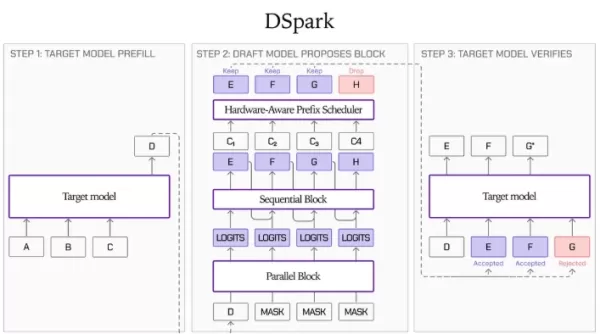 LFM2.5 DSpark Draft Model Released: Inference Speed Boosted 3.18x
Liquid AI and Hugging Face have officially released the DSpark draft model checkpoints for the LFM2.5 series, covering LFM2.5-1.2B-Instruct, LFM2.5-2.6B, and LFM2.5-8B-A1B. This innovation introduces a novel speculative decoding path that significant
LFM2.5 DSpark Draft Model Released: Inference Speed Boosted 3.18x
Liquid AI and Hugging Face have officially released the DSpark draft model checkpoints for the LFM2.5 series, covering LFM2.5-1.2B-Instruct, LFM2.5-2.6B, and LFM2.5-8B-A1B. This innovation introduces a novel speculative decoding path that significant

2026 Latest Best AI Sleep Coaching Tools for Shift Workers, Jet Lag Recovery, and Better Routines! XIX.AI has curated a top-rated list of powerful game-changing tools that go through real-world tests to deliver accurate guidance. You can find detailed free vs paid comparison info and see how these must-try solutions help boost sleep quality, speed up jet lag recovery, and build healthier routines. Explore now to discover your perfect tool!
7 tools
xix.ai

2026 Latest Best ChatGPT debugging tools for Python errors, API logs, and stack trace triage are here on XIX.AI. This curated list of top-rated solutions offers a free vs paid comparison, real-world tests, and detailed rankings to help you find the most powerful tool that can significantly boost your productivity and help you solve complex technical issues faster. Explore now to discover your perfect solution!
9 tools
xix.ai

2026 Latest Best Top-Rated AI Voiceover Tools for Product Demo Videos are here on XIX.AI! This curated list features powerful, game-changing options that help you create professional-quality audio content fast, boosting your demo efficiency significantly. We conduct real-world tests and provide a free vs paid comparison along with weekly updated rankings to help you find the perfect fit. Explore now to Unlock your AI edge!
10 tools
xix.ai

2026 Latest Best AI Business Plan Tools for Startup Validation! XIX.AI has curated a top-rated list of powerful game-changing tools that go through real-world tests to deliver accurate results. You’ll find a free vs paid comparison, detailed rankings, and easy-to-understand insights to help you choose the perfect solution and boost your startup’s success rate. Explore now to Unlock your AI edge!
9 tools
xix.ai

2026 Latest Best AI Chat Apps for Roleplay and Conversation Practice! XIX.AI curates a top-rated list of powerful must-try tools that go through rigorous real-world tests to deliver exceptional results. You’ll find detailed free vs paid comparison, comprehensive rankings, and insights into how these apps can boost your language skills and communication confidence effectively. Explore now to discover your perfect tool for practice!
10 tools
xix.ai

2026 Latest Best Top-rated AI Wireframe Tools for Product Teams! This curated list showcases powerful, game-changing solutions that significantly boost productivity through real-world tests and rigorous rankings. It includes a detailed free vs paid comparison to help you find the perfect fit. XIX.AI provides expert insights to guide your decision. Explore now to Discover your perfect tool and Unlock your AI edge in product development!
8 tools
xix.ai

このチュートリアル、すごく分かりやすい!ComfyUIのカスタマイズ性は本当に魅力的だけど、実際にアプリを作るとなると結構ハードル高そうだな…。でも、画像入力とプロンプトを組み合わせる部分の解説は役に立つかも。他のAI画像ツールより柔軟そうだし、試してみたい気分になってきた!🎨
기사가 유익하네요! ComfyUI 기능을 직접 구축하는 튜토리얼이 정말 필요했어요. 텍스트 프롬프트 위주보다 이미지 입력을 다루는 법을 배울 수 있다는 점이 신선합니다. 커스텀 툴 만들기 전에 사전 지식이 어떻게 되는지 궁금해서, 더 구체적인 코드 스니펫이나 API 문서 링크가 있으면 더 좋지 않을까 싶어요? 😄












