


 Home
HomeClaude Gains Ground on ChatGPT as Users Migrate
Following a series of controversies involving ChatGPT and its parent company OpenAI, a growing number of users are migrating to Claude.
The turning point occurred after Anthropic, Claude's creator, declined a Department of Defense request to utilize its AI models for widespread domestic surveillance or fully autonomous weaponry. In retaliation, President Trump mandated all federal agencies cease using Anthropic's products, and Defense Secretary Pete Hegseth moved to classify the company as a supply-chain threat.
Shortly thereafter, OpenAI revealed its own partnership with the Pentagon, asserting it included protective measures. Nonetheless, the agreement has ignited a broad public discussion on privacy and the ethical deployment of artificial intelligence.
Consequently, Claude has rocketed to the number one spot on the free app charts in Apple's U.S. App Store, surpassing ChatGPT. Anthropic reports daily registrations have reached unprecedented levels, free users have increased by over 60% since January, and paid subscriptions have more than doubled this year.
For many, the recent events have positioned Claude as a powerful alternative to ChatGPT. If you're thinking of switching, this guide will show you how to transfer your data and deactivate your ChatGPT account.
Exporting Your Data from ChatGPT
Leaving ChatGPT doesn't have to mean abandoning your digital history. Rather than starting over with a new AI assistant, you can migrate your information to Claude so it can quickly learn your preferences.
There are several methods to accomplish this. A good starting point is within Settings. Navigate to Personalization and locate the Memory section. Click "Manage" to review your saved data, updating any details that are no longer current. Once everything is accurate, copy the content you wish to preserve.
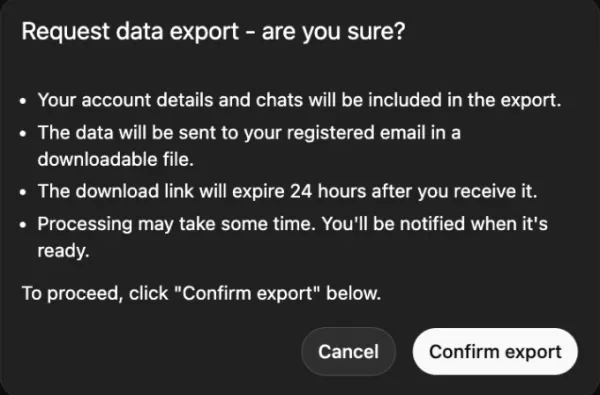
Image Credits:Screenshot of ChatGPT Settings by TechCrunch
You can also take a manual approach by copying pivotal conversations from your history or asking ChatGPT to compile a summary of your core preferences, frequently discussed topics, and any custom instructions you employ.
Importing Your Data into Claude
Once you have compiled your data, moving it to Claude is a simple process.
Open Claude, access Settings, then go to Capabilities, and ensure the Memory feature is activated. (Access to this feature requires a Pro, Max, Team, or Enterprise subscription.) Next, initiate a new conversation and use a prompt such as, "Here is some important context I'd like you to remember. Please update your memory about me with this information." Then, paste your data or summaries directly into the chat.
For exported chat logs, avoid pasting the raw data. Instead, prompt Claude with: "Please review this and summarize my key preferences."
We also recommend confirming with Claude that your information has been correctly saved. You can always revisit and adjust your preferences as they evolve.
Permanently Deleting Your ChatGPT Account
To make a clean break from ChatGPT, merely canceling your subscription will not erase your data.
Follow these steps:
Go to Settings, then Personalization, and select Memory.Delete any stored memory or personalized settings.For added certainty, type "Delete all my memory and personalized data" as a final command in the chat.Then proceed to your account management settings to permanently delete your entire account.
Related article
 Anthropic Enters AI Legal Tech Market as Competition Intensifies
Anthropic unveiled a suite of new chatbot capabilities on Tuesday, aimed at delivering automated support to legal practices. These enhancements expand upon Claude for Legal, the firm-specific platform introduced earlier this year, by adding specializ
OpenAI Closes Gap With Anthropic Among Business Users, New Data Shows
With OpenAI and Anthropic still distant from their anticipated IPOs and the release of detailed financial reports, we must turn to alternative indicators to gauge their business performance. Ramp, a corporate credit card and expense management platfo
Anthropic launches Opus 4.8 featuring new dynamic workflow tool
Anthropic unveiled Opus 4.8 on Thursday, marking the latest iteration of its premier public model. Priced identically to its predecessor, this update is now accessible across all platforms.Releasing just 41 days after Opus 4.7, Anthropic has accelera
Related Special Topic Recommendations
Image editing
Anthropic Enters AI Legal Tech Market as Competition Intensifies
Anthropic unveiled a suite of new chatbot capabilities on Tuesday, aimed at delivering automated support to legal practices. These enhancements expand upon Claude for Legal, the firm-specific platform introduced earlier this year, by adding specializ
OpenAI Closes Gap With Anthropic Among Business Users, New Data Shows
With OpenAI and Anthropic still distant from their anticipated IPOs and the release of detailed financial reports, we must turn to alternative indicators to gauge their business performance. Ramp, a corporate credit card and expense management platfo
Anthropic launches Opus 4.8 featuring new dynamic workflow tool
Anthropic unveiled Opus 4.8 on Thursday, marking the latest iteration of its premier public model. Priced identically to its predecessor, this update is now accessible across all platforms.Releasing just 41 days after Opus 4.7, Anthropic has accelera
Related Special Topic Recommendations
Image editing
 AI Object Removal Editors: Clean Up Portraits, Travel, and Product Shots
2026 Latest Best Top-rated AI Object Removal Editors for portraits travel product shots! XIX.AI curates a powerful game-changing collection regularly updated with weekly rankings. These tools offer real-world tests to help you quickly remove unwanted elements, boost content quality, and save tons of time without compromising results. Must-try for anyone aiming to unlock their AI creation edge. Explore now!
 10 tools
 xix.ai
Text-to-speech
Best AI Text to Speech Tools for Online Courses
xix.ai
Text-to-speech
Best AI Text to Speech Tools for Online Courses
2026 Latest Best Top-rated AI Text to Speech Tools for Online Courses are curated by XIX.AI based on rigorous real-world tests and weekly updated rankings. These powerful tools help creators deliver crystal-clear audio content effortlessly, boosting writing efficiency and streamlining course production. Check out the free vs paid comparison to find your perfect fit. Explore now to unlock your AI edge in online education.
10 tools
xix.ai
writing
AI Blog Title Tools for Higher Click Through Rates
2026 Latest Best Top-Rated AI Blog Title Tools for Higher Click Through Rates! XIX.AI has carefully curated a powerful, game-changing collection of top tools that go through rigorous real-world tests. You’ll find a free vs paid comparison, weekly updated rankings, and detailed insights to help you boost your blog’s traffic efficiently. Must-try options are highlighted to help you unlock your AI edge. Explore now!
10 tools
xix.ai
automation
Best AI Task Routing Tools for Support Workflows
2026 Latest Best Top-rated AI Task Routing Tools for Support Workflows! XIX.AI has curated a highly powerful game-changing collection of must-try solutions, all undergoing rigorous real-world tests and updated weekly. These tools streamline workflows, boost productivity, and help teams deliver faster, more efficient support. Explore now to discover your perfect tool and unlock your AI edge!
17 tools
xix.ai
Academic Research
AI Citation and Paper Summary Tools
2026 Latest Best Top-Rated AI Citation and Paper Summary Tools Curated by XIX.AI. Get powerful game-changing solutions for quick content creation, improved writing efficiency, and boosting productivity. We offer a free vs paid comparison along with real-world tests and weekly updated rankings to help you find the must-try tool that fits your needs perfectly. Explore now to Unlock your AI edge.
10 tools
xix.ai
Productivity
Best AI Productivity Tools for Daily Work
2026 Latest Best Top-Rated AI Productivity Tools for Daily Work! XIX.AI has curated a powerful, game-changing selection based on rigorous weekly updated rankings and real-world tests. You’ll find must-try options that boost writing efficiency, streamline content creation, and help you overcome daily work challenges. Get a free vs paid comparison to find the perfect fit for your needs. Explore now to unlock your AI edge!
9 tools
xix.ai

 Comments (0)
0/500
Comments (0)
0/500
Following a series of controversies involving ChatGPT and its parent company OpenAI, a growing number of users are migrating to Claude.
The turning point occurred after Anthropic, Claude's creator, declined a Department of Defense request to utilize its AI models for widespread domestic surveillance or fully autonomous weaponry. In retaliation, President Trump mandated all federal agencies cease using Anthropic's products, and Defense Secretary Pete Hegseth moved to classify the company as a supply-chain threat.
Shortly thereafter, OpenAI revealed its own partnership with the Pentagon, asserting it included protective measures. Nonetheless, the agreement has ignited a broad public discussion on privacy and the ethical deployment of artificial intelligence.
Consequently, Claude has rocketed to the number one spot on the free app charts in Apple's U.S. App Store, surpassing ChatGPT. Anthropic reports daily registrations have reached unprecedented levels, free users have increased by over 60% since January, and paid subscriptions have more than doubled this year.
For many, the recent events have positioned Claude as a powerful alternative to ChatGPT. If you're thinking of switching, this guide will show you how to transfer your data and deactivate your ChatGPT account.
Exporting Your Data from ChatGPT
Leaving ChatGPT doesn't have to mean abandoning your digital history. Rather than starting over with a new AI assistant, you can migrate your information to Claude so it can quickly learn your preferences.
There are several methods to accomplish this. A good starting point is within Settings. Navigate to Personalization and locate the Memory section. Click "Manage" to review your saved data, updating any details that are no longer current. Once everything is accurate, copy the content you wish to preserve.
Image Credits:Screenshot of ChatGPT Settings by TechCrunch
You can also take a manual approach by copying pivotal conversations from your history or asking ChatGPT to compile a summary of your core preferences, frequently discussed topics, and any custom instructions you employ.
Importing Your Data into Claude
Once you have compiled your data, moving it to Claude is a simple process.
Open Claude, access Settings, then go to Capabilities, and ensure the Memory feature is activated. (Access to this feature requires a Pro, Max, Team, or Enterprise subscription.) Next, initiate a new conversation and use a prompt such as, "Here is some important context I'd like you to remember. Please update your memory about me with this information." Then, paste your data or summaries directly into the chat.
For exported chat logs, avoid pasting the raw data. Instead, prompt Claude with: "Please review this and summarize my key preferences."
We also recommend confirming with Claude that your information has been correctly saved. You can always revisit and adjust your preferences as they evolve.
Permanently Deleting Your ChatGPT Account
To make a clean break from ChatGPT, merely canceling your subscription will not erase your data.
Follow these steps:
Go to Settings, then Personalization, and select Memory.Delete any stored memory or personalized settings.For added certainty, type "Delete all my memory and personalized data" as a final command in the chat.Then proceed to your account management settings to permanently delete your entire account.








 Anthropic Enters AI Legal Tech Market as Competition Intensifies
Anthropic unveiled a suite of new chatbot capabilities on Tuesday, aimed at delivering automated support to legal practices. These enhancements expand upon Claude for Legal, the firm-specific platform introduced earlier this year, by adding specializ
Anthropic Enters AI Legal Tech Market as Competition Intensifies
Anthropic unveiled a suite of new chatbot capabilities on Tuesday, aimed at delivering automated support to legal practices. These enhancements expand upon Claude for Legal, the firm-specific platform introduced earlier this year, by adding specializ
 OpenAI Closes Gap With Anthropic Among Business Users, New Data Shows
With OpenAI and Anthropic still distant from their anticipated IPOs and the release of detailed financial reports, we must turn to alternative indicators to gauge their business performance. Ramp, a corporate credit card and expense management platfo
OpenAI Closes Gap With Anthropic Among Business Users, New Data Shows
With OpenAI and Anthropic still distant from their anticipated IPOs and the release of detailed financial reports, we must turn to alternative indicators to gauge their business performance. Ramp, a corporate credit card and expense management platfo
 Anthropic launches Opus 4.8 featuring new dynamic workflow tool
Anthropic unveiled Opus 4.8 on Thursday, marking the latest iteration of its premier public model. Priced identically to its predecessor, this update is now accessible across all platforms.Releasing just 41 days after Opus 4.7, Anthropic has accelera
Anthropic launches Opus 4.8 featuring new dynamic workflow tool
Anthropic unveiled Opus 4.8 on Thursday, marking the latest iteration of its premier public model. Priced identically to its predecessor, this update is now accessible across all platforms.Releasing just 41 days after Opus 4.7, Anthropic has accelera

2026 Latest Best Top-rated AI Object Removal Editors for portraits travel product shots! XIX.AI curates a powerful game-changing collection regularly updated with weekly rankings. These tools offer real-world tests to help you quickly remove unwanted elements, boost content quality, and save tons of time without compromising results. Must-try for anyone aiming to unlock their AI creation edge. Explore now!
10 tools
xix.ai

2026 Latest Best Top-rated AI Text to Speech Tools for Online Courses are curated by XIX.AI based on rigorous real-world tests and weekly updated rankings. These powerful tools help creators deliver crystal-clear audio content effortlessly, boosting writing efficiency and streamlining course production. Check out the free vs paid comparison to find your perfect fit. Explore now to unlock your AI edge in online education.
10 tools
xix.ai

2026 Latest Best Top-Rated AI Blog Title Tools for Higher Click Through Rates! XIX.AI has carefully curated a powerful, game-changing collection of top tools that go through rigorous real-world tests. You’ll find a free vs paid comparison, weekly updated rankings, and detailed insights to help you boost your blog’s traffic efficiently. Must-try options are highlighted to help you unlock your AI edge. Explore now!
10 tools
xix.ai

2026 Latest Best Top-rated AI Task Routing Tools for Support Workflows! XIX.AI has curated a highly powerful game-changing collection of must-try solutions, all undergoing rigorous real-world tests and updated weekly. These tools streamline workflows, boost productivity, and help teams deliver faster, more efficient support. Explore now to discover your perfect tool and unlock your AI edge!
17 tools
xix.ai

2026 Latest Best Top-Rated AI Citation and Paper Summary Tools Curated by XIX.AI. Get powerful game-changing solutions for quick content creation, improved writing efficiency, and boosting productivity. We offer a free vs paid comparison along with real-world tests and weekly updated rankings to help you find the must-try tool that fits your needs perfectly. Explore now to Unlock your AI edge.
10 tools
xix.ai

2026 Latest Best Top-Rated AI Productivity Tools for Daily Work! XIX.AI has curated a powerful, game-changing selection based on rigorous weekly updated rankings and real-world tests. You’ll find must-try options that boost writing efficiency, streamline content creation, and help you overcome daily work challenges. Get a free vs paid comparison to find the perfect fit for your needs. Explore now to unlock your AI edge!
9 tools
xix.ai












